Microsoft OneDrive lets you store important files in the cloud and access them anywhere — at work or on the go! Use Jotform’s free OneDrive integration to automatically convert form responses into PDFs and send them to your OneDrive folder, including file uploads.


To integrate OneDrive, please follow the steps below.
- In the Form Builder, go to the Settings tab.
- Click Integrations from the left side.
- Search for OneDrive and click it.
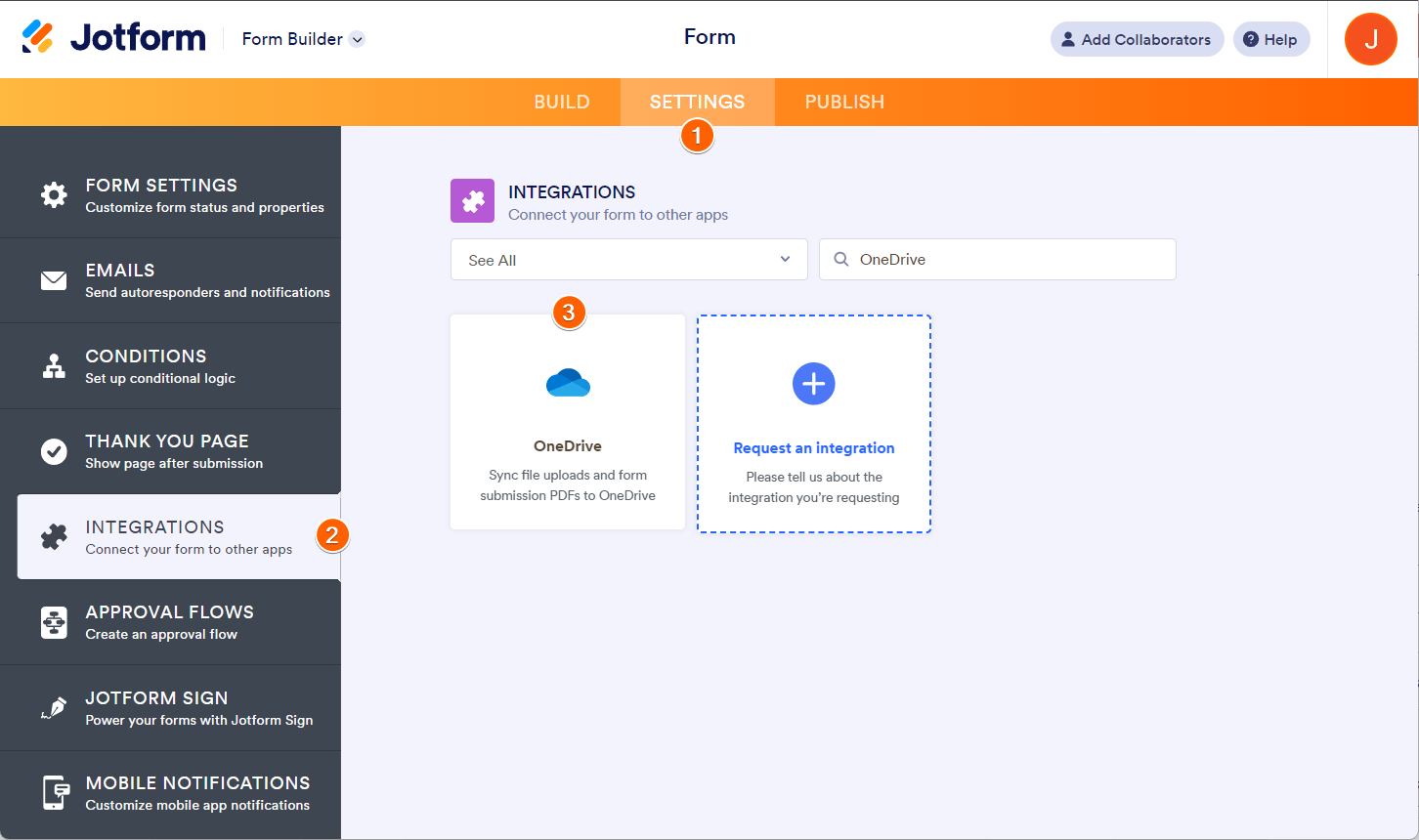
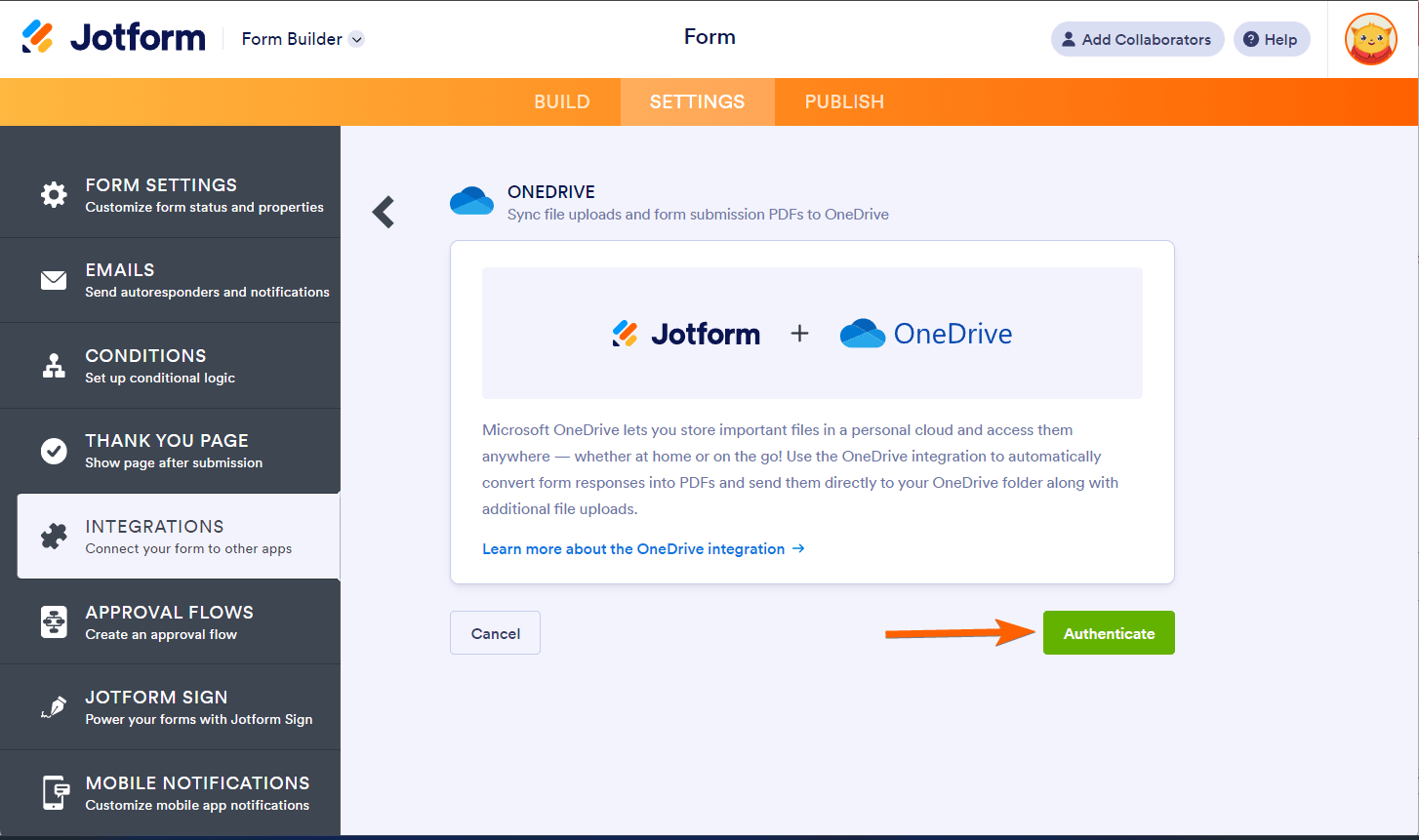
- Click the Authenticate button if you haven’t connected your OneDrive account yet. Ensure you grant access to Jotform.
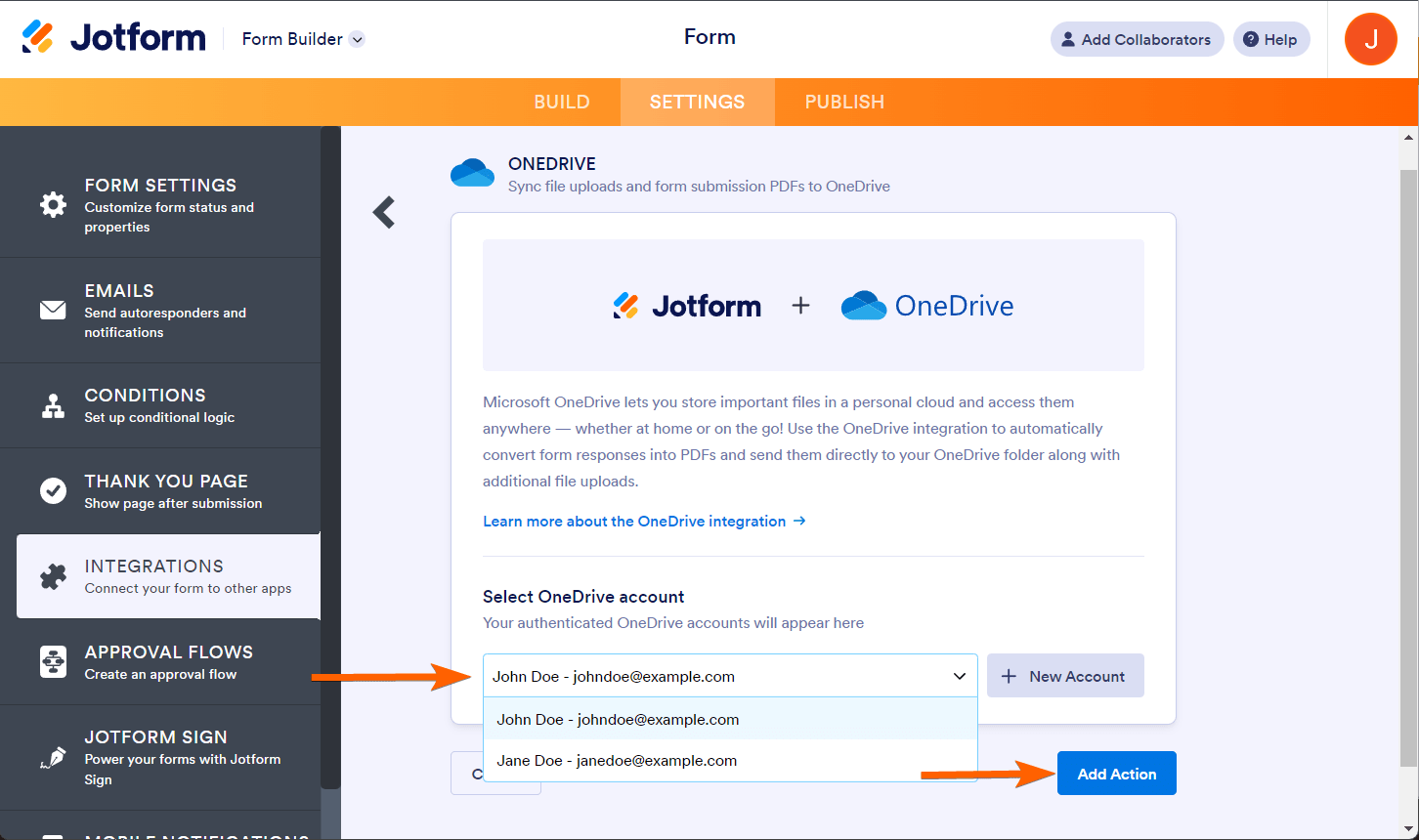
If you previously connected a OneDrive account, choose it from the dropdown and click the Add Action button.
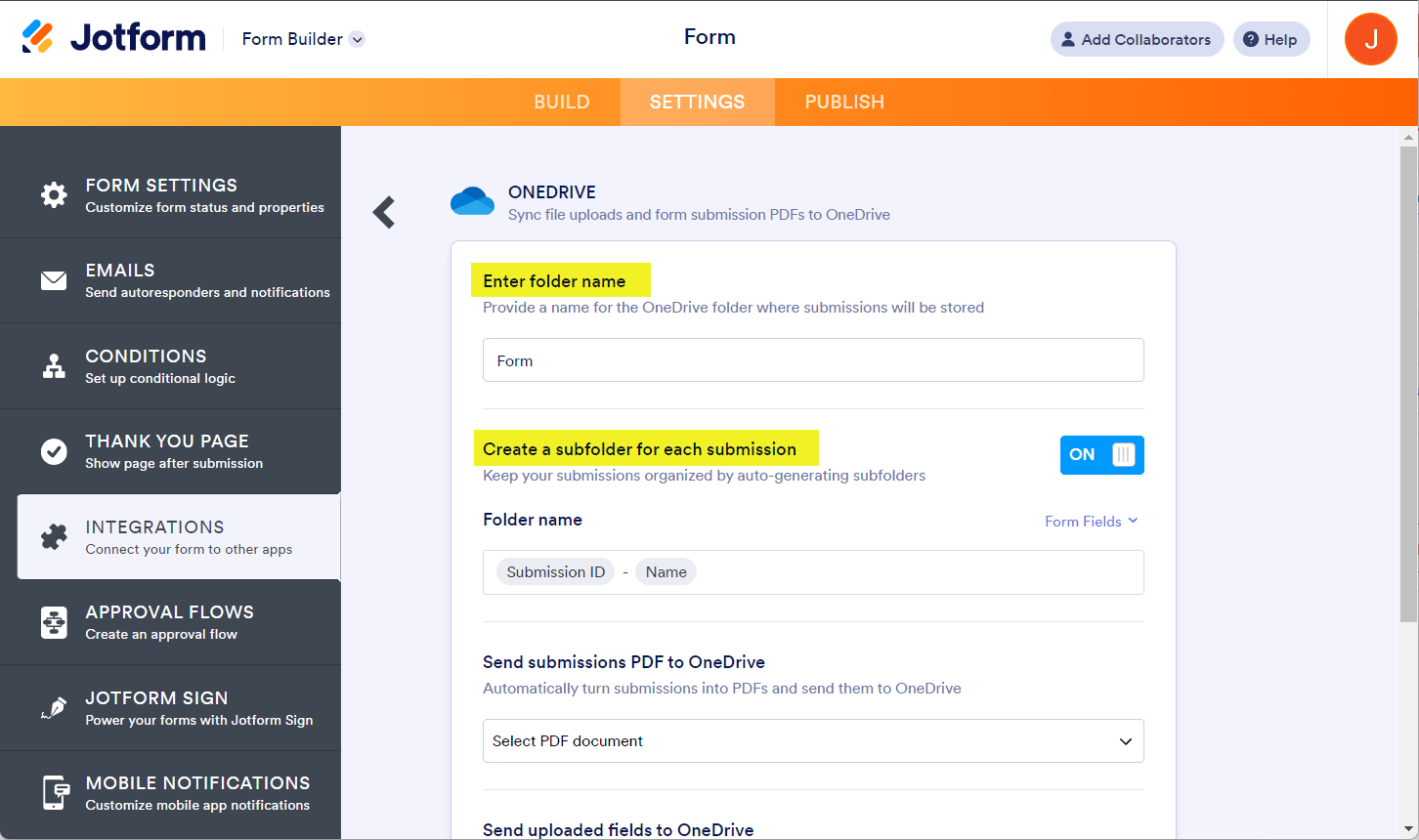
- Next, set up the following folder options:
- Enter folder name — Provide a name for the OneDrive folder where submissions will be stored.
- Create a subfolder for each submission — Enable this option to organize the individual submissions into separate folders within the main folder. You can personalize the subfolder names with unique properties/fields from your form.
- Set up the File Upload and PDF options, as shown below:
- Send submission PDF to OneDrive —Select which PDF document to send to OneDrive. You’ll see Default if you haven’t created a PDF document yet.
Note: To rename your PDF, see How to Assign a Custom File. - Send uploaded files to OneDrive — Select from which file upload to send to OneDrive. You can select multiple file upload fields here.
- Send submission PDF to OneDrive —Select which PDF document to send to OneDrive. You’ll see Default if you haven’t created a PDF document yet.

- Finally, click the Save button to complete the integration.
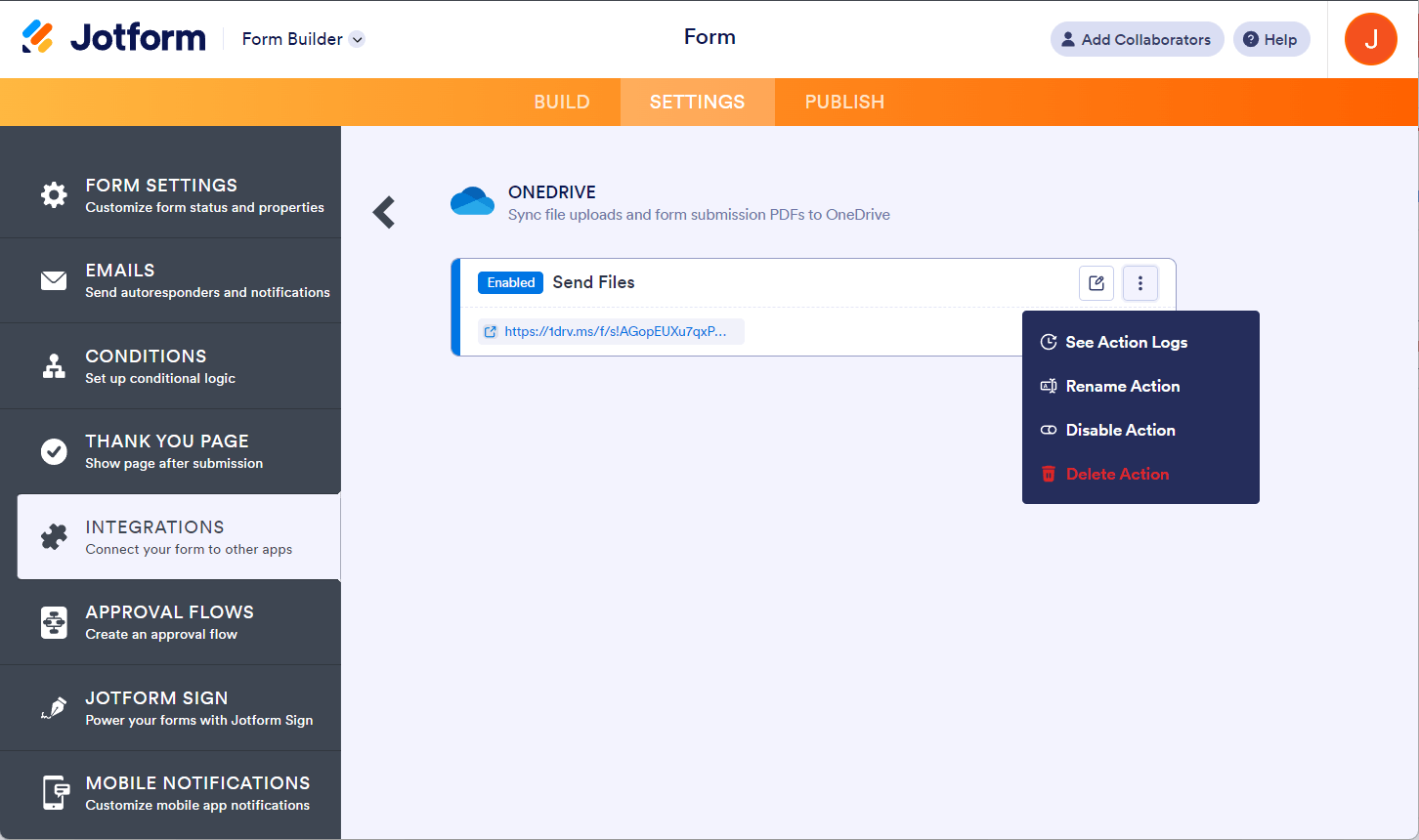
Once the integration is set, you can see and click the link to open the main folder. If you hover your mouse over the created action, you’ll see the Edit Action (pencil icon) and the More (thee-dotted vertical icon) options to the right. The More option includes the following:
- See Action Logs — This section will display your OneDrive integration’s successful and failed runs. It’s useful when troubleshooting issues.
- Rename Action — If you want to personalize the action’s title.
- Disable Action — This option is useful to temporarily stop the integration from sending files.
- Delete Action — If you want to remove the integration from your form.



Send Comment:
29 Comments:
January 14, 2026
Hi team, I have not changed any setting but my submissons for the past 2months have failed to integrate into my OneDrive, although I can see that the intergration is still there with a green tick. I deleted the integration, and re-set it up and tried to 'send files' just for the missnig submissions but its system says 'failed to send' without any help or hint on what's wrong. Need help please thank you!
November 24, 2025
Hi Team,
About a month ago, there was an option available in Jotform’s OneDrive integration to customize the file name for uploaded submissions. I was able to include details such as the form name, date, and submission ID in every file name.
However, this option no longer appears, and I’m unable to modify the file naming format now. Could you please advise on how to change the file name in the current version of the OneDrive integration?
June 3, 2025
Hi, I see that I can change the folder name, but I would like to storage in a different path than the main folder, two sub-folders down from the main one, for the account. Is that possible?
April 11, 2025
how to change user in onedrive ? - I made authorization for the wrong user.
October 4, 2024
How do i change the file location?, it seems to be placing a default one?
March 24, 2024
I have a signature field in my form, I have integrated OneDrive and it saves the form in PDF, the attached files, but it does not give the option to save the signature that the user draws. How can I save the image of the signature? Is there any option to recover the image of the signature?
August 9, 2023
The integration with onedrive solves a part of my needs, but is there the possibility of sharing with the client the link to the generated folder and setting an expiration date for it?
Thank you
July 18, 2023
I am interested in the reverse- I having linked a onedr xl link to the JF app, when the one drive file is altered will the equivalent for on JF update?
March 16, 2023
Is there a way to get forms already submitted pre-integration to be uploaded post-integration?
November 8, 2022
Can I get it to send the forms to different folders based on the answers selcted?
October 19, 2022
I would also like to echo one of the other comments requesting that we are able to choose the save PDF conditionally.
We have multilingual forms configured to deliver the responses in the appropriate language. EN, ES or PT. We can do that conditionally with Notification emails, but not (YET?) with One Drive.
September 7, 2022
Can you change the destination one drive, I have 2 a work and a personal but only my personal show when trying to intigrate
Thanks
Pete
June 5, 2022
For some reason, I cannot get this to add the folder within multiple folder systems in my OneDrive. it is working for 5 or 6 other forms that I sent up previously... but now on the new form it is just creating the folder after submission in "MY FILES" folder. I cannot seem to get it to create within another folder I have set up in the One Drive. Help!
October 29, 2021
How do I stop the approval history from appearing on the uploaded form? It's irrelevant to the storage of the form and I'd like to keep it separate.
October 24, 2021
Friends how come we can save ONLY ONE PDF if we have many? Please allow us to save all PDFs
September 8, 2021
When a correction is made to a submission, are the files automatically updated in onedrive / re-submitted to one drive?
September 4, 2021
Is there a way that enable us to create multiple folder inside OneDrive folder ? I can see only two folders are currently created! I am looking to add three or four folder inside. Thanks
August 16, 2021
Is there a way to add multiple onedrive connections? For example, say three different people should be able to see the information once it is sent to Onedrive. Is there a way to do that?
August 10, 2021
Two problems:
1. We need to be able to choose a folder in OneDrive that already exists. I don not see a way to browse and select a folder.
2. We have a condition in place that sends the notification email with 1 of 2 PDFs. The OneDrive integration only allows me to choose one of the PDFs. We need the integration to support conditions.
July 18, 2021
How is the PDF named? The folder is correct but the actual document is using the last 2 fields to name the document. Can I change this? Thanks!
June 24, 2021
How do we have our form submissions go to an excel doc through onedrive the same way it use to for google sheets
May 27, 2021
This would be okay, if people only used 1 Form - However we use multiple forms for different roles, however some are the same e.g- Engineers, Accounts and Sales.
Not being able to create a Jotform Master Folder in the root, and then have subfolders for each form is really 1 step away from perfection - Please consider adding in the future.
April 18, 2021
Trying to authenticate with OneDrive but error occurs
"Something went wrong! Please close window and try again!"
April 9, 2021
There is some way to choose subfolders, for example I want to store in this path store / registrations not in the root
March 22, 2021
can you get this integration with one drive on sliver membership?