If you using Xara Web Designer and are having issues getting the submit button of your form to show up on the page, you might need to increase the height of the form container. To do so, please follow these steps :
1) Press F2 to get the Tools selector bar
2) Modify the height (H) of your page.
In the example below, the height was increased to 1,300 pixels. The scale for height was set to 85% to fit it on the screen. On the image, you see it says 100% because it was already modified.
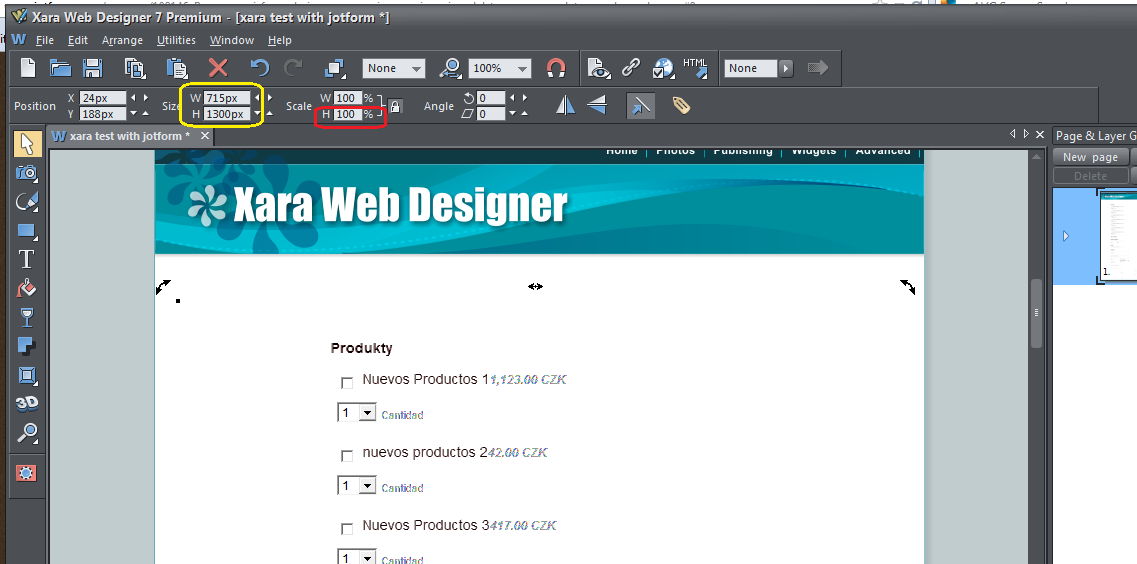
If you want to learn how to embed any of your forms into Xara 7 from the scratch, please take a look at this video that Allen, a fellow user of Jotform, made for you!
https://www.youtube.com/watch?feature=player_embedded&v=GraotFNE3gI

Send Comment:
42 Comments:
January 6, 2018
I just received an email from some unknown person who claims to be a Lottery Winner . He said in his email he will be giving money away to random people . I wanted to know whether this site is secure from having your information ? Sincerely, Jason
May 24, 2017
Is there any way we can upgrade to a TLS v1 instead of the SSL v3 certificate?
March 14, 2017
Thanks. I've just incorporated the https Feedback Button code into one of the Wordpress theme pages and it's working fine on my site .
March 12, 2017
I'm using the Wordpress plugin to display a feedback form on my https site but the feedback form is still using http references and so tyhe brower complains that parts of my site are not secure. Is there an updated Wordpess plugin with the https URL or can I make that change to the plugin code myself? Thanks
February 20, 2017
That's wonderful news! Thank you so much, you are the best =)
February 15, 2017
Hi I am using the iframe embedding option with a stripe form. My website doesn't use ssl is it still secure? Thank you
January 26, 2017
which type of SSL are you running?
Domain Validated certificates (DV), Organization Validated certificate (OV) or Extended Validation certificates (EV).
Is it 256-bit AES Encryption for SSL?
thanks!
October 27, 2016
Adding to previous posts concern Is the secure form still as secure if it's embedded on a website that doesn't have ssl or https designation in its URL
December 23, 2015
Thanks so much
October 28, 2015
Yay!!! Thank you!
October 22, 2015
Hello. This is a Good News. Thank You for ever =D
October 22, 2015
Hi There, I notice that you now offer unlimted SSL on free accounts, as I was paying $9.95 a month for SSL. I have now just down graded to the FREE version. Thanks for the great product.
October 20, 2015
you guys are awesome!!! this service is great!
October 20, 2015
Thanks so much.
You are an answer to prayers.
October 19, 2015
Your always the best
October 17, 2015
Yhooo!
October 17, 2015
Tanks for your work!
October 16, 2015
Awesome guys. I have only recently met you guys but I love already.
October 16, 2015
THANKS
October 15, 2015
Hi there, I was wondering if it would be save to replace all my forms urls on the website from with ? Or may I run into issues doing this? Is it possible that the URL changes to ? I tried a few forms and they all work with https in front. Just want to make sure this will work with all forms without the need to change any URLs. Thanks in advance! Chris
October 14, 2015
This is absolutely great. However, for some reason my SSL is limited to 100 despite my Free Submissions being 160. Shouldn't the Free SSL follow the total Free Submissions we have available? Otherwise, there was no point in sharing on Facebook and Twitter to get those additional submissions.
October 14, 2015
Thanks you!I love jotform...
October 13, 2015
Does this include CNAME domain forms??
October 13, 2015
Fantastic. This is monumental and will be loving this for sure.
Thank you ever so much. Jotform rocks!!!!
October 13, 2015
thank you