

Здравствени PDF Шаблони

Здравствени картон пацијената
У хитним случајевима, можда нећете моћи да ефикасно комуницирате са болничарима о својој здравственој историји. PDF образац за евиденцију медицинске историје омогућује пружање здравствене историје пацијента доктору. Уз помоћ PDF шаблона здравственог картона пацијената, лекар ће моћи да обезбеди бољу негу и лечење пацијента.Коришћењем овог PDF шаблона здравственог картона пацијента можете прикупити податке о пацијенту као што су лични подаци, контакт информације у хитним случајевима, питања о општој историји болести као што су операције, повреде, болести, алергије и лекови који се редовно узимају. Осим тога, можете прикупити податке о здравственом осигурању пацијента да бисте им помогли.
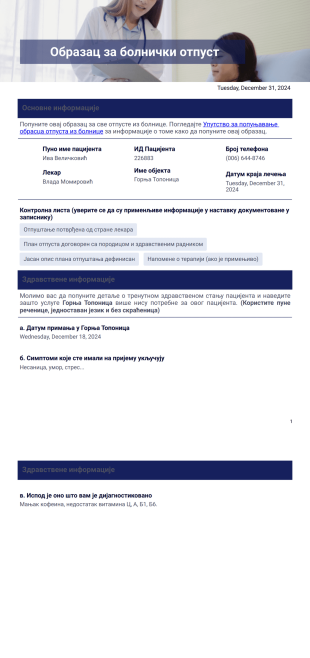
Образац за болнички отпуст
Добра је пракса да увек проверите и уверите се да је све у реду пре него што отпустите пацијента. Како би се то осигурало, управа болнице обично има образац који попуњава и проверава пре отпуста пацијента. У нашем данашњем свету где људи користе мање папира, овај шаблон за отпуст из болнице је један PDF документ који можете користити да сачувате информације о отпуштању пацијената.Суштина је да можете лако да проверите информације сачуване у PDF документу како бисте били сигурни да пацијент може бити отпуштен. Образац отпусног писма овде се може модификовати по вашем укусу.
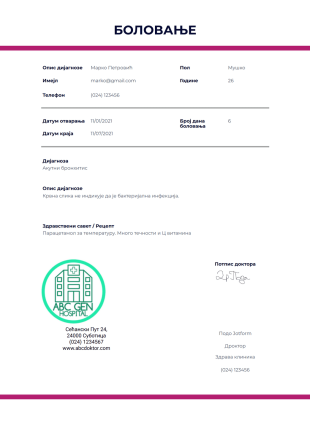
Шаблон за отварање боловања
Шаблон за отварање боловања је документ и доказ да је пацијент тражио здравствену помоћ од лекара у вези са својим тренутним стањем. Овај документ је обично потребан у школи или на послу ако ученик или запослени планира да узме одсуство због здравствених проблема. Овај документ је обавезан у већини организација као начин да се докаже да запослени не тражи само изговор да избегне долазак на посао. Ову лекарску исправу такође може да користи подносилац захтева и да је преда послодавцу наводећи да он/она има здравствено стање или инвалидитет.Овај шаблон за отварање боловања приказује информације о пацијенту, број дана које пацијент треба да се одмара, његову/њену медицинску дијагнозу, опис дијагнозе и лекарски савет или рецепт. Овај шаблон такође приказује информације о лекару и његовом/њеном потпису. У овом PDF шаблону можете да промените лого болнице, контакт податке, тип текста и тему боје преко PDF уређивача.
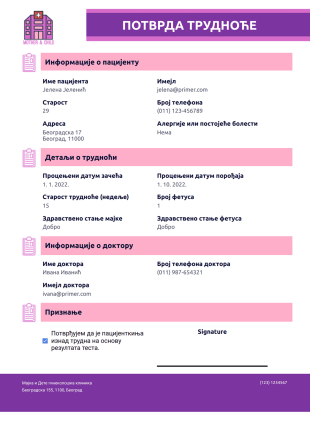
Шаблон за Потврду Трудноће
Лако генериши невероватне предлоге са овим бесплатним шаблоном предлога пројекта! Прилагоди дизајн за неколико минута. Преузми, одштампај или дели као PDF.
About Здравствени PDF Шаблони
Healthcare PDF Templates are pre-designed, reusable layouts that cater specifically to the healthcare industry, providing a seamless way to generate, manage, and distribute a wide array of documents such as patient intake forms, medical reports, and discharge summaries. These templates are crucial in streamlining documentation processes by eliminating the need for repetitive manual work and ensuring that healthcare providers maintain consistent and professional documentation standards. Within the fast-paced and meticulous environment of healthcare, these templates serve as indispensable assets that enhance operational efficiency by automatically converting collected data from online submissions into structured, professional PDF documents.
Jotform stands as a leading online form builder, providing healthcare organizations with powerful tools to customize and automate their data collection processes. Its intuitive drag-and-drop interface allows for easy customization of templates, enabling users to tailor documents specifically to their organizational needs. Furthermore, with Jotform Tables, healthcare providers can centrally manage all collected data, ensuring that it is both easily accessible and securely stored. This centralized approach not only facilitates efficient data handling but also enhances the accuracy and reliability of the information processed, ultimately supporting better patient care and streamlined administrative operations.
Why Use Healthcare PDF Templates?
- Healthcare PDF Templates significantly enhance the accuracy of documentation by ensuring that all necessary information is captured and formatted consistently. This reduces the risk of errors that often occur with manual data entry, leading to more reliable patient records and administrative documentation.
- These templates accelerate the data collection and processing timelines by automating the conversion of form responses into polished PDF documents. This automation means that healthcare staff can focus on patient care rather than being bogged down by paperwork, thus improving overall operational efficiency.
- By using Healthcare PDF Templates, healthcare organizations can project a professional image with documents that are uniformly formatted and aesthetically consistent. This is particularly important in maintaining trust and credibility with patients and other stakeholders.
- With the ability to easily customize templates, healthcare facilities can ensure that their documents meet specific regulatory and operational requirements. This flexibility is crucial in adapting to changing industry standards without the need for extensive redesigns.
- The streamlined approach to data management and document generation minimizes the risk of lost or misplaced information. Templates ensure that all data is systematically captured and stored, reducing the likelihood of critical information being overlooked or lost in transit.
Common Problems Solved by Healthcare PDF Templates
- Manual data entry and paperwork are time-consuming and prone to errors. Healthcare PDF Templates automate these processes, reducing the time spent on documentation and minimizing the chances of mistakes that can have significant consequences in patient care.
- In traditional systems, the risk of losing or misplacing important documents is high. With Healthcare PDF Templates, all information is digitized and stored securely, ensuring that it is always accessible when needed, thereby enhancing operational reliability.
- Managing large volumes of paper documents can lead to inefficiencies and clutter. By digitizing documents through templates, healthcare organizations can streamline their operations and maintain a more organized and efficient workflow.
- Consistency in document formatting can be challenging to achieve manually, leading to discrepancies and unprofessional outputs. Templates ensure that all documents adhere to a set standard, enhancing the professionalism and uniformity of documentation.
Matching Use Cases to Features
- For patient intake processes, using the Drag-and-Drop Form Builder allows healthcare providers to customize fields specific to their needs, ensuring that all necessary patient information is captured accurately.
- By implementing Conditional Logic, healthcare facilities can tailor form questions based on previous responses, creating a dynamic and streamlined data collection process that adapts to patient inputs.
- The integration of Electronic Signatures (Jotform Sign) simplifies consent and authorization processes, allowing patients to sign documents digitally, thus speeding up workflows and enhancing convenience for both patients and staff.
- Utilizing the PDF Editor for Automated PDF Generation ensures that data collected via online forms is instantly converted into professional-grade PDF documents, saving time and reducing manual errors in document creation.
- Secure Data Management with Jotform Tables enables healthcare organizations to store and manage data centrally, ensuring quick access and enhancing the security of sensitive patient information.
How to Create a Healthcare PDF Template
- Start by browsing the Template List for a Healthcare PDF template that suits your needs, or begin from a blank template to create a customized layout.
- Use the Drag-and-Drop Form Builder to customize the design and fields on your template, tailoring the document to meet specific healthcare requirements.
- Once the template is ready, publish and share it via Direct Link, Email, or Website Embed to facilitate easy distribution and access.
Top Use Cases for Healthcare PDF Templates
- For Managers: Healthcare PDF Templates provide managers with an efficient way to oversee and standardize document workflows across their organizations. By using these templates, managers can ensure that all documentation meets organizational standards and is consistent in its presentation, which is crucial for maintaining quality and compliance. This not only aids in internal audits but also enhances interdepartmental communication by providing clear and uniform documents that are easy to understand and manage.
- For Teams: For healthcare teams, these templates simplify the process of collecting and managing patient information. Teams can rely on standardized templates to input and access patient data quickly, reducing the time spent on administrative tasks and allowing more focus on patient care. This streamlined approach enhances collaboration and communication within teams, as all members have access to the same formats and information, ensuring that everyone is on the same page.
- For Customers: Patients benefit from the clarity and professionalism that Healthcare PDF Templates bring to their healthcare interactions. By receiving documents that are well-organized and easy to understand, patients can better comprehend their medical records, treatment plans, and any other information provided by their healthcare providers. This transparency and professionalism can increase patient trust and satisfaction, as they feel more informed and involved in their healthcare journey.
Summarizing Healthcare PDF Templates
Healthcare PDF Templates offer a robust solution for managing documentation needs within the healthcare industry. By leveraging these templates, organizations can achieve greater consistency, efficiency, and accuracy in their documentation processes. The ability to automate the transformation of online form submissions into professional PDF documents streamlines operations, reduces errors, and enhances overall productivity. In essence, these templates not only improve the internal workflows of healthcare providers but also significantly enhance the patient experience by ensuring clear and professional communication.
Ови шаблони су само предлози образаца. Уколико користиш образац као уговор, или сакупљаш личне информације, или их користиш за неке друге правне сврхе, препоручујемо ти да извршиш додатно истраживање како би се постарао да пратиш све законе. Такође препоручујемо консултације са адвокатом пре слања било ког обрасца.
Често Постављана Питања
1) Is it free to create Healthcare PDF Templates on Jotform?
Yes, Jotform offers a free plan that allows users to create and customize Healthcare PDF Templates, with options to upgrade for additional features and storage.
2) Да ли су шаблони и подаци из пријава безбедни?
Jotform prioritizes data security, employing measures such as data encryption and secure access protocols to protect all information collected and stored through its platform.
3) Do I need coding knowledge to build a Healthcare PDF template?
No, Jotform's drag-and-drop interface is designed to be user-friendly, allowing users to create and customize templates without any coding experience.
4) What is Field Mapping, and how does it work in Healthcare PDF Templates?
Field Mapping in Healthcare PDF Templates involves connecting form fields to specific areas on a PDF layout, ensuring that data is accurately placed and displayed in the final document.
5) Да ли ови шаблони могу да се користе на мобилним уређајима?
Yes, Healthcare PDF Templates can be accessed and filled out on mobile devices, providing flexibility and convenience for users on the go.
6) How does the Autoresponder PDF Attachment feature benefit healthcare providers?
The Autoresponder PDF Attachment feature automatically sends a PDF version of the completed form to the submitter, ensuring they receive an immediate copy of their submission for their records.
7) What are Dynamic Elements, and why are they important in Healthcare PDF Templates?
Dynamic Elements are placeholders that automatically populate with real submission data, ensuring that each generated PDF is personalized and accurate, which is critical for maintaining precise patient records.