Job Board Widget for your website
Create a searchable careers section that fits your website. Add job details, show the right fields, help candidates filter openings, choose a layout, customize the style, and embed the finished Job Board Widget without coding.
Create Now — It’s Free!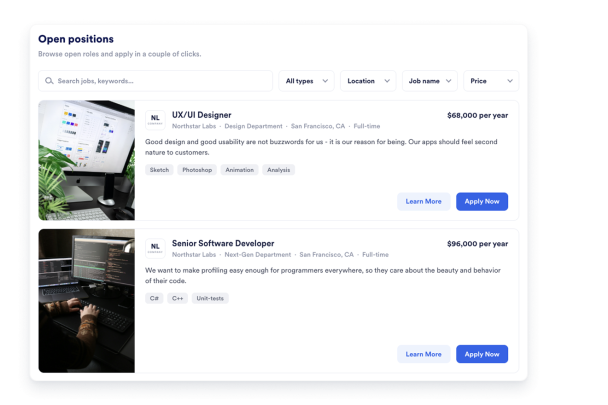

How to create a Job Board widget

Add your job listings
Enter each role’s title, department, location, employment type, salary, description, skill tags, and image to build a clear job board for candidates.
Customize the browsing experience
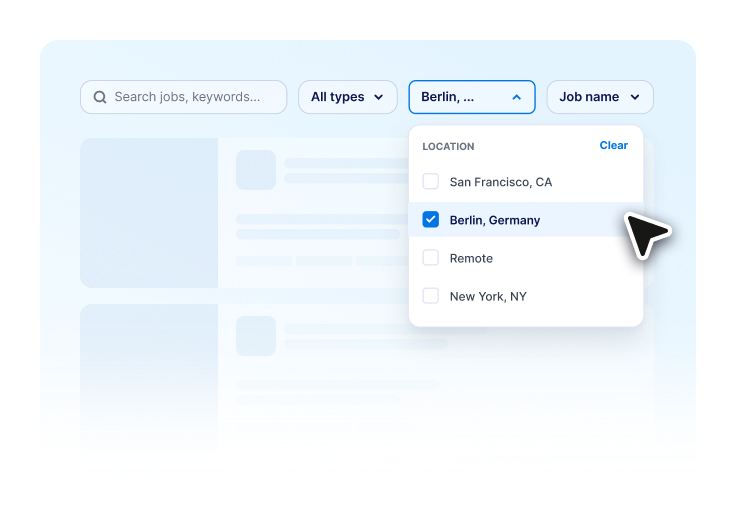
Choose a layout, enable search and department filters, adjust visible job details, and style the widget to match your website.

Embed it on your website
Copy the generated embed code and paste it into your website’s HTML or embed block to publish your job board without coding.
Turn open roles into a clear hiring experience
Show job openings clearly
Display each role with key details like title, department, location, employment type, salary, description, skill tags, and image so candidates can quickly understand the opportunity.

Match your careers page design
Choose from list, grid, image-based, dark, or background-style layouts, then customize colors, spacing, card radius, and visible job details to fit your website.

Publish jobs without coding
Customize your Job Board Widget, copy the generated embed code, and paste it into your website to create a branded job listings section without developer help.

Why Jotform Website Widgets stand out
Jotform’s widgets make your website more interactive and increase conversions. There are many tools available, from star ratings and testimonial sliders to social proof popups and media embeds. Add widgets to your forms or landing pages to collect data, display proof, and capture leads — no coding required.
Add Jotform widgets to your website with a simple embed code. Customize the widget, preview how it looks, and paste it into any page that supports custom HTML or embed blocks, all without a developer.
Use Jotform Website Widgets to collect leads, show customer feedback, display social proof, embed media, or add helpful web page tools. Each widget helps visitors interact with your business directly from your website.
If you need help setting up, customizing, embedding, or troubleshooting your widget, Jotform’s customer support team is available 24-7. You can move forward with confidence, knowing that help is there when you need it.
Where to use your Job Board Widget
Add a Job Board Widget to pages where visitors need quick context, guidance, trust, or interaction. It helps improve usability and keeps people engaged from the first section to the final call to action.
Company careers pages introduce key information quickly and guide visitors toward important actions.
Small business websites to publish current hiring needs without building a separate recruiting platform or custom careers page.
Recruiting agency pages to organize available roles by department, location, job type, or skill set for candidates.
Community and nonprofit websites to share staff roles, volunteer positions, program openings, or local opportunities.
Startup and agency websites to present open roles in a branded layout that matches the rest of the website.
High-volume hiring pages to organize seasonal, part-time, shift-based, or location-specific openings in a job board candidates can scan quickly.
Convert leads into paying customers with the Jotform Form Builder
Turn engagement into action with Jotform. Create powerful forms that capture leads, collect payments, and automate responses, all in one place. Every submission lands in your Jotform Inbox, where you can follow up or connect with your favorite apps.
Get Started — It’s Free!
FAQ
How can I create a job board?
Create your Job Board Widget in Jotform, add your job listings, choose a layout, customize the design, and copy the generated embed code. Then paste the code into your website’s HTML or embed block.
Can I change the widget design?
Is coding required?
Is the widget mobile-friendly?
Can I edit the widget after publishing?
Is the Job Board Widget free?