
Gmail is thought to power over 35 percent of all emails. It’s the second most used email client after Apple Mail.
Despite its popularity, users criticize Gmail for having a poor user experience (I must admit, I don’t like Gmail’s UX). Gmail users who have used the software for years are also frustrated with ineffective spam filters as well as the fact that its storage space is shared across other Google apps, such as Photos.
For these reasons, email clients like Shortwave and Superhuman are getting more attention. Users want an email client that goes beyond the basics, is enhanced with artificial intelligence (AI) and automation, and makes email management a breeze.
In this Shortwave vs Superhuman comparison, I’ve reviewed the two email clients alongside Jotform Gmail Agent to see which Gmail alternative is the best.
Shortwave vs Superhuman — at a glance
 Jotform Gmail Agent |  Shortwave |  Superhuman | |
|---|---|---|---|
| Best for | Individuals who want AI-powered email assistance for free | Teams looking for real-time collaboration | Small teams and individuals looking for speed |
| Industry fit | Customer support, sales, IT, and healthcare professionals who manage workflows through Gmail | Startups, agencies, and small teams who need real-time collaboration | Tailored for executives, founders, and operators in fast-paced industries |
| Scalability | Scales effortlessly with your Jotform AI ecosystem; great for solopreneurs or growing teams | Designed for team scalability — supports multiple roles, shared inboxes, and business tiers | Works best for individuals and small teams; less suited to large-scale collaboration |
| Core functionality | AI drafts and filters emails, applies smart labels, and keeps communication consistent across channels | Thread-first inbox, shared channels, and collaborative commenting built directly into Gmail | Keyboard-driven workflows, split inboxes, and instant commands for fast personal email management |
| AI and automation | AI integration for drafting, labeling, and organizing — all with your manual approval for full control | AI summaries, smart suggestions, and natural language prompts to manage and organize inboxes | AI writing assistant for fast replies, smart reminders, and automated inbox triage |
| Platforms | Works within Gmail and the Jotform AI Agents ecosystem, offering web-based access via a dashboard | Available on iOS, Android, iPadOS, and desktop; primarily for Gmail users | Available on iOS, Android, iPadOS, and desktop; supports both Gmail and Outlook (also with offline mode) |
| Collaboration | Integrates across teams via Jotform AI Agents, ensuring shared context and consistent tone; multiple team members can access the AI agent dashboard | Built for collaboration — shared threads, channels, private comments, and role-based access | Offers limited collaboration via shared conversations and private comments |
| Security | Certified by Google, holds CASA Tier 2 accreditation, meets SOC 2 Type 2 and GDPR compliance standards, and has HIPAA compliance features | CASA Tier 2 compliance and annual audit; contact Shortwave if you need SOC 2 Type 2 and GDPR compliance | All data is encrypted at rest and in transit; also SOC 2 compliant |
| Plans/pricing | Free version; paid plans start at $34 per month (billed annually) | Free version; paid plans start at $14 per user per month (billed annually) | Paid plans start at $25 per user per month (billed annually) |
| Try It Now |
Shortwave: real-time email built for teams
Shortwave is an email client that transforms Gmail into a fast, collaborative workspace. In fact, I’d say its collaboration is where Shortwave stands out from Superhuman, making it one of the best email clients for teams.
It enables teams to
- Share live threads
- Comment privately on emails and drafts
- Assign next steps across other team members
- Share labels, prompts, and templates
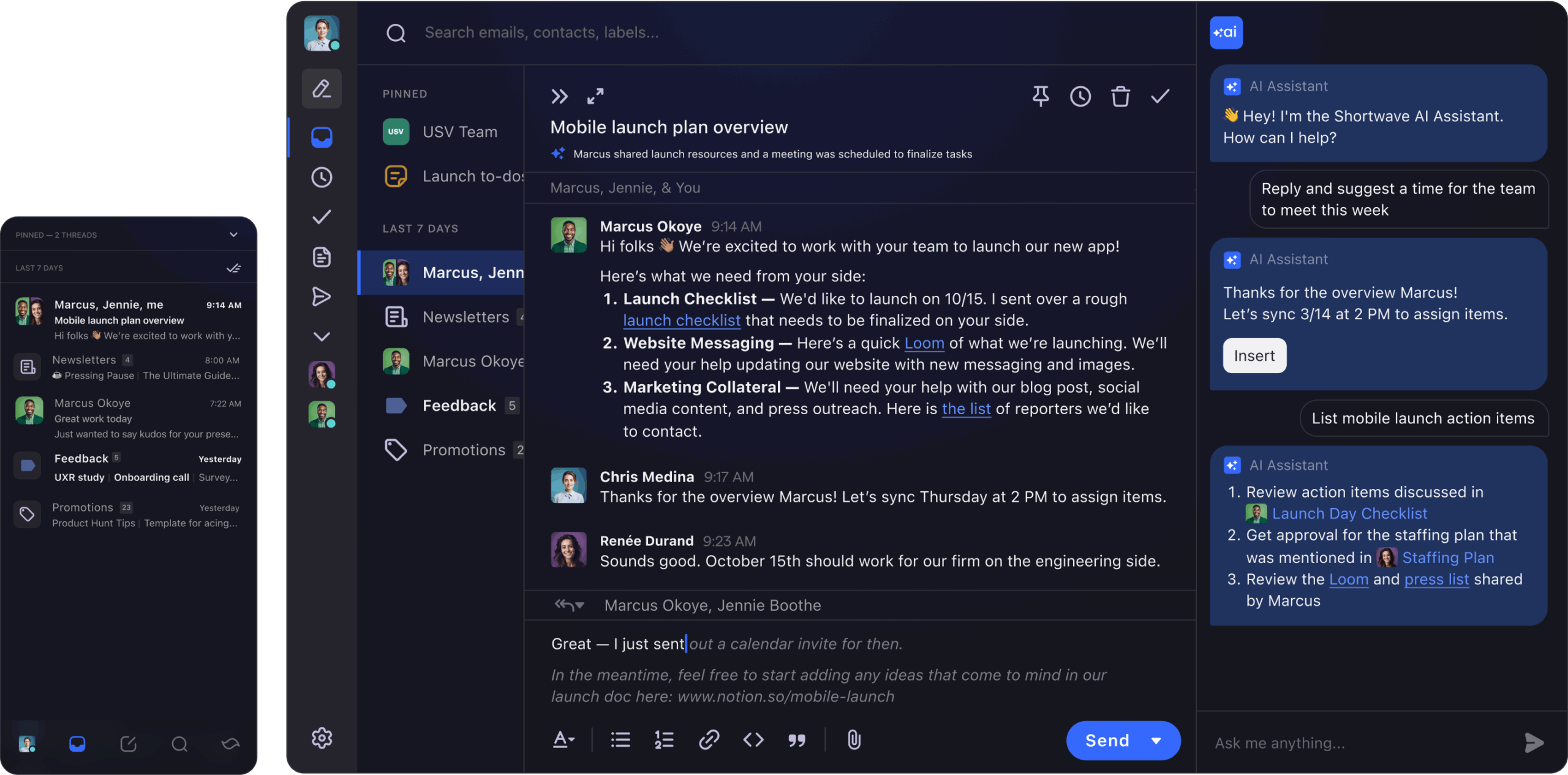
Its thread-first design organizes conversations like chat threads, and the built-in AI summarizes long chains and drafts replies, which helps teams catch up instantly. Ultimately, Shortwave turns your inbox into Slack for email.
Shortwave is free forever for individuals and offers an affordable Pro package, making it ideal for startups or small businesses. You can trial Pro for free for 14 days, and then there are packages depending on your needs.
Superhuman: speed, control, and personal productivity
Superhuman is a premium email client that works for emails on Gmail and Outlook. Its main selling point is its speed, but it also allows for some collaboration.
Users can
- Use keyword shortcuts to organize emails
- Split inboxes to focus on one at a time
- Unsubscribe and clear spam immediately (an issue with Gmail’s client)
- Reply faster with instant replies
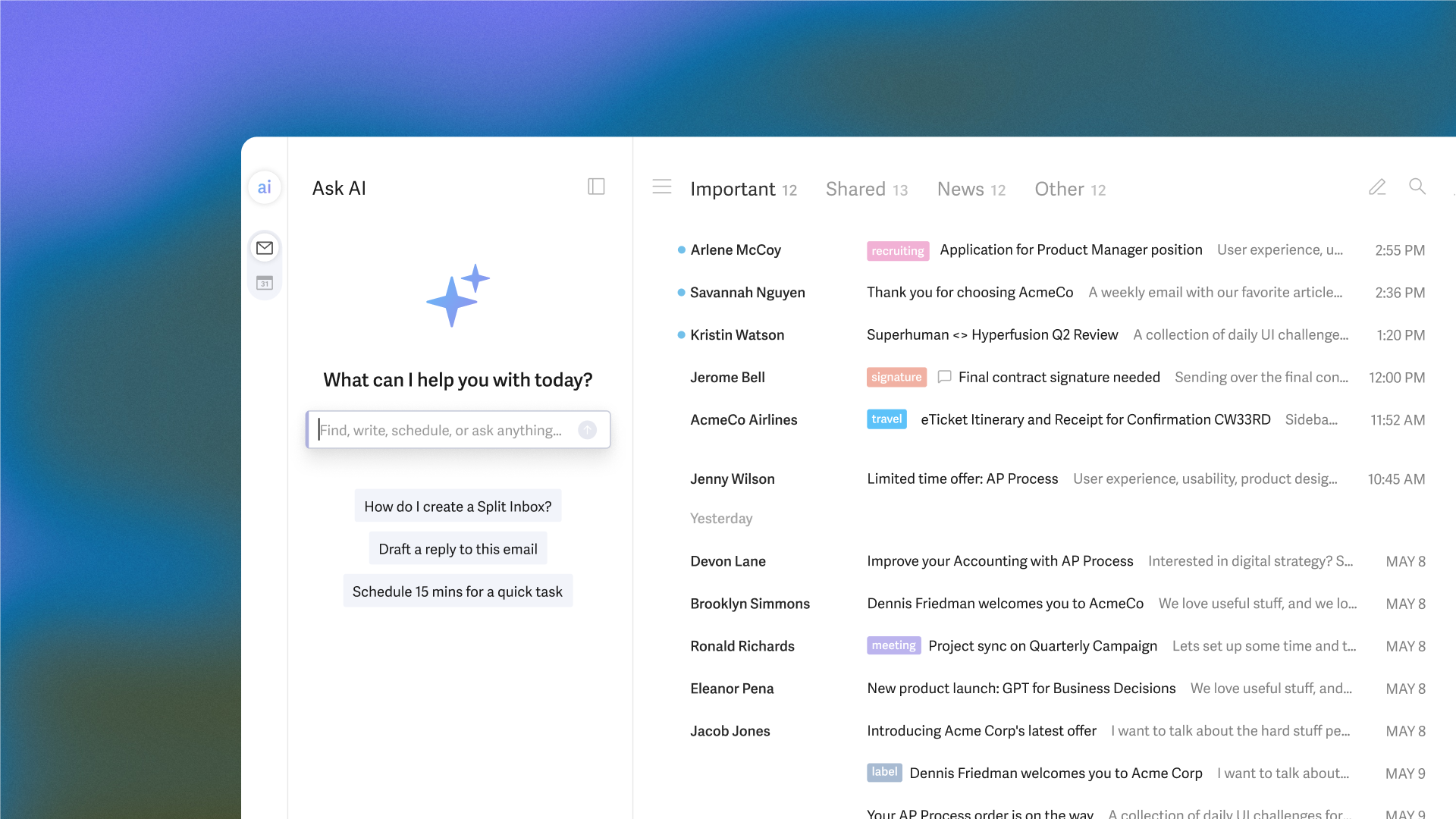
Superhuman is built for people who live in their inbox — think executives, founders, and high-output operators. It helps these busy professionals reach inbox zero fast.
It’s a more expensive solution than Shortwave, and there’s no free version, just a trial. More on pricing later.
Who should use Shortwave vs Superhuman?
Although similar in many ways, both Shortwave and Superhuman have standout features that make them better for different audiences.
Target audience for Shortwave
Shortwave is ideal for
- Remote teams that rely on fast, asynchronous communication
- Startup marketers juggling campaigns and client updates
- Project managers coordinating tasks across departments
Shortwave’s real-time commenting, shared inboxes, and smooth mobile experience make it a powerhouse for collaboration and visibility. Plus, it’s the cheaper of the two solutions, in case budget is a deciding factor for you.
Choose Shortwave if: You work in a team environment and want email that feels more like Slack — real-time, collaborative communications.
Target audience for Superhuman
Superhuman is ideal for
- Executives who need to process high volumes of email efficiently
- Solo founders managing investors, clients, and operations
- VC-backed operators who value speed, polish, and control
Its lightning-fast shortcuts, elegant interface, and intuitive inbox management are built for individuals who demand peak productivity.
Choose Superhuman if: You value speed and a frictionless path to inbox zero.
Standout features of Shortwave
Here are some of the standout features that make Shortwave great for teams and collaboration:
- Thread-first inbox: Threads group messages by conversation, not by individual emails, to make it easier to follow context. These can be shared with other team members so you can get eyes on your email conversations.
- AI summaries: When the threads get long, AI generates concise overviews so that team members can catch up on context without reading every reply.
- Shared channels: These look like a chat, but they’re emails. You can invite specific team members to channels and use them a bit like an email subscriber list. You should have a channel for your entire organization, and then you might have channels for different departments or even projects.
- Scheduled sends: This lets users time messages for optimal delivery across time zones and workflows. You can also schedule when emails come to you, which is a great addition for reducing inbox distraction. It means you can look at your emails at your convenience, rather than as they arrive.
- Fast mobile app experience: Shortwave delivers seamless syncing and instant notifications, ensuring productivity on the go.
Standout features of Superhuman
Here are some of the standout features that make Superhuman great for speed and inbox zero:
- Keyboard shortcuts: Assign a shortcut to just about every action to fly through your inbox at lightning speed. For example, “E” marks an email as done, and “CTRL + K” brings up the command palette.
- Command palette: This is Superhuman’s universal command bar that lets you do anything — compose, search, snooze, or navigate — without ever touching your mouse. You run the keyboard shortcut, then simply type what you want to do.
- Read receipts: These show you exactly when your recipients open emails, which can help you gauge when to follow up.
- AI writing assistant: Superhuman’s AI drafts polished, context-aware replies in your voice to cut down on typing time without sacrificing tone.
- Offline mode: Draft emails on the go without an internet connection.
Shared capabilities
Aside from both email clients being suitable for Gmail users, they also have a few shared functionalities.
Keyboard shortcuts
Shortwave supports shortcuts for many actions, including threads and collaborative work.
Superhuman is famous for its keyboard-first design. Every command — from snoozing emails to sweeping or splitting inboxes — can be triggered from a keyboard shortcut in seconds. It’s great, but from experience, there’s a bit of a learning curve to working this way.
Smart replies and AI drafting
Shortwave uses AI to generate contextual responses and thread summaries, helping teams stay aligned without reading every message.
Superhuman is known for its excellent drafting — it’s why the tool made Jotform’s shortlist of the best AI email generators. The AI can draft email responses from ideas; you just need to jot down some phrases. It can also respond to prompts like, “reply with three coffee spots near the office,” so you can send meeting locations without having to find them.
Split inbox views
Shortwave lets users customize split inboxes in a similar way to Superhuman, but you can also split inboxes based on labels, including Gmail’s labels or custom labels.
In Superhuman, I like having VIP emails separated into their own inbox. So, at the start of the day when email is at its most overwhelming, I could reply to the people who needed it the fastest.
Scheduling and reminders
Both email tools have scheduling functionality, like a delayed send, but there are some unique ways of handling scheduling on both tools.
Shortwave lets you schedule when your emails come in. I really like this feature because it puts you back in control of your attention and lets you engage with emails on your terms. It’s far too tempting to see a new message the second it lands and get distracted by it.
Superhuman has some smart functionality for scheduling emails. For example, you can use smart send features so that your recipient receives the email at the optimal time that they’ll open it and respond. This feature is unusual for an email client and more commonly seen in email marketing platforms like Seventh Sense.
Cross-device sync
Both AI email clients sync across a range of devices.
Shortwave is available on iOS, Android, iPadOS, and desktop.
Superhuman is available on iOS, Android, iPadOS, and desktop. If you work offline, it’ll sync across all devices when you next connect to the internet.
Unique advantages
Now you know what makes these Gmail alternatives similar, let’s see what sets them apart. It’s worth noting that both of these tools are really good, and they both made Jotform’s shortlist of the best AI email assistants.
What makes Shortwave unique?
Shortwave stands out for transforming email into a real-time collaboration hub. Its Slack-style interface, live reactions, and thread-first inbox make group communication fast and engaging. Teams can comment, share, and coordinate asynchronously, without endless CCs or message chains.
This tool is built for collective productivity, which helps manage projects and updates directly through Gmail.
What makes Superhuman unique?
Superhuman’s uniqueness lies in its speed, command-driven interface, and premium onboarding experience. The customer support is genuinely really good, too.
This tool is designed for high performers and turns inbox management into a seamless and fast experience.
5 key comparison areas
In this section, I’ve looked at five key areas, made a Shortwave vs Superhuman comparison, and declared a winner at every stage.
1. AI and automation
Both tools have excellent AI and automation features.
Shortwave’s AI and automation can
- Make smart suggestions to organize an inbox (like archiving low-priority threads or deleting junk)
- Draft replies ready for your review
- Improve on your existing draft so you can send your email knowing it’s as good as it can be
- Retrieve information from natural language prompts like, “Where is my meeting today?”
- Summarize conversations so you can get the gist without reading the whole thing
- Schedule meetings with ease using your calendar
Superhuman’s AI and automation can
- Draft replies ready for your review
- Automatically archive spam emails and cold pitches (a win for those coming from Gmail’s client, as it’s not great at this)
- Split inboxes using labels and short prompts
- Draft emails from a prompt, and prompts can be pretty sophisticated
- Send reminders so you don’t miss an email
- Summarize conversations so you can get the gist without reading the whole thing
Who wins? It’s a tie.
2. UX and speed
Shortwave offers a clean, chat-style layout that feels modern. While it is fast, its priority is collaboration over speed.
Superhuman is purpose-built for speed.
Who wins? Superhuman.
3. Collaboration features
Shortwave is designed with collaboration in mind and it’s a major selling point for this AI email client. It offers
- Assigned user roles (collaborators, admins, and owners)
- Private comments for internal teams to discuss email threads
- The ability to share entire email threads with individual team members so they have complete context
- The ability to assign emails to other team members to keep tasks moving
- Shared labels so emails are well-managed across teams
- Channels for sending team-wide emails
Superhuman has a few collaborative features, too, such as
- Shared conversations, which allow teammates (whether they use Superhuman or not) to view the full history of an email chain
- Team comments, allowing for private comments within the email so you can work on it together
Who wins? Shortwave.
4. Pricing models
Shortwave offers a free forever package, but Superhuman does not. If you’re a solo user, Shortwave is also pretty cheap compared to Superhuman.
Superhuman offers a free trial, and you can find referral links online offering 30–60 days free. After that, it’s tiered pricing. And if you’re at the enterprise level, you’ll need a custom plan.
Who wins? Shortwave.
Pro Tip
If budget is an issue for you — and you use Gmail — there is a free alternative to Shortwave and Superhuman. It’s Jotform’s Gmail Agent, a powerful AI email assistant with a free forever version.
5. Platform availability
Both tools support Gmail, but Superhuman also extends to Outlook.
Superhuman’s desktop and mobile apps deliver a consistent, sleek experience, while Shortwave’s cross-platform syncing is reliable but currently limited to Gmail users.
For Gmail users alone, this would be a tie. But overall, I have to give Superhuman this one.
Who wins? Superhuman.
Pricing and plans
Below are the pricing packages by tool.
Shortwave pricing
Shortwave splits its pricing by user: individual and business. This pricing structure is pretty useful and competitive.
Individual packages:
- Free
- Pro ($14 per seat per month, billed annually)
Business packages:
- Business ($24 per seat per month, billed annually)
- Premier ($36 per seat per month, billed annually)
- Max ($100 per seat per month, billed annually)
Superhuman pricing
Superhuman has just three pricing plans:
- Starter ($25 per user per month, billed annually)
- Business ($33 per user per month, billed annually)
- Enterprise (custom)
Shortwave does come up a lot cheaper for individuals, at $14 per month (billed annually) compared to $25 per month. The price is significant, and although Superhuman is very fast and has an exceptional UX, Shortwave is really good.
If you were looking to grow a business and collaborate later, Shortwave might be a good place to start because of the price benefits. But when it comes to higher packages, Superhuman’s pricing starts to look better, so it could be worth that upfront investment to save changing tools later.
There is a third option: Try Jotform Gmail Agent instead
The right Gmail alternative depends on how you work. Shortwave is ideal for teams, and Superhuman for individuals who want a clean inbox.
If you love the AI drafts, labels for organization, and fast filters but you don’t love the price tag, consider Jotform Gmail Agent. It’s an AI-powered email assistant designed for professionals who live in their Gmail inboxes.
Jotform’s Gmail Agent helps you write faster by drafting instant, on-brand replies that match your tone and style perfectly.
No emails are ever sent automatically. Instead, Jotform Gmail Agent suggests replies, filters out low-priority messages, and applies smart labels to keep your inbox focused.
And if you already use Jotform AI Agents, Gmail Agent integrates seamlessly, pulling from the same knowledge base to keep customer communication consistent across forms, emails, and support channels — all in one dashboard.
Best of all? It’s completely free.
If email drives your workflow, Jotform Gmail Agent ensures you spend less time typing and more time doing what matters — without adding another subscription to your stack.
Productivity seekers, team leads, solo founders, and tech-forward email users comparing modern Gmail alternatives that offer speed, AI assistance, and collaboration. Ideal for those overwhelmed by traditional inboxes and seeking smarter tools.















































Send Comment: