Even the most loyal customers don’t always know exactly what they want when they visit your site. They might browse a few product pages or check out what’s on sale. But if nothing catches their eye, they may leave without buying anything.
Give them a nudge in the right direction with a product recommendation quiz. By asking a few interactive questions about their needs and preferences, you can keep them engaged. A quiz also matches them to specific items, which could lead to more sales.
These interactive quizzes also allow you to gather data directly from potential customers. You can use this information to make your broader e-commerce marketing strategy feel more personalized. If 30 percent of quiz takers say they care about a specific feature, you can spotlight that in your next campaign.
Product recommendation quizzes are especially helpful if you use Shopify, because you can integrate them into your store. For the best results, you’ll need to do more than write a few multiple-choice questions. The questions you ask and the underlying quiz logic determine how successful your quiz will be.
Pro Tip
With Jotform’s Shopify integration, you can embed Jotform quizzes directly into your Shopify store. That makes it easier to learn about shoppers’ preferences and guide them to relevant products.
6 steps to create a product recommendation quiz
Creating a product recommendation quiz involves more than asking questions, you also need to connect answers to relevant products so shoppers receive personalized recommendations.
Here’s how to install Jotform Product Quiz Builder, create your first product recommendation quiz, customize it, and publish it on your Shopify store.
Step 1: Install the Jotform Product Quiz Builder
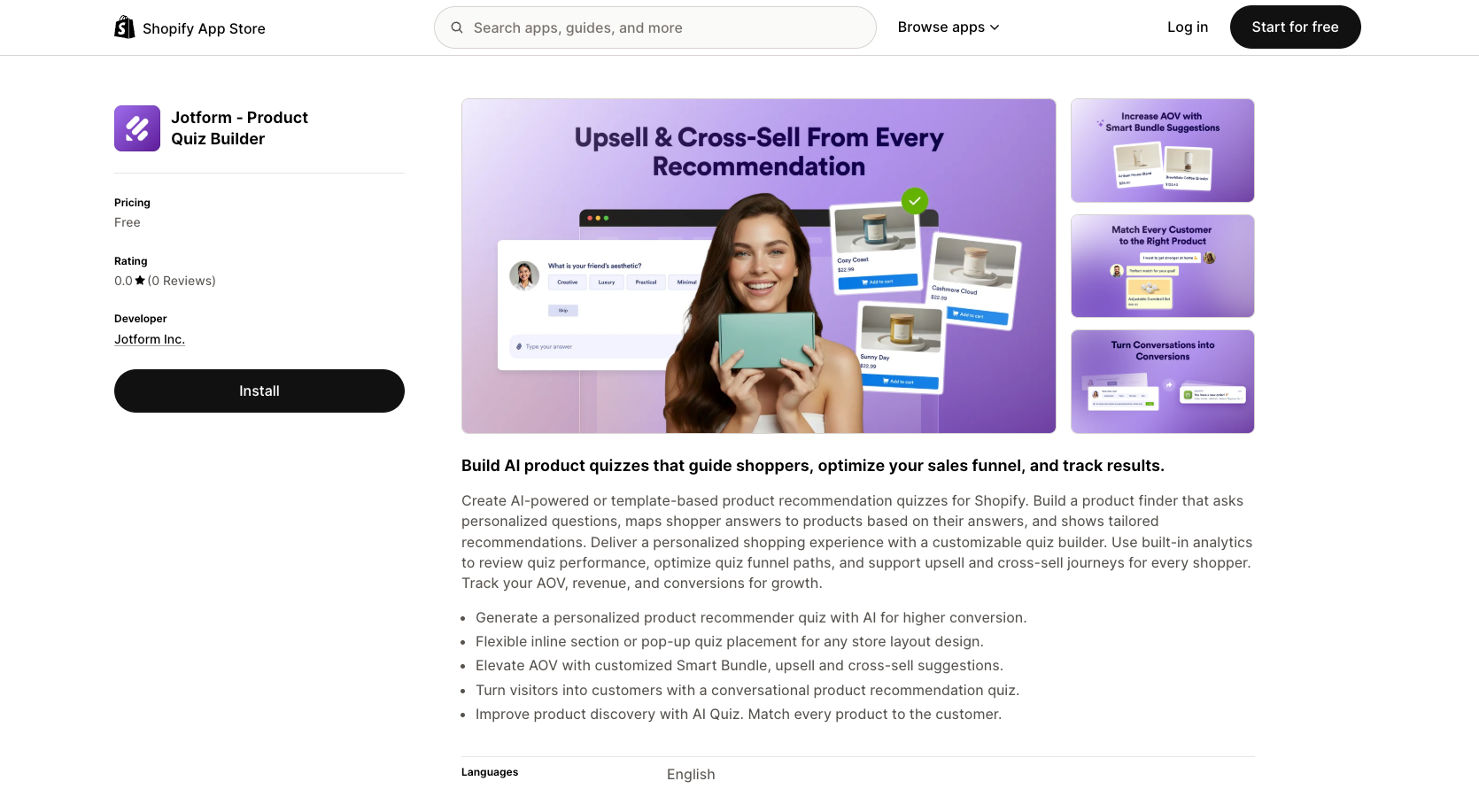
First, install Jotform Product Quiz Builder from the Shopify App Store. Once Shopify adds the app to your store, connect it to your Jotform account.
This gives Product Quiz Builder access to the Shopify environment where you’ll create, customize, and publish your quizzes. You can manage the app from your Shopify Admin Dashboard alongside the rest of your store.
Step 2: Create your first product recommendation quiz
Once the app is connected, you can create a quiz in one of two ways: Create with AI or Start with a template.
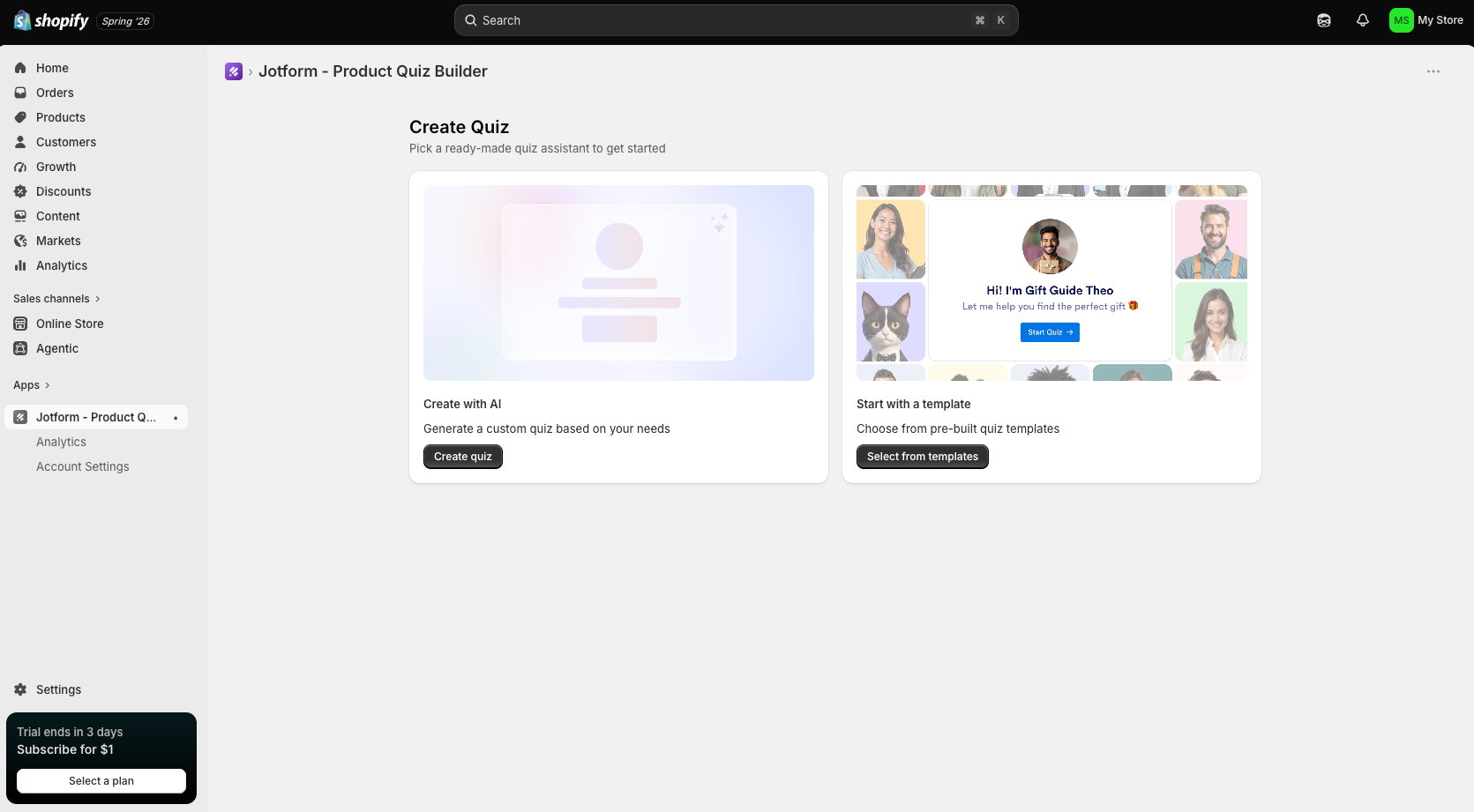
Starting with a template can be useful if you already know the kind of shopping experience you want to create. If you’d rather get a personalized starting point, use AI.
With the AI option, you choose the goal of your quiz, select the products you want to feature, and decide roughly how many questions shoppers should answer. Product Quiz Builder then generates a quiz based on those choices.
Don’t worry about getting every question perfect right away. Think of the generated quiz as a first draft that you can refine for your products and audience.
Step 3: Customize your quiz content and product recommendations
Next, look closely at the questions your customers will answer. Every question should help you understand what they need or eliminate products that aren’t a good fit.
For example, a skincare store could ask about skin type, specific concerns, and product preferences. A clothing brand might ask about style, fit, or occasion. If a question doesn’t help you make a better recommendation, it probably doesn’t need to be there.
Product Quiz Builder lets you use single-choice and multiple-choice questions. You can also connect individual answers to specific products or exclude products that don’t match a shopper’s response.
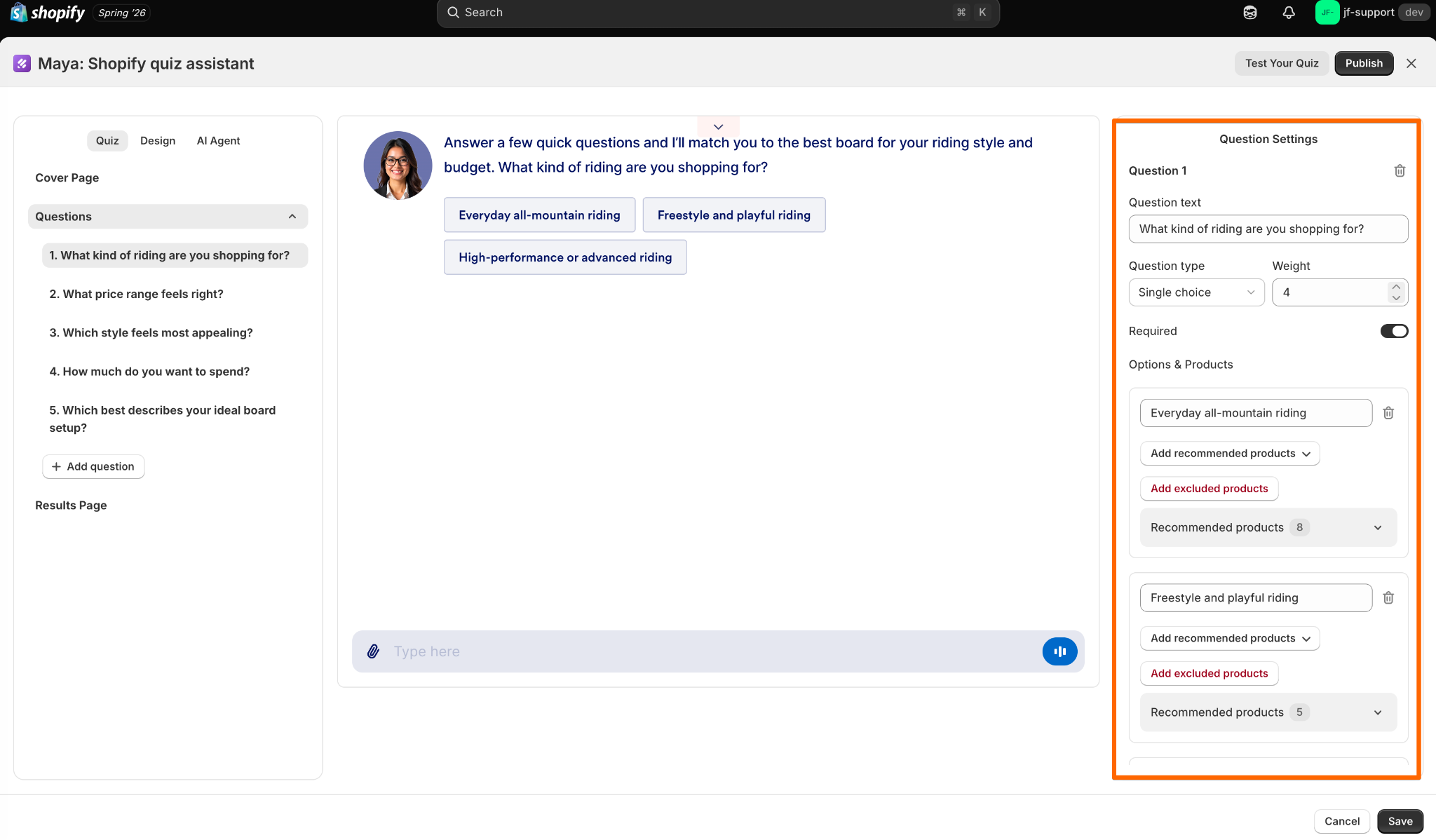
Say a customer selects dry skin as their main concern. You could associate that answer with moisturizers and hydrating products while excluding products designed mainly for oily skin. As shoppers continue answering questions, those choices help make their final recommendations more relevant.
You can also customize the results page, including the number of recommended products shoppers see. Keep the list focused. Showing a few strong matches is usually more helpful than replacing one overwhelming catalog with another.
Step 4: Match the quiz to your store
Your quiz may be a separate interaction, but it shouldn’t look like one.
Use the design settings to adjust colors, backgrounds, fonts, and text colors so the quiz fits naturally with the rest of your Shopify store. Consistent branding makes the transition from browsing your products to taking the quiz feel smoother.
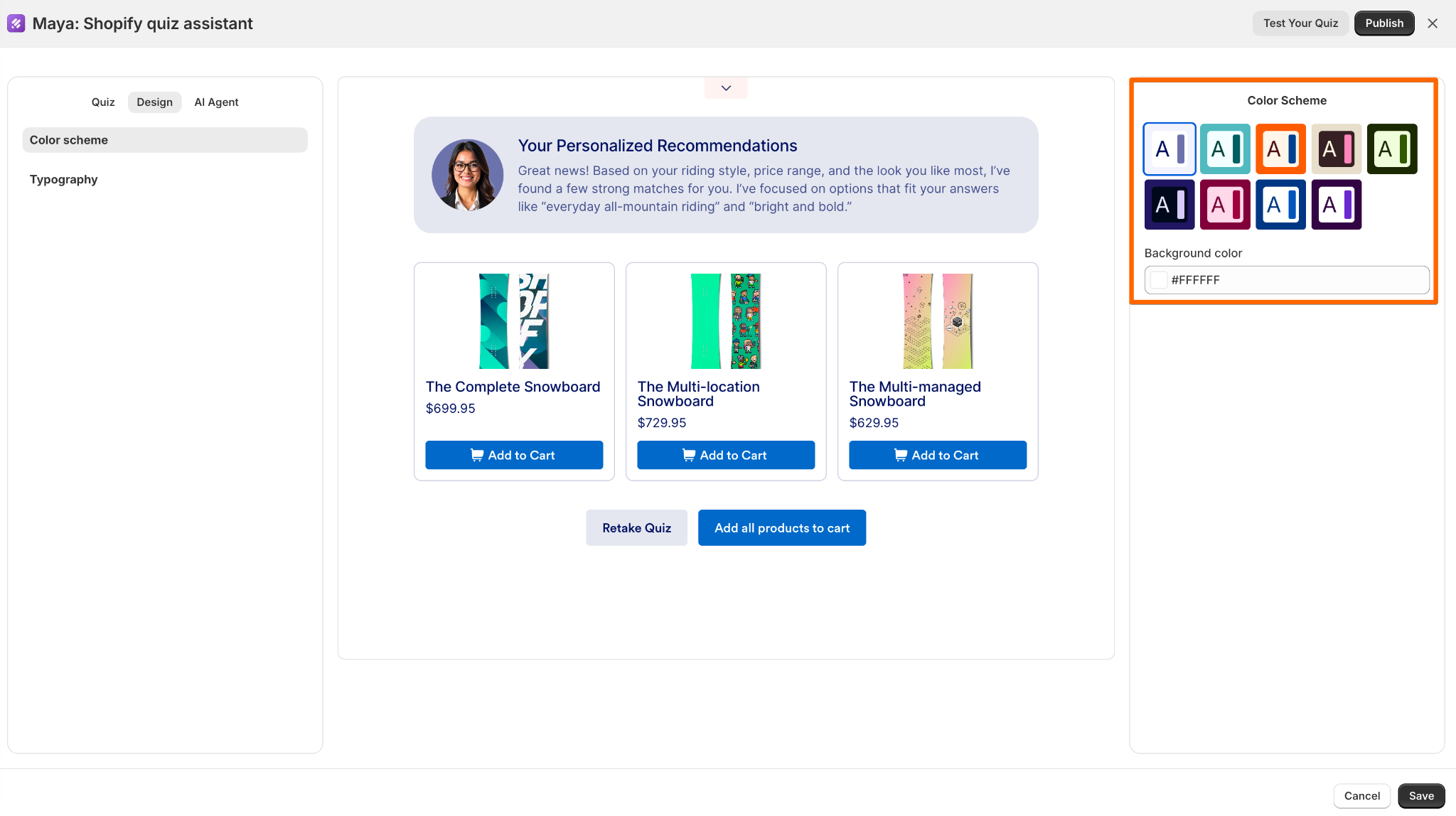
You can customize the cover page and results page as well. Think of the cover page as your chance to explain why the quiz is worth taking, and the results page as the payoff.
A simple introduction such as “Find your perfect skincare routine” tells customers what they’ll get before they begin.
Step 5: Customize your AI Shop Assistant
You can also give your product quiz a more conversational feel with an AI Shop Assistant.
Product Quiz Builder lets you choose an avatar, generate one, or upload your own. You can also name the assistant, define its role, choose its language, and adjust its tone of voice.
Try to make the persona match the way your brand already communicates. A casual fashion store might use a friendly virtual stylist, while a premium home goods store might prefer a more polished product expert.
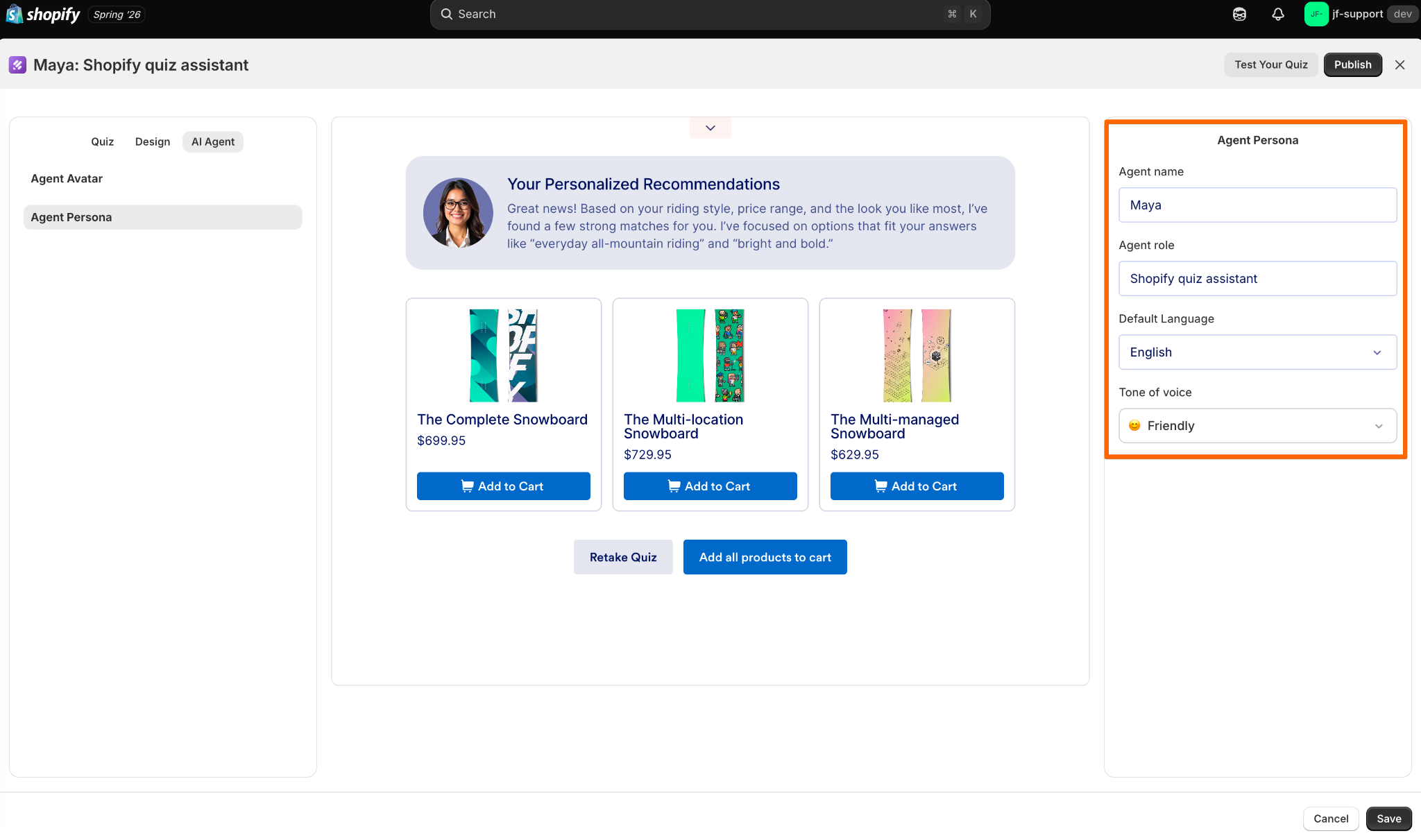
The goal isn’t to make the AI Agent the center of attention. It should complement the quiz and make the shopping experience feel more personal.
Step 6: Publish your product quiz to your Shopify store
Finally, decide how shoppers will encounter your quiz.
Jotform Product Quiz Builder gives you two main options. An Inline Section places the quiz directly on a page or section of your store. A Popup Modal opens the quiz when a shopper clicks a button.
The right choice depends on the role the quiz plays in your shopping experience. If finding the right product is a major part of your sales process, placing the quiz prominently on a landing page could make sense. If you want shoppers to browse first, a popup can give them access to personalized help when they need it.
Choose where the quiz should appear, publish it, and save the changes to your Shopify store.
Before you promote it, take the quiz yourself a few times. Try answering different types of customers to make sure each path leads to sensible recommendations.
Pro Tip
Looking for a shortcut? Use Jotform’s AI Quiz Generator to create a product recommendation quiz in minutes using only a prompt.
How product recommendation quizzes increase sales
Creating a Shopify product recommendation quiz may not seem like an obvious way to make money online, but it can have a tangible impact on your sales.
For one, this tool helps shoppers find products that match their needs quickly. Instead of scrolling through dozens of products or adjusting filters, they answer a few simple questions about their needs. That leads to faster conversions and higher customer satisfaction.
Online testing tools also help businesses understand customer intent. For example, a supplement retailer might ask if users want to lose weight, improve their health, or build muscle. If 40 percent want to build muscle, the company might invest more in relevant products or spotlight them in its marketing. Over time, these personalized strategies result in higher sales.
Common pitfalls
Of course, every technology comes with a learning curve. Avoid these common obstacles:
- Creating complicated or extensive quizzes. Customers want to shop, not feel like they’re taking the SAT. Keep product recommendation quizzes short and easy to complete.
- Not personalizing recommendations enough. If your quiz only includes a few generic answers, users may feel disappointed or confused.
- Ignoring your audience’s goals. If you don’t understand customer intent, you may create irrelevant questions.
Conditional logic helps you avoid these issues. It boosts customer engagement by only asking relevant questions. If something doesn’t apply to a given user, it skips to the next question that fits their needs.
This structure saves time and offers customers more value. After all, the last thing you want to do is ask five questions about sweaters if the user already said they don’t wear them. Instead of clicking “N/A” or abandoning the quiz, they move on to questions about their actual interests and needs.
It also helps you give more relevant suggestions by filtering out options that don’t match their responses. If a user says they’re interested in hiking gear, you focus on the features and accessories they need for their next outdoor adventure.
Ready to create one for your Shopify store? Install Jotform Product Quiz Builder to create a product recommendation quiz with AI or start from a template, then customize the experience around your products and shoppers.
FAQs about product recommendation quizzes
Jotform’s Product Recommendation AI Agent is one of the best AI tools for product recommendations. It uses conversational AI to learn about customers’ interests and needs, so you can gather useful data. The AI Agent uses this information to provide personalized product recommendations. You can customize this assistant to match your brand voice and appearance.
Use a form builder like Jotform to create your product recommendation quiz. Start by identifying the products you want to feature and developing relevant questions. You should also add conditional logic to filter out irrelevant questions and guide users to appropriate products. Finally, embed it in your Shopify store.
This article is for ecommerce store owners, Shopify merchants, marketers, online retailers, and anyone who wants to create product recommendation quizzes that personalize the shopping experience, guide customers to the right products, increase conversions, and collect valuable customer data.






Send Comment: