

Transportation Incident Forms
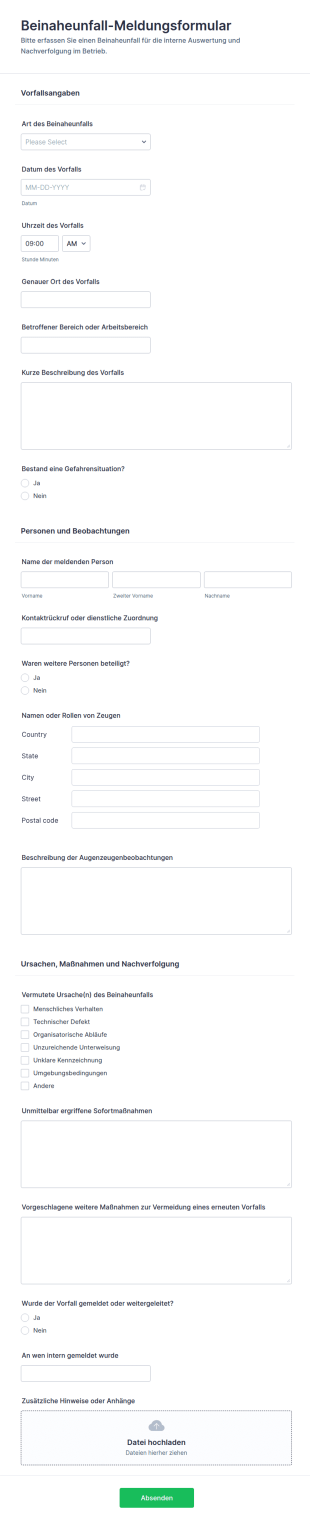
Meldung Von Beinahe Unfall Vorfallbericht Formular
Erfassen Sie Beinaheunfälle im Betrieb nachvollziehbar und zentral mit dem Beinaheunfall-Meldungsformular, damit Teams Ursachen bewerten, Maßnahmen ableiten und die Datenerfassung samt Formularantworten in Jotform sauber organisieren können.
Zur Kategorie:Vorfallsmeldeformulare
Frachtmeldung Formular 🚚
Das Frachtanspruchsformular erleichtert die Meldung von Transportschäden und Verlusten, bündelt Nachweise für die Bearbeitung und eignet sich für Versandabteilungen, Speditionen und Empfänger bei der digitalen Datenerfassung mit Jotform.
Zur Kategorie:Anspruchsformulare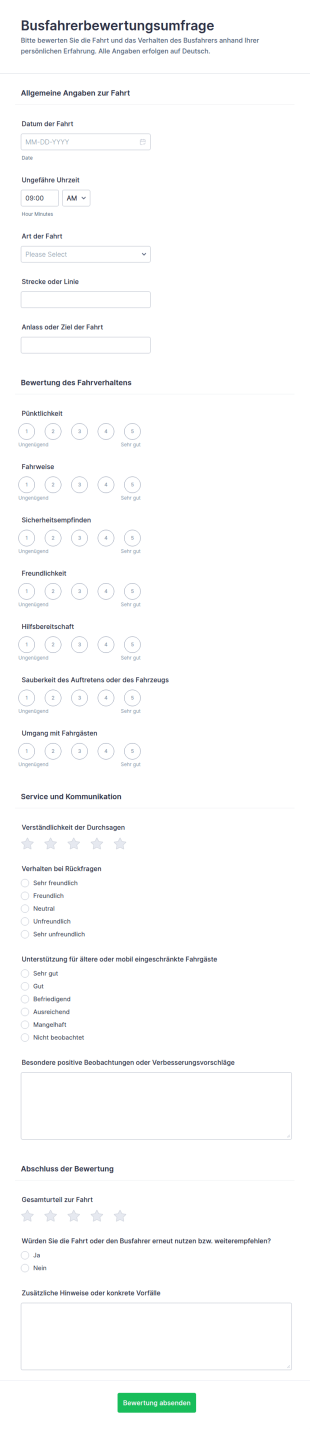
Busfahrer Bewertungsbogen
Erfassen Sie Fahrgastfeedback zu Pünktlichkeit, Fahrweise und Service je Fahrt mit dem Busfahrerbewertungsumfrage-Formular und werten Sie Rückmeldungen für Verkehrsunternehmen und Auftraggeber zentral aus.
Zur Kategorie:Umfragen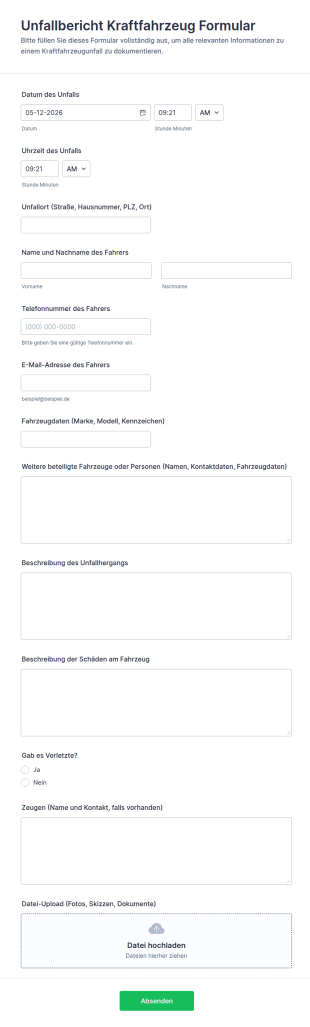
Unfallbericht Kraftfahrzeug Formular
Dokumentieren Sie Verkehrsunfälle schnell und einheitlich mit dem Kraftfahrzeug-Unfallberichtformular von Jotform, ideal für Fuhrparks, Werkstätten und Organisationen, die eine zuverlässige Datenerfassung und jede Formulareinsendung zentral verwalten möchten.
Zur Kategorie:Automotive FormulareÜber Transportation Incident Forms
Transportation incident forms are structured documents used to report, document, and track incidents that occur during vehicle and transportation operations. They help organizations capture consistent details about accidents, near misses, injuries, cargo damage, route disruptions, and safety hazards so teams can respond quickly and keep accurate records for investigations and compliance. Transportation incident forms are commonly used by logistics and delivery companies, fleet operators, public transportation teams, school transportation services, construction and field service fleets, and organizations that rely on regular vehicle movement. By standardizing incident reporting, these forms improve safety visibility, reduce reporting gaps, and support more effective corrective action.
With Jotform, transportation incident forms can be created quickly using a no-code, drag-and-drop Form Builder and optimized for mobile reporting in the field. Conditional logic can reveal follow-up questions based on incident type or severity, and file upload fields allow drivers to attach photos, documents, or evidence. Submissions are stored in Jotform Tables for organized review and filtering by vehicle, driver, location, and incident category. Automated notifications can alert managers or safety teams immediately when high-severity incidents are submitted.
Use Cases of Transportation Incident Forms
Transportation incident forms support safety reporting, operational follow-up, and documentation for internal and external reviews. Below are common ways these forms are used and the challenges they help solve.
Mögliche Anwendungsfälle:
- Meldung von Fahrzeugunfällen und Kollisionen
- Meldung von Beinaheunfällen und unsicherem Fahrverhalten
- Dokumentation von Verletzungen und Sicherheitsvorfällen während des Transports
- Meldung von Schäden an Fracht, Ausrüstung oder Eigentum
- Meldung von Streckenunterbrechungen und Verspätungen
- Versicherung, Schadensfälle und Aufnahme von Untersuchungsunterlagen
Lösungsansätze:
- Erfassen Sie alle Details zu Vorfällen für alle Fahrer und Routen – stets auf dieselbe Weise
- Reaktion und Eskalation lassen sich durch regelbasierte Weiterleitung nach Schweregrad beschleunigen
- Erstellen Sie eine zeitgestempelte Aufzeichnung für Untersuchungen, Ansprüche und Compliance
- Helfen Sie dabei, wiederkehrende Sicherheitsrisiken zu erkennen und Schulungen oder Richtlinien zu verbessern
Mögliche Eigentümer und Nutzer:
- Fahrer und Fahrzeugführer
- Einsatzteams und Flottenmanager
- Sicherheits- und Compliance-Teams
- Operationsleiter und Vorgesetzte
- Versicherungs- oder Risikomanagementteams
Unterschiede der Erstellungsmethoden:
- Unfall- und Kollisions-Berichtsformulare erfassen Zeit und Ort, die beteiligten Fahrzeuge, den Hergang des Unfalls, Verletzungen, Schäden sowie den Upload von Beweismaterial wie Fotos und Dokumenten.
- Berichtsformulare für Beinaheunfälle und Gefahrenmeldungen fokussieren sich auf die Beschreibung des Risikos, auf beitragende Faktoren wie Straße, Wetter oder Verhalten, auf den Schweregrad und auf Vorschläge für vorbeugende Maßnahmen.
- Formulare für Frachtschäden und Betriebsstörungen erfassen Versand- oder Routenkennungen, Details zu den Auswirkungen (Verspätungen, Verluste), Kunden- oder Haltestelleninformationen sowie die eingeleiteten Korrekturmaßnahmen.
How to Create a Transportation Incident Form
Creating a transportation incident form with Jotform helps you standardize incident reporting while making it easy for drivers and field teams to submit reports quickly.
1. Wählen Sie eine Vorlage oder beginnen Sie komplett neu
Klicken Sie in „Mein Workspace“ auf „Erstellen“ und wählen Sie „Formular“. Starten Sie mit einer Vorlage für einen Vorfallsbericht und passen Sie sie für Transport-Workflows an.
2. Add Incident Identification Fields
Erfassen Sie Datum/Uhrzeit, Ort, Route oder Fahrt-ID, Fahrzeug-ID, Name des Fahrers und Kategorie des Vorfalls. Strukturierte Dropdown-Menüs unterstützen die einheitliche Erfassung.
3. Capture Incident Details and Impact
Erfassen Sie Beschreibungen von Ereignissen, Verletzungen, Schäden, beteiligten Parteien und ob Rettungsdienste benachrichtigt wurden. Fügen Sie Felder für sofortige Maßnahmen hinzu.
4. Use Conditional Logic for Severity and Incident Type
Zeigen Sie getrennte Abschnitte für Kollisionen, Beinaheunfälle und Ladungsschäden an. Fordern Sie bei Berichten mit hohem Schweregrad weitere Details an und leiten Sie bei Bedarf eine Eskalation ein.
5. Add File Uploads for Evidence
Fügen Sie Upload-Felder für Fotos vom Unfallort, den Schäden, Dokumente oder Zeugenaussagen hinzu, um Nachfragen zu minimieren.
6. Publish and Track Reports in Jotform Tables
Veröffentlichen Sie das Formular und senden Sie den Fahrern einen Link oder einen QR-Code. Die eingehenden Antworten finden Sie in Tabellen – gegliedert nach Fahrzeug, Fahrer, Datum und Status.
Häufig gestellte Fragen
1. What are Transportation Incident Form templates in Jotform?
Transportation Incident Form templates in Jotform are ready-to-use digital forms that help teams report accidents, near misses, injuries, cargo damage, and other transportation-related incidents in a consistent format.
2. Why use Jotform templates instead of paper incident reports?
Jotform templates speed up reporting, reduce missing details, and make it easier to store and review incident records in one place. They also support mobile submissions from the field.
3. What information do these templates usually collect?
Typical templates collect incident date/time, location, vehicle and driver details, incident type, description, injuries or damages, immediate actions taken, and evidence attachments like photos.
4. Can drivers submit incident reports from a phone?
Yes. Jotform forms are mobile-friendly, so drivers can complete and submit incident reports on-site using a phone or tablet.
5. Can Jotform Transportation Incident Forms include photos and documents?
Yes. You can add file upload fields so users can attach photos of damage, the incident scene, insurance documents, or other supporting files.
6. Where do incident submissions go after someone submits the form?
Submissions are stored in Jotform Tables, where managers can filter and review reports by driver, vehicle, route, incident type, date, or severity.
7. Can incident reports trigger alerts for urgent cases?
Yes. You can set up notification emails that alert safety teams or managers immediately when a form is submitted, and you can route escalations based on severity using conditional logic.
8. Can these templates be customized for different fleets or incident types?
Absolutely. You can edit templates in Jotform’s drag-and-drop Form Builder, add conditional sections for collisions vs near misses, and tailor required fields to match your internal policy or compliance needs.