

Template Modulo Permesso di Lavoro
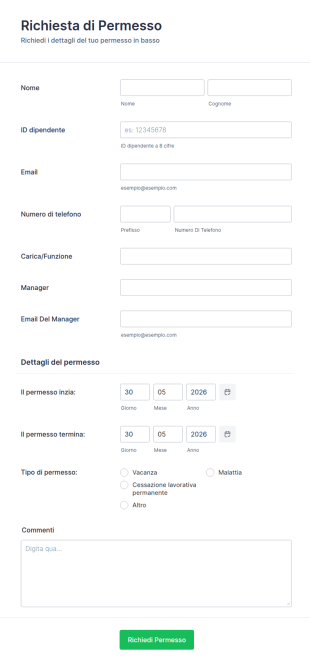
Richiesta Di Permesso Di Lavoro
Gestisci ferie e assenze con il Modulo di Richiesta di Permesso di Lavoro: intuitivo, personalizzabile e facile da integrare, per un controllo efficiente del personale.
Vai alla Categoria:Moduli per Permesso di LavoroInformazioni sui Template Modulo Permesso di Lavoro
Un modulo di congedo è un documento che aziende, istituti scolastici o altre organizzazioni utilizzano per dare al personale la possibilità di richiedere un congedo per un periodo di tempo, che si tratti di ferie, malattia, o lutto. Questi moduli aiutano le organizzazioni a stabilire un registro formale delle richieste e delle approvazioni per le assenze dei dipendenti, che è fondamentale a fini di documentazione nel caso in cui una delle parti dovesse violare i termini della richiesta di ferie.
I moduli di permesso dovrebbero includere dettagli come le informazioni di contatto personali, la durata e il motivo dell'assenza, oltre ad eventuali documenti o certificati. Nella raccolta di template per moduli di permesso Jotform, potrai trovare moduli per la richiesta di ferie, moduli di congedo del personale scolastico, moduli di congedo militare e molto altro. Seleziona semplicemente il tuo template preferito e personalizzalo in base alle tue esigenze in pochi minuti, grazie al nostro generatore di moduli drag-and-drop. Jotform ti aiuterà ad organizzarti al meglio, a semplificare i flussi di lavoro, e a tenere traccia delle assenze dei dipendenti direttamente online tramite i nostri template per moduli di permesso.
Why Use Leave of Absence Forms?
- Leave of Absence Forms ensure that all leave requests are recorded accurately and comprehensively, reducing the likelihood of errors or miscommunication. This accuracy is crucial for maintaining a fair and transparent leave policy within any organization.
- These forms significantly speed up the process of leave management by automating the submission and approval workflows. Employees can submit their requests quickly, and managers can review and approve them in a timely manner, which enhances overall productivity.
- Professional data handling is a key benefit of using Leave of Absence Forms. By capturing all relevant information in a structured digital format, these forms ensure that data is stored securely and is easily accessible for future reference and reporting.
- Using digital forms for leave requests simplifies the tracking and reporting of leave data, allowing HR teams to generate insightful reports on leave patterns and absenteeism, which can inform strategic workforce planning decisions.
- The ability to integrate Leave of Absence Forms with other business applications, such as Google Sheets or Slack, further enhances their utility, allowing organizations to streamline their workflows and maintain seamless communication across teams.
Common Problems Solved by Leave of Absence Forms
- One of the significant issues in leave management is the reliance on paper-based processes, which are prone to loss and misplacement. Leave of Absence Forms solve this by digitizing the entire process, ensuring all requests are captured and stored electronically.
- Manual data entry is another common pain point that leads to errors and inefficiencies. By using digital forms, organizations can eliminate the need for manual re-entry of data, thus reducing the risk of errors and freeing up valuable HR resources for other tasks.
- Lost data is a critical concern for many organizations, especially when dealing with sensitive employee information. Digital Leave of Absence Forms ensure secure data management, preventing data loss and unauthorized access through encrypted storage solutions.
- Processing leave requests manually can be time-consuming and inefficient, leading to delays and dissatisfaction. Leave of Absence Forms enable automated workflows that streamline the approval process, reducing turnaround time and improving employee satisfaction.
- Maintaining compliance with labor laws and company policies is essential for any organization. Leave of Absence Forms help ensure that all leave requests are processed in accordance with applicable regulations, minimizing the risk of legal issues.
Funzionalità per ogni utilizzo
- For organizations looking to streamline their leave request process, Jotform's Drag-and-Drop Form Builder allows for easy customization of forms, enabling HR teams to design forms that meet specific company policies and requirements.
- Utilizing Conditional Logic in Leave of Absence Forms ensures that only relevant fields are displayed to users based on their selections, simplifying the user experience and reducing the likelihood of incomplete submissions.
- Integration with over 100 third-party applications, such as Google Sheets and Salesforce, allows organizations to automatically sync leave data with their existing systems, facilitating seamless data sharing and reporting.
- Jotform's Electronic Signatures feature enables employees and managers to sign off on leave requests digitally, ensuring that all approvals are documented and legally binding without the need for physical paperwork.
- The Automated PDF Generation capability allows organizations to convert form submissions into professionally formatted PDF documents, making it easy to store and share leave records in a standardized format.
- Approval Workflows automate the leave approval process, enabling HR managers to set up multi-level approval chains that ensure each request is reviewed and approved by the appropriate parties before being finalized.
- Secure Data Management with Jotform Tables provides organizations with a reliable platform to store and organize leave request data, ensuring compliance with data protection regulations and easy access for reporting and analysis.
How to Create a Leave of Absence Form
- Browse the Template List for a Leave of Absences template or start from a blank form.
- Dipartimenti di comunicazione aziendale
- Consentono un rifornimento tempestivo e la prevenzione delle perdite
Top Use Cases for Leave of Absence Forms
- For Managers: Leave of Absence Forms empower managers to efficiently track and manage leave requests from their team members. By utilizing digital forms, managers can quickly assess the impact of leave on team productivity and make informed decisions regarding approvals. The automated workflows ensure that each request follows the correct approval process, reducing the administrative burden on managers and allowing them to focus on strategic tasks.
- For Teams: Teams benefit from the clarity and transparency provided by Leave of Absence Forms. With a standardized process for requesting and approving leave, team members can plan their work schedules effectively, knowing that their requests will be handled consistently and fairly. This consistency fosters a positive team environment and enhances collaboration, as team members are aware of each other's availability and can adjust their workloads accordingly.
- For Customers: From a customer's perspective, Leave of Absence Forms contribute to uninterrupted service and support. By ensuring that leave requests are managed efficiently, organizations can maintain adequate staffing levels and ensure that customer inquiries and projects are handled without delay. This reliability in service delivery enhances customer satisfaction and strengthens loyalty, as customers feel confident in the organization's commitment to their needs.
Summarizing Leave of Absence Forms
Leave of Absence Forms play a critical role in modernizing and optimizing the leave management process within organizations. By leveraging Jotform's robust online form builder, businesses can create customized, efficient, and secure forms that address common pain points in leave management. These forms not only streamline the submission and approval process but also provide valuable insights into leave patterns, enabling strategic workforce planning. Ultimately, Leave of Absence Forms contribute to a more organized, compliant, and productive work environment.
Domande Frequenti
1. Che cos'è un modulo di richiesta di permesso?
Un modulo di richiesta di permesso è un documento utilizzato dai dipendenti per richiedere formalmente un periodo di assenza dal lavoro per vari motivi, come vacanze, malattia, questioni familiari, o altre esigenze personali.
2. I moduli e i dati inviati sono sicuri?
Forniscono un modo standardizzato per documentare e monitorare le assenze dei dipendenti, garantendo trasparenza, conformità con le politiche aziendali e un'adeguata gestione del personale.
3. Quali informazioni sono tipicamente richieste su un modulo di richiesta di permesso?
Campi comuni includono il nome del dipendente, il reparto, il tipo di permesso, le date di assenza, il motivo della richiesta, e qualsiasi documentazione di supporto richiesta.
4. Posso riscuotere pagamenti direttamente tramite i miei moduli?
Sì, i moduli possono essere adattati per ogni tipologia di permesso come vacanze, malattia, congedo parentale, lutto o congedo non retribuito, ciascuno con requisiti specifici.
5. È possibile utilizzare questi moduli su dispositivi mobili?
Qualsiasi dipendente che abbia bisogno di tempo libero, così come il personale delle risorse umane e i manager responsabili dell'approvazione e del monitoraggio delle richieste di permesso, possono utilizzare questi moduli.
6. Posso trasformare le risposte dei moduli in documenti PDF professionali?
Garantisce che tutte le richieste di permesso siano adeguatamente documentate e approvate, aiutando le organizzazioni a rispettare le leggi sul lavoro e le politiche interne.
7. Le informazioni inviate tramite un modulo di richiesta di permesso sono mantenute private?
Sì, le informazioni sensibili sono protette e accessibili solo al personale autorizzato, soprattutto quando si utilizzano piattaforme sicure come Jotform.
8. È possibile integrare i moduli di permesso con altri sistemi HR?
Certamente. Con Jotform, i moduli possono essere integrati con software HR, email, gestione dati, e altri strumenti per automatizzare i flussi di lavoro.