# Jotform MCP ( Model Context Protocol) Server

# **Jotform MCP** (Model Context Protocol) Server

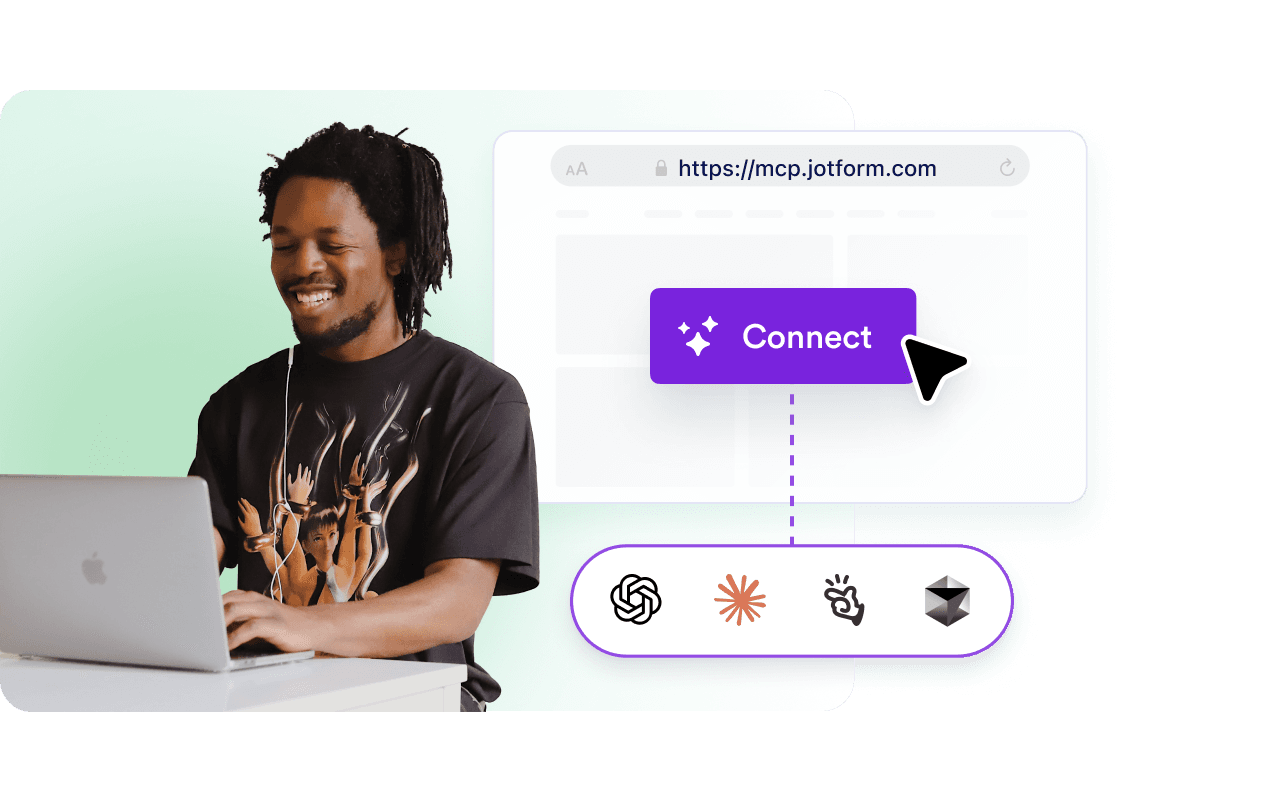
Empower your AI assistants to create, edit, and manage Jotform forms using natural language commands. Seamlessly integrate Jotform's powerful form-building capabilities into your favorite AI-powered development tools.

## How to Connect **ChatGPT** with Jotform MCP

ChatGPT Claude Manus Others

**1****Find Jotform in Apps**
Go to [chatgpt.com/apps](https://chatgpt.com/apps) and search for “Jotform” in the official store.

**2****Click Connect**
Select the Jotform tile and click the “**Connect**” button to link your accounts.

**3****Authorize Access**
Sign in to your Jotform account when prompted to securely grant ChatGPT access to your forms.

**4****Start Chatting**
Once the status is “Connected,” mention **@Jotform** in any chat to begin managing your data.

**1****Open Connectors**
Log in to [Claude.ai](https://claude.ai/settings/connectors), click your profile, and select “**Connectors**” from the menu.

**2****Add Jotform**
Search for “Jotform” in the partner library and click the “**Connect**” button.

**3****Secure the Link**
Authorize the connection via the secure Jotform login window to sync your workspace.

**4****Toggle and Use**
Ensure the Jotform connector is toggled “**On**” in your chat settings to start querying your submissions.

**1****Visit the Connectors Hub**
Sign in to [Manus](https://manus.im/app#settings/connectors) and navigate to the “Connectors” or “Apps” tab in your dashboard.

**2****Select Jotform**
Find the official **Jotform** application in the list of verified partners.

**3****Approve Permissions**
Click “**Connect**” and sign in to Jotform to authorize Manus to interact with your form workflows.

**4****Automate Instantly**
Your Jotform tools are now live. Ask Manus to summarize form results or generate new forms via simple prompts.

**Use remote MCP as**

https://mcp.jotform.com

## What is Jotform MCP?

The Jotform MCP (Model Context Protocol) server lets you control Jotform directly from AI assistants like **ChatGPT, Claude, Manus, and Cursor** using simple conversational commands. Instead of clicking through your dashboard, you can ask your AI to **"create a customer feedback form" or "show me this week's form submissions"** and get instant results.

### MCP server configuration

Integrate Jotform’s powerful form data and automation tools directly into your AI workflow using MCP. Follow these steps to configure Jotform as an MCP server across the industry's leading platforms.

**Remote server URL:**

https://mcp.jotform.com

Point any MCP‑enabled client to this address to begin connecting your AI assistant to Jotform.
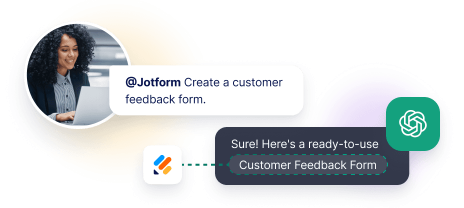
![Image 1: Automated tool creating a customer feedback form.](https://cdn.jotfor.ms/image/r/aHR0cHM6Ly9jZG4uam90Zm9yLm1zL3AvbWNwL2Fzc2V0cy9pbWctbWluL2hvbWVwYWdlL3doYXQtaXMtamYtbWNwLWZlYXR1cmVkLnBuZz92PTE=/what-is-jf-mcp-featured.png?w=40&t=1)
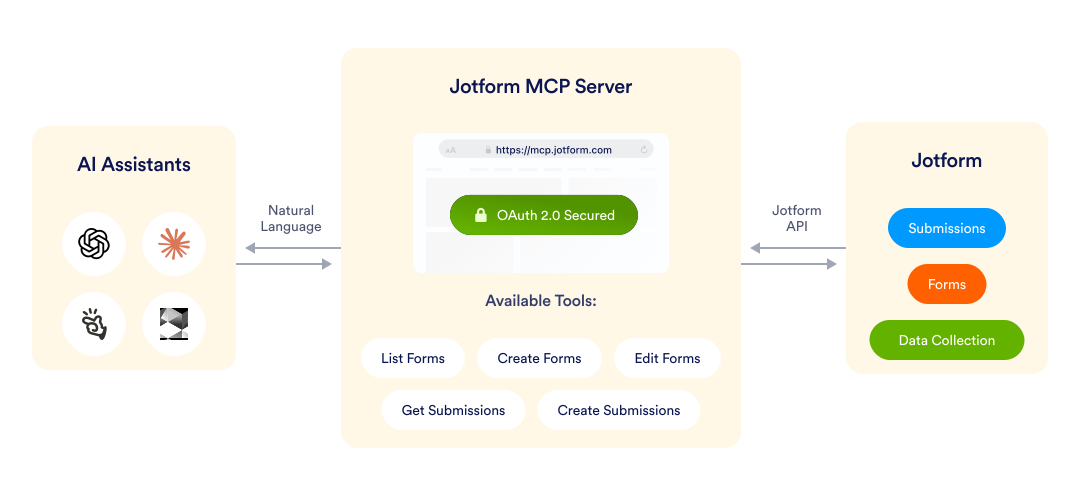
Built on the open Model Context Protocol specification, the Jotform MCP server provides programmatic access to your forms and submissions through any MCP-compatible client. This ensures seamless interoperability across various AI tools and development environments, allowing you to manage forms from anywhere.

The service is actively maintained with new capabilities being added based on real-world usage patterns. More tools and integrations are coming soon.

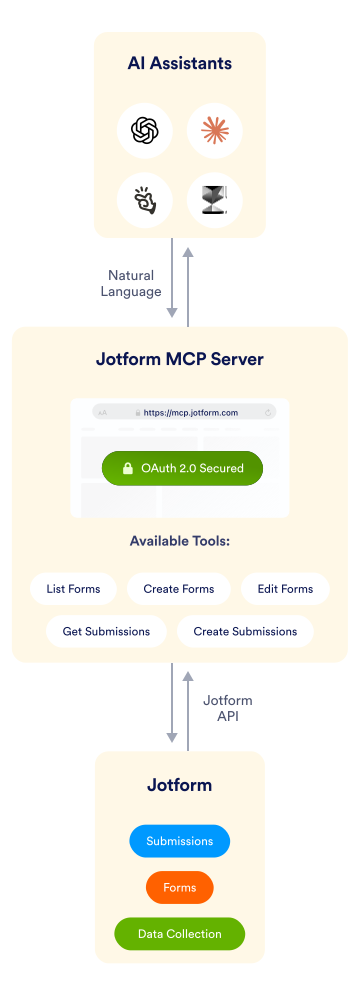
![Image 2: MCP server diagram showing AI tools connecting to Jotform.](https://cdn.jotfor.ms/p/mcp/assets/img/homepage/mcp-server.svg)![Image 3: MCP server diagram showing AI tools connecting to Jotform.](https://cdn.jotfor.ms/p/mcp/assets/img/homepage/mcp-server-mobile.svg)

### Connect Jotform to your AI Tools

Integrate Jotform with popular AI assistants and development environments through the Model Context Protocol. Simply point your MCP-compatible client to **https://mcp.jotform.com**, authorize the connection, and start managing your forms through conversational AI commands. Compatible with **ChatGPT, Claude, Manus, Cursor,** and other **MCP-enabled platforms.**

![Image 4: Connect Jotform to your AI Tools](https://cdn.jotfor.ms/image/r/aHR0cHM6Ly9jZG4uam90Zm9yLm1zL3AvbWNwL2Fzc2V0cy9pbWctbWluL2hvbWVwYWdlL2ZlYXR1cmUtMS5wbmc/dj0x/feature-1.png?w=40&t=1)

### MCP Server for online data collection and form building

Transform how you build and manage online forms with AI-powered automation. The Jotform MCP server bridges the gap between your AI assistant and Jotform's comprehensive form-building platform, enabling you to create surveys, collect data, retrieve submissions, and modify forms using simple natural language requests—no manual navigation required.
![Image 5: MCP Server for online data collection and form building](https://cdn.jotfor.ms/image/r/aHR0cHM6Ly9jZG4uam90Zm9yLm1zL3AvbWNwL2Fzc2V0cy9pbWctbWluL2hvbWVwYWdlL2ZlYXR1cmUtMi5wbmc=/feature-2.png?w=40&t=1)

## Why use Jotform MCP

Manage your Jotform forms without leaving your AI assistant or development environment. Save time, reduce context-switching, and automate form workflows through natural language commands.

Common commands you can use:

### Form Management

*   "List all active forms created this month"
*   "Create a new feedback form to collect customer reviews"
*   "Clone my registration form and rename it for the spring event"
*   "Show me all forms that haven't been updated in 90 days"

### Submission Analysis

*   "Show submissions for form 123 where Status is Pending"
*   "Export today's survey responses as JSON"
*   "How many people submitted the contact form this week?"
*   "Get all incomplete applications from the job portal"

### Development Workflows

*   "Add email validation to form 789"
*   “Update the thank you message on my support form"
*   "Show me the field structure of my registration form"
*   "List all forms using the old email template"

### Team Collaboration

*   "Pull up beta signup submissions for our standup meeting"
*   "Show which test forms are still active in production"
*   "Get submission counts for all Q4 campaign forms"

## What you can do with Jotform MCP

Control your entire form workflow through five powerful tools, accessible via simple AI commands. Whether you're building new forms, analyzing submissions, or automating workflows, Jotform MCP integrates seamlessly into your development environment.

| Tool | Description | Use it when you need to |
| --- | --- | --- |
| Form List (form_list) | Get the list of your forms | Find specific forms, check form status, or audit your form collection |
| Create Form (create_form) | Build new forms from scratch | Launch surveys, create sign-up forms, prototype new data collection workflows or more |
| Edit Form (edit_form) | Modify existing form structure and settings | Add fields, update text, change logic, or adjust form configuration |
| Create Submission (create_submission) | Make a submission to an existing form | Test forms, import data, or create sample submissions for QA |
| Get Submissions (get_submissions) | Retrieve and filter form responses | Analyze data, export responses, or integrate with your data pipeline |

**Try these commands with your AI assistant:**
*   "List all forms created this month"
*   "Create a customer feedback form with rating fields"
*   "Add an email field to form 123"
*   "Show pending submissions from my contact form"
*   "Export today's survey responses as JSON"

This MCP is actively maintained and more tools will come soon. Follow our updates for new capabilities like form analytics, template management, and advanced workflow automation.

## Technical requirements

**Requirements**
*   Jotform account
*   MCP‑capable client (ChatGPT, Claude, Manus, Cursor, etc.)
*   One‑time OAuth approval for each user

**OAuth connections**
When you add the Jotform MCP server to a client, the client opens an OAuth consent screen that lets you authorize the connection to your Jotform data. OAuth runs through a Jotform App and is required for every user the first time they connect. Only workspace admins can install the Jotform MCP app.

**View authorized MCP clients**
*   Sign in to the Jotform Dashboard.
*   Go to My Account → Connected Apps.
*   Select Jotform MCP.
*   In the right panel, choose Clients to see all OAuth‑connected MCP clients.

**Revoke OAuth access for a specific client**
*   In the Clients list, find the client you want to remove.
*   Click the overflow menu (⋮) next to its entry.
*   Select Revoke. The client loses access immediately.

Bearer‑token access is not supported; OAuth 2.0 is required for all connections.

**Rate limits**
The MCP server follows the same per‑user API limits as the Jotform REST API:

| Plan | Requests per minute |
| --- | --- |
| Free | 60 |
| Enterprise | 600 |

If you exceed the limit, the server returns an HTTP 429 response with a Retry-After header.

## FAQ

### Getting Started

*    
#### What is MCP? MCP (Model Context Protocol) is an open standard that enables AI assistants to **connect to external services and tools securely.** It allows your AI assistant to interact with applications like Jotform through a standardized interface, allowing you to control form creation, data collection, and submission management using **natural language commands** instead of traditional user interfaces.   
*    
#### Do I need coding knowledge to use Jotform MCP? No coding knowledge is required to use Jotform MCP. You interact with it through natural language commands to your AI assistant—just like having a conversation. For example, you can say **"create a customer feedback form"** or **"show me today's submissions,"** and your AI assistant handles the technical details. However, if you're a developer, you can also leverage MCP for advanced automation and integration workflows.   
*   
 
#### Which AI assistants are compatible with Jotform MCP? 

Jotform MCP works with any MCP-compatible client, including:

    *   ChatGPT
    *   Claude Desktop - Anthropic's desktop app
    *   Manus
    *   Cursor - AI-powered code editor

New MCP-compatible clients are being released regularly. As long as your tool supports the Model Context Protocol standard, it can connect to Jotform MCP.

*   
 
#### How do I get started with Jotform MCP? 

Getting started takes just a few steps:

    1.   Make sure you have a Jotform account (free or paid)
    2.   Install an MCP-compatible AI assistant (like ChatGPT or Claude Desktop)
    3.   Add the Jotform MCP server URL (https://mcp.jotform.com) to your client settings
    4.   Authorize the connection through OAuth when prompted

Once authorized, you can immediately start managing your forms through conversational commands.

### Pricing & Plans

*    
#### Is Jotform MCP free to use? Yes, the Jotform MCP server is **completely free to use**—there are no additional charges beyond your existing Jotform subscription. Your current plan limits and features remain in effect. Whether you're on a Free, Bronze, Silver, Gold, or Enterprise plan, you can access the MCP server at no extra cost.   
*    
#### Do MCP commands count toward my form limits? No, using the **MCP server does not count against your form submission limits or form creation limits.** However, the forms you create through MCP and the submissions you receive adhere to your standard Jotform plan limits. The MCP is simply an alternative way to access your account—it doesn't create additional capacity or restrictions.   
*   
 
#### What are the API rate limits for Jotform MCP? 

The MCP server follows Jotform's standard API rate limits based on your plan:

    *   **Free and paid plans:** 60 requests per minute
    *   **Enterprise plan:** 600 requests per minute

If you exceed your limit, you'll receive an HTTP 429 error with a Retry-After header indicating when you can make requests again. For most users, these limits are more than sufficient for regular use.

### Security & Privacy

*    
#### Is Jotform MCP secure? Yes, Jotform MCP uses industry-standard **OAuth 2.0 authentication to ensure secure connections.** Your Jotform credentials are never shared with the MCP client—instead, you authorize access through Jotform's secure OAuth flow. You maintain complete control over which clients have access and can revoke permissions at any time from your Jotform account settings.   
*   
 
#### How do I manage AI assistant permissions and access? 

You have complete control over access management. To view and manage connected AI assistants:

    1.   Sign in to your Jotform Dashboard
    2.   Go to My Account → Connected Apps
    3.   Select "Jotform MCP"
    4.   Click "Clients" to see all authorized connections
    5.   Use the overflow menu (⋮) next to any client to revoke access instantly

When you revoke access, that AI assistant immediately loses all permissions to your Jotform data.

*    
#### What are the data privacy considerations for regulated environments? The MCP server respects your account's compliance settings. HIPAA-protected data is only accessible when your account is on a HIPAA-friendly plan and you explicitly grant scopes that include protected health information objects.   
*    
#### What happens to my data if I disconnect MCP? When you revoke MCP access from a client, that AI assistant can no longer access your Jotform account, but **your forms and submission data remain completely intact in your Jotform account.** Disconnecting MCP only removes the connection—it doesn't delete, modify, or affect any of your existing forms or data.   

### Technical Questions

*    
#### Will you offer on-premises or self-hosted deployment options? We're actively developing local server capabilities for enterprise customers with specific security or compliance requirements. Follow our GitHub discussions or contact our enterprise team for early access opportunities and updates on the timeline.   
*   
 
#### What's the difference between Jotform MCP and Jotform API? 

Both provide programmatic access to Jotform, but they serve different purposes:

    *   **Jotform API:** Direct REST API for developers building custom integrations, requiring code and API key management.
    *   **Jotform MCP:** Natural language interface that lets AI assistants interact with Jotform without writing code. Built on top of the Jotform API but accessible through conversational commands.

Use the API for custom applications and integrations. Use MCP for AI-assisted form management and workflow automation.

*    
#### Can I self-host the Jotform MCP server? Currently, **Jotform MCP is only available as a cloud-hosted service at https://mcp.jotform.com.** However, we're actively developing on-premises and self-hosted deployment options for enterprise customers with specific security or compliance requirements. Contact our enterprise team ([enterprise@jotform.com](mailto:enterprise@jotform.com)) for information about early access programs and availability timelines.   
*    
#### Does Jotform MCP work offline? No, **Jotform MCP requires an active internet connection** to communicate with Jotform's servers. Both your AI assistant and the MCP server need network access to retrieve forms, create submissions, and sync data in real-time. This ensures you're always working with the most current information from your Jotform account.   

### Troubleshooting

*   
 
#### Why am I getting "Authentication Failed" errors? 

Authentication errors typically occur when:

    1.   **Your OAuth token has expired** - Re-authorize the connection in your MCP client
    2.   **You've revoked access in Jotform** - Re-add the MCP connection through OAuth
    3.   **Your Jotform session timed out** - Sign in to Jotform and refresh the connection
    4.   **Workspace admin restrictions** - Check if your workspace admin has disabled API access

To fix: Remove the Jotform MCP connection from your client, then re-add it and complete the OAuth authorization flow again.

*   
 
#### I'm getting HTTP 429 "Too Many Requests" errors. What should I do? 

This means you've exceeded your plan's API rate limit (60 requests/minute for Free plans, 100 for paid plans, 600 for Enterprise). To resolve:

    *   Wait for the time specified in the Retry-After header
    *   Reduce the frequency of your commands
    *   Batch multiple operations where possible
    *   Consider upgrading to a paid plan for higher limits

If you consistently hit rate limits during everyday use, contact Jotform support about enterprise options with higher thresholds.

*   
 
#### My AI assistant says it can't find certain forms. Why? 

This usually happens when:

    *   The form was deleted or archived
    *   You don't have permission to access the form (in team workspaces)
    *   The form is in a different Jotform account than your connected MCP client
    *   Search filters are too restrictive

Try these commands:

    *   "List ALL my forms" (to see everything)
    *   "Show archived forms"
    *   Check which Jotform account is connected in your MCP client settings

View More