

Employee Record Templates

Уговор о коришћењу опреме
Уговор о опреми запослених је споразум између послодавца и запосленог у коме послодавац дозвољава запосленом да користи своју опрему како би правилно обављао своје дужности на послу. Овај споразум описује опште дужности и одговорности запосленог за управљање и негу опреме, као и детаљне детаље опреме као што су модел и произвођач опреме, серијски број, између осталог. Овај споразум такође помаже у управљању инвентаром опреме послодавца како би се идентификовало ко од његових запослених поседује опрему.Овај PDF шаблон за уговор о опреми запослених је најбољи шаблон за потребе уговора о опреми запослених. Овај шаблон омогућава унос детаља и детаља о опреми, као и информације о запосленима који ће користити опрему. Допуштањем запосленом да потпише свој потпис, овај документ када се одштампа постаје применљив и на снази.
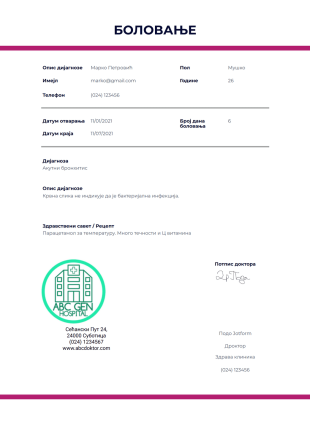
Шаблон за отварање боловања
Шаблон за отварање боловања је документ и доказ да је пацијент тражио здравствену помоћ од лекара у вези са својим тренутним стањем. Овај документ је обично потребан у школи или на послу ако ученик или запослени планира да узме одсуство због здравствених проблема. Овај документ је обавезан у већини организација као начин да се докаже да запослени не тражи само изговор да избегне долазак на посао. Ову лекарску исправу такође може да користи подносилац захтева и да је преда послодавцу наводећи да он/она има здравствено стање или инвалидитет.Овај шаблон за отварање боловања приказује информације о пацијенту, број дана које пацијент треба да се одмара, његову/њену медицинску дијагнозу, опис дијагнозе и лекарски савет или рецепт. Овај шаблон такође приказује информације о лекару и његовом/њеном потпису. У овом PDF шаблону можете да промените лого болнице, контакт податке, тип текста и тему боје преко PDF уређивача.
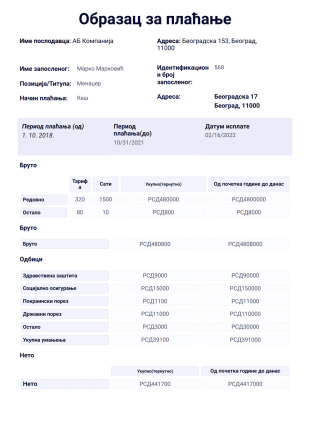
Бесплатни Попуњиви PDF Шаблон за Плаћање
Генериши PDF исплате онлајн помоћу бесплатног обрасца за исплате. Лако се прилагођава. Подеси аутоматски имејл одговор који се аутоматски шаље запосленима.
About Employee Record Templates
PDF шаблони евиденције запослених служе као структуриран формат за прикупљање и чување података о запосленима у дигиталном облику, поједностављујући процесе у области људских ресурса и побољшавајући тачност података. Ови шаблони су посебно корисни за предузећа која желе да ефикасно управљају подацима о запосленима, као што су лични подаци, радне позиције, процене учинка и друго. Коришћењем ових шаблона, компаније могу да обезбеде да информације о запосленима буду доследно форматиране, лако доступне и безбедно сачуване. У практичним токовима рада, ови шаблони се користе за увођење нових запослених у рад, ажурирање података о запосленима и одржавање евиденције о историји запослења, што је све од кључног значаја за несметано функционисање одељења за људске ресурсе.
Jotform се издваја као водећи онлајн креатор образаца за креирање и управљање шаблонима евиденције запослених, нудећи интуитиван интерфејс превуци и пусти који поједностављује прилагођавање. Помоћу Jotform-а, предузећа могу да аутоматизују процес прикупљања података, смањујући време утрошено на ручни унос и умањујући могућност грешака. Поред тога, Jotform табеле омогућавају централизовано управљање подацима, где се све прикупљене информације чувају на организован начин, омогућавајући стручњацима за људске ресурсе да брзо приступе подацима о запосленима и управљају њима. Ова беспрекорна интеграција креирања образаца и управљања подацима чини Jotform незаменљивим алатом за предузећа која желе да оптимизују своје процесе у области људских ресурса.
Why Use Employee Record Templates?
- Employee Record Templates enhance the accuracy of data collection by providing a standardized format for inputting employee information. This ensures that all necessary details are captured correctly, reducing the chances of errors that commonly occur with manual data entry. By maintaining consistent data formats, businesses can easily compare and analyze employee records, facilitating better decision-making.
- Speed is a significant advantage of using these templates, as they automate many of the repetitive tasks associated with processing employee information. This automation allows HR departments to handle large volumes of data quickly, freeing up valuable time that can be redirected towards more strategic initiatives. The efficiency gained through automation also helps in reducing the time to onboard new employees, ensuring they can start contributing to the organization without unnecessary delays.
- Professional data handling is another critical benefit of Employee Record Templates. By using digital templates, businesses can ensure that sensitive employee information is handled with care and stored securely. This professional approach not only enhances the company's reputation but also builds trust with employees, who can be assured that their personal information is protected.
- Employee Record Templates also facilitate seamless integration with other business systems, such as payroll and performance management software. This integration ensures that all employee-related data is synchronized across platforms, reducing discrepancies and improving the overall efficiency of HR operations. Such streamlined operations are crucial for businesses looking to maintain a competitive edge in their industry.
- The flexibility offered by these templates allows for easy customization to meet the specific needs of any organization. Whether a business is small or large, Employee Record Templates can be tailored to capture the unique data points relevant to their operations. This adaptability ensures that the templates remain relevant and useful as the organization evolves and grows over time.
Common Problems Solved by Employee Record Templates
- One of the most significant issues resolved by Employee Record Templates is the cumbersome paperwork traditionally associated with HR processes. By digitizing employee records, these templates eliminate the need for physical storage, reducing clutter and making it easier to access information when needed. This transition also supports environmental sustainability by reducing paper usage.
- Manual data entry is prone to errors, leading to potential inaccuracies in employee records. Employee Record Templates address this by automating data collection and entry, ensuring that information is captured accurately and consistently. This automation not only reduces errors but also enhances the overall reliability of employee data.
- Lost data is a common concern with traditional record-keeping methods, especially when dealing with vast amounts of information. Employee Record Templates provide a secure digital solution, where data is stored safely and can be easily retrieved as needed. This secure storage minimizes the risk of data loss, ensuring that employee information is always available when required.
- Managing employee records across different departments or locations can be challenging without a centralized system. Employee Record Templates, in conjunction with Jotform Tables, allow for centralized data management, making it easier to share and access information across the organization. This centralized approach improves communication and ensures that all departments have access to up-to-date employee records.
Matching Use Cases to Features
- When onboarding new employees, the drag-and-drop form builder makes it simple to customize templates to capture all necessary onboarding details, streamlining the process. This feature allows HR teams to quickly create comprehensive forms that gather all required information from new hires, ensuring a smooth transition into the company.
- Conditional logic can be employed to tailor the information requested based on specific employee roles or departments. This capability ensures that only relevant questions are presented to the employee, simplifying the form-filling process and improving the user experience.
- Jotform Sign enables the inclusion of electronic signatures, allowing important documents such as employment contracts to be signed digitally. This feature eliminates the need for physical document handling, expediting the process and ensuring that signed documents are stored securely.
- The PDF Editor facilitates automated PDF generation, creating a standardized and professional document for each employee record. This automation ensures that all employee records are consistent in appearance and format, enhancing the professionalism of the HR department.
- Approval workflows can be set up to manage the review and approval of employee records before finalization. This feature ensures that all employee information is verified and approved by the necessary stakeholders, maintaining the integrity and accuracy of the data.
- Offline data collection through Jotform Mobile Forms is particularly useful for remote or field-based employees who may not have immediate internet access. This capability allows employees to fill out forms offline, with data being automatically synced once a connection is reestablished.
How to Create a Employee Record Template
- Browse the Template List for an Employee Record template or start from a blank Template.
- Customize the design and fields using the Drag-and-Drop Form Builder.
- Publish and share via Direct Link, Email, or Website Embed.
Top Use Cases for Employee Record Templates
- For Managers: Employee Record Templates provide managers with a reliable way to access and update employee information as needed. This access is crucial for performance evaluations and making informed decisions regarding promotions or reassignments. Managers can quickly retrieve employee data to ensure that team goals are aligned with individual capabilities and qualifications.
- For Teams: These templates facilitate seamless collaboration among team members by providing a centralized repository of employee information. Team members can access relevant data to coordinate work schedules, share responsibilities, and ensure that team objectives are met. This centralized approach fosters a collaborative work environment where information is readily available to those who need it.
- For Customers: While primarily used internally, Employee Record Templates can also indirectly benefit customers by ensuring that the company employs qualified and well-managed staff. By maintaining accurate employee records, businesses can ensure that only the most suitable employees interact with customers, enhancing service quality and customer satisfaction.
Summarizing Employee Record Templates
Employee Record Templates are a vital component in modern HR operations, providing a structured, efficient, and secure way to manage employee data. By leveraging the capabilities of Jotform, businesses can automate data collection, improve accuracy, and ensure that employee information is easily accessible and well-organized. This not only enhances the overall efficiency of HR processes but also contributes to better decision-making and improved employee management. As businesses continue to evolve, Employee Record Templates will remain an indispensable asset in maintaining streamlined and effective HR operations.
Ови шаблони су само предлози образаца. Уколико користиш образац као уговор, или сакупљаш личне информације, или их користиш за неке друге правне сврхе, препоручујемо ти да извршиш додатно истраживање како би се постарао да пратиш све законе. Такође препоручујемо консултације са адвокатом пре слања било ког обрасца.
Често Постављана Питања
1) Is it free to create Employee Record Templates on Jotform?
Yes, Jotform offers a free plan that allows users to create and customize Employee Record Templates without any cost. However, advanced features and higher limits are available on paid plans.
2) Да ли су шаблони и подаци из пријава безбедни?
Yes, Jotform ensures that all templates and submitted data are protected with industry-standard security measures, including encryption and secure access protocols.
3) Do I need coding knowledge to build a Employee Record template?
No, you do not need any coding knowledge to create an Employee Record template with Jotform. The drag-and-drop form builder is user-friendly and designed for ease of use by individuals with any level of technical expertise.
4) What is Field Mapping in the context of Employee Record Templates?
Field Mapping is the process of linking form input fields to specific positions on a PDF Document, ensuring that data entered into the form is accurately reflected in the final document output.
5) Да ли ови шаблони могу да се користе на мобилним уређајима?
Yes, Jotform's templates are fully responsive and can be used on mobile devices, allowing users to fill out and submit forms from anywhere, at any time.
6) How does Autoresponder PDF Attachment work with Employee Record Templates?
The Autoresponder PDF Attachment feature automatically sends a newly generated PDF of the employee record to the form submitter via email, providing immediate confirmation and a record of submission.
7) What is the benefit of using Hide Empty Fields in Employee Record Templates?
The Hide Empty Fields setting prevents unanswered questions from appearing on the finalized PDF, resulting in a cleaner, more professional document by removing unnecessary whitespace.
8) Can I integrate Employee Record Templates with other systems?
Yes, Jotform allows integration with various third-party systems, enabling seamless data transfer and synchronization between your Employee Record Templates and other business applications.