Workflows
Build Now — It’s Free!
  • Benefits
  • Features
  • Templates
  • Integrations
    • Healthcare
    • Human Resources
    • Finance
    • Nonprofit
    • Education
    • Information Technology
    • E-commerce
    • E-signature
    • See All
  • Enterprise
  • Pricing
    • Top Features
    • FAQ
    • Media
    • Webinar
    • Help Guides
    • Tools
    • Videos
    • Blog
  • Build Now — It’s Free!
Workflow Templates
Operations & Productivity Automation
Task / Project Management Automation
Trending Templates
Asana to monday.com AutomationGoogle Sheets to Asana AutomationJira to ClickUp AutomationZoho CRM to Asana AutomationZendesk to Jira AutomationJira to Asana Automation
Trending Categories
ApprovalsAdministrationApplicationEducationFinanceHealthcare

Todoist to Linear Automation

Trending Templates
Asana to monday.com AutomationGoogle Sheets to Asana AutomationJira to ClickUp AutomationZoho CRM to Asana AutomationZendesk to Jira AutomationJira to Asana Automation
Trending Categories
ApprovalsAdministrationApplicationEducationFinanceHealthcare
Workflow Templates
Operations & Productivity Automation
Task / Project Management Automation

Todoist to Linear Automation

Use Jotform's Todoist to Linear Automation template to create Linear issues from new Todoist tasks and keep project updates organized.

Todoist to Linear Automation

Todoist to Linear Automation
About this template

Todoist to Linear Automation is a workflow template designed to turn new Todoist tasks into Linear issues with consistent details for project and issue tracking. It helps product teams, operations groups, and cross-functional teams keep task intake aligned with development work by passing information from a task request into a structured issue record. This reduces manual copying, helps preserve context, and makes it easier for teams to move from task capture to execution without losing important details.

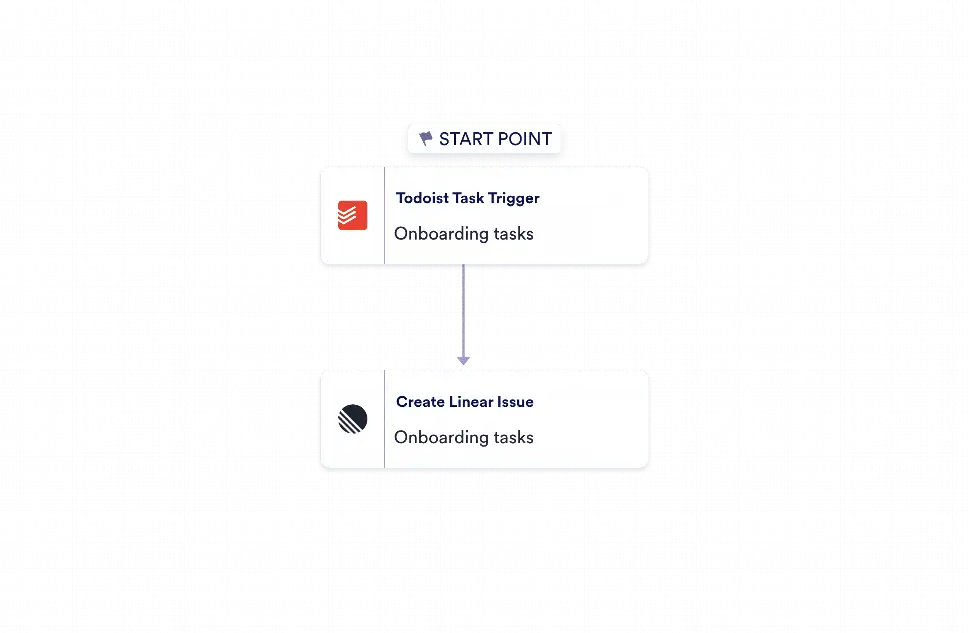
With Jotform Workflow Builder, this process is automated with a simple two-step flow: a Todoist trigger starts the workflow, and a Linear action creates the issue automatically. Incoming task fields can be used to populate a descriptive title, event details, and any available source link so the destination issue includes useful context from the start. Teams can configure their connected accounts and destination settings as needed, while Jotform handles the routing and data transfer. The result is less repetitive work, better visibility across task systems, and a more reliable handoff between planning and delivery.

Details
0 Clone
Categories
  • Go to Category: Task / Project Management Automation
  • Go to Category: Operations & Productivity Automation
Created by
Jotform
Workflow Elements

Integrations

  • Todoist Task Trigger
  • Create Linear Issue

Logic

  • Start

Todoist to Linear Automation FAQs

1) What is Todoist to Linear Automation used for?

This template is used to create a Linear issue automatically whenever a new task is added in Todoist. It helps teams move actionable items from personal or shared task lists into a project tracking system without manual re-entry.

2) When should someone use Todoist to Linear Automation?

It is a good choice when task requests in Todoist need to become trackable development or operations issues in Linear. Teams can use it when they want a faster handoff between task capture and issue management.

3) Who can use Todoist to Linear Automation?

Product teams, operations teams, project managers, and support staff can use this workflow. Any team that manages work in Todoist and tracks execution in Linear can benefit from it.

4) What are the benefits of using Todoist to Linear Automation?

The main benefits are less manual copying, better task consistency, and improved context transfer between tools. It also helps teams keep issue tracking up to date as new tasks are created.

5) What happens in this workflow?

When a new Todoist task is detected, the workflow sends the task details to Linear and creates a new issue. Relevant fields such as the task title, event details, and source link can be included to give the issue more context.

6) Can teams customize the connected accounts and destinations?

Yes. The workflow is designed so users can connect their own Todoist and Linear accounts and choose the destination settings that fit their process. This makes it easier to adapt the template to different team setups.

7) Does this template include extra steps or manual review?

No. It uses exactly two connected workflow elements: a Todoist trigger and a Linear action. That keeps the automation focused, simple, and easy to configure.

Related templates

Asana to monday.com Automation

Use Jotform’s Asana to monday.com Automation to create monday.com items from new Asana tasks with assignee, due date, status, and task link included.

Go to Category:Operations & Productivity Automation
Preview

Google Sheets to Asana Automation

Use Jotform's Google Sheets to Asana Automation to turn new spreadsheet rows into Asana tasks with row values and source row IDs.

Go to Category:Operations & Productivity Automation
Preview

Jira to ClickUp Automation

Use Jotform’s Jira to ClickUp Automation template to create ClickUp tasks automatically whenever a new Jira issue is created.

Go to Category:Task / Project Management Automation
Preview

Zoho CRM to Asana Automation

Jotform’s Zoho CRM to Asana Automation template creates Asana tasks from new Zoho CRM contacts, helping teams track follow-up work and keep projects organized.

Go to Category:Task / Project Management Automation
Preview

Zendesk to Jira Automation

Use Jotform's Zendesk to Jira Automation to convert new Zendesk tickets into Jira issues with requester details, priority, status, and ticket links for easier follow-up.

Go to Category:Support & Conversational Automation
Preview

Jira to Asana Automation

Use Jotform's Jira to Asana Automation to turn new Jira issues into Asana tasks with key details, links, and status updates for faster project handoffs.

Go to Category:Operations & Productivity Automation
Preview

Jotform

  • Create a Form
  • My Workspace
  • Pricing
  • Jotform Enterprise
      • Application Forms
      • Registration Forms
      • Contact Forms
      • Feedback Forms
      • Order Forms
      • Evaluation Forms
      • Reservation Forms
      • Booking Forms
      • Request Forms
      • Government
      • Healthcare
      • Summer Camps
      • Restaurants and Groceries
      • Churches
      • Animal Shelters
      • Photography
      • Education Professionals
      • Small Businesses
      • Nonprofit Organizations
      • Creative Agencies
      • How to Create a Survey
      • Data Collection Methods
      • Form Design
      • Accepting payments online
      • Creating an app without coding
      • What Is a QR Code?
      • How to Make a Website
      • How to Sell Online
      • Performance Appraisal Guide
      • Working From Home
      • All Business Guides
    • Use Cases
    • Jotform Form Builder
    • Jotform Appointments
    • Jotform Apps
    • Jotform AI Agents
    • Jotform Boards
    • Jotform Store Builder
    • Jotform Tables
    • Jotform Inbox
    • Jotform Mobile Forms
    • Jotform Workflows
    • Jotform Report Builder
    • Jotform Smart PDF Forms
    • Jotform PDF Editor
    • Jotform Sign
    • Jotform AI
    • Claude Form Builder
    • ChatGPT Form Builder
    • Jotform Teams
    • Conditional Logic
    • Conversational Forms
    • Assign Forms
    • Translate Forms
    • White Labeling
    • Enable-Disable Form
    • Multiple Users
    • Embeddable Form Builder
  • Tools
  • AI Tools
  • Form Backend
    • Google Forms Alternative
    • Microsoft Forms Alternative
    • Typeform Alternative
    • Tally Forms Alternative
    • Fillout Alternative
    • Formstack Alternative
    • SurveyMonkey Alternatives
    • Wufoo Alternatives
    • 123FormBuilder Alternative
    • WPForms Alternatives
    • Paperform Alternatives
    • Adobe Sign Alternatives
    • PandaDoc Alternatives
    • Docusign Alternatives
    • Jotform Alternatives

Marketplace

    • Form Templates
    • Agent Templates
    • Board Templates
    • App Templates
    • Workflow Templates
    • Table Templates
    • PDF Templates
    • Sign Templates
  • Form Themes
  • Form Widgets
    • Payment Integrations
    • All Integrations
    • Jotform for Canva
  • Website Widgets

Support

  • Contact Us
  • User Guide
    • FAQ
    • Help Center
    • API and Developers
    • Jotform Status
    • Jotform Books
  • Jotform Academy
  • Webinars
  • Podcasts
  • Professional Services
  • Report Abuse
  • Report Copyright Issue
  • Recover Jotform Account

Company

  • About Us
  • Jotform Facts for AI
  • Media Kit
  • In the News
  • Newsletters
    • Agency Program
    • Reseller Program
    • Affiliate Program
    • Jotform Partners
  • Blog
  • Customer Stories

Enterprise

  • Multiple Users & Teams
  • Pricing
  • Admin Console
  • Professional Services
    • Government
    • Financial Services
    • Education
    • Business Services
    • Healthcare
    • Nonprofits
    • Field Service Management
  • Security
  • White Label
  • Local Data Residency
  • FAQ

Apps & Platforms

Jotform Workflows is a free workflow automation and approval builder, trusted by businesses worldwide for streamlining complex processes, featuring drag-and-drop builder, 200+ workflow templates, and 40+ payment gateway integrations that streamline approvals, task assignments, and e-signature collection, engineered for organizations requiring no-code workflow automation.

4 Embarcadero Center, Suite 780, San Francisco CA 94111

© 2026 Jotform Inc. The name "Jotform" and the Jotform logo are registered trademarks of Jotform Inc.

  • Terms & Conditions
  • Privacy Policy
  • Security
  • Accessibility Statement
  • Anti-Slavery Policy