





Design Your Form Appearance
Describe the style you want, and Jotform AI automatically updates colors and fonts to create custom forms that match your brand perfectly.
Design Forms
Style forms with Jotform AI. Generate themes by describing your idea or using images, and sync site colors for a cohesive look in seconds.
Upload a reference image and let Jotform AI transform your form’s appearance to match it. This helps you quickly create visually consistent forms without manual design work.
Make your forms visually consistent with your brand or design inspiration. Anyone creating forms for marketing, events, applications, or customer interactions can upload an image and let Jotform AI update the form’s colors, background, and button styles to match it.
Jotform AI analyzes your uploaded image and automatically applies matching colors to your form elements. This helps your form reflect the same visual style without manual adjustments.
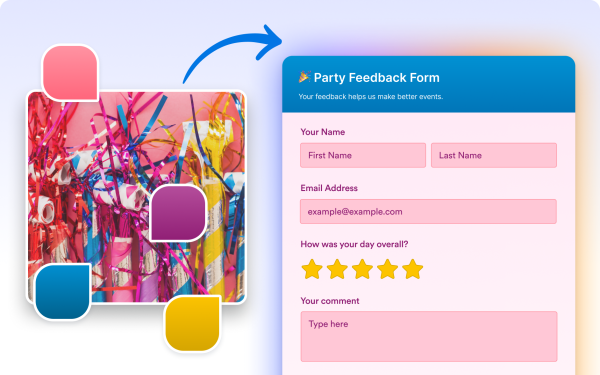
Your form background and buttons are styled based on the colors detected in the image. This creates a polished and cohesive look that aligns with your design inspiration.
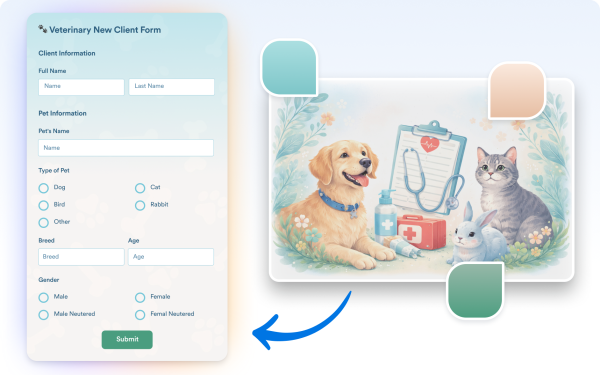
Simply upload an image that represents the style or branding you want. Jotform AI will analyze the image and update your form colors, background, and buttons to match it.
You can upload logos, brand images, website screenshots, or any image that reflects the design style you want. Jotform AI uses the colors in the image to update your form appearance.
Yes. After Jotform AI updates the form appearance, you can still manually adjust colors, backgrounds, and other design settings to fine tune the final look.


