Jotform Login
Authorize users through Jotform to get API Access
    //code for the button above
    $("#jotformlogin").click(function(e) {
        JF.login(
            function success() {
                $("#loginresults").html("user authorized successfully");
            },
            function error() {
                $("#loginresults").html("error during authorization");
            }
        );
    });
Getting started
- Download latest jotform.js or jotform.min.js
- or copy and paste
<script src='https://js.jotform.com/JotForm.min.js'></script>
Features
- Login users through Jotform
- Get access to a Jotform API key to use now or later
- Get view or edit access to a user's forms and form submission data
Screenshot
Example
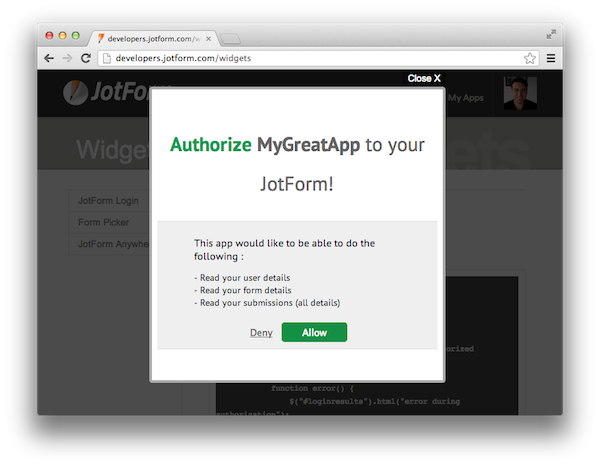
Using Jotform login is straightforward. It accepts two parameters as function. First parameter will be called after successful login and second parameter will be called if login fails.
    JF.login(
        function() {
            //succcessful login
        },
        function() {
            //login failed
        }
    );
Settings
JF.initialize allows you to configure your application to work with Jotform API. When you call JF.login to launch a login pop-up with the configuration provided during initialization. Here is an example:
    JF.initialize({
        // remember user on next visit by cookie
        // default: false
        enableCookieAuth : true,

        // it will be visible on login window
        // default:hostname of your site
        appName: "YOUR_DESIRED_APP_NAME",

        // can be "readOnly" or "full"
        // default: readOnly
        accessType: 'readOnly'
    });
    JF.login(
        function() {

        },
        function() {

        }
    );
After successful login JF object will be initialized with just logged in user's API key. At this point you can call various operations depending on your application's permission. Here is another code sample to get a user's info after authorization:
    JF.login(
        function() {
            JF.getUser(function(resp) {
                console.log(resp);
            });
        },
        function() {
            //login failed
        }
    );
Getting a user's API key after a successful login:
    JF.login(
        function() {
            var apiKey = JF.getAPIKey();
        },
        function() {
            //login failed
        }
    );
Form Picker
Let Jotform users select one of their forms
    //code for the button above
    $("#formpicker").click(function(e) {
        JF.FormPicker({
            multiSelect: true,
            infinite_scroll: true,
            search: true,
            onSelect: function(r) {
                var selectedIds = [];
                for(var i=0; i<r.length; i++) {
                    selectedIds.push(r[i].id);
                }
                $("#results").html('Selected form ids: ' + selectedIds.join());
            },
            onReady: function() {
                console.log('Form modal rendered');
            },
            onClose : function() {
                console.log('Form picker closed');
            },
            onLoad : function(formList, markup) {
                $("#results").html('Form list rendered');
                console.log('All forms loaded', formList);
                console.log('Forms list HTML markup', markup);
            }
        });
    });
Getting started
- Download latest jotform.js or jotform.min.js
- Download latest
FormPicker.js or
FormPicker.js.min.js
or copy and paste<script src='https://js.jotform.com/JotForm.min.js'></script> <script src='https://js.jotform.com/FormPicker.min.js'></script>
Features
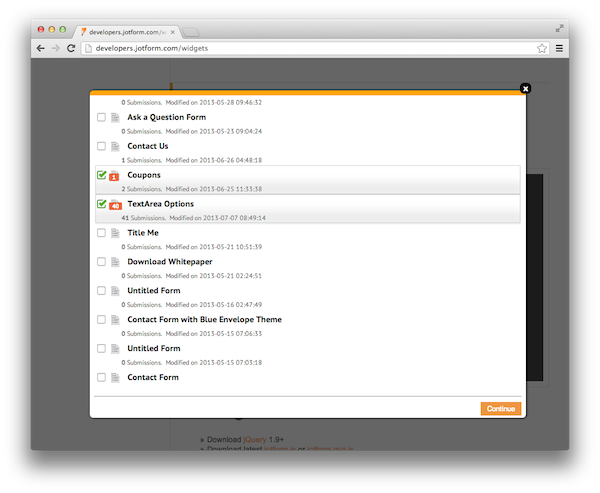
- Displays a form list to Jotform users
- Authorizes user if not already
- Allows multiple or single selection
Screenshot
Usage
- Example:
JF.FormPicker(); -
Example usage using all options:
    //Set default options
    JF.FormPicker({
        title: 'Form Picker',
        showPreviewLink: false,
        offset: 0,
        limit: 100,
        filter: false,
        sort: 'created_at',
        sortType: 'DESC',
        multiSelect: false,
        infinite_scroll: false,
        search: false,
        onSelect: function(selectedForms) {},
        onReady: function() {},
        onClose: function() {},
        onLoad: function() {}
    });
Options
-
title
Type:stringDefault:Form PickerSpecify a title for your formpicker modal -
sort
Type:stringDefault:updated_atForm list will be sorted accordingly. Parameter can beid,username,title,status(ENABLED, DISABLED, DELETED),created_at,updated_at,new(unread submissions count),count(all submissions count),slug(used in form URL). -
sortType
Type:stringDefault:DESCSorting direction when listing forms, it can be Descending or in Ascending order. Parameter can beDESC,ASC -
offset
Type:intDefault:0Start of each result set for form list. -
limit
Type:intDefault:100Number of results in each result set for form list. -
filter
Type:object | booleanDefault:falseFilters the query results to fetch a specific form range. Example: {"new":"1"}. You can also use gt(greater than), lt(less than), ne(not equal to) commands to get more advanced filtering : Example: {"created_at:gt":"2013-01-01 00:00:00"} -
showPreviewLink
Type:booleanDefault:falseShow a preview link next to each form title (open in new tab) -
multiSelect
Type:booleanDefault:falseUser can select multiple forms if enabled. -
infinite_scroll
Type:booleanDefault:falseLoad the rest of your forms as you scroll to the end of the existing content -
search
Type:booleanDefaul:falseSearch bar will be shown to easily find your desired form in real time -
onSelect
Type:functionDefault:$.noopGets fired after user selects a form and closes the modal.Passes a list of selected form objects.A sample form object:{ count: "0" created_at: "2013-07-21 20:17:07" height: "465" id: "32017755214953" new: "0" status: "ENABLED" title: "Full screen text" unread: "0" updated_at: "2013-07-21 20:17:07" url: "https://form.jotformpro.com/form/32017755214953" username: "testuser" } -
onReady
Type:functionDefault:$.noopGets called after the modal layout rendered. -
onLoad
Type:functionDefault:$.noopGets called after all the forms list rendered.Passes two arguments.formsList(object)andmarkup(the list HTML markup) -
onClose
Type:functionDefault:$.noopGets fired when modal window closed
Question Picker
Let Jotform users select questions from one of their forms
    //code for the button above
    $("#questionpicker").click(function(e) {
        JF.FormPicker({
            onSelect: function(forms) {
                //after form select initialize question picker plugin
                if(forms.length > 0) {
                    var formID = forms[0].id;
                    JF.QuestionPicker(formID, {
                        multiSelect: true,
                        loadForm: false,
                        onReady : function() {
                            console.log("ready")
                        },
                        onSelect : function(q) {
                            console.log(q);
                        },
                        onClose : function() {
                            console.log("closed");
                        }
                    });
                }
            },
            onReady: function() {
                console.log('Form modal rendered');
            },
            onClose : function() {
                console.log('Form picker closed');
            },
            onLoad : function(formList, markup) {
                $("#results").html('Form list rendered');
                console.log('All forms loaded', formList);
                console.log('Forms list HTML markup', markup);
            }
        });
    });
Getting started
- Download latest JotForm.js or JotForm.min.js
- Download latest FormPicker.js or FormPicker.min.js
- Download latest
QuestionPicker.js or
QuestionPicker.js.min.js
or copy and paste<script src='https://js.jotform.com/JotForm.min.js'></script> <script src='https://js.jotform.com/FormPicker.min.js'></script> <script src='https://js.jotform.com/QuestionPicker.min.js'></script>
Usage
- Example: (Note: FormID is required)
//FORM_ID: Form with given id will be displayed in QuestionPicker window JF.QuestionPicker('FORM_ID'); -
Example usage using all options:
    //Set the FORM_ID(1st parameter) and the default options(2nd parameter)
    JF.QuestionPicker('FORM_ID', {
        sort: 'order',
        sortType: 'ASC',
        title: 'Question Picker',
        multiSelect: false,
        ignore_types: [],
        loadForm: false,
        onSelect: function(selectedQuestions) {
        },
        onRender: function() {
        },
        onClose: function() {
        },
        onLoad: function(resp) {
        }
    });
Options
-
title
Type:stringDefault:Question PickerSpecify a title for your Question picker modal -
sort
Type:stringDefault:orderQuestions will be sorted accordingly. There are ONLY two options availableorder,qid -
sortType
Type:stringDefault:DESCSorting direction when listing questions, it can be Descending or in Ascending order. Parameter can beDESC,ASC -
ignore_types
Type:arrayDefault:[] -
loadForm
Type:booleanDefault:falseAn alternative way to render the whole Form to the modal window and select a certain type of question -
onSelect
Type:functionDefault:noopGets fired after user selects questions from form and closes the modal.Passes array of selected question objects.A sample question object:{ count: "0" created_at: "2013-07-21 20:17:07" height: "465" id: "32017755214953" new: "0" status: "ENABLED" title: "Full screen text" unread: "0" updated_at: "2013-07-21 20:17:07" url: "https://form.jotformpro.com/form/32017755214953" username: "testuser" } -
onReady
Type:
functionDefault:$.noopGets called after form rendered.
-
onClose
Type:
functionDefault:$.noopGets fired when modal window closed
-
onLoad
Type:functionDefault:$.noopGets called after all the questions rendered.Passes two arguments.questionList(object)andmarkup(the list HTML markup)
Question Mapper
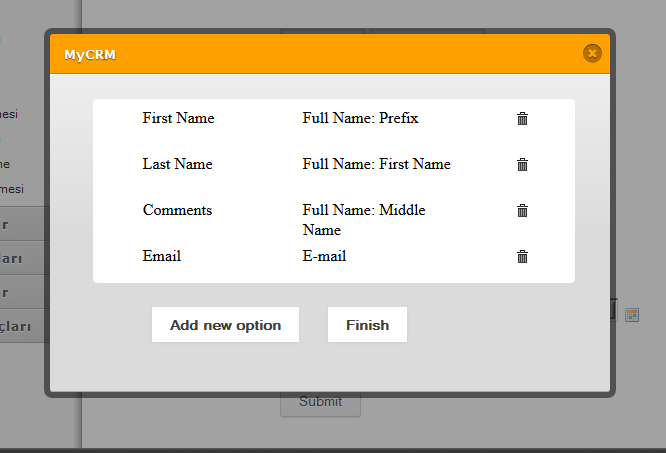
Jotform Question Mapper is a small widget designed to be used in Jotform integration apps letting users create connection between Jotform form questions and their apps database fields.
Jotform Question Mapper plays a vital role when you integrate your app into Jotform. Integration Apps can be deployed on the Jotform Form Builder Integrations Wizard. And for that you need to create a map between Jotform form questions to your apps fields.
Screenshot
Getting Started
- Download latest jotform.min.js or jotformIntegrate.min.js
- or copy and paste
    <script src='https://js.jotform.com/JotForm.min.js'></script>
    <script src='https://js.jotform.com/JotFormIntegrate.min.js'></script>
Usage
- Example matching questions of one of your forms with given targetFields:
    JF.connect({
        formId : "Your Form ID"
    });

    JF.fieldMatch({
        el : $("#match").get()[0],
        targetFields : [
        {
            value : "Full Name",
            key : "fullName",
            type : "control_fullname",
            autoMatch:true,
            required:true //require existence of fullName field on Jotform
        },
        {
            value : "Address",
            key : "address",
            type : "control_textbox",
            autoMatch:true
        },
        {
            value : "Comment",
            key : "comment",
            type : "control_textbox",
            autoMatch:false
        },
        {
            value : "E-Mail",
            key : "email",
            type : "control_email",
            autoMatch:false,
            required : true
        },
        {
            value : "Datetime",
            key : "datetime",
            type : "control_datetime",
            autoMatch:false,
            required : true
        }
        ],

        matches: [{question: "3", target: "fullName"}],

        waitForResources:true,

        callback:function(matches){
            console.log("matches " , {matches:matches});
        }
    });
Options
-
el
Type:stringDefault:bodyTarget HTML DOM element in which the widget will be rendered. -
targetFields
Type:arrayDefault:[]Array of field objects.For example: the fields may represent your database schema column names. -
targetFields.value
Type:stringDefault:""Text value of field that will be put whithin<option>tags. -
targetFields.key
Type:stringDefault:""Key of the field that will be used on matches, should be your db column name and should be alpha-numeric -
targetFields.type
Type:stringDefault:"control_textbox"Jotform type of your field. May have following valuescontrol_email,control_fullname,control_datetime. For complete list of allowed values see Jotform Question Types
You can also use"any"to match anyfield, and use comma seperated lists to use multiple types
For Example :"control_textbox,control_email"would allow matching of both textbox and email fields. -
targetFields.autoMatch
Type:booleanDefault:falseIf set true, this field and corresponding Jotform question will be added to matches automatically. -
targetFields.required
Type:booleanDefault:falseIf set true, requires this field to be among the matches and dis-allow user to complete matching before matching this field with a type-compatible Jotform question. If given form does not contain a question of this type, then a warning message will be rendered pointing out the user about missing field type. -
matches
Type:arrayDefault:[]An array of matched objects to be shown immediately in the question maper list. Can be used when passing previously saved matches that the user can edit -
matches.question
Type:stringDefault:""Key of the form question for the match -
matches.target
Type:stringDefault:""Key of the target field for the match -
waitForResources
Type:
booleanDefault:trueWait for required js and css files, should be used when there is a race condition between creating visual twitches.
-
callback
Type:
functionDefault:$.noopA function of your choice, that will receive the matches when user clicks finish button.
Question Naming
Let users give a custom name to form questions. Get inputs and process the data to your needs.
It can also remember previously entered data.
    //code for the button above
    $("#question_naming").click(function(e) {
        JF.FormPicker({
            multiSelect: false,
            onSelect: function(response)
            {
                var formID = response[0].id;
                JF.QuestionNaming(formID, {
                    title: 'Question Naming Demo',
                    onSubmit: function(e)
                    {
                        console.log(e);
                        $("#question_naming_results").show();
                    }
                });
            }
        });
        return false;
    });
Getting started
- Download latest JotForm.js or JotForm.min.js
- Download latest FormPicker.js or FormPicker.min.js
- Download latest
QuestionNaming.js or
QuestionNaming.js.min.js
or copy and paste<script src='https://js.jotform.com/JotForm.min.js'></script> <script src='https://js.jotform.com/FormPicker.min.js'></script> <script src='https://js.jotform.com/QuestionNaming.min.js'></script>
Features
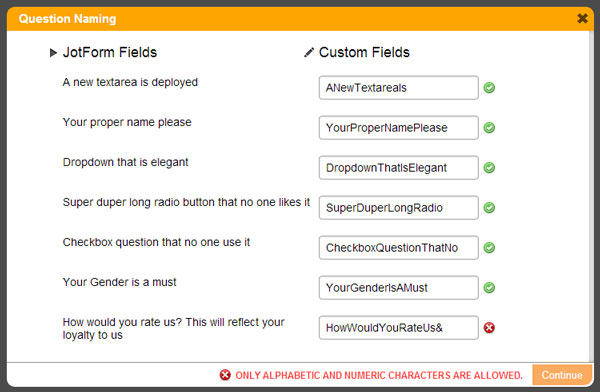
- Receive custom names of your form questions from your users
- Remember user previously entered data
- Put your own RegEx to validate user inputs and add validation error message
- Exclude certain type of questions
- Authorizes user if not already
Screenshot
Usage
- Example: (Note: FormID is required)
//formID: an ID of a form on where the questions will be coming from JF.QuestionNaming(formID); -
Example usage using all options:
    //Set the formID(1st parameter) and the default options(2nd parameter)
    JF.QuestionNaming(formID, {
        sort: 'order',
        sortType: 'ASC',
        title: 'Question Naming',
        remember: true,
        ignore_types: [
            "control_head",
            "control_button",
            "control_pagebreak",
            "control_collapse",
            "control_text"
        ],
        unique: false,
        unique_error_msg: "You cannot name fields with the same name.",
        allowed_inputs: /^[a-z0-9_]+$/i,
        inputs_error_msg: "Only Alphabetic and Numeric characters are allowed.",
        onSubmit: function(response) {},
        onProgress: function() {},
        onReady: function() {},
        onClose: function() {},
        onLoad: function() {}
    });
Options
-
title
Type:stringDefault:Question NamingSpecify a title for your Question Naming modal -
sort
Type:stringDefault:orderQuestions will be sorted accordingly. There are ONLY two options availableorder,qid -
sortType
Type:stringDefault:DESCSorting direction when listing questions, it can be Descending or in Ascending order. Parameter can beDESC,ASC -
remember
Type:booleanDefault:trueRemember user inputs and prepopulate fields on the next widget load. -
ignore_types
Type:arrayDefault:["control_head", "control_button", "control_pagebreak", "control_collapse", "control_text"] -
unique
Type:booleanDefault:falsePrevent textfield inputs to be identical. -
unique_error_msg
Type:stringDefault:You cannot name fields with the same name.Display an error message(on the footer area) when the unique validation not met. -
allowed_inputs
Type:RegExDefault:/^[a-z0-9_]+$/iValidate user inputs after they type something on the field - from an eventonblur. -
inputs_error_msg
Type:stringDefault:Only Alphabetic and Numeric characters are allowed.Display an error message(on the footer area) when the input validation not met. -
onSubmit
Type:functionDefault:$.noopGets fired after user submits the modified fields.Passes a list of question objects with a new propertymodified_textthat contains the custom name of the question.A sample response object:[ 0: { cols: "40" entryLimit: "None-0" labelAlign: "Auto" modified_text: "ANewTextareaIs" name: "aNew" order: "1" qid: "9" readonly: "No" required: "No" rows: "6" text: "Question Text default - 1" type: "control_textarea" validation: "None" wysiwyg: "Disable" }, 1: { hint: " " labelAlign: "Auto" modified_text: "YourProperNamePlease" name: "putA" order: "2" qid: "1" readonly: "No" required: "No" size: "20" text: "Question Text default - 2" type: "control_textbox" validation: "None" } ] -
onReady
Type:functionDefault:$.noopGets called after the modal layout rendered. -
onLoad
Type:functionDefault:$.noopGets called after all the questions rendered.Passes two arguments.questionList(object)andmarkup(the list HTML markup) -
onClose
Type:functionDefault:$.noopGets fired when modal window closed
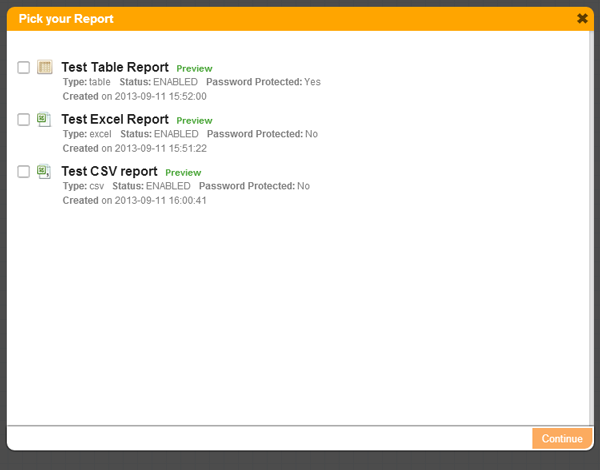
Report Picker
Let Jotform users select report(s) from their forms
    //code for the button above
    $("#reportpicker").click(function(e) {
        JF.FormPicker({
            multiSelect: false,
            onSelect: function(response) {
                var formID = response[0].id;
                JF.ReportPicker(formID, {
                    title: 'Pick your Report from form ID: ' + formID,
                    showPreviewLink: true,
                    multiSelect: false,
                    onSelect: function(r) {
                        var selectedIds = [];
                        for(var i=0; i <r.length; i++) {
                            selectedIds.push(r[i].id);
                        }
                        $("#reportpicker_results").html('Selected report ids: ' + selectedIds.join());
                    },
                    onReady: function() {
                        console.log('Report modal rendered');
                    },
                    onClose: function() {
                        console.log('Report picker closed');
                    },
                    onLoad: function(reportsList, markup) {
                        $("#reportpicker_results").html('Report list rendered');
                        console.log('All reports loaded', reportsList);
                        console.log('Reports list HTML markup', markup);
                    }
                });
            }
        });
    });
Getting started
- Download latest JotForm.js or JotForm.min.js
- Download latest FormPicker.js or FormPicker.min.js
- Download latest
ReportPicker.js or
ReportPicker.js.min.js
or copy and paste<script src='https://js.jotform.com/JotForm.min.js'></script> <script src='https://js.jotform.com/FormPicker.min.js'></script> <script src='https://js.jotform.com/ReportPicker.min.js'></script>
Features
- Displays a list of reports from specific form to Jotform users
- Authorizes user if not already
- Allows multiple or single selection
Screenshot
Usage
- Example: (Note: FormID is required)
//formID: an ID of a form on where the reports will be coming from JF.ReportPicker(formID); -
Example usage using all options:
    //Set the formID(1st parameter) and the default options(2nd parameter)
    JF.ReportPicker(formID, {
        title: 'Report Picker',
        showPreviewLink: false,
        sort: 'created_at',
        sortType: 'DESC',
        offset: 0,
        limit: 100,
        filter: false,
        multiSelect: false,
        onSelect: function(selectedForms) {},
        onProgress: function() {},
        onReady: function() {},
        onClose: function() {},
        onLoad: function() {},
        modalCSS: '<stylesheet link>'
    });
Options
-
title
Type:stringDefault:Report PickerSpecify a title for your report picker modal -
sort
Type:stringDefault:updated_atReport list will be sorted accordingly. Parameter can beid,created_at,updated_at,title,status(ENABLED, DISABLED, DELETED) -
sortType
Type:stringDefault:DESCSorting direction when listing reports, it can be Descending or in Ascending order. Parameter can beDESC,ASC -
offset
Type:intDefault:0Start of each result set for report list. -
limit
Type:intDefault:100Number of results in each result set for report list. -
filter
Type:object | booleanDefault:falseFilters the query results to fetch a specific form range. Example: {"new":"1"}. You can also use gt(greater than), lt(less than), ne(not equal to) commands to get more advanced filtering : Example: {"created_at:gt":"2013-01-01 00:00:00"} -
showPreviewLink
Type:booleanDefault:falseShow a preview link next to each report title (open in new tab) -
multiSelect
Type:booleanDefault:falseUser can select multiple reports if enabled. -
onSelect
Type:functionDefault:$.noopGets fired after user selects a report and closes the modal.Passes a list of selected report objects.A sample report object:{ created_at: "2013-09-11 00:00:00" fields: "ip,dt,5,4,6" form_id: "32314725153952" id: "32536680046050" isProtected: false list_type: "excel" previewLink: true, settings: "" status: "ENABLED" title: "Excel Report Test" updated_at: null url: "https://www.jotform.com/excel/32536680046050" } -
onReady
Type:functionDefault:$.noopGets called after the modal layout rendered. -
onLoad
Type:functionDefault:$.noopGets called after all the report list rendered.Passes two arguments.reportsList(object)andmarkup(the list HTML markup) -
onClose
Type:functionDefault:$.noopGets fired when modal window closed -
modalCSS
Type:stringDefault:JotFormReportPicker.cssCustomize the report picker to your own style. Please refer to the default stylesheet for css identifiers
Jotform Anywhere
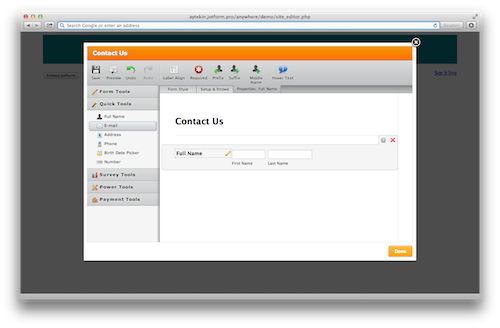
Jotform Anywhere is a small JavaScript SDK that brings the capabilities of Jotform Form Builder to all web apps.
Jotform Anywhere provides a set of client side functionality to let you add a Form Builder inside your web app. Your users can create/edit and embed forms without leaving your site.
For a complete list of documentation and demo code visit Jotform Anywhere
Screenshot
Jotform Question Types
Here is the complete* list of question types you can use on Jotform Question Mapper.
  control_head
  control_text
  control_textbox
  control_textarea
  control_dropdown
  control_radio
  control_checkbox
  control_image
  control_fileupload
  control_button
  control_fullname
  control_email
  control_address
  control_phone
  control_datetime
  control_time
  control_birthdate
  control_number
  control_captcha
  control_rating
  control_scale
  control_spinner
  control_matrix
  control_collapse
  control_pagebreak
  control_hidden
  control_slider
  control_signature
  control_widget
Note: Some fields are not meant to be used in Question Mapper, they are parts of Jotform Form Builder's internal workings. Such as control_collapse and control_pagebreak. Also payment field types omitted.