

Template Formulir Pajak
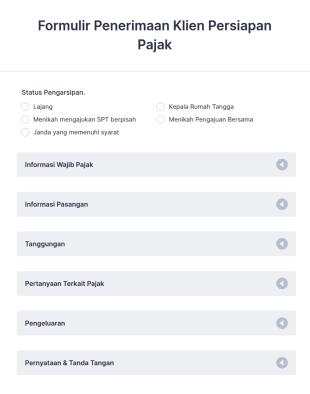
Formulir Penerimaan Klien Persiapan Pajak
Gunakan Formulir Penerimaan Klien Persiapan Pajak ini sebagai panduan saat Anda mengajukan pengembalian pajak tahunan. Formulir penerimaan ini berisi semua pertanyaan yang akan membantu Anda mengajukan pajak dengan akurat.
Buka Kategori:Formulir PajakTentang Formulir Pajak
Baik jika Anda adalah agen pemerintah yang mengumpulkan formulir pajak resmi atau akuntan yang mengumpulkan informasi dari klien Anda, terima informasi pajak secara online dengan aman menggunakan Formulir Pajak Jotform! Mulailah dengan memilih templat formulir di bawah ini dan menyesuaikan agar sesuai dengan kebutuhan dan merek Anda. Kemudian bagikan formulir tersebut atau sematkan di situs web Anda untuk diisi di ponsel cerdas, tablet, atau komputer apa pun. Tanggapan disimpan di akun Jotform Anda yang aman dan dapat diubah menjadi dokumen PDF profesional secara otomatis.
Pilih template formulir pajak di bawah ini dan sesuaikan dalam hitungan detik dengan Pembangun Formulir seret dan lepas kami. Unggah logo perusahaan Anda, tambahkan lebih banyak kolom formulir untuk mengumpulkan dokumen atau tanda tangan elektronik, menerima pembayaran melalui 30+ pemroses pembayaran populer, dan banyak lagi. Setelah Anda mulai mengumpulkan tanggapan, Anda dapat melacaknya di Jotform Inbox atau Jotform Tabel - atau menyinkronkannya ke akun Anda yang lain dengan 100+ integrasi termasuk Google Drive, Dropbox, dan banyak lagi. Sederhanakan cara Anda mengumpulkan dokumen pajak dengan Formulir Pajak online Jotform yang aman.
Why Use Tax Forms?
- Tax Forms ensure accuracy by eliminating manual entry errors commonly associated with paper forms. Utilizing digital forms allows for real-time data validation, ensuring that the information submitted meets predefined criteria and reduces the risk of errors.
- Speed is a critical advantage of using Tax Forms. By digitizing the tax documentation process, users can significantly reduce the time spent on collecting and processing information, which in turn accelerates the overall workflow and improves productivity.
- Professional data handling is guaranteed with Tax Forms as they support robust data management practices. Digital forms enable secure data collection, storage, and retrieval, ensuring compliance with data protection regulations and maintaining client confidentiality.
- Tax Forms facilitate seamless collaboration among team members. By providing a centralized platform for data submission and review, these forms enhance communication and coordination, leading to more efficient tax processing and decision-making.
- The versatility of Tax Forms allows for easy integration with existing systems. Whether it's syncing with accounting software or exporting data to spreadsheets, these forms provide flexibility and adaptability to meet diverse business needs.
Common Problems Solved by Tax Forms
- Paperwork overload is a significant challenge in tax documentation, often leading to inefficiencies and lost data. Tax Forms tackle this issue by transitioning from paper to digital, streamlining document handling and reducing physical storage needs.
- Manual data entry is prone to errors and can be time-consuming. By using digital forms, organizations can automate data capture processes, minimizing the chances of errors and freeing up valuable time for staff to focus on more critical tasks.
- Lost data can be a nightmare for businesses, especially during tax season. Tax Forms ensure that all collected data is stored securely and can be retrieved easily, reducing the risk of lost or misplaced information.
- Compliance with tax regulations is a constant concern for businesses. Tax Forms help ensure that all required fields are completed and that the data complies with current legal requirements, thereby reducing the risk of penalties and audits.
Matching Use Cases to Features
- Tax professionals can leverage the Drag-and-Drop Form Builder to quickly create customized Tax Forms tailored to specific client needs, enhancing the client service experience.
- Conditional Logic allows for dynamic form behavior, enabling users to show or hide fields based on responses, which streamlines the form-filling process and ensures that only relevant information is captured.
- With over 30 Payment Gateways, Tax Forms can facilitate the collection of taxes and fees directly through the form, providing a convenient and secure payment option for clients.
- Jotform Sign offers Electronic Signatures, enabling users to obtain legally binding signatures on Tax Forms, thereby accelerating approval processes and ensuring compliance.
- The PDF Editor allows for Automated PDF Generation, transforming form submissions into professionally formatted documents that can be easily shared with clients or filed for record-keeping.
- The Report Builder enables users to analyze form data, generating insights and summaries that support strategic decision-making and tax planning.
- With 100+ Third-party Integrations, Tax Forms can seamlessly connect with platforms like Google Sheets and Salesforce, enhancing data flow and operational efficiency.
How to Create a Tax Form
- Start by browsing the Template List for a Taxs template or begin from a blank form to suit your specific requirements.
- Customize the design and fields using the Drag-and-Drop Form Builder, ensuring that the form meets your operational needs and captures all necessary information.
- Publish and share your form via Direct Link, Email, or Website Embed to reach your intended audience quickly and efficiently.
Top Use Cases for Tax Forms
- For Managers: Tax Forms offer managers a streamlined approach to overseeing tax documentation processes. With centralized data collection and real-time access to information, managers can monitor progress, ensure compliance, and make informed decisions with confidence. The ability to customize forms and automate workflows reduces administrative burdens and enhances operational efficiency.
- For Teams: Teams benefit from Tax Forms by improving collaboration and communication across departments. Digital forms provide a unified platform where team members can access, review, and process tax information collectively. This fosters a more cohesive work environment, reduces errors, and ensures that all team members are aligned with current tax objectives and deadlines.
- For Customers: Customers experience a more seamless and efficient service when interacting with Tax Forms. These forms simplify the process of submitting tax information, providing a user-friendly interface and clear guidance on required documentation. The integration of secure payment gateways and electronic signatures further enhances the customer experience by offering convenience and assurance.
Summarizing Tax Forms
Tax Forms represent a significant advancement in how tax documentation is handled, offering a powerful solution for businesses seeking to improve accuracy, speed, and compliance. By digitizing tax processes, these forms reduce the burden of paperwork and minimize the risk of errors, while also ensuring that data is managed securely and efficiently. With Jotform's robust features and integrations, Tax Forms not only streamline operations but also enhance the overall client experience, making them an invaluable asset in the realm of tax management.
Tanya Jawab
1. Apa itu formulir pajak bisnis?
Formulir pajak bisnis adalah dokumen yang digunakan untuk mengumpulkan, melaporkan, dan mengelola informasi terkait pajak untuk bisnis, karyawan, kontraktor, atau klien. Formulir ini membantu memastikan kepatuhan terhadap regulasi pajak dan memfasilitasi pengajuan pajak yang akurat.
2. Mengapa formulir IT penting bagi organisasi?
Formulir pajak bisnis sangat penting untuk menjaga kepatuhan hukum, melaporkan pendapatan dan pengeluaran secara akurat, serta menghindari denda atau audit. Formulir ini juga mempermudah proses pengumpulan informasi yang diperlukan untuk persiapan pajak.
3. Informasi apa yang biasanya diperlukan pada formulir pajak?
Kolom umum mencakup detail identifikasi pribadi atau bisnis, nomor identifikasi pajak, jumlah pendapatan, pengurangan, status pengarsipan, dan dokumen pendukung seperti tanda terima atau faktur.
4. Apakah ada berbagai jenis formulir IT?
Ya, ada berbagai jenis, termasuk formulir deklarasi pajak karyawan, formulir pajak kontraktor, laporan pajak penjualan, formulir pelacakan pengeluaran, dan formulir penerimaan pajak klien, masing-masing disesuaikan dengan skenario pajak tertentu.
5. Siapa yang harus menggunakan formulir IT?
Pemilik bisnis, akuntan, profesional HR, spesialis penggajian, pekerja lepas, dan organisasi non-profit dapat memanfaatkan formulir pajak bisnis untuk mengelola data terkait pajak secara efisien.
6. Bagaimana formulir IT meningkatkan efisiensi alur kerja?
Formulir-formulir ini memastikan bahwa semua informasi yang diperlukan dikumpulkan dan diatur dengan baik, mengurangi risiko kesalahan dan kelalaian yang dapat menyebabkan masalah kepatuhan atau hukuman.
7. Apakah informasi yang dikirimkan melalui formulir pajak Jotform aman?
Ya, Jotform menggunakan langkah-langkah keamanan standar industri, termasuk enkripsi dan penyimpanan data yang aman, untuk melindungi informasi pajak sensitif yang dikirimkan melalui formulirnya.
8. Dapatkah formulir pajak bisnis disesuaikan untuk berbagai yurisdiksi atau undang-undang pajak?
Tentu saja. Templat Jotform dapat sepenuhnya disesuaikan untuk memasukkan kolom dan persyaratan khusus sesuai peraturan pajak lokal, negara bagian, atau federal, memastikan kepatuhan terhadap hukum yang berlaku.