
# Free QR Code Generator for 2026 - Create Custom QR Codes | Jotform

# Jotform QR Code Generator

## Create QR Codes in Minutes

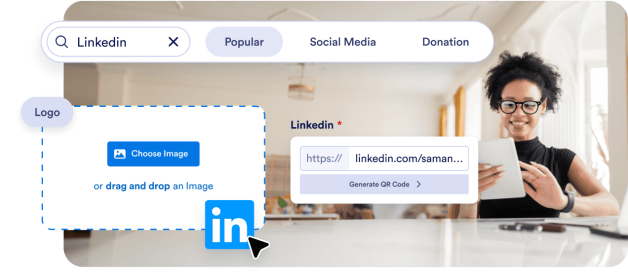
Effortlessly create personalized QR codes for your forms, surveys, and business needs with Jotform’s free QR Code Generator. Generate, customize, and track QR codes for your business or personal use - no coding or technical skills required!

## How to create a QR code in 3 steps

![Image 1: Choose your QR code type](https://cdn.jotfor.ms/image/r/aHR0cHM6Ly93d3cuam90Zm9ybS5jb20vdXBsb2Fkcy9ncm93dGhUZWFtLzI0MzM3MTUyODYxMjk2MC82MDkwMjMwNTU4NTAyODgwNzI0L2hvd2l0LTEucG5n/howit-1.png?w=40&t=1)

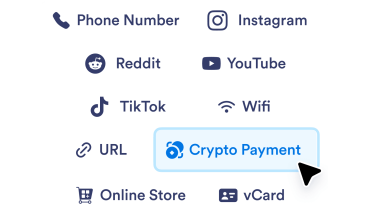
### Choose your QR code type

Select the type of QR code you want to create, whether it's a website link, contact information, Wi-Fi credentials, or a donation form.

![Image 2: Enter your information](https://cdn.jotfor.ms/image/r/aHR0cHM6Ly93d3cuam90Zm9ybS5jb20vdXBsb2Fkcy9ncm93dGhUZWFtLzI0MzM3MTUyODYxMjk2MC82MDkwMjMwNTU4NTAyODgwNzI0L2hvd2l0LTIucG5n/howit-2.png?w=40&t=1)

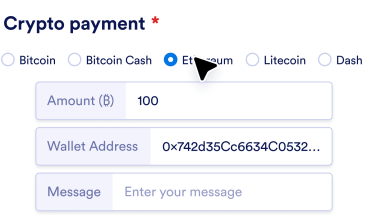
### Enter your information

Add the relevant data for the chosen QR code type, such as a URL, contact details, or custom text.

![Image 3: Customize and download](https://cdn.jotfor.ms/image/r/aHR0cHM6Ly93d3cuam90Zm9ybS5jb20vdXBsb2Fkcy9ncm93dGhUZWFtLzI0MzM3MTUyODYxMjk2MC82MDkwMjMwNTU4NTAyODgwNzI0L2hvdzMucG5n/how3.png?w=40&t=1)

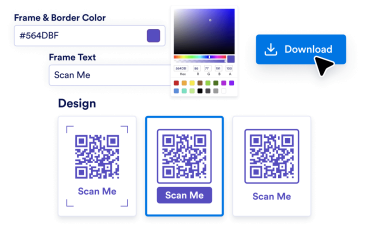
### Customize and download

Personalize your QR code by changing the color, adding text, modifying patterns, or embedding your logo. Once done, generate and download your customized QR code.

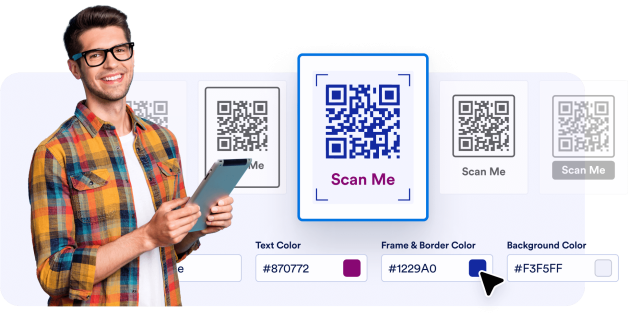
## Effortless customization

Design QR codes that align with your branding. Change the frame or background color, pick a pattern, and even add your logo for a professional touch.

![Image 4: Effortless customization](https://cdn.jotfor.ms/image/r/aHR0cHM6Ly93d3cuam90Zm9ybS5jb20vdXBsb2Fkcy9ncm93dGhUZWFtLzI0MzM3MTUyODYxMjk2MC82MDkwMjMwNTU4NTAyODgwNzI0L2JlbmVmaXRzMV84NF83Mi5wbmc=/benefits1_84_72.png?w=40&t=1)

## User-friendly interface

Jotform's QR Code Generator offers an intuitive and easy-to-use interface, designed for users of all skill levels. Whether you’re a beginner or an experienced professional, generating custom QR codes has never been easier. With a simple drag-and-drop design, you can quickly create, customize, and download QR codes without any technical knowledge.

![Image 5: User-friendly interface](https://cdn.jotfor.ms/image/r/aHR0cHM6Ly93d3cuam90Zm9ybS5jb20vdXBsb2Fkcy9ncm93dGhUZWFtLzI0MzM3MTUyODYxMjk2MC82MDkwMjMwNTU4NTAyODgwNzI0L3VzZXItZnJpZW5kbHkucG5n/user-friendly.png?w=40&t=1)

## High-quality downloads

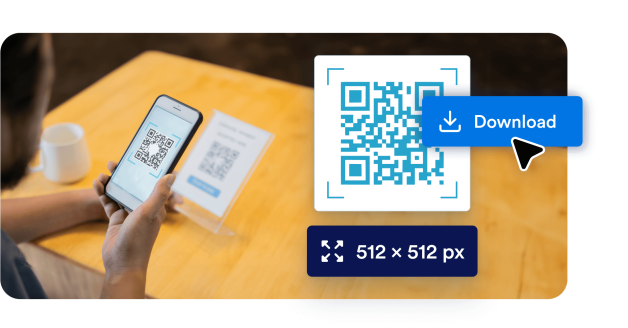
Download our high-resolution, custom-designed QR codes, tailored for all your needs! Whether you're looking to enhance your digital presence or create print-ready materials, our QR codes are perfect for seamless integration and professional results.

![Image 6: High-quality downloads](https://cdn.jotfor.ms/image/r/aHR0cHM6Ly93d3cuam90Zm9ybS5jb20vdXBsb2Fkcy9ncm93dGhUZWFtLzI0MzM3MTUyODYxMjk2MC82MDkwMjMwNTU4NTAyODgwNzI0L2JlbmVmaXRzMy5wbmc=/benefits3.png?w=40&t=1)

## Powerful features of Jotform QR Code Generator

Create, customize, and share QR codes with ease

### Create customizable QR codes

Personalize your QR codes with logos, brand colors, and unique designs to align with your branding.

### Share forms via QR code

Share your Jotform Form with a QR code. Simply use the **Share form** option in the Publish tab. Or generate QR code from Google Docs and more for easy sharing.

### Add QR codes to physical and digital media

Display your QR codes on flyers, posters, business cards, or websites to enhance accessibility and engagement.

### No coding required

Create and manage QR codes effortlessly with Jotform’s user-friendly, intuitive interface. No coding required!

### Add your logo to QR codes

Add your logo to your QR code for better brand recognition and a more personalized, professional touch.

### Embed social media links

Use QR codes to drive traffic to your social media pages, boosting your online presence and engagement.

### Make QR codes for multiple uses

Link QR codes to videos, documents, payment portals, forms, and more, providing versatile solutions for business and personal needs.

### Increase user engagement

Direct customers to interactive content, like videos, slideshows, or promotional offers, to grow more meaningful relationships with your audience.

### Create customizable QR codes

Personalize your QR codes with logos, brand colors, and unique designs to align with your branding.

### Share forms via QR code

Share your Jotform Form with a QR code. Simply use the **Share form** option in the Publish tab. Or generate QR code from Google Docs and more for easy sharing.

### Add QR codes to physical and digital media

Display your QR codes on flyers, posters, business cards, or websites to enhance accessibility and engagement.

### No coding required

Create and manage QR codes effortlessly with Jotform’s user-friendly, intuitive interface. No coding required!

### Add your logo to QR codes

Add your logo to your QR code for better brand recognition and a more personalized, professional touch.

### Embed social media links

Use QR codes to drive traffic to your social media pages, boosting your online presence and engagement.

### Make QR codes for multiple uses

Link QR codes to videos, documents, payment portals, forms, and more, providing versatile solutions for business and personal needs.

### Increase user engagement

Direct customers to interactive content, like videos, slideshows, or promotional offers, to grow more meaningful relationships with your audience.

## What type of QR codes can I create?

Find the perfect QR code for your needs.

[Link to QR code Quickly generate a QR Code for any link or webpage. Try Link to QR code](https://www.jotform.com/qr-code-generator/link/)[Google Form QR code Generate a QR Code that links directly to your Google Form. Try Google Form QR code](https://www.jotform.com/qr-code-generator/google-form/)[LinkedIn QR code Generate a LinkedIn profile or company page QR Code. Try LinkedIn QR code](https://www.jotform.com/qr-code-generator/linkedin/)[Instagram QR code Share your Instagram profile or post with an easy-to-scan code. Try Instagram QR code](https://www.jotform.com/qr-code-generator/instagram/)[Facebook QR code Direct users to your Facebook page or post instantly. Try Facebook QR code](https://www.jotform.com/qr-code-generator/facebook/)[QR code with logo Add your logo for branded and personalized QR Codes. Try QR code with logo](https://www.jotform.com/qr-code-generator/qr-with-logo/)[YouTube QR code Share videos easily by creating a QR code for your YouTube link. Try YouTube QR code](https://www.jotform.com/qr-code-generator/youtube/)[Transparent QR code Create QR codes with transparent backgrounds. Try Transparent QR code](https://www.jotform.com/qr-code-generator/transparent/)[White QR code Generate minimal and clean white QR codes. Try White QR code](https://www.jotform.com/qr-code-generator/white/)[Static QR code Create unchanging, reliable QR codes that encode permanent data, ideal for long-term use. Try Static QR code](https://www.jotform.com/qr-code-generator/static-qr/)[Google Docs QR code Quickly direct others to your Google Docs pages. Try Google Doc QR code](https://www.jotform.com/qr-code-generator/google-doc/)[Venmo QR code Easily share your Venmo profile or request payments with a customized QR code. Try Venmo QR code](https://www.jotform.com/qr-code-generator/venmo/)[Spotify QR code Create a QR code to share your favorite playlists, songs, or artist profiles instantly on Spotify. Try Spotify QR code](https://www.jotform.com/qr-code-generator/spotify/)[Payment QR code Quickly generate a custom QR code to accept payments effortlessly. Share it with anyone to receive payments instantly. Try Payment QR code](https://www.jotform.com/qr-code-generator/payment/)[Linktree QR code Easily share your Linktree profile and connect with all your links using a customizable QR code. Try Linktree QR code](https://www.jotform.com/qr-code-generator/linktree/)[Video QR code Instantly generate a QR code to share your videos effortlessly. Scan to watch anytime, anywhere! Try video QR code](https://www.jotform.com/qr-code-generator/video/)[Restaurant Menu QR Code Create QR codes for your restaurant menu and transform your dining experience with instant digital access. Try restaurant menu QR code](https://www.jotform.com/qr-code-generator/restaurant-menu/)[PayPal QR code Generate PayPal QR codes for seamless transactions. Share codes with customers, clients, or friends and accept payments securely without the need for cash or card swipes. Try PayPal QR code](https://www.jotform.com/qr-code-generator/paypal/)[Etsy QR code Generate Etsy Shop QR codes for instant store access. Share codes with customers and drive traffic to your shop effortlessly. Try Etsy QR code](https://www.jotform.com/qr-code-generator/etsy-shop/)[Resume QR Code Generator Generate Resume QR codes for instant professional access. Share codes with recruiters and showcase your qualifications effortlessly. Try resume QR code](https://www.jotform.com/qr-code-generator/resume/)[Audio QR code Link to your music, podcasts, or audio recordings with a QR code that anyone can scan to start listening. Perfect for artists, educators, marketers, and businesses that want to share audio content with ease. Try Audio QR code](https://www.jotform.com/qr-code-generator/audio/)[TikTok QR code Turn your TikTok profile, videos, or shop into a scannable QR code that fans and customers can access instantly. Whether you’re a creator, an influencer, or a business, TikTok QR codes make it easier to grow your audience and engagement. Try TikTok QR code](https://www.jotform.com/qr-code-generator/tiktok/)[Black QR code Make your QR codes stand out with a clean, professional, black design that works across mediums. Perfect for businesses, events, or personal projects where you want your code to be both functional and stylish. Try Black QR code](https://www.jotform.com/qr-code-generator/black/)[X (Twitter) QR code Make it easy for people to follow you, read your tweets, or join your conversation with an X (Twitter) QR code. Perfect for creators, brands, and marketers looking to grow their reach and engagement. Try X (Twitter) QR code](https://www.jotform.com/qr-code-generator/twitter/)[Google Maps QR code Make it easy for people to find you with a scannable Google Maps QR code. Perfect for businesses, events, and personal use when you want to share a location instantly. Try Google Maps QR code](https://www.jotform.com/qr-code-generator/google-maps/)[Zoom QR code Share your Zoom meetings, webinars, or recordings instantly with a scannable QR code. Perfect for remote teams, event organizers, and educators who want quick and seamless access. Try Zoom QR code](https://www.jotform.com/qr-code-generator/zoom/)[Google Business review QR code Generate Google Business review QR codes for instant feedback collection. Share codes with customers and boost your online reputation effortlessly. Try Google Business review QR code](https://www.jotform.com/qr-code-generator/google-business-reviews/)[Shopify Store QR code Turn your Shopify store into a scannable experience with a QR code that links directly to your shop, product pages, or discount campaigns. Perfect for driving traffic and boosting sales both online and offline. Try Shopify Store QR code](https://www.jotform.com/qr-code-generator/shopify-store/)[TripAdvisor QR code Make it easy for customers to find your Tripadvisor listing, leave reviews, or explore your services with a QR code. Perfect for restaurants, hotels, attractions, and travel businesses that want to build trust and boost visibility. Try TripAdvisor QR code](https://www.jotform.com/qr-code-generator/tripadvisor/)

View more View less

*   Link to QR code 
    
Quickly generate a QR Code for any link or webpage.

    *   [Try Link to QR code](https://www.jotform.com/qr-code-generator/link/)

*   Google Form QR code 
    
Generate a QR Code that links directly to your Google Form.

    *   [Try Google Form QR code](https://www.jotform.com/qr-code-generator/google-form/)

*   LinkedIn QR code 
    
Generate a LinkedIn profile or company page QR Code.

    *   [Try LinkedIn QR code](https://www.jotform.com/qr-code-generator/linkedin/)

*   Instagram QR code 
    
Share your Instagram profile or post with an easy-to-scan code.

    *   [Try Instagram QR code](https://www.jotform.com/qr-code-generator/instagram/)

*   Facebook QR code 
    
Direct users to your Facebook page or post instantly.

    *   [Try Facebook QR code](https://www.jotform.com/qr-code-generator/facebook/)

*   QR code with logo 
    
Add your logo for branded and personalized QR Codes.

    *   [Try QR code with logo](https://www.jotform.com/qr-code-generator/qr-with-logo/)

*   YouTube QR code 
    
Share videos easily by creating a QR code for your YouTube link.

    *   [Try YouTube QR code](https://www.jotform.com/qr-code-generator/youtube/)

*   Transparent QR code 
    
Create QR codes with transparent backgrounds.

    *   [Try Transparent QR code](https://www.jotform.com/qr-code-generator/transparent/)

*   White QR code 
    
Generate minimal and clean white QR codes.

    *   [Try White QR code](https://www.jotform.com/qr-code-generator/white/)

*   Static QR code 
    
Create unchanging, reliable QR codes that encode permanent data, ideal for long-term use.

    *   [Try Static QR code](https://www.jotform.com/qr-code-generator/static-qr/)

*   Google Docs QR code 
    
Quickly direct others to your Google Docs pages.

    *   [Try Google Doc QR code](https://www.jotform.com/qr-code-generator/google-doc/)

*   Venmo QR code 
    
Easily share your Venmo profile or request payments with a customized QR code.

    *   [Try Venmo QR code](https://www.jotform.com/qr-code-generator/venmo/)

*   Spotify QR code 
    
Create a QR code to share your favorite playlists, songs, or artist profiles instantly on Spotify.

    *   [Try Spotify QR code](https://www.jotform.com/qr-code-generator/spotify/)

*   Payment QR code 
    
Quickly generate a custom QR code to accept payments effortlessly. Share it with anyone to receive payments instantly.

    *   [Try Payment QR code](https://www.jotform.com/qr-code-generator/payment/)

*   Linktree QR code 
    
Easily share your Linktree profile and connect with all your links using a customizable QR code.

    *   [Try Linktree QR code](https://www.jotform.com/qr-code-generator/linktree/)

*   Video QR code 
    
Instantly generate a QR code to share your videos effortlessly. Scan to watch anytime, anywhere!

    *   [Try video QR code](https://www.jotform.com/qr-code-generator/video/)

*   Restaurant Menu QR Code 
    
Create QR codes for your restaurant menu and transform your dining experience with instant digital access.

    *   [Try restaurant menu QR code](https://www.jotform.com/qr-code-generator/restaurant-menu/)

*   PayPal QR code 
    
Generate PayPal QR codes for seamless transactions. Share codes with customers, clients, or friends and accept payments securely without the need for cash or card swipes.

    *   [Try PayPal QR code](https://www.jotform.com/qr-code-generator/paypal/)

*   Etsy QR code 
    
Generate Etsy Shop QR codes for instant store access. Share codes with customers and drive traffic to your shop effortlessly.

    *   [Try Etsy QR code](https://www.jotform.com/qr-code-generator/etsy-shop/)

*   Resume QR Code Generator 
    
Generate Resume QR codes for instant professional access. Share codes with recruiters and showcase your qualifications effortlessly.

    *   [Try resume QR code](https://www.jotform.com/qr-code-generator/resume/)

*   Audio QR code 
    
Link to your music, podcasts, or audio recordings with a QR code that anyone can scan to start listening. Perfect for artists, educators, marketers, and businesses that want to share audio content with ease.

    *   [Try Audio QR code](https://www.jotform.com/qr-code-generator/audio/)

*   TikTok QR code 
    
Turn your TikTok profile, videos, or shop into a scannable QR code that fans and customers can access instantly. Whether you’re a creator, an influencer, or a business, TikTok QR codes make it easier to grow your audience and engagement.

    *   [Try TikTok QR code](https://www.jotform.com/qr-code-generator/tiktok/)

*   Black QR code 
    
Make your QR codes stand out with a clean, professional, black design that works across mediums. Perfect for businesses, events, or personal projects where you want your code to be both functional and stylish.

    *   [Try Black QR code](https://www.jotform.com/qr-code-generator/black/)

*   X (Twitter) QR code 
    
Make it easy for people to follow you, read your tweets, or join your conversation with an X (Twitter) QR code. Perfect for creators, brands, and marketers looking to grow their reach and engagement.

    *   [Try X (Twitter) QR code](https://www.jotform.com/qr-code-generator/twitter/)

*   Google Maps QR code 
    
Make it easy for people to find you with a scannable Google Maps QR code. Perfect for businesses, events, and personal use when you want to share a location instantly.

    *   [Try Google Maps QR code](https://www.jotform.com/qr-code-generator/google-maps/)

*   Zoom QR code 
    
Share your Zoom meetings, webinars, or recordings instantly with a scannable QR code. Perfect for remote teams, event organizers, and educators who want quick and seamless access.

    *   [Try Zoom QR code](https://www.jotform.com/qr-code-generator/zoom/)

*   Google Business review QR code 
    
Generate Google Business review QR codes for instant feedback collection. Share codes with customers and boost your online reputation effortlessly.

    *   [Try Google Business review QR code](https://www.jotform.com/qr-code-generator/google-business-reviews/)

*   Shopify Store QR code 
    
Turn your Shopify store into a scannable experience with a QR code that links directly to your shop, product pages, or discount campaigns. Perfect for driving traffic and boosting sales both online and offline.

    *   [Try Shopify Store QR code](https://www.jotform.com/qr-code-generator/shopify-store/)

*   TripAdvisor QR code 
    
Make it easy for customers to find your Tripadvisor listing, leave reviews, or explore your services with a QR code. Perfect for restaurants, hotels, attractions, and travel businesses that want to build trust and boost visibility.

    *   [Try TripAdvisor QR code](https://www.jotform.com/qr-code-generator/tripadvisor/)

## Which businesses can benefit from QR codes

### Small businesses and entrepreneurs


![Image 7: Small businesses and entrepreneurs](https://cdn.jotfor.ms/image/r/aHR0cHM6Ly93d3cuam90Zm9ybS5jb20vdXBsb2Fkcy9ncm93dGhUZWFtLzI0MzM3MTUyODYxMjk2MC82MDkwMjMwNTU4NTAyODgwNzI0L3NsaWRlci0xLnBuZw==/slider-1.png?w=40&t=1)

Whether you're running a local shop, freelancing, or offering services, QR codes can help bridge the gap between offline and online interactions. Use them on business cards, flyers, or signage to direct potential clients to your website, portfolio, or contact information.


### Educational institutions and trainers


![Image 8: Educational institutions and trainers](https://cdn.jotfor.ms/image/r/aHR0cHM6Ly93d3cuam90Zm9ybS5jb20vdXBsb2Fkcy9ncm93dGhUZWFtLzI0MzM3MTUyODYxMjk2MC82MDkwMjMwNTU4NTAyODgwNzI0L3NsaWRlci0yLnBuZw==/slider-2.png?w=40&t=1)

Schools, universities, and independent educators can use QR codes to share resources, provide access to online assignments, or distribute event details. They’re an excellent way to connect students and parents with important updates and materials.

### Nonprofits and community organizations


![Image 9: Nonprofits and community organizations](https://cdn.jotfor.ms/image/r/aHR0cHM6Ly93d3cuam90Zm9ybS5jb20vdXBsb2Fkcy9ncm93dGhUZWFtLzI0MzM3MTUyODYxMjk2MC82MDkwMjMwNTU4NTAyODgwNzI0L3NsaWRlci0zLnBuZw==/slider-3.png?w=40&t=1)

QR codes are perfect for nonprofits looking to engage supporters. Add them to brochures or banners to direct people to donation pages, volunteer sign-ups, or event details. It’s a simple yet effective way to boost awareness and action for your cause.

## FAQ about QR Code Generator

*    
### What is a QR Code? A QR code, short for Quick Response code, is a type of two-dimensional barcode designed to store and share information efficiently. Unlike traditional barcodes, which are linear and primarily hold numerical or limited alphanumeric data, QR codes can contain a wide variety of data types, including URLs, text, email addresses, phone numbers, Wi-Fi login details, and multimedia content. They are composed of black squares arranged on a white background and are scannable from any orientation. This feature makes QR codes highly versatile and user-friendly.

QR codes can be scanned using most smartphones equipped with built-in cameras or third-party scanning apps. When scanned, the encoded information is displayed or executed instantly, such as opening a website or dialing a phone number. Their flexibility and ease of use have made them a popular choice for various applications, from marketing campaigns to contactless payments and inventory management.   
*    
### What does a QR code generator do? A QR code generator is a tool that converts specific data into a scannable QR code. It allows you to encode various types of information, such as web links, text messages, contact details, or event tickets, into a compact, two-dimensional graphic that can be easily accessed by scanning. These tools are widely available online and in mobile applications, enabling users to create QR codes effortlessly.

The process of creating a QR code is straightforward: you simply input the desired information into the generator, customize the appearance if needed, and the tool produces a ready-to-use QR code. This can be downloaded and used on digital platforms like websites, emails, and social media, or printed on physical materials such as posters, brochures, and product packaging. QR code generators are indispensable for businesses and individuals seeking to share information quickly and seamlessly.   
*   
 
### What types of QR codes can I create? 

QR codes can be created for various purposes, depending on the information you want to encode. Common types of QR codes include:

    *   Website URLs: Direct users to a specific webpage without the need for manual entry.
    *   Contact Information: Share business or personal contact details in the form of a vCard for instant saving.
    *   Social Media Profiles: Redirect users to social media platforms like Instagram, Facebook, or LinkedIn profiles.
    *   Email Addresses: Automatically compose an email to a specified address when scanned.
    *   Phone Numbers: Enable users to call a phone number with a single scan.
    *   Wi-Fi Credentials: Allow users to connect to a Wi-Fi network instantly by scanning the code.
    *   Text or Multimedia: Share plain text messages, audio files, videos, or images.
    *   Event Details: Store calendar events or ticket information for easy access.

The diversity of QR code types makes them ideal for personal, commercial, and professional use. Whether you’re promoting a product, sharing contact information, or enhancing a customer’s experience, there’s a QR code type to suit your needs.

*    
### How can I scan a QR code? Scanning a QR code is simple and requires no additional hardware beyond a smartphone or tablet with a camera. Most modern smartphones come with built-in QR code scanning capabilities integrated into their camera apps. To scan a QR code, open the camera, point it at the code, and wait for a prompt to appear, such as a link or action associated with the code.

For devices without built-in scanning functionality, you can download a third-party QR code scanner app from your app store. These apps work similarly: you launch the app, aim the camera at the QR code, and the encoded information is displayed or executed.

QR codes can also be scanned from digital displays, such as computer monitors, tablets, and televisions, making them a versatile solution for both online and offline applications.   
*   
 
### What are the advantages of using QR codes? 

QR codes offer numerous benefits, making them a popular choice for data sharing and marketing. Key advantages include:

    *   Speed and Efficiency: QR codes provide instant access to information, eliminating the need for manual data entry.
    *   Versatility: They can store various types of data, from URLs and contact details to multimedia and Wi-Fi credentials.
    *   Ease of Use: Scanning a QR code requires no special skills or equipment beyond a smartphone camera or QR scanner.
    *   Enhanced Engagement: QR codes can direct users to websites, social media profiles, and promotional content, boosting interaction.
    *   Compact and Portable: They store large amounts of data in a small, scannable format.
    *   Cost-Effectiveness: QR codes are inexpensive to generate and can be used across different media.
    *   Customization: QR codes can be personalized with colors, patterns, and logos to align with a brand’s identity.
    *   Durability: QR codes can incorporate error correction, ensuring functionality even when partially damaged.

*    
### Can I download the QR codes I create? Yes, once you are done with customizing your QR code, just click the download button and you are done! Once downloaded, these files can be used in both digital and physical mediums. For example, you can embed QR codes into websites, emails, or presentations or print them on flyers, posters, business cards, or product packaging.   
*    
### Do I need any special skills to create a QR code? With Jotform QR Code Generator, creating a QR code is simple and requires no technical expertise. Just select the QR code type you want to create, customize your QR code using the customization options the generator offers, and then simply download it!   
*    
### Can I edit my QR codes after they are created? QR codes are fixed and cannot be edited once generated. The data they encode is permanent, so any changes require creating a new QR code.   
*    
### Can I customize the design of my QR code? Yes, you can personalize your QR codes by changing their colors, adding patterns, and even embedding your logo to match your brand identity.   
*    
### How many QR codes can I create? There is no limit to the number of QR codes you can create. You are free to generate as many as needed for your personal or professional use.   
*    
### Can I include my business logo in a QR code? Absolutely! You can embed your business logo into your QR code to make it more recognizable and align with your branding.   
*    
### Can QR codes be scanned directly on a website? Yes, QR codes can be scanned directly from digital displays such as websites, computer monitors, tablets, or smartphone screens. This makes them an excellent tool for online applications like sharing files, linking to resources, or directing traffic to a specific webpage.   
*    
### Can I create QR codes on my mobile device? Yes, you can easily create QR codes directly from your mobile device. Our QR code generator is fully optimized for smartphones and tablets, allowing you to generate and manage QR codes on the go with a simple and user-friendly interface.   
*    
### Do QR codes expire? No, QR codes do not expire. Once created, they remain scannable indefinitely unless you choose to deactivate or change them. This makes QR codes a reliable, long-term solution for sharing information.   
*    
### Is there a scan limit for QR codes? No, there is no limit to the number of scans. QR codes can be scanned as many times as needed, making them perfect for ongoing use in marketing, events, or any other long-term application.   
*    
### Are my QR codes permanent? Yes, static QR codes are permanent once created. They cannot be modified or deactivated, but they will remain scannable indefinitely. This makes them ideal for long-term use, as you don’t have to worry about them becoming invalid over time.   

View More

## Ready to create QR codes?

Streamline your QR code creation process and generate customized QR codes for any purpose with ease using Jotform.

Create QR Codes for Free Now