
# Create Custom QR Codes from Links | Jotform QR Code Generator

# Link to QR Generator

## Create Your Custom QR Code for Links

Design unique, branded QR codes for your links with customizable colors, text, logos, and patterns in just a few clicks. Perfect for businesses, events, marketing campaigns, and personal use!

## How to create a QR code for a Link

![Image 1: Enter your link](https://cdn.jotfor.ms/image/r/aHR0cHM6Ly93d3cuam90Zm9ybS5jb20vdXBsb2Fkcy9ncm93dGhUZWFtLzI0MzM3MTUyODYxMjk2MC82MDkxMTExMTg4NTA0Mjc5NTk0L2hvdzFfNzlfMTYucG5n/how1_79_16.png?w=40&t=1)

### Enter your link

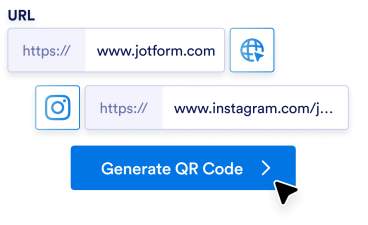
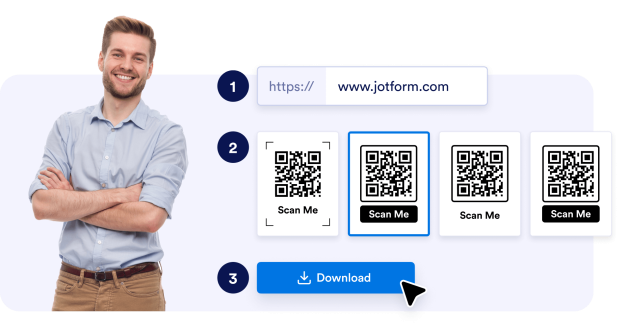
Begin by typing or pasting the URL you want your QR code to direct users to. This could be a website, social media page, or any other link.

![Image 2: Customize the design](https://cdn.jotfor.ms/image/r/aHR0cHM6Ly93d3cuam90Zm9ybS5jb20vdXBsb2Fkcy9ncm93dGhUZWFtLzI0MzM3MTUyODYxMjk2MC82MDkxMTExMTg4NTA0Mjc5NTk0L2hvdzIucG5n/how2.png?w=40&t=1)

### Customize the design

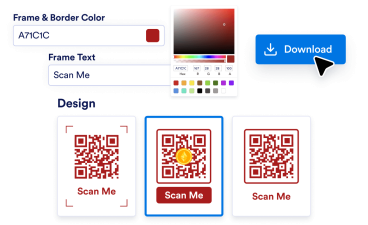
Personalize your QR code by choosing a color scheme, adding a logo, and experimenting with patterns. Instantly preview your changes in real-time.

![Image 3: Download and share](https://cdn.jotfor.ms/image/r/aHR0cHM6Ly93d3cuam90Zm9ybS5jb20vdXBsb2Fkcy9ncm93dGhUZWFtLzI0MzM3MTUyODYxMjk2MC82MDkxMTExMTg4NTA0Mjc5NTk0L2hvdzNfODFfNzgucG5n/how3_81_78.png?w=40&t=1)

### Download and share

Once you're happy with the design, download your QR code in high-quality PNG format. Use it on print materials, websites, or digital platforms.

## Elevate your branding

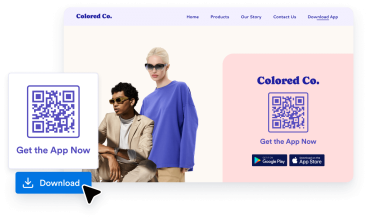
Stand out from the crowd by creating QR codes that reflect your brand identity. Whether it’s your company’s colors, logo, or custom patterns, a professionally designed QR code ensures your business makes a lasting impression.

![Image 4: Elevate your branding](https://cdn.jotfor.ms/image/r/aHR0cHM6Ly93d3cuam90Zm9ybS5jb20vdXBsb2Fkcy9ncm93dGhUZWFtLzI0MzM3MTUyODYxMjk2MC82MDkxMTExMTg4NTA0Mjc5NTk0L2JlbmVmaXRzMV84NF8zMC5wbmc=/benefits1_84_30.png?w=40&t=1)

## Boost user engagement

A visually appealing QR code captures attention more effectively than traditional designs. By customizing the look and feel of your QR code, you encourage more users to scan and interact with your links, increasing the likelihood of conversions.

![Image 5: Boost user engagement](https://cdn.jotfor.ms/image/r/aHR0cHM6Ly93d3cuam90Zm9ybS5jb20vdXBsb2Fkcy9ncm93dGhUZWFtLzI0MzM3MTUyODYxMjk2MC82MDkxMTExMTg4NTA0Mjc5NTk0L2JlbmVmaXRzMl84N18yMS5wbmc=/benefits2_87_21.png?w=40&t=1)

## Save time and effort

Skip the hassle of hiring designers or using complex software. Our QR code generator offers a user-friendly platform that simplifies the design process, allowing you to create professional-quality QR codes in just minutes, even without technical skills.

![Image 6: Save time and effort](https://cdn.jotfor.ms/image/r/aHR0cHM6Ly93d3cuam90Zm9ybS5jb20vdXBsb2Fkcy9ncm93dGhUZWFtLzI0MzM3MTUyODYxMjk2MC82MDkxMTExMTg4NTA0Mjc5NTk0L2JlbmVmaXRzM185MF85Mi5wbmc=/benefits3_90_92.png?w=40&t=1)

## Powerful features of Jotform QR Code Generator

Create, customize, and share QR codes with ease

### Create customizable QR codes

Personalize your QR codes with logos, brand colors, and unique designs to align with your branding.

### Share forms via QR code

Share your Jotform Form with a QR code. Simply use the **Share form** option in the Publish tab. Or generate QR code from Google Docs and more for easy sharing.

### Add QR codes to physical and digital media

Display your QR codes on flyers, posters, business cards, or websites to enhance accessibility and engagement.

### No coding required

Create and manage QR codes effortlessly with Jotform’s user-friendly, intuitive interface. No coding required!

### Add your logo to QR codes

Add your logo to your QR code for better brand recognition and a more personalized, professional touch.

### Embed social media links

Use QR codes to drive traffic to your social media pages, boosting your online presence and engagement.

### Make QR codes for multiple uses

Link QR codes to videos, documents, payment portals, forms, and more, providing versatile solutions for business and personal needs.

### Increase user engagement

Direct customers to interactive content, like videos, slideshows, or promotional offers, to grow more meaningful relationships with your audience.

### Create customizable QR codes

Personalize your QR codes with logos, brand colors, and unique designs to align with your branding.

### Share forms via QR code

Share your Jotform Form with a QR code. Simply use the **Share form** option in the Publish tab. Or generate QR code from Google Docs and more for easy sharing.

### Add QR codes to physical and digital media

Display your QR codes on flyers, posters, business cards, or websites to enhance accessibility and engagement.

### No coding required

Create and manage QR codes effortlessly with Jotform’s user-friendly, intuitive interface. No coding required!

### Add your logo to QR codes

Add your logo to your QR code for better brand recognition and a more personalized, professional touch.

### Embed social media links

Use QR codes to drive traffic to your social media pages, boosting your online presence and engagement.

### Make QR codes for multiple uses

Link QR codes to videos, documents, payment portals, forms, and more, providing versatile solutions for business and personal needs.

### Increase user engagement

Direct customers to interactive content, like videos, slideshows, or promotional offers, to grow more meaningful relationships with your audience.

## What type of QR codes can I create?

Find the perfect QR code for your needs.

[QR code generator Create personalized QR Codes with endless customization for links, webpages, and more! Try QR code generator](https://www.jotform.com/qr-code-generator/)[Google Form QR code Generate a QR Code that links directly to your Google Form. Try Google Form QR code](https://www.jotform.com/qr-code-generator/google-form/)[LinkedIn QR code Generate a LinkedIn profile or company page QR Code. Try LinkedIn QR code](https://www.jotform.com/qr-code-generator/linkedin/)[Instagram QR code Share your Instagram profile or post with an easy-to-scan code. Try Instagram QR code](https://www.jotform.com/qr-code-generator/instagram/)[Facebook QR code Direct users to your Facebook page or post instantly. Try Facebook QR code](https://www.jotform.com/qr-code-generator/facebook/)[QR code with logo Add your logo for branded and personalized QR Codes. Try QR code with logo](https://www.jotform.com/qr-code-generator/qr-with-logo/)[YouTube QR code Share videos easily by creating a QR code for your YouTube link. Try YouTube QR code](https://www.jotform.com/qr-code-generator/youtube/)[Transparent QR code Create QR codes with transparent backgrounds. Try Transparent QR code](https://www.jotform.com/qr-code-generator/transparent/)[White QR code Generate minimal and clean white QR codes. Try White QR code](https://www.jotform.com/qr-code-generator/white/)[Static QR code Create unchanging, reliable QR codes that encode permanent data, ideal for long-term use. Try Static QR code](https://www.jotform.com/qr-code-generator/static-qr/)[Google Docs QR code Quickly direct others to your Google Docs pages. Try Google Doc QR code](https://www.jotform.com/qr-code-generator/google-doc/)[Venmo QR code Easily share your Venmo profile or request payments with a customized QR code. Try Venmo QR code](https://www.jotform.com/qr-code-generator/venmo/)[Spotify QR code Create a QR code to share your favorite playlists, songs, or artist profiles instantly on Spotify. Try Spotify QR code](https://www.jotform.com/qr-code-generator/spotify/)[Payment QR code Quickly generate a custom QR code to accept payments effortlessly. Share it with anyone to receive payments instantly. Try Payment QR code](https://www.jotform.com/qr-code-generator/payment/)[Linktree QR code Easily share your Linktree profile and connect with all your links using a customizable QR code. Try Linktree QR code](https://www.jotform.com/qr-code-generator/linktree/)[Video QR code Instantly generate a QR code to share your videos effortlessly. Scan to watch anytime, anywhere! Try video QR code](https://www.jotform.com/qr-code-generator/video/)[Restaurant Menu QR Code Create QR codes for your restaurant menu and transform your dining experience with instant digital access. Try restaurant menu QR code](https://www.jotform.com/qr-code-generator/restaurant-menu/)[PayPal QR code Generate PayPal QR codes for seamless transactions. Share codes with customers, clients, or friends and accept payments securely without the need for cash or card swipes. Try PayPal QR code](https://www.jotform.com/qr-code-generator/paypal/)[Etsy QR code Generate Etsy Shop QR codes for instant store access. Share codes with customers and drive traffic to your shop effortlessly. Try Etsy QR code](https://www.jotform.com/qr-code-generator/etsy-shop/)[Resume QR Code Generator Generate Resume QR codes for instant professional access. Share codes with recruiters and showcase your qualifications effortlessly. Try resume QR code](https://www.jotform.com/qr-code-generator/resume/)[Audio QR code Link to your music, podcasts, or audio recordings with a QR code that anyone can scan to start listening. Perfect for artists, educators, marketers, and businesses that want to share audio content with ease. Try Audio QR code](https://www.jotform.com/qr-code-generator/audio/)[TikTok QR code Turn your TikTok profile, videos, or shop into a scannable QR code that fans and customers can access instantly. Whether you’re a creator, an influencer, or a business, TikTok QR codes make it easier to grow your audience and engagement. Try TikTok QR code](https://www.jotform.com/qr-code-generator/tiktok/)[Black QR code Make your QR codes stand out with a clean, professional, black design that works across mediums. Perfect for businesses, events, or personal projects where you want your code to be both functional and stylish. Try Black QR code](https://www.jotform.com/qr-code-generator/black/)[X (Twitter) QR code Make it easy for people to follow you, read your tweets, or join your conversation with an X (Twitter) QR code. Perfect for creators, brands, and marketers looking to grow their reach and engagement. Try X (Twitter) QR code](https://www.jotform.com/qr-code-generator/twitter/)[Google Maps QR code Make it easy for people to find you with a scannable Google Maps QR code. Perfect for businesses, events, and personal use when you want to share a location instantly. Try Google Maps QR code](https://www.jotform.com/qr-code-generator/google-maps/)[Zoom QR code Share your Zoom meetings, webinars, or recordings instantly with a scannable QR code. Perfect for remote teams, event organizers, and educators who want quick and seamless access. Try Zoom QR code](https://www.jotform.com/qr-code-generator/zoom/)[Google Business review QR code Generate Google Business review QR codes for instant feedback collection. Share codes with customers and boost your online reputation effortlessly. Try Google Business review QR code](https://www.jotform.com/qr-code-generator/google-business-reviews/)[Shopify Store QR code Turn your Shopify store into a scannable experience with a QR code that links directly to your shop, product pages, or discount campaigns. Perfect for driving traffic and boosting sales both online and offline. Try Shopify Store QR code](https://www.jotform.com/qr-code-generator/shopify-store/)[TripAdvisor QR code Make it easy for customers to find your Tripadvisor listing, leave reviews, or explore your services with a QR code. Perfect for restaurants, hotels, attractions, and travel businesses that want to build trust and boost visibility. Try TripAdvisor QR code](https://www.jotform.com/qr-code-generator/tripadvisor/)

View more View less

*   QR code generator 
    
Create personalized QR Codes with endless customization for links, webpages, and more!

    *   [Try QR code generator](https://www.jotform.com/qr-code-generator/)

*   Google Form QR code 
    
Generate a QR Code that links directly to your Google Form.

    *   [Try Google Form QR code](https://www.jotform.com/qr-code-generator/google-form/)

*   LinkedIn QR code 
    
Generate a LinkedIn profile or company page QR Code.

    *   [Try LinkedIn QR code](https://www.jotform.com/qr-code-generator/linkedin/)

*   Instagram QR code 
    
Share your Instagram profile or post with an easy-to-scan code.

    *   [Try Instagram QR code](https://www.jotform.com/qr-code-generator/instagram/)

*   Facebook QR code 
    
Direct users to your Facebook page or post instantly.

    *   [Try Facebook QR code](https://www.jotform.com/qr-code-generator/facebook/)

*   QR code with logo 
    
Add your logo for branded and personalized QR Codes.

    *   [Try QR code with logo](https://www.jotform.com/qr-code-generator/qr-with-logo/)

*   YouTube QR code 
    
Share videos easily by creating a QR code for your YouTube link.

    *   [Try YouTube QR code](https://www.jotform.com/qr-code-generator/youtube/)

*   Transparent QR code 
    
Create QR codes with transparent backgrounds.

    *   [Try Transparent QR code](https://www.jotform.com/qr-code-generator/transparent/)

*   White QR code 
    
Generate minimal and clean white QR codes.

    *   [Try White QR code](https://www.jotform.com/qr-code-generator/white/)

*   Static QR code 
    
Create unchanging, reliable QR codes that encode permanent data, ideal for long-term use.

    *   [Try Static QR code](https://www.jotform.com/qr-code-generator/static-qr/)

*   Google Docs QR code 
    
Quickly direct others to your Google Docs pages.

    *   [Try Google Doc QR code](https://www.jotform.com/qr-code-generator/google-doc/)

*   Venmo QR code 
    
Easily share your Venmo profile or request payments with a customized QR code.

    *   [Try Venmo QR code](https://www.jotform.com/qr-code-generator/venmo/)

*   Spotify QR code 
    
Create a QR code to share your favorite playlists, songs, or artist profiles instantly on Spotify.

    *   [Try Spotify QR code](https://www.jotform.com/qr-code-generator/spotify/)

*   Payment QR code 
    
Quickly generate a custom QR code to accept payments effortlessly. Share it with anyone to receive payments instantly.

    *   [Try Payment QR code](https://www.jotform.com/qr-code-generator/payment/)

*   Linktree QR code 
    
Easily share your Linktree profile and connect with all your links using a customizable QR code.

    *   [Try Linktree QR code](https://www.jotform.com/qr-code-generator/linktree/)

*   Video QR code 
    
Instantly generate a QR code to share your videos effortlessly. Scan to watch anytime, anywhere!

    *   [Try video QR code](https://www.jotform.com/qr-code-generator/video/)

*   Restaurant Menu QR Code 
    
Create QR codes for your restaurant menu and transform your dining experience with instant digital access.

    *   [Try restaurant menu QR code](https://www.jotform.com/qr-code-generator/restaurant-menu/)

*   PayPal QR code 
    
Generate PayPal QR codes for seamless transactions. Share codes with customers, clients, or friends and accept payments securely without the need for cash or card swipes.

    *   [Try PayPal QR code](https://www.jotform.com/qr-code-generator/paypal/)

*   Etsy QR code 
    
Generate Etsy Shop QR codes for instant store access. Share codes with customers and drive traffic to your shop effortlessly.

    *   [Try Etsy QR code](https://www.jotform.com/qr-code-generator/etsy-shop/)

*   Resume QR Code Generator 
    
Generate Resume QR codes for instant professional access. Share codes with recruiters and showcase your qualifications effortlessly.

    *   [Try resume QR code](https://www.jotform.com/qr-code-generator/resume/)

*   Audio QR code 
    
Link to your music, podcasts, or audio recordings with a QR code that anyone can scan to start listening. Perfect for artists, educators, marketers, and businesses that want to share audio content with ease.

    *   [Try Audio QR code](https://www.jotform.com/qr-code-generator/audio/)

*   TikTok QR code 
    
Turn your TikTok profile, videos, or shop into a scannable QR code that fans and customers can access instantly. Whether you’re a creator, an influencer, or a business, TikTok QR codes make it easier to grow your audience and engagement.

    *   [Try TikTok QR code](https://www.jotform.com/qr-code-generator/tiktok/)

*   Black QR code 
    
Make your QR codes stand out with a clean, professional, black design that works across mediums. Perfect for businesses, events, or personal projects where you want your code to be both functional and stylish.

    *   [Try Black QR code](https://www.jotform.com/qr-code-generator/black/)

*   X (Twitter) QR code 
    
Make it easy for people to follow you, read your tweets, or join your conversation with an X (Twitter) QR code. Perfect for creators, brands, and marketers looking to grow their reach and engagement.

    *   [Try X (Twitter) QR code](https://www.jotform.com/qr-code-generator/twitter/)

*   Google Maps QR code 
    
Make it easy for people to find you with a scannable Google Maps QR code. Perfect for businesses, events, and personal use when you want to share a location instantly.

    *   [Try Google Maps QR code](https://www.jotform.com/qr-code-generator/google-maps/)

*   Zoom QR code 
    
Share your Zoom meetings, webinars, or recordings instantly with a scannable QR code. Perfect for remote teams, event organizers, and educators who want quick and seamless access.

    *   [Try Zoom QR code](https://www.jotform.com/qr-code-generator/zoom/)

*   Google Business review QR code 
    
Generate Google Business review QR codes for instant feedback collection. Share codes with customers and boost your online reputation effortlessly.

    *   [Try Google Business review QR code](https://www.jotform.com/qr-code-generator/google-business-reviews/)

*   Shopify Store QR code 
    
Turn your Shopify store into a scannable experience with a QR code that links directly to your shop, product pages, or discount campaigns. Perfect for driving traffic and boosting sales both online and offline.

    *   [Try Shopify Store QR code](https://www.jotform.com/qr-code-generator/shopify-store/)

*   TripAdvisor QR code 
    
Make it easy for customers to find your Tripadvisor listing, leave reviews, or explore your services with a QR code. Perfect for restaurants, hotels, attractions, and travel businesses that want to build trust and boost visibility.

    *   [Try TripAdvisor QR code](https://www.jotform.com/qr-code-generator/tripadvisor/)

## Who can benefit from QR code generators for links?

### Small businesses and entrepreneurs


![Image 7: Small businesses and entrepreneurs](https://cdn.jotfor.ms/image/r/aHR0cHM6Ly93d3cuam90Zm9ybS5jb20vdXBsb2Fkcy9ncm93dGhUZWFtLzI0MzM3MTUyODYxMjk2MC82MDkxMTExMTg4NTA0Mjc5NTk0L3NsaWRlci0xLnBuZw==/slider-1.png?w=40&t=1)

Small businesses and freelancers can use a QR code generator for links to direct customers to their website, portfolio, or booking pages. Simply add the QR code to business cards, product packaging, or signage for a seamless connection between offline materials and online destinations.

### Educational institutions and trainers


![Image 8: Educational institutions and trainers](https://cdn.jotfor.ms/image/r/aHR0cHM6Ly93d3cuam90Zm9ybS5jb20vdXBsb2Fkcy9ncm93dGhUZWFtLzI0MzM3MTUyODYxMjk2MC82MDkxMTExMTg4NTA0Mjc5NTk0L3NsaWRlci0yLnBuZw==/slider-2.png?w=40&t=1)

Schools and educators can create QR codes for links to distribute assignments, share learning resources, or provide event details. These codes can be added to syllabi, posters, or newsletters, making it easy for students and parents to access information instantly.

### Nonprofits and community organizations


![Image 9: Nonprofits and community organizations](https://cdn.jotfor.ms/image/r/aHR0cHM6Ly93d3cuam90Zm9ybS5jb20vdXBsb2Fkcy9ncm93dGhUZWFtLzI0MzM3MTUyODYxMjk2MC82MDkxMTExMTg4NTA0Mjc5NTk0L3NsaWRlci0zLnBuZw==/slider-3.png?w=40&t=1)

Nonprofits can maximize engagement by linking QR codes to donation pages, volunteer sign-ups, or event information. Add these codes to flyers, banners, or brochures to make it easier for supporters to take action and stay informed about your cause.

## FAQ about Link to QR Code Generator

*    
### What is a Link to QR Code Generator? A Link to QR Code Generator is a tool designed to transform any URL into a scannable QR code. This allows you to easily share web links, such as your website, product pages, event registration forms, or social media profiles, with anyone. Instead of typing a long link, users can simply scan the QR code to access the content instantly.   
*    
### How does a Link to QR Code Generator work? The process is simple: input the desired link into the generator, customize the QR code’s appearance if needed, and download the generated QR code. The QR code embeds the link and redirects users to it when scanned with a smartphone or QR reader. It’s an effortless way to connect users to your content.   
*   
 
### What types of links can I convert into QR codes? 

You can convert almost any link into a QR code, including:

    *   Website URLs
    *   Social media profiles (e.g., Instagram, Facebook, LinkedIn)
    *   Product pages or eCommerce listings
    *   Event registration links
    *   Video or streaming links (e.g., YouTube, Vimeo)
    *   Blog posts or articles
    *   Download links for apps, files, or documents

*   
 
### Can I customize the appearance of the QR code for my link? 

Yes! Our tool offers extensive customization options. You can:

    *   Change the QR code’s colors to match your branding.
    *   Add your logo at the center of the QR code for brand recognition.
    *   Adjust the design, such as patterns, and, corners.
    *   Preview your QR code in real-time before downloading it.

*   
 
### Why should I use a QR code for sharing links? 

Using a QR code to share links offers several benefits:

    *   It’s quick and user-friendly—no need for typing long URLs.
    *   It boosts engagement by simplifying access to your content.
    *   It’s a clean and professional way to share links on print materials.
    *   QR codes can store large URLs in a compact format, perfect for promotional use.

*   
 
### How can I scan a QR code that links to a URL? 

Scanning a QR code linked to a URL is simple:

    *   Open your smartphone’s camera app (or a QR scanning app).
    *   Point the camera at the QR code.
    *   Wait for the prompt or notification that displays the link. Tap it to visit the URL instantly.

Most modern smartphones have built-in QR scanning capabilities, so no additional apps are required.

*   
 
### Can I use a Link to QR Code on print materials? 

Absolutely! A Link to QR Code is perfect for print materials, including:

    *   Business cards to share your portfolio or contact page.
    *   Flyers and posters to promote events or websites.
    *   Menus that link to online ordering pages.
    *   Brochures that direct customers to more detailed product information.
    *   Our tool allows you to download high-resolution QR codes, ensuring they look sharp in print.

*    
### Are the links embedded in QR codes secure? Yes, the links in your QR codes are secure because they are static and directly encode the data into the QR code itself. No external servers are used for storage. Users scanning the code will only access the link you embedded.   
*    
### Will the QR code still work if I customize the colors or add a logo? Yes, your QR code will remain functional as long as there is sufficient contrast between the foreground (QR code) and the background. Our tool automatically ensures your customized design is both visually appealing and scannable.   
*    
### Can I edit the link in my QR code after it’s created? No, static QR codes are permanent and cannot be edited once generated. If you need to change the link, you’ll need to create a new QR code.   
*    
### Do QR codes for links expire? No, QR codes generated for links are permanent and will not expire. Once created, they remain functional indefinitely, provided the embedded link is still active and accessible.   
*    
### Can QR codes be scanned on digital screens? Yes, QR codes can be scanned from digital displays, such as computer monitors, smartphones, tablets, or TVs. This makes them ideal for online presentations, videos, and webinars where users can scan directly from their screens.   
*    
### Is there a limit to how many QR codes I can generate for links? No, there’s no limit! You can generate as many QR codes as you need for your links, whether for personal, professional, or marketing purposes.   
*    
### Can I create Link to QR Codes using my mobile device? Yes, our tool is fully optimized for mobile use. You can create Link to QR Codes directly from your smartphone or tablet, customize the design, and download them instantly for sharing or printing.   
*   
 
### Why is my QR code not working for my link? 

If your QR code isn’t working, it could be due to one of the following reasons:

    *   Insufficient contrast between the QR code and its background.
    *   The embedded link may be broken or incorrect.
    *   The printed QR code might be too small or distorted.
    *   To ensure functionality, use a high-resolution download and test the QR code before sharing.

*    
### Are QR codes for links cost-effective? Yes! QR codes are highly cost-effective. They save time, reduce printing space, and offer an efficient way to share URLs without expensive marketing tools.   
*    
### Can I link to a secure HTTPS website? Yes, our tool supports all URLs, including secure HTTPS links. This ensures that users can safely and securely access your website when they scan the QR code.   
*    
### Can I use QR codes for links on social media? Yes, QR codes are a great way to drive social media engagement. For example, you can share a QR code that links to your Instagram page, Facebook profile, or LinkedIn account. Users can quickly scan the code to visit and follow your page.   
*    
### Do QR codes for links work internationally? Yes, QR codes are universal. As long as the link you’ve embedded is active and accessible worldwide, users from any country can scan the QR code and visit the URL instantly.   

View More

## Ready to create QR codes?

Start creating personalized QR codes for your links today! Explore our customization options and make your QR codes stand out.

Create QR Codes for Free!