# Jotform API

API Documentation

API Documentation

*   [Overview](https://www.jotform.com/apidocs-v1/?jfNext=1#overview)
*   [Getting Started](https://www.jotform.com/apidocs-v1/?jfNext=1#gettingstarted)
*   [Authentication](https://www.jotform.com/apidocs-v1/?jfNext=1#authentication)
*   [Libraries](https://www.jotform.com/apidocs-v1/?jfNext=1#libraries)
*   [Use Cases](https://www.jotform.com/apidocs-v1/?jfNext=1#usecases)
*   [FAQ](https://www.jotform.com/apidocs-v1/?jfNext=1#faq)
*       *   /user 
        *   [GET /user](https://www.jotform.com/apidocs-v1/?jfNext=1#user)
        *   [GET /user/usage](https://www.jotform.com/apidocs-v1/?jfNext=1#user-usage)
        *   [GET /user/submissions](https://www.jotform.com/apidocs-v1/?jfNext=1#user-submissions)
        *   [GET /user/subusers](https://www.jotform.com/apidocs-v1/?jfNext=1#user-subusers)
        *   [GET /user/folders](https://www.jotform.com/apidocs-v1/?jfNext=1#user-folders)
        *   [GET /user/reports](https://www.jotform.com/apidocs-v1/?jfNext=1#user-reports)
        *   [POST /user/login](https://www.jotform.com/apidocs-v1/?jfNext=1#user-login)
        *   [GET /user/logout](https://www.jotform.com/apidocs-v1/?jfNext=1#user-logout)
        *   [GET /user/settings](https://www.jotform.com/apidocs-v1/?jfNext=1#user-settings)
        *   [POST /user/settings](https://www.jotform.com/apidocs-v1/?jfNext=1#post-user-settings)
        *   [GET /user/history](https://www.jotform.com/apidocs-v1/?jfNext=1#user-history)
        *   [GET /user/forms](https://www.jotform.com/apidocs-v1/?jfNext=1#user-forms)
        *   [POST /user/forms](https://www.jotform.com/apidocs-v1/?jfNext=1#post-user-forms)
        *   [PUT /user/forms](https://www.jotform.com/apidocs-v1/?jfNext=1#put-user-forms)
        *   [GET /user/labels](https://www.jotform.com/apidocs-v1/?jfNext=1#get-user-labels)

    *   /label 
        *   [GET /label/{id}](https://www.jotform.com/apidocs-v1/?jfNext=1#get-label-id)
        *   [GET /label/{id}/resources](https://www.jotform.com/apidocs-v1/?jfNext=1#get-label-id-resources)
        *   [POST /label](https://www.jotform.com/apidocs-v1/?jfNext=1#post-label)
        *   [PUT /label/{id}](https://www.jotform.com/apidocs-v1/?jfNext=1#put-label-id)
        *   [PUT /label/{id}/add-resources](https://www.jotform.com/apidocs-v1/?jfNext=1#put-label-id-add-resources)
        *   [PUT /label/{id}/remove-resources](https://www.jotform.com/apidocs-v1/?jfNext=1#put-label-id-remove-resources)
        *   [DELETE /label/{id}](https://www.jotform.com/apidocs-v1/?jfNext=1#delete-label-id)

    *   /form 
        *   [POST /form](https://www.jotform.com/apidocs-v1/?jfNext=1#post-forms)
        *   [PUT /form](https://www.jotform.com/apidocs-v1/?jfNext=1#put-forms)
        *   [GET /form/{id}](https://www.jotform.com/apidocs-v1/?jfNext=1#form-id)
        *   [DELETE /form/{id}](https://www.jotform.com/apidocs-v1/?jfNext=1#delete-form-id)
        *   [POST /form/{id}/clone](https://www.jotform.com/apidocs-v1/?jfNext=1#post-form-id-clone)
        *   [GET /form/{id}/questions](https://www.jotform.com/apidocs-v1/?jfNext=1#form-id-questions)
        *   [POST /form/{id}/questions](https://www.jotform.com/apidocs-v1/?jfNext=1#post-form-id-questions)
        *   [PUT /form/{id}/questions](https://www.jotform.com/apidocs-v1/?jfNext=1#put-form-id-questions)
        *   [GET /form/{id}/question/{qid}](https://www.jotform.com/apidocs-v1/?jfNext=1#form-id-question-id)
        *   [POST /form/{id}/question/{qid}](https://www.jotform.com/apidocs-v1/?jfNext=1#post-form-id-question-id)
        *   [DELETE /form/{id}/question/{qid}](https://www.jotform.com/apidocs-v1/?jfNext=1#delete-form-id-question-id)
        *   [GET /form/{id}/properties](https://www.jotform.com/apidocs-v1/?jfNext=1#form-id-properties)
        *   [POST /form/{id}/properties](https://www.jotform.com/apidocs-v1/?jfNext=1#post-form-id-properties)
        *   [PUT /form/{id}/properties](https://www.jotform.com/apidocs-v1/?jfNext=1#put-form-id-properties)
        *   [GET /form/{id}/properties/{key}](https://www.jotform.com/apidocs-v1/?jfNext=1#form-id-properties-key)
        *   [GET /form/{id}/reports](https://www.jotform.com/apidocs-v1/?jfNext=1#form-id-reports)
        *   [POST /form/{id}/reports](https://www.jotform.com/apidocs-v1/?jfNext=1#post-form-id-reports)
        *   [GET /form/{id}/files](https://www.jotform.com/apidocs-v1/?jfNext=1#form-id-files)
        *   [GET /form/{id}/webhooks](https://www.jotform.com/apidocs-v1/?jfNext=1#form-id-webhooks)
        *   [POST /form/{id}/webhooks](https://www.jotform.com/apidocs-v1/?jfNext=1#post-form-id-webhooks)
        *   [DELETE /form/{id}/webhooks/{whid}](https://www.jotform.com/apidocs-v1/?jfNext=1#delete-form-id-webhooks)
        *   [GET /form/{id}/submissions](https://www.jotform.com/apidocs-v1/?jfNext=1#form-id-submissions)
        *   [POST /form/{id}/submissions](https://www.jotform.com/apidocs-v1/?jfNext=1#post-form-id-submissions)
        *   [PUT /form/{id}/submissions](https://www.jotform.com/apidocs-v1/?jfNext=1#put-form-id-submissions)

    *   /submission 
        *   [GET /submission/{id}](https://www.jotform.com/apidocs-v1/?jfNext=1#submission-id)
        *   [POST /submission/{id}](https://www.jotform.com/apidocs-v1/?jfNext=1#post-submission-id)
        *   [DELETE /submission/{id}](https://www.jotform.com/apidocs-v1/?jfNext=1#delete-submission-id)

    *   /report 
        *   [GET /report/{id}](https://www.jotform.com/apidocs-v1/?jfNext=1#report-id)
        *   [DELETE /report/{id}](https://www.jotform.com/apidocs-v1/?jfNext=1#delete-report-id)

    *   /folder (deprecated) 
        *   [GET /folder/{id}](https://www.jotform.com/apidocs-v1/?jfNext=1#folder-id)
        *   [POST /folder](https://www.jotform.com/apidocs-v1/?jfNext=1#post-folder)
        *   [PUT /folder/{id}](https://www.jotform.com/apidocs-v1/?jfNext=1#put-folder-id)
        *   [DELETE /folder/{id}](https://www.jotform.com/apidocs-v1/?jfNext=1#delete-folder-id)

    *   /system 
        *   [GET /system/plan/{planName}](https://www.jotform.com/apidocs-v1/?jfNext=1#system-plan-planName)

## Overview

The Jotform API makes it possible to connect to your form data without using the Jotform web site.

The Jotform API is written for Jotform users and 3rd party developers who would like to serve Jotform users. For example, [Zapier](https://zapier.com/zapbook/jotform/) uses the Jotform API to connect form submission data with other services.

Care to tell us how you would like to use Jotform API? Feel free to fill [this form](https://www.jotform.com/212704372210038). We'd be happy to help you—we’ll even assign a developer to help you with your task!

### API Endpoints

You can access our API through the following URLs:

*   **Standard API Usage:**Use the default API URL: `https://api.jotform.com`
*   **For EU:**Use the EU API URL: `https://eu-api.jotform.com`
*   **For HIPAA:**Use the HIPAA API URL: `https://hipaa-api.jotform.com`

[Upgrade to Enterprise](https://www.jotform.com/enterprise/contact-sales?jtm_medium=referral&jtm_source=api-docs&jtm_content=api-docs-upgrade-to-enterprise&jtm_campaign=enterprise_cta) to make your **API** url **your-domain.com/API** or **subdomain.jotform.com/API** instead of api.jotform.com [Learn more about Jotform Enterprise](https://www.jotform.com/enterprise/?jtm_medium=referral&jtm_source=api-docs&jtm_content=api-docs-learn-more-about-jotform-enterprise&jtm_campaign=enterprise_cta)

## Getting Started

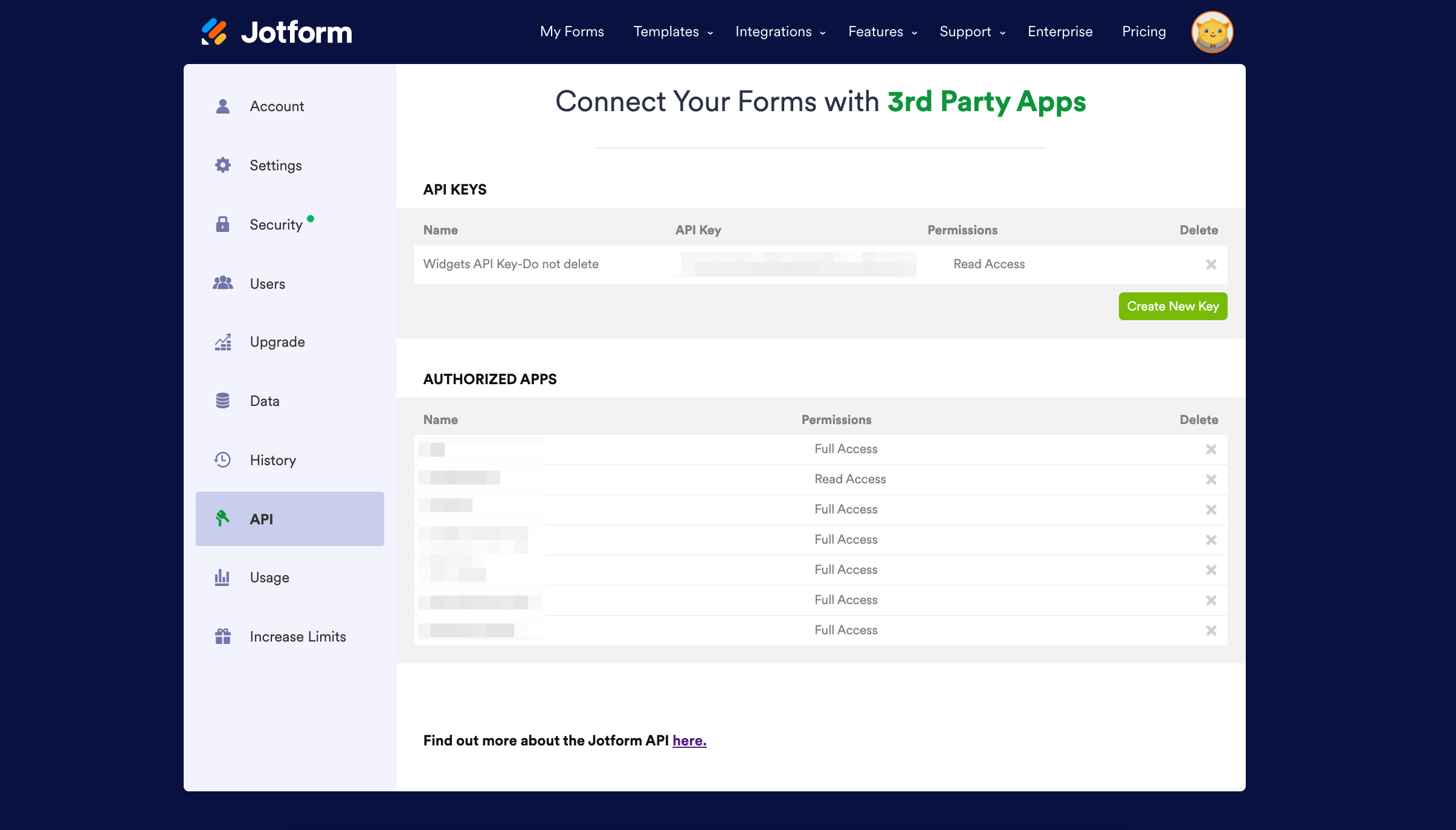
To get started using Jotform API you need a valid API key. Obtaining an API key is very simple.

*   **1.**Go to [My Account](https://www.jotform.com/myaccount/api)
*   **2.**Navigate to API Section
*   **3.**Create a new API Key

[![Image 1: My Account API Settings](https://cdn.jotfor.ms/assets/apidocs/my-account-api.png)](https://www.jotform.com/myaccount/api)
Get started with the Jotform API by using an API library in the language of your choice. See [libraries](https://www.jotform.com/apidocs-v1/?jfNext=1#libraries) section for a complete list.

## Authentication

The Jotform API supports more than one authentication method to simplify the authentication process in different programming languages.

### 1. Authenticate with Query Parameters

You can send your API Key with your query as a parameter 

**GET** An example call to get user details

`curl -X GET "https://api.jotform.com/user?apiKey={myApiKey}"`

**POST** An example call to setup a new webhook

`curl -X POST -d "webhookURL=http://my.webhook.url/connect-to-DB.ext" -d "apiKey={myApiKey}" "https://api.jotform.com/v1/form/{myFormID}/webhooks"`

### 2. Authenticate with HTTP Headers

You can send your API Key with your query as a HTTP header 

An example call to get user details by HTTP header

`curl -H "APIKEY: {myApiKey}" "https://api.jotform.com/user"`
### 3. Authenticate with Javascript SDK

You can authenticate users through Jotform by using our Javascript SDK.

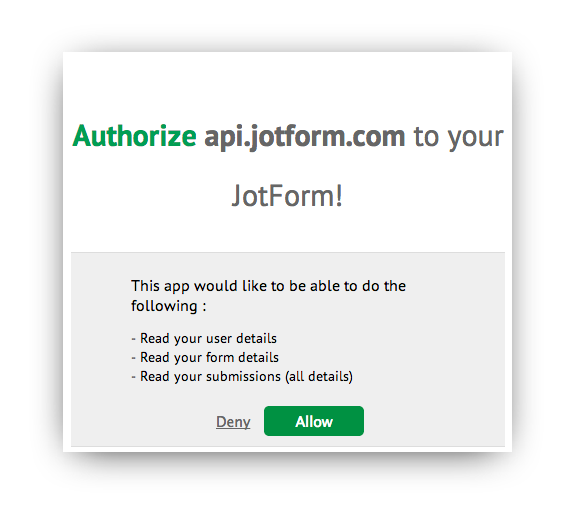
1. First, you should call JF.login() to launch a login form within an iFrame pop-up to prompt a user to sign-in. If the user authenticates successfully, (s)he will be asked to allow permissions to access to her account. You can pass callback functions to JF.login for both successful and failed authorizations.![Image 2: Authorize Window](https://cdn.jotfor.ms/assets/apidocs/authorizeWindow.png)


<script src="https://js.jotform.com/JotForm.js"></script>
<script>
//JF.login(success, error) method takes two optional arguments
//Both arguments should be function
//First argument will be called after successful login
//Second argument will be called if authorization fails
JF.login(
function success(){
JF.getForms(function(response){
for(var i=0; i<response.length; i++){
document.write( "<li> " + response[i].title);
}
});
},
function error(){
window.alert("Could not authorize user");
}
);
</script>


2. At this point, we can use the API to perform actions. But, what if we want to be able to store this authentication so that we can use it in the future? To be able to do that, you need to get the user's API key and save it in your servers. In order to obtain API key from SDK, call JF.getAPIKey method.


var apiKey = JF.getAPIKey();
console.log(apiKey); //should log currently used API key


Once you have the API key, you can call JF.initialize({apiKey: "123456789"}) and then call any other API methods. Note that JF.login method will automatically call initialize method after successful login.

`JF.initialize( {apiKey: "123456789"} );`

Login with Jotform

## Libraries

### Github Repositories

**Android :**[https://github.com/jotform/jotform-api-android](https://github.com/jotform/jotform-api-android) - [ZIP](https://github.com/jotform/jotform-api-android/archive/master.zip) or [Tarball](https://github.com/jotform/jotform-api-android/archive/master.tar.gz)

**C# :**[https://github.com/jotform/jotform-api-csharp](https://github.com/jotform/jotform-api-csharp) - [ZIP](https://github.com/jotform/jotform-api-csharp/archive/master.zip) or [Tarball](https://github.com/jotform/jotform-api-csharp/archive/master.tar.gz)

**GO :**[https://github.com/jotform/jotform-api-go](https://github.com/jotform/jotform-api-go) - [ZIP](https://github.com/jotform/jotform-api-go/archive/master.zip) or [Tarball](https://github.com/jotform/jotform-api-go/archive/master.tar.gz)

**iOS :**[https://github.com/jotform/jotform-api-ios](https://github.com/jotform/jotform-api-ios) - [ZIP](https://github.com/jotform/jotform-api-ios/archive/master.zip) or [Tarball](https://github.com/jotform/jotform-api-ios/archive/master.tar.gz)

**Java :**[https://github.com/jotform/jotform-api-java](https://github.com/jotform/jotform-api-java) - [ZIP](https://github.com/jotform/jotform-api-java/archive/master.zip) or [Tarball](https://github.com/jotform/jotform-api-java/archive/master.tar.gz)

**NodeJS :**[https://github.com/jotform/jotform-api-nodejs](https://github.com/jotform/jotform-api-nodejs) - [ZIP](https://github.com/jotform/jotform-api-nodejs/archive/master.zip) or [Tarball](https://github.com/jotform/jotform-api-nodejs/archive/master.tar.gz)

**PHP :**[https://github.com/jotform/jotform-api-php](https://github.com/jotform/jotform-api-php) - [ZIP](https://github.com/jotform/jotform-api-php/archive/master.zip) or [Tarball](https://github.com/jotform/jotform-api-php/archive/master.tar.gz)

**Python :**[https://github.com/jotform/jotform-api-python](https://github.com/jotform/jotform-api-python) - [ZIP](https://github.com/jotform/jotform-api-python/archive/master.zip) or [Tarball](https://github.com/jotform/jotform-api-python/archive/master.tar.gz)

**Ruby :**[https://github.com/jotform/jotform-api-ruby](https://github.com/jotform/jotform-api-ruby) - [ZIP](https://github.com/jotform/jotform-api-ruby/archive/master.zip) or [Tarball](https://github.com/jotform/jotform-api-ruby/archive/master.tar.gz)

**Scala :**[https://github.com/jotform/jotform-api-scala](https://github.com/jotform/jotform-api-scala) - [ZIP](https://github.com/jotform/jotform-api-scala/archive/master.zip) or [Tarball](https://github.com/jotform/jotform-api-scala/archive/master.tar.gz)

* * *

### Installation Notes

**PHP Client Library**

Simply download _Jotform.php_ into your application path and include in your php file as:

include "../Jotform.php";
More info available on [repository page at Github](https://github.com/jotform/jotform-api-php).

**Python Client Library**

There is currently no package submitted to PyPi. You need to download and import _jotform.py_ as follows.

from jotform import JotformAPIClient
More info available on [repository page at Github](https://github.com/jotform/jotform-api-python).

**Java Client Library**

Java client library is not available as a '.jar' file so you have to copy the folder structure of Jotform Java package into your project. Jotform API Java client uses _Apache HTTP Client 4.2.5_ and _org.json_ packages. So in order to work with the api client you need to add them to your project.

First check out the git repository and add the following files into your src folder as:

/src/com/jotform/api/JotformAPIWrapper.java
/src/com/jotform/api/JotformException.java
/src/com/jotform/api/samples/GetTodaysSubmissions.java
/src/com/jotform/api/samples/PrintFormList.java
/src/org/json/JSONArray.java
/src/org/json/JSONException.java
/src/org/json/JSONObject.java
/src/org/json/JSONString.java
/src/org/json/JSONStringer.java
/src/org/json/JSONTokener.java
/src/org/json/JSONWriter.java
Then copy the contents of the _/lib/_ folder into your project with the same path.

/lib/commons-logging-1.1.1.jar
/lib/httpclient-4.2.5.jar
/lib/httpcore-4.2.4.jar
Then you will need to add these _.jar_ s into your buildpath. If you are using eclipse, you can simply right click on each jar file and click Build Path->Add To Build Path. If the jars are not visible in your project explorer even though you copied them into your _lib/_ folder, try right clicking on your project in Package Explorer and then clicking refresh.

More information available on [repository page at Github](https://github.com/jotform/jotform-api-php).

**Javascript Client Library**Copy and paste the script below to your page<script src="https://js.jotform.com/JotForm.js"></script>**NodeJS Client Library**npm install jotform
More information available on [repository page at Github](https://github.com/jotform/jotform-api-nodejs).

## Use cases

You can find some use cases in **[API Use Cases Repository](https://github.com/jotform/api-use-cases)**

*   **[Calculate Survey Result Percentages](https://github.com/jotform/api-use-cases/blob/master/simple.survey.tool.php)** : Example written with API PHP library to calculate the percentages of star rates/radio buttons in the form submissions.
*   **[Download your submissions' uploaded files](https://github.com/jotform/api-use-cases/tree/master/ruby-uploaded-files-downloader)** to your computer, implemented with Ruby.
*   **[Combine Submissions](https://github.com/jotform/api-use-cases/tree/master/combine-submissions)** from different forms into one .csv file. Implemented with JavaScript and PHP.
*   **[Contribution Map](https://github.com/jotform/api-use-cases/tree/master/submission-country-map)** : See where submissions come from. Implemented with JavaScript only.
*   **[Jotform Views](https://github.com/jotform/api-use-cases/tree/master/submission-view)** : List and display Submissions blended with your imagination. Made so easy. Implemented with JavaScript and PHP.
*   **[Populate Fields](https://github.com/jotform/api-use-cases/tree/master/populate-fields)** : A script that creates urls to prepopulate your forms with your desired values. Implemented with JavaScript.
*   **[Answer Comparator](https://github.com/jotform/api-use-cases/tree/master/answer-comparator)** : This script compares the current form entries to those that have already been submitted by previous users. Implemented with JavaScript and PHP.
*   **[Import Submissions](https://github.com/jotform/api-use-cases/tree/master/import-submissions)** : This script imports data from .CSV and Microsoft Excel files and submits them to Jotform via the PHP API. Implemented with JavaScript and PHP.

_Do you have an use case to share with us? Fork our [repository](https://github.com/jotform/api-use-cases), commit your code and open a pull request!_

_Do you want us to implement examples for you? [Contact Us](https://www.jotform.com/contact/) and let us know your request!_

## FAQ

### What is Jotform API?

Jotform API allows you to access your Jotform account, forms and form submissions. Writing applications, integrations and scripts with Jotform API is very easy since it is based on REST principles. Code samples are also available on most common languages such as PHP, Java, Python, NodeJS and GO.
### What are the most common uses for Jotform API?

*   Integration with a 3rd party app to process existing form submission data, or to receive submission notifications with webhooks. 
*   Mobile frontend apps for Jotform. 
*   To Process form submission data to with your own scripts. 

### What is covered in Version 1?

Jotform API v1 is mostly read only. You can get information about the Jotform user and forms. You can also download existing form data.
### Are there any restrictions?

API Keys are limited to:*   1000 requests per day for the **starter** plan
*   10000 requests per day for the **bronze** plan
*   50000 requests per day for the **silver** plan
*   100000 requests per day for the **gold** plan
**[Jotform Enterprise](https://www.jotform.com/enterprise/?jtm_medium=referral&jtm_source=api.jotform.com/docs/&jtm_content=unlimited_api_calls&jtm_campaign=enterprise_cta)** has no limits to the number of daily API calls.

You can get more information about the limits from our article [Daily API Call Limits](https://www.jotform.com/help/406-daily-api-call-limits/).

If you need your limits to be increased please [contact us](https://www.jotform.com/contact/).
### Where can I get an API Key?

You can get your Jotform API Key from [API section](https://www.jotform.com/myaccount/api) at My Account.
### Does Jotform API supports JSONP?

Yes, Jotform API supports JSONP requests. You can simply add "callback" variable with your callback function's name to your API requests.

Example usage: [https://api.jotform.com/user?apiKey={APIKey}&callback=myCallBackFunction](https://api.jotform.com/user?apiKey={APIKey}&callback=myCallBackFunction)

If you have any further question, please [contact](https://www.jotform.com/contact/) API Team.

## GET/user

### Get User Information

Get user account details for this Jotform user. Including user account type, avatar URL, name, email, website URL.

`curl -X GET "https://api.jotform.com/user?apiKey={apiKey}"`


$jotformAPI = new JotForm("YOUR API KEY");
$userInfo = $jotformAPI->getUser();


JotformAPIClient client = new JotformAPIClient("YOUR API KEY");
JSONObject userInfo = client.getUser();


jotformAPI = JotformAPIClient("YOUR API KEY")
userInfo = jotformAPI.get_user()


var jf = require("Jotform");
jf.options({
debug: true,
apiKey: "YOUR_API_KEY"
});
jf.getUser()
.then(function(r){
/**
successful response including user information
.
*/
})
.fail(function(e){
/*
error during request or not authenticated
*/
});


client := jotform.NewJotFormAPIClient("YOUR API KEY", "OUTPUT TYPE", "DEBUG MODE")
userInfo := client.GetUser()


JF.getUser(function(response){
/**
successful response including user information
.
*/
document.write(response.username);
});


var jotformAPIClient = new JotForm.APIClient("YOUR API CODE");
var userInfo = jotformAPIClient.getUser();


jotform = JotForm.new("APIKey")
userInfo = jotform.getUser()


val client = new JotForm()
client.setAPIKey("YOUR API KEY")
val userInfo = client.getUser()


[Sample Response](https://www.jotform.com/apidocs-v1/?jfNext=1)

*   Minimize

*   **username**, **name**, **email**, **website**, **avatarUrl** and **company** are basic user account details.

*   **time_zone** is in [IANA format](http://en.wikipedia.org/wiki/List_of_IANA_time_zones).
*   **account_type** list can be seen in [Pricing page](http://www.jotform.com/pricing/). 
*   **status** can be ACTIVE, DELETED or SUSPENDED
*   **created_at**: YYYY-MM-DD HH:MM:SS
*   **updated_at**: YYYY-MM-DD HH:MM:SS
*   You should append API Key (or authenticate with header/cookie) to the **usage** URL to get the monthly usage details for a user.

*   **limit-left** is the number of daily api calls you can make.


{
"responseCode": 200,
"message": "success",
"content": {
"username": "johnsmith",
"name": "John Smith",
"email": "john@example.com",
"website": "http://www.jotform.com",
"time_zone": "America/New_York",
"account_type": "http://api.jotform.com/system/plan/PREMIUM",
"status": "ACTIVE",
"created_at": "2013-06-24 18:43:21",
"updated_at": "2013-06-25 19:01:52",
"is_verified": "1",
"usage": "http://api.jotform.com/user/usage",
"industry": "Web Development",
"securityAnswer": "",
"company": "Interlogy, LLC",
"securityQuestion": "",
"webhooks": "[\"http://www.example.com/instant_submission_notification.php\"]",
"doNotClone": "0",
"folderLayout": "{\"rootFolderID\":{\"nodes\":{\"folderID\":{\"nodes\":[]},\"folderID\":{\"nodes\":[]},}}}",
"language": "en-US",
"avatarUrl": "http://gravatar.com/avatar/c3308f0feb2f350cded9222f83fb9363",
},
"limit-left": 4999
}


Parameter Description Test Console
**apikey**

String Jotform User API Key 

[Get a new API Key](https://www.jotform.com/myaccount/api)
[Try it out](https://www.jotform.com/apidocs-v1/?jfNext=1)

##### Response Body

##### Response Code

##### Response Headers

##### Request URL

## GET/user/usage

### Get Monthly User Usage

Get number of form submissions received this month. Also, get number of SSL form submissions, payment form submissions and upload space used by user.

`curl -X GET "https://api.jotform.com/user/usage?apiKey={apiKey}"`


$jotformAPI = new JotForm("YOUR API KEY");
$usage = $jotformAPI->getUsage();


JotformAPIClient client = new JotformAPIClient("YOUR API KEY");
JSONObject usage = client.getUsage();


jotformAPI = JotformAPIClient("YOUR API KEY")
usage = jotformAPI.get_usage()


var jf = require("Jotform");
jf.options({
debug: true,
apiKey: "YOUR_API_KEY"
});
jf.getUsage()
.then(function(r){
/**
successful response including user usage data
.
*/
})
.fail(function(e){
/*
error during request or not authenticated
*/
});


client := jotform.NewJotFormAPIClient("YOUR API KEY", "OUTPUT TYPE", "DEBUG MODE")
usage := client.GetUsage()


JF.getUsage(function(response){
/**
successful response including user usage data
.
*/
document.write(response.submissions);
});


var jotformAPIClient = new JotForm.APIClient("YOUR API CODE");
var usage = jotformAPIClient.getUsage();


jotform = JotForm.new("APIKey")
usage = jotform.getUsage()


val client = new JotForm()
client.setAPIKey("YOUR API KEY")
val usage = client.getUsage()


[Sample Response](https://www.jotform.com/apidocs-v1/?jfNext=1)

*   Minimize

*   Number of **submissions** received this month
*   Number of secure submissions received this month
*   Number of payment submissions received this month
*   Total disk space used for uploaded files. In bytes.
*   Number of **mobile submissions** received this month
*   Number of form **views** received this month
*   Number of **api** calls used today.

*   **limit-left** is the number of daily api calls you can make.


{
"responseCode": 200,
"message": "success",
"content": {
"submissions": "478",
"ssl_submissions": "234",
"payments": "35",
"uploads": "31246868",
"mobile_submissions": "21",
"views": "2014",
"api": "14",
},
"limit-left": 4986
}


Parameter Description Test Console
**apikey**

String Jotform User API Key 

[Get a new API Key](https://www.jotform.com/myaccount/api)
[Try it out](https://www.jotform.com/apidocs-v1/?jfNext=1)

##### Response Body

##### Response Code

##### Response Headers

##### Request URL

## GET/user/submissions

### Get User Submissions

Get a list of all submissions for all forms on this account. The **answers** array has the submission data. Created_at is the date of the submission.

`curl -X GET "https://api.jotform.com/user/submissions?apiKey={apiKey}"`


$jotformAPI = new JotForm("YOUR API KEY");
$submissions = $jotformAPI->getSubmissions();


JotformAPIClient client = new JotformAPIClient("YOUR API KEY");
JSONObject submissions = client.getSubmissions();


jotformAPI = JotformAPIClient("YOUR API KEY")
submissions = jotformAPI.get_submissions()


var jf = require("Jotform");
jf.options({
debug: true,
apiKey: "YOUR_API_KEY"
});
jf.getSubmissions()
.then(function(r){
/**
successful response including user submissions data
.
*/
})
.fail(function(e){
/*
error during request or not authenticated
*/
});


client := jotform.NewJotFormAPIClient("YOUR API KEY", "OUTPUT TYPE", "DEBUG MODE")
submissions := client.GetSubmissions()


JF.getSubmissions(function(response){
/**
successful response including user submissions data
.
*/
for(var i=0; i<response.length; i++){
document.write(response[i].form_id);
}
});


var jotformAPIClient = new JotForm.APIClient("YOUR API CODE");
var submissions = jotformAPIClient.getSubmissions();


jotform = JotForm.new("APIKey")
submissions = jotform.getSubmissions()


val client = new JotForm()
client.setAPIKey("YOUR API KEY")
val submissions = client.getSubmissions()


[Sample Response](https://www.jotform.com/apidocs-v1/?jfNext=1)

*   Minimize

*   **id** is the Submission ID

*   **ip** address of the submitter
*   **created_at**, **updated_at**: YYYY-MM-DD HH:MM:SS

*   **status** can be ACTIVE or OVERQUOTA
*   **new** is 1 if this submission is not read

*   **text** is the question label on the form
*   **type** is the question type such as textbox or dropdown
*   **answer** is the actual entry made by the submitter

*   Most commonly used **type**s are control_textbox, control_textarea, control_dropdown control_radio, control_checkbox, control_fileupload, control_fullname, control_email and control_datetime.[Full List](https://www.jotform.com/help/46-quick-overview-of-form-fields/)

*   **offset** is start of each result set for submission data.
*   **limit** is number of results in each result set for submission data.
*   **orderby** orders results by a submission field name.
*   **filter** filters the query results to fetch a specific submissions range.

*   **count** is total number of results returned by the API

*   **limit-left** is the number of daily api calls you can make.


{
"responseCode": 200,
"message": "success",
"content": [{
"id": "237955080346633702",
"form_id": "31751954731962",
"ip": "123.123.123.123",
"created_at": "2013-06-25 03:38:00",
"updated_at": "2013-06-27 04:58:00",
"status": "ACTIVE",
"new": "1",
"answers": {
"3": {
"text": "Name",
"type":"control_fullname",
"answer": {
"first": "Bart",
"last": "Simpson"
},
"prettyFormat": "Bart Simpson"
},
"4": {
"text": "Your Message",
"type": "control_textarea",
"answer":"¡Ay, caramba!"
}
}],
"resultSet": {
"offset": 0,
"limit": 100,
"orderby": "id",
"filter": {
"new": "1"
},
"count": 100
},
"limit-left": 9991
}


Parameter Description Test Console
**apikey**

String Jotform User API Key 

[Get a new API Key](https://www.jotform.com/myaccount/api)
[Show Optional Fields](https://www.jotform.com/apidocs-v1/?jfNext=1)
**offset**

Number Start of each result set for submission data. Useful for pagination. Default is 0.

Example: 20
**limit**

Number Number of results in each result set for submission data. Default is 20. Maximum is 1000.

Example: 30
**filter**

jsonString Filters the query results to fetch a specific submissions range.

Example: {"new":"1"} 

 You can also use gt(greater than), lt(less than), ne(not equal to), formIDs and fullText commands to get more advanced filtering :

 Example: {"created_at:gt":"2013-01-01 00:00:00"}

 Example: {"formIDs":["your-form-id","your-form-id#2"]}

 Example: {"fullText":"John Brown"}
**orderby**

Enum Order results by a submission field name: id, form_id, IP, created_at, status, new, flag, updated_at.

Example: created_at
[Try it out](https://www.jotform.com/apidocs-v1/?jfNext=1)

##### Response Body

##### Response Code

##### Response Headers

##### Request URL

## GET/user/subusers

### Get Sub-User Account List

Get a list of sub users for this accounts and list of forms and form folders with access privileges.

`curl -X GET "https://api.jotform.com/user/subusers?apiKey={apiKey}"`


$jotformAPI = new JotForm("YOUR API KEY");
$subusers = $jotformAPI->getSubusers();


JotformAPIClient client = new JotformAPIClient("YOUR API KEY");
JSONObject subusers = client.getSubUsers();


jotformAPI = JotformAPIClient("YOUR API KEY")
subusers = jotformAPI.get_subusers()


var jf = require("Jotform");
jf.options({
debug: true,
apiKey: "YOUR_API_KEY"
});
jf.getSubusers()
.then(function(r){
/**
successful response including user subusers data
.
*/
})
.fail(function(e){
/*
error during request or not authenticated
*/
});


client := jotform.NewJotFormAPIClient("YOUR API KEY", "OUTPUT TYPE", "DEBUG MODE")
subusers := client.GetSubusers()


JF.getSubUsers(function(response){
/**
successful response including user subusers data
.
*/
for(var i=0; i<response.length; i++){
document.write(response[i].username);
}
})


var jotformAPIClient = new JotForm.APIClient("YOUR API CODE");
var subusers = jotformAPIClient.getSubusers();


jotform = JotForm.new("APIKey")
subusers = jotform.getSubusers()


val client = new JotForm()
client.setAPIKey("YOUR API KEY")
val subusers = client.getSubusers()


[Sample Response](https://www.jotform.com/apidocs-v1/?jfNext=1)

*   Minimize

*   **owner** the parent account that created this sub-user.
*   **status** can be LIVE, DELETED or PENDING. If the user has not accepted the invitation sub-user is in PENDING status.
*   **created_at**: YYYY-MM-DD HH:MM:SS 

*   **type** can be FORM, FOLDER or ALL. 
*   **resource_id** is form ID or folder ID, depending on **type**.
*   **access_type** is full or readOnly. readOnly means form cannot be changed by the sub-user. Only submissions can be viewed.

*   **limit-left** is the number of daily api calls you can make.


{
"responseCode": 200,
"message": "success",
"content": [{
"owner": "johnsmith",
"status": "LIVE",
"email": "john@example.com",
"username": "fredsmith",
"created_at": "2013-06-25 03:38:00",
"permissions": [{
"type": "FORM",
"resource_id": "22911182663957",
"access_type": "full",
"title":"Contact Us"
}],
"limit-left": 9991
}


Parameter Description Test Console
**apikey**

String Jotform User API Key 

[Get a new API Key](https://www.jotform.com/myaccount/api)
[Try it out](https://www.jotform.com/apidocs-v1/?jfNext=1)

##### Response Body

##### Response Code

##### Response Headers

##### Request URL

## GET/user/folders

### Get User Folders

Get a list of form folders for this account. Returns name of the folder and owner of the folder for shared folders. (**IMPORTANT: This endpoint is deprecated. Refer to the 'label' endpoints section for the updated endpoints.**)

`curl -H "APIKEY: {apiKey}" "https://api.jotform.com/user/folders"`


$jotformAPI = new JotForm("YOUR API KEY");
$folders = $jotformAPI->getFolders();


JotformAPIClient client = new JotformAPIClient("YOUR API KEY");
JSONObject folders = client.getFolders();


jotformAPI = JotformAPIClient("YOUR API KEY")
folders = jotformAPI.get_folders()


var jf = require("Jotform");
jf.options({
debug: true,
apiKey: "YOUR_API_KEY"
});
jf.getFolders()
.then(function(r){
/**
successful response including user folders array
.
*/
})
.fail(function(e){
/*
error during request or not authenticated
*/
});


client := jotform.NewJotFormAPIClient("YOUR API KEY", "OUTPUT TYPE", "DEBUG MODE")
folders := client.GetFolders()


JF.getFolders(function(response){
/**
successful response including user folders array
.
*/
document.write(response.name);
});


var jotformAPIClient = new JotForm.APIClient("YOUR API CODE");
var folders = jotformAPIClient.getFolders();


jotform = JotForm.new("APIKey")
folders = jotform.getFolders()


val client = new JotForm()
client.setAPIKey("YOUR API KEY")
val folders = client.getFolders()


[Sample Response](https://www.jotform.com/apidocs-v1/?jfNext=1)

*   Minimize

*   **id** is folder ID.
*   **path** is list of folders above this folder separated with comma.

*   **parent** is the next folder above. If this folder is a root folder parent returns itself.
*   **forms** lists all forms under this folder.

*   **subfolders** lists all folders under this folder.

*   **limit-left** is the number of daily api calls you can make.


{
"responseCode": 200,
"message": "success",
"content": {
"id": "507eb4d2ceae3f9674000000",
"path": "507eb4d2ceae3f9674000000",
"owner": "johnsmith",
"name": "Contact Forms",
"parent": "507eb4d2ceae3f9674000000",
"color": "rgb(94,94,94)",
"forms": {
"31504059977966":
{
"id":"31504059977966",
"username":"johnsmith",
"title":"Contact Us",
"height":"501",
"status":"ENABLED",
"created_at":"2012-12-21 12:12:09",
"updated_at":"2013-04-12 02:16:44",
"new":"11",
"count":"11",
"source":"",
"slug":"23554898332968",
"url":"http://form.jotformpro.com/form/31504059977966"
}
},
"subfolders": [
{
"id": "907eb4d2ceae3f9674000000",
"path": "507eb4d2ceae3f9674000000,907eb4d2ceae3f9674000000",
"owner": "johnsmith",
"name": "Special Contact Forms",
"parent": "507eb4d2ceae3f9674000000",
"color": "rgb(95,95,95)",
"forms": [],
"subfolders": []
}
]
}
"limit-left": 4985
}


Parameter Description Test Console
**apikey**

String Jotform User API Key 

[Get a new API Key](https://www.jotform.com/myaccount/api)
[Try it out](https://www.jotform.com/apidocs-v1/?jfNext=1)

##### Response Body

##### Response Code

##### Response Headers

##### Request URL

## GET/user/reports

### Get User Reports

List of URLS for reports in this account. Includes reports for all of the forms. ie. Excel, CSV, printable charts, embeddable HTML tables.

`curl -X GET "https://api.jotform.com/user/reports?apiKey={apiKey}"`


$jotformAPI = new JotForm("YOUR API KEY");
$reports = $jotformAPI->getReports();


JotformAPIClient client = new JotformAPIClient("YOUR API KEY");
JSONObject reports = client.getReports();


jotformAPI = JotformAPIClient("YOUR API KEY")
reports = jotformAPI.get_reports()


var jf = require("Jotform");
jf.options({
debug: true,
apiKey: "YOUR_API_KEY"
});
jf.getReports()
.then(function(r){
/**
successful response including user reports data
.
*/
})
.fail(function(e){
/*
error during request or not authenticated
*/
});


client := jotform.NewJotFormAPIClient("YOUR API KEY", "OUTPUT TYPE", "DEBUG MODE")
reports := client.GetReports()


JF.getReports(function(response){
/**
successful response including user reports data
.
*/
for(var i=0; i<response.length; i++){
document.write(response[i].title);
}
});


var jotformAPIClient = new JotForm.APIClient("YOUR API CODE");
var reports = jotformAPIClient.getReports();


jotform = JotForm.new("APIKey")
reports = jotform.getReports()


val client = new JotForm()
client.setAPIKey("YOUR API KEY")
val reports = client.getReports()


[Sample Response](https://www.jotform.com/apidocs-v1/?jfNext=1)

*   Minimize

*   **id** is report ID.

*   **created_at**, **updated_at**: YYYY-MM-DD HH:MM:SS

*   **fields** is a comma separated list of all fields.
*   **list_type** can be excel, csv, grid, table, calendar, rss or visual.
*   **status** can be ENABLED or DELETED

*   **isProtected** is true if password protected

*   **limit-left** is the number of daily api calls you can make.


{
"responseCode": 200,
"message": "success",
"content": [{
"id": "31673586029057",
"form_id": "31673104360950",
"title": "Report",
"created_at":"2013-06-17 08:11:49",
"updated_at":"2013-06-17 08:14:49",
"fields": "ip,dt,3,4",
"list_type": "excel",
"status": "ENABLED",
"url": "http://www.jotform.com/excel/31672077425051",
"isProtected": false
}],
"limit-left": 4985
}


Parameter Description Test Console
**apikey**

String Jotform User API Key 

[Get a new API Key](https://www.jotform.com/myaccount/api)
[Try it out](https://www.jotform.com/apidocs-v1/?jfNext=1)

##### Response Body

##### Response Code

##### Response Headers

##### Request URL

## POST/user/login

### Login user with given credentials

`curl -X POST -d "username=Username" -d "password=Password" -d "appName=Application Name" -d "access=Access Type" "https://api.jotform.com/user/login"`


$jotformAPI = new JotForm();
$creadentials = array(
"username" => "Username",
"password" => "Password",
"appName" => "Application Name",
"access" => "Access Type",
);
$response = $jotformAPI->loginUser($creadentials);


JotformAPIClient client = new JotformAPIClient();
HashMap<String, String> credentials = new HashMap<String, String>();
credentials.put("username", "Username");
credentials.put("password", "Password");
credentials.put("appName", "Application Name");
credentials.put("access", "Access Type");
JSONObject response = client.loginUser(credentials);


jotformAPI = JotformAPIClient()
credentials = {'username': 'Username', 'password': 'Password', 'appName': 'Application Name', 'access': 'Access Type'}
response = jotformAPI.login_user(credentials)


client := jotform.NewJotFormAPIClient("", "OUTPUT TYPE", "DEBUG MODE")
credentials := make(map[string]string)
credentials["username"] = "Username"
credentials["password"] = "Password"
credentials["appName"] = "Application Name"
credentials["access"] = "Access Type"
response := client.LoginUser(credentials)


var user = {
username: 'Username',
password: 'Password',
appName: 'Application Name',
access: 'Access type'
};
JF.userLogin(user, function(response){
/**
successful response including the logged in user
.
*/
document.write(response.username);
});


var jotformAPIClient = new JotForm.APIClient();
Dictionary<string, string> credentials = new Dictionary<string, string>();
credentials.Add("username", "Username");
credentials.Add("password", "Password");
credentials.Add("appName", "Application Name");
credentials.Add("access", "Access Type");
var response = jotformAPIClient.loginUser(credentials);


jotform = JotForm.new("APIKey")
credentials = {
'username' => 'Username',
'password' => 'Password',
'appName' => 'Application Name',
'access' => 'Access Type'
}
response = jotform.loginUser(credentials)


val client = new JotForm()
val credentials = Map("username" -> "Username", "password" -> "Password" ,"appName" -> "Application Name", "access" -> "Access Type")
val response = client.loginUser(credentials)


[Sample Response](https://www.jotform.com/apidocs-v1/?jfNext=1)

*   Minimize

*   **username**, **name**, **email**, **website**, **avatarUrl**, **company**, **industry**, **security question** and **security answer** are basic user account details.

*   **time_zone** is in [IANA format](http://en.wikipedia.org/wiki/List_of_IANA_time_zones).
*   **account_type** list can be seen in [Pricing page](http://www.jotform.com/pricing/). 
*   **status** can be ACTIVE, DELETED or SUSPENDED
*   **created_at**, **updated_at**: YYYY-MM-DD HH:MM:SS
*   1 if you verified your account otherwise 0
*   You should append API Key (or authenticate with header/cookie) to the **usage** URL to get the monthly usage details for a user.


{
"responseCode": 200,
"message": "success",
"content": {
"username": "johnsmith",
"name": "John Smith",
"email": "john@example.com",
"website": "http://www.jotform.com",
"time_zone": "America/New_York",
"account_type": "http://api.jotform.com/system/plan/PREMIUM",
"status": "ACTIVE",
"created_at": "2013-06-24 18:43:21",
"updated_at": "2013-06-25 19:01:52",
"is_verified": "0",
"usage": "http://api.jotform.com/user/usage",
"industry": "",
"securityAnswer": "",
"company": "Interlogy, LLC",
"securityQuestion": "",
"avatarUrl": "http://gravatar.com/avatar/c3308f0feb2f350cded9222f83fb9363",
"appKey": "APP KEY"
}
}


Parameter Description Test Console
**username**

String User's username
**password**

String User's password
[Show Optional Fields](https://www.jotform.com/apidocs-v1/?jfNext=1)
**appName**

String Your application name
**access**

String Full access able to do write operations, but readOnly just for reading operations
[Try it out](https://www.jotform.com/apidocs-v1/?jfNext=1)

##### Response Body

##### Response Code

##### Response Headers

##### Request URL

## GET/user/logout

### Logout user

`curl -X GET "https://api.jotform.com/v1/user/logout"`


$jotformAPI = new JotForm();
$response = $jotformAPI->logoutUser();


JotformAPIClient client = new JotformAPIClient();
JSONObject response = client.logoutUser();


jotformAPI = JotformAPIClient()
response = jotformAPI.logout_user()


client := jotform.NewJotFormAPIClient("", "OUTPUT TYPE", "DEBUG MODE")
response := client.LogoutUser()


`JF.logout();`


var jotformAPIClient = new JotForm.APIClient();
var response = jotformAPIClient.logoutUser();


jotform = JotForm.new("APIKey")
response = jotform.logoutUser()


val client = new JotForm()
val response = client.logoutUser()


[Sample Response](https://www.jotform.com/apidocs-v1/?jfNext=1)

*   Minimize


{
"responseCode": 200,
"message": "success",
"content": true
}


Parameter Description Test Console
**No parameter needed**
[Try it out](https://www.jotform.com/apidocs-v1/?jfNext=1)

##### Response Body

##### Response Code

##### Response Headers

##### Request URL

## GET/user/settings

### Get User Settings

Get user's time zone and language.

`curl -X GET "https://api.jotform.com/user/settings?apiKey={apiKey}"`


$jotformAPI = new JotForm("YOUR API KEY");
$settings = $jotformAPI->getSettings();


JotformAPIClient client = new JotformAPIClient("YOUR API KEY");
JSONObject settings = client.getSettings();


jotformAPI = JotformAPIClient("YOUR API KEY")
settings = jotformAPI.get_settings()


var jf = require("Jotform");
jf.options({
debug: true,
apiKey: "YOUR_API_KEY"
});
jf.getSettings()
.then(function(r){
/**
successful response including user settings data
.
*/
})
.fail(function(e){
/*
error during request or not authenticated
*/
});


client := jotform.NewJotFormAPIClient("YOUR API KEY", "OUTPUT TYPE", "DEBUG MODE")
settings := client.GetSettings()


JF.getSettings(function(response){
/**
successful response including user settings data
.
*/
document.write(response.time_zone);
});


var jotformAPIClient = new JotForm.APIClient("YOUR API CODE");
var settings = jotformAPIClient.getSettings();


jotform = JotForm.new("APIKey")
settings = jotform.getSettings()


val client = new JotForm()
client.setAPIKey("YOUR API KEY")
val settings = client.getSettings()


[Sample Response](https://www.jotform.com/apidocs-v1/?jfNext=1)

*   Minimize

*   **username**, **name**, **email**, **website**, **avatarUrl** and **company** are basic user account details.

*   **time_zone** is in [IANA format](http://en.wikipedia.org/wiki/List_of_IANA_time_zones).
*   **account_type** list can be seen in [Pricing page](http://www.jotform.com/pricing/). 
*   **status** can be ACTIVE, DELETED or SUSPENDED
*   **created_at**, **updated_at**: YYYY-MM-DD HH:MM:SS

*   1 if you verified your account otherwise 0
*   You should append API Key (or authenticate with header/cookie) to the **usage** URL to get the monthly usage details for a user.

*   **limit-left** is the number of daily api calls you can make.


{
"responseCode": 200,
"message": "success",
"content": {
"username": "johnsmith",
"name": "John Smith",
"email": "john@example.com",
"website": "http://www.jotform.com",
"time_zone": "America/New_York",
"account_type": "http://api.jotform.com/system/plan/PREMIUM",
"status": "ACTIVE",
"created_at": "2013-06-24 18:43:21",
"updated_at": "2013-06-25 19:01:52",
"is_verified": "1",
"usage": "http://api.jotform.com/user/usage",
"industry": "Education",
"securityAnswer": "",
"company": "Interlogy, LLC",
"webhooks": "[\"ssl:\\/\\/gateway.sandbox.push.apple.com\"]",
"doNotClone": "0",
"avatarUrl": "http://www.gravatar.com/avatar/bf3438cb82e49ad6d37604bd1b23a9f7?s=50&d=identicon"
},
"limit-left": 4999
}


Parameter Description Test Console
**apikey**

String Jotform User API Key 

[Get a new API Key](https://www.jotform.com/myaccount/api)
[Try it out](https://www.jotform.com/apidocs-v1/?jfNext=1)

##### Response Body

##### Response Code

##### Response Headers

##### Request URL

## POST/user/settings

### Update User Settings

Update user's settings like time zone and language.

`curl -X POST -d "email=new@email.com" -d "website=www.newwebsite.com" "https://api.jotform.com/user/settings?apiKey={apiKey}"`


$jotformAPI = new JotForm("YOUR API KEY");
$settings = array(
'email' => 'new@email.com',
'website' => 'www.newwebsite.com',
);
$response = $jotformAPI->updateSettings($settings);


JotformAPIClient client = new JotformAPIClient("YOUR API KEY");
HashMap<String, String> settings = new HashMap<String, String>();
settings.put("email", "new@email.com");
settings.put("website", "www.newwebsite.com");
JSONObject response = client.updateSettings(settings);


jotformAPI = JotformAPIClient("YOUR API KEY")
settings = {'email': 'new@email.com', 'website': 'www.newwebsite.com'}
response = jotformAPI.update_settings(settings)


client := jotform.NewJotFormAPIClient("YOUR API KEY", "OUTPUT TYPE", "DEBUG MODE")
settings := make(map[string]string)
settings["email"] = "new@email.com"
settings["website"] = "www.newwebsite.com"
response := jotformAPI.UpdateSettings(settings)


/**
* Create settings object array
*/
var settings = {
time_zone: "UTC+08:00",
website: "http://www.example.com"
};
JF.updateSettings(settings, function(response){
/**
successful response including user updated settings data
*/
document.write(response.website);
});


var jotformAPIClient = new JotForm.APIClient("YOUR API CODE");
Dictionary<string, string> settings = new Dictionary<string, string>();
settings.Add("email", "new@email.com");
settings.Add("website", "www.newwebsite.com");
var response = jotformAPIClient.updateSettings(settings);


jotform = JotForm.new("APIKey")
settings = {
'email' => 'new@email.com',
'website' => 'www.newwebsite.com'
}
response = jotform.updateSettings(settings)


val client = new JotForm()
client.setAPIKey("YOUR API KEY")
val settings = Map("email" -> "new@email.com", "website" -> "http://www.newwebsite.com")
val response = client.updateSettings(settings)


[Sample Response](https://www.jotform.com/apidocs-v1/?jfNext=1)

*   Minimize

*   **username**, **name**, **email**, and**website** are basic user account details.

*   **time_zone** is in [IANA format](http://en.wikipedia.org/wiki/List_of_IANA_time_zones).
*   **account_type** list can be seen in [Pricing page](http://www.jotform.com/pricing/). 
*   **status** can be ACTIVE, DELETED or SUSPENDED
*   **created_at**, **updated_at**: YYYY-MM-DD HH:MM:SS

*   **limit-left** is the number of daily api calls you can make.


{
"responseCode": 200,
"message": "success",
"content": {
"username": "johndoe",
"name": null,
"email": null,
"website": "http://www.example.com",
"time_zone": "UTC+8:00",
"account_type": null,
"status": null,
"created_at": null,
"updated_at": null
},
"limit-left": 4999
}


Parameter Description Test Console
**apikey**

String Jotform User API Key 

[Get a new API Key](https://www.jotform.com/myaccount/api)
[Show Optional Fields](https://www.jotform.com/apidocs-v1/?jfNext=1)
**name**

String User's name

Example: John Smith
**email**

String User's email

Example: john@smith.com
**website**

String User's website

Example: www.johnsmith.com
**time_zone**

String User's time zone

Example: UTC
**company**

String User's company

Example: Interlogy, LLC.
**securityQuestion**

String User's security question

Example: What was your first car?
**securityAnswer**

String User's security answer

Example: Ford
**industry**

String User's industry

Example: Education
[Try it out](https://www.jotform.com/apidocs-v1/?jfNext=1)

##### Response Body

##### Response Code

##### Response Headers

##### Request URL

## GET/user/history

### Get History

User activity log about things like forms created/modified/deleted, account logins and other operations.

`curl -X GET "https://api.jotform.com/user/history?apiKey={apiKey}"`


$jotformAPI = new JotForm("YOUR API KEY");
$history = $jotformAPI->getHistory();


JotformAPIClient client = new JotformAPIClient("YOUR API KEY");
JSONObject history = client.getHistory();


jotformAPI = JotformAPIClient("YOUR API KEY")
history = jotformAPI.get_history()


var jf = require("Jotform");
jf.options({
debug: true,
apiKey: "YOUR_API_KEY"
});
jf.getHistory()
.then(function(r){
/**
successful response including user history records
.
*/
})
.fail(function(e){
/*
error during request or not authenticated
*/
});


client := jotform.NewJotFormAPIClient("YOUR API KEY", "OUTPUT TYPE", "DEBUG MODE")
settings := client.GetHistory()


JF.getHistory(function(response){
/**
successful response including user history records
.
*/
for(var i=0; i<response.length; i++){
document.write(response[i].type);
}
});


var jotformAPIClient = new JotForm.APIClient("YOUR API CODE");
var history = jotformAPIClient.getHistory();


jotform = JotForm.new("APIKey")
history = jotform.getHistory()


val client = new JotForm()
client.setAPIKey("YOUR API KEY")
val history = client.getHistory()


[Sample Response](https://www.jotform.com/apidocs-v1/?jfNext=1)

*   Minimize

*   **type** can be userCreation, userLogin, formCreation, formUpdate, formDelete or formPurge.

*   **timestamp** is number of seconds since Jan 1st, 1970.

*   **limit-left** is the number of daily api calls you can make.


{
"responseCode": 200,
"message": "success",
"content": [{
"type": "formCreation",
"formID": "31751954731962",
"username": "johnsmith",
"formTitle": "Untitled Form",
"formStatus": "ENABLED",
"ip": "123.123.123.123",
"timestamp": 1372145854
}],
"limit-left": 4999
}


Parameter Description Test Console
**apikey**

String Jotform User API Key 

[Get a new API Key](https://www.jotform.com/myaccount/api)
[Show Optional Fields](https://www.jotform.com/apidocs-v1/?jfNext=1)
**action**

Enum Filter results by activity performed. Default is 'all'.
**date**

Enum Limit results by a date range. If you'd like to limit results by specific dates you can use startDate and endDate fields **instead**.

Example: lastWeek
**sortBy**

Enum Lists results by ascending and descending order

Example: ASC
**startDate**

String Limit results to only after a specific date. Format: MM/DD/YYYY.

Example: 01/31/2013
**endDate**

String Limit results to only before a specific date. Format: MM/DD/YYYY.

Example: 12/31/2013
[Try it out](https://www.jotform.com/apidocs-v1/?jfNext=1)

##### Response Body

##### Response Code

##### Response Headers

##### Request URL

## GET/label/{id}

### Get Label Details

Get the details of a label, including its name and color.

`curl --location 'https://api.jotform.com/label/0196f1f4cd4d79b28676d71465ad1da806a8'`

[Sample Response](https://www.jotform.com/apidocs-v1/?jfNext=1)

*   Minimize

*   **id** is report ID.

*   **fields** is a comma separated list of all fields.
*   **list_type** can be excel, csv, grid, table, calendar, rss or visual.
*   **status** can be ENABLED or DELETED

*   **isProtected** is true if password protected

*   **limit-left** is the number of daily api calls you can make.


{
"responseCode": 200,
"message": "success",
"content": {
"id": "0196f1f4cd4d79b28676d71465ad1da806a8",
"name": "Finance Operations",
"order": "0",
"color": "#59BED2",
"created_at": "2025-05-15 04:23:32",
"updated_at":"2025-08-16 08:33:45",
"owner": "johnsmith",
"ownerType": "USER"
}
}


Parameter Description Test Console
**apikey**

String Jotform User API Key 

[Get a new API Key](https://www.jotform.com/myaccount/api)
**id**

String Label ID
[Try it out](https://www.jotform.com/apidocs-v1/?jfNext=1)

##### Response Body

##### Response Code

##### Response Headers

##### Request URL

## GET/label/{id}/resources

### Get Label Resources

Get a list of assets in a label and their associated information.

`curl --location 'https://api.jotform.com/label/01970c85084778e996bab3d509a148f0eda5/resources?offset=0&limit=30&orderby=created_at&status=active'`

[Sample Response](https://www.jotform.com/apidocs-v1/?jfNext=1)

*   Minimize

*   **id** is report ID.

*   **fields** is a comma separated list of all fields.
*   **list_type** can be excel, csv, grid, table, calendar, rss or visual.
*   **status** can be ENABLED or DELETED

*   **isProtected** is true if password protected

*   **limit-left** is the number of daily api calls you can make.


{
"responseCode": 200,
"message": "success",
"content": [
{
"id": "251453058472053",
"username": "johnsmith",
"title": "Form",
"height": "539",
"status": "ENABLED",
"created_at": "2025-05-26 08:15:38",
"updated_at": "2025-05-26 08:15:52",
"last_submission": null,
"new": "0",
"count": "0",
"type": "LEGACY",
"favorite": "0",
"archived": "0",
"assetType": "form",
"labels": "01970c85084778e996bab3d509a148f0eda5"
},
{
"id": "251453701279861",
"username": "johnsmith",
"title": "Workflow",
"status": "AUTODISABLED",
"created_at": "2025-05-26 08:32:06",
"updated_at": "2025-05-26 08:32:13",
"favorite": "0",
"type": "default",
"assetType": "workflow",
"labels": "01970c85084778e996bab3d509a148f0eda5"
},
{
"id": "251453041327852",
"username": "johnsmith",
"title": "App",
"status": "ENABLED",
"created_at": "2025-05-26 08:19:16",
"updated_at": "2025-05-26 08:19:26",
"slug": "251453041327852",
"type": "APP",
"assetType": "portal",
"labels": "01970c85084778e996bab3d509a148f0eda5"
}
]
}


Parameter Description Test Console
**apikey**

String Jotform User API Key 

[Get a new API Key](https://www.jotform.com/myaccount/api)
**id**

String Label ID
[Try it out](https://www.jotform.com/apidocs-v1/?jfNext=1)

##### Response Body

##### Response Code

##### Response Headers

##### Request URL

## POST/label

### Create Label

Create a label by defining attributes such as name and color.


curl --location --request POST 'https://api.jotform.com/label' \
-d 'name=IT Operations' -d 'color=#FFDC7B' -d 'parent=01970c85084778e996bab3d509a148f0eda5' \


[Sample Response](https://www.jotform.com/apidocs-v1/?jfNext=1)

*   Minimize

*   **id** is report ID.

*   **fields** is a comma separated list of all fields.
*   **list_type** can be excel, csv, grid, table, calendar, rss or visual.
*   **status** can be ENABLED or DELETED

*   **isProtected** is true if password protected

*   **limit-left** is the number of daily api calls you can make.


{
"responseCode": 200,
"message": "success",
"content": {
"id": "019952892d9277c6a809b529c11eb7849bff",
"name": "IT Operations",
"color": "#FFDC7B",
"created_at": "2025-05-28 08:39:05",
"updated_at": null,
"owner": "johnsmith"
}
}


Parameter Description Test Console
**apikey**

String Jotform User API Key 

[Get a new API Key](https://www.jotform.com/myaccount/api)
**name**

String Name of the label
[Show Optional Fields](https://www.jotform.com/apidocs-v1/?jfNext=1)
**color**

String Color of the label Example: #FFFFFF
**parent**

String Parent label ID
[Try it out](https://www.jotform.com/apidocs-v1/?jfNext=1)

##### Response Body

##### Response Code

##### Response Headers

##### Request URL

## PUT/label/{id}

### Create Label

Update an existing label with specified parameters, such as name and color


curl --location --request PUT 'https://api.jotform.com/label/0196f1f4cd5071db8ae8af4edfb17a214983' \
--header 'Content-Type: application/json' \
--data '{"name": "Workplace Operations", "color": "#23FFDD"}'


[Sample Response](https://www.jotform.com/apidocs-v1/?jfNext=1)

*   Minimize

*   **id** is report ID.

*   **fields** is a comma separated list of all fields.
*   **list_type** can be excel, csv, grid, table, calendar, rss or visual.
*   **status** can be ENABLED or DELETED

*   **isProtected** is true if password protected

*   **limit-left** is the number of daily api calls you can make.


{
"responseCode": 200,
"message": "success",
"content": {
"name": "Workplace Operations",
"color": "#23FFDD"
}
}


Parameter Description Test Console
**apikey**

String Jotform User API Key 

[Get a new API Key](https://www.jotform.com/myaccount/api)
**id**

String ID of the label
**property**

JSON Properties to be updated such as name and color, in JSON format.
[Try it out](https://www.jotform.com/apidocs-v1/?jfNext=1)

##### Response Body

##### Response Code

##### Response Headers

##### Request URL

## PUT/label/{id}/add-resources

### Add Resources to Label

Add the specified assets, identified by their IDs and types, into a label.


curl --location --request PUT 'https://api.jotform.com/label/0196f1f4cd5071db8ae8af4edfb17a214983/add-resources' \
--header 'Content-Type: application/json' \
--data '{"resources":[{"id":"251464995493876","type":"form"},{"id":"251453701279861","type":"workflow"},{"id":"251453319010041","type":"sheet"},{"id":"251453041327852","type":"portal"}]}'


[Sample Response](https://www.jotform.com/apidocs-v1/?jfNext=1)

*   Minimize

*   **id** is report ID.

*   **fields** is a comma separated list of all fields.
*   **list_type** can be excel, csv, grid, table, calendar, rss or visual.
*   **status** can be ENABLED or DELETED

*   **isProtected** is true if password protected

*   **limit-left** is the number of daily api calls you can make.


{
"responseCode": 200,
"message": "success",
"content": [
{
"id": "251464995493876",
"type": "FORM"
},
{
"id": "251453701279861",
"type": "WORKFLOW"
},
{
"id": "251453319010041",
"type": "SHEET"
},
{
"id": "251453041327852",
"type": "PORTAL"
}
]
}


Parameter Description Test Console
**apikey**

String Jotform User API Key 

[Get a new API Key](https://www.jotform.com/myaccount/api)
**id**

String ID of the label
**resources**

JSON Resources to be added to the label, in JSON format.
[Try it out](https://www.jotform.com/apidocs-v1/?jfNext=1)

##### Response Body

##### Response Code

##### Response Headers

##### Request URL

## PUT/label/{id}/remove-resources

### Remove Resources from Label

Remove the specified assets, identified by their IDs and types, from a label.


curl --location --request PUT 'https://api.jotform.com/label/0196f1f4cd5071db8ae8af4edfb17a214983/remove-resources' \
--header 'Content-Type: application/json' \
--data '{"resources":[{"id":"251464995493876","type":"form"},{"id":"251453701279861","type":"workflow"},{"id":"251453319010041","type":"sheet"},{"id":"251453041327852","type":"portal"}]}'


[Sample Response](https://www.jotform.com/apidocs-v1/?jfNext=1)

*   Minimize

*   **id** is report ID.

*   **fields** is a comma separated list of all fields.
*   **list_type** can be excel, csv, grid, table, calendar, rss or visual.
*   **status** can be ENABLED or DELETED

*   **isProtected** is true if password protected

*   **limit-left** is the number of daily api calls you can make.


{
"responseCode": 200,
"message": "success",
"content": [
{
"id": "251464995493876",
"type": "FORM"
},
{
"id": "251453701279861",
"type": "WORKFLOW"
},
{
"id": "251453319010041",
"type": "SHEET"
},
{
"id": "251453041327852",
"type": "PORTAL"
}
]
}


Parameter Description Test Console
**apikey**

String Jotform User API Key 

[Get a new API Key](https://www.jotform.com/myaccount/api)
**id**

String ID of the label
**resources**

JSON Resources to be removed from the label, in JSON format.
[Try it out](https://www.jotform.com/apidocs-v1/?jfNext=1)

##### Response Body

##### Response Code

##### Response Headers

##### Request URL

## DELETE/label/{id}

### Delete Label

Delete a label along with all its sublabels.

`curl --location --request DELETE 'https://api.jotform.com/label/01970ca8dac37a72aeb31b17d489ed9e8247'`

[Sample Response](https://www.jotform.com/apidocs-v1/?jfNext=1)

Parameter Description Test Console
**apikey**

String Jotform User API Key 

[Get a new API Key](https://www.jotform.com/myaccount/api)
**id**

String ID of the label
[Try it out](https://www.jotform.com/apidocs-v1/?jfNext=1)

##### Response Body

##### Response Code

##### Response Headers

##### Request URL

## GET/user/forms

### Get User Forms

Get a list of forms for this account. Includes basic details such as title of the form, when it was created, number of new and total submissions.

`curl -H "APIKEY: {apiKey}" "https://api.jotform.com/user/forms"`


$jotformAPI = new JotForm("YOUR API KEY");
$forms = $jotformAPI->getForms();


JotformAPIClient client = new JotformAPIClient("YOUR API KEY");
JSONObject forms = client.getForms();


jotformAPI = JotformAPIClient("YOUR API KEY")
forms = jotformAPI.get_forms()


var jf = require("Jotform");
jf.options({
debug: true,
apiKey: "YOUR_API_KEY"
});
jf.getForms()
.then(function(r){
/**
successful response including user forms array
.
*/
})
.fail(function(e){
/*
error during request or not authenticated
*/
});


client := jotform.NewJotFormAPIClient("YOUR API KEY", "OUTPUT TYPE", "DEBUG MODE")
forms := client.GetForms()


JF.getForms(function(response){
/**
successful response including user forms array
*
*/
for(var i=0; i<response.length; i++){
document.write(response[i].title);
}
});


var jotformAPIClient = new JotForm.APIClient("YOUR API CODE");
var forms = jotformAPIClient.getForms();


jotform = JotForm.new("APIKey")
forms = jotform.getForms()


val client = new JotForm()
client.setAPIKey("YOUR API KEY")
val forms = client.getForms()


[Sample Response](https://www.jotform.com/apidocs-v1/?jfNext=1)

*   Minimize

*   **id** is the Form ID

*   Form **height** in pixel. Form width can be called from /form/{formID}/properties/formWidth
*   **status** can be ENABLED, DISABLED or DELETED
*   **created_at**, **updated_at**: YYYY-MM-DD HH:MM:SS
*   **last_submission** YYYY-MM-DD HH:MM:SS
*   **new** is the total number of unread submissions
*   **count** is the total number of submissions
*   **type** can be LEGACY or CARD
*   **favorite** 1 if you add the form to your favorites otherwise 0
*   **archived** 1 if you archive the form otherwise 0

*   **offset** is start of each result set for form data.
*   **limit** is number of results in each result set for form data.
*   **count** is total number of results returned by the API

*   **limit-left** is the number of daily api calls you can make.


{
"responseCode": 200,
"message": "success",
"content": [{
"id": "31504059977966",
"username": "johnsmith",
"title": "Contact Us",
"height": "1550",
"status": "ENABLED",
"created_at": "2013-06-24 18:43:21",
"updated_at": "2013-06-25 19:01:52",
"last_submission": "2013-06-25 19:04:52",
"new": "5",
"count": "755",
"type": "LEGACY",
"favorite": 0,
"archived": 0,
"url": "http://www.jotformpro.com/form/31504059977966",
}],
"resultSet": {
"offset": 0,
"limit": 20,
"count": 20
},
"limit-left": 4986
}


Parameter Description Test Console
**apikey**

String Jotform User API Key 

[Get a new API Key](https://www.jotform.com/myaccount/api)
[Show Optional Fields](https://www.jotform.com/apidocs-v1/?jfNext=1)
**offset**

Number Start of each result set for form list. Useful for pagination. Default is 0.

Example: 20
**limit**

Number Number of results in each result set for form list. Default is 20. Maximum is 1000.

Example: 30
**filter**

jsonString Filters the query results to fetch a specific form range.

Example: {"new":"1"} 

 You can also use gt(greater than), lt(less than), ne(not equal to) commands to get more advanced filtering :

 Example: {"created_at:gt":"2013-01-01 00:00:00"}
**orderby**

Enum Order results by a form field name: id, username, title, status(ENABLED, DISABLED, DELETED), created_at, updated_at, new (unread submissions count), count (all submissions count), slug (used in form URL).

Example: created_at
[Try it out](https://www.jotform.com/apidocs-v1/?jfNext=1)

##### Response Body

##### Response Code

##### Response Headers

##### Request URL

## POST/user/forms

### Create a new form

Create new forms with questions, properties and email settings.

`curl -X POST -d "questions[0][type]=control_head" -d "questions[0][text]=Form Title" -d "questions[0][order]=1" -d "questions[0][name]=Header" -d "questions[1][type]=control_textbox" -d "questions[1][text]=Text Box Title" -d "questions[1][order]=2" -d "questions[1][name]=TextBox" -d "questions[1][validation]=None" -d "questions[1][required]=No" -d "questions[1][readonly]=No" -d "questions[1][size]=20" -d "questions[1][labelAlign]=Auto" -d "questions[1][hint]= " -d "properties[title]=New Form" -d "properties[height]=600" -d "emails[0][type]=notification" -d "emails[0][name]=notification" -d "emails[0][from]=default" -d "emails[0][to]=noreply@jotform.com" -d "emails[0][subject]=New Submission" -d "emails[0][html]=false" "https://api.jotform.com/user/forms?apiKey={apiKey}"`


$jotformAPI = new JotForm("YOUR API KEY");
$form = array(
'questions' => array(
array(
'type' => 'control_head',
'text' => 'Form Title',
'order' => '1',
'name' => 'Header',
),
array(
'type' => 'control_textbox',
'text' => 'Text Box Title',
'order' => '2',
'name' => 'TextBox',
'validation' => 'None',
'required' => 'No',
'readonly' => 'No',
'size' => '20',
'labelAlign' => 'Auto',
'hint' => '',
),
),
'properties' => array(
'title' => 'New Form',
'height' => '600',
),
'emails' => array(
array(
'type' => 'notification',
'name' => 'notification',
'from' => 'default',
'to' => 'noreply@jotform.com',
'subject' => 'New Submission',
'html' => 'false'
),
),
);
$response = $jotformAPI->createForm($form);


JotformAPIClient client = new JotformAPIClient("YOUR API KEY");
HashMap<String, String> question1 = new HashMap<String, String>();
question1.put("type", "control_head");
question1.put("text", "Form Title");
question1.put("order", "1");
question1.put("name", "Header");
question1.put("headerType", "Large");
HashMap<String, String> question2 = new HashMap<String, String>();
question2.put("type", "control_textbox");
question2.put("text", "Text Box Title");
question2.put("order", "2");
question2.put("name", "TextBox");
question2.put("validation", "None");
question2.put("requied", "No");
question2.put("readonly", "No");
question2.put("size", "20");
question2.put("labelAlign", "Auto");
question2.put("hint", "");
Map questions = new HashMap();
questions.put(1, question1);
questions.put(2, question2);
HashMap<String, String> formProperties = new HashMap<String, String>();
formProperties.put("title", "New Form");
formProperties.put("height", "600");
HashMap email1 = new HashMap();
email1.put("type", "notification");
email1.put("name", "notification");
email1.put("from", "default");
email1.put("to", "YOUR EMAIL ADDRESS");
email1.put("subject", "New Submission");
email1.put("html", "false");
Map emails = new HashMap();
emails.put(1, email1);
Map form = new HashMap();
form.put("questions", questions);
form.put("properties", formProperties);
form.put("emails", emails);
JSONObject response = client.createForm(form);


jotformAPI = JotformAPIClient("YOUR API KEY")
form = {
'questions': {
'1': {
'type': 'control_head',
'text': 'Form Title',
'order': '1',
'name': 'Header',
'headerType': 'Large',
},
'2': {
'type': 'control_textbox',
'text': 'Text Box Title',
'order': '2',
'name': 'TextBox',
'validation': 'None',
'required': 'No',
'readonly': 'No',
'size': '20',
'labelAlign': 'Auto',
'hint': '',
},
},
'properties': {
'title': 'New Form',
'height': '600',
},
'emails': {
'0': {
'type': 'notification',
'name': 'notification',
'from': 'default',
'to': 'noreply@jotform.com',
'subject': 'New Submission',
'html': 'false',
},
},
}
response = jotformAPI.create_form(form)


client := jotform.NewJotFormAPIClient("YOUR API KEY", "OUTPUT TYPE", "DEBUG MODE")
question1 := map[string]string {
"type": "control_head",
"text": "Form Title",
"order": "1",
"name": "Header",
"headerType": "Large",
}
question2 := map[string]string {
"type": "control_textbox",
"text": "Text Box Title",
"order": "2",
"name": "TextBox",
"validation": "None",
"required": "No",
"readonly": "No",
"size": "20",
"labelAlign": "Auto",
"hint": "",
}
questions := make(map[string]interface{})
questions["1"] = question1
questions["2"] = question2
properties := map[string]string {
"title": "New Form",
"height": "600",
}
email1 := map[string]string {
"type": "notification",
"name": "notification",
"from": "default",
"to": "noreply@jotform.com",
"subject": "New Submission",
"html": "false"
}
emails := make(map[string]interface{})
emails["1"] = email1
form := make(map[string]interface{})
form["questions"] = questions
form["properties"] = properties
form["emails"] = emails
response := client.CreateForm(form)


JF.createForm(formObject,function(response){
/**
successful response including created form object
*
*/
document.write(response.title);
});


var jotformAPIClient = new JotForm.APIClient("YOUR API CODE");
Dictionary<string, string> question1 = new Dictionary<string, string>();
question1.Add("type", "control_head");
question1.Add("text", "Form Title");
question1.Add("order", "1");
question1.Add("name", "Header");
Dictionary<string, string> question2 = new Dictionary<string, string>();
question2.Add("type", "control_textbox");
question2.Add("text", "Text Box Title");
question2.Add("order", "2");
question2.Add("name", "TextBox");
question2.Add("validation", "None");
question2.Add("required", "No");
question2.Add("readonly", "No");
question2.Add("size", "20");
question2.Add("labelAlign", "Auto");
question2.Add("hint", "");
Dictionary<string, string>[] questions = new Dictionary<string, string>[2];
questions[0] = question1;
questions[1] = question2;
Dictionary<string, string> properties = new Dictionary<string, string>();
properties.Add("title", "New Form");
properties.Add("height", "600");
Dictionary<string, string> email1 = new Dictionary<string, string>();
email1.Add("type", "notification");
email1.Add("name", "notification");
email1.Add("from", "default");
email1.Add("to", "noreply@jotform.com");
email1.Add("subject", "New Submission");
email1.Add("html", "false");
Dictionary<string, string>[] emails = new Dictionary<string, string>[1];
emails[0] = email1;
Dictionary<string, dynamic> form = new Dictionary<string, dynamic>();
form.Add("questions", questions);
form.Add("properties", properties);
form.Add("emails", emails);
var response = jotformAPIClient.createForm(form);


jotform = JotForm.new("APIKey")
form = {
'questions' => {
'1' => {
'type' => 'control_head',
'text' => 'Form Title',
'order' => '1',
'name' => 'Header',
'headerType' => 'Large',
},
'2' => {
'type' => 'control_textbox',
'text' => 'Text Box Title',
'order' => '2',
'name' => 'TextBox',
'validation' => 'None',
'required' => 'No',
'readonly' => 'No',
'size' => '20',
'labelAlign' => 'Auto',
'hint' => '',
},
},
'properties' => {
'title' => 'New Form',
'height' => '600',
},
'emails' => {
'0' => {
'type' => 'notification',
'name' => 'notification',
'from' => 'default',
'to' => 'noreply@jotform.com',
'subject' => 'New Submission',
'html' => 'false',
}
}
}
response = jotform.createForm(form)


val client = new JotForm()
client.setAPIKey("YOUR API KEY")
val question1: Map[String, String] = Map("type" -> "control_head", "text" -> "Form Title", "qid" -> "1", "order" -> "1", "name" -> "Header", "headerType" -> "Large")
val question2: Map[String, String] = Map("type" -> "control_textbox", "text" -> "Text Box Title", "qid" -> "2", "order" -> "2", "name" -> "TextBox", "validation" -> "None", "requied" -> "No", "readonly" -> "No", "size" -> "20", "labelAlign" -> "Auto", "hint" -> "")
val questions: Map[String, Any] = Map("1" -> question1, "2" -> question2)
val formProperties: Map[String, String] =Map("title" -> "New Form", "height" -> "600")
val email1: Map[String, String] = Map("type" -> "notification", "name" -> "notification", "from" -> "default", "from" -> "default", "to" -> "YOUR EMAIL ADDRESS", "subject" -> "New Submission", "html" -> "false")
val emails: Map[String, Any] = Map("1" -> email1)
val form: Map[String, Any] = Map("questions" -> questions, "properties" -> formProperties, "emails" -> emails)
val response: JSONObject = client.createForm(form)
val response = client.createForm(form)


[Sample Response](https://www.jotform.com/apidocs-v1/?jfNext=1)

*   Minimize

*   **id** is the ID of the created Form

*   **username** is user who created the Form
*   **title** is the specified title of the Form
*   **height** is the specified height of the Form
*   **status** can be ENABLED, DISABLED or DELETED
*   **created_at**, **updated_at**: YYYY-MM-DD HH:MM:SS

*   **new** is the total number of unread submissions
*   **count** is the total number of submissions

*   **limit-left** is the number of daily api calls you can make.


{
"responseCode": 200,
"message": "success",
"content": {
"id": "FORM ID",
"username": "username",
"title": "Form Title",
"height": "600",
"status": null,
"created_at": null,
"updated_at": null,
"new": 0,
"count": 0,
"url": "http://form.jotformpro.com/form/{formID}"
},
"limit-left": 9951
}


Parameter Description Test Console
**apikey**

String Jotform User API Key 

[Get a new API Key](https://www.jotform.com/myaccount/api)
**questions[1][type]**

String Question field type
**questions[1][text]**

String Label of your question
**questions[1][order]**

String Order defines the location of the question in the form.
**questions[1][name]**

String Slug of question label
**properties[title]**

String Form Title
[Show Optional Fields](https://www.jotform.com/apidocs-v1/?jfNext=1)
**questions[2][type]**

String Question field type
**questions[2][text]**

String Label of your question
**questions[2][order]**

String Order defines the location of the question in the form.
**questions[2][name]**

String Slug of question label
**properties[height]**

String Height of form
**emails[1][type]**

String Is this email a notification or a autoresponder? Notifications are sent to the owner of the form and autoresponders are sent to the person who fills the form.
**emails[1][from]**

String From email address on emails. This will only work if the email address is validated on the account.
**emails[1][to]**

String Recipient email address for the emails. If there are more than one email addresses separate them with a comma.
**emails[1][subject]**

String Subject of the email
**emails[1][html]**

String Send email in HTML or plan text format. Set it to 1 if the email is HTML.
**emails[1][body]**

String Email contents
[Try it out](https://www.jotform.com/apidocs-v1/?jfNext=1)

##### Response Body

##### Response Code

##### Response Headers

##### Request URL

## POST/form

### Create a new form

Create new forms with questions, properties and email settings.

`curl -X POST -d "questions[0][type]=control_head" -d "questions[0][text]=Form Title" -d "questions[0][order]=1" -d "questions[0][name]=Header" -d "questions[1][type]=control_textbox" -d "questions[1][text]=Text Box Title" -d "questions[1][order]=2" -d "questions[1][name]=TextBox" -d "questions[1][validation]=None" -d "questions[1][required]=No" -d "questions[1][readonly]=No" -d "questions[1][size]=20" -d "questions[1][labelAlign]=Auto" -d "questions[1][hint]= " -d "properties[title]=New Form" -d "properties[height]=600" -d "emails[0][type]=notification" -d "emails[0][name]=notification" -d "emails[0][from]=default" -d "emails[0][to]=noreply@jotform.com" -d "emails[0][subject]=New Submission" -d "emails[0][html]=false" "https://api.jotform.com/form?apiKey={apiKey}"`


$jotformAPI = new JotForm("YOUR API KEY");
$form = array(
'questions' => array(
array(
'type' => 'control_head',
'text' => 'Form Title',
'order' => '1',
'name' => 'Header',
),
array(
'type' => 'control_textbox',
'text' => 'Text Box Title',
'order' => '2',
'name' => 'TextBox',
'validation' => 'None',
'required' => 'No',
'readonly' => 'No',
'size' => '20',
'labelAlign' => 'Auto',
'hint' => '',
),
),
'properties' => array(
'title' => 'New Form',
'height' => '600',
),
'emails' => array(
array(
'type' => 'notification',
'name' => 'notification',
'from' => 'default',
'to' => 'noreply@jotform.com',
'subject' => 'New Submission',
'html' => 'false'
),
),
);
$response = $jotformAPI->createForm($form);


JotformAPIClient client = new JotformAPIClient("YOUR API KEY");
HashMap<String, String> question1 = new HashMap<String, String>();
question1.put("type", "control_head");
question1.put("text", "Form Title");
question1.put("order", "1");
question1.put("name", "Header");
question1.put("headerType", "Large");
HashMap<String, String> question2 = new HashMap<String, String>();
question2.put("type", "control_textbox");
question2.put("text", "Text Box Title");
question2.put("order", "2");
question2.put("name", "TextBox");
question2.put("validation", "None");
question2.put("requied", "No");
question2.put("readonly", "No");
question2.put("size", "20");
question2.put("labelAlign", "Auto");
question2.put("hint", "");
Map questions = new HashMap();
questions.put(1, question1);
questions.put(2, question2);
HashMap<String, String> formProperties = new HashMap<String, String>();
formProperties.put("title", "New Form");
formProperties.put("height", "600");
HashMap email1 = new HashMap();
email1.put("type", "notification");
email1.put("name", "notification");
email1.put("from", "default");
email1.put("to", "YOUR EMAIL ADDRESS");
email1.put("subject", "New Submission");
email1.put("html", "false");
Map emails = new HashMap();
emails.put(1, email1);
Map form = new HashMap();
form.put("questions", questions);
form.put("properties", formProperties);
form.put("emails", emails);
JSONObject response = client.createForm(form);


jotformAPI = JotformAPIClient("YOUR API KEY")
form = {
'questions': {
'1': {
'type': 'control_head',
'text': 'Form Title',
'order': '1',
'name': 'Header',
'headerType': 'Large',
},
'2': {
'type': 'control_textbox',
'text': 'Text Box Title',
'order': '2',
'name': 'TextBox',
'validation': 'None',
'required': 'No',
'readonly': 'No',
'size': '20',
'labelAlign': 'Auto',
'hint': '',
},
},
'properties': {
'title': 'New Form',
'height': '600',
},
'emails': {
'0': {
'type': 'notification',
'name': 'notification',
'from': 'default',
'to': 'noreply@jotform.com',
'subject': 'New Submission',
'html': 'false',
},
},
}
response = jotformAPI.create_form(form)


client := jotform.NewJotFormAPIClient("YOUR API KEY", "OUTPUT TYPE", "DEBUG MODE")
question1 := map[string]string {
"type": "control_head",
"text": "Form Title",
"order": "1",
"name": "Header",
"headerType": "Large",
}
question2 := map[string]string {
"type": "control_textbox",
"text": "Text Box Title",
"order": "2",
"name": "TextBox",
"validation": "None",
"required": "No",
"readonly": "No",
"size": "20",
"labelAlign": "Auto",
"hint": "",
}
questions := make(map[string]interface{})
questions["1"] = question1
questions["2"] = question2
properties := map[string]string {
"title": "New Form",
"height": "600",
}
email1 := map[string]string {
"type": "notification",
"name": "notification",
"from": "default",
"to": "noreply@jotform.com",
"subject": "New Submission",
"html": "false"
}
emails := make(map[string]interface{})
emails["1"] = email1
form := make(map[string]interface{})
form["questions"] = questions
form["properties"] = properties
form["emails"] = emails
response := client.CreateForm(form)


JF.createForm(formObject,function(response){
/**
successful response including created form object
*
*/
document.write(response.title);
});


var jotformAPIClient = new JotForm.APIClient("YOUR API CODE");
Dictionary<string, string> question1 = new Dictionary<string, string>();
question1.Add("type", "control_head");
question1.Add("text", "Form Title");
question1.Add("order", "1");
question1.Add("name", "Header");
Dictionary<string, string> question2 = new Dictionary<string, string>();
question2.Add("type", "control_textbox");
question2.Add("text", "Text Box Title");
question2.Add("order", "2");
question2.Add("name", "TextBox");
question2.Add("validation", "None");
question2.Add("required", "No");
question2.Add("readonly", "No");
question2.Add("size", "20");
question2.Add("labelAlign", "Auto");
question2.Add("hint", "");
Dictionary<string, string>[] questions = new Dictionary<string, string>[2];
questions[0] = question1;
questions[1] = question2;
Dictionary<string, string> properties = new Dictionary<string, string>();
properties.Add("title", "New Form");
properties.Add("height", "600");
Dictionary<string, string> email1 = new Dictionary<string, string>();
email1.Add("type", "notification");
email1.Add("name", "notification");
email1.Add("from", "default");
email1.Add("to", "noreply@jotform.com");
email1.Add("subject", "New Submission");
email1.Add("html", "false");
Dictionary<string, string>[] emails = new Dictionary<string, string>[1];
emails[0] = email1;
Dictionary<string, dynamic> form = new Dictionary<string, dynamic>();
form.Add("questions", questions);
form.Add("properties", properties);
form.Add("emails", emails);
var response = jotformAPIClient.createForm(form);


jotform = JotForm.new("APIKey")
form = {
'questions' => {
'1' => {
'type' => 'control_head',
'text' => 'Form Title',
'order' => '1',
'name' => 'Header',
'headerType' => 'Large',
},
'2' => {
'type' => 'control_textbox',
'text' => 'Text Box Title',
'order' => '2',
'name' => 'TextBox',
'validation' => 'None',
'required' => 'No',
'readonly' => 'No',
'size' => '20',
'labelAlign' => 'Auto',
'hint' => '',
},
},
'properties' => {
'title' => 'New Form',
'height' => '600',
},
'emails' => {
'0' => {
'type' => 'notification',
'name' => 'notification',
'from' => 'default',
'to' => 'noreply@jotform.com',
'subject' => 'New Submission',
'html' => 'false',
}
}
}
response = jotform.createForm(form)


val client = new JotForm()
client.setAPIKey("YOUR API KEY")
val question1: Map[String, String] = Map("type" -> "control_head", "text" -> "Form Title", "qid" -> "1", "order" -> "1", "name" -> "Header", "headerType" -> "Large")
val question2: Map[String, String] = Map("type" -> "control_textbox", "text" -> "Text Box Title", "qid" -> "2", "order" -> "2", "name" -> "TextBox", "validation" -> "None", "requied" -> "No", "readonly" -> "No", "size" -> "20", "labelAlign" -> "Auto", "hint" -> "")
val questions: Map[String, Any] = Map("1" -> question1, "2" -> question2)
val formProperties: Map[String, String] =Map("title" -> "New Form", "height" -> "600")
val email1: Map[String, String] = Map("type" -> "notification", "name" -> "notification", "from" -> "default", "from" -> "default", "to" -> "YOUR EMAIL ADDRESS", "subject" -> "New Submission", "html" -> "false")
val emails: Map[String, Any] = Map("1" -> email1)
val form: Map[String, Any] = Map("questions" -> questions, "properties" -> formProperties, "emails" -> emails)
val response: JSONObject = client.createForm(form)
val response = client.createForm(form)


[Sample Response](https://www.jotform.com/apidocs-v1/?jfNext=1)

Parameter Description Test Console
**apikey**

String Jotform User API Key 

[Get a new API Key](https://www.jotform.com/myaccount/api)
**questions[1][type]**

String Question field type
**questions[1][text]**

String Label of your question
**questions[1][order]**

String Order defines the location of the question in the form.
**questions[1][name]**

String Slug of question label
**properties[title]**

String Form Title
[Show Optional Fields](https://www.jotform.com/apidocs-v1/?jfNext=1)
**questions[2][type]**

String Question field type
**questions[2][text]**

String Label of your question
**questions[2][order]**

String Order defines the location of the question in the form.
**questions[2][name]**

String Slug of question label
**properties[height]**

String Height of form
**emails[1][type]**

String Is this email a notification or a autoresponder? Notifications are sent to the owner of the form and autoresponders are sent to the person who fills the form.
**emails[1][from]**

String From email address on emails. This will only work if the email address is validated on the account.
**emails[1][to]**

String Recipient email address for the emails. If there are more than one email addresses separate them with a comma.
**emails[1][subject]**

String Subject of the email
**emails[1][html]**

String Send email in HTML or plan text format. Set it to 1 if the email is HTML.
**emails[1][body]**

String Email contents
[Try it out](https://www.jotform.com/apidocs-v1/?jfNext=1)

##### Response Body

##### Response Code

##### Response Headers

##### Request URL

## PUT/user/forms

### Create new forms

Create new forms with questions, properties and email settings.

`curl -X PUT -d '{"questions":[{"type":"control_head","text":"Form Title","order":"1","name":"Header"},{"type":"control_textbox","text":"Text Box Title","order":"2","name":"TextBox","validation":"None","required":"No","readonly":"No","size":"20","labelAlign":"Auto","hint":""}],"properties":{"title":"New Form","height":"600"},"emails":[{"type":"notification","name":"notification", "from":"default","to":"noreply@jotform.com","subject":"New Submission","html":"false"}]}' "https://api.jotform.com/user/forms?apiKey={apiKey}"`


$jotformAPI = new JotForm("YOUR API KEY");
$form = array(
'questions' => array(
array(
'type' => 'control_head',
'text' => 'Form Title',
'order' => '1',
'name' => 'Header',
),
array(
'type' => 'control_textbox',
'text' => 'Text Box Title',
'order' => '2',
'name' => 'TextBox',
'validation' => 'None',
'required' => 'No',
'readonly' => 'No',
'size' => '20',
'labelAlign' => 'Auto',
'hint' => '',
),
),
'properties' => array(
'title' => 'New Form',
'height' => '600',
),
'emails' => array(
array(
'type' => 'notification',
'name' => 'notification',
'from' => 'default',
'to' => 'noreply@jotform.com',
'subject' => 'New Submission',
'html' => 'false'
),
),
);
$data = json_encode($form);
/* $data needs to be json
{
"questions":[
{
"type":"control_head",
"text":"Form Title",
"order":"1",
"name":"Header"
},
{
"type":"control_textbox",
"text":"Text Box Title",
"order":"2",
"name":"TextBox",
"validation":"None",
"required":"No",
"readonly":"No",
"size":"20",
"labelAlign":"Auto",
"hint":""
}
],
"properties":{
"title":"New Form",
"height":"600"
},
"emails":[
{
"type":"notification",
"name":"notification",
"from":"default",
"to":"your mail address",
"subject":"New Submission",
"html":"false"
}
]
}
*/
$response = $jotformAPI->createForms($data);


JotformAPIClient client = new JotformAPIClient("YOUR API KEY");
HashMap<String, String> question1 = new HashMap<String, String>();
question1.put("type", "control_head");
question1.put("text", "Form Title");
question1.put("order", "1");
question1.put("name", "Header");
question1.put("headerType", "Large");
HashMap<String, String> question2 = new HashMap<String, String>();
question2.put("type", "control_textbox");
question2.put("text", "Text Box Title");
question2.put("order", "2");
question2.put("name", "TextBox");
question2.put("validation", "None");
question2.put("requied", "No");
question2.put("readonly", "No");
question2.put("size", "20");
question2.put("labelAlign", "Auto");
question2.put("hint", "");
Map questions = new HashMap();
questions.put(1, question1);
questions.put(2, question2);
HashMap<String, String> formProperties = new HashMap<String, String>();
formProperties.put("title", "New Form");
formProperties.put("height", "600");
HashMap email1 = new HashMap();
email1.put("type", "notification");
email1.put("name", "notification");
email1.put("from", "default");
email1.put("to", "YOUR EMAIL ADDRESS");
email1.put("subject", "New Submission");
email1.put("html", "false");
Map emails = new HashMap();
emails.put(1, email1);
Map form = new HashMap();
form.put("questions", questions);
form.put("properties", formProperties);
form.put("emails", emails);
JSONObject data = new JSONObject(form);
/* data needs to be json
{
"questions":[
{
"type":"control_head",
"text":"Form Title",
"order":"1",
"name":"Header"
},
{
"type":"control_textbox",
"text":"Text Box Title",
"order":"2",
"name":"TextBox",
"validation":"None",
"required":"No",
"readonly":"No",
"size":"20",
"labelAlign":"Auto",
"hint":""
}
],
"properties":{
"title":"New Form",
"height":"600"
},
"emails":[
{
"type":"notification",
"name":"notification",
"from":"default",
"to":"noreply@jotform.com",
"subject":"New Submission",
"html":"false"
}
]
}
*/
JSONObject response = client.createForms(data);


jotformAPI = JotformAPIClient("YOUR API KEY")
form = {
'questions': {
'1': {
'type': 'control_head',
'text': 'Form Title',
'order': '1',
'name': 'Header',
'headerType': 'Large',
},
'2': {
'type': 'control_textbox',
'text': 'Text Box Title',
'order': '2',
'name': 'TextBox',
'validation': 'None',
'required': 'No',
'readonly': 'No',
'size': '20',
'labelAlign': 'Auto',
'hint': '',
},
},
'properties': {
'title': 'New Form',
'height': '600',
},
'emails': {
'0': {
'type': 'notification',
'name': 'notification',
'from': 'default',
'to': 'noreply@jotform.com',
'subject': 'New Submission',
'html': 'false',
},
},
}
data = json.dumps(form)
'''data needs to be json
{
"questions":[
{
"type":"control_head",
"text":"Form Title",
"order":"1",
"name":"Header"
},
{
"type":"control_textbox",
"text":"Text Box Title",
"order":"2",
"name":"TextBox",
"validation":"None",
"required":"No",
"readonly":"No",
"size":"20",
"labelAlign":"Auto",
"hint":""
}
],
"properties":{
"title":"New Form",
"height":"600"
},
"emails":[
{
"type":"notification",
"name":"notification",
"from":"default",
"to":"noreply@jotform.com",
"subject":"New Submission",
"html":"false"
}
]
}
'''
response = jotformAPI.create_forms(data)


client := jotform.NewJotFormAPIClient("YOUR API KEY", "OUTPUT TYPE", "DEBUG MODE")
question1 := map[string]string {
"type": "control_head",
"text": "Form Title",
"order": "1",
"name": "Header",
"headerType": "Large",
}
question2 := map[string]string {
"type": "control_textbox",
"text": "Text Box Title",
"order": "2",
"name": "TextBox",
"validation": "None",
"required": "No",
"readonly": "No",
"size": "20",
"labelAlign": "Auto",
"hint": "",
}
questions := make(map[string]interface{})
questions["1"] = question1
questions["2"] = question2
properties := map[string]string {
"title": "New Form",
"height": "600",
}
email1 := map[string]string {
"type": "notification",
"name": "notification",
"from": "default",
"to": "noreply@jotform.com",
"subject": "New Submission",
"html": "false"
}
emails := make(map[string]interface{})
emails["1"] = email1
form := make(map[string]interface{})
form["questions"] = questions
form["properties"] = properties
form["emails"] = emails
data, err := json.Marshal(form)
/* data needs to be json
{
"questions":[
{
"type":"control_head",
"text":"Form Title",
"order":"1",
"name":"Header"
},
{
"type":"control_textbox",
"text":"Text Box Title",
"order":"2",
"name":"TextBox",
"validation":"None",
"required":"No",
"readonly":"No",
"size":"20",
"labelAlign":"Auto",
"hint":""
}
],
"properties":{
"title":"New Form",
"height":"600"
},
"emails":[
{
"type":"notification",
"name":"notification",
"from":"default",
"to":"noreply@jotform.com",
"subject":"New Submission",
"html":"false"
}
]
}
*/
if err == nil {
response := client.CreateForms(data)
}


JF.createForms(formJSON,function(response){
/**
successful response including created form object
*
*/
document.write(response.title);
});


var jotformAPIClient = new JotForm.APIClient("YOUR API CODE");
Dictionary<string, string> question1 = new Dictionary<string, string>();
question1.Add("type", "control_head");
question1.Add("text", "Form Title");
question1.Add("order", "1");
question1.Add("name", "Header");
Dictionary<string, string> question2 = new Dictionary<string, string>();
question2.Add("type", "control_textbox");
question2.Add("text", "Text Box Title");
question2.Add("order", "2");
question2.Add("name", "TextBox");
question2.Add("validation", "None");
question2.Add("required", "No");
question2.Add("readonly", "No");
question2.Add("size", "20");
question2.Add("labelAlign", "Auto");
question2.Add("hint", "");
Dictionary<string, string>[] questions = new Dictionary<string, string>[2];
questions[0] = question1;
questions[1] = question2;
Dictionary<string, string> properties = new Dictionary<string, string>();
properties.Add("title", "New Form");
properties.Add("height", "600");
Dictionary<string, string> email1 = new Dictionary<string, string>();
email1.Add("type", "notification");
email1.Add("name", "notification");
email1.Add("from", "default");
email1.Add("to", "noreply@jotform.com");
email1.Add("subject", "New Submission");
email1.Add("html", "false");
Dictionary<string, string>[] emails = new Dictionary<string, string>[1];
emails[0] = email1;
Dictionary<string, dynamic> form = new Dictionary<string, string>dynamic();
form.Add("questions", questions);
form.Add("properties", properties);
form.Add("emails", emails);
String data = JsonConvert.SerializeObject(form);
var response = jotformAPIClient.createForms(data);


require 'json'
jotform = JotForm.new("APIKey")
form = {
'questions' => {
'1' => {
'type' => 'control_head',
'text' => 'Form Title',
'order' => '1',
'name' => 'Header',
'headerType' => 'Large',
},
'2' => {
'type' => 'control_textbox',
'text' => 'Text Box Title',
'order' => '2',
'name' => 'TextBox',
'validation' => 'None',
'required' => 'No',
'readonly' => 'No',
'size' => '20',
'labelAlign' => 'Auto',
'hint' => '',
},
},
'properties' => {
'title' => 'New Form',
'height' => '600',
},
'emails' => {
'0' => {
'type' => 'notification',
'name' => 'notification',
'from' => 'default',
'to' =< 'noreply@jotform.com',
'subject' => 'New Submission',
'html' => 'false',
}
}
}
data = form.to_json
response = jotform.createForms(data)


val client = new JotForm()
client.setAPIKey("YOUR API KEY")
val question1: HashMap[String, String] = new HashMap[String, String]()
question1.put("type", "control_head")
question1.put("text", "Form Title")
question1.put("qid", "1")
question1.put("order", "1")
question1.put("name", "Header")
question1.put("headerType", "Large")
val question2: HashMap[String, String] = new HashMap[String, String]()
question2.put("type", "control_textbox")
question2.put("text", "Text Box Title")
question2.put("qid", "2")
question2.put("order", "2")
question2.put("name", "TextBox")
question2.put("validation", "None")
question2.put("requied", "No")
question2.put("readonly", "No")
question2.put("size", "20")
question2.put("labelAlign", "Auto")
question2.put("hint", "")
val questions: HashMap[String, Object] = new HashMap[String, Object]()
questions.put("1", question1)
questions.put("2", question2)
val formProperties: HashMap[String, String] = new HashMap[String, String]()
formProperties.put("title", "New Form")
formProperties.put("height", "600")
val email1: HashMap[String, String] = new HashMap[String, String]()
email1.put("type", "notification")
email1.put("name", "notification")
email1.put("from", "default")
email1.put("to", "YOUR EMAIL ADDRESS")
email1.put("subject", "New Submission")
email1.put("html", "false")
val emails: HashMap[String, Object] = new HashMap[String, Object]()
emails.put("1", email1)
val form: HashMap[String, Object] = new HashMap[String, Object]()
form.put("questions", questions)
form.put("properties", formProperties)
form.put("emails", emails)
val data: JSONObject = new JSONObject(properties)
/* data needs to be json
{
"questions":[
{
"type":"control_head",
"text":"Form Title",
"order":"1",
"name":"Header"
},
{
"type":"control_textbox",
"text":"Text Box Title",
"order":"2",
"name":"TextBox",
"validation":"None",
"required":"No",
"readonly":"No",
"size":"20",
"labelAlign":"Auto",
"hint":""
}
],
"properties":{
"title":"New Form",
"height":"600"
},
"emails":[
{
"type":"notification",
"name":"notification",
"from":"default",
"to":"noreply@jotform.com",
"subject":"New Submission",
"html":"false"
}
]
}
*/
val response: JSONObject = client.createForms(data)


[Sample Response](https://www.jotform.com/apidocs-v1/?jfNext=1)

*   Minimize

*   **id** is the ID of the created Form

*   **username** is user who created the Form
*   **title** is the specified title of the Form
*   **height** is the specified height of the Form
*   **status** can be ENABLED, DISABLED or DELETED
*   **created_at**, **updated_at**: YYYY-MM-DD HH:MM:SS

*   **new** is the total number of unread submissions
*   **count** is the total number of submissions

*   **limit-left** is the number of daily api calls you can make.


{
"responseCode": 200,
"message": "success",
"content": {
"id": "FORM ID",
"username": "username",
"title": "Form Title",
"height": "600",
"status": null,
"created_at": null,
"updated_at": null,
"new": 0,
"count": 0,
"url": "http://form.jotformpro.com/form/{formID}"
},
"limit-left": 9951
}


Parameter Description Test Console
**apikey**

String Jotform User API Key 

[Get a new API Key](https://www.jotform.com/myaccount/api)
**formContent**

JSON Questions, [properties](https://www.jotform.com/apidocs-v1/properties/) and emails of new form.
[Try it out](https://www.jotform.com/apidocs-v1/?jfNext=1)

##### Response Body

##### Response Code

##### Response Headers

##### Request URL

## GET/user/labels

### Get Label Details

Get all labels in a user’s account, with optional support for including related resources via parameter.

`curl --location 'https://api.jotform.com/user/labels'`

[Sample Response](https://www.jotform.com/apidocs-v1/?jfNext=1)

*   Minimize

*   **id** is report ID.

*   **fields** is a comma separated list of all fields.
*   **list_type** can be excel, csv, grid, table, calendar, rss or visual.
*   **status** can be ENABLED or DELETED

*   **isProtected** is true if password protected

*   **limit-left** is the number of daily api calls you can make.


{
"responseCode": 200,
"message": "success",
"content": {
"id": "01994c78da9175919e30625f8a6f1821401f",
"owner": "johnsmith",
"owner_type": "USER",
"created_at": "2025-05-15 04:23:32",
"sublabels": [
{
"id": "0196f1f4cd4d79b28676d71465ad1da806a8",
"name": "Finance Operations",
"order": "0",
"color": "#59BED2",
"created_at": "2025-05-15 04:23:32",
"updated_at": null,
"parent_label_id": "01994c78da9175919e30625f8a6f1821401f",
"owner": "johnsmith",
"sublabels": [
{
"id": "01995274b08f7b898c5ea0de46447b274d47",
"name": "HR Operations",
"order": "0",
"color": "#008F75",
"created_at": "2025-05-16 08:16:43",
"updated_at": null,
"parent_label_id": "0196f1f4cd4d79b28676d71465ad1da806a8",
"owner": "johnsmith",
"sublabels": []
}
]
}
]
}
}


Parameter Description Test Console
**apikey**

String Jotform User API Key 

[Get a new API Key](https://www.jotform.com/myaccount/api)
**addResources**

String Includes related label resources.
[Try it out](https://www.jotform.com/apidocs-v1/?jfNext=1)

##### Response Body

##### Response Code

##### Response Headers

##### Request URL

## PUT/form

### Create new forms

Create new forms with questions, properties and email settings.

`curl -X PUT -d '{"questions":[{"type":"control_head","text":"Form Title","order":"1","name":"Header"},{"type":"control_textbox","text":"Text Box Title","order":"2","name":"TextBox","validation":"None","required":"No","readonly":"No","size":"20","labelAlign":"Auto","hint":""}],"properties":{"title":"New Form","height":"600"},"emails":[{"type":"notification","name":"notification", "from":"default","to":"noreply@jotform.com","subject":"New Submission","html":"false"}]}' "https://api.jotform.com/form?apiKey={apiKey}"`


$jotformAPI = new JotForm("YOUR API KEY");
$form = array(
'questions' => array(
array(
'type' => 'control_head',
'text' => 'Form Title',
'order' => '1',
'name' => 'Header',
),
array(
'type' => 'control_textbox',
'text' => 'Text Box Title',
'order' => '2',
'name' => 'TextBox',
'validation' => 'None',
'required' => 'No',
'readonly' => 'No',
'size' => '20',
'labelAlign' => 'Auto',
'hint' => '',
),
),
'properties' => array(
'title' => 'New Form',
'height' => '600',
),
'emails' => array(
array(
'type' => 'notification',
'name' => 'notification',
'from' => 'default',
'to' => 'noreply@jotform.com',
'subject' => 'New Submission',
'html' => 'false'
),
),
);
$data = json_encode($form);
/* $data needs to be json
{
"questions":[
{
"type":"control_head",
"text":"Form Title",
"order":"1",
"name":"Header"
},
{
"type":"control_textbox",
"text":"Text Box Title",
"order":"2",
"name":"TextBox",
"validation":"None",
"required":"No",
"readonly":"No",
"size":"20",
"labelAlign":"Auto",
"hint":""
}
],
"properties":{
"title":"New Form",
"height":"600"
},
"emails":[
{
"type":"notification",
"name":"notification",
"from":"default",
"to":"your mail address",
"subject":"New Submission",
"html":"false"
}
]
}
*/
$response = $jotformAPI->createForms($data);


JotformAPIClient client = new JotformAPIClient("YOUR API KEY");
HashMap<String, String> question1 = new HashMap<String, String>();
question1.put("type", "control_head");
question1.put("text", "Form Title");
question1.put("order", "1");
question1.put("name", "Header");
question1.put("headerType", "Large");
HashMap<String, String> question2 = new HashMap<String, String>();
question2.put("type", "control_textbox");
question2.put("text", "Text Box Title");
question2.put("order", "2");
question2.put("name", "TextBox");
question2.put("validation", "None");
question2.put("requied", "No");
question2.put("readonly", "No");
question2.put("size", "20");
question2.put("labelAlign", "Auto");
question2.put("hint", "");
Map questions = new HashMap();
questions.put(1, question1);
questions.put(2, question2);
HashMap<String, String> formProperties = new HashMap<String, String>();
formProperties.put("title", "New Form");
formProperties.put("height", "600");
HashMap email1 = new HashMap();
email1.put("type", "notification");
email1.put("name", "notification");
email1.put("from", "default");
email1.put("to", "YOUR EMAIL ADDRESS");
email1.put("subject", "New Submission");
email1.put("html", "false");
Map emails = new HashMap();
emails.put(1, email1);
Map form = new HashMap();
form.put("questions", questions);
form.put("properties", formProperties);
form.put("emails", emails);
JSONObject data = new JSONObject(form);
/* data needs to be json
{
"questions":[
{
"type":"control_head",
"text":"Form Title",
"order":"1",
"name":"Header"
},
{
"type":"control_textbox",
"text":"Text Box Title",
"order":"2",
"name":"TextBox",
"validation":"None",
"required":"No",
"readonly":"No",
"size":"20",
"labelAlign":"Auto",
"hint":""
}
],
"properties":{
"title":"New Form",
"height":"600"
},
"emails":[
{
"type":"notification",
"name":"notification",
"from":"default",
"to":"noreply@jotform.com",
"subject":"New Submission",
"html":"false"
}
]
}
*/
JSONObject response = client.createForms(data);


jotformAPI = JotformAPIClient("YOUR API KEY")
form = {
'questions': {
'1': {
'type': 'control_head',
'text': 'Form Title',
'order': '1',
'name': 'Header',
'headerType': 'Large',
},
'2': {
'type': 'control_textbox',
'text': 'Text Box Title',
'order': '2',
'name': 'TextBox',
'validation': 'None',
'required': 'No',
'readonly': 'No',
'size': '20',
'labelAlign': 'Auto',
'hint': '',
},
},
'properties': {
'title': 'New Form',
'height': '600',
},
'emails': {
'0': {
'type': 'notification',
'name': 'notification',
'from': 'default',
'to': 'noreply@jotform.com',
'subject': 'New Submission',
'html': 'false',
},
},
}
data = json.dumps(form)
'''data needs to be json
{
"questions":[
{
"type":"control_head",
"text":"Form Title",
"order":"1",
"name":"Header"
},
{
"type":"control_textbox",
"text":"Text Box Title",
"order":"2",
"name":"TextBox",
"validation":"None",
"required":"No",
"readonly":"No",
"size":"20",
"labelAlign":"Auto",
"hint":""
}
],
"properties":{
"title":"New Form",
"height":"600"
},
"emails":[
{
"type":"notification",
"name":"notification",
"from":"default",
"to":"noreply@jotform.com",
"subject":"New Submission",
"html":"false"
}
]
}
'''
response = jotformAPI.create_forms(data)


client := jotform.NewJotFormAPIClient("YOUR API KEY", "OUTPUT TYPE", "DEBUG MODE")
question1 := map[string]string {
"type": "control_head",
"text": "Form Title",
"order": "1",
"name": "Header",
"headerType": "Large",
}
question2 := map[string]string {
"type": "control_textbox",
"text": "Text Box Title",
"order": "2",
"name": "TextBox",
"validation": "None",
"required": "No",
"readonly": "No",
"size": "20",
"labelAlign": "Auto",
"hint": "",
}
questions := make(map[string]interface{})
questions["1"] = question1
questions["2"] = question2
properties := map[string]string {
"title": "New Form",
"height": "600",
}
email1 := map[string]string {
"type": "notification",
"name": "notification",
"from": "default",
"to": "noreply@jotform.com",
"subject": "New Submission",
"html": "false"
}
emails := make(map[string]interface{})
emails["1"] = email1
form := make(map[string]interface{})
form["questions"] = questions
form["properties"] = properties
form["emails"] = emails
data, err := json.Marshal(form)
/* data needs to be json
{
"questions":[
{
"type":"control_head",
"text":"Form Title",
"order":"1",
"name":"Header"
},
{
"type":"control_textbox",
"text":"Text Box Title",
"order":"2",
"name":"TextBox",
"validation":"None",
"required":"No",
"readonly":"No",
"size":"20",
"labelAlign":"Auto",
"hint":""
}
],
"properties":{
"title":"New Form",
"height":"600"
},
"emails":[
{
"type":"notification",
"name":"notification",
"from":"default",
"to":"noreply@jotform.com",
"subject":"New Submission",
"html":"false"
}
]
}
*/
if err == nil {
response := client.CreateForms(data)
}


JF.createForms(formJSON,function(response){
/**
successful response including created form object
*
*/
document.write(response.title);
});


var jotformAPIClient = new JotForm.APIClient("YOUR API CODE");
Dictionary<string, string> question1 = new Dictionary<string, string>();
question1.Add("type", "control_head");
question1.Add("text", "Form Title");
question1.Add("order", "1");
question1.Add("name", "Header");
Dictionary<string, string> question2 = new Dictionary<string, string>();
question2.Add("type", "control_textbox");
question2.Add("text", "Text Box Title");
question2.Add("order", "2");
question2.Add("name", "TextBox");
question2.Add("validation", "None");
question2.Add("required", "No");
question2.Add("readonly", "No");
question2.Add("size", "20");
question2.Add("labelAlign", "Auto");
question2.Add("hint", "");
Dictionary<string, string>[] questions = new Dictionary<string, string>[2];
questions[0] = question1;
questions[1] = question2;
Dictionary<string, string> properties = new Dictionary<string, string>();
properties.Add("title", "New Form");
properties.Add("height", "600");
Dictionary<string, string> email1 = new Dictionary<string, string>();
email1.Add("type", "notification");
email1.Add("name", "notification");
email1.Add("from", "default");
email1.Add("to", "noreply@jotform.com");
email1.Add("subject", "New Submission");
email1.Add("html", "false");
Dictionary<string, string>[] emails = new Dictionary<string, string>[1];
emails[0] = email1;
Dictionary<string, dynamic> form = new Dictionary<string, string>dynamic();
form.Add("questions", questions);
form.Add("properties", properties);
form.Add("emails", emails);
String data = JsonConvert.SerializeObject(form);
var response = jotformAPIClient.createForms(data);


require 'json'
jotform = JotForm.new("APIKey")
form = {
'questions' => {
'1' => {
'type' => 'control_head',
'text' => 'Form Title',
'order' => '1',
'name' => 'Header',
'headerType' => 'Large',
},
'2' => {
'type' => 'control_textbox',
'text' => 'Text Box Title',
'order' => '2',
'name' => 'TextBox',
'validation' => 'None',
'required' => 'No',
'readonly' => 'No',
'size' => '20',
'labelAlign' => 'Auto',
'hint' => '',
},
},
'properties' => {
'title' => 'New Form',
'height' => '600',
},
'emails' => {
'0' => {
'type' => 'notification',
'name' => 'notification',
'from' => 'default',
'to' =< 'noreply@jotform.com',
'subject' => 'New Submission',
'html' => 'false',
}
}
}
data = form.to_json
response = jotform.createForms(data)


val client = new JotForm()
client.setAPIKey("YOUR API KEY")
val question1: HashMap[String, String] = new HashMap[String, String]()
question1.put("type", "control_head")
question1.put("text", "Form Title")
question1.put("qid", "1")
question1.put("order", "1")
question1.put("name", "Header")
question1.put("headerType", "Large")
val question2: HashMap[String, String] = new HashMap[String, String]()
question2.put("type", "control_textbox")
question2.put("text", "Text Box Title")
question2.put("qid", "2")
question2.put("order", "2")
question2.put("name", "TextBox")
question2.put("validation", "None")
question2.put("requied", "No")
question2.put("readonly", "No")
question2.put("size", "20")
question2.put("labelAlign", "Auto")
question2.put("hint", "")
val questions: HashMap[String, Object] = new HashMap[String, Object]()
questions.put("1", question1)
questions.put("2", question2)
val formProperties: HashMap[String, String] = new HashMap[String, String]()
formProperties.put("title", "New Form")
formProperties.put("height", "600")
val email1: HashMap[String, String] = new HashMap[String, String]()
email1.put("type", "notification")
email1.put("name", "notification")
email1.put("from", "default")
email1.put("to", "YOUR EMAIL ADDRESS")
email1.put("subject", "New Submission")
email1.put("html", "false")
val emails: HashMap[String, Object] = new HashMap[String, Object]()
emails.put("1", email1)
val form: HashMap[String, Object] = new HashMap[String, Object]()
form.put("questions", questions)
form.put("properties", formProperties)
form.put("emails", emails)
val data: JSONObject = new JSONObject(properties)
/* data needs to be json
{
"questions":[
{
"type":"control_head",
"text":"Form Title",
"order":"1",
"name":"Header"
},
{
"type":"control_textbox",
"text":"Text Box Title",
"order":"2",
"name":"TextBox",
"validation":"None",
"required":"No",
"readonly":"No",
"size":"20",
"labelAlign":"Auto",
"hint":""
}
],
"properties":{
"title":"New Form",
"height":"600"
},
"emails":[
{
"type":"notification",
"name":"notification",
"from":"default",
"to":"noreply@jotform.com",
"subject":"New Submission",
"html":"false"
}
]
}
*/
val response: JSONObject = client.createForms(data)


[Sample Response](https://www.jotform.com/apidocs-v1/?jfNext=1)

Parameter Description Test Console
**apikey**

String Jotform User API Key 

[Get a new API Key](https://www.jotform.com/myaccount/api)
**formContent**

JSON Questions, [properties](https://www.jotform.com/apidocs-v1/properties/) and emails of new form.
[Try it out](https://www.jotform.com/apidocs-v1/?jfNext=1)

##### Response Body

##### Response Code

##### Response Headers

##### Request URL

## GET/form/{id}

### Get Form Details

Get basic information about a form. Use /form/{id}/questions to get the list of questions.

`curl -X GET "https://api.jotform.com/form/{formID}?apiKey={apiKey}"`


$jotformAPI = new JotForm("YOUR API KEY");
$form = $jotformAPI->getForm("FORM ID");


JotformAPIClient client = new JotformAPIClient("YOUR API KEY");
JSONObject form = client.getForm("FORM ID");


jotformAPI = JotformAPIClient("YOUR API KEY")
form = jotformAPI.get_form("FORM ID")


var jf = require("Jotform");
jf.options({
debug: true,
apiKey: "YOUR_API_KEY"
});
jf.getForm(formID)
.then(function(r){
/**
successful response including form data with given id
.
*/
})
.fail(function(e){
/*
error during request or not authenticated
*/
});


client := jotform.NewJotFormAPIClient("YOUR API KEY", "OUTPUT TYPE", "DEBUG MODE")
form := client.GetForm("FORM ID")


JF.getForm(formID, function(response){
/**
successful response including form data with given id
.
*/
document.write(response.title);
});


var jotformAPIClient = new JotForm.APIClient("YOUR API CODE");
var form = jotformAPIClient.getForm("FORM ID");


jotform = JotForm.new("APIKey")
form = jotform.getForm()
form = jotform.getForm("#formID")


val client = new JotForm()
client.setAPIKey("YOUR API KEY")
val form = client.getForm("FORM ID")


[Sample Response](https://www.jotform.com/apidocs-v1/?jfNext=1)

*   Minimize

*   **id** is the Form ID
*   **username** is user who created the Form
*   **title** is the specified title of the Form
*   Form height in pixel. Form width can be called from /form/{formID}/properties/formWidth
*   **status** can be ENABLED, DISABLED or DELETED
*   **created_at**, **updated_at**: YYYY-MM-DD HH:MM:SS
*   **last_submission** YYYY-MM-DD HH:MM:SS
*   **new** is the total number of unread submissions
*   **count** is the total number of submissions
*   **type** can be LEGACY or CARD
*   **favorite** 1 if you add the form to your favorites otherwise 0
*   **archived** 1 if you archive the form otherwise 0

*   **limit-left** is the number of daily api calls you can make.


{
"responseCode": 200,
"message": "success",
"content": [{
"id": "31504059977966",
"username": "johnsmith",
"title": "Contact Us",
"height": "1550",
"status": "ENABLED",
"created_at": "2013-06-24 18:43:21",
"updated_at": "2013-06-25 19:01:52",
"last_submission": "2013-06-25 19:04:52",
"new": "5",
"count": "755",
"type": "LEGACY",
"favorite": "0",
"archived": "0",
"url": "http://www.jotformpro.com/form/31504059977966"
}],
"limit-left": 4984
}


Parameter Description Test Console
**apikey**

String Jotform User API Key 

[Get a new API Key](https://www.jotform.com/myaccount/api)
**id**

String Form ID is the numbers you see on a form URL: https://www.jotformpro.com/form/**30693660548966**.

Example: 30693660548966
[Try it out](https://www.jotform.com/apidocs-v1/?jfNext=1)

##### Response Body

##### Response Code

##### Response Headers

##### Request URL

## DELETE/form/{id}

### Delete a form

Delete an existing form.

`curl -X DELETE "https://api.jotform.com/form/{formID}?apiKey={apiKey}"`


$jotformAPI = new JotForm("YOUR API KEY");
$response = $jotformAPI->deleteForm("FORM ID");


JotformAPIClient client = new JotformAPIClient("YOUR API KEY");
JSONObject response = client.deleteForm("FORM ID");


jotformAPI = JotformAPIClient("YOUR API KEY")
response = jotformAPI.delete_form("FORM ID")


client := jotform.NewJotFormAPIClient("YOUR API KEY", "OUTPUT TYPE", "DEBUG MODE")
response := client.DeleteForm("FORM ID")


JF.deleteForm(formID, function(response){
/**
successful response including deleted form's data
.
*/
document.write(response.status);
});


var jotformAPIClient = new JotForm.APIClient("YOUR API CODE");
var response = jotformAPIClient.deleteForm("FORM ID");


jotform = JotForm.new("APIKey")
response = jotform.deleteForm("FORM-ID")


val client = new JotForm()
client.setAPIKey("YOUR API KEY")
val response = client.deleteForm("FORM ID")


[Sample Response](https://www.jotform.com/apidocs-v1/?jfNext=1)

*   Minimize

*   **id** is the ID of the created Form
*   **username** is user who created the Form
*   **title** is the specified title of the Form
*   **height** is the specified height of the Form
*   **status** can be ENABLED, DISABLED or DELETED
*   **created_at**, **updated_at**: YYYY-MM-DD HH:MM:SS

*   **new** is the total number of unread submissions
*   **count** is the total number of submissions

*   **limit-left** is the number of daily api calls you can make.


{
"responseCode": 200,
"message": "success",
"content": {
"id": "FORM ID",
"username": "username",
"title": "Form Title",
"height": "600",
"status": "DELETED",
"created_at": "2013-08-05 08:49:01",
"updated_at": "2013-08-05 08:50:41",
"new": "0",
"count": "0"
},
"limit-left": 9950
}


Parameter Description Test Console
**apikey**

String Jotform User API Key 

[Get a new API Key](https://www.jotform.com/myaccount/api)
**id**

String Form ID: You can get form IDs when you call /user/forms. Question ID: You can get question IDs when you call /form/{id}/questions.
[Try it out](https://www.jotform.com/apidocs-v1/?jfNext=1)

##### Response Body

##### Response Code

##### Response Headers

##### Request URL

## POST/form/{id}/clone

### Clone Form

Clone a single form.

`curl -X POST "https://api.jotform.com/form/{formID}/clone?apiKey={apiKey}"`


$jotformAPI = new JotForm("YOUR API KEY");
$result = $jotformAPI->cloneForm("FORM ID");


JotformAPIClient client = new JotformAPIClient("YOUR API KEY");
JSONObject result = client.cloneForm("FORM ID");


client := jotform.NewJotFormAPIClient("YOUR API KEY", "OUTPUT TYPE", "DEBUG MODE")
result := client.CloneForm("FORM ID")


JF.cloneForm(formID, function(response){
/**
successful response including data of the cloned form
.
*/
document.write(response.title);
});


var jotformAPIClient = new JotForm.APIClient("YOUR API CODE");
var result = jotformAPIClient.cloneForm("FORM ID");


val client = new JotForm()
client.setAPIKey("YOUR API KEY")
val result = client.cloneForm("FORM ID")


[Sample Response](https://www.jotform.com/apidocs-v1/?jfNext=1)

*   Minimize

*   **id** is the ID of the created Form
*   **username** is user who created the Form
*   **title** is the specified title of the Form
*   **height** is the specified height of the Form
*   **status** can be ENABLED, DISABLED or DELETED
*   **created_at**, **updated_at**: YYYY-MM-DD HH:MM:SS

*   **last_submission** YYYY-MM-DD HH:MM:SS
*   **new** is the total number of unread submissions
*   **count** is the total number of submissions
*   **type** can be LEGACY or CARD
*   **favorite** 1 if you add the form to your favorites otherwise 0
*   **archived** 1 if you archive the form otherwise 0

*   **limit-left** is the number of daily api calls you can make.


{
"responseCode": 200,
"message": "success",
"content": {
"id": "{formID}",
"username": "username",
"title": "form title",
"height": "527",
"status": "ENABLED",
"created_at": null,
"updated_at": null,
"last_submission": null,
"new": 0,
"count": 0,
"type": "LEGACY",
"favorite": 0,
"archived": 0,
"url": "http://form.jotform.co/form/{formID}"
},
"limit-left": 9957
}


Parameter Description Test Console
**apikey**

String Jotform User API Key 

[Get a new API Key](https://www.jotform.com/myaccount/api)
**id**

String Form ID. You can get form IDs when you call /user/forms.

Example: 31974353596870
[Try it out](https://www.jotform.com/apidocs-v1/?jfNext=1)

##### Response Body

##### Response Code

##### Response Headers

##### Request URL

## GET/form/{id}/questions

### Get Form Questions

Get a list of all questions on a form. Type describes [question field type](https://www.jotform.com/help/46-quick-overview-of-form-fields/). Order is the question order in the form. Text field is the question label.

`curl -X GET "https://api.jotform.com/form/{formID}/questions?apiKey={apiKey}"`


$jotformAPI = new JotForm("YOUR API KEY");
$questions = $jotformAPI->getFormQuestions("FORM ID");


JotformAPIClient client = new JotformAPIClient("YOUR API KEY");
JSONObject questions = client.getFormQuestions("FORM ID");


jotformAPI = JotformAPIClient("YOUR API KEY")
questions = jotformAPI.get_form_questions("FORM ID")


var jf = require("Jotform");
jf.options({
debug: true,
apiKey: "YOUR_API_KEY"
});
jf.getFormQuestions(formID)
.then(function(r){
/**
successful response including questions of form with given id
.
*/
})
.fail(function(e){
/*
error during request or not authenticated
*/
});


client := jotform.NewJotFormAPIClient("YOUR API KEY", "OUTPUT TYPE", "DEBUG MODE")
questions := client.GetFormQuestions("FORM ID")


JF.getFormQuestions(formID, function(response){
/**
successful response including questions of form with given id
.
*/
for(var i in response){
document.write(response[i].qid);
}
});


var jotformAPIClient = new JotForm.APIClient("YOUR API CODE");
var questions = jotformAPIClient.getFormQuestions("FORM ID");


jotform = JotForm.new("APIKey")
questions = jotform.getFormQuestions("#formID")


val client = new JotForm()
client.setAPIKey("YOUR API KEY")
val questions = client.getFormQuestions("FORM ID")


[Sample Response](https://www.jotform.com/apidocs-v1/?jfNext=1)

*   Minimize

*   **order** defines the location of the question in the form.
*   **qid** is question ID.

*   **text** is question label
*   Most commonly used **type**s are control_textbox, control_textarea, control_dropdown control_radio, control_checkbox, control_fileupload, control_fullname, control_email and control_datetime. [Full List](https://www.jotform.com/help/46-quick-overview-of-form-fields/)

*   **sublabel** is used in questions with multiple fields.

*   **limit-left** is the number of daily api calls you can make.


{
"responseCode": 200,
"message": "success",
"content": {
"1": {
"hint":" ",
"labelAlign":"Auto",
"name":"textboxExample1",
"order":"1",
"qid":"1",
"readonly":"No",
"required":"No",
"shrink": "No",
"size":"20",
"text":"Textbox Example",
"type":"control_textbox",
"validation":"None"
},
"2": {
"labelAlign":"Auto",
"middle":"No",
"name":"fullName2",
"order":"1",
"prefix":"No",
"qid":"2",
"readonly":"No",
"required":"No",
"shrink": "Yes",
"sublabels":
{
"prefix":"Prefix",
"first":"First Name",
"middle":"Middle Name",
"last":"Last Name",
"suffix":"Suffix"
},
"suffix":"No",
"text":"Full Name",
"type":"control_fullname"
},
"3": {
"cols": "40",
"entryLimit": "None-0",
"labelAlign": "Auto",
"name": "yourMessage",
"order": "3",
"qid": "3",
"required": "No",
"rows": "6",
"text": "Your Message",
"type": "control_textarea",
"validation": "None"
}
},
"limit-left": 4982
}


Parameter Description Test Console
**apikey**

String Jotform User API Key 

[Get a new API Key](https://www.jotform.com/myaccount/api)
**id**

String Form ID is the numbers you see on a form URL: https://www.jotformpro.com/form/**30693660548966**.
[Try it out](https://www.jotform.com/apidocs-v1/?jfNext=1)

##### Response Body

##### Response Code

##### Response Headers

##### Request URL

## POST/form/{id}/questions

### Add new question to specified form

Add new question to specified form. Form questions might have various [properties](https://www.jotform.com/apidocs-v1/properties/). Examples: Is it required? Are there any validations such as 'numeric only'?

`curl -X POST -d "question[type]=control_head" -d "question[text]=Header" -d "question[order]=1" -d "question[name]=clickTo" "https://api.jotform.com/form/{formID}/questions?apiKey={apiKey}"`


$jotformAPI = new JotForm("YOUR API KEY");
$question = array(
'type' => 'control_head',
'text' => 'Header',
'order' => '1',
'name' => 'clickTo',
);
$response = $jotformAPI->createFormQuestion("FORM ID", $question);


JotformAPIClient client = new JotformAPIClient("YOUR API KEY");
HashMap<String, String> question = new HashMap<String, String>();
question.put("type", "control_head");
question.put("text", "Header");
question.put("order", "1");
question.put("name", "clickTo");
JSONObject response = client.createFormQuestion("FORM ID", question);


jotformAPI = JotformAPIClient("YOUR API KEY")
question = {'type': 'control_head', 'text': 'Header', 'order': '1', 'name': 'clickTo'}
response = jotformAPI.create_form_question('32134810077952', question)


client := jotform.NewJotFormAPIClient("YOUR API KEY", "OUTPUT TYPE", "DEBUG MODE")
question := map[string]string {
"type": "control_head",
"text": "Header",
"order": "1",
"name": "clickTo",
}
response := client.CreateFormQuestion("FORM ID", question)


questionObject = { "type": "control_head", "text" : "Header", "order" : "1"};
JF.createFormQuestion(formID, questionObject, function(response){
/**
successful response including question with given id of form with given id
.
*/
document.write(response.qid);
});


var jotformAPIClient = new JotForm.APIClient("YOUR API CODE");
Dictionary<string, string> question = new Dictionary<string, string>();
question.Add("type", "control_head");
question.Add("text", "Header");
question.Add("order", "1");
question.Add("name", "clickTo");
var response = jotformAPIClient.createFormQuestion("FORM ID", question);


jotform = JotForm.new("APIKey")
question = {
"type" => "control_head",
"text" => "Header",
"order" => "1",
"name" => "clickTo"
}
response = jotform.createFormQuestion('FORM-ID', question)


val client = new JotForm()
client.setAPIKey("YOUR API KEY")
val question = Map("type" -> "control_head", "text" -> "Header", "order" -> "1", "name" -> "clickTo")
val response = client.createFormQuestion("FORM ID", question)


[Sample Response](https://www.jotform.com/apidocs-v1/?jfNext=1)

*   Minimize
*   Most commonly used **type**s are control_textbox, control_textarea, control_dropdown control_radio, control_checkbox, control_fileupload, control_fullname, control_email and control_datetime. [Full List](https://www.jotform.com/help/46-quick-overview-of-form-fields/)
*   **text** is question label
*   **qid** is question ID.
*   **order** defines the location of the question in the form.

*   **limit-left** is the number of daily api calls you can make.


{
"responseCode": 200,
"message": "success",
"content": {
"type": "control_head",
"text": "Header",
"qid": 1,
"order": 1,
"name": "clickTo",
"headerType": "Default"
},
"limit-left": 9957
}


Parameter Description Test Console
**apikey**

String Jotform User API Key 

[Get a new API Key](https://www.jotform.com/myaccount/api)
**id**

String Form ID: You can get form IDs when you call /user/forms. Question ID: You can get question IDs when you call /form/{id}/questions.
**question[type]**

String Type describes question field type.

Most commonly used types are control_textbox, control_textarea, control_dropdown control_radio, control_checkbox, control_fileupload, control_fullname, control_email and control_datetime
[Show Optional Fields](https://www.jotform.com/apidocs-v1/?jfNext=1)
**question[text]**

String Label of your question
**question[order]**

String Order defines the location of the question in the form.
**question[name]**

String Slug of question label
[Try it out](https://www.jotform.com/apidocs-v1/?jfNext=1)

##### Response Body

##### Response Code

##### Response Headers

##### Request URL

## PUT/form/{id}/questions

### Add new questions to specified form

Add new questions to specified form. Form questions might have various [properties](https://www.jotform.com/apidocs-v1/properties/). Examples: Is it required? Are there any validations such as 'numeric only'?

`curl -X PUT -d '{"questions":{"1":{"type":"control_head","text":"Text 1","order":"1","name":"Header1"},"2":{"type":"control_head","text":"Text 2","order":"2","name":"Header2"}}}' "https://api.jotform.com/form/{formID}/questions?apiKey={apiKey}"`


$jotformAPI = new JotForm("YOUR API KEY");
$questions = array(
'questions' => array(
array(
'type' => 'control_head',
'text'=> 'Text 1',
'order' => '1',
'name' => 'Header1',
),
array(
'type' => 'control_head',
'text' => 'Text 2',
'order' => '2',
'name' => 'Header2',
)
),
);
$data = json_encode($questions);
/* $data needs to be json
{
"questions":[
{
"type":"control_head",
"text":"Text 1",
"order":"1",
"name":"Header1"
},
{
"type":"control_head",
"text":"Text 2",
"order":"2",
"name":"Header2"
}
]
}
*/
$response = $jotformAPI->createFormQuestions("FORM ID", $data);


JotformAPIClient client = new JotformAPIClient("YOUR API KEY");
HashMap<String, String> question1 = new HashMap<String, String>();
question1.put("type", "control_head");
question1.put("text", "Text 1");
question1.put("order", "1");
question1.put("name", "Header1");
HashMap<String, String> question2 = new HashMap<String, String>();
question2.put("type", "control_head");
question2.put("text", "Text 2");
question2.put("order", "2");
question2.put("name", "Header2");
Map questions = new HashMap();
questions.put(1,question1);
questions.put(2, question2);
Map questionObject = new HashMap();
questionObject.put("questions", questions);
JSONObject data = new JSONObject(questionObject);
/* data needs to be json
{
"questions":[
{
"type":"control_head",
"text":"Text 1",
"order":"1",
"name":"Header1"
},
{
"type":"control_head",
"text":"Text 2",
"order":"2",
"name":"Header2"
}
]
}
*/
JSONObject response = client.createFormQuestions("FORM ID", data);


jotformAPI = JotformAPIClient("YOUR API KEY")
questions = {
'questions': {
'1': {
'type':'control_head',
'text':'Text 1',
'order':'1',
'name':'clickTo'
},
'2': {
'type':'control_head',
'text':'Text 2',
'order':'2',
'name':'clickTo'
}
}
}
data = json.dumps(questions)
'''data needs to be json
{
"questions":[
{
"type":"control_head",
"text":"Text 1",
"order":"1",
"name":"Header1"
},
{
"type":"control_head",
"text":"Text 2",
"order":"2",
"name":"Header2"
}
]
}
'''
response = jotformAPI.create_form_questions('FORM ID', data)


client := jotform.NewJotFormAPIClient("YOUR API KEY", "OUTPUT TYPE", "DEBUG MODE")
question1 := map[string]string{
"type": "control_head",
"text": "Text 1",
"qid": "1",
"order": "1",
"name": "clickTo",
}
question2 := map[string]string{
"type": "control_head",
"text": "Text 2",
"qid": "1",
"order": "1",
"name": "clickTo",
}
questions := make(map[string]map[string]string)
questions["1"] = question1
questions["2"] = question2
qObj := make(map[string]interface{})
qObj["questions"] = questions
data, err := json.Marshal(qObj)
/* data needs to be json
{
"questions":[
{
"type":"control_head",
"text":"Text 1",
"order":"1",
"name":"Header1"
},
{
"type":"control_head",
"text":"Text 2",
"order":"2",
"name":"Header2"
}
]
}
*/
if err == nil {
response := client.CreateFormQuestions("FORM ID", data)
}


questionsArray = new Array({
"type": "control_textbox",
"name": "textbox",
"text": "Label 1",
"order":"3"
},{
"type": "control_textarea",
"name": "textarea",
"text": "Label 2",
"order":"4"
});
jsonData = JSON.stringify({ "questions" : questionsArray});
JF.createFormQuestions(formID, jsonData, function(response){
/**
successful response including new questions
*/
for(var i in response){
document.write(response[i].qid);
}
});


var jotformAPIClient = new JotForm.APIClient("YOUR API CODE");
Dictionary<string, string> question1 = new Dictionary<string, string>();
question1.Add("type", "control_head");
question1.Add("text", "Text 1");
question1.Add("qid", "1");
question1.Add("order", "1");
question1.Add("name", "Header1");
Dictionary<string, string> question2 = new Dictionary<string, string>();
question2.Add("type", "control_head");
question2.Add("text", "Text 2");
question2.Add("qid", "2");
question2.Add("order", "2");
question2.Add("name", "Header 2");
Dictionary<string, string>[] questions = new Dictionary<string, string>[2];
questions[0] = question1;
questions[1] = question2;
Dictionary<String, Dictionary<string, string>[]> questionObject = new Dictionary<string, Dictionary<string, string>[]>>;
questionObject.Add("questions", questions);
var response = jotformAPIClient.createFormQuestions("FORM ID", JsonConvert.SerializeObject(questionObject, Formatting.Indented));


require 'json'
jotform = JotForm.new("APIKey")
questions = {
"questions" => {
"1" => {
"type" => "control_head",
"text" => "Header",
"order" => "1",
"name" => "Header"
},
"2" => {
"type" => "control_textbox",
"text" => "question 2",
"order" => "2",
"name" => "textBox"
}
}
}
data = questions.to_json
response = jotform.createFormQuestions("FORM-ID", data)


val client = new JotForm()
client.setAPIKey("YOUR API KEY")
val question1:	HashMap[String, String] = new HashMap[String, String]()
question1.put("type", "control_head")
question1.put("text", "Text 1")
question1.put("qid", "1")
question1.put("order", "1")
question1.put("name", "Header1")
val question2: HashMap[String, String] = new HashMap[String, String]()
question2.put("type", "control_head")
question2.put("text", "Text 2")
question2.put("qid", "2")
question2.put("order", "2")
question2.put("name", "Header2")
val questions: HashMap[String, Object] = new HashMap[String, Object]()
questions.put("1",question1)
questions.put("2", question2)
val questionObject: HashMap[String, Object] = new HashMap[String, Object]()
questionObject.put("questions", questions)
val data: JSONObject = new JSONObject(questionObject)
/* data needs to be json
{
"questions":[
{
"type":"control_head",
"text":"Text 1",
"order":"1",
"name":"Header1"
},
{
"type":"control_head",
"text":"Text 2",
"order":"2",
"name":"Header2"
}
]
}
*/
val response = client.createFormQuestions("FORM ID", data);


[Sample Response](https://www.jotform.com/apidocs-v1/?jfNext=1)

*   Minimize

*   Most commonly used **type**s are control_textbox, control_textarea, control_dropdown control_radio, control_checkbox, control_fileupload, control_fullname, control_email and control_datetime. [Full List](https://www.jotform.com/help/46-quick-overview-of-form-fields/)
*   **text** is question label
*   **qid** is question ID.
*   **order** defines the location of the question in the form.

*   **limit-left** is the number of daily api calls you can make.


{
"responseCode": 200,
"message": "success",
"content": {
"1": {
"type": "control_head",
"text": "Text 1",
"qid": 1,
"order": "1",
"name": "Header1",
"headerType": "Default"
},
"2": {
"type": "control_head",
"text": "Text 2",
"qid": 2,
"order": "2",
"name": "Header2",
"headerType": "Small"
}
},
"limit-left": 9956
}


Parameter Description Test Console
**apikey**

String Jotform User API Key 

[Get a new API Key](https://www.jotform.com/myaccount/api)
**id**

String Form ID: You can get form IDs when you call /user/forms. Question ID: You can get question IDs when you call /form/{id}/questions.
**questions**

JSON New question's [properties](https://www.jotform.com/apidocs-v1/properties/?field=form)
[Try it out](https://www.jotform.com/apidocs-v1/?jfNext=1)

##### Response Body

##### Response Code

##### Response Headers

##### Request URL

## GET/form/{id}/question/{qid}

### Get Details About a Question

Form questions might have various [properties](https://www.jotform.com/apidocs-v1/properties/). Examples: Is it required? Are there any validations such as 'numeric only'?

`curl -X GET "https://api.jotform.com/form/{formID}/question/{questionID}?apiKey={apiKey}"`


$jotformAPI = new JotForm("YOUR API KEY");
$question = $jotformAPI->getFormQuestion("FORM ID", "QUESTION ID");


jotformAPI = JotformAPIClient("YOUR API KEY")
question = jotformAPI.get_form_question("FORM ID", "QUESTION ID")


var jf = require("Jotform");
jf.options({
debug: true,
apiKey: "YOUR_API_KEY"
});
jf.getFormQuestion(formID, qid)
.then(function(r){
/**
successful response including question with given id of form with given id
.
*/
})
.fail(function(e){
/*
error during request or not authenticated
*/
});


client := jotform.NewJotFormAPIClient("YOUR API KEY", "OUTPUT TYPE", "DEBUG MODE")
property := client.GetFormQuestion("FORM ID", "QUESTION ID")


JF.getFormQuestion(formID, questionID, function(response){
/**
successful response including question with given id of form with given id
.
*/
document.write(response.qid);
});


var jotformAPIClient = new JotForm.APIClient("YOUR API CODE");
var question = jotformAPIClient.getFormQuestion("FORM ID", "QUESTION ID");


jotform = JotForm.new("APIKey")
question = jotform.getFormQuestion("#formID", "#questionID")


val client = new JotForm()
client.setAPIKey("YOUR API KEY")
val question = client.getFormQuestion("FORM ID", "QUESTION ID")


[Sample Response](https://www.jotform.com/apidocs-v1/?jfNext=1)

*   Minimize

*   **order** defines the location of the question in the form.
*   **qid** is question ID.
*   **text** is question label
*   Most commonly used **type**s are control_textbox, control_textarea, control_dropdown control_radio, control_checkbox, control_fileupload, control_fullname, control_email and control_datetime. [Full List](https://www.jotform.com/help/46-quick-overview-of-form-fields/)

*   **limit-left** is the number of daily api calls you can make.


{
"responseCode": 200,
"message": "success",
"content": {
"headerType": "Large",
"name": "Header",
"order": "1",
"qid": "1",
"text": "Form Title",
"type": "control_head"
},
"limit-left": 9994
}


Parameter Description Test Console
**apikey**

String Jotform User API Key 

[Get a new API Key](https://www.jotform.com/myaccount/api)
**id**

String Form ID is the numbers you see on a form URL: https://www.jotformpro.com/form/**30693660548966**.
**qid**

String Identifier for each question on a form. You can get a list of question IDs from /form/{id}/questions end point.
[Try it out](https://www.jotform.com/apidocs-v1/?jfNext=1)

##### Response Body

##### Response Code

##### Response Headers

##### Request URL

## POST/form/{id}/question/{qid}

### Add or edit a single question properties

Edit a [question property](https://www.jotform.com/apidocs-v1/properties/) or add a new one. Form questions might have various properties. Examples: Is it required? Are there any validations such as 'numeric only'?

`curl -X POST -d "question[text]=New Text" -d "question[order]=3" -d "question[name]=New Name of Question" "https://api.jotform.com/form/{formID}/question/{questionID}?apiKey={apiKey}"`


$jotformAPI = new JotForm("YOUR API KEY");
$questionProperties = array(
'text' => 'New Text',
'order' => '3',
'name' => 'New Name of Question',
);
$response = $jotformAPI->editFormQuestion("FORM ID", "QUESTION ID", $questionProperties);


JotformAPIClient client = new JotformAPIClient("YOUR API KEY");
HashMap<String, String> questionProperties = new HashMap<String, String>();
questionProperties.put("text", "New Text");
questionProperties.put("order", "3");
questionProperties.put("name", "New Name of Question");
JSONObject response = client.editFormQuestion("FORM ID", "QUESTION ID", questionProperties);


jotformAPI = JotformAPIClient("YOUR API KEY")
question_properties = {'text':'New Text', 'order':'3', 'name': 'New Name of Question'}
response = jotformAPI.edit_form_question('FORM ID', 'QUESTION ID', question_properties)


client := jotform.NewJotFormAPIClient("YOUR API KEY", "OUTPUT TYPE", "DEBUG MODE")
questionProperties := map[string]string {
"text": "New Text",
"order": "3",
"name": "New Name of Question",
}
response := client.EditFormQuestion("FORM ID", "QUESTION ID", questionProperties)


question = { "text" : "New Text", "order" : "4", "name" : "New name"};
JF.editFormQuestion(formID, questionID, question, function(response){
/**
successful response including question with given id of form with given id
.
*/
document.write(response.qid);
});


var jotformAPIClient = new JotForm.APIClient("YOUR API CODE");
Dictionary<string, string> questionProperties = new Dictionary<string, string>();
questionProperties.Add("text", "New Text");
questionProperties.Add("order", "3");
questionProperties.Add("name", "New Name of Question");
var response = jotformAPIClient.editFormQuestion("FORM ID", "QUESTION ID", questionProperties);


jotform = JotForm.new("APIKey")
questionProperties = {
'text' => 'New Text',
'order' => '3',
'name' => 'New Name of Question'
}
response = jotform.editFormQuestion("FORM-ID", "QUESTION-ID", questionProperties)


val client = new JotForm()
client.setAPIKey("YOUR API KEY")
val questionProperties = Map("text" -> "New Text", "order" -> "3", "name" -> "New Name of Question")
val response = client.editFormQuestion("FORM ID", "QUESTION ID", questionProperties)


[Sample Response](https://www.jotform.com/apidocs-v1/?jfNext=1)

*   Minimize

*   **text** is question label
*   **order** defines the location of the question in the form.
*   Most commonly used **type**s are control_textbox, control_textarea, control_dropdown control_radio, control_checkbox, control_fileupload, control_fullname, control_email and control_datetime. [Full List](https://www.jotform.com/help/46-quick-overview-of-form-fields/)
*   **limit-left** is the number of daily api calls you can make.


{
"responseCode": 200,
"message": "success",
"content": [
{
"text": "New Text",
"order": "3",
"type": "control_head"
}
],
"limit-left": 9954
}


Parameter Description Test Console
**apikey**

String Jotform User API Key 

[Get a new API Key](https://www.jotform.com/myaccount/api)
**id**

String Form ID: You can get form IDs when you call /user/forms. Question ID: You can get question IDs when you call /form/{id}/questions.
**qid**

String Identifier for each question on a form. You can get a list of question IDs from /form/{id}/questions end point.
[Show Optional Fields](https://www.jotform.com/apidocs-v1/?jfNext=1)
**question[text]**

String Label of your question
**question[order]**

String Order defines the location of the question in the form.
**question[name]**

String Slug of question label
[Try it out](https://www.jotform.com/apidocs-v1/?jfNext=1)

##### Response Body

##### Response Code

##### Response Headers

##### Request URL

## DELETE/form/{id}/question/{qid}

### Delete Form Question

Delete a single form question.

`curl -X DELETE "https://api.jotform.com/form/{formID}/question/{questionID}?apiKey={apiKey}"`


$jotformAPI = new JotForm("YOUR API KEY");
$result = $jotformAPI->deleteFormQuestion("FORM ID", "QUESTION ID");


JotformAPIClient client = new JotformAPIClient("YOUR API KEY");
JSONObject result = client.deleteFormQuestion("FORM ID", "QUESTION ID");


jotformAPI = JotformAPIClient("YOUR API KEY")
result = jotformAPI.delete_form_question("FORM ID", "QUESTION ID")


client := jotform.NewJotFormAPIClient("YOUR API KEY", "OUTPUT TYPE", "DEBUG MODE")
result := client.DeleteFormQuestion("FORM ID", "QUESTION ID")


JF.deleteFormQuestion(formID, questionID, function(response){
/**
successful response including response message
.
*/
document.write(response);
});


var jotformAPIClient = new JotForm.APIClient("YOUR API CODE");
var result = jotformAPIClient.deleteFormQuestion("FORM ID", "QUESTION ID");


jotform = JotForm.new("APIKey")
response = jotform.deleteFormQuestion("FORM-ID", "QUESTION-ID")


val client = new JotForm()
client.setAPIKey("YOUR API KEY")
val result = client.deleteFormQuestion("FORM ID", "QUESTION ID");


[Sample Response](https://www.jotform.com/apidocs-v1/?jfNext=1)

*   Minimize

*   **limit-left** is the number of daily api calls you can make.


{
"responseCode": 200,
"message": "success",
"content": "QuestionID #{QuestionID} successfully deleted.",
"limit-left": 9953
}


Parameter Description Test Console
**apikey**

String Jotform User API Key 

[Get a new API Key](https://www.jotform.com/myaccount/api)
**id**

String Form ID: You can get form IDs when you call /user/forms.

Example: 31974353596870
**qid**

String Question ID: You can get question IDs when you call /form/{id}/questions.

Example: 2
[Try it out](https://www.jotform.com/apidocs-v1/?jfNext=1)

##### Response Body

##### Response Code

##### Response Headers

##### Request URL

## GET/form/{id}/properties

### Get Form Properties

Get a list of all [properties](https://www.jotform.com/apidocs-v1/properties/) on a form.

`curl -X GET "https://api.jotform.com/form/{formID}/properties?apiKey={apiKey}"`


$jotformAPI = new JotForm("YOUR API KEY");
$properties = $jotformAPI->getFormProperties("FORM ID");


JotformAPIClient client = new JotformAPIClient("YOUR API KEY");
JSONObject properties = client.getFormProperties("FORM ID");


jotformAPI = JotformAPIClient("YOUR API KEY")
properties = jotformAPI.get_form_properties("FORM ID")


client := jotform.NewJotFormAPIClient("YOUR API KEY", "OUTPUT TYPE", "DEBUG MODE")
properties := client.GetFormProperties("FORM ID")


JF.getFormProperties(formID, function(response){
/**
successful response including form properties
.
*/
document.write(response.alignment);
});


var jotformAPIClient = new JotForm.APIClient("YOUR API CODE");
var properties = jotformAPIClient.getFormProperties("FORM ID");


jotform = JotForm.new("APIKey")
properties = jotform.getFormProperties("FORM-ID")


val client = new JotForm()
client.setAPIKey("YOUR API KEY")
val properties = client.getFormProperties("FORM ID")


[Sample Response](https://www.jotform.com/apidocs-v1/?jfNext=1)

*   Minimize

*   **id** is the Form ID.

*   **emails** is the notifications array of the form.

*   **formStrings** contains messages of your form for your users.

*   **limit-left** is the number of daily api calls you can make.


{
"responseCode": 200,
"message": "success",
"content": {
"id": "31774828724868",
"formWidth": "690",
"activeRedirect": "default",
"alignment": "Left",
"defaultEmailAssigned": "Yes",
"expireDate": "No Limit",
"font": "Lucida Grande",
"fontcolor": "#555",
"fontsize": "14",
"hash": "6t6ch3o90",
"hideMailEmptyFields": "disable",
"highlightLine": "Enabled",
"labelWidth": "150",
"limitSubmission": "No Limit",
"lineSpacing": "12",
"messageOfLimitedForm": "This form is currently unavailable!",
"optioncolor": "#000",
"pagetitle": "Form",
"sendpostdata": "No",
"styles": "nova",
"unique": "None",
"uniqueField": "",
"autoFill": {
"bindChange": "on",
"menu": "disable",
"timeout": "4",
"ttl": "86400"
},
"emails": {
"body": "\nQuestion\t\t Answer\t\t \nFull Name\t\t {fullName3}\t\t \nE-mail\t\t {email5}\t\t \nAddress\t\t {address4}\t\t \n",
"dirty": "1",
"disabled": "",
"from": "default|",
"html": "",
"name": "Notification",
"replyTo": "none",
"subject": "New submission: {form_title}",
"to": "johnsmith@example.com",
"type": "notification"
},{
"body": "\n\n\n&nbsp;\n\n\n\n\n\n\n&nbsp;\n\n&nbsp;\n\n\n\n\n\n\n&nbsp;\n\n\nQuestion\nAnswer\n\n\nFull Name{fullName1}\n\nE-mail{email3}\n\n\n&nbsp;\n\n\n&nbsp;\n&nbsp;\n&nbsp;\n\n\n\n\n\n\n&nbsp;\n\n\n\n\&nbsp;",
"dirty": "",
"disabled": "",
"from": "none|noreply@jotform.com",
"html": "1",
"name": "Auto Responder",
"replyTo": "johnsmith@example.com",
"subject": "Auto Responder",
"to": "{email3}",
"type": "autorespond"
},
"formStrings": {
"alphabetic": "This field can only contain letters",
"alphanumeric": "This field can only contain letters and numbers.",
"confirmClearForm": "Are you sure you want to clear the form?",
"confirmEmail": "E-mail does not match",
"email": "Enter a valid e-mail address",
"gradingScoreError": "Score total should only be less than or equal to",
"incompleteFields": "There are incomplete required fields. Please complete them.",
"inputCarretErrorA": "Input should not be less than the minimum value:",
"inputCarretErrorB": "Input should not be greater than the maximum value:",
"lessThan": "Your score should be less than or equal to",
"maxDigitsError": "The maximum digits allowed is",
"numeric": "This field can only contain numeric values",
"pleaseWait": "Please wait...",
"required": "This field is required.",
"requireEveryRow": "Every row is required.",
"requireOne": "At least one field required.",
"submissionLimit": "Sorry! Only one entry is allowed. Multiple submissions are disabled for this form.",
"uploadExtensions": "You can only upload following files:",
"uploadFilesize": "File size cannot be bigger than:"
}
},
"limit-left": 9998
}


Parameter Description Test Console
**apikey**

String Jotform User API Key 

[Get a new API Key](https://www.jotform.com/myaccount/api)
**id**

String Form ID is the numbers you see on a form URL: https://www.jotformpro.com/form/**30693660548966**.
[Try it out](https://www.jotform.com/apidocs-v1/?jfNext=1)

##### Response Body

##### Response Code

##### Response Headers

##### Request URL

## POST/form/{id}/properties

### Add or edit properties of a specific form

Edit a [form property](https://www.jotform.com/apidocs-v1/properties/?field=form) or add a new one.

`curl -X POST -d "properties[thankurl]=http://www.newthankyoupage.com" -d "properties[activeRedirect]=thankurl" -d "properties[formWidth]=650" -d "properties[labelWidth]=150" -d "https://api.jotform.com/form/{formID}/properties?apiKey={apiKey}"`


$jotformAPI = new JotForm("YOUR API KEY");
$formProperties = array(
'thankurl' => 'http://www.newthankyoupage.com',
'activeRedirect' => 'thankurl',
'formWidth' => '650',
'labelWidth' => '150',
'styles' => 'nova',
);
$response = $jotformAPI->setFormProperties("FORM ID", $formProperties);


JotformAPIClient client = new JotformAPIClient("YOUR API KEY");
HashMap<String, String> formProperties = new HashMap<String, String>();
formProperties.put("thankurl", "http://www.newthankyoupage.com");
formProperties.put("activeRedirect", "thankurl");
formProperties.put("formWidth", "650");
formProperties.put("labelWidth", "150");
formProperties.put("styles", "nova");
JSONObject response = client.setFormProperties("FORM ID", formProperties);


client := jotform.NewJotFormAPIClient("YOUR API KEY", "OUTPUT TYPE", "DEBUG MODE")
formProperties := map[string]string {
"thankurl": "http://www.newthankyoupage.com",
"activeRedirect": "thankurl",
"formWidth": "650",
"labelWidth": "150",
"styles": "nova",
}
response := client.SetFormProperties("FORM ID", formProperties)


properties = new Object();
properties['alignment'] = 'Left';
properties['formWidth'] = '500';
JF.setFormProperties(formID, properties, function(response){
/**
successful response including new form properties
*/
document.write(response.alignment);
});


var jotformAPIClient = new JotForm.APIClient("YOUR API CODE");
Dictionary<string, string> formProperties = new Dictionary<string, string>();
formProperties.Add("thankurl", "http://www.newthankyoupage.com");
formProperties.Add("activeRedirect", "thankurl");
formProperties.Add("formWidth", "650");
formProperties.Add("labelWidth", "150");
formProperties.Add("styles", "nova");
var response = jotformAPIClient.setFormProperties("FORM ID", formProperties);


jotform = JotForm.new("APIKey")
formProperties = {
'thankurl' => 'http://www.newthankyoupage.com',
'activeRedirect' => 'thankurl',
'formWidth' => '650',
'labelWidth' => '150',
'styles' => 'nova'
}
response = jotform.setFormProperties("FORM-ID", formProperties)


val client = new JotForm()
client.setAPIKey("YOUR API KEY")
val formProperties = Map("thankurl" -> "http://www.newthankyoupage.com", "activeRedirect" -> "default", "formWidth" -> "650", "labelWidth" -> "150", "styles" -> "nova")
val response = client.setFormProperties("FORM ID", formProperties)


[Sample Response](https://www.jotform.com/apidocs-v1/?jfNext=1)

*   Minimize

*   **content:** edited property keys and their new values

*   **limit-left** is the number of daily api calls you can make.


{
"responseCode": 200,
"message": "success",
"content": {
"thankurl": "http://www.newthankyoupage.com",
"activeRedirect": "default",
"formWidth": "650",
"labelWidth": "150",
"styles": "nova"
},
"limit-left": 9998
}


Parameter Description Test Console
**apikey**

String Jotform User API Key 

[Get a new API Key](https://www.jotform.com/myaccount/api)
**id**

String Form ID: You can get form IDs when you call /user/forms. Question ID: You can get question IDs when you call /form/{id}/questions.
[Show Optional Fields](https://www.jotform.com/apidocs-v1/?jfNext=1)
**properties[thankurl]**

String Redirect user to a page after submission
**properties[activeRedirect]**

Enum What happens when someone submits the form. default shows them a default thank you message. thanktext and thankurl allows you to customize the thank you message or redirect user to another page.
**properties[formWidth]**

String Resize form width
**properties[labelWidth]**

String Resize question label width
[Try it out](https://www.jotform.com/apidocs-v1/?jfNext=1)

##### Response Body

##### Response Code

##### Response Headers

##### Request URL

## PUT/form/{id}/properties

### Add or edit properties of a specific form

Edit a [form property](https://www.jotform.com/apidocs-v1/properties/?field=form) or add a new one.

`curl -X PUT -d '{"properties":{"activeRedirect":"default","formWidth":"650","labelWidth":"150"}}' "https://api.jotform.com/form/{formID}/properties?apiKey={apiKey}"`


$jotformAPI = new JotForm("YOUR API KEY");
$formProperties = array(
'properties' => array(
'activeRedirect' => 'default',
'formWidth' => '650',
'labelWidth' => '150',
'styles' => 'nova',
),
);
$data = json_encode($formProperties);
/* $data needs to be json
{
"properties":{
"activeRedirect":"default",
"formWidth":"650",
"labelWidth":"150",
"styles":"nova"
}
}
*/
$response = $jotformAPI->setMultipleFormProperties("FORM ID", $data);


JotformAPIClient client = new JotformAPIClient("YOUR API KEY");
HashMap<String, String> formProperties = new HashMap<String, String>();
formProperties.put("activeRedirect", "default");
formProperties.put("formWidth", "650");
formProperties.put("labelWidth", "100");
formProperties.put("styles", "nova");
Map properties = new HashMap();
properties.put("properties", formProperties);
JSONObject data = new JSONObject(properties);
/* data needs to be json
{
"properties":{
"activeRedirect":"default",
"formWidth":"650",
"labelWidth":"150",
"styles":"nova"
}
}
*/
JSONObject response = client.setMultipleFormProperties("FORM ID", data);


jotformAPI = JotformAPIClient("YOUR API KEY")
form_properties = {
'properties': {
'activeRedirect': 'default',
'formWidth': '650',
'labelWidth': '150',
'styles': 'nova'
}
}
data = json.dumps(form_properties)
''' data needs to be json
{
"properties":{
"activeRedirect":"default",
"formWidth":"650",
"labelWidth":"150",
"styles":"nova"
}
}
'''
response = jotformAPI.set_multiple_form_properties('FORM ID', data)


client := jotform.NewJotFormAPIClient("YOUR API KEY", "OUTPUT TYPE", "DEBUG MODE")
formProperties := map[string]string {
"activeRedirect": "default",
"formWidth": "650",
"labelWidth": "150",
"styles": "nova",
}
properties := make(map[string]interface{})
properties["properties"] = formProperties
data, err := json.Marshal(properties)
/* data needs to be json
{
"properties":{
"activeRedirect":"default",
"formWidth":"650",
"labelWidth":"150",
"styles":"nova"
}
}
*/
if err == nil {
response := client.SetMultipleFormProperties("FORM ID", data)
}


propertiesArray = new Array({
"activeRedirect": "default",
"alignment": "Left",
"formWidth": "600",
"styles":"nova"
});
jsonData = JSON.stringify({ "properties" : propertiesArray});
JF.setMultipleFormProperties(formID, jsonData, function(response){
/**
successful response including form properties
*/
document.write(response.alignment);
});


var jotformAPIClient = new JotForm.APIClient("YOUR API CODE");
Dictionary<string, string> formProperties = new Dictionary<string, string>();
formProperties.Add("activeRedirect", "default");
formProperties.Add("formWidth", "650");
formProperties.Add("labelWidth", "150");
formProperties.Add("styles", "nova");
Dictionary<String, Dictionary<string, string>> propertiesObject = new Dictionary<string, Dictionary<string, string>>();
propertiesObject.Add("properties", formProperties);
var response = client.setMultipleFormProperties("FORM ID", JsonConvert.SerializeObject(propertiesObject, Formatting.Indented));


require 'json'
jotform = JotForm.new("APIKey")
formProperties = {
"properties" => {
'thankurl' => 'http://www.newthankyoupage.com',
'activeRedirect' => 'thankurl',
'formWidth' => '650',
'labelWidth' => '150',
'styles' => 'nova'
}
}
data = formProperties.to_json
response = jotform.setFormProperties("FORM-ID", data)


val client = new JotForm()
client.setAPIKey("YOUR API KEY")
val formProperties: HashMap[String, String] = new HashMap[String, String]()
formProperties.put("activeRedirect", "default")
formProperties.put("formWidth", "650")
formProperties.put("labelWidth", "100")
formProperties.put("styles", "nova")
val properties: HashMap[String, Object] = new HashMap[String, Object]()
properties.put("properties", formProperties)
val data: JSONObject = new JSONObject(properties)
/* data needs to be json
{
"properties":{
"activeRedirect":"default",
"formWidth":"650",
"labelWidth":"150",
"styles":"nova"
}
}
*/
val response = client.setMultipleFormProperties("FORM ID", data)


[Sample Response](https://www.jotform.com/apidocs-v1/?jfNext=1)

*   Minimize

*   **content:** edited property keys and their values

*   **limit-left** is the number of daily api calls you can make.


{
"responseCode": 200,
"message": "success",
"content": {
"messageOfLimitedForm": "Limit reached!",
"labelWidth": "100"
},
"limit-left": 9952
}


Parameter Description Test Console
**apikey**

String Jotform User API Key 

[Get a new API Key](https://www.jotform.com/myaccount/api)
**id**

String Form ID: You can get form IDs when you call /user/forms. Question ID: You can get question IDs when you call /form/{id}/questions.
**formProperties**

JSON New [properties](https://www.jotform.com/apidocs-v1/properties/?field=form) like label width and style.
[Try it out](https://www.jotform.com/apidocs-v1/?jfNext=1)

##### Response Body

##### Response Code

##### Response Headers

##### Request URL

## GET/form/{id}/properties/{key}

### Get a Form Property

Get a specific [property](https://www.jotform.com/apidocs-v1/properties/?field=form) of the form.

`curl -X GET "https://api.jotform.com/form/{formID}/properties/{propertyKey}?apiKey={apiKey}"`


$jotformAPI = new JotForm("YOUR API KEY");
$property = $jotformAPI->getFormProperty("FORM ID", "PROPERTY KEY");


JotformAPIClient client = new JotformAPIClient("YOUR API KEY");
JSONObject property = client.getFormProperty("FORM ID", "PROPERTY KEY");


jotformAPI = JotformAPIClient("YOUR API KEY")
property = jotformAPI.get_form_property("FORM ID", "PROPERTY KEY")


client := jotform.NewJotFormAPIClient("YOUR API KEY", "OUTPUT TYPE", "DEBUG MODE")
property := client.GetFormProperty("FORM ID", "PROPERTY KEY")


var key = 'labelWidth';
JF.getFormProperty(formID, key, function(response){
/**
successful response including given form property
.
*/
document.write(response[key]);
});


var jotformAPIClient = new JotForm.APIClient("YOUR API CODE");
var property = jotformAPIClient.getFormProperty("FORM ID", "PROPERTY KEY");


jotform = JotForm.new("APIKey")
properties = jotform.getFormProperty("FORM-ID", "PROPERTY-KEY")


val client = new JotForm()
client.setAPIKey("YOUR API KEY")
client property = client.getFormProperty("FORM ID", "PROPERTY KEY")


[Sample Response](https://www.jotform.com/apidocs-v1/?jfNext=1)

*   Minimize

*   **content** contains your requested property key in the request 

(Ex. formWidth)

*   **limit-left** is the number of daily api calls you can make.


{
"responseCode": 200,
"message": "success",
"content": {
"formWidth": "690"
},
"limit-left": 9997
}


Parameter Description Test Console
**apikey**

String Jotform User API Key 

[Get a new API Key](https://www.jotform.com/myaccount/api)
**id**

String Form ID is the numbers you see on a form URL: https://www.jotformpro.com/form/**30693660548966**.
**key**

String Property key

You can find property descriptions at [property list](https://www.jotform.com/apidocs-v1/properties/?field=form) of the form.
[Try it out](https://www.jotform.com/apidocs-v1/?jfNext=1)

##### Response Body

##### Response Code

##### Response Headers

##### Request URL

## GET/form/{id}/reports

### Get form reports

Get all the reports of a specific form.

`curl -X GET "https://api.jotform.com/form/{formID}/reports?apiKey={apiKey}"`


$jotformAPI = new JotForm("YOUR API KEY");
$reports = $jotformAPI->getFormReports("FORM ID");


JotformAPIClient client = new JotformAPIClient("YOUR API KEY");
JSONObject response = client.getFormReports("FORM ID");


jotformAPI = JotformAPIClient("YOUR API KEY")
reports = jotformAPI.get_form_reports("FORM ID")


client := jotform.NewJotFormAPIClient("YOUR API KEY", "OUTPUT TYPE", "DEBUG MODE")
response := client.GetFormReports("FORM ID")


JF.getFormReports(formID, function(response){
/**
successful response including form reports.
*/
for(var i=0; i<response.length; i++){
document.write(response[i].id);
}
});


var jotformAPIClient = new JotForm.APIClient("YOUR API CODE");
var response = jotformAPIClient.getFormReports("FORM ID");


jotform = JotForm.new("APIKey")
response = jotform.getFormReports("FOLDER-ID")


val client = new JotForm()
client.setAPIKey("YOUR API KEY")
val response = client.getFormReports("FORM ID")


[Sample Response](https://www.jotform.com/apidocs-v1/?jfNext=1)

*   Minimize

*   **id** is report ID.

*   **created_at**, **updated_at**: YYYY-MM-DD HH:MM:SS

*   **fields** is a comma separated list of all fields.
*   **list_type** can be excel, csv, grid, table, calendar, rss or visual.
*   **status** can be ENABLED or DELETED

*   **isProtected** is true if password protected

*   **created_at**, **updated_at**: YYYY-MM-DD HH:MM:SS

*   **limit-left** is the number of daily api calls you can make.


{
"responseCode": 200,
"message": "success",
"content": [
{
"id": "REPORT ID",
"form_id": "FORM ID",
"title": "Report",
"created_at": "2013-09-03 02:39:55",
"updated_at": null,
"url": "http://www.jotform.com/report/REPORT ID",
"isProtected": false
},
{
"id": "REPORT ID",
"form_id": "FORM ID",
"title": "Table Report",
"fields": "ip,dt,1,2",
"list_type": "table",
"status": "ENABLED",
"url": "http://www.jotform.com/table/REPORT ID",
"isProtected": false,
"settings": "{\"displayImgRaw\":{\"toggle\":\"show\",\"checked\":\"no\"}}",
"created_at": "2013-09-03 02:39:45",
"updated_at": null
}
],
"limit-left": 9962
}


Parameter Description Test Console
**apikey**

String Jotform User API Key 

[Get a new API Key](https://www.jotform.com/myaccount/api)
**id**

String Form ID is the numbers you see on a form URL: https://www.jotformpro.com/form/**30693660548966**.
[Try it out](https://www.jotform.com/apidocs-v1/?jfNext=1)

##### Response Body

##### Response Code

##### Response Headers

##### Request URL

## POST/form/{id}/reports

### Create report

Create new report of a form with intended fields, type and title.

`curl -X POST -d "title=Report Title" -d "list_type=grid" -d "fields=ip,dt,1" "https://api.jotform.com/form/{formID}/reports?apiKey={apiKey}"`


$jotformAPI = new JotForm("YOUR API KEY");
$report = array(
"title" => "REPORT TITLE",
"list_type" => "REPORT TYPE",
"fields" => "ip, dt, 1"
);
$response = $jotformAPI->createReport("FORM ID", $report);


JotformAPIClient client = new JotformAPIClient("YOUR API KEY");
HashMap report = new HashMap();
report.put("title", "REPORT TITLE");
report.put("list_type", "REPORT TYPE");
report.put("fields", "ip, dt, 1");
JSONObject response = client.createReport("FORM ID", report);


jotformAPI = JotformAPIClient("YOUR API KEY")
report = {'title': 'REPORT TITLE', 'list_type': 'REPORT TYPE', 'fields': 'ip, dt, 1'}
response = jotformAPI.create_report("FORM ID", report)


client := jotform.NewJotFormAPIClient("YOUR API KEY", "OUTPUT TYPE", "DEBUG MODE")
report := make(map[string]string)
report["title"] = "REPORT TITLE"
report["list_type"] = "REPORT TYPE"
report["fields"] = "ip, dt, 1"
response := jotformAPI.CreateReport("FORM ID", report)


var report = {
title: 'Report Title',
list_type: 'excel', //grid, excel, table, csv, rss
fields: 'ip,dt', //ip - IP Address, submission date, question ID's
};
JF.createReport(formID, report, function(response){
/**
successful response including the created report object
*/
document.write(response.title);
});


var jotformAPIClient = new JotForm.APIClient("YOUR API CODE");
Dictionary report = new Dictionary();
report.Add("title", "REPORT TITLE");
report.Add("list_type", "REPORT TYPE");
report.Add("fields", "ip, dt, 1");
var response = client.createReport("FORM ID", report);


jotform = JotForm.new("APIKey")
report = {
"title" => "REPORT-TITLE",
"list_type" => "REPORT-TYPE",
"fields" => "ip, dt, 1"
}
response = jotformAPI.createReport("FORM-ID", report)


val client = new JotForm()
client.setAPIKey("YOUR API KEY")
val report = Map("title" -> "REPORT TITLE", "list_type" -> "REPORT TYPE", "fields" -> "ip, dt, 1")
val response = client.createReport("FORM ID", report)


[Sample Response](https://www.jotform.com/apidocs-v1/?jfNext=1)

*   Minimize

*   **id** is report ID.

*   **fields** is a comma separated list of all fields.
*   **list_type** can be excel, csv, grid, table, calendar, rss or visual.
*   **status** can be ENABLED or DELETED

*   **isProtected** is true if password protected

*   **limit-left** is the number of daily api calls you can make.


{
"responseCode": 200,
"message": "success",
"content": {
"id": "REPORT ID",
"form_id": "FORM ID",
"title": "REPORT TITLE",
"fields": "dt,ip",
"list_type": "REPORT TYPE",
"status": "ENABLED",
"url": "http://www.jotform.com/{reportType}/{reportID}",
"isProtected": false
},
"limit-left": 9973
}


Parameter Description Test Console
**apikey**

String Jotform User API Key 

[Get a new API Key](https://www.jotform.com/myaccount/api)
**id**

String Form ID is the numbers you see on a form URL: https://www.jotformpro.com/form/**30693660548966**.
**title**

String Report title
**list_type**

String Report type
[Show Optional Fields](https://www.jotform.com/apidocs-v1/?jfNext=1)
**fields**

String Report fields.

User IP, submission date (dt) and question IDs.
[Try it out](https://www.jotform.com/apidocs-v1/?jfNext=1)

##### Response Body

##### Response Code

##### Response Headers

##### Request URL

## GET/form/{id}/files

### Get Form Uploads

List of files uploaded on a form. Here is how you can access a particular file: https://www.jotform.com/uploads/{username}/{form-id}/{submission-id}/{file-name}. Size and file type is also included.

`curl -X GET "https://api.jotform.com/form/{formID}/files?apiKey={apiKey}"`


$jotformAPI = new JotForm("YOUR API KEY");
$files = $jotformAPI->getFormFiles("FORM ID");


JotformAPIClient client = new JotformAPIClient("YOUR API KEY");
JSONObject files = client.getFormFiles("FORM ID");


jotformAPI = JotformAPIClient("YOUR API KEY")
files = jotformAPI.get_form_files("FORM ID")


var jf = require("Jotform");
jf.options({
debug: true,
apiKey: "YOUR_API_KEY"
});
jf.getFormFiles(formID)
.then(function(r){
/**
successful response including files of form with given id
.
*/
})
.fail(function(e){
/*
error during request or not authenticated
*/
});


client := jotform.NewJotFormAPIClient("YOUR API KEY", "OUTPUT TYPE", "DEBUG MODE")
files := client.GetFormFiles("FORM ID")


JF.getFormFiles(formID, function(response){
/**
successful response including files of form with given id
.
*/
for(var i=0; i<response.length; i++){
document.write(response[i].name);
}
})


var jotformAPIClient = new JotForm.APIClient("YOUR API CODE");
var files = jotformAPIClient.getFormFiles();


jotform = JotForm.new("APIKey")
files = jotform.getFormFiles()


val client = new JotForm()
client.setAPIKey("YOUR API KEY")
val files = client.getFormFiles()


[Sample Response](https://www.jotform.com/apidocs-v1/?jfNext=1)

*   Minimize

*   **name** is file name
*   **type** is file type
*   **size** is in bytes

*   **date:** YYYY-MM-DD HH:MM:SS

*   **limit-left** is the number of daily api calls you can make.


{
"responseCode": 200,
"message": "success",
"content": [
{
"name": "picture.png",
"type": "image/png",
"size": "9692",
"username": "johnsmith",
"form_id": "31754366679872",
"submission_id": "237977932346236318",
"date": "2013-06-25 09:58:52",
"url": "http://www.jotform.com/uploads/johnsmith/31754366679872/237977932346236318/screen.png",
}
],
"limit-left": 9962
}


Parameter Description Test Console
**apikey**

String Jotform User API Key 

[Get a new API Key](https://www.jotform.com/myaccount/api)
**id**

String Form ID is the numbers you see on a form URL: https://www.jotformpro.com/form/**30693660548966**.
[Try it out](https://www.jotform.com/apidocs-v1/?jfNext=1)

##### Response Body

##### Response Code

##### Response Headers

##### Request URL

## GET/form/{id}/webhooks

### List of Webhooks for a Form

Webhooks can be used to send form submission data as an instant notification. Returns list of webhooks for this form.

`curl -X GET "https://api.jotform.com/form/{formID}/webhooks?apiKey={apiKey}"`


$jotformAPI = new JotForm("YOUR API KEY");
$webhooks = $jotformAPI->getFormWebhooks("FORM ID");


JotformAPIClient client = new JotformAPIClient("YOUR API KEY");
JSONObject webhooks = client.getFormWebhooks("FORM ID");


jotformAPI = JotformAPIClient("YOUR API KEY")
webhooks = jotformAPI.get_form_webhooks("FORM ID")


var jf = require("Jotform");
jf.options({
debug: true,
apiKey: "YOUR_API_KEY"
});
jf.getFormWebhooks(formID)
.then(function(r){
/**
successful response including user subusers data
.
*/
})
.fail(function(e){
/*
error during request or not authenticated
*/
});


client := jotform.NewJotFormAPIClient("YOUR API KEY", "OUTPUT TYPE", "DEBUG MODE")
webhooks := client.GetFormWebhooks("FORM ID")


JF.getFormWebhooks(formID, function(response){
/**
successful response including user subusers data
.
*/
for(var i=0; i<response.length; i++){
document.write(response[i]);
}
})


var jotformAPIClient = new JotForm.APIClient("YOUR API CODE");
var webhooks = jotformAPIClient.getFormWebhooks("FORM ID");


jotform = JotForm.new("APIKey")
webhooks = jotform.getFormWebhooks("#formID")


val client = new JotForm()
client.setAPIKey("YOUR API KEY")
val webhooks = client.getFormWebhooks("FORM ID")


[Sample Response](https://www.jotform.com/apidocs-v1/?jfNext=1)

*   Minimize

*   **content:**Webhook URL list of form

*   **limit-left** is the number of daily api calls you can make.


{
"responseCode":200,
"message":"success",
"content":{
"0": "http://www.example.com/instant_submission_notification.php",
"1": "http://www.example.com/notify.php"
},
"limit-left":9959
}


Parameter Description Test Console
**apikey**

String Jotform User API Key 

[Get a new API Key](https://www.jotform.com/myaccount/api)
**id**

String Form ID is the numbers you see on a form URL: https://www.jotformpro.com/form/**30693660548966**.
[Try it out](https://www.jotform.com/apidocs-v1/?jfNext=1)

##### Response Body

##### Response Code

##### Response Headers

##### Request URL

## POST/form/{id}/webhooks

### Add a New Webhook

Webhooks can be used to send form submission data as an instant notification.

`curl -X POST -d "webhookURL=http://my.domain.tld/connect-to-DB.ext" "https://api.jotform.com/form/{formID}/webhooks?apiKey={apiKey}"`


$jotformAPI = new JotForm("YOUR API KEY");
$result = $jotformAPI->createFormWebhook("FORM ID", "http://www.example.com/notify.php");


JotformAPIClient client = new JotformAPIClient("YOUR API KEY");
JSONObject result = client.createFormWebhook("FORM ID", "http://www.example.com/notify.php");


jotformAPI = JotformAPIClient("YOUR API KEY")
result = jotformAPI.create_form_webhook("FORM ID", "http://www.example.com/notify.php")


var jf = require("Jotform");
jf.options({
debug: true,
apiKey: "YOUR_API_KEY"
});
jf.createFormWebhook(formID, webhookURL)
.then(function(r){
/**
successful response including user subusers data
.
*/
})
.fail(function(e){
/*
error during request or not authenticated
*/
});


client := jotform.NewJotFormAPIClient("YOUR API KEY", "OUTPUT TYPE", "DEBUG MODE")
result := client.CreateFormWebhook("FORM ID", "http://www.example.com/notify.php")


JF.createFormWebhook(formID, webhookUrl, function(response){
/**
successful response including form's webhook Urls
.
*/
for(var i=0; i<response.length; i++){
document.write(response[i]);
}
})


var jotformAPIClient = new JotForm.APIClient("YOUR API CODE");
var result = jotformAPIClient.createFormWebhook("FORM ID", "http://www.example.com/notify.php");


jotform = JotForm.new("APIKey")
result = jotform.createFormWebhook("#formID", "http://www.example.com/notify.php")


val client = new JotForm()
client.setAPIKey("YOUR API KEY")
val result = client.createFormWebhook("FORM ID", "http://www.example.com/notify.php")


[Sample Response](https://www.jotform.com/apidocs-v1/?jfNext=1)

*   Minimize

*   **content:**Webhook URL list of form

*   **limit-left** is the number of daily api calls you can make.


{
"responseCode": 200,
"message": "success",
"content": [
"0": "http://newly.added.webhook.tld/notification.php",
"1": "http://www.example.com/instant_submission_notification.php"
],
"limit-left": 9957
}


Parameter Description Test Console
**apikey**

String Jotform User API Key 

[Get a new API Key](https://www.jotform.com/myaccount/api)
**id**

String Form ID is the numbers you see on a form URL: https://www.jotformpro.com/form/**30693660548966**.
**webhookURL**

String Webhook URL is where form data will be posted when form is submitted. 

Example: http://my.web.tld/handle.php
[Try it out](https://www.jotform.com/apidocs-v1/?jfNext=1)

##### Response Body

##### Response Code

##### Response Headers

##### Request URL

## DELETE/form/{id}/webhooks/{whid}

### Delete a webhook of a specific form

Delete a webhook of a specific form

`curl -X DELETE "https://api.jotform.com/form/{formID}/webhooks/{webhookID}?apiKey={apiKey}"`


$jotformAPI = new JotForm("YOUR API KEY");
$result = $jotformAPI->deleteFormWebhook("FORM ID", "WEBHOOK ID");


JotformAPIClient client = new JotformAPIClient("YOUR API KEY");
JSONObject result = client.deleteFormWebhook("FORM ID", "WEBHOOK ID");


jotformAPI = JotformAPIClient("YOUR API KEY")
result = jotformAPI.delete("FORM ID", "WEBHOOK ID")


client := jotform.NewJotFormAPIClient("YOUR API KEY", "OUTPUT TYPE", "DEBUG MODE")
result := client.DeleteFormWebhook("FORM ID", "WEBHOOK ID")


webhookID = '0'; //The very first one
JF.deleteFormWebhook(formID, webhookID, function(response){
/**
successful response including form's webhook Urls
.
*/
for(var i=0; i<response.length; i++){
document.write(response[i]);
}
})


var jotformAPIClient = new JotForm.APIClient("YOUR API CODE");
var response = jotformAPIClient.deleteFormWebhook("FORM ID", "WEBHOOK ID");


val client = new JotForm()
client.setAPIKey("YOUR API KEY")
val response = client.deleteFormWebhook("FORM ID", "WEBHOOK ID")


[Sample Response](https://www.jotform.com/apidocs-v1/?jfNext=1)

*   Minimize

*   **content:**Remaining webhook URLs of form

*   **limit-left** is the number of daily api calls you can make.


{
"responseCode": 200,
"message": "success",
"content": [
"0": "http://newly.added.webhook.tld/notification.php",
"1": "http://www.example.com/instant_submission_notification.php"
],
"limit-left": 9957
}


Parameter Description Test Console
**apikey**

String Jotform User API Key 

[Get a new API Key](https://www.jotform.com/myaccount/api)
**id**

String Form ID is the numbers you see on a form URL: https://www.jotformpro.com/form/**30693660548966**.
**webhookID**

String Webhook URL is where form data will be posted when form is submitted. You can get webhook IDs when you call /form/{formID}/webhooks.

Example: 0
[Try it out](https://www.jotform.com/apidocs-v1/?jfNext=1)

##### Response Body

##### Response Code

##### Response Headers

##### Request URL

## GET/form/{id}/submissions

### Get Form Submissions

List of form responses. **answers** array has the submitted data. Created_at is the date of the submission.

`curl -X GET "https://api.jotform.com/form/{formID}/submissions?apiKey={apiKey}"`


$jotformAPI = new JotForm("YOUR API KEY");
$submissions = $jotformAPI->getFormSubmissions("FORM ID");


JotformAPIClient client = new JotformAPIClient("YOUR API KEY");
JSONObject submissions = client.getFormSubmissions("FORM ID");


jotformAPI = JotformAPIClient("YOUR API KEY")
submissions = jotformAPI.get_form_submissions("FORM ID")


var jf = require("Jotform");
jf.options({
debug: true,
apiKey: "YOUR_API_KEY"
});
jf.getFormSubmissions(formID)
.then(function(r){
/**
successful response including submissions of form with given id
.
*/
})
.fail(function(e){
/*
error during request or not authenticated
*/
});


client := jotform.NewJotFormAPIClient("YOUR API KEY", "OUTPUT TYPE", "DEBUG MODE")
submissions := client.GetFormSubmissions("FORM ID")


JF.getFormSubmissions(formID, function(response){
/**
successful response including submissions of form with given id
.
*/
for(var i=0; i<response.length; i++){
document.write(response[i].answers);
}
});


var jotformAPIClient = new JotForm.APIClient("YOUR API CODE");
var submissions = jotformAPIClient.getFormSubmissons("FORM ID");


jotform = JotForm.new("APIKey")
submissions = jotform.getFormSubmissons("#formID")


val client = new JotForm()
client.setAPIKey("YOUR API KEY")
val submissions = client.getFormSubmissons("FORM ID")


[Sample Response](https://www.jotform.com/apidocs-v1/?jfNext=1)

*   Minimize

*   **id** is the Submission ID

*   **ip** address of the submitter
*   **created_at**, **updated_at**: YYYY-MM-DD HH:MM:SS

*   **status** can be ACTIVE or OVERQUOTA
*   **new** is 1 if this submission is not read

*   **text** is the question label on the form
*   **type** is the question type such as textbox or dropdown
*   **answer** is the actual entry made by the submitter

*   Most commonly used **type**s are control_textbox, control_textarea, control_dropdown control_radio, control_checkbox, control_fileupload, control_fullname, control_email and control_datetime.[Full List](https://www.jotform.com/help/46-quick-overview-of-form-fields/)

*   **workflowStatus** has only shown if the form is connected to any workflow.
*   **limit-left** is the number of daily api calls you can make.


{
"responseCode": 200,
"message": "success",
"content": [{
"id": "237955080346633702",
"form_id": "31751954731962",
"ip": "123.123.123.123",
"created_at": "2013-06-25 03:38:00",
"updated_at": "2013-06-27 04:58:00",
"status": "ACTIVE",
"new": "1",
"answers": {
"3": {
"text": "Name",
"type":"control_fullname",
"answer": {
"first": "Bart",
"last": "Simpson"
},
"prettyFormat": "Bart Simpson"
},
"4": {
"text": "Your Message",
"type": "control_textarea",
"answer":"¡Ay, caramba!"
}
},
"workflowStatus": "Approve"
}],
"limit-left": 9991
}


Parameter Description Test Console
**apikey**

String Jotform User API Key 

[Get a new API Key](https://www.jotform.com/myaccount/api)
**id**

String Form ID is the numbers you see on a form URL: https://www.jotformpro.com/form/**30693660548966**.
[Show Optional Fields](https://www.jotform.com/apidocs-v1/?jfNext=1)
**offset**

Number Start of each result set for form list. Useful for pagination. Default is 0.

Example: 20
**limit**

Number Number of results in each result set for form list. Default is 20. Maximum is 1000.

Example: 30
**filter**

jsonString Filters the query results to fetch a specific submissions range.

Example: {"id:gt":"31974353596870"} 

 You can also use gt(greater than), lt(less than), ne(not equal to) commands to get more advanced filtering :

 Example: {"created_at:gt":"2013-01-01 00:00:00"}

 Example: {"workflowStatus:ne":"Approve"}
**orderby**

Enum Order results by a form field name: id, username, title, status(ENABLED, DISABLED, DELETED), created_at, updated_at, new (unread submissions count), count (all submissions count), slug (used in form URL).

Example: created_at
[Try it out](https://www.jotform.com/apidocs-v1/?jfNext=1)

##### Response Body

##### Response Code

##### Response Headers

##### Request URL

## POST/form/{id}/submissions

### Add a Submission to the Form

Submit data to this form using the API. You should get a list of question IDs from form/{id}/questions and send the submission data with qid.

`curl -X POST -d "submission[1]=answer of Question 1" -d "submission[2_first]=First Name" -d "submission[2_last]=Last Name" "https://api.jotform.com/form/{formID}/submissions?apiKey={apiKey}"`


$jotformAPI = new JotForm("YOUR API KEY");
$submission = array(
"1" => "answer of Question 1",
"2_first" => "First Name",
"2_last" => "Last Name"
);
$result = $jotformAPI->createFormSubmission("FORM ID", $submission);


JotformAPIClient client = new JotformAPIClient("YOUR API KEY");
HashMap<String, String> submission = new HashMap<String, String>();
submission.put("1", "answer of Question 1");
submission.put("2_first","First Name");
submission.put("2_last", "Last Name");
JSONObject submissions = client.createFormSubmission("FORM ID", submission);


jotformAPI = JotformAPIClient("YOUR API KEY")
submission = {'1': 'answer of Question 1', '2_first': 'First Name', '2_last': 'Last Name'}
response = jotformAPI.create_form_submission("FORM ID", submission)


var jf = require("Jotform");
jf.options({
debug: true,
apiKey: "YOUR_API_KEY"
});
jf.createFormSubmission(formID, submissions)
.then(function(r){
/**
successful response including submissions of form with given id
.
*/
})
.fail(function(e){
/*
error during request or not authenticated
*/
});


client := jotform.NewJotFormAPIClient("YOUR API KEY", "OUTPUT TYPE", "DEBUG MODE")
newSubmission := map[string]string {
"1": "answer of Question 1"
"2_first": "First Name",
"2_last": "Last Name",
}
result := client.CreateFormSubmissions("FORM ID", newSubmission)


submission = new Object();
submission['1'] = 'Answer 1';
submission['2'] = 'Answer 2';
JF.createFormSubmission(formID, submission, function(response){
/**
successful response including new submission
.
*/
document.write(response.URL);
});


var jotformAPIClient = new JotForm.APIClient("YOUR API CODE");
Dictionary<string, string> submission = new Dictionary<string, string>();
submission.Add("1", "answer of Question 1");
submission.Add("2_first", "First Name");
submission.Add("2_last", "Last Name");
var result = jotformAPIClient.createFormSubmission("FORM ID", submission);


jotform = JotForm.new("APIKey")
submission = {
"3" => "Answer of Question 3",
"4_first" => "First Name",
"4_last" => "Last Name"
}
result = jotform.createFormSubmissions("#formID", submission)


val client = new JotForm()
client.setAPIKey("YOUR API KEY")
val submission = Map("1" -> "answer of Question 1", "2_first" -> "First Name", "2_last" -> "Last Name")
val result = client.createFormSubmission("FORM ID", submission)


[Sample Response](https://www.jotform.com/apidocs-v1/?jfNext=1)

*   Minimize

*   **id** is the Submission ID

*   **limit-left** is the number of daily api calls you can make.


{
"responseCode": 200,
"message": "success",
"content": {
"submissionID": "SUBMISSION ID",
"URL": "http://api.jotform.com/submission/SUBMISSION ID"
},
"limit-left": 9966
}


Parameter Description Test Console
**apikey**

String Jotform User API Key 

[Get a new API Key](https://www.jotform.com/myaccount/api)
**id**

String Form ID is the numbers you see on a form URL: https://www.jotformpro.com/form/**30693660548966**.
**submission[1]**

String Data entered in question 1. You should first get a list of question IDs from form/{id}/questions. Or, look at the source code of the form.

Example: john@example.com
[Show Optional Fields](https://www.jotform.com/apidocs-v1/?jfNext=1)
**submission[2][first]**

String Data entered in question 2. In this example the second question is a full name question. So, there are two fields in this question: firstName and lastName. These fields can be found by looking at the source code of the form.

Example: John
**submission[2][last]**

String Data entered in the second part of question 2.

Example: Smith
**submission[3]**

String Data entered in question 3. (You should get a list of question IDs from form/{id}/questions)

Example: Lorem ipsum dolor sit amet, consectetur adipisicing elit, sed do eiusmod tempor incididunt ut labore et dolore magna aliqua.
[Try it out](https://www.jotform.com/apidocs-v1/?jfNext=1)

##### Response Body

##### Response Code

##### Response Headers

##### Request URL

## PUT/form/{id}/submissions

### Add Submissions to the Form

Submit data to this form using the API. You should get a list of question IDs from form/{id}/questions and send the submission data with qid.

`curl -X PUT -d '[{"1":{"text":"answer of Question 1"},"2":{"text":"answer of Question 2"}},{"1":{"text":"answer of Question 1"},"2":{"text":"answer of Question 2"}}]' "https://api.jotform.com/form/{formID}/submissions?apiKey={apiKey}"`


$jotformAPI = new JotForm("YOUR API KEY");
$submission = array(
// First submission
array(
"1" => array(
"text" => "answer of Question 1",
),
"2" => array(
"text" => "answer of Question 2",
)
),
//Second submission
array(
"1" => array(
"text" => "answer of Question 1",
),
"2" => array(
"text" => "answer of Question 2",
)
)
);
$data = json_encode($submission);
/*$data needs to be json
[
{
"1":{
"text":"answer of Question 1"
},
"2":{
"text":"answer of Question 2"
}
},
{
"1":{
"text":"answer of Question 1"
},
"2":{
"text":"answer of Question 2"
}
}
]
*/
$response = jotformAPI->createFormSubmissions("FORM ID", $data);


JotformAPIClient client = new JotformAPIClient("YOUR API KEY");
// First submission
HashMap answer1_1 = new HashMap();
answer1_1.put("text", "answer of Question 1");
HashMap answer1_2 = new HashMap();
answer1_2.put("text", "answer of Question 2");
Map submission1 = new HashMap();
submission1.put("1", answer1_1);
submission1.put("2", answer1_2);
// Second submission
HashMap answer2_1 = new HashMap();
answer2_1.put("text", "answer of Question 1");
HashMap answer2_2 = new HashMap();
answer2_2.put("text", "answer of Question 2");
Map submission2 = new HashMap();
submission2.put("1", answer2_1);
submission2.put("2", answer2_2);
Map submissions=new HashMap();
submissions.put("1", submission1);
submissions.put("2", submission2);
JSONObject data = new JSONObject(submissions);
/*data needs to be json
[
{
"1":{
"text":"answer of Question 1"
},
"2":{
"text":"answer of Question 2"
}
},
{
"1":{
"text":"answer of Question 1"
},
"2":{
"text":"answer of Question 2"
}
}
]
*/
JSONObject response = client.createFormSubmissions("FORM ID", data);


jotformAPI = JotformAPIClient("YOUR API KEY")
// First submission
answer1_1 = {'text': 'answer of Question 1'}
answer1_2 = {'text': 'answer of Question 2'}
submission1 = {'1': answer1_1, '2': answer1_2}
// Second submission
answer2_1 = {'text': 'answer of Question 1'}
answer2_2 = {'text': 'answer of Question 2'}
submission2 = {'1': answer2_1, '2': answer2_2}
submissions = []
submissions.append(submission1)
submissions.append(submission2)
data = json.dumps(submission)
'''data needs to be json
[
{
"1":{
"text":"answer of Question 1"
},
"2":{
"text":"answer of Question 2"
}
},
{
"1":{
"text":"answer of Question 1"
},
"2":{
"text":"answer of Question 2"
}
}
]
'''
submissions = jotformAPI.create_form_submissions("FORM ID", data)


client := jotform.NewJotFormAPIClient("YOUR API KEY", "OUTPUT TYPE", "DEBUG MODE")
// First submission
answer1_1 := make(map[string]string)
answer1_1["text"] = "answer of Question 1"
answer1_2 := make(map[string]string)
answer1_2["text"] = "answer of Question 2"
submission1 := make(map[string]interface{})
submission1["1"] = answer1_1
submission1["2"] = answer1_2
// Second submission
answer2_1 := make(map[string]string)
answer2_1["text"] = "answer of Question 1"
answer2_2 := make(map[string]string)
answer2_2["text"] = "answer of Question 2"
submission2 := make(map[string]interface{})
submission2["1"] = answer2_1
submission2["2"] = answer2_2
var submissions [2]map[string]interface{}
submissions[0] = submission1
submissions[1] = submission2
data, err := json.Marshal(submissions)
/*data needs to be json
[
{
"1":{
"text":"answer of Question 1"
},
"2":{
"text":"answer of Question 2"
}
},
{
"1":{
"text":"answer of Question 1"
},
"2":{
"text":"answer of Question 2"
}
}
]
*/
if err == nil {
response := client.CreateFormSubmissions("FORM ID", data)
}


submissionsArray = new Array({
"1": {"text": "Answer 11"},
"2": {"text": "Answer 12"}
},{
"1": {"text": "Answer 21"},
"2": {"text": "Answer 22"}
});
jsonData = JSON.stringify(submissionsArray);
JF.createFormSubmissions(formID, jsonData, function(response){
/**
successful response including new submissions
*/
for(var i=0; i<response.length; i++){
document.write(response[i].URL);
}
});


var jotformAPIClient = new JotForm.APIClient("YOUR API CODE");
// First submission
Dictionary<string, string> answer1_1 = new Dictionary<string, string>();
answer1_1.Add("text", "answer of Question 1");
Dictionary<string, string> answer1_2 = new Dictionary<string, string>();
answer1_2.Add("text", "answer of Question 2");
Dictionary<string, string>[] submission1 = new Dictionary<string, string>[2];
submission1[0] = answer1_1;
submission1[1] = answer1_2;
// Second submission
Dictionary<string, string> answer2_1 = new Dictionary<string, string>();
answer2_1.Add("text", "answer of Question 1");
Dictionary<string, string> answer2_2 = new Dictionary<string, string>();
answer2_2.Add("text", "answer of Question 2");
Dictionary<string, string>[] submission2 = new Dictionary<string, string>[2];
submission2[0] = answer2_1;
submission2[1] = answer2_2;
Dictionary<string, string>[][] submissions = new Dictionary<string, string>[][] {submission1, submission2};
string data = JsonConvert.SerializeObject(submissions);
var response = client.createFormSubmissions("FORM ID", data);


jotform = JotForm.new("APIKey")
properties = jotform.getFormProperty("FORM-ID", "PROPERTY-KEY")


val client = new JotForm()
client.setAPIKey("YOUR API KEY")
// First submission
val answer1_1: HashMap[String, String] = new HashMap[String, String]()
answer1_1.put("text", "answer of Question 1")
val answer1_2: HashMap[String, String] = new HashMap[String, String]()
answer1_2.put("text", "answer of Question 2")
val submission1: HashMap[String, Object] = new HashMap[String, Object]()
submission1.put("1", answer1_1)
submission1.put("2", answer1_2)
// Second submission
val answer2_1: HashMap[String, String] = new HashMap[String, String]()
answer2_1.put("text", "answer of Question 1")
val answer2_2: HashMap[String, String] = new HashMap[String, String]()
answer2_2.put("text", "answer of Question 2")
val submission2: HashMap[String, Object] = new HashMap[String, Object]()
submission2.put("1", answer2_1)
submission2.put("2", answer2_2)
val submissions: Map[String, Object] = new HashMap[String, Object]()
submissions.put("1", submission1)
submissions.put("2", submission2)
val data: JSONObject = new JSONObject(submissions)
/*data needs to be json
[
{
"1":{
"text":"answer of Question 1"
},
"2":{
"text":"answer of Question 2"
}
},
{
"1":{
"text":"answer of Question 1"
},
"2":{
"text":"answer of Question 2"
}
}
]
*/
var response = client.createFormSubmissions("FORM ID", data)


[Sample Response](https://www.jotform.com/apidocs-v1/?jfNext=1)

*   Minimize

*   **id** is the Submission ID

*   **limit-left** is the number of daily api calls you can make.


{
"responseCode": 200,
"message": "success",
"content": [
{
"submissionID": "SUBMISSION ID",
"URL": "http://api.jotform.com/submission/SUBMISSION ID"
},
{
"submissionID": "SUBMISSION ID",
"URL": "http://api.jotform.com/submission/SUBMISSION ID"
}
],
"limit-left": 9973
}


Parameter Description Test Console
**apikey**

String Jotform User API Key 

[Get a new API Key](https://www.jotform.com/myaccount/api)
**id**

String Form ID is the numbers you see on a form URL: https://www.jotformpro.com/form/**30693660548966**.
**submission**

JSON Submission data with question IDs.
[Try it out](https://www.jotform.com/apidocs-v1/?jfNext=1)

##### Response Body

##### Response Code

##### Response Headers

##### Request URL

## GET/submission/{id}

### Get Submission Data

Similar to /form/{form-id}/submissions. But only get a single submission.

`curl -X GET "https://api.jotform.com/submission/{submissionID}?apiKey={apiKey}"`


$jotformAPI = new JotForm("YOUR API KEY");
$submission = $jotformAPI->getSubmission("SUBMISSION ID");


JotformAPIClient client = new JotformAPIClient("YOUR API KEY");
JSONObject submission = client.getSubmission("SUBMISSION ID");


jotformAPI = JotformAPIClient("YOUR API KEY")
submission = jotformAPI.get_submission("SUBMISSION ID")


var jf = require("Jotform");
jf.options({
debug: true,
apiKey: "YOUR_API_KEY"
});
jf.getSubmission(sid)
.then(function(r){
/**
successful response including submission data with given id
.
*/
})
.fail(function(e){
/*
error during request or not authenticated
*/
});


client := jotform.NewJotFormAPIClient("YOUR API KEY", "OUTPUT TYPE", "DEBUG MODE")
submission := client.GetSubmission("SUBMISSION ID")


JF.getSubmission(sid, function(response){
/**
successful response including submission data with given id
.
*/
document.write(response.id);
})


var jotformAPIClient = new JotForm.APIClient("YOUR API CODE");
var submission = jotformAPIClient.getSubmission("SUBMISSION ID");


jotform = JotForm.new("APIKey")
submission = jotform.getSubmission("#submissionID")


val client = new JotForm()
client.setAPIKey("YOUR API KEY")
val submission = client.getSubmission("SUBMISSION ID")


[Sample Response](https://www.jotform.com/apidocs-v1/?jfNext=1)

*   Minimize

*   **id** is the Submission ID

*   **ip** address of the submitter
*   **created_at**, **updated_at**: YYYY-MM-DD HH:MM:SS

*   **status** can be ACTIVE or OVERQUOTA
*   **new** is 1 if this submission is not read

*   **text** is the question label on the form
*   **type** is the question type such as textbox or dropdown
*   **answer** is the actual entry made by the submitter

*   Most commonly used **type**s are control_textbox, control_textarea, control_dropdown control_radio, control_checkbox, control_fileupload, control_fullname, control_email and control_datetime.[Full List](https://www.jotform.com/help/46-quick-overview-of-form-fields/)

*   **workflowStatus** has only shown if the form is connected to any workflow.
*   **limit-left** is the number of daily api calls you can make.


{
"responseCode": 200,
"message": "success",
"content": {
"id": "237955080346633702",
"form_id": "31751954731962",
"ip": "123.123.123.123",
"created_at": "2013-06-25 03:38:00",
"updated_at": "2013-06-27 04:58:00",
"status": "ACTIVE",
"new": "1",
"answers": {
"3": {
"text": "Name",
"type":"control_fullname",
"answer": {
"first": "Bart",
"last": "Simpson"
},
"prettyFormat": "Bart Simpson"
},
"4": {
"text": "Your Message",
"type": "control_textarea",
"answer":"¡Ay, caramba!"
}
},
"workflowStatus": "Approve",
"limit-left": 9991
}


Parameter Description Test Console
**apikey**

String Jotform User API Key 

[Get a new API Key](https://www.jotform.com/myaccount/api)
**id**

String Submission ID. You can get submission IDs when you call /form/{id}/submissions. View submissions directly on a browser: https://www.jotform.com/submission/**235194815571509962**.

Example: 235194815571509962
[Try it out](https://www.jotform.com/apidocs-v1/?jfNext=1)

##### Response Body

##### Response Code

##### Response Headers

##### Request URL

## POST/submission/{id}

### Edit Submission Data

Edit a single submission.

`curl -X POST -d "submission[1_first]=Johny" -d "submission[new]=1" -d "submission[flag]=0" "https://api.jotform.com/submission/{submissionID}?apiKey={apiKey}"`


$jotformAPI = new JotForm("YOUR API KEY");
$result = $jotformAPI->editSubmission("SUBMISSION ID", array("1_first" => "FIRST NAME", "new" => "0", "flag" => "0"));


JotformAPIClient client = new JotformAPIClient("YOUR API KEY");
HashMap<String, String> newSubmission = new HashMap<String, String>();
newSubmission.put("1_first","FIRST NAME");
newSubmission.put("new", "0");
newSubmission.put("flag", "0")
JSONObject result = client.editSubmission("SUBMISSION ID", newSubmission);


jotformAPI = JotformAPIClient("YOUR API KEY")
result = jotformAPI.edit_submission("SUBMISSION ID", {"1_first": "FIRST NAME", "new": "0", "flag": "0"})


client := jotform.NewJotFormAPIClient("YOUR API KEY", "OUTPUT TYPE", "DEBUG MODE")
newSubmission := map[string]string {
"1_first": "FIRST NAME",
"new": "0",
"flag": "0",
}
result := client.EditSubmission("SUBMISSION ID", newSubmission)


submission = new Object();
submission['1'] = 'New answer';
submission['new'] = '1'; //Mark as new
submission['flag'] = '1'; //Mark as flagged
JF.editSubmission(sid, submission, function(response){
/**
successful response including changed submission data
.
*/
document.write(response.submissionID);
})


var jotformAPIClient = new JotForm.APIClient("YOUR API CODE");
Dictionary<string, string> newSubmission = new Dictionary<string, string>();
newSubmission.Add("1_first", "FIRST NAME");
newSubmission.Add("new", "0");
newSubmission.Add("flag", "0");
var result = jotformAPIClient.editSubmission("SUBMISSION ID", newSubmission);


jotform = JotForm.new("APIKey")
submission = {
"1_first" => "FIRST NAME",
"new" => "0",
"flag"=> "0"
}
response = jotform.editSubmission("SUBMISSION-ID", submission)


val client = new JotForm()
client.setAPIKey("YOUR API KEY")
val submission = Map("1_first" -> "FIRST NAME", "new" -> "0", "flag" -> "*")
val result = client.editSubmission("SUBMISSION ID", newSubmission)


[Sample Response](https://www.jotform.com/apidocs-v1/?jfNext=1)

*   Minimize

*   **id** is the Submission ID

*   **limit-left** is the number of daily api calls you can make.


{
"responseCode": 200,
"message": "success",
"content": {
"submissionID": "{submissionID}",
"URL": "http://api.jotform.com/submission/{submissionID}"
},
"limit-left": 9961
}


Parameter Description Test Console
**apikey**

String Jotform User API Key 

[Get a new API Key](https://www.jotform.com/myaccount/api)
**id**

String Submission ID. You can get submission IDs when you call /form/{id}/submissions. View submissions directly on a browser: https://www.jotform.com/submission/**235194815571509962**.

Example: 235194815571509962
[Show Optional Fields](https://www.jotform.com/apidocs-v1/?jfNext=1)
**submission[1][first]**

String Data entered in question 1. In this example the first question is a full name question. So, there are two fields in this question: firstName and lastName. These fields can be found by looking at the source code of the form.

Example: John
**submission[new]**

String new is 1 if this submission is not read
**submission[flag]**

String flag is 1 if this submission is marked as flagged.
[Try it out](https://www.jotform.com/apidocs-v1/?jfNext=1)

##### Response Body

##### Response Code

##### Response Headers

##### Request URL

## DELETE/submission/{id}

### Delete Submission Data

Delete a single submission.

`curl -X DELETE "https://api.jotform.com/submission/{submissionID}?apiKey={apiKey}"`


$jotformAPI = new JotForm("YOUR API KEY");
$result = $jotformAPI->deleteSubmission("SUBMISSION ID");


JotformAPIClient client = new JotformAPIClient("YOUR API KEY");
JSONObject result = client.deleteSubmission("SUBMISSION ID");


jotformAPI = JotformAPIClient("YOUR API KEY")
result = jotformAPI.delete_submission("SUBMISSION ID")


client := jotform.NewJotFormAPIClient("YOUR API KEY", "OUTPUT TYPE", "DEBUG MODE")
result := client.DeleteSubmission("SUBMISSION ID")


JF.deleteSubmission(sid, function(response){
/**
successful response including a text message
.
*/
document.write(response);
})


var jotformAPIClient = new JotForm.APIClient("YOUR API CODE");
var result = jotformAPIClient.deleteSubmission("SUBMISSION ID");


jotform = JotForm.new("APIKey")
response = jotform.deleteSubmission("SUBMISSION-ID")


val client = new JotForm()
client.setAPIKey("YOUR API KEY")
val result = client.deleteSubmission("SUBMISSION ID")


[Sample Response](https://www.jotform.com/apidocs-v1/?jfNext=1)

*   Minimize

*   **limit-left** is the number of daily api calls you can make.


{
"responseCode": 200,
"message": "success",
"content": "Submission #{submissionID} deleted successfully.",
"limit-left": 9965
}


Parameter Description Test Console
**apikey**

String Jotform User API Key 

[Get a new API Key](https://www.jotform.com/myaccount/api)
**id**

String Submission ID. You can get submission IDs when you call /form/{id}/submissions. View submissions directly on a browser: https://www.jotform.com/submission/**235194815571509962**.

Example: 235194815571509962
[Try it out](https://www.jotform.com/apidocs-v1/?jfNext=1)

##### Response Body

##### Response Code

##### Response Headers

##### Request URL

## GET/report/{id}

### Get Report Details

Get more information about a data report.

`curl -X GET "https://api.jotform.com/report/{reportID}?apiKey={apiKey}"`


$jotformAPI = new JotForm("YOUR API KEY");
$report = $jotformAPI->getReport("REPORT ID");


JotformAPIClient client = new JotformAPIClient("YOUR API KEY");
JSONObject report = client.getReport("REPORT ID");


jotformAPI = JotformAPIClient("YOUR API KEY")
report = jotformAPI.get_report("REPORT ID")


var jf = require("Jotform");
jf.options({
debug: true,
apiKey: "YOUR_API_KEY"
});
jf.getReport(reportID)
.then(function(r){
/**
successful response including report data with given id
.
*/
})
.fail(function(e){
/*
error during request or not authenticated
*/
});


client := jotform.NewJotFormAPIClient("YOUR API KEY", "OUTPUT TYPE", "DEBUG MODE")
report := client.GetReport("REPORT ID")


JF.getReport(reportID, function(response){
/**
successful response including report data with given id
.
*/
for(var i=0; i<response.length; i++){
document.write(response[i].title);
}
});


var jotformAPIClient = new JotForm.APIClient("YOUR API CODE");
var report = jotformAPIClient.getReport("REPORT ID");


jotform = JotForm.new("APIKey")
report = jotform.getReport("#reportID")


val client = new JotForm()
client.setAPIKey("YOUR API KEY")
val report = client.getReport("REPORT ID");


[Sample Response](https://www.jotform.com/apidocs-v1/?jfNext=1)

*   Minimize

*   **id** is report ID.

*   **created_at**, **updated_at**: YYYY-MM-DD HH:MM:SS

*   **fields** is a comma separated list of all fields.
*   **list_type** can be excel, csv, grid, table, calendar, rss or visual.
*   **status** can be ENABLED or DELETED

*   **isProtected** is true if password protected

*   **limit-left** is the number of daily api calls you can make.


{
"responseCode": 200,
"message": "success",
"content": [{
"id": "31673586029057",
"form_id": "31673104360950",
"title": "Report",
"created_at":"2013-06-17 08:11:49",
"updated_at":"2013-06-17 08:14:49",
"fields": "ip,dt,3,4",
"list_type": "excel",
"status": "ENABLED",
"url": "http://www.jotform.com/excel/31672077425051",
"isProtected": false
}],
"limit-left": 4985
}


Parameter Description Test Console
**apikey**

String Jotform User API Key 

[Get a new API Key](https://www.jotform.com/myaccount/api)
**id**

String Report ID. You can get a list of reports from /user/reports. For example, you can see the report ID in this report URL: https://www.jotform.com/rss/**31753290421044**

Example: 31753290421044
[Try it out](https://www.jotform.com/apidocs-v1/?jfNext=1)

##### Response Body

##### Response Code

##### Response Headers

##### Request URL

## DELETE/report/{id}

### Delete a Report

Delete an existing report.

`curl -X DELETE "https://api.jotform.com/report/{reportID}?apiKey={apiKey}"`


$jotformAPI = new JotForm("YOUR API KEY");
$response = $jotformAPI->deleteReport("REPORT ID");


JotformAPIClient client = new JotformAPIClient("YOUR API KEY");
JSONObject response = client.deleteReport("REPORT ID");


jotformAPI = JotformAPIClient("YOUR API KEY")
response = jotformAPI.delete_report("REPORT ID")


client := jotform.NewJotFormAPIClient("YOUR API KEY", "OUTPUT TYPE", "DEBUG MODE")
response := client.DeleteReport("REPORT ID")


var jotformAPIClient = new JotForm.APIClient("YOUR API CODE");
var response = jotformAPIClient.deleteReport("REPORT ID");


jotform = JotForm.new("APIKey")
response = jotform.deleteReport("REPORT-ID")


val client = new JotForm()
client.setAPIKey("YOUR API KEY")
val response = client.deleteReport("REPORT ID")


[Sample Response](https://www.jotform.com/apidocs-v1/?jfNext=1)

*   Minimize

*   **limit-left** is the number of daily api calls you can make.


{
"responseCode": 200,
"message": "success",
"content": true,
"limit-left": 9998
}


Parameter Description Test Console
**apikey**

String Jotform User API Key 

[Get a new API Key](https://www.jotform.com/myaccount/api)
**id**

String Report ID. You can get a list of reports from /user/reports. For example, you can see the report ID in this report URL: https://www.jotform.com/rss/**31753290421044**
[Try it out](https://www.jotform.com/apidocs-v1/?jfNext=1)

##### Response Body

##### Response Code

##### Response Headers

##### Request URL

## GET/folder/{id}

### Get Folder Details

Get a list of forms in a folder, and other details about the form such as folder color. (**IMPORTANT: This endpoint is deprecated. Refer to the 'label' endpoints section for the updated endpoints.**)

`curl -X GET "https://api.jotform.com/folder/{folderID}?apiKey={apiKey}"`


$jotformAPI = new JotForm("YOUR API KEY");
$folder = $jotformAPI->getFolder("FOLDER ID");


JotformAPIClient client = new JotformAPIClient("YOUR API KEY");
JSONObject folder = client.getFolder("FOLDER ID");


jotformAPI = JotformAPIClient("YOUR API KEY")
report = jotformAPI.get_folder("FOLDER ID")


var jf = require("Jotform");
jf.options({
debug: true,
apiKey: "YOUR_API_KEY"
});
jf.getFolder(folderID)
.then(function(r){
/**
successful response including report data with given id
.
*/
})
.fail(function(e){
/*
error during request or not authenticated
*/
});


client := jotform.NewJotFormAPIClient("YOUR API KEY", "OUTPUT TYPE", "DEBUG MODE")
report := client.GetFolder("FOLDER ID")


JF.getFolder(folderID, function(response){
/**
successful response including report data with given id
*/
document.write(response.name);
});


var jotformAPIClient = new JotForm.APIClient("YOUR API CODE");
var folder = jotformAPIClient.getFolder("FOLDER ID");


jotform = JotForm.new("APIKey")
folder = jotform.getFolder("#folderID")


val client = new JotForm()
client.setAPIKey("YOUR API KEY")
val folder = client.getFolder("FOLDER ID")


[Sample Response](https://www.jotform.com/apidocs-v1/?jfNext=1)

*   Minimize

*   **id** is folder ID.
*   **path** is list of folders above this folder separated with comma.

*   **parent** is the next folder above. If this folder is a root folder parent returns itself.
*   **forms** lists all forms under this folder.

*   **subfolders** lists all folders under this folder.

*   **limit-left** is the number of daily api calls you can make.


{
"responseCode": 200,
"message": "success",
"content": {
"id": "507eb4d2ceae3f9674000000",
"path": "507eb4d2ceae3f9674000000",
"owner": "johnsmith",
"name": "Contact Forms",
"parent": "507eb4d2ceae3f9674000000",
"color": "rgb(94,94,94)",
"forms": {
"31504059977966":
{
"id":"31504059977966",
"username":"johnsmith",
"title":"Contact Us",
"height":"501",
"status":"ENABLED",
"created_at":"2012-12-21 12:12:09",
"updated_at":"2013-04-12 02:16:44",
"new":"11",
"count":"11",
"source":"",
"slug":"23554898332968",
"url":"http://form.jotformpro.com/form/31504059977966"
}
},
"subfolders": [
{
"id": "907eb4d2ceae3f9674000000",
"path": "507eb4d2ceae3f9674000000,907eb4d2ceae3f9674000000",
"owner": "johnsmith",
"name": "Special Contact Forms",
"parent": "507eb4d2ceae3f9674000000",
"color": "rgb(95,95,95)",
"forms": [],
"subfolders": []
}
]
},
"limit-left": 9957
}


Parameter Description Test Console
**apikey**

String Jotform User API Key 

[Get a new API Key](https://www.jotform.com/myaccount/api)
**id**

String Folder ID. Get a list of folders from /user/folders
[Try it out](https://www.jotform.com/apidocs-v1/?jfNext=1)

##### Response Body

##### Response Code

##### Response Headers

##### Request URL

## POST/folder

### Create Folder

Create a folder with specified parameters. (**IMPORTANT: This endpoint is deprecated. Refer to the 'label' endpoints section for the updated endpoints.**)

`curl -X POST -d "name={folderName}" -d "color={hexColorCode}" -d "parent={parentFolderID}" "https://api.jotform.com/folder?apiKey={apiKey}"`


$jotformAPI = new JotForm("YOUR API KEY");
$folder = array(
"name" => "FOLDER-NAME",
"color" => "#FFFFFF",
"parent" => "PARENT-FOLDER-ID",
);
$response = $jotformAPI->createFolder($folder);


JotformAPIClient client = new JotformAPIClient("YOUR API KEY");
HashMap folderProperties = new HashMap();
folderProperties.put("name", "FOLDER-NAME");
folderProperties.put("parent", "PARENT-FOLDER-ID");
folderProperties.put("color", "#FFFFFF");
JSONObject response = client.createFolder(folderProperties);


jotformAPI = JotformAPIClient("YOUR API KEY")
folder = {'name': 'FOLDER-NAME', 'color': '#FFFFFF', 'parent': 'PARENT-FOLDER-ID'}
response = jotformAPI.create_folder(folder)


var jf = require("Jotform");
jf.options({
debug: true,
apiKey: "YOUR_API_KEY"
});
folderProperties = {
"name": "FOLDER-NAME",
"color": "#FFFFFF",
"parent": "PARENT-FOLDER-ID"
}
jf.createFolder(folderProperties)
.then(function(r){
/**
successful response including report data with given id
.
*/
})
.fail(function(e){
/*
error during request or not authenticated
*/
});


client := jotform.NewJotFormAPIClient("YOUR API KEY", "OUTPUT TYPE", "DEBUG MODE")
folderProperties := map[string]string{
"name": "FOLDER-NAME",
"color": "#FFFFFF",
"parent": "PARENT-FOLDER-ID"
}
folder := client.CreateFolder(folderProperties)


var jotformAPIClient = new JotForm.APIClient("YOUR API CODE");
Dictionary folderProperties = new Dictionary();
folderProperties.Add("name", "FOLDER-NAME");
folderProperties.Add("color", "#FFFFFF");
folderProperties.Add("parent", "PARENT-FOLDER-ID");
var response = client.createFolder(folderProperties);


jotform = JotForm.new("APIKey")
folder = {
"name" => "FOLDER-NAME",
"parent" => "PARENT-FOLDER-ID",
"color" => "#FFFFFF"
}
response = jotform.createFolder(folder)


val client = new JotForm()
client.setAPIKey("YOUR API KEY")
val folderProperties = Map("name" -> "FOLDER-NAME", "color" -> "#FFFFFF", "parent" -> "PARENT-FOLDER-ID")
val response = client.createFolder(folderProperties)


[Sample Response](https://www.jotform.com/apidocs-v1/?jfNext=1)

*   Minimize

*   **id** is folder ID.
*   **path** is list of folders above this folder separated with comma.

*   **parent** is the next folder above. If this folder is a root folder parent returns itself.
*   **forms** lists all forms under this folder.

*   **limit-left** is the number of daily api calls you can make.


{
"responseCode": 200,
"message": "success",
"content": {
"id": "507eb4d2ceae3f9674000000",
"path": "507eb4d2ceae3f9674000000",
"owner": "johnsmith",
"name": "Contact Forms",
"parent": "507eb4d2ceae3f9674000000",
"color": "#26A4E5",
"forms": null,
},
"limit-left": 9957
}


Parameter Description Test Console
**apikey**

String Jotform User API Key 

[Get a new API Key](https://www.jotform.com/myaccount/api)
**name**

String Name of the folder
[Show Optional Fields](https://www.jotform.com/apidocs-v1/?jfNext=1)
**parent**

String Parent id of the folder to be created
**color**

String Color of the folder Example: #FFFFFF
[Try it out](https://www.jotform.com/apidocs-v1/?jfNext=1)

##### Response Body

##### Response Code

##### Response Headers

##### Request URL

## PUT/folder/{id}

### Update Folder

Update a folder with specified parameters. Also you can add forms to the folder. (**IMPORTANT: This endpoint is deprecated. Refer to the 'label' endpoints section for the updated endpoints.**)

`curl -X PUT -d '{"name": "someFolderName", "color": "#FFFFFF", "forms": ["someFormID", "anotherFormID"]}' "https://api.jotform.com/folder/{folderID}?apiKey={apiKey}"`


$jotformAPI = new JotForm("YOUR API KEY");
$folder = array(
"name" => "FOLDER-NAME",
"color" => "#FFFFFF",
"parent" => "PARENT-FOLDER-ID",
"forms" => array("SOME-FORM-ID", "ANOTHER-FORM-ID")
);
$data = json_encode($folder);
$response = $jotformAPI->updateFolder($folder);


JotformAPIClient client = new JotformAPIClient("YOUR API KEY");
JSONObject folderProperties = new JSONObject();
folderProperties.put("name", "FOLDER-NAME");
folderProperties.put("color", "#000000");
folderProperties.put("parent", "PARENT-FOLDER-ID");
JSONArray formIDs = new JSONArray();
folderIDs.put("SOME-FORM-ID");
folderIDs.put("ANOTHER-FORM-ID");
folderProperties.put("forms", formIDs);
JSONObject response = client.updateFolder("FOLDER-ID", folderProperties);


jotformAPI = JotformAPIClient("YOUR API KEY")
folder = {
'name': 'FOLDER-NAME',
'color': '#FFFFFF',
'parent': 'PARENT-FOLDER-ID',
"forms": ["someFormID", "anotherFormID"]
}
data = json.dumps(folder)
response = jotformAPI.update_folder(data)


var jf = require("Jotform");
jf.options({
debug: true,
apiKey: "YOUR_API_KEY"
});
folderProperties = {
"name": "FOLDER-NAME",
"color": "#FFFFFF",
"parent": "PARENT-FOLDER-ID",
"forms": ["SOME-FORM-ID", "ANOTHER-FORM-ID"]
}
jf.updateFolder(folderProperties)
.then(function(r){
/**
successful response including report data with given id
.
*/
})
.fail(function(e){
/*
error during request or not authenticated
*/
});


client := jotform.NewJotFormAPIClient("YOUR API KEY", "OUTPUT TYPE", "DEBUG MODE")
folderProperties := map[string]string{
"color": "#000000",
"parent": "PARENT-FOLDER-ID",
"name": "NEW-FOLDER-NAME",
}
properties, _ := json.Marshal(folderProperties)
folder := client.UpdateFolder("FOLDER-ID", properties)


var jotformAPIClient = new JotForm.APIClient("YOUR API CODE");
Dictionary folderProperties = new Dictionary();
folderProperties.Add("name", "FOLDER-NAME");
folderProperties.Add("color", "#FFFFFF");
folderProperties.Add("parent", "PARENT-FOLDER-ID");
string data = JsonConvert.SerializeObject(folderProperties);
var response = client.updateFolder("FOLDER-ID", data);


require 'json'
jotform = JotForm.new("APIKey")
folderProperties = {
"name": "NEW-FOLDER-NAME",
"color": "#000000",
"parent": "PARENT-FOLDER-ID",
"forms": ["SOME-FORM-ID", "ANOTHER-FORM-ID"]
}
data = folderProperties.to_json
response = jotform.updateFolder("FOLDER-ID", data)


val client = new JotForm()
client.setAPIKey("YOUR API KEY")
val folderProperties: HashMap[String, String] = new HashMap[String, String]()
folderProperties.put("name", "FOLDER-ID")
folderProperties.put("color", "#000000")
folderProperties.put("parent", "PARENT-FOLDER-ID")
val data: JSONObject = new JSONObject(folderProperties)
val response = client.updateFolder("FOLDER-ID", data);


[Sample Response](https://www.jotform.com/apidocs-v1/?jfNext=1)

*   Minimize

*   **limit-left** is the number of daily api calls you can make.


{
"responseCode": 200,
"message": "success",
"content": {
"30693660548966": true,
"color": "#FFFFFF"
},
"limit-left": 9979
}


Parameter Description Test Console
**apikey**

String Jotform User API Key 

[Get a new API Key](https://www.jotform.com/myaccount/api)
**id**

String ID of the folder
**folderContent**

JSON Name, color, parent of the specified folder. Also you can move forms to the specified folder.
[Try it out](https://www.jotform.com/apidocs-v1/?jfNext=1)

##### Response Body

##### Response Code

##### Response Headers

##### Request URL

## DELETE/folder/{id}

### Delete Folder

Delete a folder and its subfolders. (**IMPORTANT: This endpoint is deprecated. Refer to the 'label' endpoints section for the updated endpoints.**)

`curl -X DELETE -d "https://api.jotform.com/folder/{folderID}?apiKey={apiKey}"`


$jotformAPI = new JotForm("YOUR API KEY");
$response = $jotformAPI->deleteFolder("FOLDER ID");


JotformAPIClient client = new JotformAPIClient("YOUR API KEY");
JSONObject response = client.deleteFolder("FOLDER-ID");


jotformAPI = JotformAPIClient("YOUR API KEY")
response = jotformAPI.delete_folder("FOLDER-ID")


var jf = require("Jotform");
jf.options({
debug: true,
apiKey: "YOUR_API_KEY"
});
jf.deleteFolder("FOLDER-ID")
.then(function(r){
/**
successful response including report data with given id
.
*/
})
.fail(function(e){
/*
error during request or not authenticated
*/
});


client := jotform.NewJotFormAPIClient("YOUR API KEY", "OUTPUT TYPE", "DEBUG MODE")
status := client.DeleteFolder("FOLDER-ID")


var jotformAPIClient = new JotForm.APIClient("YOUR API CODE");
var response = client.deleteFolder("FOLDER-ID");


jotform = JotForm.new("APIKey")
response = jotform.deleteFolder("FOLDER-ID")


val client = new JotForm()
client.setAPIKey("YOUR API KEY")
val response = client.deleteFolder("FOLDER-ID")


[Sample Response](https://www.jotform.com/apidocs-v1/?jfNext=1)

*   Minimize

*   **limit-left** is the number of daily api calls you can make.


{
"responseCode": 200,
"message": "success",
"content": "Folder deleted successfully",
"limit-left": 9957
}


Parameter Description Test Console
**apikey**

String Jotform User API Key 

[Get a new API Key](https://www.jotform.com/myaccount/api)
**id**

String ID of the folder
[Try it out](https://www.jotform.com/apidocs-v1/?jfNext=1)

##### Response Body

##### Response Code

##### Response Headers

##### Request URL

## GET/system/plan/{planName}

### Get details of a plan

Get limit and prices of a plan.

`curl -X GET "https://api.jotform.com/system/plan/FREE"`


$jotformAPI = new JotForm();
$response = $jotformAPI->getPlan("PLAN NAME");


JotformAPIClient client = new JotformAPIClient();
JSONObject response = client.getPlan("PLAN NAME");


jotformAPI = JotformAPIClient()
response = jotformAPI.get_plan("PLAN NAME")


client := jotform.NewJotFormAPIClient("", "OUTPUT TYPE", "DEBUG MODE")
response := client.GetPlan("PLAN NAME")


var jotformAPIClient = new JotForm.APIClient();
var response = jotformAPIClient.getPlan("PLAN NAME");


jotform = JotForm.new("APIKey")
response = jotform.getPlan("PLAN-NAME")


val client = new JotForm()
val response = client.getPlan("PLAN NAME")


[Sample Response](https://www.jotform.com/apidocs-v1/?jfNext=1)

*   Minimize

*   **name** is users account type. Full list can be seen in [Pricing page](http://www.jotform.com/pricing/). 

*   Number of **submissions** can be received in a month

*   Number of secure submissions can be received in a month
*   Number of payment submissions can be received in a month
*   Total disk space can be used for uploaded files. In bytes.

*   **api-daily-limit** is the number of daily api calls you can make.

*   **limit-left** is the number of daily api calls you can make.


{
"responseCode": 200,
"message": "success",
"content": {
"name": "FREE",
"limits": {
"submissions": 100,
"overSubmissions": 1000,
"sslSubmissions": 10,
"payments": 10,
"uploads": 104857600,
"tickets": 0,
"subusers": 1,
"api-daily-limit": 1000
},
"prices": {
"monthly": 0,
"yearly": 0,
"biyearly": 0
},
"plimusIDs": {
"monthly": 0,
"yearly": 0,
"biyearly": 0
},
"fastSpringURLs": {
"monthly": "",
"yearly": "",
"biyearly": ""
}
},
"limit-left": 9962
}


Parameter Description Test Console
**planName**

String Name of the requested plan. FREE, BRONZE etc.
[Try it out](https://www.jotform.com/apidocs-v1/?jfNext=1)

##### Response Body

##### Response Code

##### Response Headers

##### Request URL

| ‹ | April 2026 | › |
| --- | --- | --- |
| Su | Mo | Tu | We | Th | Fr | Sa |
| 29 | 30 | 31 | 1 | 2 | 3 | 4 |
| 5 | 6 | 7 | 8 | 9 | 10 | 11 |
| 12 | 13 | 14 | 15 | 16 | 17 | 18 |
| 19 | 20 | 21 | 22 | 23 | 24 | 25 |
| 26 | 27 | 28 | 29 | 30 | 1 | 2 |
| 3 | 4 | 5 | 6 | 7 | 8 | 9 |

| ‹ | 2026 | › |
| --- | --- | --- |
| Jan Feb Mar Apr May Jun Jul Aug Sep Oct Nov Dec |

| ‹ | 2020-2029 | › |
| --- | --- | --- |
| 2019 2020 2021 2022 2023 2024 2025 2026 2027 2028 2029 2030 |

| ‹ | April 2026 | › |
| --- | --- | --- |
| Su | Mo | Tu | We | Th | Fr | Sa |
| 29 | 30 | 31 | 1 | 2 | 3 | 4 |
| 5 | 6 | 7 | 8 | 9 | 10 | 11 |
| 12 | 13 | 14 | 15 | 16 | 17 | 18 |
| 19 | 20 | 21 | 22 | 23 | 24 | 25 |
| 26 | 27 | 28 | 29 | 30 | 1 | 2 |
| 3 | 4 | 5 | 6 | 7 | 8 | 9 |

| ‹ | 2026 | › |
| --- | --- | --- |
| Jan Feb Mar Apr May Jun Jul Aug Sep Oct Nov Dec |

| ‹ | 2020-2029 | › |
| --- | --- | --- |
| 2019 2020 2021 2022 2023 2024 2025 2026 2027 2028 2029 2030 |