Jotform’s Form Builder lets you inject Custom CSS Codes to style your form just the way you want. The same goes for widgets, but because widgets are embedded in their own iframes, they have a separate CSS injection option. This is due to the Same-Origin Policy, which limits interaction between content from different sources.
Note
Custom CSS in widgets isn’t supported in Jotform Cards. Check our guide on How to Change Your Form Layout to switch to Classic form.
If you’ve added a widget to your form, like the Configurable List, and want to customize how it looks with CSS, it’s easy to do. Here’s how:
- In Form Builder, select your widget and on the right side of it, click on the Wand icon.
- Then, under the Custom CSS tab, paste in your CSS code.
- Now, click on Update, and you’re all set.
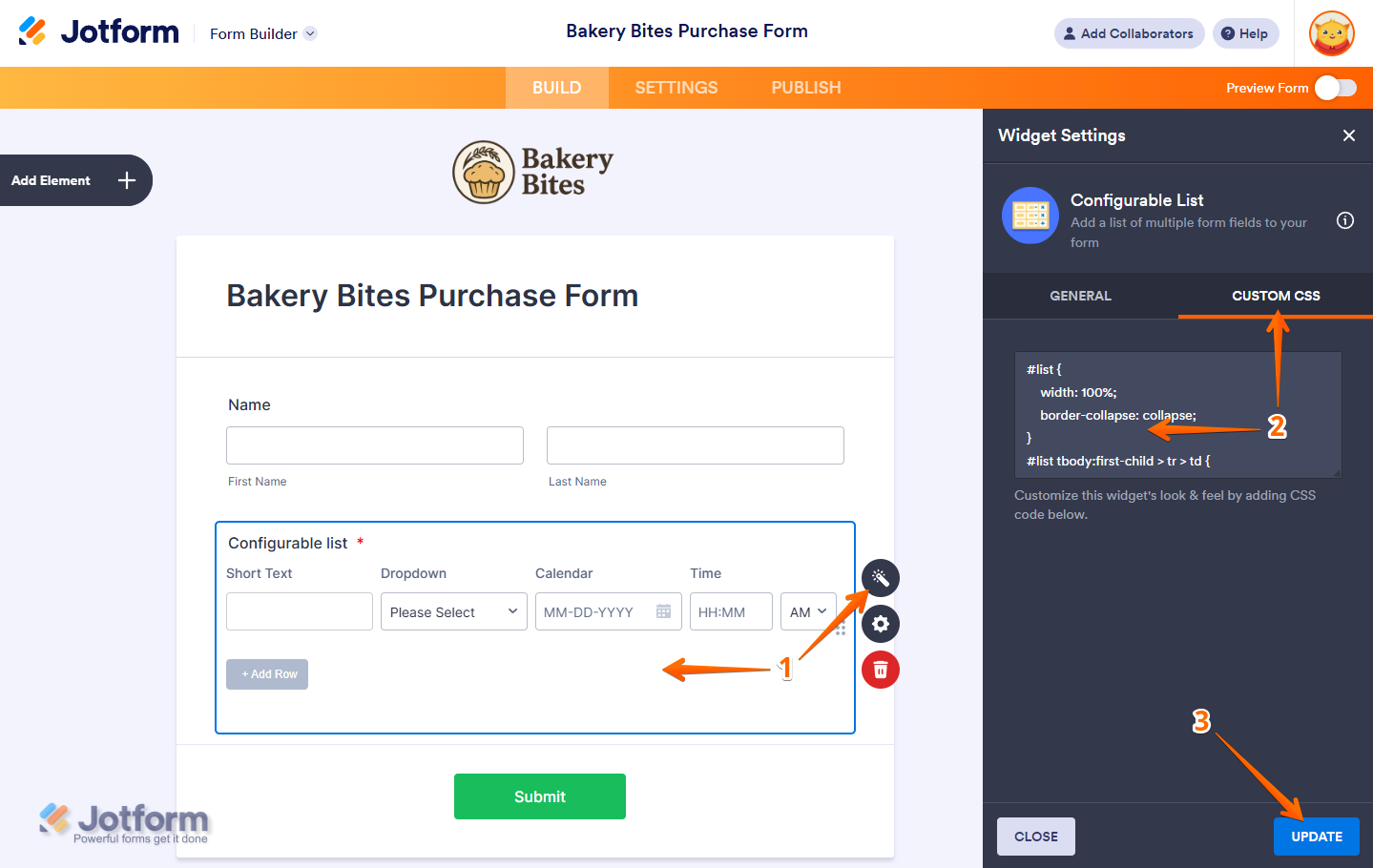
That’s it! With just a few clicks, you can style your widgets to blend seamlessly with the rest of your form’s design.

Send Comment:
24 Comments:
July 21, 2025
I'd like to add a slider type question. As it is a rating scale, I'd like to have explanation. For example: Here is the question,
When it comes to transforming how our team operates, our leaders are...
Mostly looking for others to change (value 1)
1
2
3
4
5
6
7
8
9
10
Eager to be challenged and change themselves (value 10)
How to add the description.
November 19, 2023
Hi.
I have created a form using the Sliders with calculated result widget, but it looks horrible on mobile phones.
I would like the widget to use 100% of the screen space, with the text on the left using about 35-40% of the space (aligned to the left), and the remaining space used by the slider aligned to the right. I know we need a small amount of padding for aesthetic and functional reasons.
At the moment the slider is so small it is hard to use, so the priority is to make it longer.
What CSS do I need to use to make this work better?
Thanks :)
May 11, 2023
How did you get the "True Range" field to appear? Can the output in that field be used as the data for another field in the form?
November 17, 2022
I am trying to customize the Ticket Purchases widget so it doesn't take up the full width of the page, so I can put another form element beside it. I have tried "shrinking" the field, which makes it half the page width, and I was able to insert an image next to it. But I want the Ticket Purchase information to take up 70% of the page width and the image to take up 30%. Please show the details on how to customize the css to do this...
November 10, 2022
I need help with changing the width of one column in the MultiSelect Grid widget.
October 27, 2022
Hi
I need some help with making my links look like button and also have a word as the button rather than showing the link itself
April 23, 2022
I still can't figure this out - its not working I need to enlarge the photos on my jotform they are too small.
help!
February 27, 2022
Hi Jotform Team,
How do I change the font when there is no "Custom CSS" code block for the part of the widget I want to customize?
Example: the "Checklist" widget within "Question Properties" for a Yes/No question does have a CSS code block under "widget settings" then "checklist items," however, this only changes the font of the "Yes/No" checkbox.
I am looking to change the font of the actual question text located in the widget's "properties" in "advanced" under "question text." I'm not finding an area here to enter custom CSS, I tried entering CSS with the text but it doesn't seem to work, is there a better way to get this to work, or a section i'm missing? Thanks!
November 10, 2021
how to Filter Form Options Conditionally in drowpdown lists | Advanced Jotform feature
May 25, 2021
Hello
I would like to use the appointment widget to create a reservation form for reservations for a restaurant.
I would like subscribers to have a choice to chose every 30minutes their time of arrival, but the duration is 2 hours.
I would like to leave out (f.e. through CSS coding) the duration. Then I can set the (virtual) duration at 30 minutes. I can maximize the total of reservations on every time swat, but when I confirm the reservation by mail (after approval - fantastic tool!- I just want to communicate the time of arrival (and nog the duration of the reservation). Through the current short css tutorials I found, they do not explain enough to me how to fix this specific issue. Looking forward to your always fantastic advice. ;-) Luc
February 18, 2021
Hi I need help with changing SMS Confirmation Widget. I need it not to get cut off when viewed on a mobile phone.
Here is a link to my site where it is displayed
I also would like all of the boxes to be the same size. If you notice my E-mail Validator Widget will put the button below the box when on the iphone.
I don't know any CSS coding so I am lost on how to make these changes. If you can also direct to place that can teach me how to make these changes that would be much appreciated.
January 6, 2021
I do not have a tab for CSS options on the Configurable List Widget
August 1, 2020
Hi I was wondering where I find all the ‘widget’ css codes? I want to centre my text in a spreadsheet and change the colour if possible?
November 15, 2019
I do not see any Custom CSS fields in any widgets ?
Please update this tutorial and explain how this is now done ?
Thanks !
November 4, 2019
How can I change the color of the "plus sign" to WHITE on the Field Multiplier Widget? I would also like to add a sub-label to this widget. Thank you!
April 21, 2019
Hello
Can you help me to configure CSS code for Take Photo Widget?
I need to change the color to Green and the word Take Photo to Snap-in
February 5, 2019
Is there a way to customize the iframe embed widget to look & feel the way I want by adding CSS code? Need help!!!
November 11, 2018
Hi
Can you help with configurable list widget css
How can I control the fields width and margins, it seems that from the demo all the css commands are not effecting.
October 16, 2018
can you show how the code is entered? your css windows are blank. Is it just raw css like
text-align:center;
or are their special characters?
May 23, 2018
For my own confirmation does this mean we can encrypt PDFs we send to responders.
1)Would this work to enforce responders to encrypt uploaded PDFs before they respond?
2)Can we password protect the PDF's provided on the responses?
May 22, 2018
Does the use of this feature override the default sending of submitted form data in the body of the e-mail (i.e. - HTML version of submitted form data)?
In other words, if this feature is enabled, is *only* a password-protected PDF attached to the e-mail received from Jotform, or does the e-mail contain a password-protected PDF *plus* all of the raw data, unencrypted and in HTML format right in the e-mail body? If the latter, it basically negates the utility of this feature...
May 22, 2018
Could you clarify something for me? Is this for attachments the client supplies or for a copy of the form we supply to the client?
July 17, 2017
how can i add custom css form fields in infinite list widget?
June 17, 2017
Is there a list with the names of the css fields that we can edit to change the look and feel of each element?