# Stripe Payment Forms | Payment Integration | Jotform

# Str ipe Payment Forms

Build your own Stripe payment forms and accept payments in a secure manner in no time!

Sign Up with Google Sign Up with Apple Sign Up with an email

https://www.jotform.com

Jotform Stripe Payment Form

Full Name

Next

My Products

Yellow Mug

$10.00

Red T-Shirt

$10.00

Previous

Next

Credit Card Information

Credit Card Number


Expiration Date


Security Code


Previous

Submit

Your payment is received with

## Easy Payments for Your Business

With Jotform’s Stripe integration, you can now create professional credit card payment forms in minutes.

![Image 1: Create Your Form](https://cdn.jotfor.ms/p/stripe/assets/img-min/1.png?v=1.0.0.0)
### Create Your Form

Build your own superstar form with Jotform. Just drag and drop the form fields you need.

![Image 2: Add Stripe](https://cdn.jotfor.ms/p/stripe/assets/img-min/2.png?v=1.0.0.0)
### Add Stripe

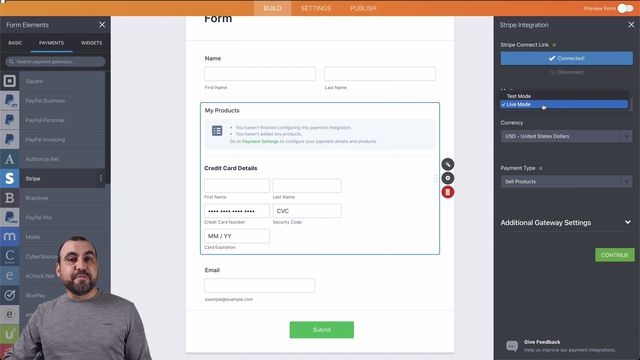
Adding Stripe to your form is a piece of cake. Just select the Stripe icon in the form builder, then click the Stripe login link to connect your account.

![Image 3: Collect Payments](https://cdn.jotfor.ms/p/stripe/assets/img-min/3.png?v=1.0.0.0)
### Collect Payments

That’s it! Now your business can thrive with a simple online payment method.

## Jot form Makes Payments Simple

[![Image 4: Order Form](https://cdn.jotfor.ms/p/stripe/assets/img/online-food-order-form.png)](https://www.jotform.com/stripe/?jtm_campaign=cta&jtm_medium=jotform_blog&jtm_source=https%3A%2F%2Fwww.jotform.com%2Fblog%2Fis-stripe-psd2-compliant%2F&jfNext=1)

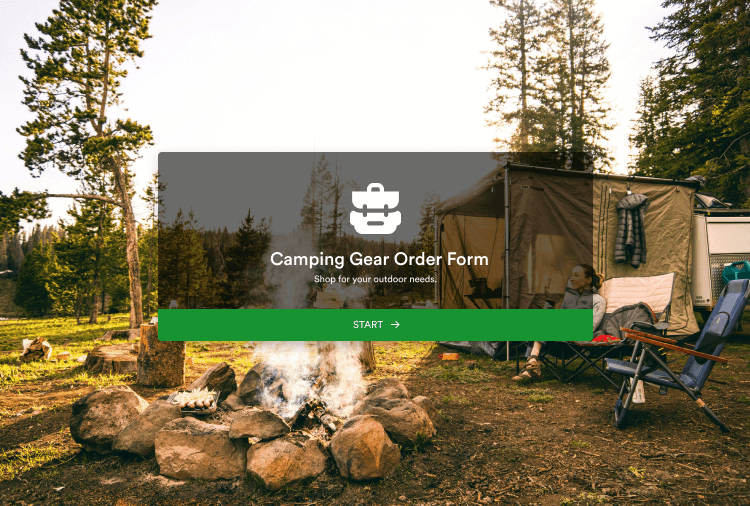
[![Image 5: Order Form](https://cdn.jotfor.ms/p/stripe/assets/img/camping-gear-order-form.png)](https://www.jotform.com/stripe/?jtm_campaign=cta&jtm_medium=jotform_blog&jtm_source=https%3A%2F%2Fwww.jotform.com%2Fblog%2Fis-stripe-psd2-compliant%2F&jfNext=1)

[![Image 6: Registration Form](https://cdn.jotfor.ms/p/stripe/assets/img/registration-form.png)](https://www.jotform.com/stripe/?jtm_campaign=cta&jtm_medium=jotform_blog&jtm_source=https%3A%2F%2Fwww.jotform.com%2Fblog%2Fis-stripe-psd2-compliant%2F&jfNext=1)

[![Image 7: Order Form](https://cdn.jotfor.ms/p/stripe/assets/img/online-food-order-form.png)](https://www.jotform.com/stripe/?jtm_campaign=cta&jtm_medium=jotform_blog&jtm_source=https%3A%2F%2Fwww.jotform.com%2Fblog%2Fis-stripe-psd2-compliant%2F&jfNext=1)

[![Image 8: Order Form](https://cdn.jotfor.ms/p/stripe/assets/img/camping-gear-order-form.png)](https://www.jotform.com/stripe/?jtm_campaign=cta&jtm_medium=jotform_blog&jtm_source=https%3A%2F%2Fwww.jotform.com%2Fblog%2Fis-stripe-psd2-compliant%2F&jfNext=1)

[![Image 9: Registration Form](https://cdn.jotfor.ms/p/stripe/assets/img/registration-form.png)](https://www.jotform.com/stripe/?jtm_campaign=cta&jtm_medium=jotform_blog&jtm_source=https%3A%2F%2Fwww.jotform.com%2Fblog%2Fis-stripe-psd2-compliant%2F&jfNext=1)

[![Image 10: Order Form](https://cdn.jotfor.ms/p/stripe/assets/img/online-food-order-form.png)](https://www.jotform.com/stripe/?jtm_campaign=cta&jtm_medium=jotform_blog&jtm_source=https%3A%2F%2Fwww.jotform.com%2Fblog%2Fis-stripe-psd2-compliant%2F&jfNext=1)

[![Image 11: Order Form](https://cdn.jotfor.ms/p/stripe/assets/img/camping-gear-order-form.png)](https://www.jotform.com/stripe/?jtm_campaign=cta&jtm_medium=jotform_blog&jtm_source=https%3A%2F%2Fwww.jotform.com%2Fblog%2Fis-stripe-psd2-compliant%2F&jfNext=1)

[![Image 12: Registration Form](https://cdn.jotfor.ms/p/stripe/assets/img/registration-form.png)](https://www.jotform.com/stripe/?jtm_campaign=cta&jtm_medium=jotform_blog&jtm_source=https%3A%2F%2Fwww.jotform.com%2Fblog%2Fis-stripe-psd2-compliant%2F&jfNext=1)

[Use template](https://www.jotform.com/stripe/?jtm_campaign=cta&jtm_medium=jotform_blog&jtm_source=https%3A%2F%2Fwww.jotform.com%2Fblog%2Fis-stripe-psd2-compliant%2F&jfNext=1)

## No Additional Transaction Fees

Process payments without Jotform taking a cut

![Image 13: Podo](https://cdn.jotfor.ms/assets/img/landing/payments/podo.png?v=1.0.0.0)
Whether you’re a small business selling products, a school accepting enrollment fees, or a nonprofit collecting donations, you need an easy way to get paid. And more importantly, your customers need an easy way to pay you. That’s why Jotform and Stripe are such a winning combination.

N o company on earth makes creating online payment forms easier than Jotform. Our drag-and-drop form builder has zero learning curve, allowing anyone to create a fully-functional, gorgeous online form in just minutes. With Jotform, you can even create the form using a mobile device.

But the real benefit to using Jotform is how easy the experience is for your customers. The forms show perfectly on any device and have built-in features to make the forms easy to fill out -- vastly increasing your response rate and revenue.

Thousands of businesses power their online revenue stream through Jotform and Stripe, and a big reason is how secure it is. Both companies are leaders in payment security, with Jotform being the only online form software that’s PCI DSS Service Provider Level 1 compliant. Jotform’s Stripe integration also complies with the EU’s Payment Services Directive (PSD2), ensuring transactions meet PSD2’s strong customer authentication requirements.

Get started with a Jotform and Stripe payment form today for free!

![Image 14: How to use Jotform to create a Stripe order form](https://cdn.jotfor.ms/p/_templates/payment-scss/assets/img-min/video-blank.png)

### How to use Jotform to create a Stripe order form

Join us in this Jotform tutorial, let us show you how easy it is to build a custom online order form with Jotform and integrate it with Stripe, so you can quickly get paid for your products or services and keep your online store running smoothly.

## Make a Stripe Payment Form Today

Get Paid Swiftly and Securely With a Custom Stripe Order Form

Create a Free Payment Form