
“The traditional nine-to-five support model is obsolete,” reports a recent AI for customer service industry analysis.
The global helpdesk automation market is worth over $10.7 billion today and projected to hit $91.9 billion by 2033. But most of that money is still spent dragging outdated systems into the present. Meanwhile, customer expectations are speeding ahead — they want support that’s instant, personal, and available 24-7.
And yet, the 2026 Consumer Experience Trends Report from Qualtrics found that nearly one in five consumers saw “no benefit” at all from AI-powered customer service, making it one of the worst-performing use cases for AI adoption.
This failure point is critical: consumers don’t hate AI — they hate the outdated, fixed-logic systems dressed up as AI. They hate chatbots that can only handle one simple keyword and waiting for an agent after the bot fails to properly assist them.
Power through this AI ticketing system guide, and we guarantee that you won’t be a part of that scary statistic.
What is AI ticketing?
AI ticketing systems use machine learning (ML), natural language processing (NLP), and large language models (LLMs) to manage incoming support tickets, automating what used to be a long chain of manual steps.
At a baseline, they’re designed to do four things better than a traditional ticketing system:
- Categorize tickets based on intent, sentiment, and context (beyond just keywords)
- Prioritize tickets based on urgency, customer history, or escalation risk
- Route tickets to the right queue or agent without human sorting
- Respond instantly with context-aware answers when possible
Why choose an AI-based ticketing system over traditional helpdesks?
Hi, I ordered the X‑Widget two weeks ago via express shipping but still nothing. I’ve emailed and the chat said someone will update me but they never did. The item shows delivered on the tracking but wasn’t to my address. My neighbor said they didn’t get it either. Also I changed my shipping address a week ago and I’m not sure if you cancelled the old order or what’s happening??? Can you check and get back asap because I need it for a client meeting. Thanks.
Now here’s what going on:
- The customer writes a long paragraph with multiple issues (order, shipping address change, tracking mismatch).
- They jump between topics (“ordered,” “changed address,” “tracking says delivered but we didn’t get it”).
- They indicate urgency (“client meeting”) but didn’t clearly pick a single ask.
- They’ve used multiple channels (email, chat) and reference the responses but didn’t get closure.
This kind of message breaks the “if X, then Y” logic that traditional ticket systems rely on because there are multiple intents, ambiguous statements, and context for jumping channels.
And if your system can’t handle your customers’ long-winded, jagged complaints … well, a 2025 Cornell University research study across 17 companies found that 3 to 70 percent of all chat abandonments are silent, meaning the system never receives a clear signal that the customer left.
AI ticketing systems that use ML/NLP excel by handling the essential questions of modern support:
- WHAT the customer actually intends, rather than just matching keywords
- WHETHER the ticket should be treated as high priority
- WHEN a message requires escalation (e.g., delivery mismatch and address change) instead of a simple “resend item” rule
- HOW multiple channels and message complexity should influence routing, often to a senior agent instead of the standard queue
How do AI ticketing systems work?
Most traditional ticketing systems follow a fixed playbook:
A customer writes in → the system tags it → someone reads it → someone responds.
AI ticketing systems do more work up front, so agents don’t spend time on repeat questions, misrouted tickets, or guessing what a customer actually wants.
Here’s what’s happening behind the scenes:
1. Intelligent routing and categorization
AI reviews each ticket as it comes in, looking at language, topic, urgency, and customer history. So, instead of just tagging a message as “support,” it might recognize,
“This is a billing question from a high-value customer who’s emailed twice already.”
From there, it sends the ticket to the right queue (or person) automatically.
Pro Tip
With Jotform, you can link form submissions directly into your AI‑ticketing workflow, so when someone fills out a refund or cancellation form, the system instantly categorizes it, triggers ticket creation, and routes it to the right agent, without anyone manually checking the inbox.
2. Natural language processing for intent and tone
Not every customer says exactly what they mean. NLP helps systems pick up on messy, emotional, or unclear language — and still get the gist.
So whether a customer writes, “Still no package. This is ridiculous,” or “Hi, just checking in on delivery status,” the system understands both are about order delays, but one might need faster escalation.
3. AI-generated replies for common questions
Modern AI ticketing leverages large language models and retrieval-augmented generation (RAG) to create contextually appropriate responses. The process typically follows this flow:
- First, the system searches its knowledge base for relevant information using semantic search — finding content based on meaning rather than exact keyword matches.
- Then, it uses this retrieved information as context for generating responses, ensuring accuracy while maintaining a natural, conversational tone.
- Instead of copy-pasting canned responses, the AI adapts language based on customer sentiment, personalizes responses with account information, and can also combine multiple knowledge-base articles to address complex queries.
For example, Jotform’s Support Ticket AI Chatbot uses your Jotform knowledge base to generate real-time responses that match company tone and content.
4. Predictive analytics and escalation patterns
AI-powered ticketing automations continuously analyze data streams to predict future support needs and identify escalation risks. The predictive engine examines historical patterns and detects trends.
Historical patterns reveal when certain issues typically escalate. Maybe password-reset tickets from enterprise customers have a 40 percent escalation rate after two exchanges. The system learns these patterns and can proactively flag high-risk tickets for supervisor attention.
Trend-detection algorithms monitor ticket volumes, identifying unusual spikes that might indicate system outages or product issues. If login-related tickets suddenly triple, the system alerts technical teams before the support queue becomes overwhelmed.
5. Continuous learning through machine learning
The learning loop is what transforms a basic ticketing system into an intelligent one. That’s because every interaction becomes training data for the next interaction.
Reinforcement learning algorithms track which autoresponses lead to successful resolutions versus escalations, continuously refining response strategies. When agents correct or modify AI-suggested responses, the system learns from these adjustments, improving future suggestions.
Transfer learning allows the system to apply knowledge across different contexts — insights from handling shipping complaints can improve how it processes return requests. Active learning identifies edge cases where the AI has low confidence, flagging these for human review to expand its knowledge boundaries.
The feedback loop includes both explicit signals (customer satisfaction ratings, resolution confirmations) and implicit ones (response times, escalation patterns), creating a multidimensional optimization system.
6. Integration architecture with customer relationship management (CRM) and communication channels
The best AI ticketing systems don’t exist in silos. They connect across
- CRMs (e.g., Salesforce, HubSpot)
- Live chat tools (e.g., Intercom, Zendesk)
- Multichannel inputs (email, Twitter, chat, voice transcripts)
That way, if a customer starts on Twitter, follows up via email, and escalates on chat, the AI keeps context across all touchpoints.
For instance, Jotform lets you
- Connect form workflows to any ticketing system using webhooks, Zapier, or native integrations
- Embed AI into support forms without writing a line of code
- Create Zendesk support tickets from form submissions


Why choose Jotform AI Agents for your automated ticketing system?
Fair question. We know you’re not short on options. But most AI support tools
- Require a developer lift to set up
- Force you into their rigid ticketing logic
- Slap a chatbot on top of your existing mess and call it automation
Jotform AI Agents are different.
These tools are the intelligent intake and triage layer that connects to your existing system. AI agents don’t replace your CRM or helpdesk (like Zendesk or HubSpot); they are fed perfectly structured, context-rich tickets and respond accordingly.
Your agent adjusts in real time based on what customers say.
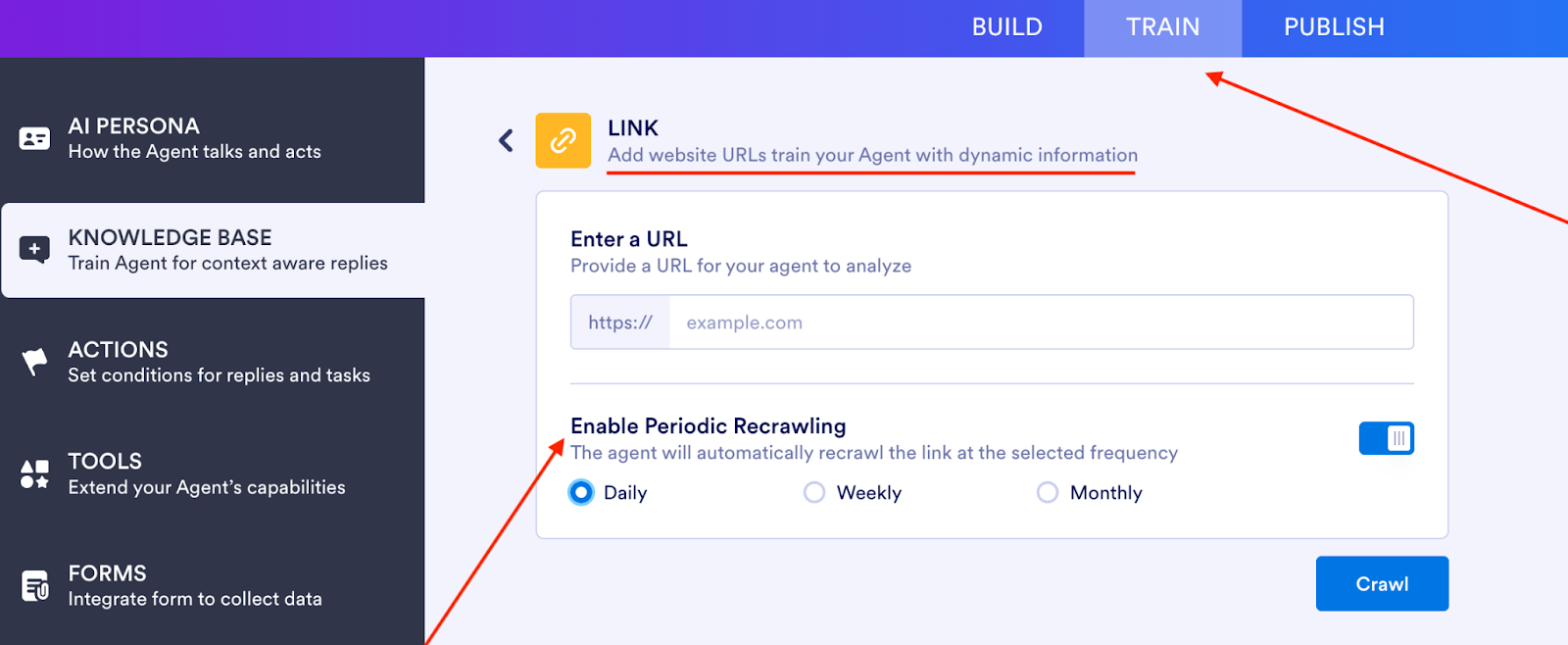
Feed your AI Agent live, dynamic content by simply adding a website URL. Jotform will recrawl the page at your chosen frequency (daily, weekly, or monthly) to keep replies accurate and up to date.
You can build your agent from scratch, convert any existing form, or just grab a ticketing-ready template from our AI Agent Template Gallery:
- CRM Support Ticket AI Agent to capture issue type, user information priority, and attachments
- IT Helpdesk Support AI Agent to guide users through troubleshooting and ticket creation
- Event Ticket AI Agent to handle customer service and purchase flows for events
Connect your agent to Zendesk, HubSpot, Salesforce, or any other system using Jotform’s API integrations or native connectors. The moment a customer interacts with your form, a ticket is created.
And as your volume grows, Jotform AI Agents scale with you, without you needing to rebuild your logic or bring in a dedicated developer. Easily clone flows, add conditions, or adapt the logic for new teams and territories.
How to automate ticketing with Jotform’s AI Agent builder
We built Jotform AI Agents so you can build automations — including AI helpdesk ticketing — without writing a single line of code.
Time it. You can build this automation yourself, in less than seven minutes, without pinging your developer team.
Here’s how:
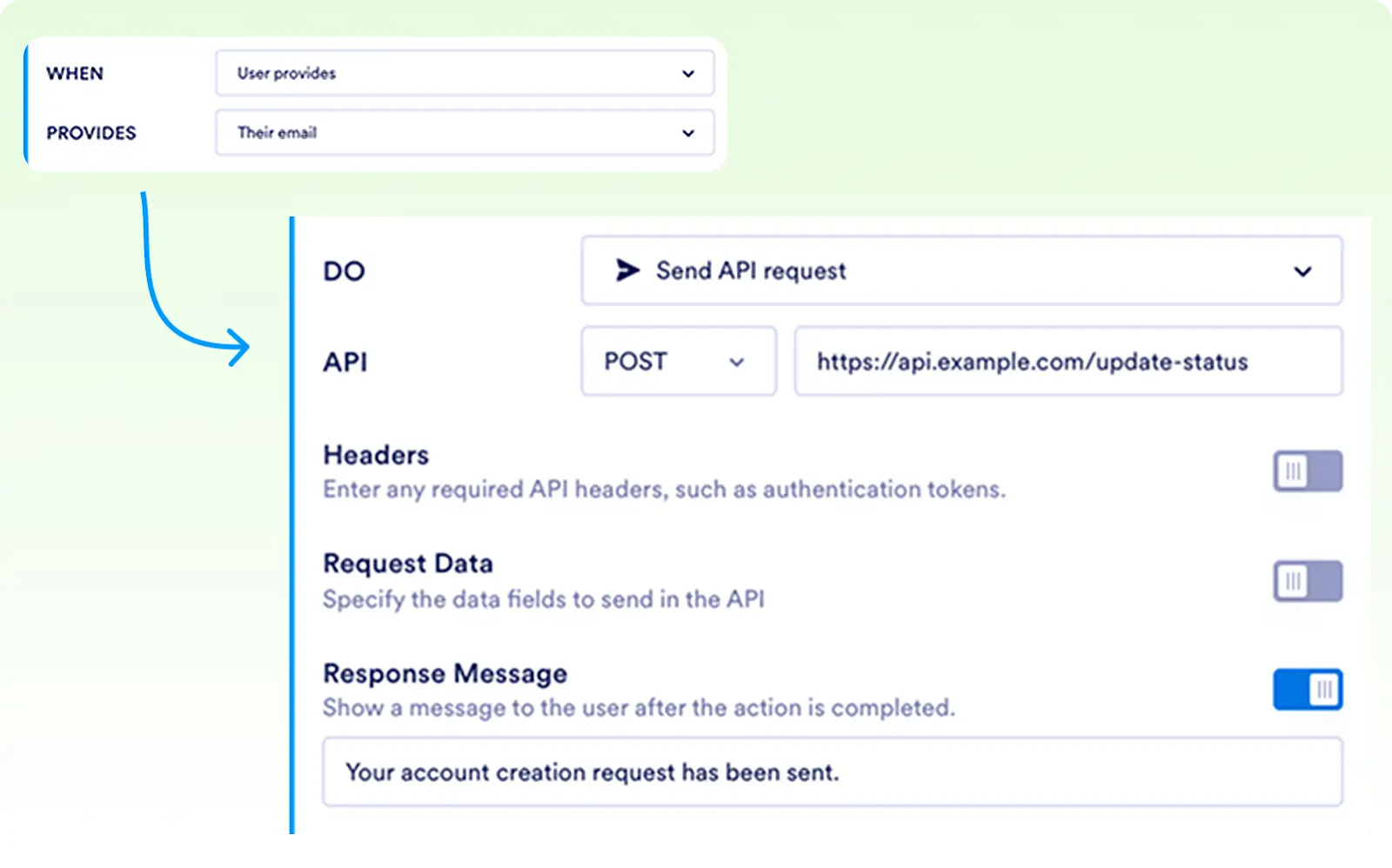
- Open your AI Agent in the Builder: Go to the Train tab, then click Actions.
- Set your trigger: Under When, define what should create the ticket — e.g., Customer selects “Refund request” or Form submission contains “Escalation.”
- Choose the action: Under Do, select Send API Request. Choose POST, and enter your ticketing system’s API endpoint plus any required headers.
- Map your fields: Connect your form data to your ticket fields like ticket title, issue type, description, customer ID, attachments, priority level, etc.
- Save your configuration: Hit Save to lock in your automation logic.
- Use built‑in integrations to simplify mapping: For example, Jotform’s Zendesk integration lets you send data directly into your support system without touching the API.
- Test the flow: Submit a sample form, check that the ticket appears in your helpdesk, confirm the category and priority, and make sure the routing is correct.
- Refine as needed: Adjust triggers, update mappings, or add conditions to catch edge cases like silent abandonments or duplicate submissions.
5 real-life use cases for AI ticketing systems
Even if you’re not a massive call center or SaaS unicorn, an AI ticketing system for IT support can help you stay in lockstep with customer demand.
The five AI ticketing examples below are solving real problems in real life. Let’s break them down by industry.
1. Real estate
Real estate teams field appointment requests, route buyer and renter leads, collect documentation, and often run in-person events or open houses that bring in hundreds of people. That’s a lot of forms and follow-ups.
AI ticketing systems can
- Automatically qualify and route leads from your website, email, or social channels
- Collect key details like budget, desired location, and contact preferences
- Escalate urgent buyer or seller inquiries to the right team member
- Handle common questions around application status, availability, tours, or event logistics
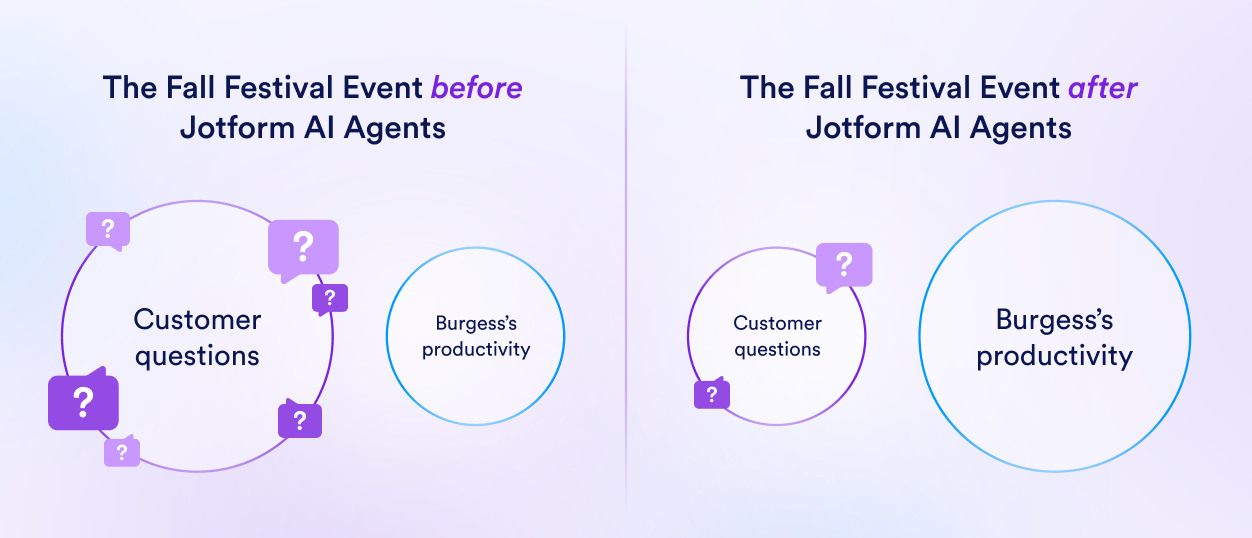
Take the Burgess Group for example. The boutique real estate firm, based in Dallas, hosts a fall festival each year with over 500 attendees, all the while managing active real estate clients. In the past, the team spent hours responding to the same pre-event questions:
Will there be food?
Can I bring my dog?
What’s the parking situation?
That’s when founder Drew Burgess started building his Jotform AI Agent:
“The agent (nicknamed Sunny) was used to handle registration and to field any questions that otherwise would take up hours, or even days, of our time,” Burgess said.
“So I trained it on the content of the Fall Festival, the requirements, our location, and more.”
And Sunny delivered.
By handling simple queries like Can I bring guests to the event?, the AI Agent saved the team an estimated $200 to $400 during the festival — a modest amount, sure, but one that makes a big difference for a small business.
“I think the agent is very worthwhile. If you’re talking about a tool you would use for six to twelve months, even that requires a bit of training, it’s well worth the time; essentially, because you’re training something that will be answering a hundred times the questions that you’re spending the time and training (staff) for,” Burgess explains.
2. E-commerce
In e-commerce, your delivery strategy is now front and center in your customers’ minds. According to Sendcloud’s 2025 research, 66 percent of shoppers say high shipping costs are a deal breaker, and 43 percent cite slow delivery as their quitting point.
And even worse: 74 percent of consumers get frustrated when a delay happens and they receive no update. That tracks, considering that e-commerce support is often reactive. You’re fielding a bunch of tickets about “Where’s my order?”, “I need to return this,” or “Can I exchange size?”
The volume alone is a headache.
And that’s exactly where an AI ticketing system steps in: instant responses, automated status updates, and routing of genuine problems before they become complaints.
Jotform’s AI Agents are a great starting point. Launch real-time customer service processes, automate ticket creation, and personalize shopping experiences.
Use Jotform’s AI-powered chatbots for e-commerce to
- Offer around-the-clock multichannel support
- Answer WISMO queries instantly
- Guide users through returns, exchanges, and sizing FAQs
- Personalize product suggestions based on inputs
- Collect structured customer feedback in real time
Jotform’s 200-plus e-commerce AI Agent templates let you skip the build-from-scratch headache. Start with a prebuilt agent like
- Product Purchase Order AI Agent to let users browse, select, and purchase within a single flow
- Customer Feedback AI Agent to collect structured feedback to improve your customer service experience
- Order Management Specialist AI Agent to route tickets by issue type (delay, refund, exchange)

3. Healthcare
AI agents in healthcare can cut paperwork by 30 percent, saving staff up to a day each week, per Salesforce’s new research.
Patient feedback, intake forms, appointment requests, insurance questions: all these daily, routine events threaten to clog your team’s bandwidth. Because when staff spend time chasing forms and answering repeat questions, they lose time with patients.
AI ticketing systems can automate the front end of that: capture responses, route issues, follow up when needed, and gather richer feedback while the admin burden drops.
And regularly collecting patient feedback can drive better outcomes, but only if it’s not a drag on your team’s resources.
Just ask One to One Health:
“Healthcare paperwork can be annoying,” says CEO David Kinzler. One to One Health used Jotform Enterprise to scale feedback collection for large‑scale employers and government agencies.
Kinzler says, “We can leverage broad and targeted patient satisfaction surveys for specific programs and use cases to learn what’s going on while we deliver care in a near real-time fashion. It’s super valuable.”
And with an AI Agent layered on top, you can throw in conditional follow‑up questions (e.g., if a patient says they’re dissatisfied, ask, “What can we improve?”) and integrate responses into your CRM or ticketing system automatically.
You can see this article to learn more about How Jotform’s AI Agents are helping healthcare providers focus more on patients.
4. Finance
The finance sector is implementing AI at scale. According to KPMG’s Global AI in Finance report, 71 percent of finance leaders have already embedded AI into their operations, from accounting to tax workflows.
Anthropic’s Economic Index shows that 77 percent of enterprise usage via API isn’t conversational but functional. That means teams aren’t asking LLMs for advice — they’re handing off tasks.
In finance, that means less back and forth: auto-tagging invoices, routing approvals, summarizing statements, pulling data for audits. And as usage matures, the prompt complexity drops.
Finance teams can use Jotform’s AI Agents to handle routine queries and high-volume support flows without hiring extra hands. These agents work 24-7 across channels like live chat, WhatsApp, Messenger, and voice, offering consistent, secure, and compliant interactions.
You can check out this article to learn more on How AI is transforming finance.
Some standout finance automations include
- Loan application guidance: Step-by-step assistance ensures customers complete forms accurately the first time, reducing back and forth and approval delays.
- Account management support: AI Agents handle updates, balance inquiries, and document requests without needing a live rep on call.
- Invoice upload and tracking: Automatically collect, categorize, and store invoices for faster billing and reduced human error.
- Real-time call handling: Agents can transcribe and respond to voice interactions in real time, freeing up reps from tedious phone documentation.
- Effortless asset reporting: Gather accurate asset data across large teams using a structured, conversational interface that maps to your form logic or CRM fields.
Browse Jotform’s Finance AI Agents template library with 178-plus plug-and-play options covering everything from loan guidance to invoice tracking, accounting chatbots, and payment workflows.
5. Nonprofit
Forty-one percent of nonprofit organizations say a lack of automation remains one of their biggest operational challenges in 2025.
Between donor management, client intake, and program coordination, nonprofit teams juggle a ton of moving parts. AI ticketing systems can help by turning unstructured messages, like email, form submissions, or chat queries, into trackable, triaged support tickets.
That means
- Volunteers and donors get faster responses
- Repetitive admin (like “Where do I sign up?”) gets routed automatically
- Sensitive inquiries are escalated to the right person
Take Body Brave, a Canadian nonprofit that provides accessible eating disorder treatment. They already use Jotform to handle intake forms, issue consent docs with e-signatures, and collect research data securely — while staying on brand and enabling HIPAA compliance.
If you’re just getting started, there’s no need to start from scratch. Jotform offers 129-plus ready-to-use Charity AI Agent templates for donation flows, volunteer coordination, fundraising campaigns, and more that you can get up and running in minutes.
Ready to automate the boring stuff and scale your support? Jotform’s ready-made AI Agents can plug into your existing forms, systems, and support flows.
Try them out. Tweak a template. Ship a flow that saves your team hours.
AI ticketing system FAQs
Not exactly. While Google Workspace offers tools like Forms and Sheets, it doesn’t include a native ticketing system built for customer support. Instead, people build DIY ticketing with Google Forms and Sheets integrations.
So yes, you can piece together a “ticketing system” with Google tools, but it’s not purpose built. If you want full ticketing with AI routing, you’ll likely need a dedicated AI tool for customer support.
“Best” depends on your support model, team size, channels, and growth plans.
Here’s a quick way to pick:
- Choose if it automates (AI routing, categorization)
- Choose if it supports multichannel (email, chat, social)
- Choose if it integrates with your stack (CRM, form tools, APIs)
By the way, Jotform AI Agents hit all three, with zero code and built-in templates for support, e-commerce, and events.
This article is for IT support managers, helpdesk teams, operations leads, and anyone who wants to improve ticket resolution speed and scale customer support using AI-powered ticketing systems that automate intake, routing, and response workflows.






















































Send Comment: