

Muut henkilöstöhallinnon (HR) lomakkeet

Työntekijän Henkilötiedot Lomake
Monet yritykset käyttävät työntekijän henkilötiedot -lomaketta työntekijöiden tietojen kirjaamiseen tietokantaan. Lomakepohja sisältää erilaisia osioita, jotka sisältävät työntekijöiden yhteystiedot ja kaikki tarvittavat tiedot työpisteestä ja asemasta, sekä hätätilanteiden yhteystiedot. Muokkaa lomaketta omiin tarpeisiisi käyttämällä helppoja työkalujamme ja lukuisia widgettejä.
Siirry kategoriaan:Henkilöstöhallinnon lomakkeet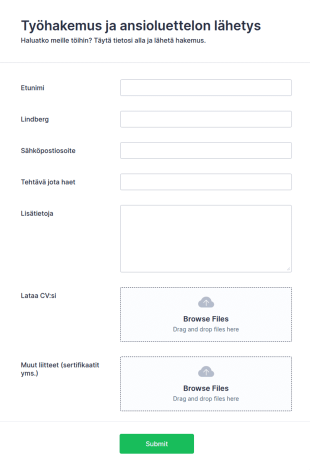
Työhakemus Ansioluettelolla
Tämä työhakemus ansioluettelolla auttaa sinua keräämään ansioluetteloita nopeasti ja helpottaa työntekijöiden valintaa. Lomakepohja koostuu kentistä, joilla keräät tarvittavat hakijan yhteystiedot ja vastaanotat hakijan ansioluettelon ja muut liitetiedostot liitteinä suoraan samalla lomakkeella. Käytä lomakepohjaa perustana työhakemuksellesi, ja muokkaa sitä vapaasti omien tarpeidesi mukaan monien työkalujen ja widgettien avulla.
Siirry kategoriaan:Henkilöstöhallinnon lomakkeet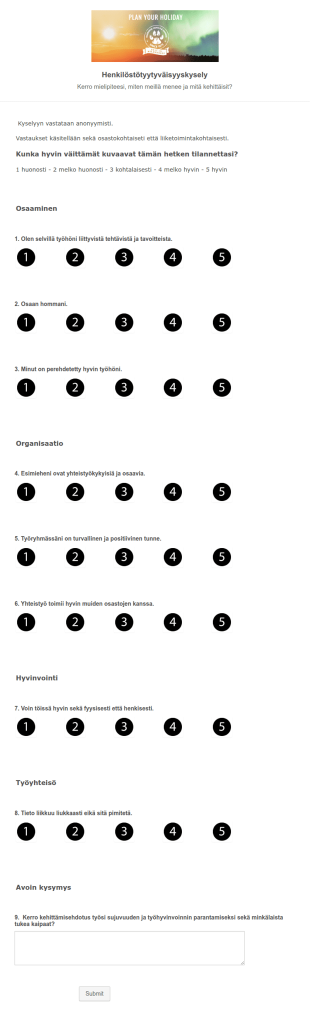
Malli 'Harriniva' Henkilöstötyytyväisyyskysely
Toimitettu malliksi Tero Hassinen Oranssi Liekki Rokmind
Siirry kategoriaan:Henkilöstöhallinnon lomakkeet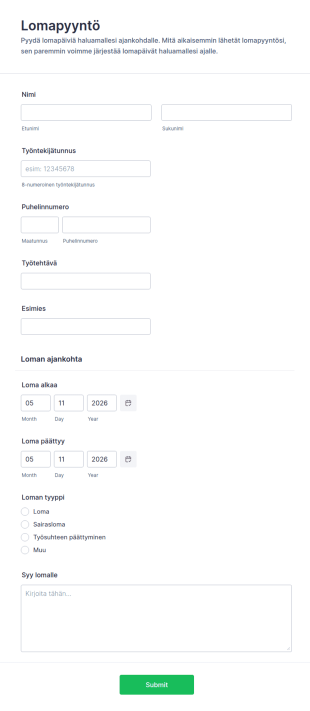
Lomapyyntö
Tämän helposti täytettävän työntekijän lomapyyntölomakkeen avulla saat yksityiskohtaiset lomapyynnöt työntekijöiltäsi välittömästi, ja estät ristiriidat lomapäivissä. Lomakentät keräävät työntekijätunnuksen, esimiestiedot ja lomapäivät. Muokkaa lomakepohjaa vapaasti, ja lisää kenttiä niin että lomake sopii organisaatiorakenteeseesi. Saat käyttöösi kaikki JotFormin lomakkeenrakennustyökalut ja widgetit, jotta tietojen kerääminen olisi helpompaa ja nopeampaa.
Siirry kategoriaan:Henkilöstöhallinnon lomakkeet
Työntekijän Suoriutumisen Arviointilomake
Työntekijän suoriutumisen arviointilomake tukee kehityskeskusteluja ja tavoitteiden seurantaa, ja se sopii esihenkilöille sekä henkilöstöhallinnolle yhtenäiseen tiedonkeruuseen Jotformilla.
Siirry kategoriaan:Henkilöstöhallinnon lomakkeetTietoja Muut henkilöstöhallinnon (HR) lomakkeet
Henkilöstöhallinnon lomakkeet ovat asiakirjoja, joita yrityksen henkilöstöosasto käyttää työntekijöiden rekrytointiin ja hallinnointiin. Jotformin online-henkilöstöhallinnon lomakepohjien avulla henkilöstöosastosi voi hallinnoida työntekijätietoja, työsuhteen vahvistuksia, työtyytyväisyyttä, CV-hakemuksia, työhakemuksia ja poissaolopyyntöjä. Aloita valitsemalla alta lomakepohja, jota voit muokata ilmaiseksi.
Jotform serves as the premier online form builder for creating and managing Human Resources (HR) Forms. With its user-friendly interface, Jotform allows HR professionals to customize forms effortlessly, tailoring them to meet specific organizational needs. The platform's ability to automate data collection processes ensures that information is captured consistently and accurately, reducing the risk of errors. Moreover, Jotform Tables offer centralized data management, enabling HR teams to organize, analyze, and access data from a single, secure location. This comprehensive solution empowers HR departments to enhance their efficiency and focus more on strategic HR initiatives.
Why Use Human Resources (HR) Forms?
- Human Resources (HR) Forms significantly boost data accuracy by eliminating the need for manual data entry, which is prone to human errors. By having employees fill out digital forms, organizations ensure that the captured data is precise and reliable, leading to better decision-making processes.
- The speed of data collection is greatly enhanced with HR forms. As opposed to traditional paper forms, digital HR forms enable instant submission and processing of information, allowing HR teams to act swiftly on the data received, whether it be for onboarding new employees or processing leave requests.
- Professional data handling is a hallmark of HR forms, offering a structured approach to managing sensitive employee information. By adhering to industry standards for data protection and confidentiality, HR forms ensure that all collected data is handled with the utmost care and security.
- HR forms facilitate seamless communication between employees and HR departments. By providing a centralized platform for submitting inquiries, feedback, and requests, these forms help streamline communication channels, ensuring that all parties are on the same page.
- Automation of routine HR tasks is made possible with digital forms. By integrating HR forms with existing systems and workflows, organizations can automate repetitive tasks such as sending email confirmations or updating employee records, thereby freeing up valuable time for HR professionals.
Common Problems Solved by Human Resources (HR) Forms
- One of the primary issues HR departments face is the overwhelming amount of paperwork, which can lead to inefficiencies and lost documents. HR forms digitize this paperwork, making it easier to manage and reducing the risk of misplaced documents.
- Manual entry of employee data is not only time-consuming but also increases the likelihood of errors. HR forms automate this process, ensuring that information is accurately captured and reducing the need for redundant data entry.
- Lost data can have significant implications for an organization, especially when it comes to compliance and employee management. HR forms provide a secure and reliable way to store and manage data, ensuring that all information is preserved and easily retrievable when needed.
- Keeping track of employee requests and approvals can be challenging without a standardized process. HR forms streamline these workflows by providing a structured format for submissions and approvals, ensuring that nothing falls through the cracks.
3. Mahdolliset omistajat ja käyttäjät:
- The Drag-and-Drop Form Builder is ideal for customizing HR forms to suit specific departmental needs. HR professionals can easily add, remove, or modify fields to tailor forms for various purposes, such as performance reviews or employee feedback, ensuring that all necessary information is gathered efficiently.
- Conditional Logic in HR forms allows for dynamic form interactions, making the user experience more intuitive. For instance, forms can be set to display specific questions based on previous answers, streamlining the data collection process and ensuring only relevant information is requested from employees.
- With over 30 Payment Gateways, HR forms can facilitate transactions such as employee reimbursements or event registrations. By incorporating these gateways, organizations can handle financial transactions directly within the form, providing convenience and efficiency.
- Electronic Signatures (Jotform Sign) enable HR departments to collect legally binding signatures directly on forms. This feature is particularly useful for contracts and agreements, ensuring that all documentation is completed and signed in a timely manner.
- The PDF Editor allows for automated PDF generation, creating professional documents from form submissions. This is particularly useful for generating employee records, contracts, or reports, ensuring that all documentation is consistent and easily shareable.
- Jotform's 100+ Third-party Integrations, such as with Google Sheets or Salesforce, enhance workflow efficiency by ensuring that data collected through HR forms is seamlessly integrated into existing systems. This connectivity allows for real-time data updates and streamlined operations.
- Approval Workflows facilitate the routing of forms for necessary approvals, ensuring that requests such as leave applications or expense claims are properly vetted and authorized in a timely manner.
How to Create a Human Resources (HR) Form
- Browse the Template List for a Human Resources (HR)s template or start from a blank form. This step allows you to select a starting point that best fits your organization's requirements.
- Customize the design and fields using the Drag-and-Drop Form Builder. This intuitive process allows you to add or modify fields to create a form that meets your specific data collection needs.
- Publish and share via Direct Link, Email, or Website Embed. This ensures that your form is easily accessible to all intended participants, facilitating smooth data collection.
Top Use Cases for Human Resources (HR) Forms
- For Managers: Managers can leverage HR forms to streamline employee evaluations, goal setting, and feedback collection. By utilizing digital forms, managers can ensure that evaluations are conducted consistently and that feedback is gathered in a structured manner. This not only enhances the performance review process but also aids in identifying areas for employee development and growth.
- For Teams: Teams benefit from HR forms through streamlined communication and collaboration. Forms such as team feedback surveys or inter-departmental requests facilitate efficient information exchange and ensure that all team members are aligned with organizational objectives. This collaborative approach fosters a cohesive work environment and promotes team synergy.
- For Customers: While primarily designed for internal use, HR forms can also enhance customer interactions by ensuring that HR-related inquiries and processes are handled smoothly and professionally. For example, forms can be used to manage client training sessions or to gather feedback on HR service delivery, ensuring that client expectations are met and exceeded.
Summarizing Human Resources (HR) Forms
Human Resources (HR) Forms serve as a vital component in modern HR management, offering a comprehensive solution for streamlining data collection, enhancing communication, and automating routine tasks. By adopting digital forms, organizations can significantly reduce the administrative burden on HR teams, allowing them to focus on strategic initiatives that drive business success. With Jotform's powerful features and integrations, HR departments are equipped with the tools needed to efficiently manage their workflows, ensuring that employee data is handled with precision and security.
Usein kysytyt kysymykset
1) Is it free to create Human Resources (HR) Forms on Jotform?
Henkilöstöhallinnon (HR) lomakkeet ovat asiakirjoja, joita organisaatiot käyttävät keräämään, seuraamaan ja hallinnoimaan työntekijöiden tietoja ja toimintaa. Nämä lomakkeet auttavat yrityksiä ja voittoa tavoittelemattomia organisaatioita noudattamaan työlainsäädäntöä ja -määräyksiä, ohjaamaan työntekijän elinkaarta ja varmistamaan tehokkaan viestinnän henkilöstöosaston ja työntekijöiden välillä.
2. Miksi verkkokauppalomakkeet ovat tärkeitä verkkoliiketoiminnalle?
HR-ammattilaiset tarvitsevat HR-lomakkeita hoitaakseen monia vastuitaan, aina uusien työntekijöiden perehdyttämisestä poissaolopyyntöjen hallintaan. Ilman HR-lomakkeita työntekijätietojen käsittelyyn yritys voi kadottaa tai jättää huomiotta olennaisia tietoja, jotka sen on pidettävä saatavilla.
3) Do I need coding knowledge to build a Human Resources (HR) Form?
HR-lomakkeet ovat olennainen osa yrityksen toiminnan ylläpitämistä. Ne auttavat tehostamaan työsuhdeprosesseja, yhdenmukaistamaan työntekijätietojen keräämistä, ylläpitämään tarkkoja tietoja ja täyttämään lakisääteiset vaatimukset. HR-lomakkeet auttavat yrityksiä varmistamaan, etteivät ne menetä tärkeitä tietoja työvoimastaan.
4. Onko olemassa erilaisia verkkokauppalomakkeita?
Voit luoda HR-lomakkeen muutamassa minuutissa yhdellä Jotformin ilmaisista lomakepohjista! Siirry vain lomakepohjahakemistoomme ja valitse tarpeisiisi parhaiten sopiva lomakepohja. Kun olet muokannut lomakepohjan valmiiksi intuitiivisessa verkkolomaketyökalussamme, voit jakaa sen työntekijöillesi sähköpostitse, linkin tai QR-koodin avulla, jotta he voivat täyttää sen välittömästi.
5. Kuka voi hyötyä verkkokauppalomakepohjien käytöstä?
HR-lomakkeita käytetään kaikissa rekrytointi-, vakuutus-, kurinpito-, poikkeamaraportointi-, poissaolo- ja kyselyprosesseissa. Muita yleisiä käyttökohteita HR-lomakkeille ovat palkanlaskenta ja palkitseminen, ylennykset ja konfliktienratkaisu.
6. Miten yksityisyys säilytetään vakuutuskorvaushakemusten lähettämisessä verkossa?
On olemassa monenlaisia HR-lomakkeita! Näitä ovat esimerkiksi työhakemuslomakkeet, työtarjoukset, työntekijöiden tietolomakkeet, läsnäololomakkeet ja sopimukset. HR vastaa usein myös suoritusarviointilomakkeista, lomapyynnöistä, kulukorvauksista ja koulutuslomakkeista. Myös rekrytointi- ja irtisanomisprosessit vaativat usein monenlaisia HR-lomakkeita.
7) How do HR forms streamline the onboarding process?
HR forms simplify the onboarding process by automating the collection of necessary information and documentation from new hires. This ensures a smooth transition and reduces the administrative workload on HR teams.
8) Can HR forms integrate with our existing HR systems?
Yes, Jotform offers over 100 third-party integrations, allowing HR forms to seamlessly connect with existing HR systems and applications such as Google Sheets, Salesforce, and Slack, enhancing workflow efficiency.