

Kirkkojen lomakepohjat

Yksityinen Rukouspyyntö Lomake
Kirkot voivat käyttää rukouspyyntölomaketta kerätäkseen rukouspyyntöjä yhteisönsä jäseniltä. COVID-19-pandemian aikana kirkon kävijät eivät voi enää lähettää rukouspyyntöjään henkilökohtaisesti-joten käytä ilmaista online-rukouspyyntölomakettamme keräämään saumattomasti rukouspyyntöjä verkossa! Muokkaa vain lomakepohjaa, upota se verkkosivustollesi tai jaa se kirkkosi seurakunnan kanssa sosiaalisen median tai uutiskirjeen kautta ja katso vastaanotetut rukouspyynnöt suoraan Jotform -tililtäsi. Lomakevastauksia voi katsella ja hallita tietokoneella, tabletilla tai älypuhelimella. Mukauta tämän rukouspyyntölomakepohjan ulkoasua vedä ja pudota -lomakkeenrakentajamme avulla. Lisää kirkkosi logo, lataa kuvia kirkon jäsenistä tai vaihda fontteja ja värejä yksilölliseksi. Jos haluat synkronoida rukouspyyntöjä muille seurakuntasi käyttämille tileille, kuten Google Sheetsiin, Google Driveen ja Dropboxiin, tee se automaattisesti yli 100 suositula integraatiollamme. Ilmaisella online -rukouspyyntölomakkeella, joka kerää rukouspyyntöjä verkossa, sinä ja muut kirkon henkilökunta voitte helposti käsitellä pyynnöt ja varmistaa, että kaikki saavat rukouksensa.
Siirry kategoriaan:Kirkkojen lomakepohjat
Seurakunnan Jäsenen Yhteystietolomake
Pidä seurakunnan jäsenten yhteystiedot ajantasalla tämän lomakkeen avulla, jolla voit myös kerätä valokuvan jäsenistä. Näin pidät tietokantasi helposti ajantasalla vaivattomasti.
Siirry kategoriaan:Kirkkojen lomakepohjat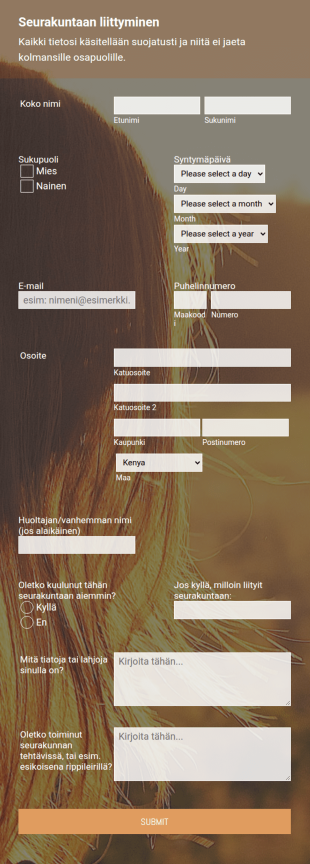
Seurakunnan Liittymislomake
Seurankunnan liittymislomakkeella hoidat uusien seurakunnan jäsenten rekisteröinnin nopeasti ja keräät jäsenten yhteystiedot. Voit mukauttaa lomakepohjaa lisäämällä logosi, kysymyksesi käyttämällä monia muita JotFormin työkaluja ja integraatioita. Voit toimittaa lomakkeen sähköpostitse, upottaa sen verkkosivustollesi tai käyttää sitä erillisenä lomakkeena.
Siirry kategoriaan:Kirkkojen lomakepohjat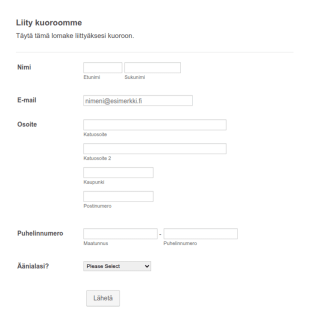
Kuoron Rekisteröintilomake
Käytä tätä kuoron rekisteröintilomaketta, joka kerää hakijan henkilökohtaiset ja yhteystiedot heidän äänialansa, vastaanottaaksesi uusien jäsenten kuorohakemuksia. Lomakeen avulla myös luokittelet kuorolaiset helpommin. Voit mukauttaa lomakepohjaa erilaisilla JotFormin työkaluilla ja integraatioilla, lisätä logosi, sisällyttää visuaalista ja informatiivista sisältöä, kerätä asiakirjoja, muuttaa väriä, fontteja, taustaa ja joko upottaa lomakkeen verkkosivustollesi tai käyttää sitä erillisenä lomakkeena.
Siirry kategoriaan:Kirkkojen lomakepohjat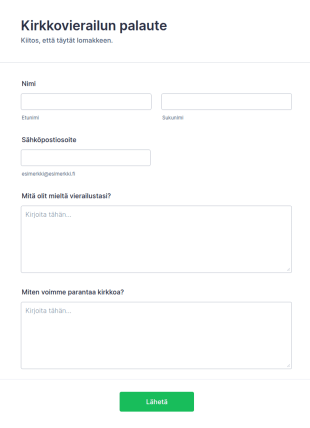
Kirkkolomake
Kirkkolomake on lyhyt kyselylomake, jota kirkot käyttävät keräämään palautetta kirkon kävijöiltä heidän kokemuksestaan palveluksen tai muun kirkkoon liittyvän tapahtuman aikana. Olitpa pastori, uskonnollisten järjestöjen johtaja tai seurankunnan jäsen, ota kirkkokäyntien palautelomake käyttöön saadaksesi välitöntä palautetta verkossa. Muokkaa lomaketta helposti lomakkeenrakennustyökalullamme. Sinun tarvitsee vain mukauttaa kysymyksiä tai lisätä tai muuttaa widgettejä kerätäksesi haluamasi tiedot näppärästi lomakkeella. Jos haluat lähettää lomakevastaukset muille tileillesi, kuten Dropbox, Google Drive tai Copy, tee se automaattisesti JotFormin integraatioilla. Olitpa kirkon kävijä, nuorisokirkon johtaja tai seurakunnan jäsen, käytä ilmaista online-kirkkokäyntien palautelomaketta kerätäksesi palautetta kirkostasi. Lomakkeen käyttöönotto vain muutaman minuutin ja antaa sinulle kaikki tarvittavat tiedot palvelujen parantamiseksi.
Siirry kategoriaan:Kirkkojen lomakepohjatTietoja Kirkkojen lomakepohjat
Kirkot käyttävät verkkolomakkeita uusien jäsenten rekisteröintiin, lahjoituksiin, tapahtumien ja kokousten suunnitteluun sekä vierailuaikataulujen järjestämiseen. Tutustu yhteen kirkoille tarkoitetuista verkkolomakemalleistamme, niiden avulla keräät tietoa jäseniltäsi, hallinnoit vapaaehtoisihakemuksia, ja keräät lahjoituksia helposti. Jokainen näistä kirkkojen käyttöön tarkoitetuista lomakemalleista on helposti muokattavissa.
Jotform is the premier online form builder for creating Church Forms, offering an intuitive platform that allows for easy customization and automation of data collection processes. The drag-and-drop interface simplifies form design, enabling users to tailor forms to their specific needs without any technical expertise. With centralized data management through Jotform Tables, churches can efficiently organize and access all collected information in one secure place. This capability not only enhances operational efficiency but also ensures that data is readily available for analysis and reporting, making Jotform an indispensable asset for modern church management.
Why Use Church Forms?
- Church Forms provide a high level of accuracy in data collection, minimizing errors that often occur with manual paper-based methods. By utilizing digital forms, churches can ensure that all data is captured correctly and efficiently, leading to more reliable data management and reporting.
- The speed of data processing is significantly enhanced with Church Forms, as digital submissions are instantaneously recorded and accessible. This immediacy allows church staff to focus on more crucial tasks, such as planning events or engaging with the community, rather than being bogged down by administrative paperwork.
- Professional data handling is a key advantage of using Church Forms. With secure data management features, all sensitive information collected through the forms is protected, ensuring compliance with data protection regulations and safeguarding the privacy of church members and donors.
- Church Forms facilitate seamless communication between church members and administration. Through automated workflows, notifications can be set up to keep all stakeholders informed about upcoming events, volunteer opportunities, or community announcements, thereby enhancing engagement and participation.
- These forms offer the flexibility to integrate with over 100 third-party applications, such as Google Sheets and Salesforce, allowing churches to synchronize their data across multiple platforms for more comprehensive analysis and reporting. This integration capability ensures that all data collected is used effectively to support church operations.
Common Problems Solved by Church Forms
- One of the primary pain points for churches is the reliance on paper-based processes, which are prone to errors and inefficiencies. Church Forms eliminate the need for physical paperwork, offering a streamlined digital alternative that saves time and resources.
- Manual data entry often results in lost or inaccurate information, which can impede church operations. By using Church Forms, churches can automate data entry, ensuring that all submissions are accurately recorded and easily retrievable when needed.
- Churches frequently struggle with managing volunteer sign-ups and event registrations due to fragmented communication. Church Forms enable centralized data collection, making it easier to track and manage participant information and ensuring no volunteer or attendee is overlooked.
- Lost data is a significant concern, particularly when managing sensitive information such as donations and membership details. Church Forms provide secure, cloud-based storage, ensuring that all data is backed up and protected against loss or unauthorized access.
3. Mahdolliset omistajat ja käyttäjät:
- When organizing church events, using the Drag-and-Drop Form Builder allows for quick and easy customization of registration forms, ensuring all necessary information is collected efficiently. This feature streamlines event planning, making it easier to manage attendee details and logistics.
- Conditional Logic can be employed in donation forms to provide dynamic options based on the donor's preferences, enhancing the user experience and potentially increasing contributions by offering tailored giving opportunities.
- The ability to integrate with 30+ Payment Gateways, such as Stripe and PayPal, facilitates secure online donations directly through Church Forms, ensuring a seamless transaction process for donors.
- Electronic Signatures through Jotform Sign can be utilized for membership applications or consent forms, providing a legally binding solution that simplifies document handling and reduces the need for physical paperwork.
- With the PDF Editor, churches can automatically generate professional PDF documents from form submissions, such as donation receipts or event confirmations, ensuring that all records are maintained in a consistent and professional format.
- The Report Builder feature allows churches to analyze form data comprehensively, enabling them to generate insightful reports that inform decision-making and strategic planning.
- Jotform's Approval Workflows streamline the process of reviewing and approving form submissions, such as volunteer applications, ensuring that all entries are handled efficiently and in a timely manner.
How to Create a Church Form
- Start by browsing the Template List for a Churchs template that suits your needs or initiate the process from a blank form.
- Customize the design and fields of your form using Jotform's intuitive Drag-and-Drop Form Builder, which offers a user-friendly interface for tailoring the form to your specific requirements.
- Once your form design is complete, publish it and share it via Direct Link, Email, or embed it directly on your church’s website to start collecting responses.
Top Use Cases for Church Forms
- For Managers: Church managers can leverage Church Forms to streamline administrative tasks, such as managing member databases and tracking attendance at church events. The automated workflows and centralized data management allow managers to efficiently oversee all aspects of church operations, ensuring that information is consistent and up-to-date across the organization.
- For Teams: Church teams, such as those responsible for organizing community outreach programs or volunteer activities, can utilize Church Forms for efficient coordination and communication. By collecting and managing volunteer sign-ups and feedback digitally, teams can ensure that all participants are engaged and informed, leading to more successful and impactful initiatives.
- For Customers: Church members and attendees benefit from the ease of use and accessibility of Church Forms. Whether registering for events, signing up for newsletters, or making donations, the intuitive and user-friendly interface ensures a smooth and hassle-free experience. This convenience encourages greater participation and engagement from the church community.
Summarizing Church Forms
Church Forms represent a transformative approach to managing church operations by providing a digital solution that enhances accuracy, efficiency, and security. By leveraging the power of Jotform's online form builder, churches can streamline their processes, reduce reliance on paper-based systems, and ensure that all data is collected and managed in a professional manner. The ability to customize forms easily, automate workflows, and integrate with other platforms makes Church Forms a versatile and indispensable asset for any religious organization seeking to improve its administrative capabilities.
Usein kysytyt kysymykset
1) Is it free to create Church Forms on Jotform?
Kirkkolomakepohja on valmiiksi suunniteltu verkkolomake, joka auttaa kirkkoja keräämään ja hallinnoimaan tietoja erilaisiin toimintoihin, kuten tapahtumailmoittautumisiin, lahjoituksiin, vapaaehtoisten ilmoittautumisiin ja rukouspyyntöihin.
2. Miksi verkkokauppalomakkeet ovat tärkeitä verkkoliiketoiminnalle?
Absolutely, Jotform prioritizes data security by implementing industry-standard security measures, including SSL encryption, to ensure that all submitted data is protected against unauthorized access.
3) Do I need coding knowledge to build a Church Form?
No, Jotform's Drag-and-Drop Form Builder is designed for ease of use, allowing anyone to create and customize forms without any coding experience.
4. Onko olemassa erilaisia verkkokauppalomakkeita?
Yes, Church Forms can be integrated with over 30 payment gateways, such as PayPal and Stripe, enabling churches to collect donations and other payments directly through their forms.
5. Kuka voi hyötyä verkkokauppalomakepohjien käytöstä?
Yes, Jotform Mobile Forms allows users to access and submit forms offline on mobile devices, ensuring flexibility and convenience for both form creators and respondents.
6. Miten yksityisyys säilytetään vakuutuskorvaushakemusten lähettämisessä verkossa?
Certainly, with Jotform's PDF Editor, you can automatically generate professional PDF documents from your form submissions, which can be used for records or distribution.
7. Voiko kirkon lomakkeita mukauttaa eri kirkkokunnille tai toiminnoille?
Ehdottomasti. Jotformin pohjat ovat täysin muokattavissa, joten kirkot voivat lisätä tai poistaa kenttiä, muuttaa ulkoasua ja räätälöidä lomakkeita vastaamaan tiettyä uskontokuntaa, seurakuntaa tai tapahtumaa.
8. Mitkä ovat digitaalisten lomakkeiden edut kirkon lahjoituksissa?
Yes, Church Forms can be used to create comprehensive event registration forms, allowing churches to manage attendee information, track RSVPs, and plan events more effectively.