

Template Pelacak

Lembar Pelacakan Kemajuan Siswa
Lacak dan pantau kemajuan siswa Anda dengan Lembar Pelacakan Kemajuan Siswa online gratis dari Jotform! Templat tabel gratis ini bekerja bersama dengan Formulir Evaluasi Kinerja Siswa, yang dapat Anda isi dari perangkat apa pun untuk mengisi tabel Anda secara otomatis dengan data tanggapan. Anda juga dapat mengimpor file eksternal ke tabel untuk membantu Anda melacak semua informasi siswa di satu tempat yang mudah diakses. Lembar Pelacakan Kemajuan Siswa ini dibagi menjadi beberapa tab yang berbeda untuk setiap siswa Anda, tetapi jangan ragu untuk menyesuaikan templat agar bekerja sesuai dengan apa yang Anda inginkan. Anda dapat menambahkan baris dan kolom, membuat tab untuk siswa baru, dan menyiapkan filter dan formula lanjutan untuk mengatur data secara otomatis untuk Anda. Anda bahkan dapat beralih dari tampilan tabel ke tampilan kalender, tampilan kartu, atau tampilan unggah sehingga Anda dapat melihat data Anda persis seperti yang Anda perlukan. Mengelola data siswa secara online tidak harus rumit dengan Lembar Pelacakan Kemajuan Siswa online khusus untuk kelas Anda!
Buka Kategori:Template Pelacak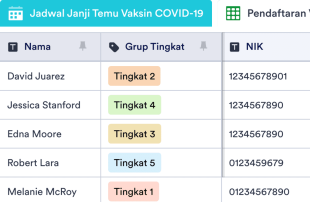
Pelacak Vaksin COVID-19
Pelacak Vaksin COVID-19 digunakan oleh organisasi medis untuk melacak pasien yang telah atau akan divaksinasi. Dengan Pelacak Vaksin COVID-19 online gratis dari Jotform, Anda dapat mengelola pendaftaran vaksin covid di tabel online profesional — dan dapat juga memilih untuk melihat info Anda di spreadsheet, kalender, atau kartu yang mudah dibaca. Kumpulkan pendaftaran vaksin melalui Formulir Pendaftaran Vaksin COVID-19 terlampir dan perhatikan saat informasi muncul di tabel Anda secara otomatis, siap untuk dilihat, diperbarui, atau dibagikan dengan rekan kerja. Proses vaksinasi setiap tempat berbeda, jadi jangan ragu untuk menyesuaikan templat tabel Anda dengan mengatur ulang tata letak, menambahkan kolom baru, menyortir info ke dalam tab yang berbeda, menetapkan label berkode warna, dan banyak lagi. Pastikan untuk meningkatkan kepatuhan HIPAA agar informasi kesehatan pasien yang sensitif tetap terlindungi! Semua orang ingin mendapatkan vaksin mereka — jadi buat prosesnya selancar mungkin dengan Pelacak Vaksin COVID-19 online yang dapat Anda gunakan di perangkat apa pun.
Buka Kategori:Template PelacakTentang Template Pelacak
Templat pelacak digunakan untuk melacak dan mengelola informasi penting, baik itu tugas, detail kontak, aplikasi, personel, atau kehadiran. Templat Pelacak gratis dari Jotform memungkinkan kustomisasi lengkap, dan fitur-fitur canggihnya membantu menyederhanakan alur kerja Anda.
Pilih dari berbagai jenis bidang dan rumus yang sudah tersedia, cari dan filter data Anda, dan tambahkan tab atau label berkode warna untuk mengatur apa pun yang Anda lacak dengan ahli. Anda bahkan dapat berkolaborasi pada templat tabel Anda dengan rekan satu tim menggunakan fitur berbagi sekali klik kami.
Why Use Tracker Templates?
- Tracker Templates eliminate the need for manual data transfer by automatically populating responses from Jotform Forms into Jotform Tables. This automation ensures that all submissions are captured accurately and reduces the potential for human error.
- Keeping responses together in a centralized location allows for quick and efficient access to all data. This centralized approach saves time and effort when needing to locate specific records for review or reporting.
- The ability to search, filter, and group entries in Tracker Templates simplifies the process of finding and analyzing specific data points. This functionality ensures that records can be quickly accessed based on defined criteria.
- Reviewing complete submission details, including any associated uploads, within Jotform Tables allows form owners to make informed decisions based on comprehensive data.
- Coordinating follow-up actions and tracking changes in submissions is streamlined through Jotform Tables, enhancing communication and accountability within teams.
- Reporting on collected data becomes more efficient with the use of Tracker Templates, allowing for the generation of insights and statistics necessary for informed decision-making.
Common Problems Solved by Tracker Templates
- Manually copying submissions into spreadsheets is time-consuming and prone to errors. Tracker Templates automate this process by directly importing form responses into Jotform Tables.
- Scattered responses across different platforms or documents can lead to inefficiencies. Tracker Templates centralize all submissions in one place, making them easily accessible.
- Difficulty locating records quickly is a common challenge that is addressed by Tracker Templates, which offer robust search and filtering capabilities.
- Inconsistent review processes can result from missing context or incomplete data. With Tracker Templates, all relevant information is organized and readily available for thorough review.
- Hard-to-review uploads and unclear ownership of submissions are resolved by the structured format of Tracker Templates, which supports comprehensive data analysis and clear assignment of responsibilities.
Matching Form Submission Use Cases to Jotform Tables Features
- When collecting event registration data through a Jotform Form, submissions automatically appear in the connected table, ensuring that event organizers have real-time access to attendee information.
- Submissions related to customer feedback can be organized using Table View or Detail View, allowing customer service teams to analyze responses and improve service delivery efficiently.
- Healthcare professionals can use filters and data grouping to manage patient records, ensuring that critical information is easily accessible for medical evaluations and follow-ups.
- Access settings and assignees facilitate team collaboration by allowing only authorized personnel to modify records while maintaining a clear history of changes and assignments.
- Generating reports from collected survey data is simplified through the use of Report View, enabling marketing teams to present findings in a structured and professional format.
How to Use Tracker Templates with Jotform Forms
- Start by selecting a category-relevant Jotform Tables template, a blank table, or the table connected to an existing Jotform Form. The Jotform Form will collect the category-specific information, and new responses will automatically appear in the connected table.
- Configure the table for submission review by naming columns, selecting appropriate column types, and choosing relevant views such as Table View, Detail View, Calendar View, Uploads View, or Report View to best fit the data being managed.
- Manage submissions effectively by using search, filters, grouping, formulas, access settings, assignees, revision history, linked tables, action buttons, or outputs, depending on the specific needs of your category.
Top Use Cases for Tracker Templates
- For Form Owners: Form owners benefit from Tracker Templates by having a streamlined process for reviewing incoming responses. They can edit submission data, check details or uploads, and keep records organized within Jotform Tables. This ensures that all information is up-to-date and easily accessible, aiding in decision-making and data management.
- For Teams: Authorized team members can efficiently find and maintain entries using Tracker Templates. They can coordinate responsibility with assignees, ensuring tasks are completed by the right people. Additionally, using access settings and revision history supports shared work by providing a clear audit trail of changes and maintaining data integrity.
- For Managers: Managers utilize Tracker Templates to monitor collected data and review category-specific patterns. By checking progress and ownership, they can ensure that operations run smoothly. Report View and other relevant views provide oversight, helping managers make informed decisions based on comprehensive data analysis.
Summarizing Tracker Templates
Tidak perlu banyak aplikasi — kumpulkan, bagikan, dan kelola informasi Anda di ruang kerja lengkap dengan Templat Pelacak Jotform.
Tanya Jawab
1) Apa saja jenis-jenis lembar pelacak?
Meskipun Anda dapat menggunakan lembar pelacak untuk mengelola informasi apa pun, beberapa kasus penggunaan umum adalah
2) Siapa yang harus menggunakan lembar pelacak?
Submissions from Jotform Forms automatically appear in Tracker Templates due to their connected relationship. Once a respondent submits a form, the response is recorded as an entry in the linked table, ensuring a seamless data flow. Future responses continue to auto-populate the table, maintaining an up-to-date record set.
3) Bagaimana cara membuat dan menggunakan lembar pelacak?
Yes, Tracker Templates allow you to edit submissions and organize data using various tools such as search, filters, and data grouping. You can also apply formulas and calculations to process the data further. While these features enhance data management, they do not automate decision-making processes.
4) Can I export the data inside the tables as CSV or Excel?
Data within Tracker Templates can be exported as CSV or Excel files, providing flexibility in data management. This capability allows you to add existing information to the table or use the export for external analysis and reporting. The integration of connected-form submissions with manually imported data is seamless.
5) Which Jotform Tables views can I use with Tracker Templates?
Tracker Templates support several views, including Table View, Detail View, Calendar View, Report View, and Uploads View. Table View is ideal for a broad overview of all entries, while Detail View allows for in-depth analysis of individual records. Calendar View helps in tracking dates, Report View aids in generating structured reports, and Uploads View is useful for managing attachments efficiently.
6) Can teams collaborate on submissions in Tracker Templates?
Teams can collaborate effectively on submissions using Tracker Templates by leveraging access settings and assigning tasks to specific team members. Real-time tracking and revision history help manage shared work, ensuring that changes are transparent and easily traceable. This collaborative environment enhances team productivity and data accuracy.
7) Can I connect Tracker Templates to related data or other applications?
Tracker Templates support linked tables and integrations, allowing you to connect to related data or third-party applications. Action buttons provide additional functionality to trigger specific tasks, enhancing the workflow. This connectivity ensures that Tracker Templates can be part of a broader data management strategy.
8) Can I create reports, PDFs, and manage files from Tracker Templates?
You can create detailed reports using Report View and generate PDFs for sharing or archival purposes. Uploads View allows you to manage files associated with table data, ensuring that all relevant documents are easily accessible. While not every category requires all capabilities, these features enhance the management and presentation of collected data.