
Help desk software is the unseen hero behind every customer service interaction. When you chat or email a company for help, a customer support app like HappyFox or Zendesk routes your message to the right team to get picked up by a support agent or auto-answered with AI.
Help desk software looks, at first glance, like a standard email app, with lists of new messages and tools to reply and file conversations for later. Only the lingo is different: Conversations are called tickets, problems are called issues, and a completed conversation isn’t archived, it’s resolved. And everything’s designed to be collaborative. Instead of an inbox of private messages, customer support apps are catchall inboxes for companies that allow the next available operator to answer the newest ticket.
Both Zendesk and HappyFox are designed for customer support teams. These apps offer collaborative inboxes to answer emails and chat messages, knowledge bases to store documentation, and AI tools to automate replies. But among the similarities lie differences that make each app stand apart. Zendesk has extensive add-ons and customizable database-like tools to track anything. HappyFox has a unified support and service desk to assist members across teams in a single app.
Here’s what makes HappyFox and Zendesk unique. These details will help you choose the best help desk for your team.
 HappyFox |  Zendesk | |
|---|---|---|
| Best for | A unified email inbox for multiple departments and brands | Support tied deeply into company data with integrations and custom objects |
| Industry fit | Small-to-medium-sized businesses with all-hands support | Enterprises with detailed reporting needs |
| Core functionality | Email and social network support for multiple brands or departments in one app | Email, live chat, phone, and social media support in a unified inbox |
| Scalability | Priced per user, unlimited agent plans available for fast-growing teams | Priced per user, with add-on pricing for AI agent resolutions |
| AI & automation | AI writing tools in email response box, AI answers and suggested resolutions, and AI-suggested documentation drafts | AI agents answer customers and automatically resolve issues, AI copilot recommends next steps, and AI forecasts support volume and agent availability |
What is HappyFox?
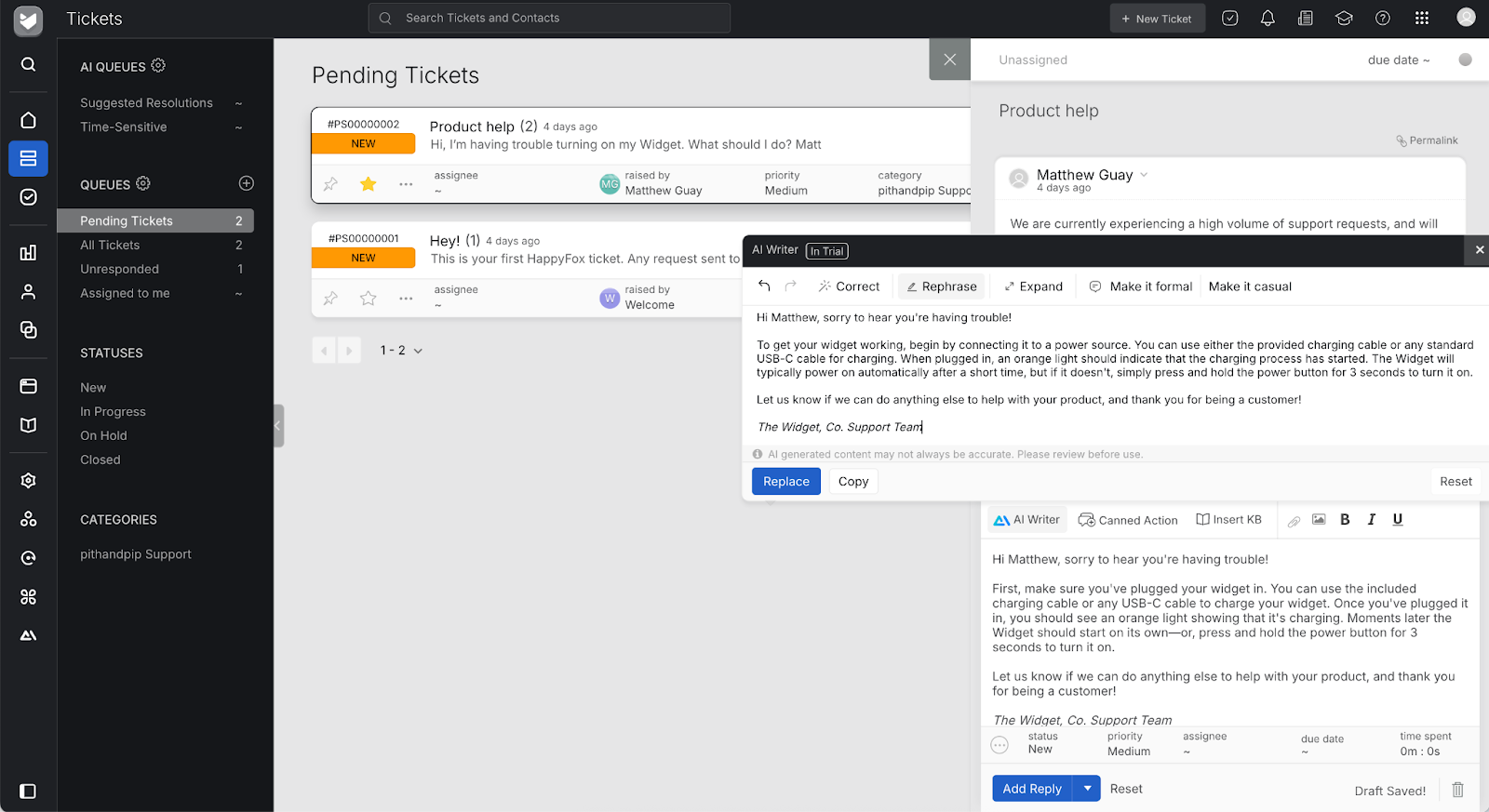
Launched in 2005 as Helpdesk Pilot, HappyFox got its start as on-premises customer support software. “We decided to develop a tool for ourselves,” founder Shalin Jain recalled. His team needed something to manage their growing support emails about their software offerings. That internal tool became their next product, and it proved popular enough that 11 companies purchased Helpdesk Pilot during its first month on the market.
By 2011, the team had rebuilt their tool for the cloud, rebranded as HappyFox. Today, HappyFox is SaaS customer support software that runs in your browser. It offers AI-powered replies, live chat and social media support, and a unified support interface for every team in your company.
You’d be hard-pressed to find bits of the original Helpdesk Pilot in HappyFox today, but its legacy lives on. The first customer for their hosted support software was a German firm that translated the app and documentation for free. That jump-started HappyFox’s global focus. The company supports 38 languages, live chat translation for 135 languages, and customers in over 70 countries. And the “pay it forward” idea the team assimilated from their earliest customer tracks today in their customer base, which is filled with educational institutions and healthcare providers alongside enterprises like Whirlpool. It’s a streamlined email- and phone-focused support desk, with companion chat and automation products available as well.
What is Zendesk?
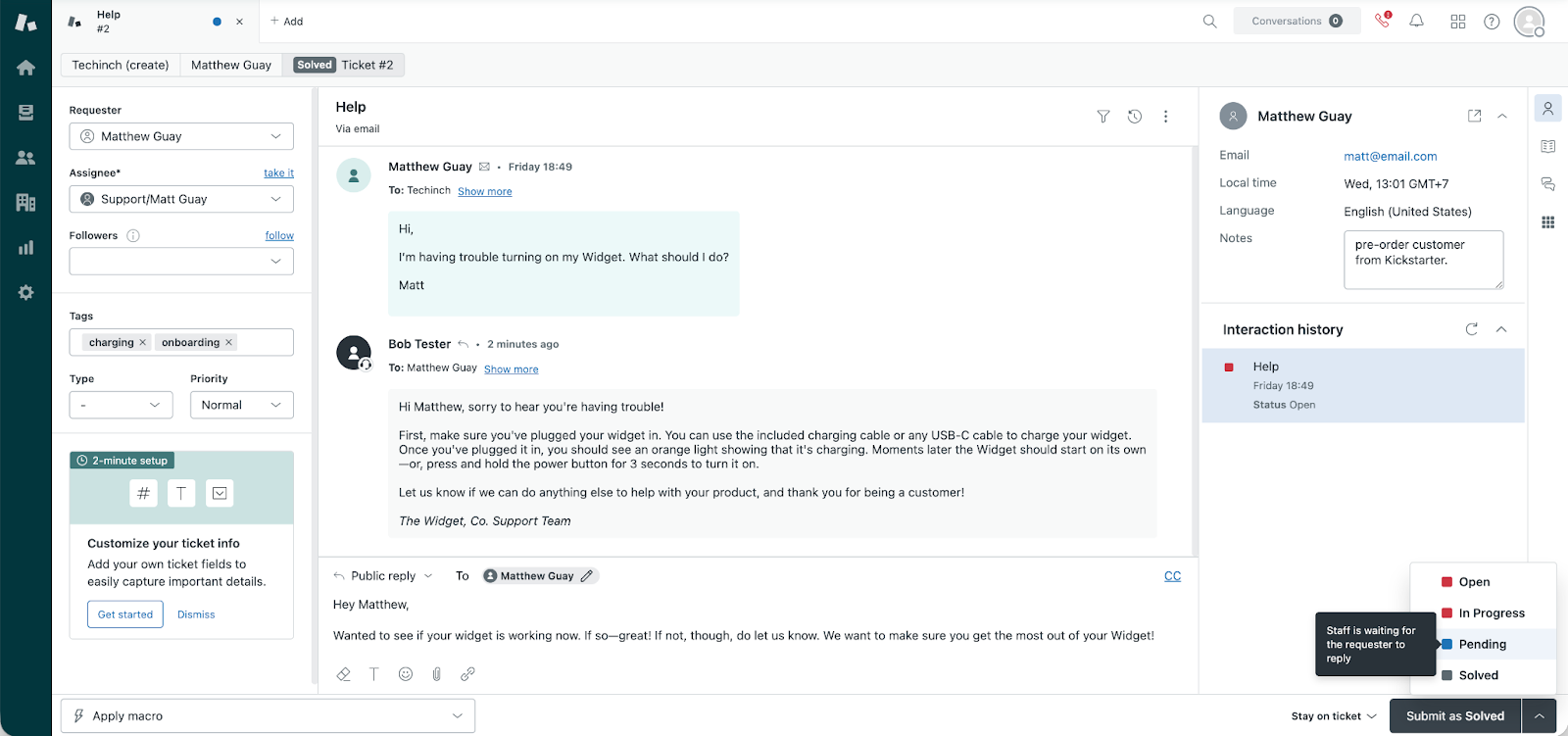
Zendesk got a later start to the customer support software game. Zendesk was built by a consulting team that’d been setting up customer support tools for other companies. “The software available for delivering customer service looked terrible and was not a software designed for humans,” recalled Zendesk cofounder Morten Primdahl. So, they set out to build something better, something that would help you “love your helpdesk,” as their early motto read.
Zendesk was built from the ground up as a hosted SaaS and allowed teams to sign for the software and manage support tickets entirely from their browser without setting up servers. That’s how most software today runs. But in 2007, that was still a new enough concept to win over startups, including the early Twitter team, to their new customer support software. Then it was off to the races, with an IPO in 2014 before being acquired in 2022 for $10.2 billion.
Zendesk’s growth, in large part, came from quickly scaling up features from its initial startup-focused tool set. Today, while it’s still accessible to small teams, it’s increasingly an enterprise-focused support system used by startups that have turned into giants, such as Uber and Grubhub, alongside enterprises like Tesco. It’s an all-in-one support desk with features to support complex support workflows.
Common features of HappyFox and Zendesk
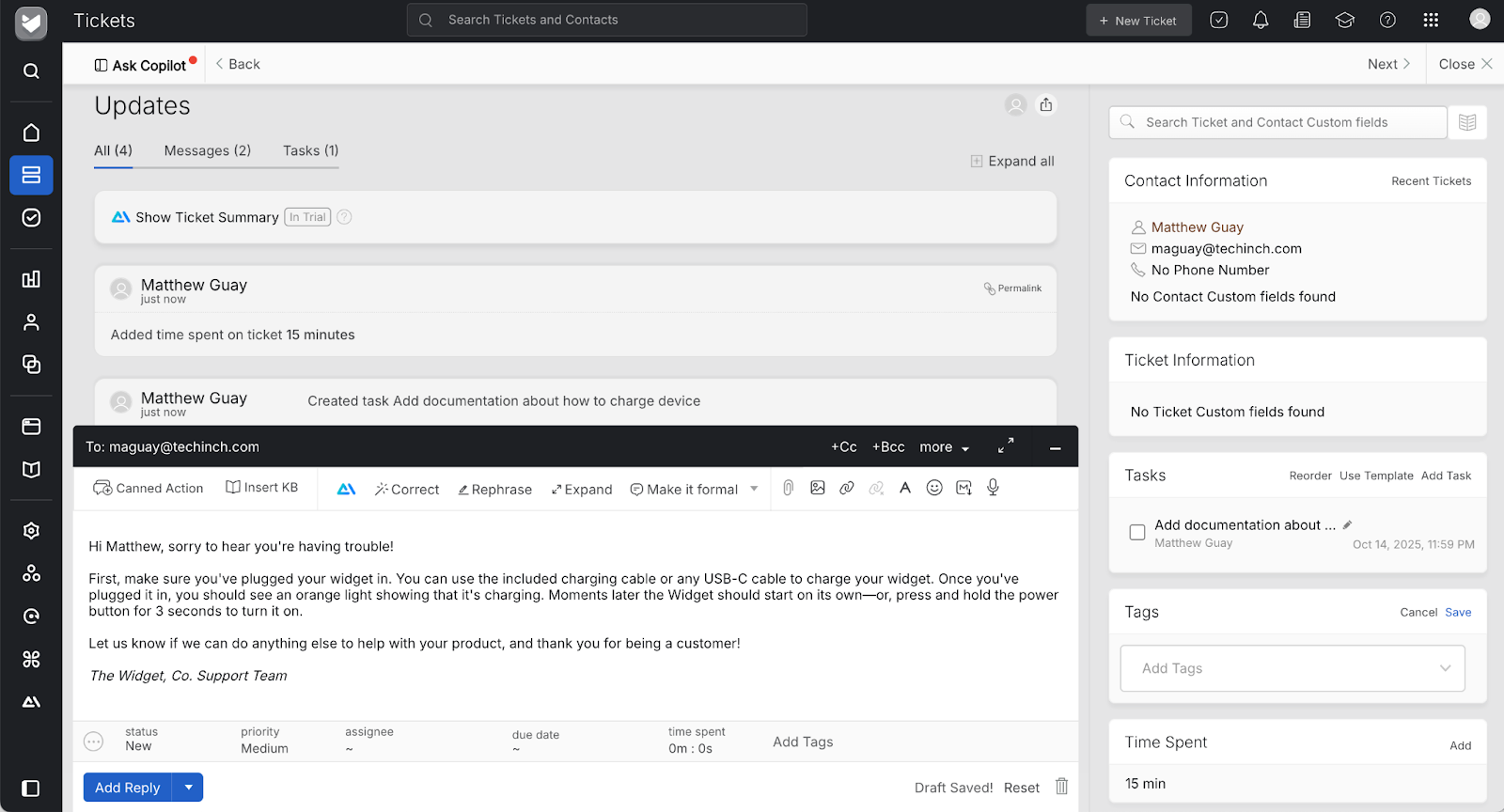
Need to answer customer support questions over email, document your product in a public knowledge base, customize emails with your branding, and connect to third-party tools for an integrated support hub? Both HappyFox and Zendesk excel in the same core areas.
Both apps include tools to speed up support agents. Their inboxes let you assign tickets to specific agents, sort them into categories with tags, and save more details about the interaction with private notes. In either tool, you can search through past tickets, create tickets automatically with automations, and use AI to speed up your support work. They also both include social media integrations to turn Facebook page comments or private messages into support tickets.
HappyFox and Zendesk are both built around teamwork as well. You can manage multiple groups, with support for brands in HappyFox, and for multiple organizations in Zendesk. You can also set which team members have access to which data. Both apps offer iOS and Android apps for support team members, allowing you to answer tickets on the go. Depending on your plan, they both offer HIPAA-compliance features for medical teams, and GDPR-compliance for European companies.
Both HappyFox and Zendesk include built-in tools to translate emails: Zendesk uses Google Translate, and HappyFox uses AI rewriting tools.
Who should use HappyFox or Zendesk?
Both HappyFox and Zendesk offer tools to handle customer support over email, live chat, social networks, and phone calls, in addition to managing documentation and using AI to speed up your work. Over years of development, though, each has grown into unique niches. HappyFox is most at home with small-to-medium-sized companies, and Zendesk is more often used by tech startups and larger enterprises.
Target audience for HappyFox
HappyFox’s happy spot is with growing small to medium-sized companies: Keeping costs down while the support team grows and managing everything in one platform are of utmost importance to these companies. HappyFox offers enterprise-ready features, including HIPAA compliance, along with features built for smaller teams, such as the option to keep email support desks for multiple teams unified in the same account and a simple interface. HappyFox is great for agencies that support multiple brands, and educational institutions where team members wear a variety of hats.
“We use HappyFox,” shared one user on Reddit’s Sysadmin group. “Pretty inexpensive and easy to set up. For our small org it works great.” Another from an education-focused discussion seconded the opinion: “HappyFox. Best decision ever.”
Pricing is a core reason many smaller, fast-growing teams choose HappyFox. While the base HappyFox plans are priced similarly to Zendesk, HappyFox’s top plan, at $119 per month per agent, is significantly cheaper than Zendesk’s more than $149 per month. And it includes more features in many of its tiers, such as multilingual support in all plans and a multilingual help desk in its mid-tier and higher plans. HappyFox also offers unlimited agent plans starting at $1,999 per month (compared to 40 agents on the Team plan or only 20 agents on a Pro plan) as an affordable way to involve more of the team in support or to use HappyFox for internal issues without paying for a license for every team member.
Target audience for Zendesk
Zendesk’s earliest customers were fast-growing startups, including Twitter, Tumblr, and Pinterest, and it grew alongside them as Zendesk built out its enterprise-focused capabilities to meet customer demand. Today, it’s a flexible support product built to be customizable without requiring development work. Its core customers are larger companies that have more exacting demands from customer support than an off-the-shelf solution can deliver. It’s the customer support tool of choice for larger, tech-focused companies like Uber and Grubhub, and is ideal for teams that need to combine email, chat, and phone support in one app.
“Zendesk is nice because it’s easy to set up and build custom workflows,” wrote a Zendesk user in the platform’s Reddit community. Another user noted that “out of box config is easy, external connections aren’t too difficult, and there’s already native integration to lots of common SaaS like Slack/Jira, and easy to build other out of the box configurations.”
That flexibility comes at a cost, both in price and complexity. “Zendesk is one of those tools that’s incredibly powerful but can feel like you need a PhD to get simple things done,” shared another user on Reddit. Others mentioned it proved expensive for smaller teams. But with more powerful integrations and customization options, those costs can be worth it for larger companies that otherwise would need to develop a custom tool for their support needs.
Key features of HappyFox
- Email inbox support queue
- Keyboard shortcut-powered interface for productivity
- Tools to keep track of follow-up tasks from the support queue
- Generative AI to rewrite email replies, prioritize tickets, and suggest next steps
- Social media and HappyFox Chat integrations
HappyFox is built to help teams quickly answer customer support tickets. Its interface puts conversations front and center. Select a message, reply, and close it, then jump straight to the next. You can write full emails every time, use pre-written responses, or write a rough email and have HappyFox AI make the email sound more professional automatically.
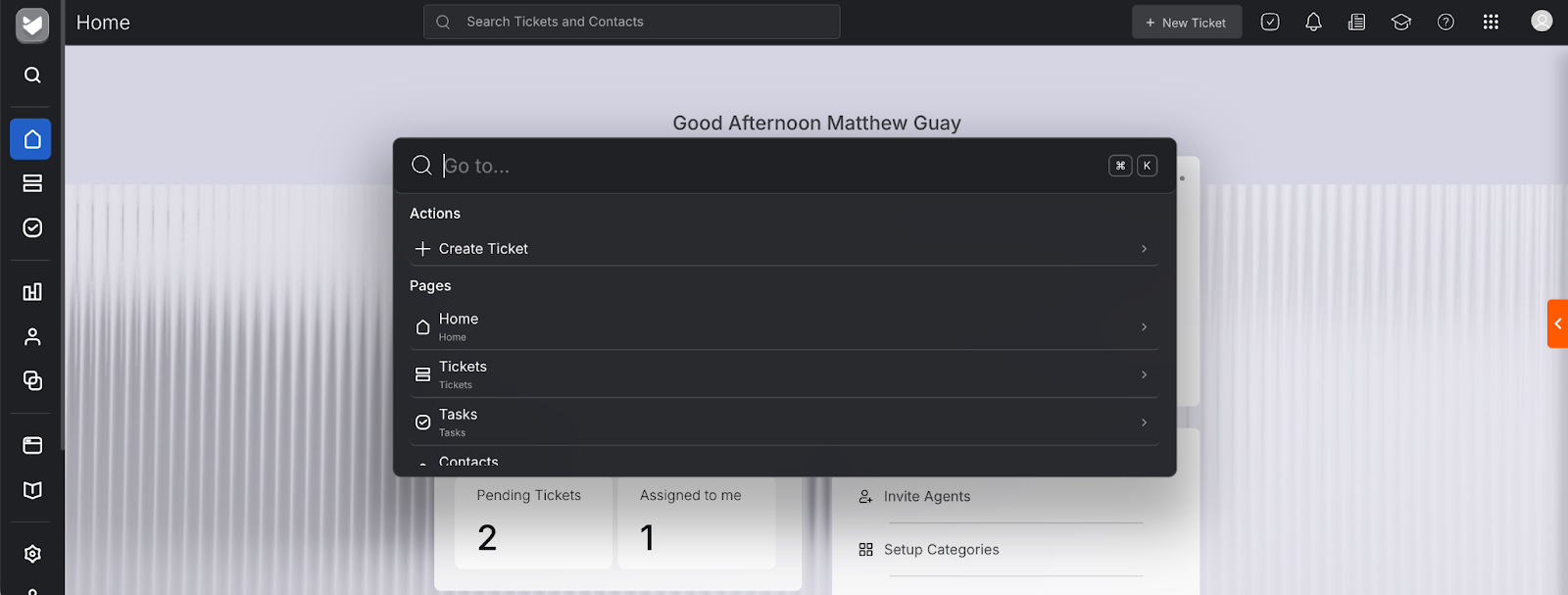
The focus on productivity extends throughout the app. Open a command palette to search through HappyFox features and create a new ticket, or jump to your tasks and assigned tickets. Similarly, when answering a ticket, HappyFox lets you add tasks and assign them to anyone on your team. That way, if a customer mentions a bug in your product, you can assign a task to your dev team. If a customer needs a refund, you can assign the task to your finance team. Or you can add tasks for yourself to keep from forgetting follow-up tasks after you complete a ticket.
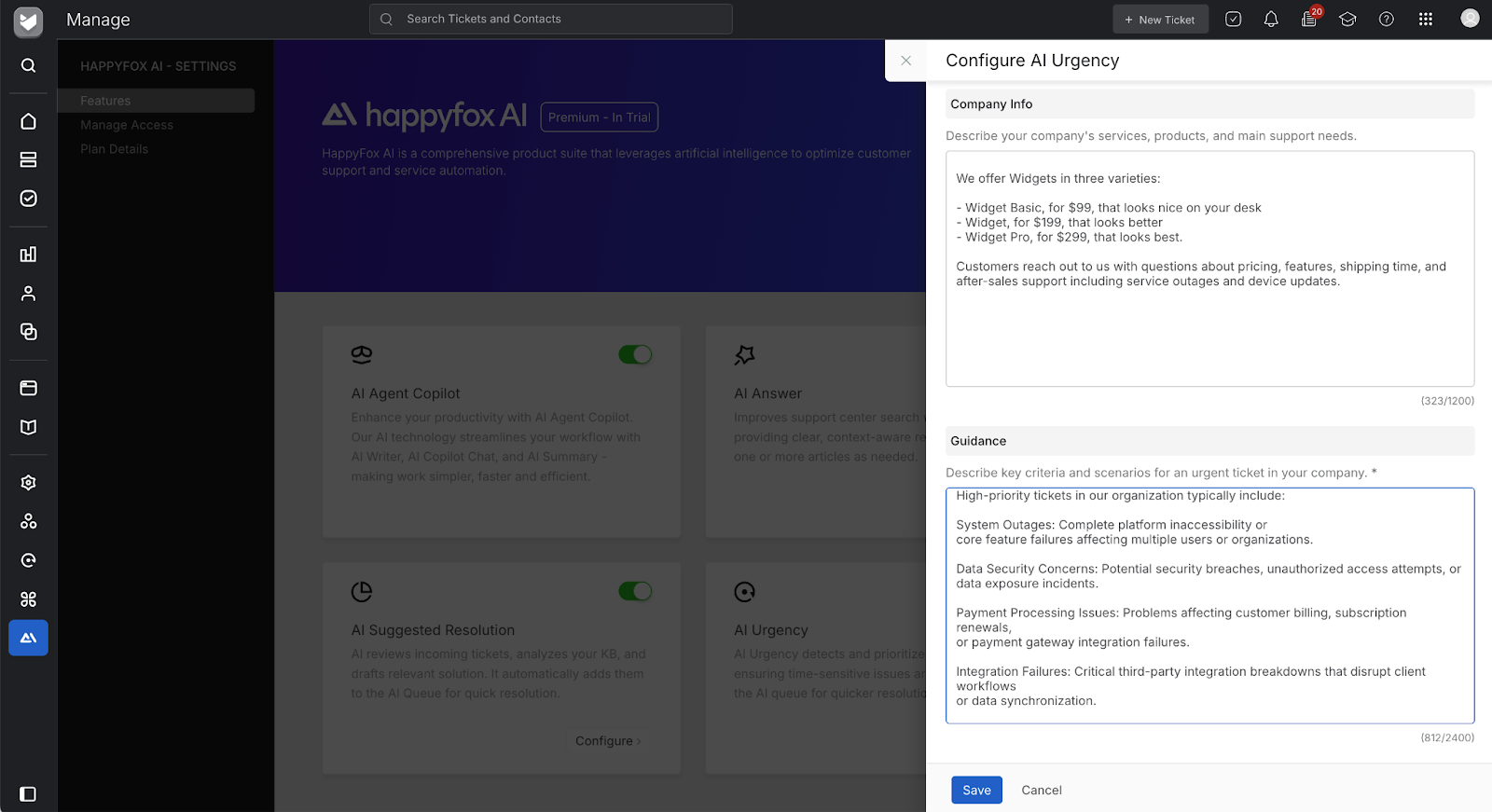
HappyFox AI features are built to help resolve issues. With the AI Urgency tool, you can explain your team’s products and priorities, and it’ll use that data to mark tasks as urgent or not. Similar tools can suggest steps to resolve tickets or remind you when something should be added to your company’s documentation.
HappyFox is built for email support, but it doesn’t end there. With the companion HappyFox Chat app, you can add live chat support to your help desk, and social network integrations can turn Facebook messages into tickets. You can also add integrations to link HappyFox to Slack and other team chat apps to pull in the whole company and get advice from other team members. And the unlimited agent plan makes it affordable for your whole company to be part of your support team.
Key features of Zendesk
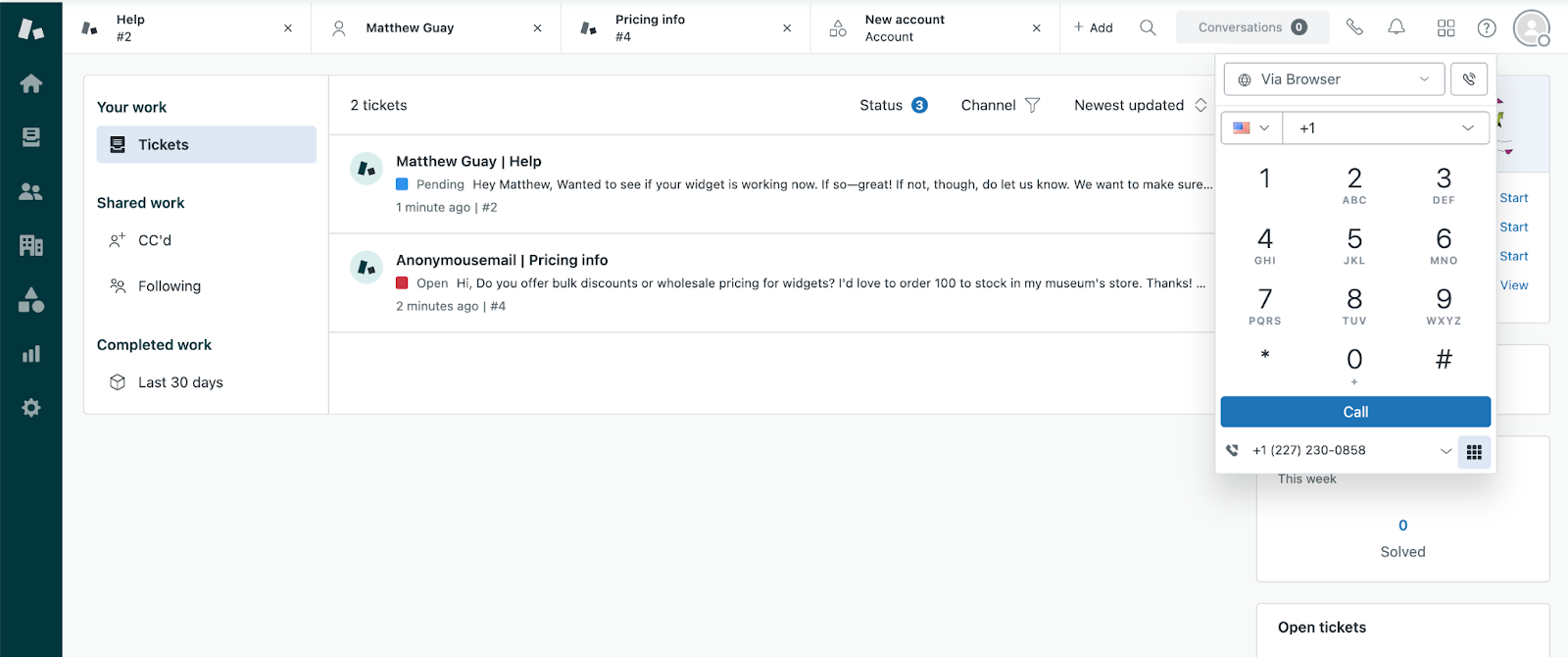
- Universal customer support inbox for email, phone, SMS, social networks, and chat
- Tabbed interface to quickly switch between tickets
- Custom objects to store detailed data about customers, products, and more
- AI agents to automatically answer and resolve support tickets
- Automations, macros, and more than 1,998 apps and integrations
Zendesk is built around answering support queries in one place, wherever they come from. Alongside the inbox with new messages from email and chat, Zendesk includes a phone dialer to reach out to customers and talk over the phone from your browser. You can also reply to SMS text messages or offer support over a wide variety of social networks, including Facebook Messenger, X/Twitter, WhatsApp, WeChat, LINE, Instagram, and Apple Messages. Software teams can even build Zendesk into mobile apps with a dedicated support software development kit.
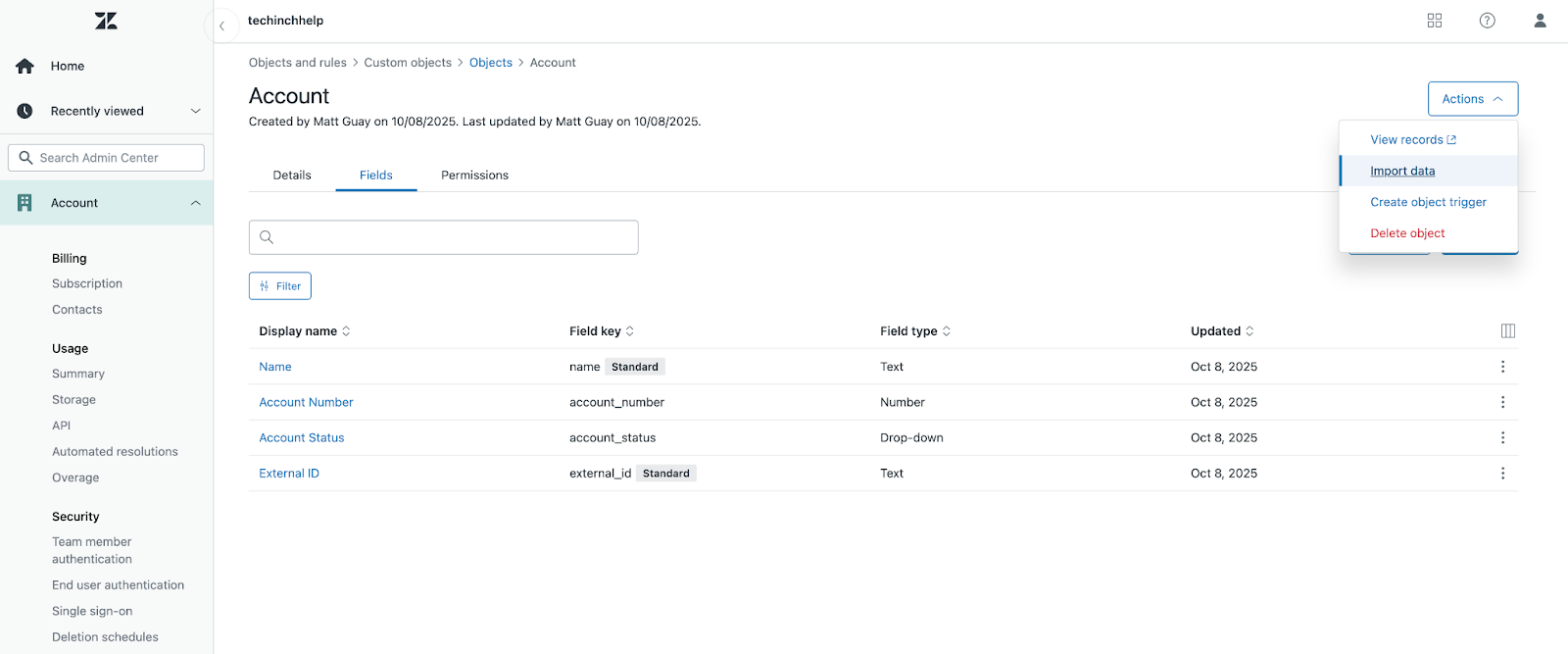
No matter which channels you use for support, the same Zendesk tools organize and answer messages quickly. Zendesk’s interface, by default, is sparse, with your message, a simple reply box, and details about the customer and their past interactions with your team. You can expand on that with custom objects, which each can include their own fields and details, such as orders with each of the order details, or accounts with account numbers and payment plans.
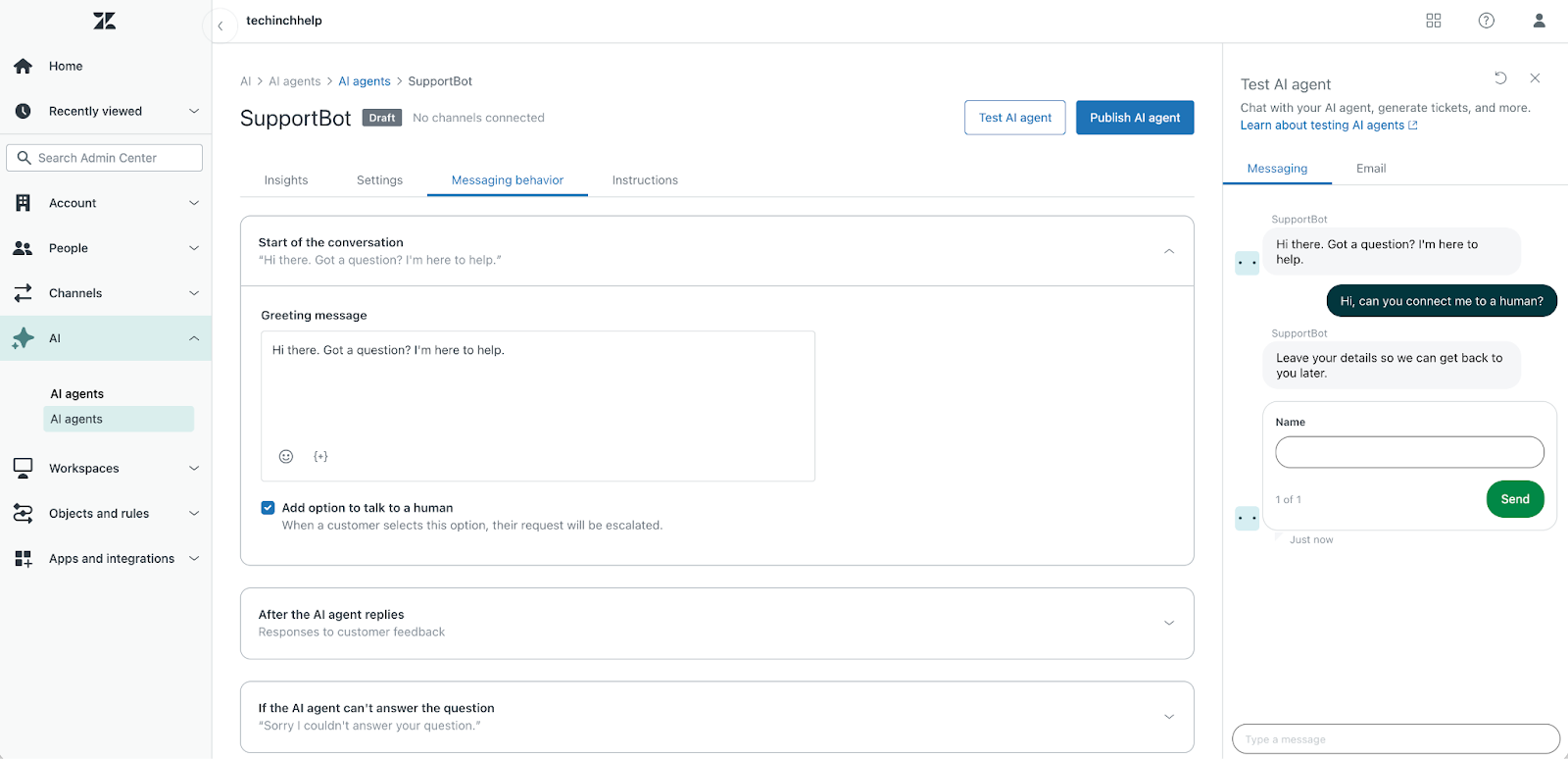
Zendesk is also built to answer customer questions on your behalf. With Zendesk AI agents, you can train a chatbot to talk to customers, answer questions based on documentation, and resolve issues on its own when possible. That way, the simplest questions will get taken care of automatically, leaving your inbox with only the questions that AI and documentation can’t yet cover.
Integrations play a part here, too. Zendesk’s extensive library of integrations lets you pull details, such as order and account details alongside support questions, from your software into Zendesk. The support bots can also handle customer interactions automatically to look up order info and include that along with automated answers. AI support agents are treated a bit like a human team member in Zendesk; they’re billed at around $2 per successful resolution, with discounts available for prepurchased AI resolutions.
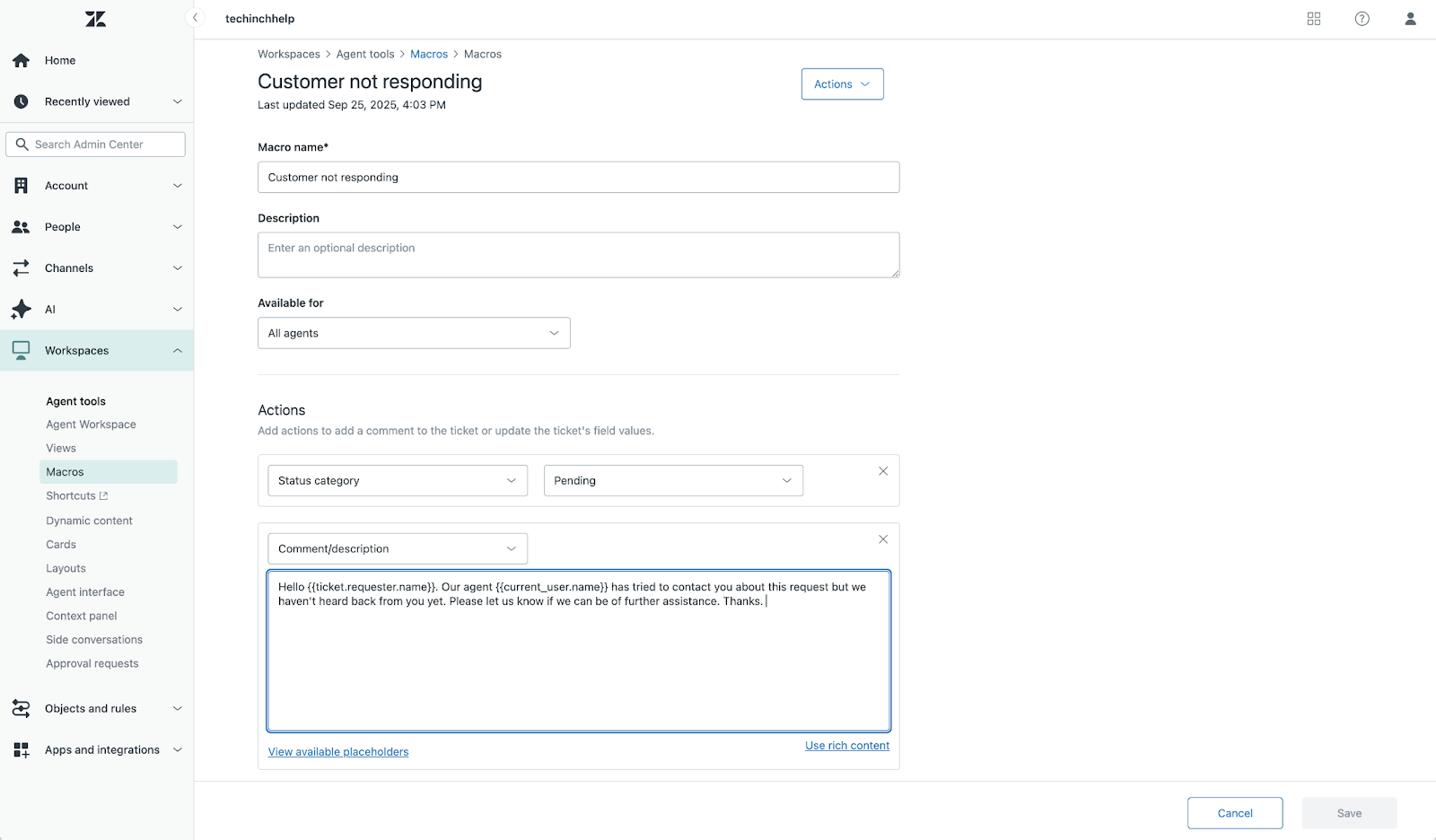
Zendesk macros automatically reply to messages (perhaps to let customers know the expected time for a response, or to reach back out if customers haven’t replied yet). Similar automation add-ons can watch for wording in tickets to detect when a customer is more likely to cancel their account, and both escalate the ticket accordingly and coach the support agent about where to improve in their responses.
It can take time to fully integrate Zendesk with your team’s software and internal data, and pull every support interaction, documentation, and default reply workflow into the system. When you do, though, Zendesk includes the tools to handle all your customer communication needs in one place.
What makes HappyFox and Zendesk unique?
HappyFox offers a more traditional email-style interface: a three-column layout that lets you quickly jump between messages and conversations. It also includes a command prompt to navigate HappyFox from your keyboard. Zendesk uses a tabbed interface, similar to Gmail. The full-screen view of your conversation with a customer is flanked by details about their past interactions.
Zendesk offers more support options in a single platform, such as live chat, phone calls, email, and social network support. HappyFox focuses on email and social network support, but it also offers a companion HappyFox Chat product for live conversations.
Zendesk’s objects and integration features are a key standout between the two platforms. Zendesk Objects let you store as many details in your help desk as needed. You can track account numbers and plan details all under an Account object. Zendesk also offers over 1,998 Zendesk apps, versus HappyFox’s 98 apps, for more ways to add new functionality to your help desk.
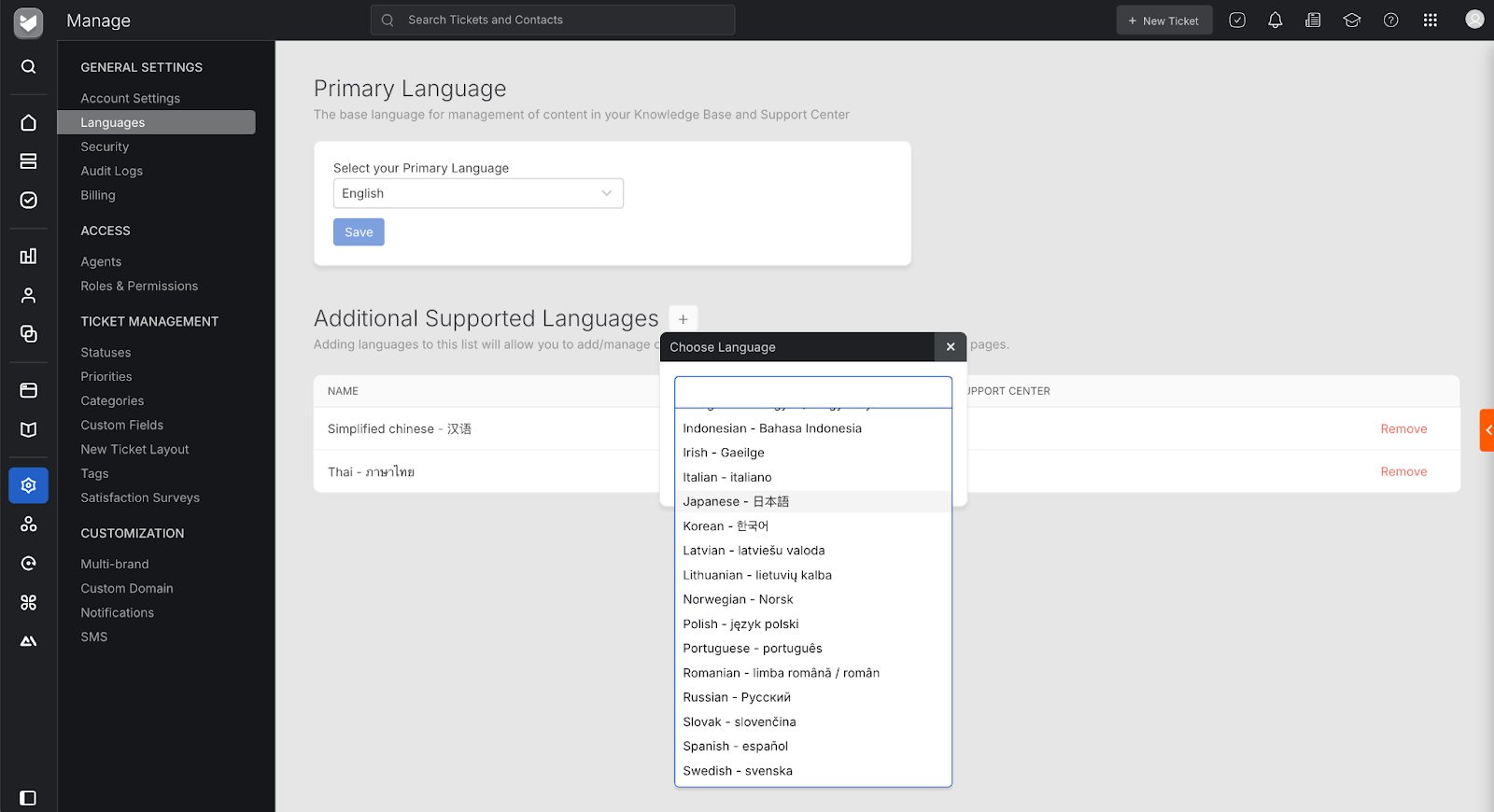
HappyFox, on the other hand, offers more internationalization customization support. Every plan lets you use multiple languages in the agent portal, something Zendesk offers in only the Professional and higher plans. HappyFox also supports 38 languages, versus the 30 that Zendesk supports.
AI features also differ between the two platforms. Zendesk’s AI is focused on AI agents, with chatbots that answer customer questions and resolve tickets in chat. With its deep integration with other software, agents can look up order details, check internal documentation to see if a product can be returned, then share return details with a customer. HappyFox’s AI is more focused on helping customer support agents work faster. Built-in AI tools rewrite support replies from a prompt, suggest answers from relevant documentation, let you know when new documentation is needed, and suggest solutions to detect urgency and prioritize emails accordingly.
HappyFox vs Zendesk pricing
| Tool Name | Base plan | Mid plan | Pro plan | Unlimited plan |
|---|---|---|---|---|
HappyFox |
$29 (max five agents) |
$69 |
$119 |
$1,999 per month for 20k tickets per year |
Zendesk |
$25 |
$69 |
$149 |
– |
HappyFox’s and Zendesk’s core pricing plans are similar: Monthly billing per agent starts at under $30 per month, and a mid-tier plan with most features is $69 per month. Zendesk then offers more expensive top-tier plans, while HappyFox offers unlimited agent plans for larger teams.
Zendesk starts out cheaper. Zendesk Support Team, the cheapest plan, costs $25 per month, per agent, and does not cap the number of agents on the plan. But it also doesn’t include most automation or customization features. HappyFox Basic costs $29 per month, per agent and can only be used by up to five agents. However, it doesn’t support custom domains or a multi-brand help desk.
HappyFox Pro is $119 per month, per agent. It is cheaper than Zendesk Suite Professional’s $149 per month, per agent (and nearly half the price of Zendesk Enterprise’s $219 per month per agent). And while both Zendesk and HappyFox offer annual discounts, HappyFox also offers a two-year plan that brings the Basic plan down to $21 per month, Team to $39 per month, and Pro to $89 per month. Zendesk also offers upgrades, including extra AI support at $2 per resolution and advanced AI features. HappyFox plans include all their support features without additional add-ons, but it offers its chat and automation tools as separate but integrated products.
Scaling to larger teams is where help desk costs bite the most. Zendesk helps keep costs down with light agents, which are free users who can only view and comment on tickets as a way to pull advice from developers, sales agents, and other teams into the support workflow. HappyFox’s unlimited agent plans start at$1,999 per month and provide unlimited agents and 20,000 tickets per year. These plans are designed for companies with all-hands support and heavy internal use of tickets to resolve in-company issues.
HappyFox vs Zendesk side by side
HappyFox | Zendesk | |
|---|---|---|
| Email tickets | ||
| Live chat | With HappyFox Chat add-on | |
| Phone support | ||
| Supported languages | 38 | 30 |
| Apps and integrations | 98+ | 1,998+ |
| Custom objects | Only custom individual fields | |
| Pricing model | Per agent or unlimited agent | Per agent, with limited free light agents |
| AI features | AI tools, AI ticket escalation, and next steps | AI agents to resolve issues in chat |
| HIPAA compliance | HIPAA-compliant encrypted data storage, audit trails, access controls, and secure communication channels | Full HIPAA compliance via Business Associate Agreement |
How Jotform AI Agents enhance help desks and customer support
Once you’ve chosen help desk software for your team, you’ll want to integrate it into your website, order forms, software, social media presence, and more. If you already have Jotform Forms on your site, you can turn every customer inquiry into a support ticket using our built-in Jotform Zendesk integration or with automation platform Zapier to integrate Jotform and HappyFox.
It’s not just forms, either. Jotform AI Agents turn forms into self-service chatbots to automatically answer customer questions. AI agents can learn from your website, documentation, and any custom training data you add. They can then, in natural language, chat with customers, answer their core questions, validate their responses to fit your support ticket requirements, and automatically create a support ticket when more help is needed. Jotform will inform you whenever the bot can’t answer a question. You can then add training data and let it take the question on its own next time.
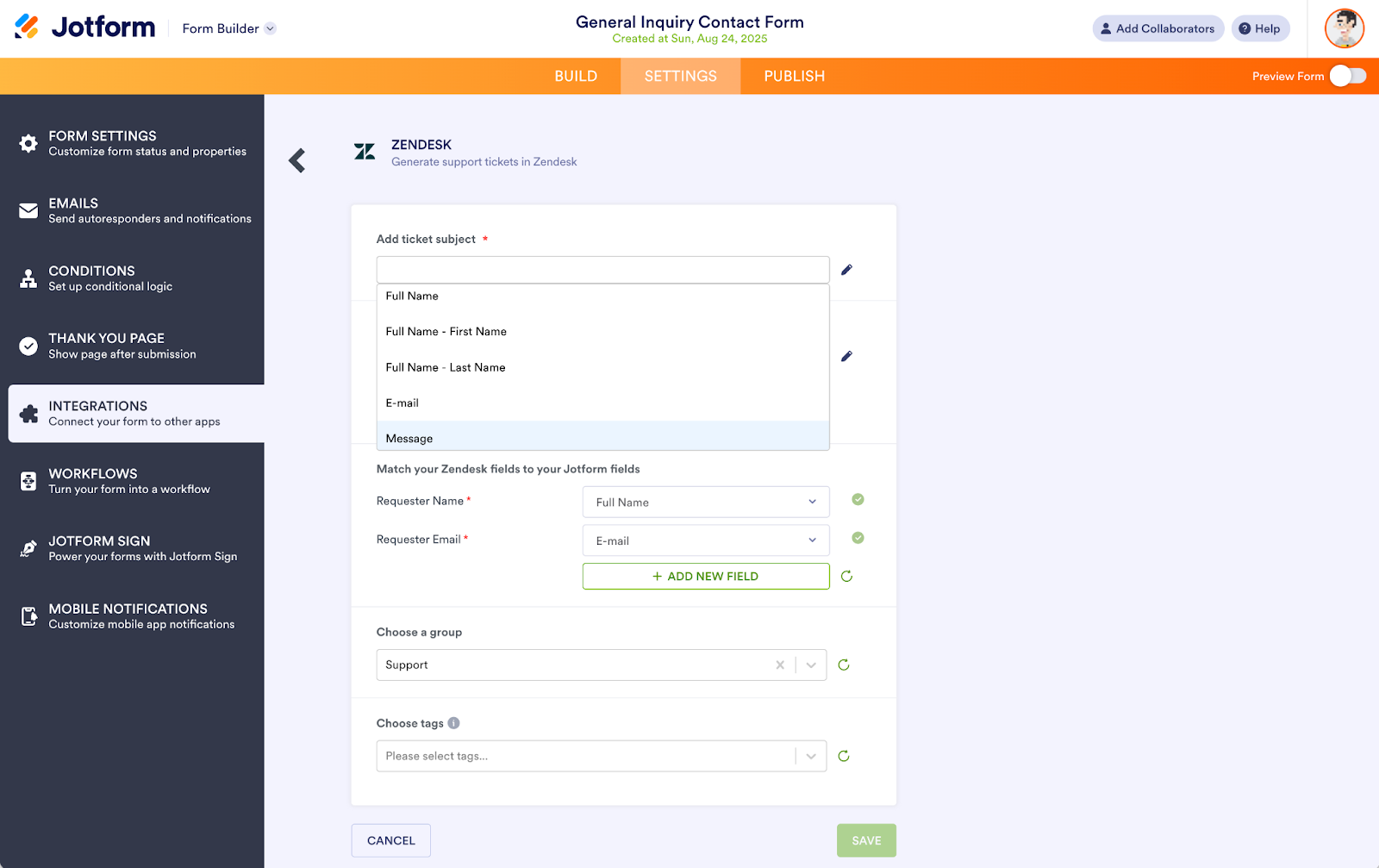
Jotform’s Zendesk integration lets you turn form data into tickets with minimal setup. Connect your account, then map your form fields to a Zendesk ticket subject and message. Jotform will do its best to match the name and email automatically.
Setup is a bit more complex with HappyFox. You’ll need to build a Zapier automation to watch Jotform for whenever anyone fills out a form, signs a document, or is assigned a Jotform form. Zapier can then create a new ticket in HappyFox, using the form data to add details to the ticket and route it to the right team. The standard form automation is perfect for most teams. The document signing and assigned forms tools can help power internal workflows to, for example, onboard new staff or request new hardware from your internal service desk.
With Jotform Forms or Jotform AI Agents on your site, you can reduce your AI and agent spending on your help desk, and resolve issues faster with an AI bot that learns from every new customer interaction. It’s one ingredient to scaling your customer support as your customer base grows, without overloading your support team.
This article is for people comparing help desk software for customer support, especially teams choosing between HappyFox and Zendesk and considering how integrations and AI chatbots can connect web forms, tickets, and self-service support workflows.






















































Send Comment: