

Businesses run on workflows: Employee approvals, customer onboarding, support requests, and dozens of other processes happen every day. In the past, you had to define triggers and configure actions step by step in the automation software to set up these workflows.
You no longer have to do all this manually. Instead, you can generate workflows with AI simply by describing what you want in plain language. This prompt-to-automation system creates the automation structure on autopilot.
This transition is happening across industries. According to the 2025 McKinsey Global Survey on the State of AI, high-performing companies are 2.8 times more likely to redesign their core workflows around AI rather than use it only for isolated tasks. This transition shows the shift from experimental AI tools to agentic AI, where agents help execute operational processes.
If you’re planning to automate your tasks, choosing the best AI workflow generator can reduce a big part of your manual work.
In this guide, we tested and ranked the five best AI workflow generators in 2026 to find out how well each converts prompts into working automations.
5 best AI workflow generators in 2026
To compare platforms fairly, we evaluated each workflow generator AI tool using the same testing prompt. The prompt was designed to simulate a realistic operational scenario that many organizations face.
The prompt we used was:
Create a workflow that collects a customer support request, assigns it to the correct team, sends a Slack notification, and stores the request in a database.
This scenario tests multiple components of workflow automation: data collection, routing logic, notifications, and storage. Our evaluation factors included prompt-to-workflow accuracy, ease of customization, integrations, setup speed, and availability of a free plan.
Below is a simplified comparison of the AI workflow automation tools we evaluated:
| Tool | Prompt Based Generation | Integrations | Customization | Free Plan / Trial |
|---|---|---|---|---|
 Jotform AI Workflow Generator |
Full prompt workflow generation |
150+ native integrations |
Drag-and-drop editor |
Free plan |
 Zapier AI Copilot |
Prompt assisted workflow suggestions |
8000+ native integrations |
Visual editor |
Free plan |
 n8n AI Workflow Builder |
Prompt assisted node generation |
400+ native integrations |
Developer-friendly nodes |
Free trial |
 Make AI Workflow Builder |
AI scenario suggestions |
3000+ integrations |
Advanced automation builder |
Free plan |
 Pipedream AI Builder |
AI assisted API workflows |
3000+ integrations |
Code + visual workflows |
Free trial |
Each of these AI tools approaches automation slightly differently. Some prioritize nontechnical usability, while others focus on developer flexibility. The following sections explain how each platform performed during testing:
1. Jotform AI Workflow Generator
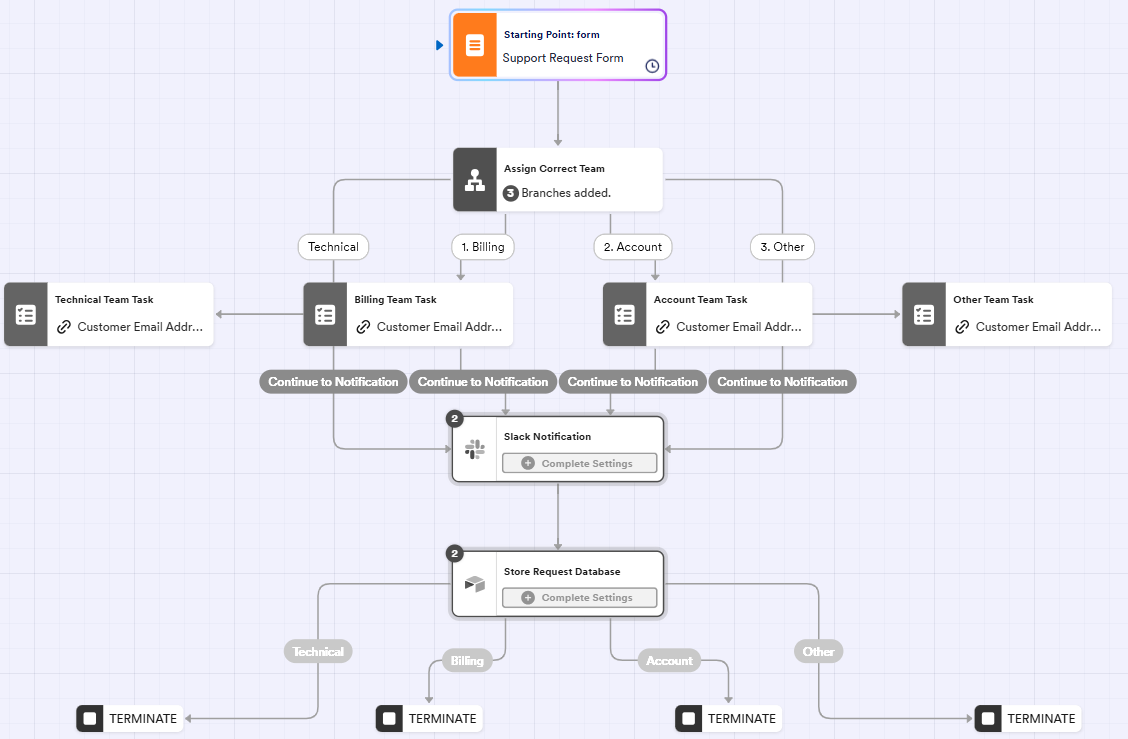
One of the most straightforward tools we tested was the Jotform AI Workflow Generator. Unlike many automation platforms that suggest steps, Jotform’s tool focuses on a full prompt-to-automation experience. You describe the workflow you want, and the system generates the entire structure automatically.
During testing, Jotform produced a complete workflow structure. It included a form trigger, task routing, notifications, and data storage. This made it easy to review and refine the automation instead of building each step manually.
Jotform workflows also connect directly with tools like Jotform AI Form Builder and Jotform Tables, giving teams a unified way to manage data. Forms created with the AI Form Builder send submissions directly into Jotform Tables, where you can organize and track information in real time.
From there, workflows automate the next steps: triggering approvals, notifications, or actions based on the data. This integration lets you handle form creation, data management, and automation in one place.
- Best for: Nontechnical teams that want instant workflow creation
- Key features
- Prompt-to-workflow generation
- No-code drag-and-drop editor
- Integrates with forms, approvals, and submission tracking
- Built-in approval flows for routing submissions to teams or managers
- Real-time workflow tracking dashboard to monitor status, progress, and outcomes
- Conditional logic to route tasks dynamically based on form responses or data rules
- Pros
- Creates full workflows from a single prompt
- Very easy for nontechnical users
- Fast setup compared to traditional automation tools
- Cons
- Smaller integration ecosystem than Zapier
- Complex enterprise automations may require customization
- Plans/Pricing
- Starter: Free (five forms, 100 monthly submissions, and 100 MB available space)
- Bronze: $34 per month (25 forms, 1000 monthly submissions, and 1 GB available space)
- Silver: $39 per month (50 forms, 2,500 monthly submissions, and 10 GB available space)
- Gold: $99 per month (100 forms, 10,000 monthly submissions, 100 GB available space)
- Enterprise: Custom price
2. Zapier AI Copilot
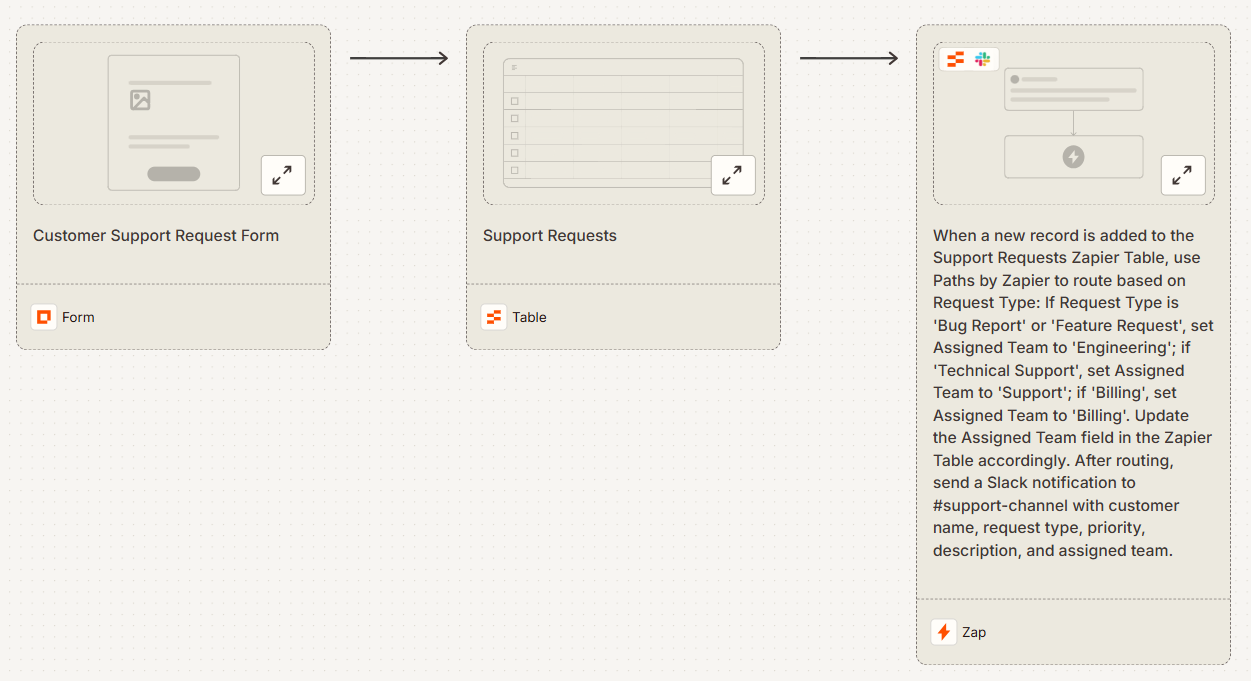
Zapier has long been a dominant automation software for connecting apps. Its AI Copilot feature provides conversational assistance to help users design automations more quickly.
Instead of creating Zaps entirely from scratch, you describe your intended workflow, and the platform suggests triggers and actions. During testing, Zapier’s AI Copilot successfully interpreted our prompt and proposed an automation that routed support requests and triggered Slack notifications.
However, Zapier’s AI functions primarily as a workflow assistant rather than a full AI workflow creator. You would still need to review, confirm, and configure each step before the automation becomes operational.
- Best for: Businesses already connected to the Zapier ecosystem
- Key features
- AI Copilot for workflow suggestions
- More than 8,000 integrations
- Visual automation editor
- Natural language workflow search that locates existing Zaps and integrations
- AI recommendations for improving workflow efficiency and reducing task steps
- Pros
- Huge integration library
- Mature automation platform
- Reliable triggers and actions
- Cons
- AI still requires manual configuration
- Complex workflows can become expensive
- Plans/Pricing
- Free: $0
- Professional: Starting from $19.99 per month (billed annually)
- Team: Starting from $69 per month (billed annually)
- Enterprise: Custom pricing
3. n8n AI Workflow builder
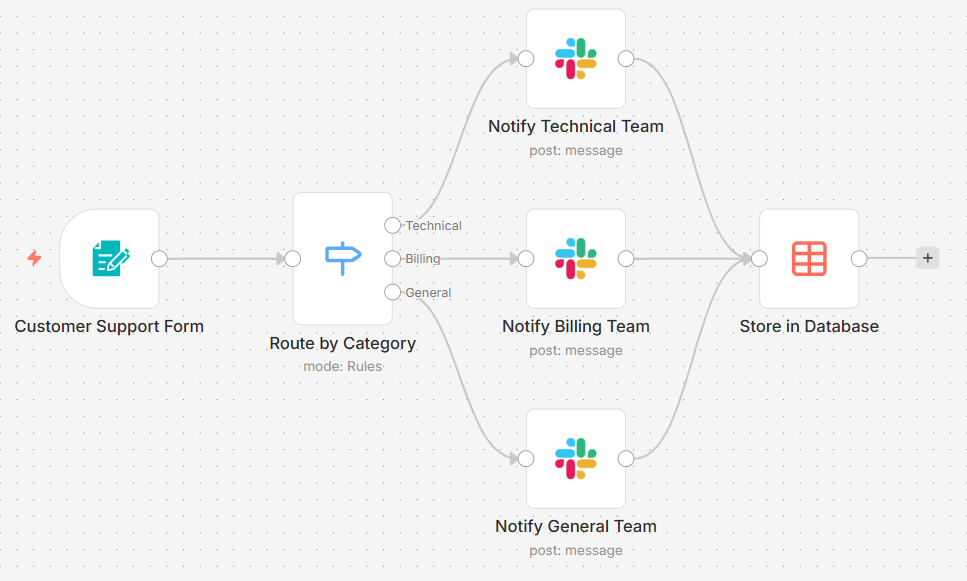
n8n is an open-source workflow automation platform emphasizing flexibility and developer control. Its AI features accelerate the creation of automation nodes, which are the building blocks for constructing workflows.
When we tested n8n with our support automation prompt, it generated suggestions for nodes that could collect form data, send Slack notifications, and write information to a database.
However, these nodes still required manual configuration and connection before the workflow could run. Because of this structure, n8n functions more as a developer-friendly workflow generator AI platform rather than a simple prompt-to-automation solution.
- Best for: Developers and technical teams
- Key features
- Open-source automation platform
- AI node generation and monitoring through built-in debugging tools
- Custom API integrations for connecting internal tools and proprietary systems
- Advanced workflow branching for complex multi-path automation logic
- Pros
- Highly customizable
- Self-hosting available
- Great for engineering teams
- Cons
- Steeper learning curve
- Requires technical knowledge
- Plans/Pricing
- Starter: $20 per month (billed annually)
- Pro: $50 per month (billed annually)
- Business: $800 per month (billed annually)
- Enterprise: Custom pricing
4. Make AI Workflow Builder
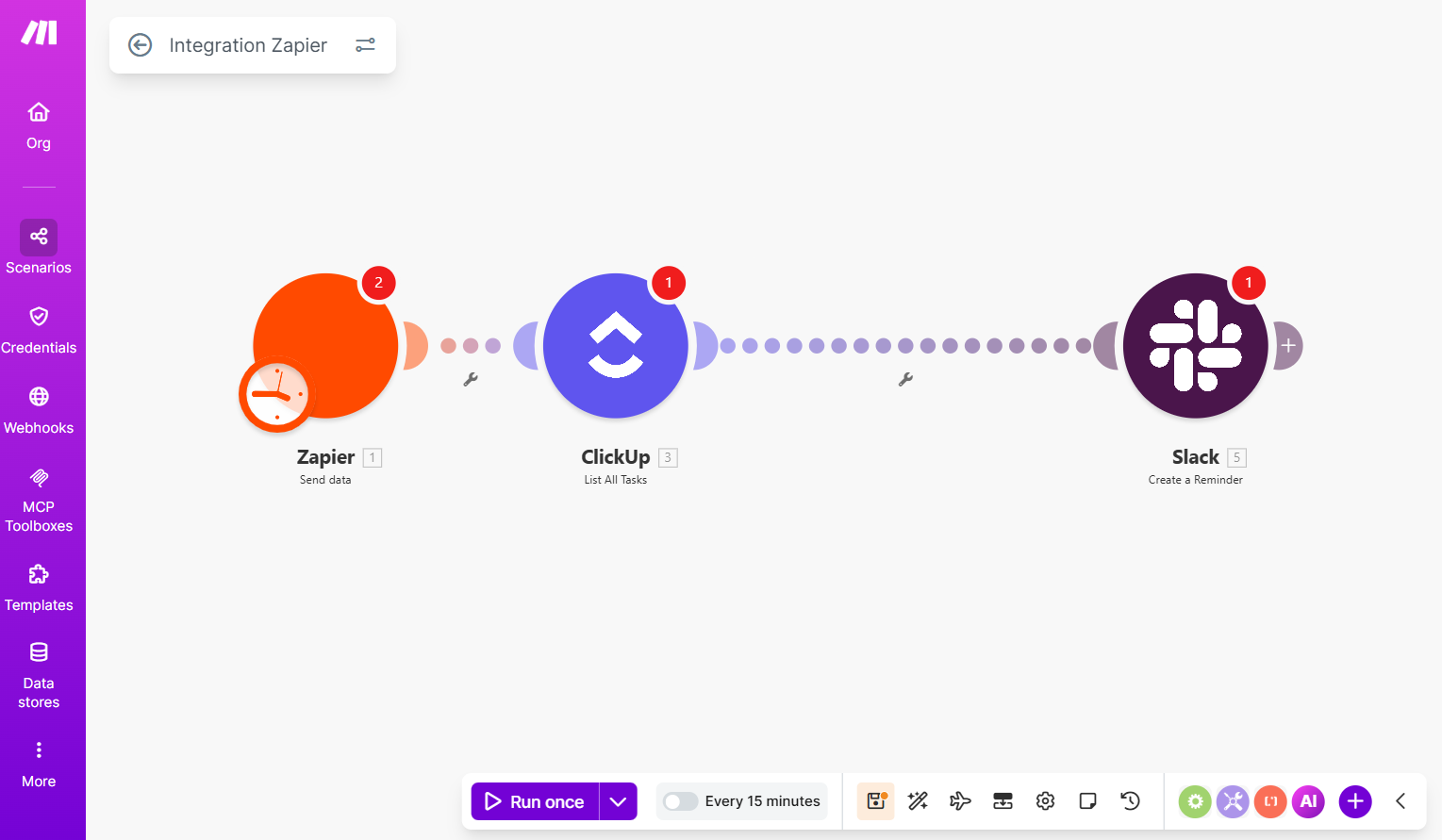
Make, formerly known as Integromat, is known for its visual automation environment. Its AI capabilities assist users in designing workflow scenarios instead of fully generating them from a single prompt.
When we tested the platform, Make interpreted our prompt and recommended modules. These could capture form data, apply conditional routing, and trigger notifications.
The suggestions helped achieve workflow automation benefits, but they still required manual assembly.
- Best for: Teams building complex automation scenarios
- Key features
- Automated visual scenario mapping that displays workflows as connected automation diagrams
- Scenario simulation tools
- Large integration ecosystem
- Advanced data transformation tools for modifying information between workflow steps
- Pros
- Powerful automation logic
- Excellent visualization
- Supports complex workflows
- Cons
- Steeper learning curve
- AI generation is not fully automated
- Plans/Pricing
- Free: $0 for 10,000 credits
- Core: $9 per month for 10,000 credits (billed annually)
- Pro: $16 per month for 10,000 credits (billed annually)
- Teams: $29 per month for 10,000 credits (billed annually)
- Enterprise: Custom pricing
5. Pipedream AI Builder
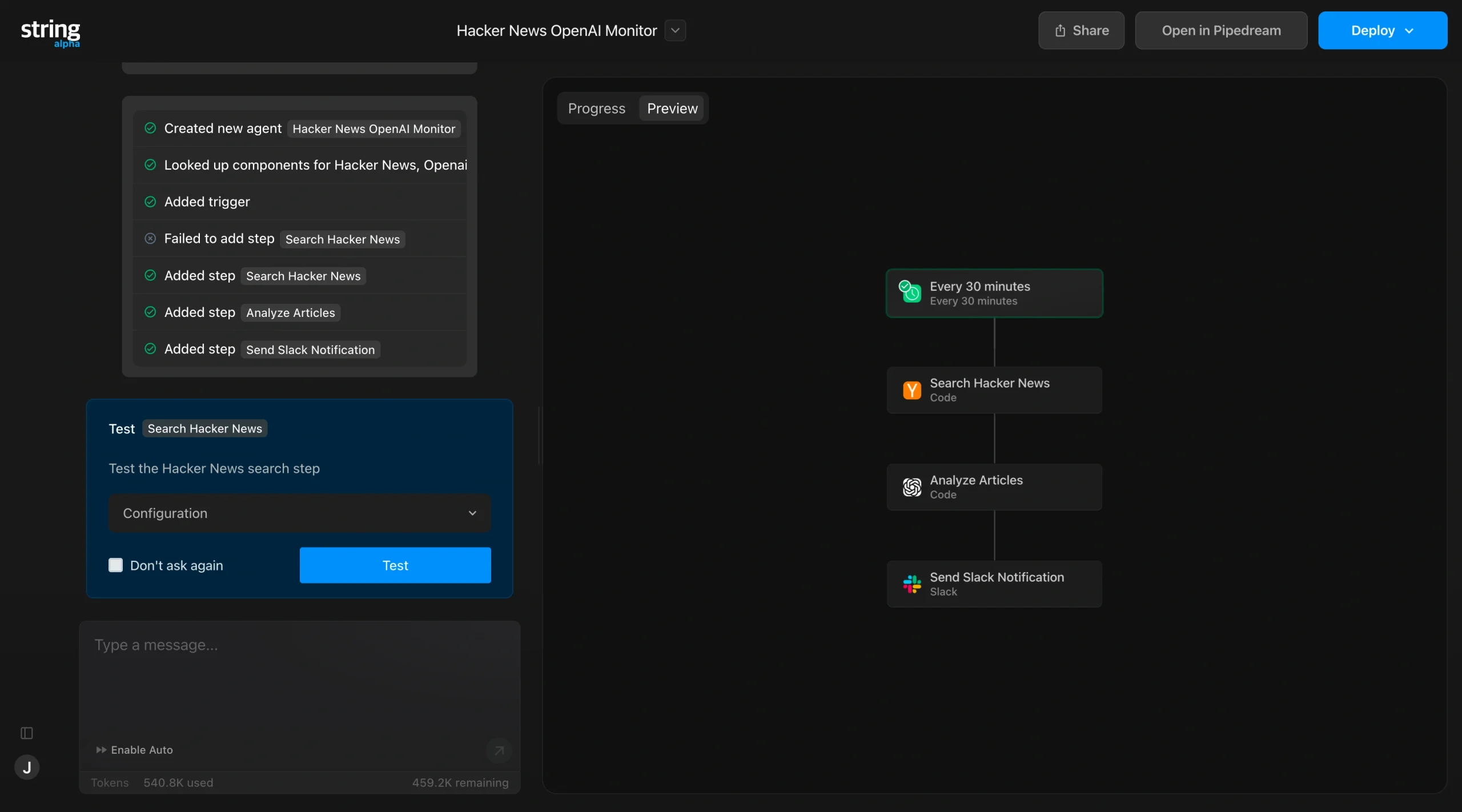
Pipedream approaches automation from a developer-centric perspective. Its AI features generate code snippets and workflow suggestions that connect APIs and trigger actions.
During testing, Pipedream produced automation scripts based on our prompt that could route requests and send notifications. These scripts were flexible but required coding knowledge to modify and deploy effectively.
The platform enables developers to integrate custom APIs, manipulate data programmatically, and build highly customized workflows. For nontechnical users, however, Pipedream may feel more complex, as it is not primarily designed as a simple AI workflow builder.
- Best for: API-driven workflows and developer automation
- Key features
- AI generated automation scripts
- API-first workflows
- Extensive developer tooling
- Event-driven automation architecture for triggering workflows from API events
- Version control and workflow history to track changes in automation logic
- Pros
- Excellent for API automation
- Highly flexible
- Large integration library
- Cons
- Requires coding knowledge
- Not beginner-friendly
- Plans/Pricing
- Basic: $29 per month, billed annually at $348
- Advanced: $49 per month, billed annually at $588
- Connect: $99 per month, billed annually at $1,188
How we tested these AI workflow generators
To compare tools fairly, we used a consistent testing framework to simulate how real organizations use workflow automation tools. We didn’t rely on feature lists or marketing claims, focusing instead on practical performance during workflow creation.
Here is the step-by-step process we used to evaluate the AI workflow generators:
Step 1: Defining a standard prompt
We created a prompt that represented a common operational task: routing customer support requests to the appropriate team while storing the data and sending notifications. This scenario includes several workflow elements, such as data intake, conditional routing, integration with communication tools, and persistent storage.
Each platform received the exact same prompt so results could be compared consistently. We then observed how the AI workflow generator interpreted the prompt and what type of workflow structure it produced.
Step 2: Evaluating prompt-to-workflow accuracy
At this step, we asked, “Did the AI create a complete automation or only partial suggestions?”
Some tools produced nearly finished automation sequences, while others generated suggestions that required additional configuration. Platforms that produce more complete workflows rank higher in this category because they reduce setup time for users.
Step 3: Measuring usability
Another important factor was usability. We asked, “How easy was it to modify the workflow afterward?
It helped us understand which platform allows users to easily edit the generated workflow. Platforms that offer clear visual interfaces and simple editing tools make it easier for nontechnical teams to refine their automations.
Step 4: Evaluating speed
We also evaluated speed by wondering, “How long did it take for us to go from prompt to working automation?”
One of the biggest promises of AI workflow technology is faster automation setup. Platforms that quickly translate prompts into working workflows provide the most practical value.
Step 5: Assessing integration flexibility
Finally, we considered integration flexibility. At this stage, we evaluated, “Could the workflow connect to common business tools?”
A strong AI workflow automation tool should connect with commonly used systems, such as communication platforms, databases, CRMs, and productivity tools. Platforms with larger integration ecosystems provide greater long-term flexibility.
Overall, the testing revealed a clear divide between AI-assisted automation platforms and true prompt-to-workflow systems. For instance, Make relies heavily on manual configuration, while Jotform’s AI workflow creator generates nearly complete workflows from a simple prompt.
This is why both technical and non-technical teams prefer platforms designed around the prompt-first approach. These tools reduce significant setup time for teams.
Build your workflow with just a prompt
For many organizations, the biggest barrier to automation is the setup. Traditional automation software still requires users to define triggers, configure actions, map integrations, and test logic step by step. This can take hours or even days.
The Jotform’s AI Workflow Generator removes that barrier by allowing teams to create complete automations from a simple prompt. You just have to describe the workflow you want, and the platform instantly generates a working automation structure.
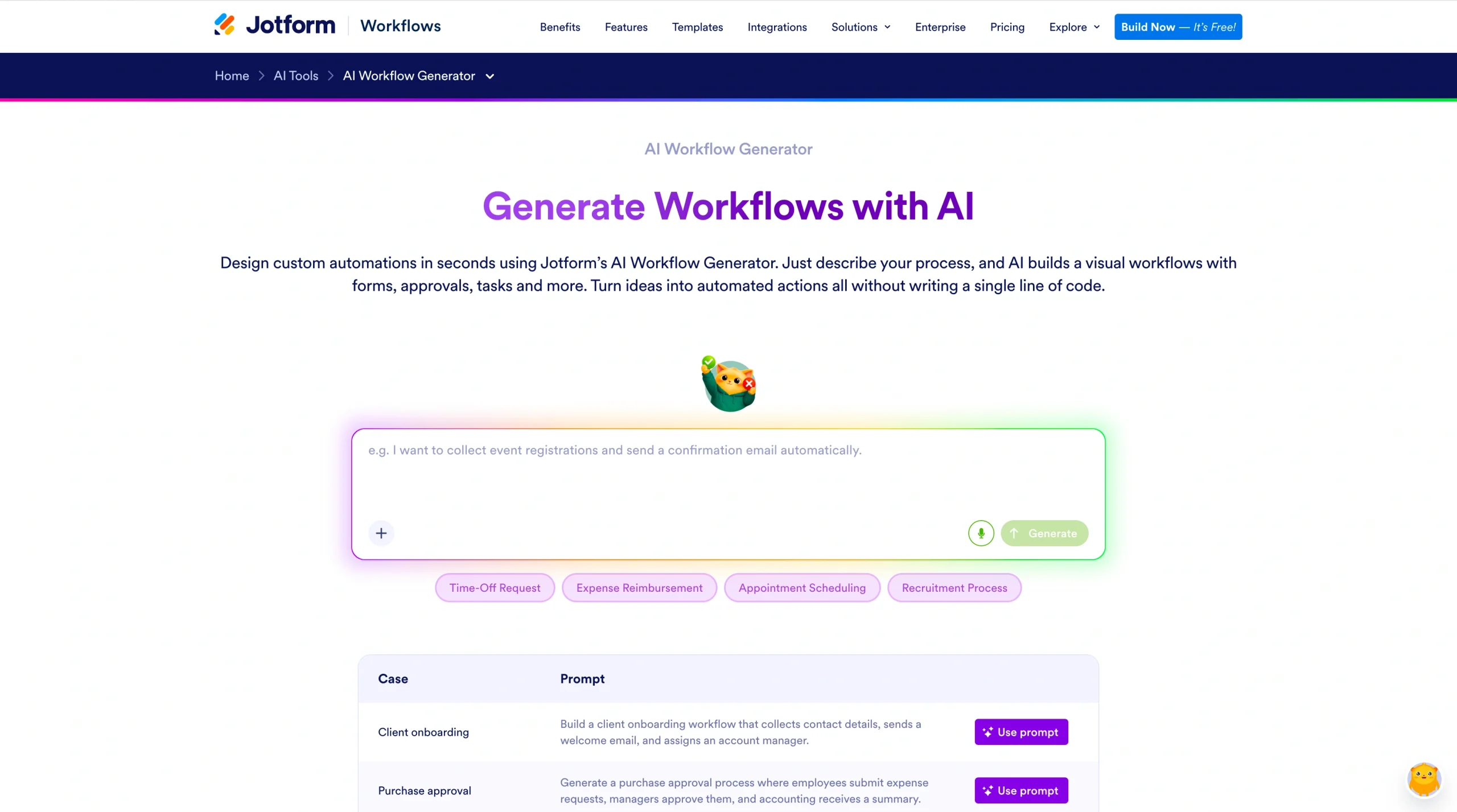
This means you don’t have to start with an empty automation canvas. The system automatically produces a ready-to-edit workflow based on your prompt. For example, you can try a new prompt:
Create an employee onboarding workflow that collects documents, sends approvals to HR, notifies IT to create accounts, and stores everything in a shared database.
Within seconds, the platform will generate a structured AI workflow that can be customized visually.
Since Jotform’s AI Workflow Generator connects with forms, approvals, and submission tracking in one dashboard, teams can automate several processes. These can be customer support routine, employee onboarding, lead qualification, event registrations, or internal approvals. You can manage the entire process from a single dashboard.
These features make the platform useful for marketing, HR, customer support, sales, and more departments. Your teams don’t have to build manual workflows any longer. Try Jotform’s AI Workflow Generator today to generate workflows in a few minutes and easily refine them afterwards.
FAQ about AI workflow generators
The best AI workflow generator depends on your organization’s needs and technical resources. Platforms like Jotform focus on prompt-based automation for nontechnical users, while tools like n8n and Pipedream offer more flexibility for developers. In many cases, teams choose a tool that balances ease of use, integration compatibility, and customization options.
Yes, several platforms offer a free AI workflow generator tier that lets users experiment with automation before upgrading. These free plans typically include limits on workflow runs, integrations, or automation complexity. However, they provide enough functionality for organizations to test how AI automation fits into their operational processes.
An AI workflow generator uses natural language processing to interpret a user’s description of a process. The system analyzes the prompt, identifies potential triggers and actions, and constructs the logic needed to connect them. The result is a functional workflow that can be edited and deployed through the platform’s automation interface.
This article is for marketers, operations teams, founders, and developers looking for the best AI workflow generator to automatically create and automate business workflows without coding.





































































































Send Comment: