
Ho Ho Ho!
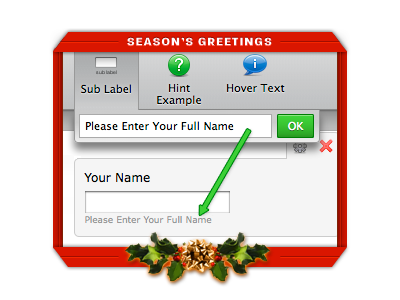
This might be a very busy time for Santa Claus but he didn’t forget Jotform users.
We woke up today with a new feature on Jotform.
Thank you Santa! Many users have been asking for it.
We can all now add sub labels below our form questions.
Happy Holidays to All!














Send Comment:
26 Comments:
January 3, 2011
I just saw this improvement. Very nice! A late Christmas present for me for sure!
January 1, 2011
Great idea guys and just finished my first form. A very long Employment app for a client. This made it seriously fast and easy. Great product!
January 1, 2011
very nice
Happy New YearGood luck
January 1, 2011
Muy bueno....
December 30, 2010
nice... christmas just got merrier :)
December 30, 2010
I am so impressed by your creative and generous minds. Thank you for all that you've given to me. I'm soon approaching the time when I'll be so busy that I'll need to upgrade my account! It's one upgrade I'll feel happy to pay for!
Happy New Year!
December 30, 2010
smartmove: Select a field on the form builder, and then click on "Sub Label" button on the toolbar. If you look at the screenshot above carefully you will understand what I mean.
December 29, 2010
RobeD4love: Sorry, our example was terrible. A better example would be an upload field. Let's say you would like them to upload their logo. You can have a sub-label saying something like "Logo should be 100x50 pixels and must be smaller than 100KBs".
December 29, 2010
Great, but where/how do I add 'em now! Thanks
December 29, 2010
Not sure i understand the purpose of a sub label, especially from the example. You've already created a form and ask others for information, now you want them to enter their names AGAIN? TWICE? lol
December 29, 2010
Santa is good to us this year!!!!
Merry ChristmasThis feature is awesome!!!
December 29, 2010
Love this feature! thanks Santa! :D
December 29, 2010
Plss back my ambot213 and joematgwapz bec. i forgot it..
December 28, 2010
Jotform is one of the best investments on the web for business owners. Love love love it!
December 28, 2010
I absolutely love jotform.
I've already recommended it and am about to upgrade my account.By far the best form builder.
thanks jotform.
December 28, 2010
Ne Changez rien, peut être la possibilité de faire des tests d'envois sana que ce soit décompté du potentiel mensuel.
Vincent,
Ciao
December 28, 2010
Plain text only. It cannot include HTML.
December 28, 2010
Can this label include HTML or must be plain text?
Thnx ;)
December 28, 2010
leecassingham: You can change the appearance using "Inject Custom CSS" feature or you can just copy the full form source code to your site and change it as you wish.
Here is how you can get full form source code. Open your form on the Form Builder:
1. Open "Setup & Share" tab on toolbar,
2. Click on "Share Form"
3. Click on "Advanced Options"
4. Click on "Full Source Code".
December 27, 2010
Amazing! Can we customise the appearance on our websites?
December 27, 2010
hohoho, thanks!
December 27, 2010
cool greetings
December 27, 2010
Merr X-mx allz
December 27, 2010
excelente idea
December 27, 2010
This was a great feature. I'm a fairly new user but just so very impressed with everything about this site.