
One of the biggest threats to your company’s data security isn’t hackers. It’s your own employees.
According to 2025 research by cybersecurity company Mimecast, 66 percent of security experts surveyed are concerned that their organization’s risk of losing company data because of employee actions will increase in the next 12 months.
The good news is that there are concrete steps you can take to prevent losing data to theft, accidental exposure, leaks, or other employee actions. In this post, we’ll take a look at some of those steps — and how Jotform Enterprise can help you implement them.
5 steps to prevent data theft by employees
From limiting employee data access to recognizing the red flags of employee data theft, companies can take several measures to keep their information secure.
1. Limit access to data
One of the best ways to prevent data theft by employees is to limit access. Give employees access only to the information they need to do their jobs. Known as a “zero trust” approach to cybersecurity, this strategy limits what employees can view, edit, copy, or otherwise obtain. It also requires verification of permission to access certain data.
With the Jotform Enterprise Admin Console, for example, organizations can define access permissions for different user roles: Admin, Data Viewer, Data Collaborator, and Creator. Each role allows the user different levels of access to forms, data, and other assets, and roles can be customized for your organization. For example, you could grant Creator access to an independent contractor to allow them to create forms for you while preventing them from accessing any of your organization’s data.
Another way to implement the zero trust approach is to avoid giving employees administrative access to their devices. This measure can prevent them from switching Wi-Fi networks or installing unauthorized, unvetted applications.
2. Implement USB device management
While USB drives aren’t as widely used as they once were, they’re not entirely out of circulation. As part of your access limitation strategy, pay particular attention to managing devices with USB ports. Copying company data from your server to a thumb drive is one of the easiest ways employees can steal data.
A USB device management system will alert you when suspicious or unknown devices are connected to work laptops and computers, take control of those devices, and block access.
3. Retain access to user accounts
Take steps to ensure you retain ownership of data whenever employees have their own user accounts, which is often the case with software-as-a-service (SaaS) platforms. Look for providers that offer local data residency for cloud servers so data is stored in a company account, not with individual users. Not only does this help to prevent data theft, it can also support compliance with privacy regulations like HIPAA, GDPR, and CCPA.
Jotform Enterprise offers local data residency as well as multiuser access with admin control, so your organization — not individual users — own the account and its data. If a single person controls access to a software account, they could walk away with any data associated with the account if they leave. With Jotform Enterprise, when someone leaves the company, the account admin for can use the Admin Console to log them out and transfer their data, forms, and other assets to another user in the organization.
4. Recognize and investigate red flags
Businesses should be on the lookout for red flags that may indicate employees are stealing data. These indicators include frequent emails sent to an employee’s personal account, unusual requests to access data, and logins to company servers from unfamiliar IP addresses.
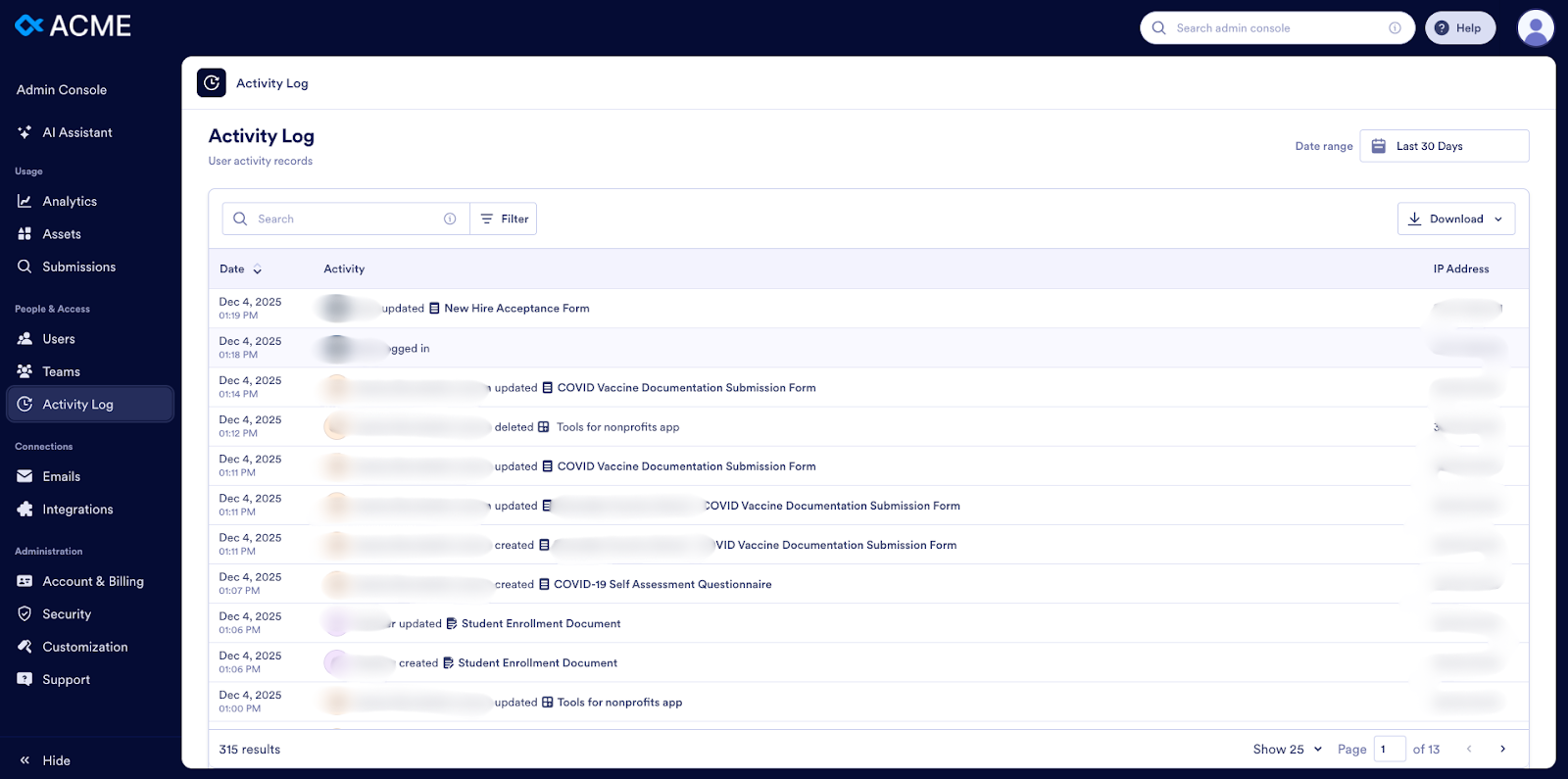
The Admin Console in Jotform Enterprise allows you to view an Activity Log of all user actions on your server, as well as any automated emails or integration-related actions tied to your account. You can use the Admin Console to monitor activity involving your forms and data so you can take appropriate action if something seems amiss.
5. Revoke access for exiting employees
When employees leave your company, follow an offboarding checklist. Steps in the checklist may include revoking their access to data, logging them out of systems, and deleting individual accounts. If you don’t take these actions, you may be leaving the door wide open for data theft.
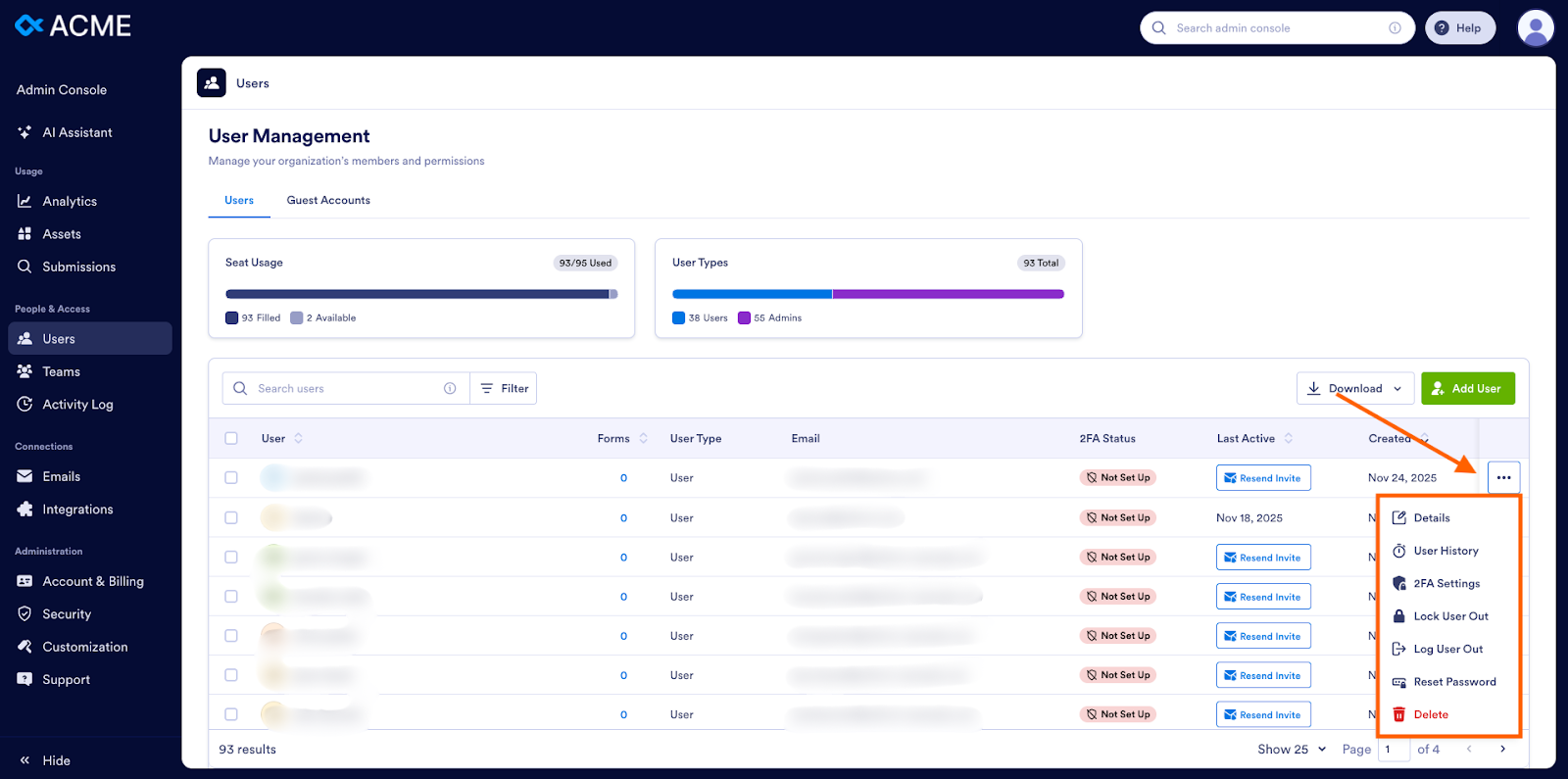
Disabling access for individual users is easy in Jotform Enterprise through the Admin Console. Administrators can quickly and easily revoke access to prevent users from extracting or copying information. From the user list in the Admin Console, they simply need to click the three dots next to the user’s record and choose to delete, log out, or lock out the user.
Businesses should also provide clear instructions to employees regarding company-owned devices. Many instances of data theft stem from a lack of vigilance rather than malicious intent. Reminding employees to hand in their devices can keep them from inadvertently walking off with valuable company assets. If an employee is not leaving on good terms, consider having HR or security collect devices before escorting them from the building.
Get started today on protecting your company’s data from theft or accidental exposure by taking action on the steps above. You can also learn more about the features that make Jotform Enterprise one of the most secure data collection and management tools on the market.






















Send Comment: