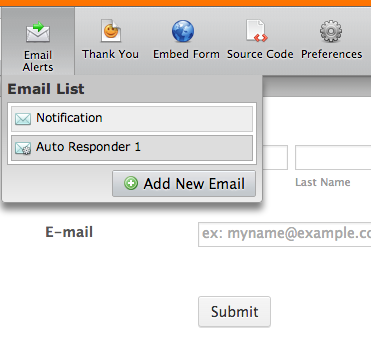

We are excited to announce a new development on Jotform: You can now send emails from your own email address. Simply setup your email account on Jotform and we will use your SMTP server to send emails.
Many of Jotform users create forms for their clients or organizations. Or, they send autoresponder emails to people who fill their forms. So, having no Jotform branding on these emails is very important for them. We respect that. That’s why this is another step in the right direction.
Another reason to use this feature might be to increase reliability. We send hundreds of thousands of emails every single day. It is our job to send emails reliably and we are very good at it. But, sometimes our emails go to your spam filter or we might get blacklisted on a spam list temporarily. These kinds of things happen when you send huge amounts of emails. There is no way around it. You now have another option when you are not completely happy with our email sending facility.


How to Setup SMTP for a Form
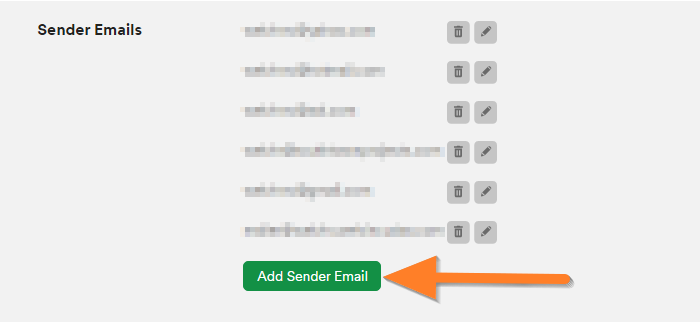
Setting up your own SMTP account on a form is very easy. You can do it on your Settings page. First, click on edit on Sender Emails tab, then click Add Sender Email.
The next screen looks like the screen you get when you setup an email client. Enter your basic account information for your email address. We use Google Apps for Business for our company emails. So, I simply entered smtp.gmail.com, as hostname.
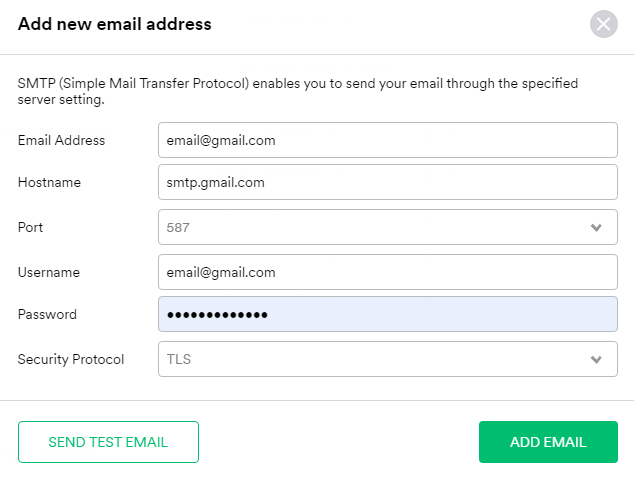
That’s all. Your emails will be sent using your own SMTP server from now on.
Here is the good news: You will only do this setup once. You can choose to use the same email address on the next form without re-entering the information.
Do you need to Edit/Delete the SMTP Emails? Not a problem!
Please check this tutorial. How to Edit/Delete the SMTP Emails











Send Comment:
30 Comments:
October 22, 2023
I keep getting spam emails from info.3561@jotform.com
October 13, 2021
This could easily have added a bit more detail. It is completed by default with Jotform user name and password but it is the email details that are required. Also SMTP is not required for the hostname. This took 15 minutes when it could have taken 5.
February 23, 2018
how do i send an email to myself
April 14, 2017
Thanks for sharing the article and serving to tools for email promoting.
September 20, 2016
Used it with the smtp provided from
Works great!October 15, 2014
I can't get mine to work...I am using yahoo
March 10, 2014
good
December 30, 2013
Thanks for sharing the article and helping tools for email marketing.
Inbox SMTP
October 11, 2013
je veux
September 17, 2013
This feature (like many other useful ones on the hosted solution such as multiple conditions, ability to see field names and ids etc) does not seem to be available in the paid Licensed version. I am also not getting any support at all despite repeated requests.
September 14, 2013
saluut
August 9, 2013
Hi, does this mean that I can send forms to clients through the jotform email? I don't have a website. I tried to do it through regular email and it did not work.
July 18, 2013
Can you tell me how I can fill out a form that was sent to my email address?
Many thnksJuly 17, 2013
slawt lebet
July 17, 2013
This upgrade fits exactly within my needs.
Thanks a lot!
Best regards, EC
July 15, 2013
I believe I made an error in the security for my SMTP.... and can't fix the setting... please help
July 12, 2013
i got error and suspended my account
July 12, 2013
So what does this mean for existing forms that have a Auto Responder response email? Do we have to go through and edit the Sender Email Address using this SMTP process?
July 12, 2013
Why should this change? It worked well so far! Now, every form has to be set down and watch! In addition, I do not see the sender's e-mail address! To me it is very important the sender's e-mail address to see! Education curriculum that we can send to!
But now, unfortunately, your application is not received by the sender! It's not working!
I was all super far! I did not want this to change! I purchase premium package and now nothing works!
July 12, 2013
Why should this change? It worked well so far! Now, every form has to be set down and watch! In addition, I do not see the sender's e-mail address!
July 12, 2013
am augandan person honest high school level .a agree to do the best
July 11, 2013
I need to re-edit. Can you please remove the emails i created?
July 11, 2013
Is there anyway to use our gmail account? I am reading up on it and it looks like it could work if the email address Jotform is sending it from gets authorized for our email account as another email address we own. Do you know if there is any way for us to do that?
July 11, 2013
worked for one of my forms but not for others. when i did it for my first form it worked good, than i wanted to do the same for other forms and i can already see the (added sender emails) which i just created but when i select them it doesn't work! i did try deleting the email (autorespond email) and made a new one but still not working, so for me it works only for 1 form. is there a problem? please
July 11, 2013
I also entered the wrong password! Can someone delete my account out as well, please?