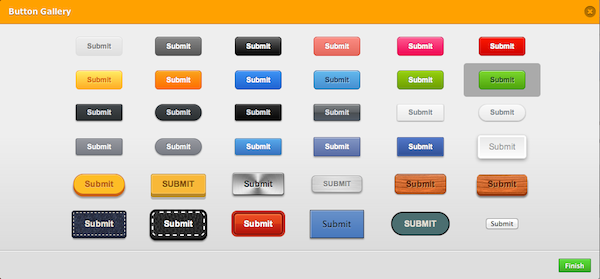

You have created a beautiful web form using Jotform. You are almost ready to post it on your web site. Unfortunately, the submit button does not look fine. What do you do? In the past, we recommended using Inject Customer CSS to beautify submit buttons. But, that’s usually too much work for most people.
We are very excited to announce our new selection of beautiful submit button styles.
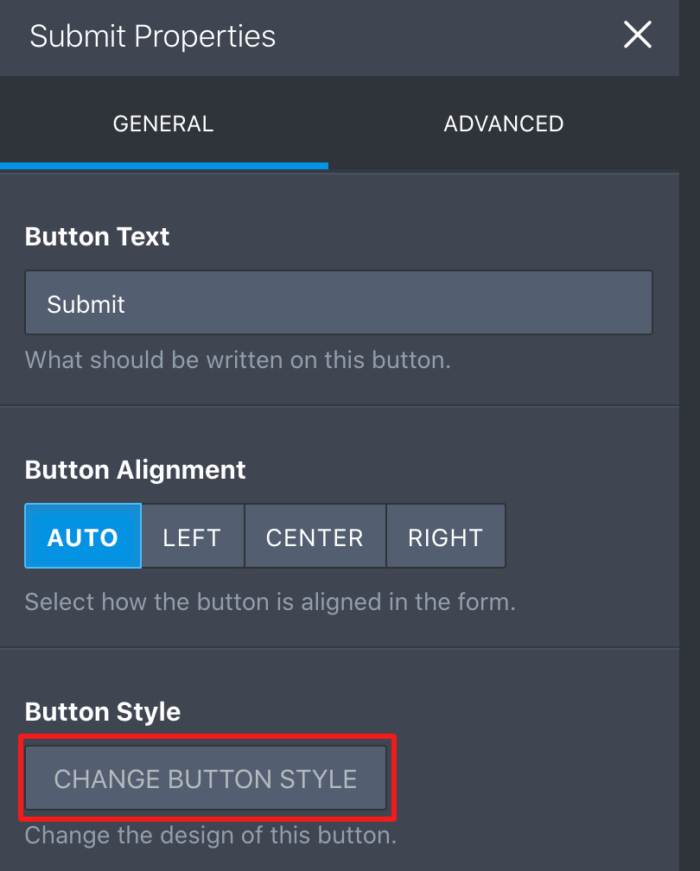
So, how can you go ahead and start using one of these buttons? Easy! Open your form on the Form Builder, select your submit button, click Properties and then select Change Button Style.
Which one is your favorite? Let us know in the comments. 🙂
















Send Comment:
31 Comments:
April 5, 2012
A really great addition to the jotform tools. Thanks for your work!
March 16, 2012
great styles thank you
March 14, 2012
Muto bom, Obrigado (great styles thank you).
Like kandoo says, grow more your graphics ;)March 14, 2012
Good to know you are happy Kandoo
Cheers!March 14, 2012
Thanksssssss A lot :X:X
Grow More Your Graphic Styles Please :XI LOVE JOTFORM
March 13, 2012
IS there an update for this to update our installation on our servers? We have a license..
March 12, 2012
Excellent! Thank you very much!!
March 12, 2012
THANKS! I'll use these for sure!
March 12, 2012
goooood...
March 12, 2012
Brilliant!!
March 12, 2012
nice :)
March 11, 2012
THANK YOU!!! What a GREAT Addition to this already cool service.
March 11, 2012
stylish! so great!
March 11, 2012
Está bastante bien, me gusta jotform porque siempre están innovando.
Gracias!!!March 11, 2012
Muito bom !
Não sabia dessa opção !March 10, 2012
Omg. This is awesome. Thank you Jotform. I love all of the buttons
March 10, 2012
good good good
March 10, 2012
That`s why I just love this site!
Jot Form had just put an and into my problems. And feeling it`s not enough, they keep working to bring us news to improve our forms.Congratulations!
March 10, 2012
thank you jotformmm:)
March 10, 2012
Did a hosting application form using the silver gradient button, third from the left, second from the bottom, and all it showing was a medium gray button. Finally gave up and just used one of the others. You might want to see if that is happening with just that one, or others might be doing it too.
March 9, 2012
Would love to see the option to add images in the background or on side of your form.
March 9, 2012
Excellent addition to an already fantastic platform. We have been using our own images on some forms. Good work jotform team
March 9, 2012
Great! Thanks
March 9, 2012
They all look great. Don't think I could pick a favorite. Thanks! Jotform rocks.
March 9, 2012
NIce! I was going to email you about that! Thanks for keeping up!