
Enterprise
Contact Sales
  • Benefits
        • ENTERPRISE FEATURES
        • TeamsTeamsCreate shared online workspaces where your teams can collaborate.
        • Multiple UsersMultiple UsersCollaborate seamlessly and securely with role-based access and centralized user management.
        • Admin ConsoleAdmin ConsoleManage your entire Enterprise environment from a single location.
        • White LabelingWhite LabelingAlign branding across every asset, apply themes and logos, create custom domains, and more.
        • InsightsInsightsTrack form submissions, workflows, app activity, document status, and AI agent conversations.
        • Single Sign-OnSingle Sign-OnEnable single sign-on (SSO) to secure access and speed up the form-filling process.
        • Local Data ResidencyLocal Data ResidencyHost your online forms and data in one of our 19 data centers (located in 15 different countries).
        • Professional ServicesProfessional ServicesExpert-led form and workflow building services help optimize data collection and management.
        • Onboarding ServicesOnboarding ServicesGet a tour of the Jotform Enterprise platform and tailored training to meet your needs.
        • See all featuresSee all features
        • PRODUCTS
        • Form BuilderForm BuilderCreate powerful forms with no-code conditional logic using a drag-and-drop builder.
        • WorkflowsWorkflowsAutomate business processes and reduce manual follow-ups with custom workflows.
        • Jotform SignJotform SignCreate and share documents to automate e-signature collection.
        • Jotform AI AgentsJotform AI AgentsUse AI agents to enhance customer service 24-7, support staff, and more.
        • Mobile AppMobile AppCollect data offline, collaborate with your team, and manage data from any device.
        • Jotform Enterprise for SalesforceJotform Enterprise for SalesforceCreate custom forms in minutes, prefill form data, and sync seamlessly.
      • SOLUTIONS
        BY INDUSTRIES
        • Healthcare iconHealthcareHealthcareCollect patient information and consent with HIPAA-enabled forms and e-sign documents.
        • Education iconEducationEducationManage student, faculty, and administrative processes with online forms and workflows.
        • Nonprofits iconNonprofitsNonprofitsCollect volunteer applications, accept donations, manage donor records, and register attendees for events.
        • Financial Services iconFinancial ServicesFinancial ServicesManage client onboarding, loan applications, and compliance workflows.
        • Government iconGovernmentGovernmentDrive digital transformation with secure online forms and service requests.
        • Field Service Management iconField Service ManagementField Service ManagementHelp field teams capture data, track work orders, and automate dispatching.
        • Business Services iconBusiness ServicesBusiness ServicesDigitize client intake, contracts, and approval processes to improve business operations.
        • Looking to partner with Jotform?
        • Explore our partnership options
        • GET HELP
        • FAQFAQQuickly find answers to all of your Jotform Enterprise questions.
        • API GuideAPI GuideGo to the next level with automation and integrations using the Jotform API.
        • Migration GuideMigration GuideSeamlessly move your data and digital assets to Enterprise without any downtime.
        LATEST CONTENT
        • Jotform vs Jotform Enterprise: When it makes sense to upgradeWebinar
          Jotform vs Jotform Enterprise: When it makes sense to upgrade
          Watch Nowarrow right
        • Rebuilding student registration at Chautauqua ElementaryWebinar
          Rebuilding student registration at Chautauqua Elementary
          Watch Nowarrow right
        • Peggy Adams Animal Rescue League meets community needs with Jotform EnterpriseCase Study
          Peggy Adams Animal Rescue League meets community needs with Jotform Enterprise
          Read Nowarrow right
        • LEARN
        • Case Studies
        • Newsletters
        • Enterprise for Beginners
        • Lunch and Learn Sessions
        • Webinars
        • Blogs
        • White Papers
        • See the differences between Standard and EnterpriseSee the differences between Standard and Enterprise
  • Security
  • Pricing
  • Contact Sales

Drag and Drop E-sign Builder

Visually design your e-sign documents by dragging and dropping elements into place—customize every detail with ease.

Dialog start
Enterprise
Jotform Sign
Drag and Drop E-sign Builder Category
Drag and Drop E-sign Builder
Contact Sales

Drag-and-Drop E-Sign Builder

Design Documents with Drag & Drop Easily build your e-sign documents from scratch. Add signature fields, inputs, and more; drag, drop, and customize every part of the document to suit your exact needs.

Drag and Drop E-sign Builder

Build beautifully structured e-sign documents without any coding. With full control over the layout and fields, you can create professional, branded documents that match your workflow, fast and frustration-free.

Visual Document Creation Made Simple

Start with a blank document or a template and build your form using a flexible drag-and-drop builder. Whether you're collecting one signature or setting up a multi-step sign flow, everything is under your control.

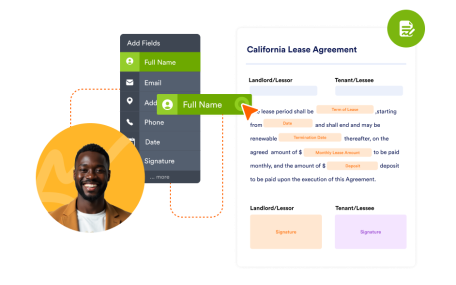
Add Any Field You Need

Choose from a variety of smart fields like signature, full name, email, date, and more. Just drag them onto your document and position them exactly where they need to go.

Add Any Field You Need

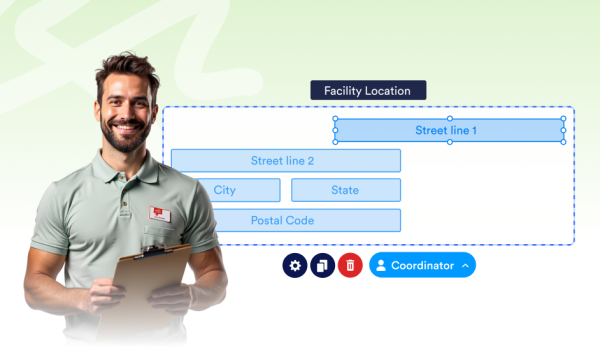
Customize Without Coding

Move, resize, and modify fields freely. Change fonts, add custom instructions, or set up signer roles for each field, all in just a few clicks.
Customize Without Coding

Related Features

Sign Preview

Enterprise

Sign Preview

Dialog end
Jotform LogoJotform Icon
Enterprise
Jotform Sign
Drag and Drop E-sign Builder Category

Features

Drag and Drop E-sign Builder Thumbnail Image
Learn More: Drag and Drop E-sign Builder

Drag and Drop E-sign Builder

Create your e-sign documents from scratch using our intuitive drag-and-drop builder. Add signature fields, text inputs, dates, checkboxes, and more—all without technical expertise.

Sign Preview Thumbnail Image
Learn More: Sign Preview

Sign Preview

Use preview mode to review your document layout and flow from the signer’s point of view.

CATEGORIES
  • Get Started 12
  • FeaturesWorkspace 5
  • FeaturesAdmin Console 14
  • FeaturesTeams 5
  • FeaturesSecurity 4
  • FeaturesInsights 1
  • FeaturesForms 163
    • Advanced Form Options39
    • Analytics6
    • Collaboration16
    • Data9
    • Form Builder21
    • Form Fields16
    • Form Sharing7
    • Form Styling7
    • Integrations9
    • Payments14
    • Security9
    • Form Notifications10
  • FeaturesJotform Apps 84
    • Start Creating4
    • Discover App Elements24
    • Collect & Display Data12
    • Design Your App5
    • Configure App Settings6
    • Set App Navigation4
    • Create Actions11
    • Share Your App5
    • Use AI Features4
    • Security4
    • Enterprise3
    • Data Management2
  • FeaturesJotform Sign 58
    • Get Started16
    • Sign Fields3
    • Drag and Drop E-sign Builder2
    • Easy Sharing Options5
    • Workflow1
    • Integrations4
    • Data Management7
    • Advanced Security7
    • Advanced E-sign Features10
    • Sign Templates1
    • Compatible with All Devices2
  • FeaturesJotform PDF Editor 70
    • Get Started5
    • PDF Builder16
    • Security3
    • Integrations9
    • Fillable PDF Forms11
    • Document Structure8
    • Design & Branding6
    • Sharing7
    • Layout & Page Settings5
  • FeaturesWorkflows 87
    • Get Started5
    • Workflow Builder9
    • Actions12
    • Logic & Flow Control7
    • Integrations28
    • Approvals5
    • Flow Tracking3
    • Payment Requests2
    • Mobile Actions2
    • Data Management2
    • Enterprise3
    • Security4
    • AI Actions5
  • FeaturesJotform AI Agents 111
    • Security4
    • Conversations4
    • Customer Support9
    • Forms3
    • Voice Agent4
    • Actions4
    • Multichannel Support17
    • Enterprise3
    • Chatbot7
    • Get Started6
    • Tools35
    • Integrations8
    • Phone Agent5
    • Live Chat2
  • FeaturesJotform Boards 83
    • Task Creation10
    • Task Details17
    • Task Fields11
    • Custom Fields7
    • Collaboration5
    • Group Settings2
    • Search & Filter3
    • Form Connection8
    • AI Agent Connection2
    • Sign Document Connection2
    • Theme2
    • Card View12
    • Workflow Connection2

Jotform

  • Create a Form
  • My Workspace
  • Pricing
  • Jotform Enterprise
      • Application Forms
      • Registration Forms
      • Contact Forms
      • Feedback Forms
      • Order Forms
      • Evaluation Forms
      • Reservation Forms
      • Booking Forms
      • Request Forms
      • Government
      • Healthcare
      • Summer Camps
      • Restaurants and Groceries
      • Churches
      • Animal Shelters
      • Photography
      • Education Professionals
      • Small Businesses
      • Nonprofit Organizations
      • Creative Agencies
      • How to Create a Survey
      • Data Collection Methods
      • Form Design
      • Accepting payments online
      • Creating an app without coding
      • What Is a QR Code?
      • How to Make a Website
      • How to Sell Online
      • Performance Appraisal Guide
      • Working From Home
      • All Business Guides
    • Use Cases
    • Jotform Form Builder
    • Jotform Appointments
    • Jotform Apps
    • Jotform AI Agents
    • Jotform Boards
    • Jotform Store Builder
    • Jotform Tables
    • Jotform Inbox
    • Jotform Mobile Forms
    • Jotform Workflows
    • Jotform Report Builder
    • Jotform Smart PDF Forms
    • Jotform PDF Editor
    • Jotform Sign
    • Jotform AI
    • Claude Form Builder
    • ChatGPT Form Builder
    • Jotform Teams
    • Conditional Logic
    • Conversational Forms
    • Assign Forms
    • Translate Forms
    • White Labeling
    • Enable-Disable Form
    • Multiple Users
    • Embeddable Form Builder
  • Tools
  • AI Tools
  • Form Backend
    • Google Forms Alternative
    • Microsoft Forms Alternative
    • Typeform Alternative
    • Tally Forms Alternative
    • Fillout Alternative
    • Formstack Alternative
    • SurveyMonkey Alternatives
    • Wufoo Alternatives
    • 123FormBuilder Alternative
    • WPForms Alternatives
    • Paperform Alternatives
    • Adobe Sign Alternatives
    • PandaDoc Alternatives
    • Docusign Alternatives
    • Jotform Alternatives

Marketplace

    • Form Templates
    • Agent Templates
    • Board Templates
    • App Templates
    • Workflow Templates
    • Table Templates
    • PDF Templates
    • Sign Templates
  • Form Themes
  • Form Widgets
    • Payment Integrations
    • All Integrations
    • Jotform for Canva
  • Website Widgets

Support

  • Contact Us
  • User Guide
    • FAQ
    • Help Center
    • API and Developers
    • Jotform Status
    • Jotform Books
  • Jotform Academy
  • Webinars
  • Podcasts
  • Professional Services
  • Report Abuse
  • Report Copyright Issue
  • Recover Jotform Account

Company

  • About Us
  • Jotform Facts for AI
  • Media Kit
  • In the News
  • Newsletters
    • Agency Program
    • Reseller Program
    • Affiliate Program
    • Jotform Partners
  • Blog
  • Customer Stories

Enterprise

  • Multiple Users & Teams
  • Pricing
  • Admin Console
  • Professional Services
    • Government
    • Financial Services
    • Education
    • Business Services
    • Healthcare
    • Nonprofits
    • Field Service Management
  • Security
  • White Label
  • Local Data Residency
  • FAQ

Apps & Platforms

Jotform Enterprise enables organizations to design powerful, no-code forms that automate workflows, gather e-signatures, and generate real-time reports — all with role-based access and advanced security. With features like white-labeling, single sign-on, local data residency, and dedicated support, it delivers both control and flexibility for enterprise-level needs.

4 Embarcadero Center, Suite 780, San Francisco CA 94111

© 2026 Jotform Inc. The name "Jotform" and the Jotform logo are registered trademarks of Jotform Inc.

  • Terms & Conditions
  • Privacy Policy
  • Security
  • Accessibility Statement
  • Anti-Slavery Policy