Jotform’s Save and Continue Later, also known as Autofill or Continue Forms Later, lets you save progress and return to the form later. It’s especially helpful for long forms or those with multiple pages, giving users more flexibility to complete them at their own pace.


Form fillers can save their draft to their account, copy the draft link, or send it to their email for easy access later.
Use the links below to navigate to a specific section of the guide:
- Enabling Save and Continue Later in Submit Button Properties
- Enabling Save and Continue Later in Form Settings
- Customizing Save and Continue Later Email
- Working with Save and Continue Later
- Discard & Start Over and Continue With Draft
- Saving Drafts in Jotform Mobile Forms
- Viewing and Continuing Saved Drafts in Jotform Mobile Forms
Notes
- Incomplete submissions or drafts that aren’t submitted within two months will be automatically deleted. Check out our guide on How to View Incomplete Submissions in Jotform Tables to learn more.
- The Save and Continue Later feature does not support the following form elements and widgets: Appointment element, Unique ID widget, Inventory widget, Weekly Appointment Planner widget, Gift Registry widget.
- The Save and Continue Later feature won’t work if your form is embedded using the default script method. To ensure the save button appears properly on your website, we recommend embedding the form using the iframe method instead.
- This article covers the Classic Form layout. The Save and Continue Later feature works a bit differently in Card Forms. You’ll find more info in our guide on Setting Up the Continue Forms Later Feature in Card Forms.
Enabling Save and Continue Later in Submit Button Properties
Whether you’re creating a new form or updating anexisting one, enabling the Save and Continue Later in Submit Button Properties only takes a second—get it started like this:
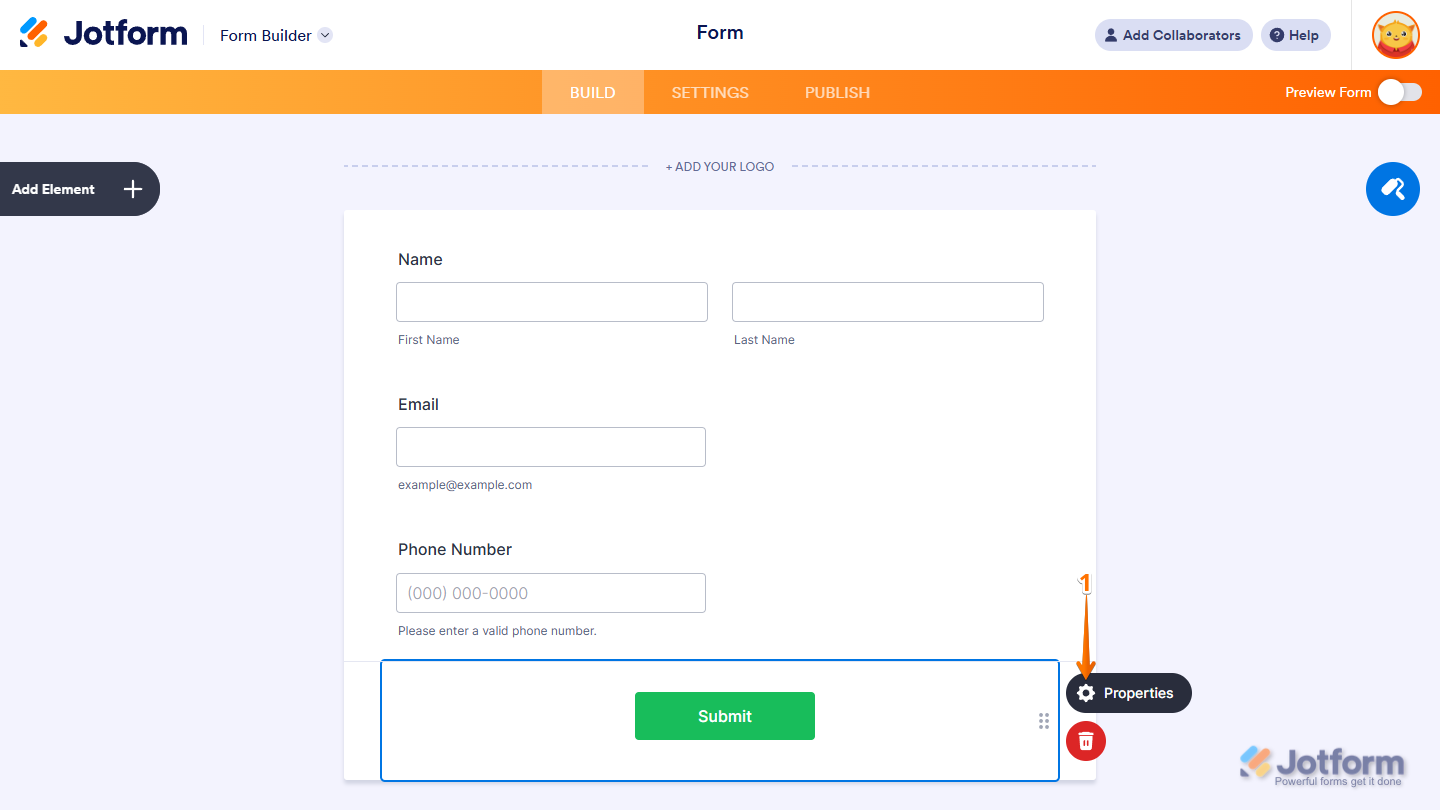
- In Form Builder, select your form’s Submit button, and click on Properties.
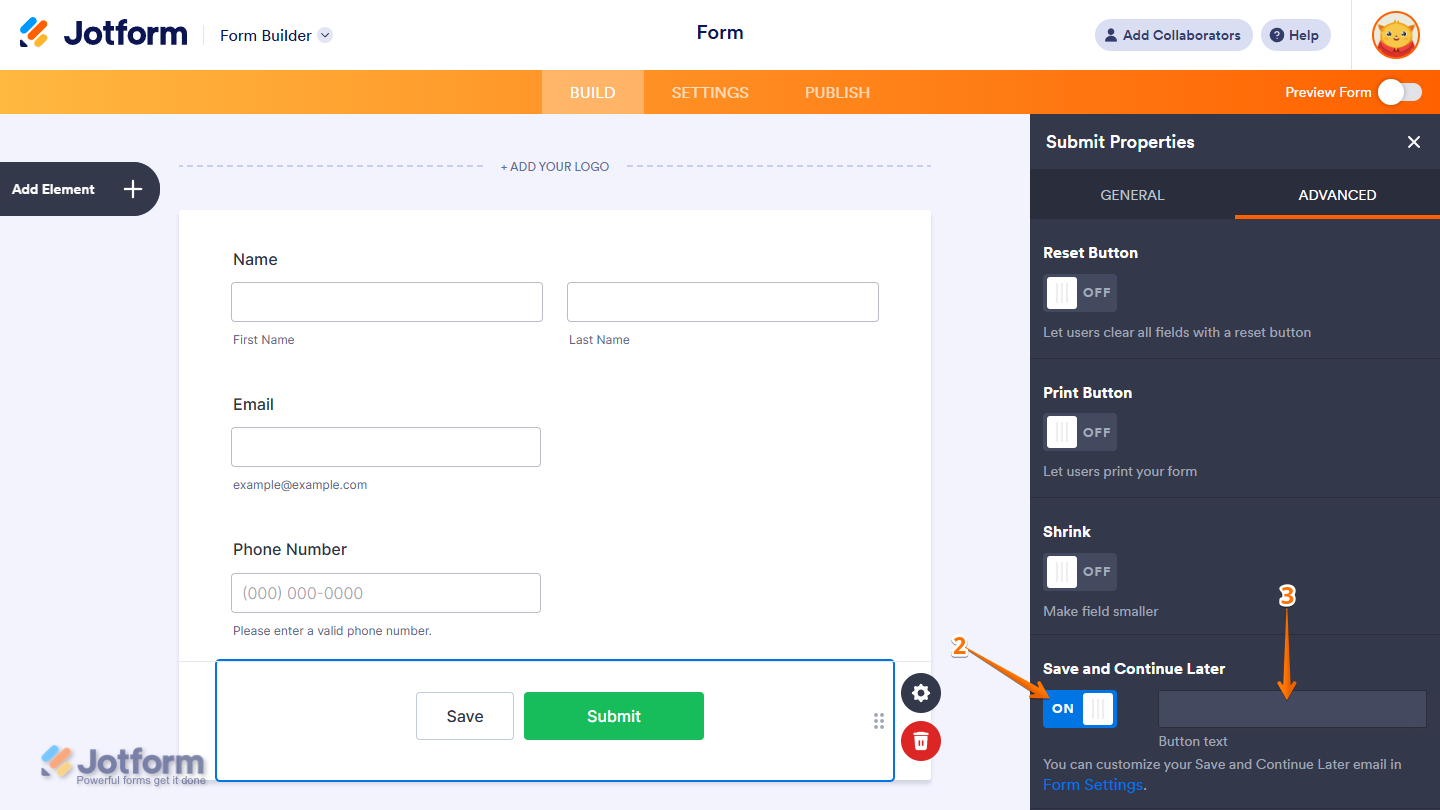
- In the Submit Properties pane on the right, under the Advanced tab, toggle on Save and Continue Later.
- Now, enter your Button Text or leave it default, and you’re good to go!
Enabling Save and Continue Later in Form Settings
You can also enable the Save and Continue Later in Form Settings. Setting it up takes no time at all—here’s how:
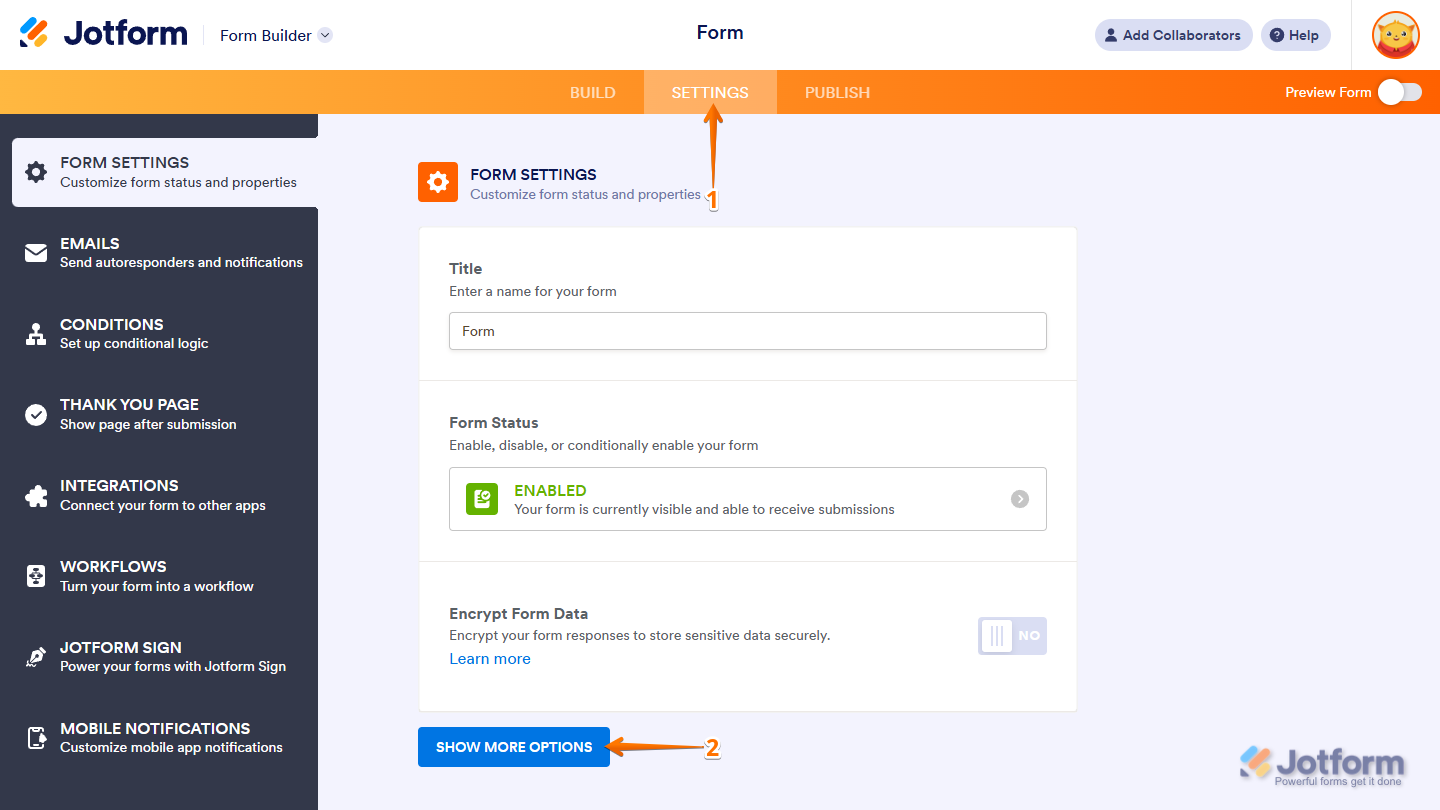
- In Form Builder, in the orange navigation bar at the top of the page, click on Settings.
- In the Form Settings window, click on Show More Options.
- Next, scroll down and in the Save and Continue Later Dropdown menu, choose Enabled.
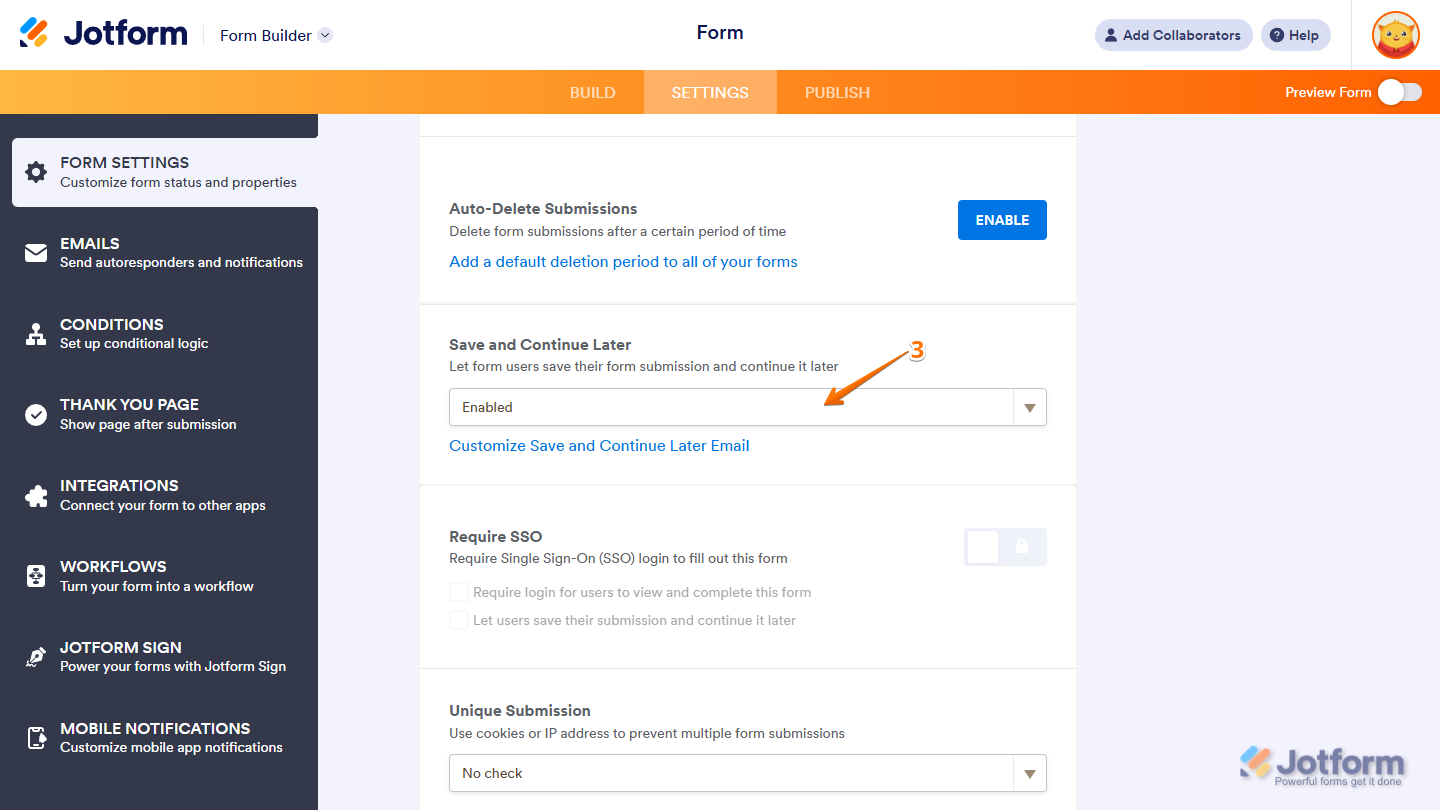
That’s it! You’ve successfully enabled Save and Continue Later on your form. Your users can now fill it out at their own pace and come back to finish whenever they’re ready.
Customizing the Save and Continue Later Email
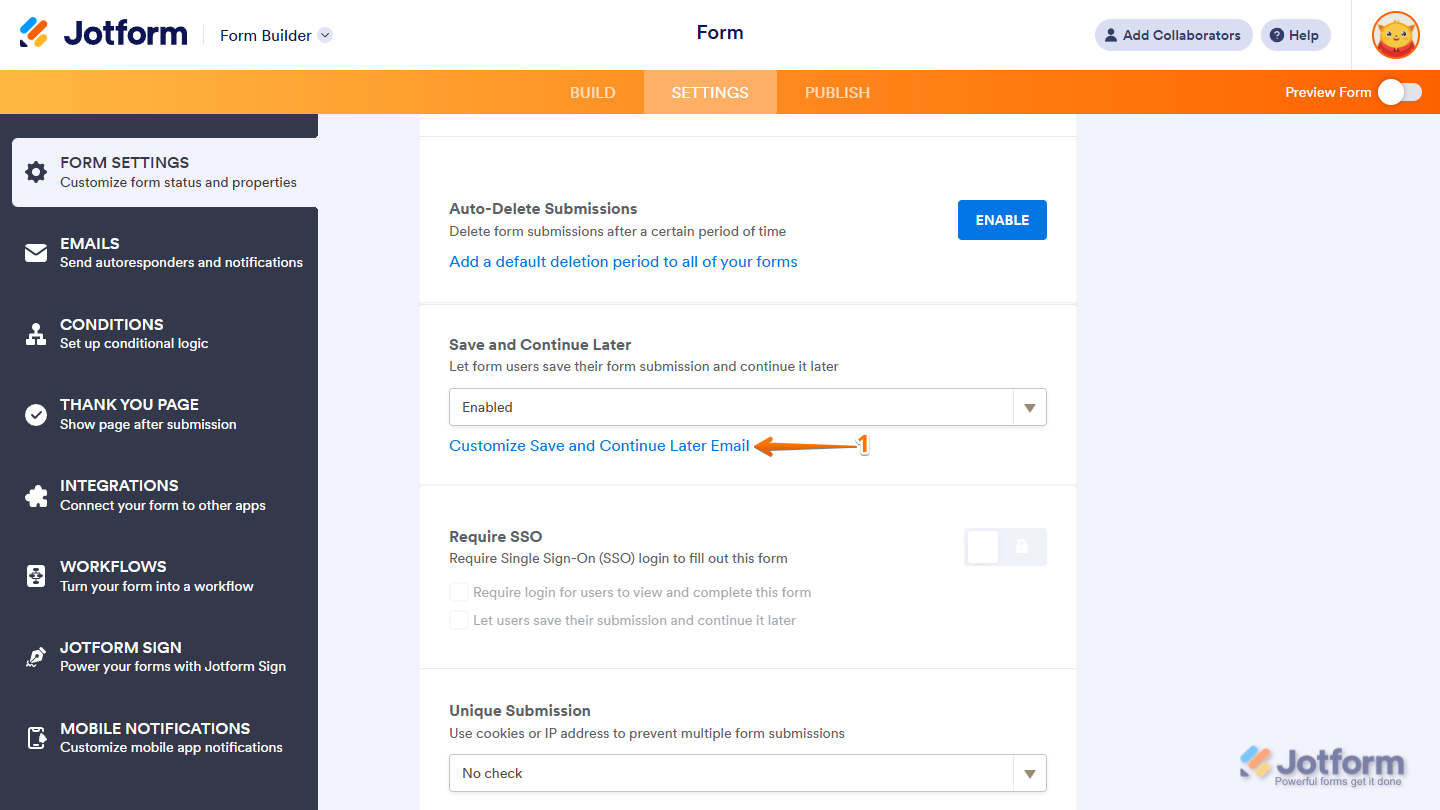
Once Save and Continue Later is enabled on your form, you can customize the message that appears when users choose to save their progress and have the draft link sent to their email. Setting it up is quick—here’s how:
- While you’re in the Save and Continue Later section, click on the Customize Save and Continue Later Email link.
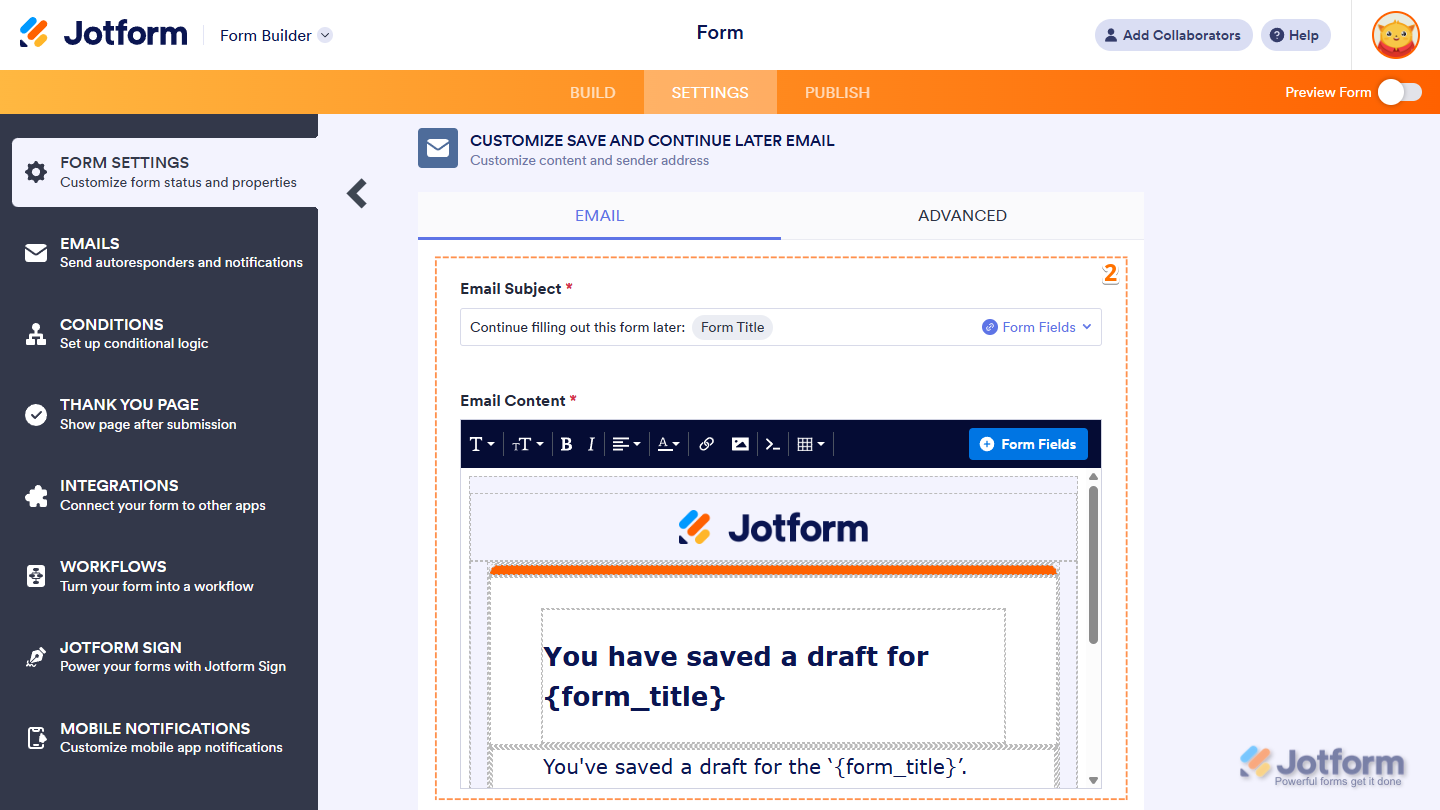
- Next, in the Customize Save and Continue Later Email window, under the Email tab, set up these things:
- Email Subject — Enter the subject line for your email. To include your form title, use the Form Fields dropdown on the right.
- Email Content — This is the body of your email. Feel free to edit, format, or style it however you like. You can also personalize it with your form title using the Form Fields button.
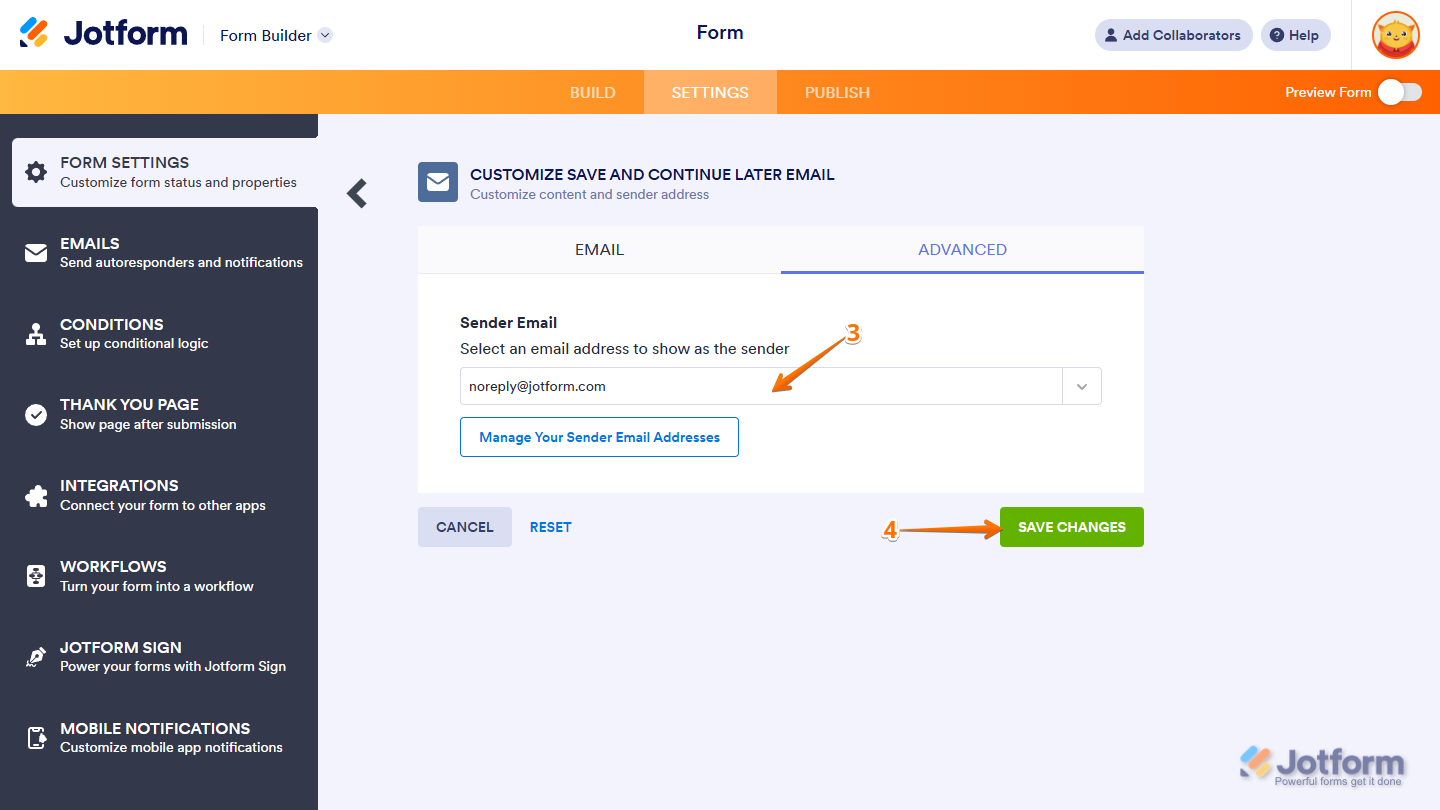
- Then, under the Advanced tab, select your preferred sender from the Sender Email Dropdown menu.
- Finally, click on Save Changes, and you’re all set.
Note
You can use a custom sender email address for Save and Continue Later emails. To set it up, simply add your preferred email address from your Account Settings page. Our guide on How to Set Up a Custom Sender Email with SMTP has more details about that.
Working with Save and Continue Later
Once you enable the Save and Continue Later feature, a Save button will be automatically added to your form.
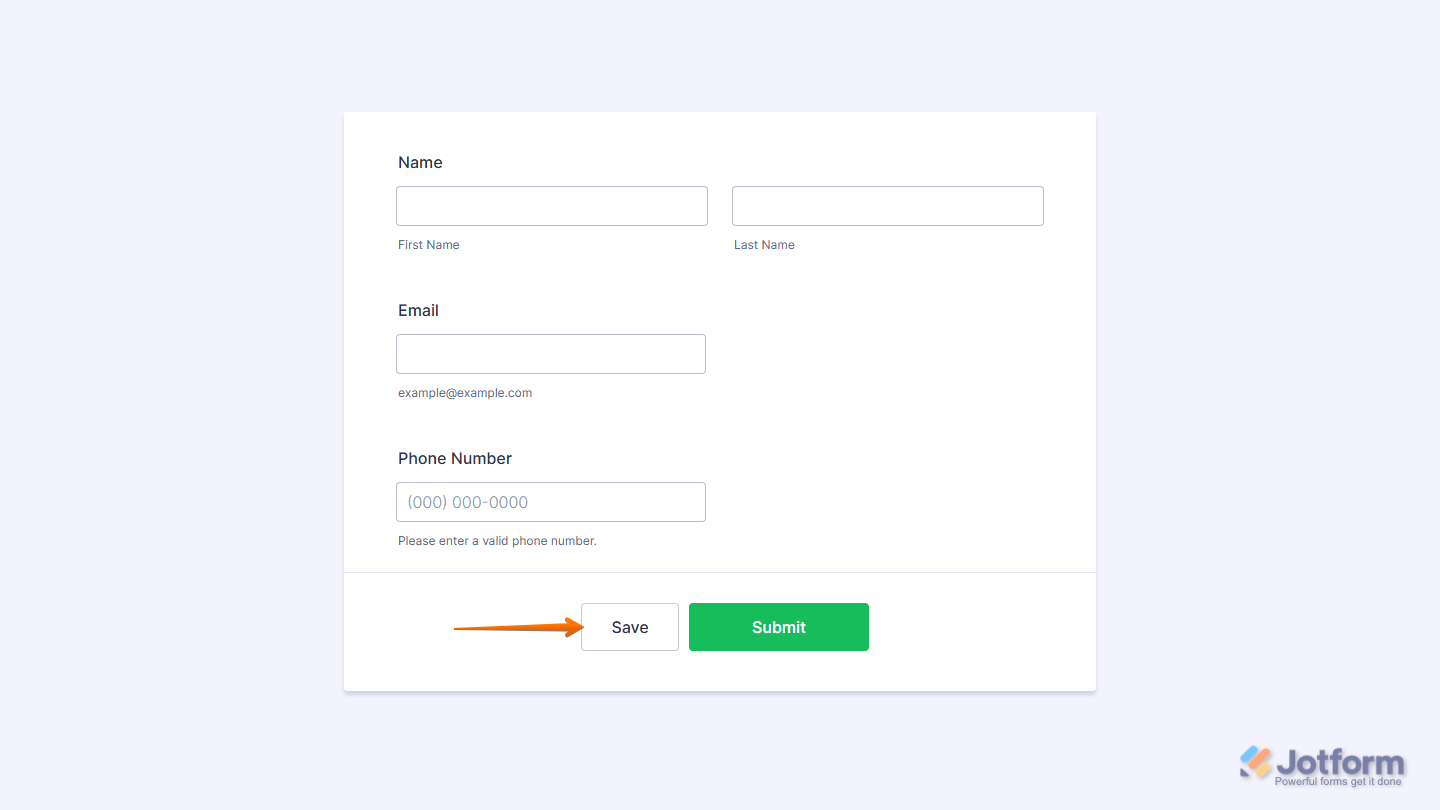
Clicking the Save button opens a dialog where form fillers can either sign up or log in to Jotform to save and manage their drafts in their account, or skip creating an account altogether.
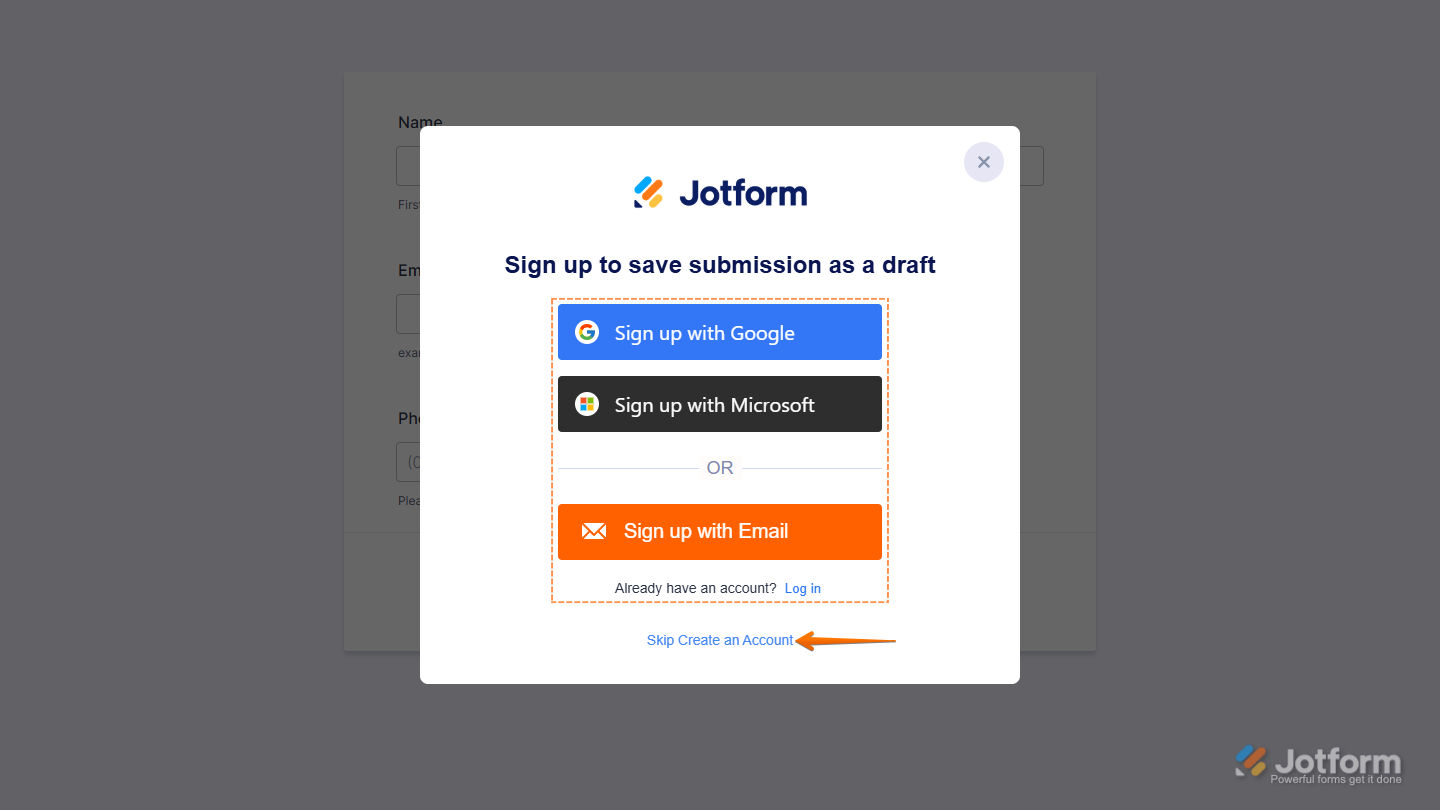
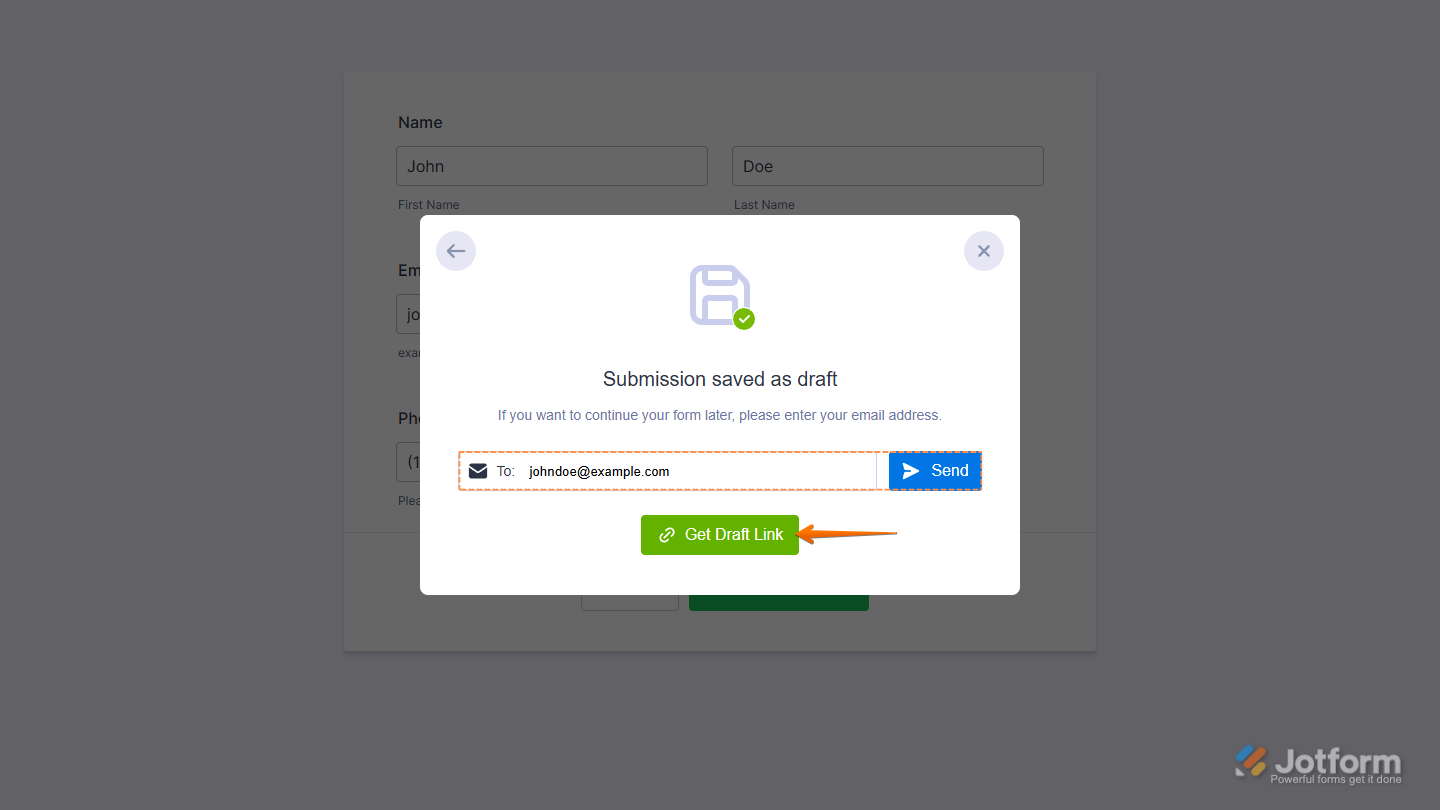
Choosing to skip account creation will open a dialog where users can either copy a shareable draft link or have it sent to their email.
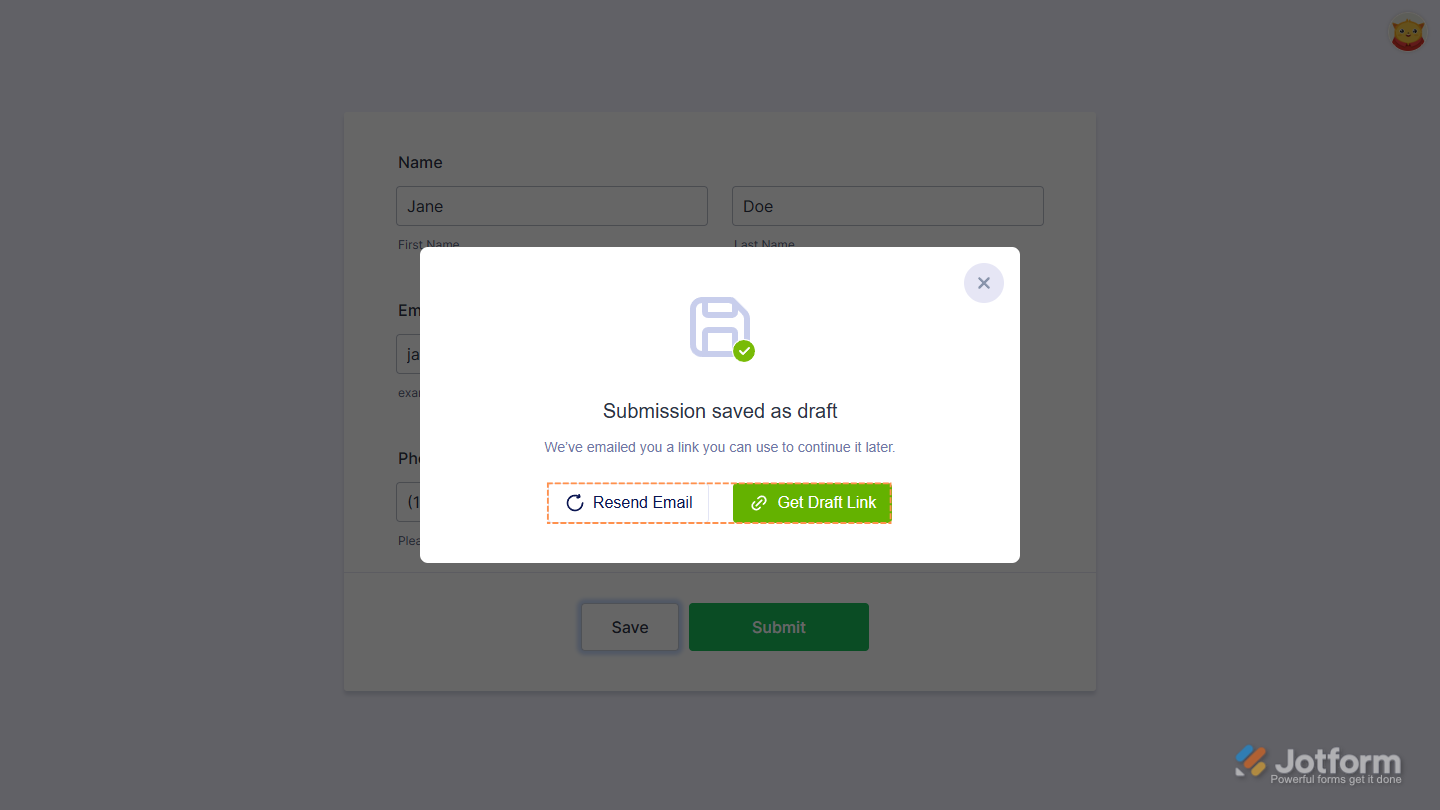
For logged-in users, clicking the Save button opens a dialog that lets them resend the draft email or copy a shareable draft link.
Note
Whether you’re logged in or filling out the form as a guest, you’ll need to click the Save button to save your progress.
Discard & Start Over and Continue With Draft
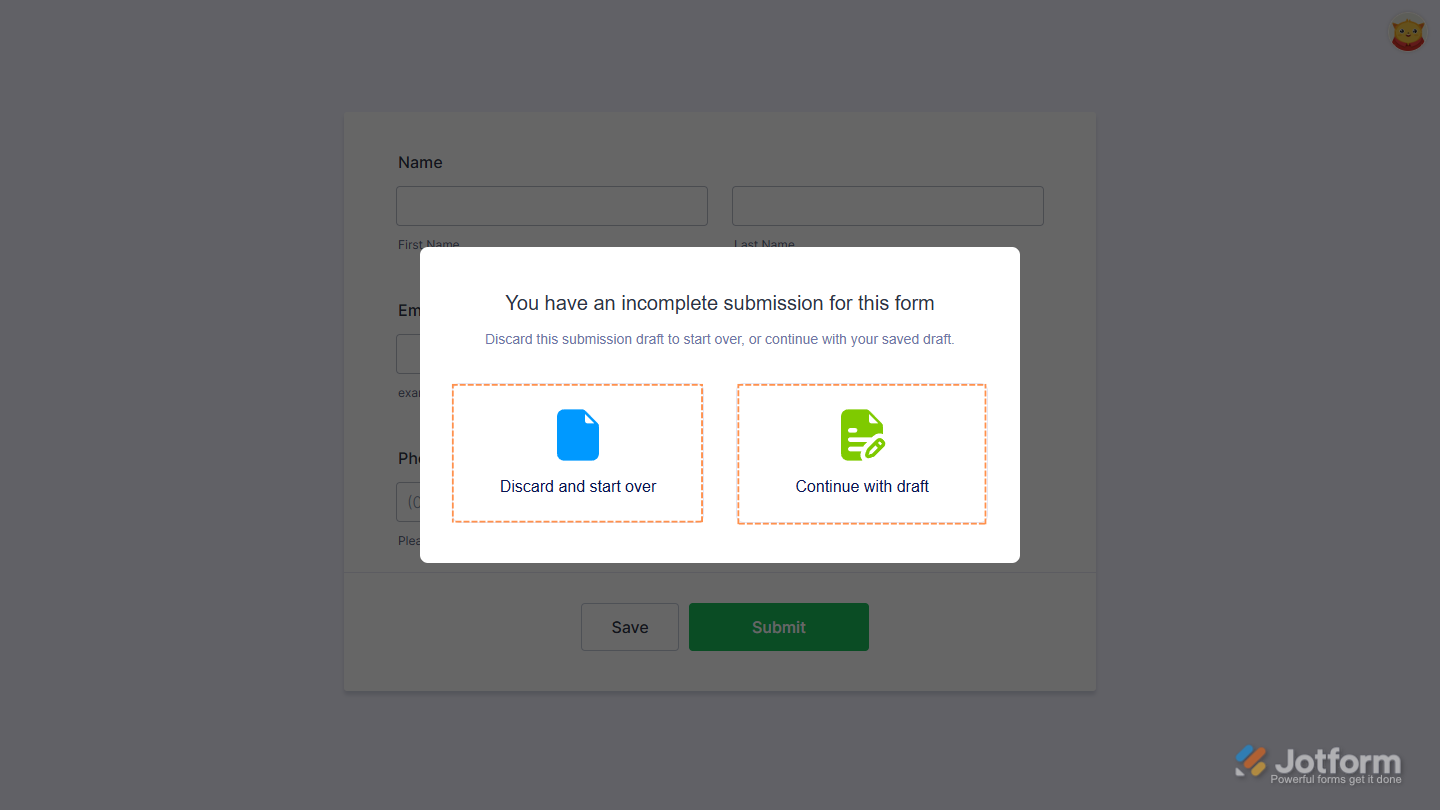
If someone accesses your form while logged in to their Jotform account and a draft already exists, they’ll be given the option to either start over or continue where they left off.
Saving Drafts in Jotform Mobile Forms
Save and Continue Later includes additional features in the Jotform Mobile Forms app. It’s built right into the app, allowing you—as the form owner or assignee—to save multiple submission drafts for forms opened from the main dashboard and filled out directly in the app.
Note
Forms that rely on a browser or require an active internet connection, such as those with payment integrations, aren’t supported by this feature.
Saving drafts in Jotform Mobile Forms is quick—here’s how:
- In the Jotform Mobile App, tap Workspace at the top center of the screen.
- In the Dropdown menu that opens, tap on Forms.
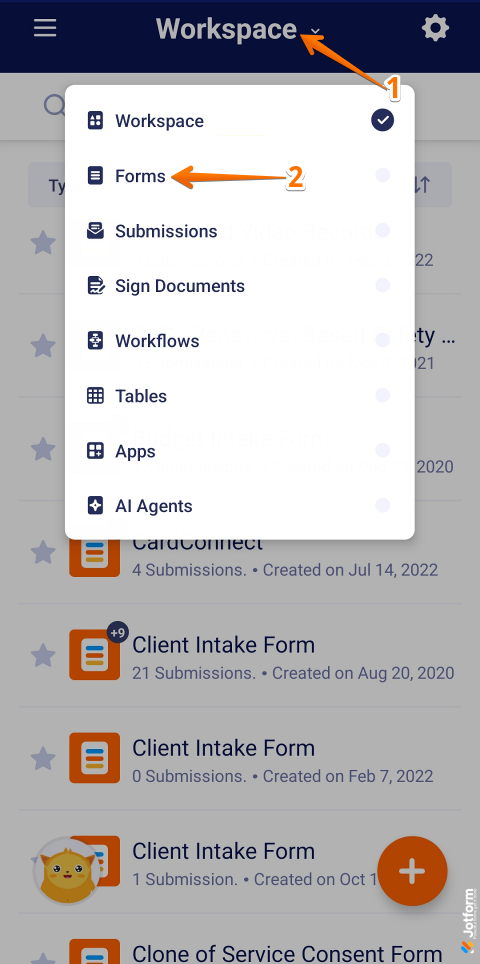
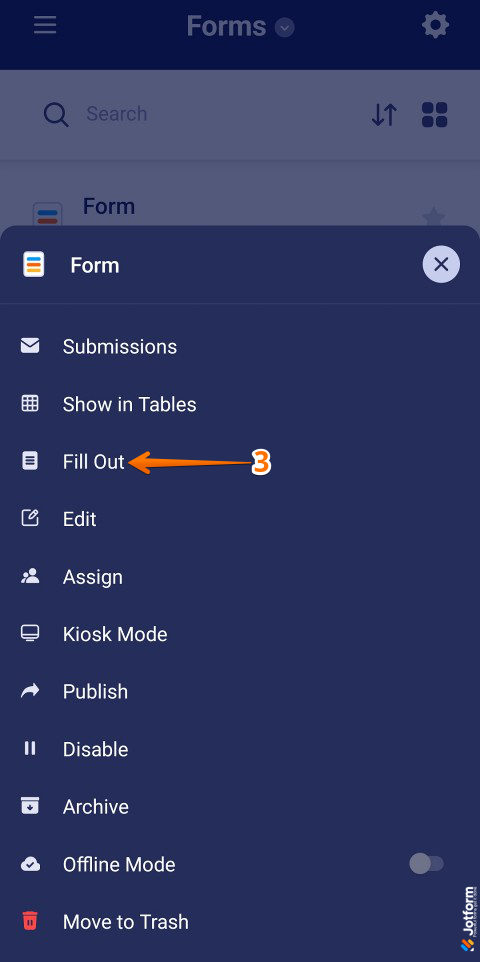
- Next, in the Forms screen, tap the form you wish to open, then in the menu that opens, tap Fill Out.
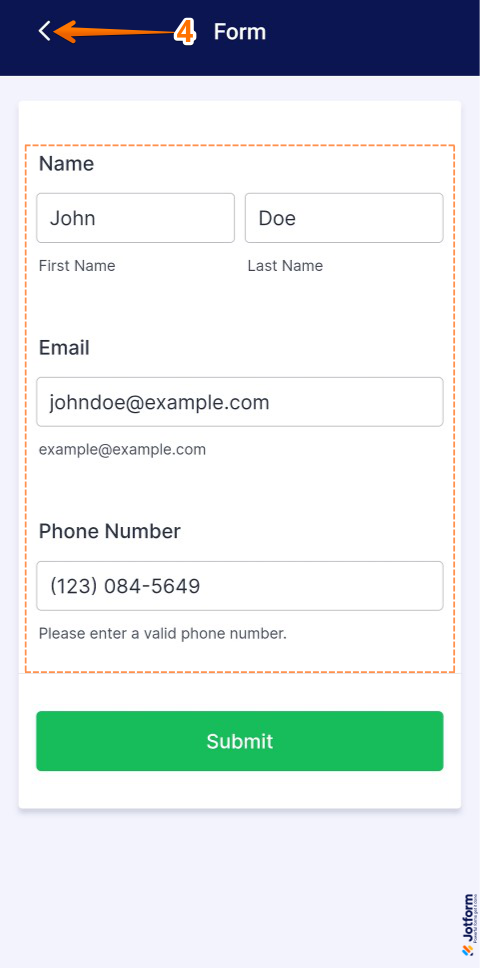
- Then partially fill out the form and, in the top left corner of the screen, tap the Backward Arrow icon.
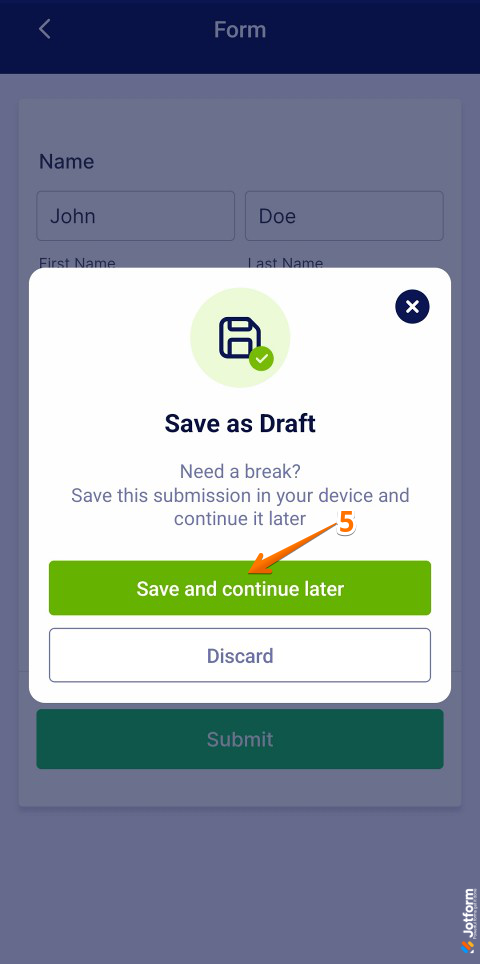
- Now, in the Save as Draft window that opens, tap on Save and Continue Later.
Viewing and Continuing Saved Drafts in Jotform Mobile Forms
Once a draft is saved, you can view it from the Submissions screen of the partially completed form. Viewing and continuing saved drafts is simple—here’s what to do:
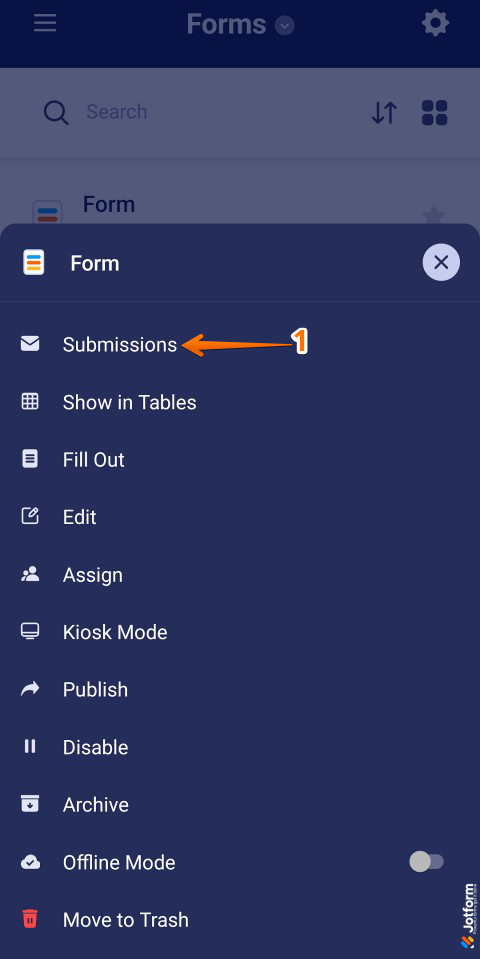
- In the Forms screen, tap a form to view its drafts, then in the Form menu that opens, tap Submissions.
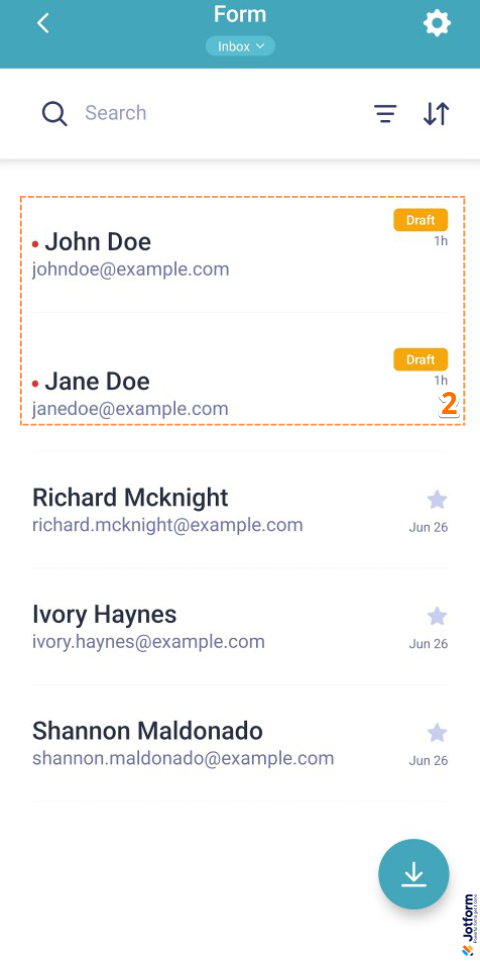
- Next, in the Inbox screen, tap the saved draft from the list.
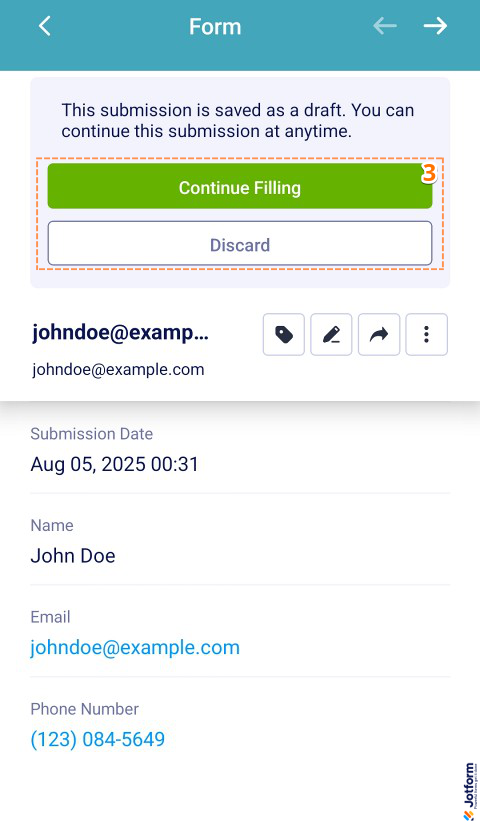
- Now, on the Submission screen, tap Continue Filling to resume where you left off, or Discard to start over.



Send Comment:
66 Comments:
July 17, 2026
a very clunky way to do this to be honest.
October 6, 2025
enable auto save forms
October 6, 2025
I would like a function that SAVES and lets you continue right there. Just because on long forms if they go out for any reason in the middle we have no way of restoring data, we do not have any submission and they would have to reenter everything. I would like a save button that was unobtrusive and sent them that draft link without exiting the form.
October 3, 2025
Please help me find my partially filled form for application for assistant pastor
It’s dated yesterday
August 24, 2025
I have filled out the forms 3 different times and when I go to check they dont show that they are completed.
July 28, 2025
I have the exact issue Adel Regalado has below. There is no Skip Create an Account" link option for me in the pop-up. Any way to fix this?
June 10, 2025
Hello, Similar Question was asked before, but there was not a clear follow up "answer"
When choosing the "save and continue later" option embedded in the form, the draft in sent on our email address. Is there a way the person filling the application can receive the email with the draft link on their address? So, they can access it later and continue from where they left it Thank u!
April 28, 2025
We are having an issue where photos in our forms are not being saved when we edit
March 26, 2025
Would like to echo requests for a way to only show a screen to input email, no prompting to login or create an account. Our end users will bounce off creating an account but we do require a way for them to save and continue forms. We get that this is likely done to boost user registration numbers, but it would be nice for paid account tiers to have the option. The current pop-up layout dominates with Create Account and the skip option is not obvious enough.
Also, we have a shared concern with another user about having multiple people using the same device/browser to submit forms. Our reps use a single device (an iPad) to speak to multiple clients and fill out forms via iframe embeds. Under no circumstances can we allow one account to see another's data. What is recommended to make sure the forms reset and to get users signed out if they do Create Account? Our reps will not be savvy enough to clear cookies and we cannot rely on them to navigate to Jotform each time to sign the account out.
March 25, 2025
I was unable to add the Save and Continue Later option to my form; is it not available on encrypted forms?
May 8, 2024
I came here looking for a "autosave" feature, that means saving contact information either automatically, or at a minimum, when they click "Next" the first time, so that even if they abandon halfway through, you have still captured that initial contact information.
Please provide us a workaround solution for that !
Thank you
April 19, 2024
Can someone without a Jotform account save a form and continue it later? I can't figure out how to configure so that they are able to do this.
April 15, 2024
Hi there!
I understand that the save and continue later feature is enabled when starting a form (pre-submission). However, we have a use case where our team is filling out the form partially complete, submitting and during live discussions with our clients they edit the submission. Is there any way to autosave updates when editing a submission OR is it possible to extend the timeout so the responses are not lost?
We have to submit the forms partially complete as the gsheet integration is the easiest way to extract the edit link without setting up zaps.
Thank you :)
April 9, 2024
Is Jotform ever going to support autosave/dropoff/abandonment? This "Save and Continue Later" is a really clunky and pretty outdated method to continue a form.
From the form provider's perspective, in 99% of cases, you want to capture some basic information whether the person hits submit or not.
That means saving contact information either automatically, or at a minimum, when they click "Next" the first time, so that even if they abandon halfway through, you have still captured that initial contact information.
A quick forum search shows me this has been requested by at least 25 people and for multiple years. C'mon, Jotform!
July 7, 2023
Hello,
When choosing the "save and continue later" option embeded in the form, the progress in sent on our email adress. Is there a way the person filling the application receive the progress on their adress? So they can easilly acces it later.
I know they have the link, but it would be more easier if they would get an email with the form and the option to continue from there. Thank u!
May 4, 2023
how can I retrieve my saved items which are no more reflected I my form
February 8, 2023
How can I use this feature without the pop-up having jotform branding and without you soliciting account set-ups from my users. I understand how the "skip" link works but I want to remove that step and just let users enter their email or get the link.
December 20, 2022
This is so outdated function!!!! Your customers have asked for abandonment submission for years. Why don't you just make that function available??? There are so many requests made for it and all you do is send people to this pointless function "save your details"...
October 6, 2022
Does this work if the form is embedded in a website?
June 19, 2022
Hi,
When using the save and continue later option, we have found that we can't have more than one draft form running at once. Each time we try to do a new one, the old one's data gets erased even with the link given at the end of the draft.
Not sure if we are doing something wrong or if it's just not possible.
Any help would be greatly appreciated.
May 27, 2022
Hi, I am adding in the save for later option to our form. Is there a way that I can also receive a notification when a user starts and saves an application? I know that they can receive the e-mail notifying them of the saved application and the link to continue it, but can I also receive this notification or something similar?
Thank you, Janice
February 8, 2022
I still cannot see that my user from last year will have the ability to have the form pre-filled when they go to register their child this year. Is there a way? Sounds like they can easily register as a user. And if they do, can we save their input info?
Thanks, LoriAnn
January 17, 2022
I want to complete an application
October 12, 2021
Hello,
We have a Silver account and create HIPAA-compliant forms for our Webhosting clients. We like the review answer widget and save-for-later functions. However, we don't like the fact that our clients are asked to create an account to continue filling out their forms. The save your progress screen does not show the skip create an account feature to our clients. We agree that the data should be stored on your secure server, however, we don't want our clients setting up accounts to do the work we're hired to perform for them. That defeats our purpose snd we don't want this to be a deal-breaker for us.
We understand in order to white label this product you have to have an Enterprise account with a minimum of 5 users. We only need one user. Can you customize enterprise-level applications for a single Silver plan user? If so, I do have some suggestions.
Overall, we are pleased with the forms we have created, except for those details listed above. With a few minor tweaks, we will be delighted to refer designing colleagues to your services.
Thank you for your assistance and I look forward to your answer.
Enjoy your day.
Cynthia Bryant
September 1, 2021
Hello, I may be trying to do something different than most posts I have seen. I have tried reading all of the comments and posts on this subject but unlike the others I DO NOT want the save button to appear at all. I DO NOT want our users to be able to save and finish later. I want them to submit what they have regardless. I have tried disabling the "Continue Forms Later" but the Save button is still at the bottom. When I hit the Save button it then gives me a window that I don't want to see that says "You have a draft of this form. You can continue your draft or discard and start with a blank form" It then give two icons with options "Discard & Start Over" and "Continue with Draft". If it is not possible to eliminate the Save button and this additional window I will have to teach people not to hit the Save button at all but was hoping it could be removed. I found one support ticket that discussed adding some code. I copied and added that code but it still did not remove the save button. If there is not a way to totally remove the button you can just reply here and tell me that. If there is, please see the next paragraph.
Can someone contact me by phone to discuss this please? I wasn't sure if I should list my phone number in this post so if you don't have it, let me know and I can. I appreciate your assistance.