

Attendance Sheets

毎日の勤怠記録表
無料オンライシートで出勤状況を簡単に管理できます。学校や企業の勤怠管理に最適。カスタマイズ・ダウンロード・印刷も簡単で、コード不要です。
カテゴリーへ移動:Attendance Sheets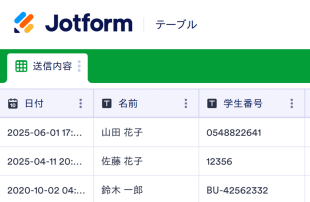
Attendance Sheetsについて
Jotformの無料勤怠表を使ってオンラインで勤怠を管理しましょう!まずは下のリストからスプレッドシートのテンプレートをお選びください。その後、学校や非営利団体、企業に合わせてカスタマイズし、どのデバイスからでも出席情報を入力できます。スタッフや同僚に添付フォームに入力してもらい、スプレッドシートに自動入力させたい場合は、添付フォームをウェブサイトに埋め込んだり、リンクで送信したり、QRコードを使って同僚や上司と共有すれば、どのデバイスからでもすぐにフォームを開くことができます。
Jotform Tables is where the journey of form submissions continues as they automatically appear in the connected table. Each response transforms into an entry that can be examined in Table View or Detail View, allowing for a comprehensive review of the information. Users can organize and analyze submissions using features like search, filters, data grouping, and different column types. They can also take advantage of Calendar View, Report View, and Uploads View for varied perspectives on the data. While manual entry and the import of CSV or Excel files are available for adding existing records, the core workflow remains the seamless transition from form submission to table entry.
Why Use Attendance Sheets?
- By using Attendance Sheets, form owners eliminate the tedious task of manually transferring data from form submissions to spreadsheets. This automation ensures responses are captured accurately and reduces the risk of human error, allowing teams to focus on more strategic tasks.
- Collecting responses through Jotform Forms and managing them in Jotform Tables keeps all attendance data centralized. This consolidation means that users can quickly access any record when needed, streamlining the process of data retrieval.
- The detailed review capabilities in Jotform Tables allow for a complete examination of each submission, including any uploads or supplementary information. This thorough approach ensures all necessary details are considered when analyzing attendance records.
- Coordinating follow-up actions is simplified, as Jotform Tables enables users to track changes and updates to any entry. This feature ensures that everyone involved is aware of any modifications, aiding in effective communication and coordination.
- Reporting on collected data is made easy with Jotform Tables’ various views, such as Report View, which helps form owners create comprehensive summaries of attendance records. This ability to generate reports supports informed decision-making and strategic planning.
Common Problems Solved by Attendance Sheets
- One common issue is manually copying submissions from forms into spreadsheets, which is both time-consuming and prone to errors. Jotform Tables solves this by automatically populating the connected table with submissions, ensuring accuracy and saving time.
- Scattered responses across different platforms can lead to difficulty in locating specific records. Attendance Sheets centralize all responses, making it much easier to find and access the information when needed.
- チームメンバーによってデータの扱い方が異なると、審査プロセスにばらつきが生じることがあります。Jotformテーブルでは、統一された表示形式と構造化されたデータ表示によって審査プロセスを標準化し、より一貫性と信頼性の高い結果につなげることができます。
- When context is missing, it can be challenging to understand the full scope of a submission. Jotform Tables allows for detailed views of entries, ensuring that users have all the necessary information to make informed decisions.
- Hard-to-review uploads can slow down the process of data analysis. With Uploads View, Jotform Tables simplifies the examination of attached files, making it easier to review and incorporate them into the decision-making process.
Matching Form Submission Use Cases to Jotform Tables Features
- When collecting attendance data through Jotform Forms, the auto-population feature ensures that each submission automatically appears in the connected table. This seamless integration allows for immediate access and management of the data.
- For reviewing and organizing submissions, Table View and Detail View provide comprehensive options to analyze each entry. Users can utilize search and filters to quickly locate specific records, ensuring efficient data management.
- Teams can manage access settings and assign responsibilities to specific members, facilitating collaboration and maintaining accountability. Real-time tracking and revision history further support coordinated team efforts by providing transparency in the workflow.
- Using Report View, form owners can generate detailed summaries of the collected attendance data. This feature aids in presenting findings, identifying trends, and making data-driven decisions.
- For those needing to connect their Attendance Sheets to related data, linked tables and integrations offer powerful tools for expanding data relationships and automating workflows with other applications.
How to Use Attendance Sheets with Jotform Forms
- Start by selecting a relevant Jotform Tables template, a blank table, or a table connected to an existing Jotform Form. The Jotform Form is used to collect the category-specific information, and as responses are submitted, they automatically appear in the connected table for immediate access.
- Configure the table to suit your submission review needs by naming columns and choosing appropriate column types. Select relevant views such as Table View, Detail View, Calendar View, Uploads View, or Report View to effectively organize and analyze the data.
- Manage submissions with various tools like search, filters, grouping, and formulas. Utilize access settings and assign tasks to team members when necessary. Track changes using revision history, link tables for comprehensive analysis, and use action buttons for efficient data handling.
Top Use Cases for Attendance Sheets
- For Form Owners: Form owners benefit from the ability to review incoming responses promptly as they appear in their connected table. They can edit submission data when required, ensuring that all information is accurate and up-to-date. By checking details and uploads thoroughly, form owners maintain a well-organized collection of records within Jotform Tables, streamlining their workflow and supporting their data management needs.
- For Teams: Authorized team members can easily find necessary submissions within the centralized database, maintaining and updating entries as needed. By coordinating responsibilities through assignees, teams ensure accountability and efficient task distribution. Access settings and revision history further support shared work by providing a clear record of changes and decisions, fostering a collaborative environment.
- For Managers: Managers play a crucial role in overseeing collected data and identifying category-specific patterns or trends. By reviewing submissions in different views such as Report View, they can gain insights into progress and ownership, ensuring that operations align with organizational goals. Managers can also use these insights to make informed decisions and drive strategic initiatives.
Summarizing Attendance Sheets
Attendance Sheets provide a valuable framework for collecting and managing attendance-related information through Jotform Forms and Jotform Tables. By automating the transfer of submissions to a central table, users can efficiently organize, review, and act on data. This seamless workflow enhances data accuracy, facilitates collaboration, and supports strategic decision-making, making Attendance Sheets an integral part of any data management strategy.
よくあるご質問
1) Is it free to use Attendance Sheets with Jotform Tables?
Jotform offers a Starter plan, which allows users to utilize Attendance Sheets and other features. This plan provides a way to explore the capabilities of Jotform Tables without immediate financial commitment. It is an excellent starting point for small teams or individuals looking to manage their data efficiently.
2) How do submissions from Jotform Forms appear in Attendance Sheets?
Submissions from Jotform Forms automatically appear in the connected Attendance Sheets table. As respondents fill out and submit the form, their responses are instantaneously transformed into entries in the table. This process ensures that new submissions continue to auto-populate, providing a seamless and efficient data collection and management experience.
3) Can I edit, search, filter, group, and calculate data in Attendance Sheets?
Yes, Attendance Sheets allow for comprehensive data management, including editing submissions to ensure accuracy. Users can search, filter, and group data to find specific records quickly and easily. Additionally, formulas and calculations are available to perform necessary data analysis, supporting informed decision-making.
4) Can I export the data inside the tables as CSV or Excel?
Exporting data as CSV or Excel is possible with Attendance Sheets, providing flexibility in how information is used or shared. This feature allows users to integrate existing data with new submissions collected through connected forms. It supports further analysis and reporting outside of Jotform Tables.
5) Which Jotform Tables views can I use with Attendance Sheets?
Attendance Sheets offer various views, including Table View for a comprehensive overview, Detail View for in-depth analysis, and Calendar View to track submissions over time. Report View helps summarize findings, while Uploads View makes reviewing attached files straightforward. Each view serves a specific purpose in data management and review.
6) Can teams collaborate on submissions in Attendance Sheets?
Teams can collaborate effectively on submissions within Attendance Sheets by using access settings to control who can view or edit data. Assignees can be designated for specific tasks, and real-time tracking ensures everyone is updated on changes. Revision history provides a transparent record of all modifications, supporting coordinated team efforts.
7) Can I connect Attendance Sheets to related data or other applications?
Yes, linked tables and integrations enable users to connect Attendance Sheets with related data sets or external applications. Action buttons facilitate workflows, ensuring that processes are seamless and efficient. This connectivity enhances data management capabilities, allowing for comprehensive analysis and automation.
8) Can I create reports, PDFs, and manage files from Attendance Sheets?
Attendance Sheets support creating reports through Report View, providing valuable insights into collected data. Users can generate PDFs for documentation purposes and manage files efficiently with Uploads View. These capabilities ensure that all aspects of data management, from review to reporting, are covered comprehensively.