

Formulários para Relatório de Incidentes

Relatório De Ocorrência Policial
O Formulário de Relatório de Ocorrência Policial permite que cidadãos registrem incidentes não urgentes, informando data, horário, local e outros detalhes relevantes sobre a situação.
Ir para Categoria:Formulários para Policiais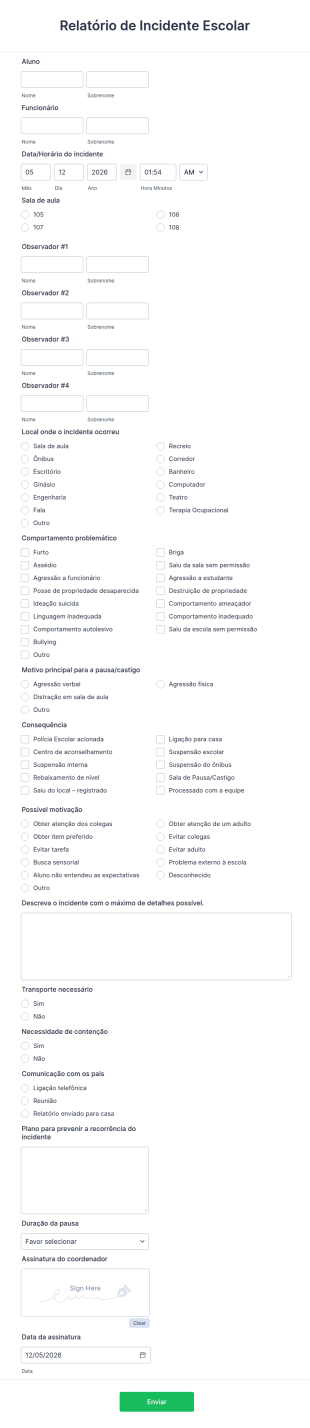
Relatório De Incidente Escolar
O Formulário de Relatório de Incidente Escolar permite registrar imediatamente qualquer ocorrência na escola, reunindo informações sobre o aluno, a equipe envolvida, data, horário, local e quem respondeu ao incidente.
Ir para Categoria:Formulários para Professores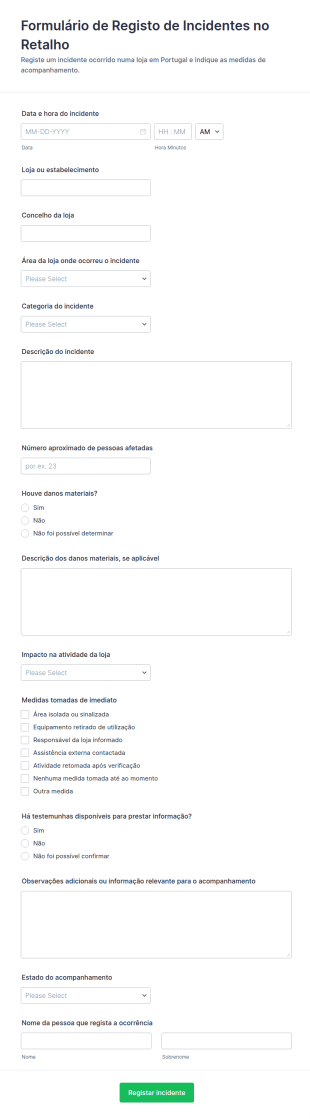
Relatório De Incidente No Varejo
O Formulário de Registo de Incidentes no Retalho apoia lojas e equipas de operações a registar ocorrências, acompanhar ações e manter a recolha de dados consistente em todos os estabelecimentos com o Jotform.
Ir para Categoria:Formulários para Relatório de IncidentesSobre Formulários para Relatório de Incidentes
Formulários para relatório de incidentes são formulários digitais especializados desenvolvidos para simplificar o processo de documentação e gerenciamento de incidentes em diversos setores. Esses formulários são fundamentais para registrar detalhes sobre acidentes, violações de segurança ou quaisquer eventos significativos que exijam um relatório formal. Eles desempenham um papel importante em setores como saúde, manufatura e ambientes corporativos, nos quais a documentação precisa e oportuna de incidentes é essencial para a conformidade e a eficiência operacional. Ao utilizar formulários para relatório de incidentes, as organizações podem garantir que todos os dados relevantes sejam coletados de maneira consistente e eficiente, facilitando uma resposta rápida e a resolução dos incidentes.
Jotform se destaca como o principal criador de formulários online para gerenciar formulários para relatório de incidentes. Sua interface intuitiva de arrastar e soltar permite que os usuários personalizem facilmente os formulários de acordo com as necessidades específicas da organização. Com Jotform, a coleta de dados é automatizada, reduzindo o trabalho manual associado à papelada tradicional. Os robustos recursos de gerenciamento de dados da plataforma, oferecidos pelo Jotform Tabelas, garantem que todos os dados de incidentes sejam centralizados, seguros e facilmente acessíveis para análise e geração de relatórios. Essa integração entre a criação de formulários e o gerenciamento de dados torna Jotform uma ferramenta indispensável para empresas que desejam aprimorar seus processos de relatório de incidentes.
Por que usar Formulários para Relatório de Incidentes?
- Os formulários para relatório de incidentes são essenciais para garantir a precisão e a consistência dos dados na documentação de incidentes. Ao utilizar formulários digitais estruturados, as organizações podem eliminar a variabilidade e os erros frequentemente associados a relatórios manuscritos, mantendo assim a alta qualidade e a confiabilidade dos dados.
- Esses formulários aumentam significativamente a agilidade da coleta e do processamento de dados. Diferentemente dos métodos tradicionais baseados em papel, os formulários digitais permitem o envio instantâneo e a integração dos dados aos sistemas centralizados, acelerando o processo de resolução de incidentes.
- O gerenciamento profissional de dados é outro benefício importante do uso dos formulários para relatório de incidentes. Com fluxos de trabalho automatizados e captura de dados em tempo real, as organizações podem garantir que todas as informações dos incidentes sejam tratadas de maneira profissional, reduzindo o risco de perda ou manuseio inadequado dos dados.
- Formulários para relatório de incidentes facilitam a conformidade com regulamentações e padrões do setor. Ao manter um registro completo e acessível de todos os incidentes, as organizações podem demonstrar facilmente o cumprimento das diretrizes de segurança e geração de relatórios, evitando possíveis penalidades legais e financeiras.
- O uso desses formulários também aprimora a comunicação e a colaboração dentro das organizações. Ao oferecer um formato padronizado para o registro de incidentes, todas as partes envolvidas podem permanecer informadas e alinhadas, permitindo uma resposta mais coordenada e eficaz aos incidentes.
Problemas comuns solucionados por Formulários para Relatório de Incidentes
- Um dos principais desafios resolvidos pelos formulários para relatório de incidentes é a ineficiência da papelada tradicional. Formulários em papel podem levar tempo para serem preenchidos, estar sujeitos a erros e ser difíceis de gerenciar. Formulários digitais simplificam todo o processo, tornando-o mais rápido e eficiente.
- A entrada manual de dados é outro problema comum que esses formulários ajudam a resolver. Ao automatizar a coleta e a integração de dados, as organizações podem minimizar o risco de erros associados à entrada manual, garantindo registros de incidentes mais precisos e confiáveis.
- Dados perdidos ou extraviados são uma preocupação significativa na geração de relatórios de incidentes. Formulários digitais garantem que todos os dados sejam armazenados com segurança e facilmente recuperáveis, eliminando o risco de perda de documentos e garantindo que todas as informações dos incidentes estejam prontamente acessíveis quando necessário.
- Os formulários para relatório de incidentes também ajudam a resolver o problema de atrasos na resposta a incidentes. Com o envio de dados em tempo real e notificações automatizadas, as organizações podem responder mais rapidamente aos incidentes, reduzindo possíveis danos e melhorando a segurança e a eficiência gerais.
Relacionando casos de uso aos recursos
- Para uma coleta eficiente de dados durante um incidente, o Criador de Formulários de arrastar e soltar permite criar rapidamente formulários personalizados para tipos específicos de incidentes, garantindo que todas as informações necessárias sejam coletadas com precisão e eficiência.
- A lógica condicional pode ser utilizada para simplificar o preenchimento dos formulários, ajustando dinamicamente os campos com base nas informações inseridas pelo usuário. Dessa forma, apenas informações relevantes são coletadas, reduzindo a complexidade do formulário.
- O recurso de assinaturas eletrônicas da Jotform permite coletar assinaturas juridicamente vinculantes diretamente nos formulários, facilitando a conformidade e garantindo que todos os relatórios de incidentes sejam devidamente autorizados e validados.
- O Editor de PDFs pode gerar automaticamente documentos PDF profissionais a partir dos envios aos formulários, oferecendo um formato padronizado e bem elaborado para comunicar incidentes às partes interessadas ou aos órgãos reguladores.
- Para organizações que precisam de integração integrada de dados, Jotform oferece mais de 100 integrações de terceiros, incluindo Planilhas Google e Salesforce, permitindo que os dados de incidentes sejam sincronizados automaticamente com os sistemas existentes para análise e geração de relatórios.
- O gerenciamento seguro de dados com Jotform Tabelas garante que todos os dados de incidentes sejam armazenados com segurança, enquanto controles de acesso e criptografia garantem a conformidade com as regulamentações de proteção de dados e protegem informações confidenciais.
Como criar um Formulário para Relatório de Incidentes
- Comece explorando a lista de modelos em busca de um modelo para relatório de incidentes ou comece com um formulário em branco para adaptar o design às suas necessidades específicas.
- Personalize seu design e campos usando o Criador de Formulários de arrastar e soltar, adicionando ou removendo elementos conforme necessário para coletar todas as informações relevantes do incidente.
- Quando o formulário estiver concluído, publique-o e compartilhe-o por meio de um link direto, e-mail ou incorporação no site para garantir fácil acesso a todos os usuários.
Principais casos de uso dos Formulários para Relatório de Incidentes
- Para gestores: Os formulários para relatório de incidentes oferecem aos gerentes um método completo e organizado para acompanhar incidentes em suas organizações. Ao ter acesso a relatórios detalhados e consistentes, os gerentes podem identificar padrões ou problemas recorrentes, permitindo implementar medidas preventivas e melhorar a segurança geral no local de trabalho. Além disso, os dados em tempo real fornecidos por esses formulários permitem que os gerentes tomem decisões fundamentadas rapidamente, reduzindo o impacto dos incidentes nas operações.
- Para equipes: As equipes se beneficiam dos formulários para relatório de incidentes por terem uma maneira padronizada e eficiente de documentar incidentes conforme eles ocorrem. Isso garante que todos os membros da equipe estejam alinhados, promovendo uma melhor comunicação e colaboração na abordagem e resolução dos incidentes. Ao utilizar esses formulários, as equipes também podem simplificar seus processos de geração de relatórios, economizando tempo e reduzindo a carga administrativa associada aos métodos tradicionais de registro de incidentes em papel.
- Para clientes: Os formulários para relatório de incidentes também podem ser usados para aumentar a satisfação dos clientes, oferecendo um mecanismo transparente e eficiente para relatar problemas ou incidentes. Os clientes podem preencher facilmente esses formulários online, garantindo que suas preocupações sejam tratadas e resolvidas rapidamente. Essa abordagem proativa ao gerenciamento de incidentes não apenas aumenta a confiança e a fidelidade dos clientes, mas também ajuda as organizações a manter uma reputação positiva ao demonstrar seu compromisso com um atendimento excelente e ágil.
Resumindo os Formulários para Relatório de Incidentes
Formulários para relatório de incidentes oferecem um valor significativo para as empresas ao aumentar a eficiência, a precisão e a confiabilidade dos processos de documentação e gerenciamento de incidentes. Ao utilizar o robusto criador de formulários online da Jotform, as organizações podem personalizar e automatizar seus fluxos de relatórios de incidentes, garantindo que todos os dados relevantes sejam coletados e gerenciados de maneira eficaz. Isso, por sua vez, facilita a resolução mais rápida de incidentes, melhora a conformidade e aprimora a tomada de decisões, contribuindo, em última análise, para um ambiente de trabalho mais seguro e produtivo.
Perguntas Frequentes
1) É gratuito criar formulários para relatório de incidentes?
Sim, Jotform oferece um plano gratuito que permite aos usuários criar e utilizar formulários para relatório de incidentes, com opções de upgrade para obter recursos e capacidade adicionais conforme necessário.
2) Os formulários e dados enviados são seguros?
Com certeza, Jotform garante que todos os formulários e dados sejam protegidos com criptografia e medidas de segurança padrão do setor, mantendo as informações confidenciais seguras e em conformidade com as regulamentações de proteção de dados.
3) Preciso ter conhecimentos de programação para criar um formulário para relatório de incidentes?
Não, o Criador de Formulários de arrastar e soltar da Jotform permite que os usuários criem formulários sem conhecimentos de programação, tornando o processo acessível e simples para todos.
4) Posso receber pagamentos diretamente pelos meus formulários?
Sim, Jotform é compatível com a integração com mais de 30 gateways de pagamento, incluindo Stripe, PayPal e Square, permitindo que os usuários coletem pagamentos diretamente pelos formulários.
5) Esses formulários podem ser usados em dispositivos móveis?
Sim, os formulários Jotform são totalmente responsivos e podem ser acessados e preenchidos em dispositivos móveis, garantindo praticidade e acessibilidade para usuários em movimento.
6) Posso transformar os envios aos formulários em documentos PDF profissionais?
Sim, o Editor de PDFs Jotform permite gerar automaticamente documentos PDF profissionais a partir dos envios aos formulários, ideais para fins de geração de relatórios e manutenção de registros.
7) Esses formulários podem ser integrados a sistemas existentes, como CRM ou software de gerenciamento de projetos?
Sim, com mais de 100 integrações de terceiros disponíveis, Jotform pode se conectar de maneira integrada a sistemas de CRM, como Salesforce, e ferramentas de gerenciamento de projetos, garantindo um fluxo de dados eficiente e aumentando a produtividade.
8) Existem recursos para automatizar os fluxos de aprovação dos formulários enviados?
Sim, Jotform oferece fluxos de aprovação que podem automatizar o processo de encaminhamento de formulários enviados para revisão e aprovação, simplificando a eficiência operacional e reduzindo o tempo de processamento.