

Simple Business Plan Templates

Шаблон Пословног Плана на Једној Страници
Пословни план на једној страници је баш онако како звучи: резиме пословних циљева приказаних на једној страници.
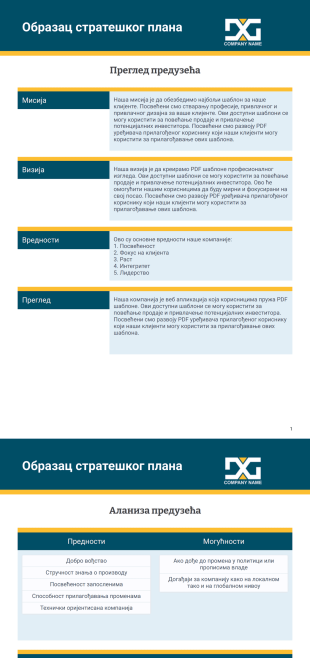
Образац стратешког плана
Фокусирајте се на будућност и наставите да ваша компанија напредује помоћу Jotform шаблона за стратешки плана. Једноставно попуни приложени образац са прегледом твоје компаније, прођите дубље помоћу СВОТ анализе и заврши одређивањем својих стратешких циљева, акција и финансијских планова. Наш потпуно прилагодљив шаблон претвара послате информације у углађене PDF доцументе, које можеш одмах да преузмеш, одштампаш или делиш.Није ти потребна диплома дизајна да би направили професионални стратешки план. Промени фонтове, ажурирајте боје и додај логотип своје компаније у трену — са Jotform PDF уређивачем, прилагођавање је лако! Постави циљеве, приоритете и састави чврсте акционе планове као PDF документа помоћу нашег шаблона за стратешки план. Јасно дефинишући своје циљеве и кораке које ћеш предузети да их постигнеш, можеш задржати своју компанију на правом путу и брже развијати своје пословање.
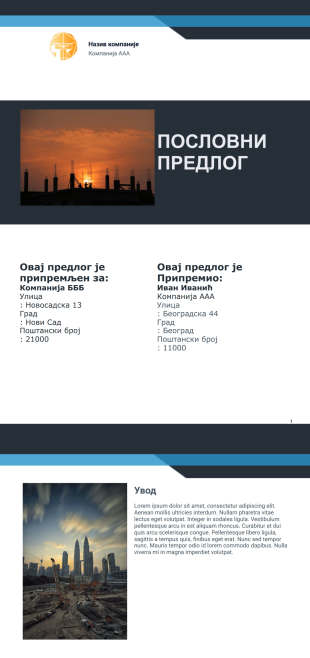
Бесплатан Шаблон Пословног Предлога
Имаш пословни план на уму и већ си структурирао како ће функционисати корак по корак, али су ти потребна нека финансијска средства или мораш да извршиш зајам са компанијом. Да би понекад нудио зајмове, да би заштитио своје пословање, требало би да знаш колико је твој план успешан. Компаније или власници понекад морају да изграде партнерства и потребно им је да имају документ како би правилно визуелизовали постављени пословни план како би њихови инвеститори сарађивали око посла који компанија има на уму. Пословни предлог је ефикасан алат који помаже инвеститорима да виде бољу пројекцију о томе какав ће бити пословни план. Пословни предлог је документ који даје мапу пута која описује одређени пројекат, производ или услугу. Помаже да се посао представи потенцијалном клијенту или инвеститору. Уз коришћење пословног предлога, то ти даје прилику да до детаља формализујеш нацрт онога што можеш да изнесеш на сто са потенцијалним партнером.

Преглог за развој мобилне апликације
Убеди своје клијенте да искористе твоје софтверске услуге слањем овог PDF-а као предлог за развој мобилних апликација. Овај шаблон има насловну страницу, увод, преглед компаније, развојни процес, понуђене услуге, детаље о пројекту и услове. У овом шаблону, твоји клијенти ће дефинитивно ценити предлог јер садржи мисију и визију твоје компаније. Такође илуструје развојни процес о томе како твој тим креира мобилну апликацију од предлагања, састанка, одобрења, тестирања и покретања.Овај сензационални шаблон предлога мобилне апликације такође приказује опис пројекта и цену. На крају, услови одређују обим услуга компаније.
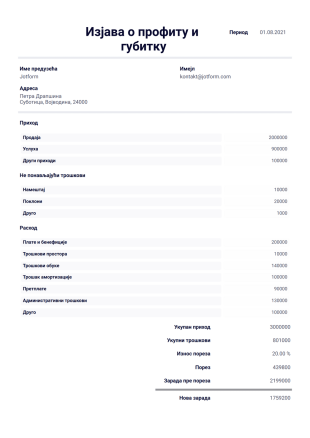
Изјава о профиту и губитку
Изјава о профиту и губитку је финансијски извештај о трошковима, издацима и приходима о компанији у одређеном периоду. Информација у овом прегледу помаже при сазнању да ли предузеће послује позитивно или не. Ова изјава може да се користи за разне сврхе, као на пример да се пронађе где компанија највише губи новац, или за припајање отенцијалних клијената у предузеће.Овај PDF шаблон за изјаву о профиту и губитку ти дозвољава да имаш PDF документ који можеш да одштампаш са подацима из базе. Ово ти помаже да уштедиш време од ручмих калкулација. Све што треба да урадиш је да унесеш износе. Шаблон се са лакоћом може прилагодити како би се слагао са твојим потребама. Копирај овај шаблон у свој Jotform налог бесплатно!
About Simple Business Plan Templates
PDF шаблони једноставних пословних планова су посебно дизајнирани да поједноставе процес израде пословних планова тако што пружају структуриран, унапред припремљен PDF формат који се може прилагодити различитим пословним потребама. Ови шаблони олакшавају креирање детаљних пословних планова тако што нуде организован формат за представљање циљева компаније, стратегија, финансијских пројекција и анализе тржишта. Уобичајени примери употребе ових шаблона укључују развој стратешких планова за стартапе, припрему детаљних предлога за инвеститоре и креирање стратегија раста за већ успостављена предузећа. У практичним токовима рада, ови шаблони се често користе и у малим предузећима и у великим корпорацијама, омогућавајући доследно и професионално представљање пословних циљева.
Jotform се издваја као водећи онлајн креатор образаца за креирање једноставних шаблона пословних планова. Он пружа изузетну једноставност прилагођавања, омогућавајући корисницима да прилагоде сваки део свог пословног плана како би одговарао специфичним захтевима. Могућност платформе да аутоматизује прикупљање података омогућава корисницима да без проблема интегришу податке из различитих извора, обезбеђујући да све неопходне информације буду прикупљене и укључене у коначни документ. Поред тога, Jotform табеле пружају централизован систем за управљање подацима, омогућавајући корисницима да ефикасно организују и анализирају своје податке, чиме се обезбеђује да пословни планови не буду само свеобухватни, већ и засновани на подацима.
Why Use Simple Business Plan Templates?
- Simple Business Plan Templates offer a structured format that ensures all critical aspects of a business plan are covered comprehensively. This structured approach helps users avoid overlooking important sections such as financial projections, market analysis, and operational strategies, thereby creating a more robust business plan.
- These templates significantly reduce the time and effort required to draft a business plan from scratch. By leveraging pre-designed sections and layouts, users can focus on customizing content rather than formatting, which accelerates the planning process and allows for quicker decision-making.
- The use of Simple Business Plan Templates enhances accuracy by providing predefined fields and prompts that guide users through the plan creation process. This reduces the likelihood of errors and ensures that all necessary information is included, leading to a clearer and more professional document.
- Jotform’s templates are designed with flexibility in mind, allowing for easy customization to suit various business types and objectives. Whether you are a startup or an established enterprise, these templates can be adjusted to reflect specific business needs and industry standards.
- Simple Business Plan Templates facilitate professional data handling by integrating seamlessly with Jotform’s online form builder. This integration allows for the collection, organization, and analysis of data, supporting informed business decisions and strategic planning.
Common Problems Solved by Simple Business Plan Templates
- One of the most common challenges in business planning is the overwhelming amount of paperwork and manual data entry required. Simple Business Plan Templates eliminate this burden by providing a digital, automated solution that streamlines the documentation process and reduces the need for physical paperwork.
- Manual entry often leads to errors and inconsistencies in data, which can significantly impact the quality of a business plan. By using these templates, users can ensure that data is accurately captured and automatically formatted, minimizing the risk of human error.
- Lost data and missing information are frequent issues faced during the business planning process. With Jotform’s templates, all data is securely stored and easily accessible, preventing data loss and ensuring that all relevant information is readily available for inclusion in the business plan.
- The process of creating a business plan can be daunting, especially for those with limited experience. Simple Business Plan Templates provide a guided framework that makes the process more approachable and manageable, allowing users to focus on content rather than worrying about format or structure.
Matching Use Cases to Features
- For startups looking to craft a compelling business plan, the Drag-and-Drop Form Builder allows for easy customization of template fields and sections, ensuring that the plan is tailored to highlight unique business propositions and market strategies. This feature ensures a professional presentation that appeals to potential investors.
- Established businesses can benefit from using Conditional Logic to dynamically adjust the content and structure of their business plan based on specific criteria or business scenarios. This ensures that the plan remains relevant and adaptable to changing business environments.
- For companies requiring electronic signatures on business plans, Jotform Sign offers a secure and convenient way to obtain and manage signatures. This feature streamlines the approval process and ensures that all stakeholders have validated the document.
- The PDF Editor enables automated PDF generation, which is ideal for businesses needing to distribute finalized business plans to stakeholders. This ensures that all recipients receive a consistent and professional document that reflects the company’s strategic goals.
- Using the Report Builder, businesses can create detailed reports and summaries that complement their business plans, providing additional insights and data analysis. This feature helps in presenting a more comprehensive view of the business landscape and strategic direction.
- Jotform’s Approval Workflows can be integrated into the business planning process to streamline the review and approval stages. This ensures that the plan is thoroughly vetted by key stakeholders before finalization, enhancing the plan’s credibility and thoroughness.
- Secure Data Management through Jotform Tables ensures that all data used in the business plan is organized, accessible, and protected. This supports the integrity of the business plan by ensuring that all data is accurate and up-to-date.
How to Create a Simple Business Plan Template
- Browse the Template List for a Simple Business Plan template or start from a blank Template.
- Customize the design and fields using the Drag-and-Drop Form Builder.
- Publish and share via Direct Link, Email, or Website Embed.
Top Use Cases for Simple Business Plan Templates
- For Managers: Managers can utilize Simple Business Plan Templates to articulate strategic objectives and operational plans clearly. These templates help managers to outline detailed business goals, strategies, and financial forecasts, which are essential for guiding teams and securing buy-in from stakeholders. By providing a structured format, managers can ensure that all critical aspects of the business are covered, leading to more effective and actionable plans.
- For Teams: Simple Business Plan Templates serve as a collaborative platform where team members can contribute insights and data. The templates facilitate a unified approach to business planning, allowing teams to align on objectives and strategies. This collaborative process enhances communication and ensures that all team members are on the same page, which is crucial for executing business plans successfully.
- For Customers: While primarily used internally, business plans can also be shared with customers to provide transparency and build trust. By presenting a well-structured business plan, companies can demonstrate their commitment to growth and customer satisfaction. This transparency can strengthen customer relationships and foster long-term loyalty.
Summarizing Simple Business Plan Templates
Једноставни шаблони пословних планова које нуди Jotform представљају вредан алат за предузећа која желе да креирају свеобухватне и професионалне пословне планове. Ови шаблони поједностављују процес планирања тако што пружају структуриран формат који обухвата све кључне аспекте пословног плана. Захваљујући функцијама као што су аутоматско креирање PDF докумената, безбедно управљање подацима и прилагодљива поља, предузећа могу да креирају планове прилагођене својим јединственим циљевима и стратегијама. Поједностављивањем процеса планирања, ови шаблони омогућавају предузећима да се усредсреде на стратешко доношење одлука и остваривање својих циљева.
Ови шаблони су само предлози образаца. Уколико користиш образац као уговор, или сакупљаш личне информације, или их користиш за неке друге правне сврхе, препоручујемо ти да извршиш додатно истраживање како би се постарао да пратиш све законе. Такође препоручујемо консултације са адвокатом пре слања било ког обрасца.
Често Постављана Питања
1) Да ли је бесплатно креирати једноставне шаблоне пословних планова у Jotform-у?
Да, Jotform нуди различите бесплатне шаблоне, укључујући једноставне шаблоне пословних планова, које корисници могу да прилагоде и користе без икаквих трошкова.
2) Да ли су шаблони и подаци из пријава безбедни?
Jotform обезбеђује да сви шаблони и подаци из пријава буду заштићени напредним методама шифровања, пружајући корисницима сигурност и безбрижност.
3) Да ли ми је потребно знање програмирања за креирање једноставног шаблона пословног плана?
Не, Jotform-ов креатор образаца са функцијом превуци и пусти, прилагођен корисницима, омогућава ти да креираш и прилагођаваш шаблоне без икаквог знања програмирања.
4) Шта су динамички елементи у једноставним шаблонима пословних планова?
Динамички елементи у једноставним шаблонима пословних планова су поља за замену која се аутоматски попуњавају стварним подацима из пријава, као што су назив компаније или детаљи о пројекту, чиме се побољшавају аутоматизација и тачност.
5) Да ли ови шаблони могу да се користе на мобилним уређајима?
Yes, Jotform’s templates are mobile-friendly and can be accessed and used on various devices, making them convenient for on-the-go editing and viewing.
6) How does Jotform ensure Hide Empty Fields in templates?
Jotform’s PDF Editor includes a Hide Empty Fields setting that excludes unanswered questions from the finalized PDF, ensuring a clean and concise document presentation.
7) What is the role of Field Mapping in Simple Business Plan Templates?
Field Mapping allows users to connect web form input fields to specific positions on the PDF layout, ensuring that all relevant information is accurately reflected in the final document.
8) How does Autoresponder PDF Attachment work with Simple Business Plan Templates?
The Autoresponder PDF Attachment feature automatically sends a copy of the completed business plan PDF to the submitter via email, streamlining distribution and ensuring timely sharing of documents.