

Attendance Sheets

Табела Дневне Присутности
Без обзира да ли треба да пратиш присуство студената или запослених, започни са овом бесплатним онлајн Табелом Дневне Присутности Jotform-а! Све што треба да урадиш је да унесеш информације о свакој особи и означиш њихово присуство у табели. Можеш чак подесиш образац који ће се попуњавати сваки дан — пријаве ће се аутоматски појавити у твој Табели Дневне Присутности! Без икаквог кодирања, можеш да прилагодиш своју табелу дневен присутности тако да боље одговара твојим потребама. Само превуци и пусти да додаш још редова и колона, креираш ознаке и убациш картице да би одвојио присуство по недељама, месецима или заказаним сесијама. Када се попуни, моћи ћеш да видиш своју табелу са било ког уређаја, преузмеш податке као PDF, CSV или Excel и одштампаш га само једним кликом. Прати посећеност као никада раније помоћу прилагођене онлајн Табеле Дневне Присутности.
Иди на категорију:Attendance Sheets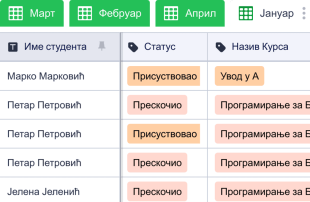
Табела Месечног Присуства
Без обзира да ли треба да пратиш присуство студената, запослених или волонтера у својој непрофитној или добротворној организацији, боље управљај својим подацима користећи Jotform-ову бесплатну Табелу Месечног Присуства! Да би започео, персонализуј шаблон тако да одговара твојој организацији и унеси податке о присуству са било ког уређаја. Слободно преузми табелу као CSV, PDF или Excel документ да би брзо поделио своје евиденције о присуству. Прилагоди ову табелу у само неколико кликова користећи Jotform-ов интерфејс — додај нова имена или боје, преуреди редове или колоне или одвоји своје учионице, волонтерске групе или информације о одељењу запослених у различите картице. Користећи ову Табелу Месечног Присуства за лако праћење студената, волонтера или запослених онлајн, можеш потрошити мање времена на логистику, а више времена тамо где је то важно!
Иди на категорију:Attendance Sheets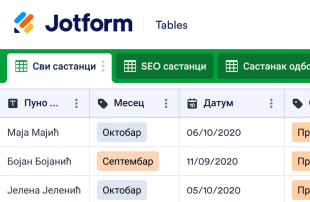
Табела Присуства
Лако прати присуство запослених на састанцима твоје компаније помоћу бесплатне онлајн Табеле Присуства! Брзим уносом детаља о присуству у овој професионалној дигиталној табели, можеш да складиштиш и надгледаш евиденцију посећености у целој компанији без икаквог кодирања — савршено за одељења људских ресурса, секретаре, менаџере и многе друге. Можеш чак да преузмеш своју Табелу Присуства као CSV, PDF или Excel документ да имаш штампану копију за своју евиденцију! Нека овај шаблон одговара твојој компанији ажурирањем назива и боја, додавањем нових картица за различита одељења или преуређивањем распореда померањем редова и колона. Можеш чак да отпреми фајлове као што су PDF-ови и PowerPoint презентације да би такође сачувао белешке са састанка или да дели приложени образац као QR code како би помогао запосленима да га брже попуне. Са бесплатном онлајн Табелом Присуства који ти помаже да стручно пратиш посећеност састанцима, можеш брзо да видиш на којим састанцима присуствују запослени и боље управљаш својом компанијом.
Иди на категорију:Attendance Sheets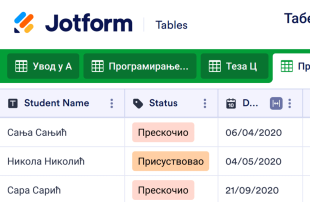
Табела о Похађању Наставе
Без обзира који предмет предајеш, лако можеш онлајн да пратиш присуство са овом Табелом о Похађању Наставе. Да почнеш, једноставно унеси податке о студентима и присуство у табелу руком током или после часа — или нека студенти попуне образац током часа како би одмах унели своје податке у табелу аутоматски! Моћи ћеш да обновиш лист о присуству за сваку сесију часа, а када се попуни, можеш је прегледати са било ког уређаја, преузети као PDF, CSV или Excel и одштампати га за своју евиденцију. Нећеш морати да идеш на часове да би научио како да прилагодиш своју Табелу о Похађању Наставе. Једноставно превуци и пусти да би додао још редова и колона за сваког ученика, креирао ознаке у боји, убацио картице за различите предмете, па чак и прегледао информације у приказу календара или извештаја. Са прилагођеним онлајн табелом о похађању наставе, можеш брзо и лако да узмеш у обзир присуство студената како би се више усредсредио на подучавање.
Иди на категорију:Attendance Sheets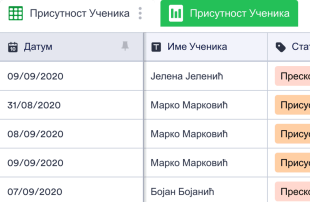
Присутност Ученика
Без обзира ком разреду предајеш, наша бесплатна онлајн Табела Присутност Ученика ће ти помоћи да лакше пратиш присутност ученика. Једноставно унесите име ученика и информације о присутност у табелу помоћу рачунара или мобилног уређаја - или постави онлајн образац за присуство који ће ученици попунити на крају часа! Пријаве ће одмах бити ускладиштене у табели којој је лако приступити, а податке можеш преузети као PDF, CSV, Excel или их одштампати. Нећеш морати да научиш како да кодираш да би прилагодио своју Табелу Присутност Ученика. Једноставно превуци и пусти да додаш редове и колоне, креираш ознаке у бојама, раздвојиш резреде по картицама и филтрираш податке по групама. Када завршиш, имаћеш ефикасану табелу која ти не одузме драгоцено време, тако да можеш да се усредсредиш на подучавање својих ученика - никада се више нећеш вратити на папирне табеле!
Иди на категорију:Attendance Sheets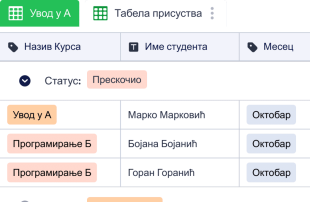
Табела Доласка на Наставу
Бележи присуство са нашом бесплатним онлајн Табелом Доласка на Наставу! Професори, наставници и саветници могу да користе ову табелу да с лакоћом евидентирају присуство студената – једноставно унеси детаље у табелу или нека студенти попуне образац како би аутоматски попунио табелу. Једним кликом, моћи ћеш да видиш табелу са било ког рачунара или мобилног уређаја, да је преузмеш као CSV, PDF или Excel документ, да је одштампаш за своју евиденцију и да поделиш са другим члановима факултета користећи линк или QR код. Прилагођавање Табеле Доласка на Наставу не захтева никакво кодирање – само превуци и пусти да би променио називе и боје ознака, креирао картице за одвојене разреде и филтрирао податке у групе. Такође ћеш моћи да уредиш образац помоћу нашег интуитивног Кретора Образаца. Са прилагођеном табелом, можеш потрошити мање времена на прозивку и више времена припремајући студенте за будућност.
Иди на категорију:Attendance SheetsAbout Attendance Sheets
Листови за евиденцију присуства су шаблони Табеле специфични за одређене категорије, осмишљени за ефикасно организовање и управљање записима прикупљеним путем Jotform образаца. Ове Табеле су неопходне за прикупљање и обраду информација о присуству, док корисници шаљу своје податке путем Jotform образаца. Било да се прати присуство на догађајима, састанцима или образовним сесијама, власници образаца у различитим областима, као што су образовање, људски ресурси и организација догађаја, могу да користе листове за евиденцију присуства како би водили тачне и организоване евиденције. Како пријаве пристижу, Табела постаје централно место за управљање и преглед прикупљених података, при чему није ни образац ни апликација, већ ефикасан алат за управљање евиденцијама.
Jotform Табела је место где се процес пријава из образаца наставља тако што се оне аутоматски појављују у повезаној Табели. Сваки одговор се претвара у запис који се може прегледати у приказу Табеле или детаљном приказу, што омогућава свеобухватан преглед информација. Корисници могу да организују и анализирају пријаве помоћу функција као што су претрага, филтери, груписање података и различити типови колона. Такође могу да користе приказ календара, приказ извештаја и приказ отпремљених фајлова за различите начине прегледа података. Иако су ручни унос и увоз CSV или Excel фајлова доступни за додавање постојећих записа, основни ток рада и даље представља неприметан прелаз од слања обрасца до записа у Табели.
Why Use Attendance Sheets?
- By using Attendance Sheets, form owners eliminate the tedious task of manually transferring data from form submissions to spreadsheets. This automation ensures responses are captured accurately and reduces the risk of human error, allowing teams to focus on more strategic tasks.
- Collecting responses through Jotform Forms and managing them in Jotform Tables keeps all attendance data centralized. This consolidation means that users can quickly access any record when needed, streamlining the process of data retrieval.
- The detailed review capabilities in Jotform Tables allow for a complete examination of each submission, including any uploads or supplementary information. This thorough approach ensures all necessary details are considered when analyzing attendance records.
- Coordinating follow-up actions is simplified, as Jotform Tables enables users to track changes and updates to any entry. This feature ensures that everyone involved is aware of any modifications, aiding in effective communication and coordination.
- Reporting on collected data is made easy with Jotform Tables’ various views, such as Report View, which helps form owners create comprehensive summaries of attendance records. This ability to generate reports supports informed decision-making and strategic planning.
Common Problems Solved by Attendance Sheets
- One common issue is manually copying submissions from forms into spreadsheets, which is both time-consuming and prone to errors. Jotform Tables solves this by automatically populating the connected table with submissions, ensuring accuracy and saving time.
- Scattered responses across different platforms can lead to difficulty in locating specific records. Attendance Sheets centralize all responses, making it much easier to find and access the information when needed.
- Inconsistent review processes can occur when team members have varying methods of handling data. Jotform Tables standardizes the review process through uniform views and structured data presentation, leading to more consistent and reliable outcomes.
- When context is missing, it can be challenging to understand the full scope of a submission. Jotform Tables allows for detailed views of entries, ensuring that users have all the necessary information to make informed decisions.
- Hard-to-review uploads can slow down the process of data analysis. With Uploads View, Jotform Tables simplifies the examination of attached files, making it easier to review and incorporate them into the decision-making process.
Matching Form Submission Use Cases to Jotform Tables Features
- When collecting attendance data through Jotform Forms, the auto-population feature ensures that each submission automatically appears in the connected table. This seamless integration allows for immediate access and management of the data.
- For reviewing and organizing submissions, Table View and Detail View provide comprehensive options to analyze each entry. Users can utilize search and filters to quickly locate specific records, ensuring efficient data management.
- Teams can manage access settings and assign responsibilities to specific members, facilitating collaboration and maintaining accountability. Real-time tracking and revision history further support coordinated team efforts by providing transparency in the workflow.
- Using Report View, form owners can generate detailed summaries of the collected attendance data. This feature aids in presenting findings, identifying trends, and making data-driven decisions.
- For those needing to connect their Attendance Sheets to related data, linked tables and integrations offer powerful tools for expanding data relationships and automating workflows with other applications.
How to Use Attendance Sheets with Jotform Forms
- Start by selecting a relevant Jotform Tables template, a blank table, or a table connected to an existing Jotform Form. The Jotform Form is used to collect the category-specific information, and as responses are submitted, they automatically appear in the connected table for immediate access.
- Configure the table to suit your submission review needs by naming columns and choosing appropriate column types. Select relevant views such as Table View, Detail View, Calendar View, Uploads View, or Report View to effectively organize and analyze the data.
- Manage submissions with various tools like search, filters, grouping, and formulas. Utilize access settings and assign tasks to team members when necessary. Track changes using revision history, link tables for comprehensive analysis, and use action buttons for efficient data handling.
Top Use Cases for Attendance Sheets
- For Form Owners: Form owners benefit from the ability to review incoming responses promptly as they appear in their connected table. They can edit submission data when required, ensuring that all information is accurate and up-to-date. By checking details and uploads thoroughly, form owners maintain a well-organized collection of records within Jotform Tables, streamlining their workflow and supporting their data management needs.
- For Teams: Authorized team members can easily find necessary submissions within the centralized database, maintaining and updating entries as needed. By coordinating responsibilities through assignees, teams ensure accountability and efficient task distribution. Access settings and revision history further support shared work by providing a clear record of changes and decisions, fostering a collaborative environment.
- For Managers: Managers play a crucial role in overseeing collected data and identifying category-specific patterns or trends. By reviewing submissions in different views such as Report View, they can gain insights into progress and ownership, ensuring that operations align with organizational goals. Managers can also use these insights to make informed decisions and drive strategic initiatives.
Summarizing Attendance Sheets
Attendance Sheets provide a valuable framework for collecting and managing attendance-related information through Jotform Forms and Jotform Tables. By automating the transfer of submissions to a central table, users can efficiently organize, review, and act on data. This seamless workflow enhances data accuracy, facilitates collaboration, and supports strategic decision-making, making Attendance Sheets an integral part of any data management strategy.
Често Постављана Питања
1) Is it free to use Attendance Sheets with Jotform Tables?
Jotform нуди Почетни план, који омогућава корисницима да користе листове за евиденцију присуства и друге функције. Овај план пружа могућност да истражиш могућности Jotform Табеле без непосредне финансијске обавезе. То је одличан начин да започнеш ако си део малог тима или самостално желиш да ефикасно управљаш својим подацима.
2) How do submissions from Jotform Forms appear in Attendance Sheets?
Submissions from Jotform Forms automatically appear in the connected Attendance Sheets table. As respondents fill out and submit the form, their responses are instantaneously transformed into entries in the table. This process ensures that new submissions continue to auto-populate, providing a seamless and efficient data collection and management experience.
3) Can I edit, search, filter, group, and calculate data in Attendance Sheets?
Yes, Attendance Sheets allow for comprehensive data management, including editing submissions to ensure accuracy. Users can search, filter, and group data to find specific records quickly and easily. Additionally, formulas and calculations are available to perform necessary data analysis, supporting informed decision-making.
4) Can I export the data inside the tables as CSV or Excel?
Exporting data as CSV or Excel is possible with Attendance Sheets, providing flexibility in how information is used or shared. This feature allows users to integrate existing data with new submissions collected through connected forms. It supports further analysis and reporting outside of Jotform Tables.
5) Which Jotform Tables views can I use with Attendance Sheets?
Attendance Sheets offer various views, including Table View for a comprehensive overview, Detail View for in-depth analysis, and Calendar View to track submissions over time. Report View helps summarize findings, while Uploads View makes reviewing attached files straightforward. Each view serves a specific purpose in data management and review.
6) Can teams collaborate on submissions in Attendance Sheets?
Teams can collaborate effectively on submissions within Attendance Sheets by using access settings to control who can view or edit data. Assignees can be designated for specific tasks, and real-time tracking ensures everyone is updated on changes. Revision history provides a transparent record of all modifications, supporting coordinated team efforts.
7) Can I connect Attendance Sheets to related data or other applications?
Yes, linked tables and integrations enable users to connect Attendance Sheets with related data sets or external applications. Action buttons facilitate workflows, ensuring that processes are seamless and efficient. This connectivity enhances data management capabilities, allowing for comprehensive analysis and automation.
8) Can I create reports, PDFs, and manage files from Attendance Sheets?
Attendance Sheets support creating reports through Report View, providing valuable insights into collected data. Users can generate PDFs for documentation purposes and manage files efficiently with Uploads View. These capabilities ensure that all aspects of data management, from review to reporting, are covered comprehensively.