

Шаблони процене

Шаблон за Поређење Понуда
Шаблон за Поређење Понуда је табела која се користи за онлајн поређење понуда. Без обзира да ли продајеш грађевинску опрему или одржаваш аукцију, прати понуде онлајн помоћу Jotform-овог Шаблона за Поређење Понуда! Почни тако што ћеш прилагодити табелу тако да одговара твом предузећу — затим ручно унеси детаље понуде или повежи табелу са онлајн обрасцем да би је аутоматски попунио понудама клијената. Можеш чак и да се пребацујеш између приказа табеле или картице да би изабрао како да видиш своје информације. Овај Шаблон за Поређење Понуда је направљен да упореди понуде за грађевинску опрему, али слободно га прилагоди променом назива етикета и додавањем или уклањањем редова да би добио дизајн који желиш. А ако желиш да сабереш укупне износе да израчунаш колико новца ћеш зарадити, уради то аутоматски помоћу функције израчунавања. Без обзира за шта прикупљаш и упоређујеш понуде, управљај информацијама о понудама онлајн помоћу овог бесплатног Шаблона за Поређење Понуда.
Иди на категорију:Шаблони процене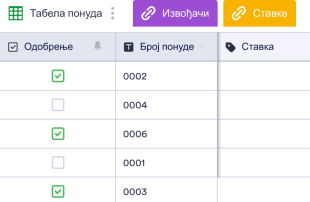
Шаблон Табеле Понуда
Шаблон Табеле Понуда је онлајн табела која води евиденцију о понудама које су предали извођачи. Ако си власник земљишта или зграде који тражи извођаче радова за обављање одређених послова и потребан ти је начин да боље управљаш понудама, испробај наш бесплатни Шаблон Табеле Понуда! Моћи ћеш да видиш понуде извођача у професионалном формату табеле, отпремиш важне фајлове, пратиш контакт информације извођача и још много тога. Прилагоди овај Шаблон Табеле Понуда додавањем нових картица да би укључио додатне информације, преуређивањем редова и колона у складу са твојим потребама или променом боја и назива ознака за персонализовани изглед. А ако желиш да аутоматски сабереш укупне вредности, уради то аутоматски помоћу наше функције прорачуна у табели! Организуј се и боље управљај својим понудама онлајн помоћу Jotform-овог бесплатног Шаблон Табеле Понуда.
Иди на категорију:Шаблони процене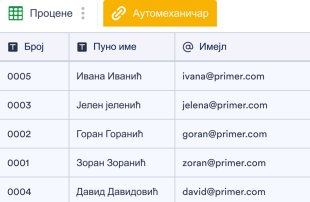
Шаблон Процене Поправке Аутомобила
Шаблон Процене Поправке Аутомобила користе ауто-продавнице или независни механичари да би одредили колико ће њихова поправка или услуге коштати по клијенту и забележили информације. Ако радиш у или поседујете радионицу за поправку аутомобила, користи овај бесплатни Шаблон Процене Поправке Аутомобила да би лако пратио процене својих услуга у онлајн табели! Једноставно прилагоди шаблон тако да одговара твом пословању, унеси информације о процени сваког клијента у табелу и прегледај, уређуј или управљај информацијама на било ком уређају. Ако желиш да прилагодиш изглед овог Шаблона Процене Поправке Аутомобила ажурирањем редова или колона, променом назива и боја етикета или додавањем нових картица за организовање информација на другачији начин, уради то у неколико кликова помоћу нашег једноставног интерфејса. А ако желиш да сабереш укупне вредности, можеш да користиш нашу функцију израчунавања да то урадиш аутоматски – није потребан ручни рад! Без обзира на обим посла можеш пратити процене поправке аутомобила клијената и управљати њима онлајн помоћу овог бесплатног Шаблона Процене Поправке Аутомобила.
Иди на категорију:Шаблони процене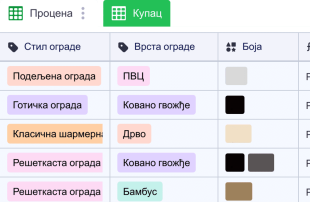
Шаблон за Процену Ограде
Шаблон за Процену Ограде користе независни извођачи или компаније за постављање ограда како би пратили процене, трошкове рада, опреме и материјала за своје клијенте. Ако правиш ограде користи овај шаблон да би управљао својим проценама у онлајн табели! Да би започео, само прилагоди шаблон тако да одговара твојим потребама, унеси своје трошкове по клијенту и управљај информацијама на било ком уређају. Додај нове картице да би боље организовао своје процене, промени називе и боје ознака, преуреди редове и колоне и још много тога. Потребно је само неколико кликова да би добио жељени изглед! А ако ти је досадило ручно сабираш укупне вредности, уради то аутоматски помоћу наше функције прорачуна која се лако користи. Управљај својим проценама ограде помоћу овог бесплатног шаблона да би био ефикаснији и да ти остане више времена за друге важне ствари — попут изградње прелепих ограда за своје клијенте.
Иди на категорију:Шаблони процене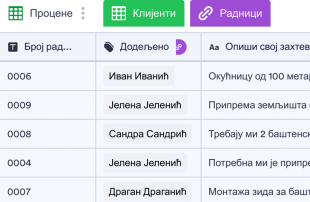
Шаблон за Уређење Пејзажа
Шаблоне за Уређење Пејзажа користе пејзажисти да би детаљно приказали трошкове повезане са одређеним пројектима уређења. Без обзира да ли си пејзажиста или водиш посао за негу травњака, користи наш бесплатни шаблон да брзо и лако одредиш процене трошкова за сваки нови пројекат уређења. Једноставно унеси детаље као што су број радног налога, опис пројекта, трошкове и потребне сате у дату табелу. А са нашим Кретором Образаца, можеш чак и да синхронизујеш ову табелу са обрасцем захтева за процену који тренутно попуњава табелу са пријавама обрасца. Напорно радиш на пројекатима уређења пејзажа за своје клијенте, па зашто не би урадио исто са својим шаблоном за уређење пејзажа? Без икаквог кодирања, можеш лако додати колоне, редове, картице и ознаке у табелу превлачењем и пуштањем. Када се попуни, моћи ћеш да прегледаш, уређујеш, штампаш и делиш своју табелу са било ког рачунара или мобилног уређаја. Са лако доступним онлајн шаблоном управљаћеш пројектима уређења – и својим буџетом – боље него икада раније.
Иди на категорију:Шаблони процене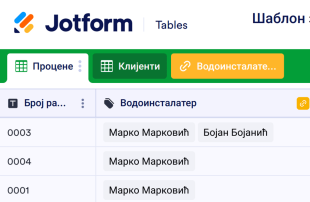
Шаблон за Процену Водоинсталација
Водоинсталатерске компаније и независни извођачи користе Шаблон за Процену Водоинсталација да би пратили процене за своје клијенте. Ако радиш за водоинсталатерску компанију користи овај бесплатни онлајн шаблон да би управљао контакт информацијама клијента, одредио потенцијалне трошкове опреме и рада и чувао друге важне информације онлајн! Да би започео, једноставно прилагоди шаблон табеле тако да одговара твојим потребама, унеси своје процене за сваког клијента и прати информације на било ком уређају. У само неколико кликова можеш да прилагодиш овај бесплатни Шаблон за Процену Водоинсталација да би укључио додатне редове и колоне, ажурирао изглед и боје ознака или чак да додаш нове картице да би пратио додатне информације. А ако ти је досадило да ручно рачунаш укупне вредности, уради то аутоматски уместо тога помоћу наше функције израчунавања која се лако користи! Са онлајн шаблоном који ти помаже да онлајн пратиш процену трошкова, можеш се фокусирати на ствари које су важне — као што је пружање врхунске услуге клијентима.
Иди на категорију:Шаблони проценеAbout Шаблони процене
Шаблони за процене су шаблони Табеле специфични за одређене категорије, осмишљени за ефикасно организовање и управљање записима. Они служе као важан алат за власнике образаца који путем Jotform образаца треба да прикупе детаљне информације, као што су захтеви, пријаве, повратне информације или поруџбине. Ове пријаве су од кључног значаја за индустрије као што су грађевинарство, планирање догађаја и продаја, где су прецизне процене и прорачуни од суштинске важности. Шаблони обезбеђују да прикупљене информације буду структуриране, доступне и спремне за преглед или даље поступање. Табела служи као централизована база података, што тимовима и одељењима олакшава управљање пристиглим подацима без оптерећења сложеношћу ручног уноса података.
Jotform Табела служи као централно место где се пријаве из повезаних Jotform образаца аутоматски појављују, што омогућава непрекидан ток управљања подацима. Сваки одговор послат путем обрасца постаје запис у овом свеобухватном систему, који се може прегледати у приказу Табеле или детаљном приказу. Корисници могу да организују своје податке помоћу различитих алата, као што су функције за претрагу, филтери и груписање података. Поред тога, различити прикази, попут приказа календара или приказа отпремљених фајлова, пружају флексибилност у начину на који се информације анализирају. Иако су ручни унос или увоз CSV и Excel фајлова доступни за додавање постојећих података, главна предност ових Табела лежи у њиховој способности да управљају аутоматски попуњеним записима из образаца, поједностављујући цео процес пријављивања од почетка до краја.
Why Use Estimate Templates?
- Managing submissions through Jotform Tables eliminates the need for manual data transfer, which reduces errors and saves valuable time. By automatically populating responses from Jotform Forms, users can focus on more strategic tasks rather than mundane data entry.
- These tables keep all responses consolidated in one location, making it easier for teams to access and review submissions without sifting through scattered emails or documents. This centralized approach enhances productivity and ensures that no information is overlooked.
- Finding specific records is faster and more efficient with the use of search functions and filters, allowing users to quickly sort through large volumes of data and extract the information they need without delay.
- Reviewing complete submission details is seamless, with options to view data in multiple formats such as Table View and Detail View. This comprehensive oversight ensures that all necessary information is considered before any decisions or actions are taken.
- Coordinating follow-up actions is straightforward, as users can track changes, assign tasks, and manage responsibilities directly within the table. This functionality facilitates effective communication and collaboration across teams.
- Reporting on collected data becomes a streamlined process, thanks to built-in capabilities for generating reports and visualizing data trends. This feature supports informed decision-making and strategic planning.
Common Problems Solved by Estimate Templates
- Manually copying submissions into spreadsheets can lead to errors and inconsistencies. With Estimate Templates, data from Jotform Forms automatically populates the connected table, drastically reducing manual input and the associated risks.
- Scattered responses across various platforms make it difficult to maintain a comprehensive view of all submissions. These templates centralize data, ensuring that all information is easily accessible and properly organized.
- Difficulty locating records is a common issue, especially when dealing with high volumes of data. Search and filter capabilities in Jotform Tables make it easy to find specific entries quickly, improving efficiency and accuracy.
- Inconsistent review processes can lead to oversight and missed opportunities. By using column types and different views, Estimate Templates provide a structured framework for consistent and thorough data review.
- Hard-to-review uploads can be challenging to manage when not properly integrated into the data system. Uploads View in Jotform Tables allows users to handle files and documents efficiently within the submission review process.
Matching Form Submission Use Cases to Jotform Tables Features
- Incoming estimate requests submitted through connected Jotform Forms are automatically captured in the table, ensuring that each new entry is logged and organized without manual intervention. This auto-population feature keeps data up-to-date and ready for analysis.
- Review and organization of submissions are greatly enhanced with Table View and Detail View, allowing users to examine individual entries in detail or gain a broad overview of all collected data. This flexibility aids in thorough data assessment and informed decision-making.
- Search and filter functionalities help users quickly locate specific records within the table, streamlining data management and minimizing the time spent sifting through entries. This capability is particularly useful in fast-paced environments where timely access to information is critical.
- For team management, access settings and assignees ensure that the right individuals have control over specific data, fostering accountability and collaboration. Real-time tracking and revision history enable teams to monitor changes and maintain a clear record of data interactions.
- Reporting and document generation capabilities allow users to create detailed reports and PDFs from their data, providing valuable insights and documentation for stakeholders. These features support strategic planning and reporting needs.
How to Use Estimate Templates with Jotform Forms
- Begin with a category-relevant Jotform Tables template, a blank table, or the table connected to an existing Jotform Form. The form is designed to collect category-specific information, and new responses will automatically appear in the connected table, ensuring seamless data capture.
- Configure the table for submission review by naming columns and selecting appropriate column types to match the data being collected. Choose relevant views like Table View for general oversight or Uploads View for managing attached files, ensuring the data is organized and accessible.
- Manage submissions by applying search, filters, and data grouping to streamline the review process. Utilize access settings and assignees to coordinate team responsibilities, and employ action buttons for quick data-related tasks, ensuring efficient management of all entries.
Top Use Cases for Estimate Templates
- For Form Owners: Form owners who have created or own the connected Jotform Form play a crucial role in managing incoming responses. They regularly review new entries, edit submission data as needed, and check the completeness of details or uploads. By using Jotform Tables, they can keep records organized and ensure that all pertinent information is accurately tracked and easily retrievable.
- For Teams: Authorized team members benefit from the centralized system to find and maintain submissions effectively. They coordinate responsibilities with assignees, utilizing access settings to manage data interactions. Revision history supports collaborative work by providing a clear trail of changes, ensuring transparency and accountability in team efforts.
- For Managers: Managers use Jotform Tables to monitor collected data and review patterns specific to their category. They check the progress of tasks or ownership of submissions and employ Report View to gain insights into collected information. This oversight capability enables managers to make informed decisions and maintain control over the data management process.
Summarizing Estimate Templates
Estimate Templates provide significant value by streamlining the process of collecting and managing category-specific information through Jotform Forms. By automatically capturing responses in Jotform Tables, users can efficiently organize, review, and act on their data. This integrated approach reduces manual workload, enhances data accuracy, and supports effective collaboration and decision-making across teams and departments.
Често Постављана Питања
1) Is it free to use Estimate Templates with Jotform Tables?
Jotform offers a Starter plan, which provides access to Estimate Templates in Jotform Tables. This plan allows users to explore the basic functionalities without incurring any costs. It is a great way to get started with managing submissions efficiently.
2) How do submissions from Jotform Forms appear in Estimate Templates?
When a Jotform Form is connected to an Estimate Template, each submission made through the form automatically appears in the linked table. The responses become entries or rows, ensuring that all incoming data is captured systematically. Future submissions continue to auto-populate the table as they arrive.
3) Can I edit, search, filter, group, and calculate data in Estimate Templates?
Yes, you can edit submissions, utilize various column types, and perform searches to find specific data points. Filters and data grouping help organize entries, while formulas and calculations can be applied to analyze the data further. These features enable comprehensive data management and analysis.
4) Can I export the data inside the tables as CSV or Excel?
You can export the data in Estimate Templates as CSV or Excel files. This capability allows users to integrate existing information with new submissions collected via connected forms. It ensures flexibility in data handling and facilitates further analysis or reporting outside the Jotform environment.
5) Which Jotform Tables views can I use with Estimate Templates?
Estimate Templates support several views, including Table View, Detail View, and Uploads View. Table View offers an overview of all entries, Detail View allows for in-depth examination of individual submissions, and Uploads View helps manage files associated with submissions. These views provide versatile options for reviewing data.
6) Can teams collaborate on submissions in Estimate Templates?
Teams can collaborate effectively by utilizing access settings to control data visibility and permissions. Assignees can be designated for specific entries, and real-time tracking ensures up-to-date information sharing. Revision history maintains a record of changes, supporting transparency and collaborative efforts across the team.
7) Can I connect Estimate Templates to related data or other applications?
Estimate Templates can be linked to related data through linked tables, allowing for integrated data management. Additionally, action buttons and integrations facilitate connections with other applications, providing extended functionality. This capability supports comprehensive data workflows and enhances operational efficiency.
8) Can I create reports, PDFs, and manage files from Estimate Templates?
Yes, you can create reports using Report View, generate PDFs for documentation purposes, and manage files through Uploads View. Signed documents associated with table data can also be handled effectively. These features support thorough data management and provide valuable documentation tools.