
Top AI tools for nonprofits
- ChatGPT: Best for AI-powered donor engagement and chatbot automation
- Jotform AI Agents: Best for automating donation, volunteer, and supporter forms
- ClickUp AI: Best for streamlining tasks with AI-generated documents and checklists
- Krisp: Best for making virtual meetings quieter, clearer, and easier to review
- Salesforce Nonprofit Cloud (Einstein AI): Best for AI-powered fundraising, program delivery, and volunteer management
- Fundraise Up: Best for AI-driven online donation optimization
- GoFundMe Pro: Best for optimizing donation forms at scale with AI-powered personalization
- DonorSearch Ai: Best for predictive donor analytics and wealth screening
- Magic Studio by Canva: Best for fast, high-quality visual creation
- Buffer AI Assistant: Best for maintaining a consistent, multichannel social media presence
- Hootsuite Listening: Best for AI-powered social media monitoring
Nearly 70 percent of nonprofit leaders are worried about employee burnout.
I get it. A few years ago, I worked as a Digital Communications Manager for a nonprofit, and I still remember how hard it was to balance my need to do good with what my body could physically produce in a day. My desire to make a difference was there, but I lacked the tools to do it efficiently.
And I wasn’t alone. In fact, the problem persists. Fast forward to 2025, and 41 percent of nonprofits cite a lack of automation as one of their biggest operational challenges.
So in this guide, I’ve rounded up the 11 best artificial intelligence (AI) tools for nonprofits that I wish I had back in 2021.
How can you use AI for nonprofits?
Liza Chawla is the founder of Chhoti Si Asha, a women-led nonprofit that empowers financial independence by reviving Indigenous Indian crafts. I worked with her years ago — before ChatGPT, before AI tools went mainstream. Back then, we did everything manually.
I asked her how AI fits into her workflow today.
“We were short on staff and had no budget for campaigns or a social media hire, so I started using ChatGPT quite a bit. I have a paid account now,” she said.
Most recently, she’s started using AI-generated images to improve customer engagement. “We realized that just sending people to the website wasn’t working,” she explained.
“So I started creating visuals — like a stack of pouches arranged as birthday return gifts — so customers could actually see how our products could fit into their lives.”
Liza’s story about using AI to improve her messaging and efficiency isn’t unusual. Sage’s 2025 Nonprofit Technology Impact Report found that 35 percent of nonprofit leaders say manual reporting is eating up valuable time.
But not every nonprofit has the bandwidth — or frankly, the comfort level — to experiment with new technologies unless they’re purpose-built. That’s where AI can help, whether you need to predict donor behavior, write better grant proposals, automate internal workflows, or even optimize your fundraising strategy in real time.
Up next: 11 AI tools for nonprofits that actually make your work easier, grouped by real use cases.
TL;DR: Best AI tools for nonprofit organizations
| Tool | Best for | Pricing (Nonprofit discounts?) |
|---|---|---|
 ChatGPT |
Enhancing donor communication with personalized AI-generated messaging and automation |
%20 to %50 nonprofit discounts available |
 Jotform AI Agents |
Automating donor and volunteer forms to save time |
%50 nonprofit discount on paid plans |
 ClickUp AI |
Summarizing documents and managing tasks efficiently |
Offers discount for nonprofits |
 Krisp |
Removing background noise and transcribing virtual meetings |
Offers discount for nonprofits |
 Salesforce Nonprofit Cloud (Einstein AI) |
Managing fundraising, programs, and volunteers with AI insights |
Starts at $60 per user per month Offers discount for nonprofits |
 Fundraise Up |
Optimizing donation amounts and increasing donor retention |
Custom pricing Offers discount for nonprofits |
 GoFund Me Pro |
Scaling and personalizing fundraising campaigns with AI |
Custom pricing Offers discount for nonprofits |
 DonorSearch |
Predicting high-value donors and targeting outreach |
Custom pricing Offers discount for nonprofits |
 Magic Studio by Canva |
Quickly creating professional visuals and copy |
Offers discount for nonprofits |
 Buffer AI Assistant |
Generating, tailoring, and scheduling social media posts across platforms |
Offers discount for nonprofits |
 Hootsuite Listening |
Tracking brand sentiment and engagement across social media |
Offers discount for nonprofits |
The 11 best AI tools for nonprofits
A recent Stanford University study shows that 78 percent of funders and 77 percent of nonprofits believe their organization would benefit from using more AI — especially in mission-related work. But while their interest is high, actual adoption is lagging behind, creating a big opportunity gap: 14 percent for traditional AI, and a full 22 percent for generative AI.
And that’s exactly why I put this list together: to show you how each tool actually fits into your nonprofit’s day-to-day workflow.
A note on G2 ratings
The provided software review ratings are based on available search results. For some, a general company or broader product rating is included where specific AI tool ratings weren’t immediately obvious.
AI-powered donor communications
These tools help you write faster, respond more consistently, and automate routine conversations with donors and volunteers. They’re a simple way to keep your messaging clear without piling more communications tasks onto your plate.
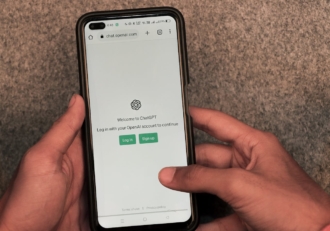
1. ChatGPT: Best for AI-powered donor engagement and chatbot automation
| Developer | OpenAI |
| Overall G2 rating | 4.7/5 ⭐ |
Key features
- Custom generative pretrained transformers (better known as GPTs) you can train on your own campaign content, donor tiers, and tone of voice
- AI chatbot scripting for automated replies to donor FAQs — train it once, reuse everywhere
- Natural tone variation for different donor types (e.g., new, recurring, lapsed, major)
- Multi-language support for international campaigns or diverse donor bases
- Integrated memory (ChatGPT Team) that remembers your organization’s context across prompts
- Automated content generation for newsletters, landing pages, and donation follow-ups
- Email drafting for appeals, acknowledgments, and campaign updates
Say your inbox is full of donor questions on Giving Tuesday — for example, “Is my donation tax-deductible?” or “Can I donate on behalf of someone else?”
You can create a Custom GPT trained on your organization’s donation policies and brand tone, then use it to generate accurate, on-brand responses you can plug into chatbots or email templates.
Example prompt:
“Act as a donor support assistant for [YOUR COMPANY NAME]. A donor asks if their donation is tax-deductible and if they can donate in someone else’s name. Keep the response friendly and under 100 words.”
Pro Tip
You don’t have to build a GPT from scratch. Inside ChatGPT, just click the “GPTs” tab on the left panel. Type in “nonprofit” and you’ll see ready-made GPTs, like “Nonprofit Executive Director” or “Fundraiser Strategizer”, built by other users. Clone, test, or customize any of them.

Pros
- ChatGPT is very easy to get started with. There’s a ton of real-world documentation and prompt examples online, which makes it much more accessible than many other tools.
- You can organize your work into “Projects,” which lets you keep chats, prompts, and custom instructions in one place. You can even share the whole project with teammates, so it’s not locked in your personal account.
In fact, “Projects” are one of Liza’s top use cases for social media planning for her nonprofit, Chhoti Si Asha.
“Social media is a project in itself,” she said. “All campaigns, calendars — everything — I now discuss in-depth with ChatGPT. I ideate with it before making a calendar.”
Cons
- Custom GPTs take a little setup time, and the interface can feel intimidating if you’re new to AI.
- Like most large language models (LLMs), ChatGPT can hallucinate: It’ll sound confident even when it’s confidently wrong. Double-check donor tax information, dates, or links.
ChatGPT pricing
- Free: Access to GPT‑4.1 mini, real-time web browsing, limited file uploads, data analysis, image generation, voice mode, code edits with macOS desktop app, and use of custom GPTs
- Plus at $20 per month: Everything in Free, plus extended limits on messaging, uploads, and analysis; access to GPT‑4.1, GPT‑4.5 (preview), and OpenAI o3/o4 models; standard and advanced voice mode with video/screensharing; ability to create and use projects and tasks; and limited access to Sora video generation
- Pro at $200 per month: Everything in Plus, plus unlimited access to all reasoning models (including GPT‑4o and o3‑pro); extended voice, video, screensharing, and Sora generation; access to Codex agent (research preview); and higher compute limits for complex reasoning
Nonprofits can get 20 percent off ChatGPT Team through OpenAI for Nonprofits, and larger organizations can access 50 percent off ChatGPT Enterprise by contacting OpenAI’s sales team.
2. Jotform AI Agents: Best for automating donation, volunteer, and supporter forms
You’re reading this post on the Jotform blog, and yes, Jotform’s AI Agents made the list. But plenty of nonprofits like Body Brave already rely on Jotform to save more than five hours per week. Charity AI Agents are simply the next step: smarter, faster, and built to take the administrative load off your plate.
| Developer | Jotform |
| Overall G2 rating | 4.5/5 ⭐ |
Key features
- AI-powered forms that adjust in real time based on supporter responses
- Natural language processing to understand donor intent and generate smart replies
- Customizable agents trained on your donation tiers, volunteer roles, and campaign information
- No-code setup with drag-and-drop Agent Builder
- Built-in automation for donation processing, volunteer sign-ups, and supporter follow-ups
- Consistent tone and messaging across all interactions, even with multiple team members
Here’s how Jotform’s Charity AI Agents work:
- Start from scratch, start with a form, or use a template to clone it for yourself: Jotform gives you access to 129 premade Charity AI Agent templates.
- Train the AI: Upload documents or paste in URLs — this gives the agent the knowledge it needs to answer supporter questions and guide interactions.
- Customize with the Agent Builder: Use Jotform’s no-code builder to personalize your agent’s tone, questions, and behavior. Tailor it to match your donation tiers, program goals, and supporter segments.
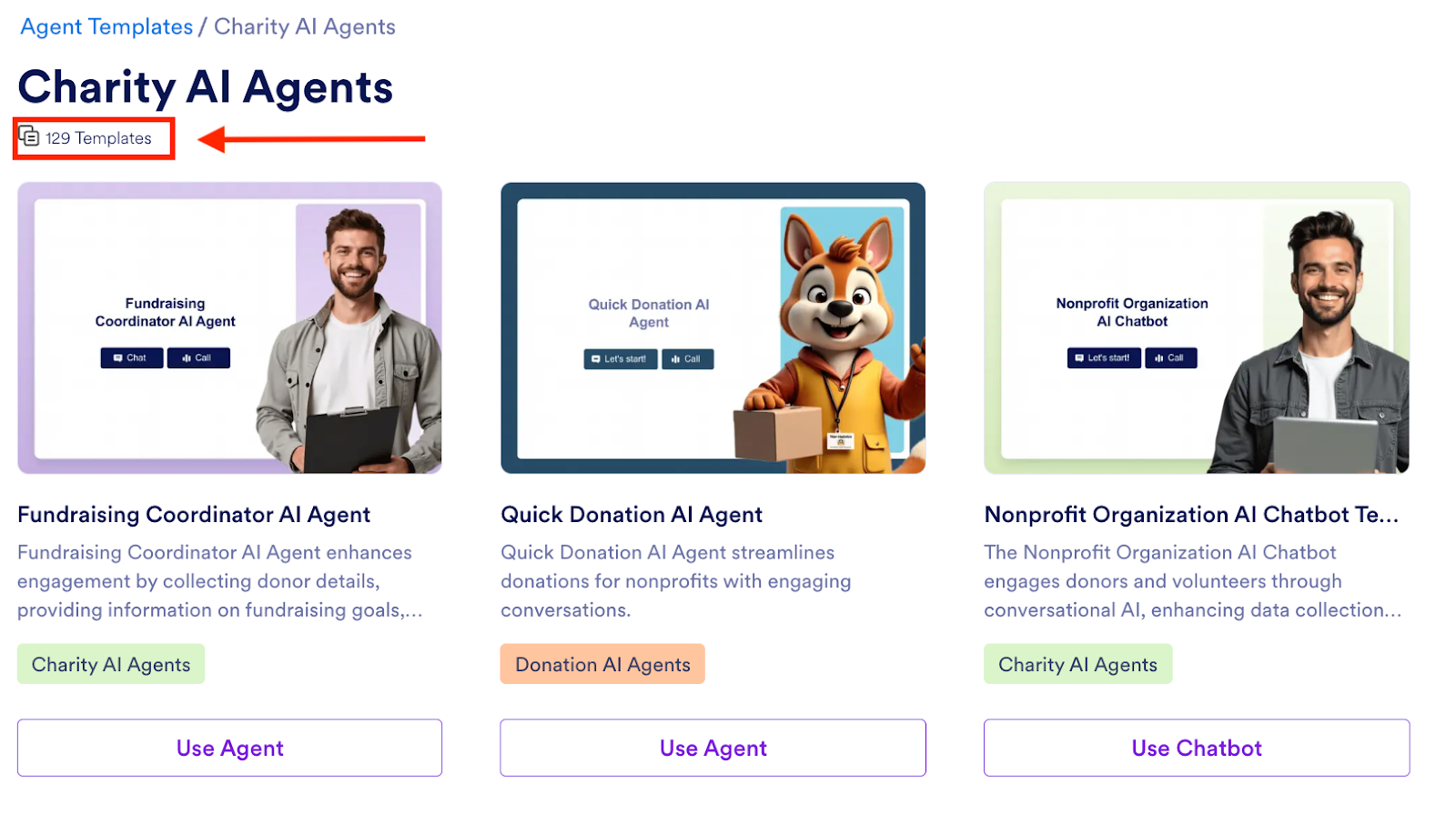
In the following example, “Jefferson,” a fundraising AI Agent, is guiding a user through donation options. The response is quick, conversational, and tailored to the user’s input — all set up without a developer.
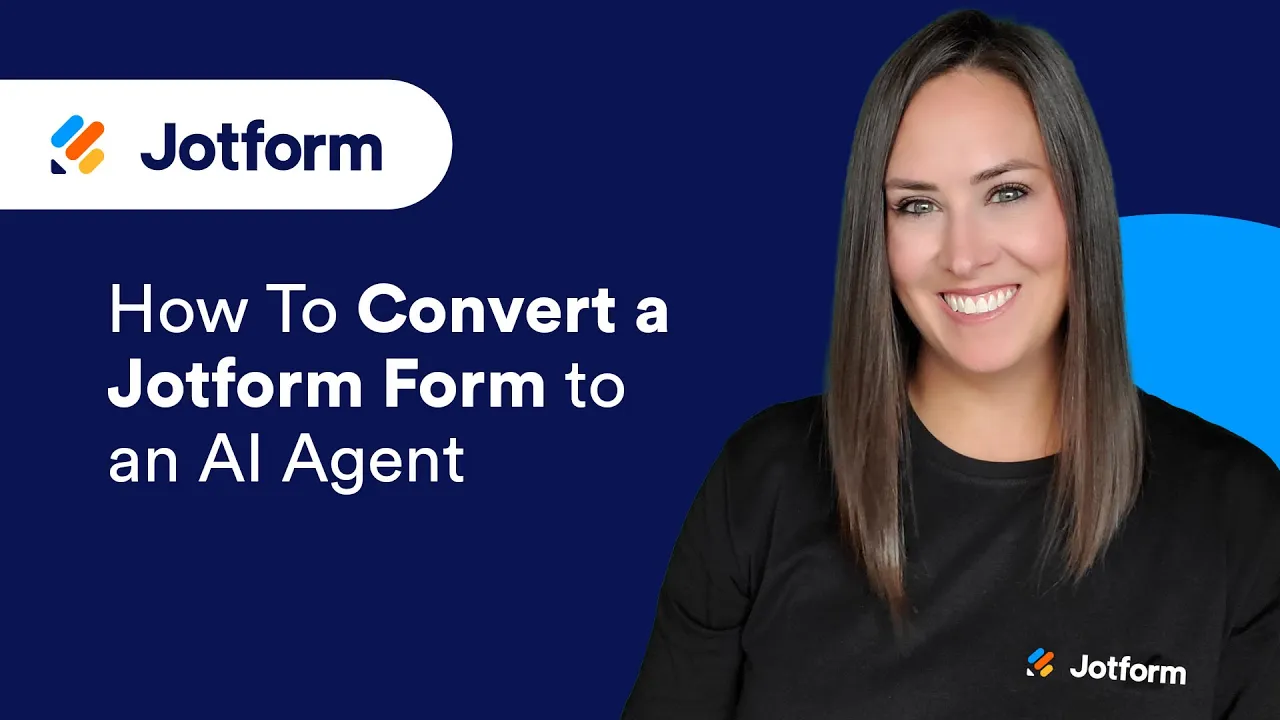
If you haven’t yet tried making your own Jotform AI Agent, here’s how you can get started:

Pros
- You can get set up with a Charity AI Agent in minutes, even if you’ve never used Jotform before. There are ready-made templates you can adapt in minutes, so you don’t waste time building forms from scratch.
- These agents aren’t locked into one platform. Embed them on your site, use them as stand-alone chatbots, or integrate with WhatsApp, Gmail, Zoom, Messenger, Instagram, Shopify, and more.
Cons
- If you haven’t worked inside Jotform before, the number of features can feel overwhelming at first, but you can still get a working AI Agent up and running in under a day.
- The chatbot’s personality and responses rely entirely on the quality of your training data, so if you skip that step, the agent may sound too generic or miss key context.
Jotform pricing
You want to make the world a better place — and we’re here to help you do it. All plans come with phone number add-ons and access to full features. Nonprofits can get 50 percent off Bronze, Silver, and Gold plans.
- Starter (Free): Includes five AI Agents, 100 monthly conversations, 10,000 monthly sessions, 50 minutes of voice calls, 250 SMS messages, and 10 million knowledge base characters
- Bronze at $34 per month, billed annually: Supports 25 AI Agents, 1,000 monthly conversations, 100,000 sessions, 100 minutes of voice calls, 300 SMS messages, and 20 million knowledge base characters
- Silver at $39 per month, billed annually: Includes 50 AI Agents, 2,500 conversations, 1 million sessions, 200 voice call minutes, 500 SMS messages, and 50 million knowledge base characters
- Gold at $99 per month, billed annually: Supports 100 AI Agents, 10,000 conversations, 2 million sessions, 300 minutes voice calls, 750 SMS, and 100 million knowledge base characters
- Enterprise (custom pricing): Unlimited AI Agents, conversations, sessions, 1,000 minutes voice calls, unlimited SMS messages, and knowledge base usage
Internal productivity
Nonprofits aren’t short on passion — they’re short on time. These tools help you stay organized, reduce manual work, and keep things moving even when you’re operating on skeleton crews.
3. ClickUp AI: Best for streamlining tasks with AI-generated documents and checklists
| Developer | ClickUp |
| Overall G2 rating | 4.7/5 ⭐ |
Key features
- Catch up on long task or document threads with AI-generated recaps, making asynchronous collaboration much easier
- Summarize lengthy documents like board reports, research briefs, or meeting notes into a TL;DR with a single click
- Pull action items directly from comment threads or agendas and have them auto-assigned as tasks
- Track funding goals, grant deliverables, and donation totals using custom fields and formulas so progress is always clear, even mid-campaign
- Translate content between languages, which is useful if your nonprofit works across borders or with multilingual communities
- With time tracking, log volunteer hours, tag them by program or role, and export timesheets for donor reporting or board updates
- Plug in other tools you already use, like Google Drive, Slack, or Zoom, using ClickUp’s native integrations
In the preceding example, ClickUp AI summarizes a long document in seconds, turning dense content into a skimmable summary without leaving your workspace.
Pros
- The AI features help your team get unstuck faster, whether that’s summarizing board meeting notes, pulling action items from a messy agenda, or drafting internal updates.
- They’re clearly investing in nonprofits and smaller teams; the mobile AI features coming soon mean that you can actually work between field visits, donor calls, or commutes without falling behind.
Cons
- For team members who aren’t used to productivity tools, the interface can be a bit intimidating. You might need to spend some time helping everyone get comfortable before the benefits really kick in.
- ClickUp can slow down with very large workspaces, so if you have a lot of tasks, you might notice some lags.
ClickUp pricing
- Free Forever: One form, 60MB storage, unlimited tasks, Kanban and calendar views, documents, and basic custom fields
- Unlimited at $7 per user per month: Unlimited forms, storage, integrations, folders, spaces, time tracking, and dashboards
- Business at $12 per user per month: Everything in Unlimited, plus advanced dashboards, workload management, sprints, and more views
- Enterprise (custom pricing): Single sign-on (SSO), Health Insurance Portability and Accountability Act (HIPAA), advanced permissions, managed onboarding, and MSA plus data residency option
For AI features, you’ll need a paid plan with the ClickUp AI add-on, which costs $5 per user per month on top of any paid workspace plan. Nonprofits can request a discount by contacting support directly.
4. Krisp: Best for making virtual meetings quieter, clearer, and easier to review
| Developer | Krisp Technologies, Inc. |
| Overall G2 rating | 4.7/5 ⭐ |
Key features
- Krisp removes background noise, echo, and cross-talk from both sides of any virtual meeting, so you sound clear even in busy or shared workspaces.
- Krisp will transcribe meetings automatically, creating clean, searchable notes without the need for a human note-taker.
- You can record your meetings in audio or video format, with customizable recording presets depending on your privacy or documentation needs.
- The tool can summarize meetings with AI-generated recaps and follow-up actions, which can be copied directly into your customer relationship management (CRM) or project tracker.
- Smart meeting preparation tools, like agendas based on previous calls and other insights, help you walk in ready.
- With “Ask Krisp,” you can query transcripts without copying and pasting them into ChatGPT — it responds right in the app.
A standout functionality is Krisp’s AI Live Interpreter, which translates spoken language in real time so your team can host multilingual meetings or donor calls without needing a human interpreter, all while keeping background noise out of the conversation.
Krisp is already a favorite in call centers, which makes it a great pick if you’re eyeing a large-scale telefundraising campaign. The software works like a “smart layer” between your headset and your calling app, canceling out background noise, converting accents, translating speech, and transcribing calls in real time.
Pros
- The background noise cancellation alone makes it worth it. Whether you’re working from a shared office, a café, or someone’s living room, it gives your virtual meetings a professional polish, especially when you’re speaking with funders or potential partners and need to make a strong impression.
- The platform is easy to get started with and doesn’t come with a steep learning curve, which is helpful when your team already has a lot on its plate.
Cons
- While it’s not the most expensive tool, if you’re already paying for Zoom, Google Meet, or Teams, you have to decide whether Krisp’s added value justifies the extra cost.
- Some of the newer AI features — like real-time interpretation or detailed summaries — can be resource-intensive and may lag a bit, especially on older machines.
Krisp pricing
Save 50 percent on your Krisp subscription when you opt for their yearly plans:
- Free Trial: Free for 14 days, no credit card required; full access to all premium features, unlimited noise cancellation, transcription, recording, and AI notes
- Pro at $8 per month per user (billed annually): Unlimited noise cancellation and transcription; unlimited audio and video recording; unlimited AI-generated notes and action items; 60 minutes per day AI accent conversion; 5GB storage; transcript and summaries in more than 17 languages; in-person meeting support; AI chat; centralized action items; Slack, Zapier, and Teams integrations; HIPAA and General Data Protection Regulation (GDPR) compliant; and mobile and browser extension support
- Business at $15 per month per user (billed annually): Everything in Pro, plus four hours per day AI accent conversion, 30GB storage, SSO/System for Cross-Domain Identity Management (SCIM) support, manager and deal views, company-level deal grouping, premium integrations (HubSpot, Salesforce, Affinity), admin controls, note-taking mode enforcement, meeting link sharing, dedicated account manager, advanced security, reporting, and analytics
- Enterprise (custom pricing): Everything in Business, plus: super admin role; private, on-device transcription and recordings; usage analytics reports; live onboarding; and advanced security options
If you’re a small nonprofit team just trying to keep your virtual meetings noise-free, start with the Pro plan. But if you’re handling sensitive data or your funders are the kind who read the fine print, choose Enterprise.
5. Salesforce Nonprofit Cloud (Einstein AI): Best for AI-powered fundraising, program delivery, and volunteer management
Salesforce may be best known as the world’s leading CRM software. But with the launch of Salesforce Nonprofit Cloud coupled with Einstein AI’s development, they’ve gone well beyond donor databases and into full-blown mission operations.
| Developer | Salesforce |
| Overall G2 rating | 4.1/5 ⭐ |
Key features
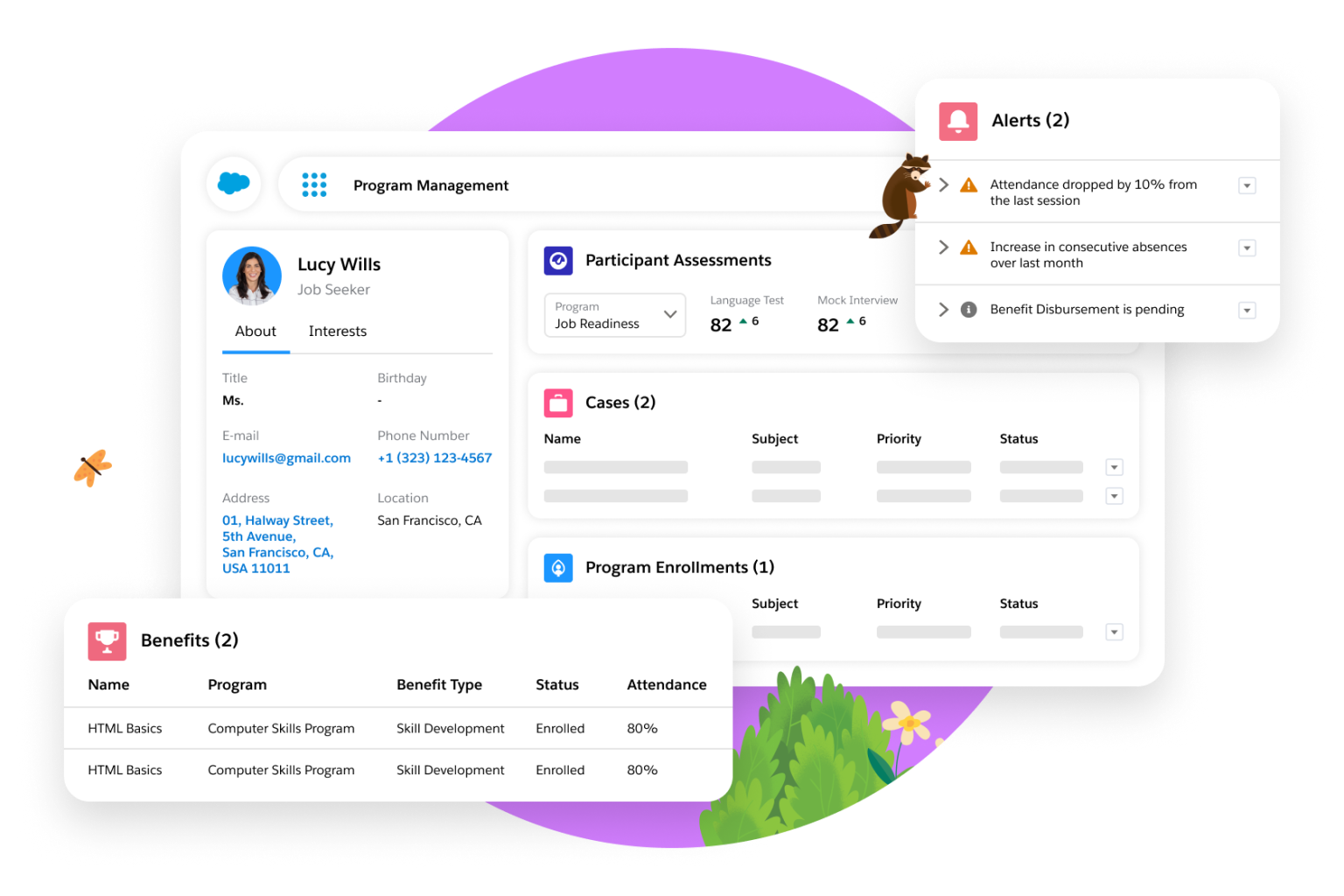
- Einstein for Nonprofits brings real predictive power to your donor data by using historical behavior to forecast which supporters are likely to donate for the first time, give again, or become major donors.
- Einstein Copilot (Beta) acts like an AI assistant for fundraisers, automatically pulling data from your organization to draft gift proposals, saving hours on manual preparation, and giving your team a polished starting point.
- Einstein Generative AI (Beta) goes a step further — turning raw data into grant summaries, board-ready documents, and outcome reports. Just ask, and it drafts.
- The Einstein Prediction Builder helps you generate probability scores for every contact. You’ll know at a glance who’s ready to give, who’s drifting, and who’s got high-value potential.
- If your organization doesn’t have enough historical data for full predictions, “Backup Models” still provide directional insights, so you’re not left flying blind.
- The predictions are surfaced right on the donor’s “Contact Card,” so anyone on your team can act on them in real time.
Pros
- You’re getting the power of Salesforce without the awkward work-around. Nonprofit Cloud is purpose-built for organizations like yours, which means you’re not force-fitting donation data into a system made for corporate sales.
- Einstein AI gives you a smarter starting point: from predictive donor insights to auto-drafted gift proposals and campaign summaries, Einstein helps you act on your data instead of just staring at it.
Cons
- For teams new to Salesforce, the platform can feel overwhelming. You’ll need to invest in training so your staff doesn’t default back to spreadsheets.
- If your data setup or workflows aren’t properly configured, it can lead to gaps or errors that are difficult to clean up later — especially as your team scales.
Salesforce Nonprofit Cloud pricing
- Nonprofit Cloud Enterprise at $60 per user per month (billed annually): Nonprofit data model, nonprofit toolkit plus accounting subledger, fundraising, program and outcome management, and volunteer management
- Nonprofit Cloud Unlimited at $100 per user per month (billed annually): Everything in Enterprise, plus more storage and automation, full Sandbox and Premier Success Plan, and 24-7 support and coaching
- Agentforce 1 for Sales at $325 per user per month (billed annually): Everything in Unlimited, plus Agentforce for Sales and Nonprofit Cloud, Data Cloud, Experience Cloud, Salesforce Maps, Scheduler, Slack Enterprise+, and Tableau Next
- Agentforce 1 for Service at $325 per user per month (billed annually): Everything in Unlimited, plus Agentforce for Service and Nonprofit Cloud, digital engagement, Service Cloud Voice, Slack Enterprise+, and Tableau Next
We’d recommend starting with the Enterprise or Unlimited plan for most nonprofit teams. Larger organizations with advanced AI and compliance needs can explore Agentforce 1 options.
Also, thanks to Salesforce’s Power of Us Program, eligible nonprofits can access Saleforce’s Nonprofit Cloud for a fraction of the cost.
- You get 10 free licenses: Yes, completely free. Eligible organizations receive 10 donated Salesforce Nonprofit Cloud or Sales/Service Cloud licenses to get started.
- Need more seats? Salesforce offers steep discounts on additional licenses so your whole team can get on board.
Check their eligibility requirements before you log in to apply for your custom, discounted pricing.
Fundraising and donation optimization
Nonprofits live and die by their fundraising engines — how you engage donors, when you reach them, and whether your tools help you turn one-time contributors into long-term supporters all play a part in your success.
These AI fundraising tools help you personalize outreach, optimize donation funnels, and prevent donor churn.
6. Fundraise Up: Best for AI-driven online donation optimization
| Developer | Fundraise Up |
| Overall G2 rating | 4.8/5 ⭐ |
Key features
- The AI analyzes data like device type, time of day, and user behavior to suggest the ideal donation amount while the donor is actively engaging; this dynamic personalization helps boost conversion rates and increases the size of each gift.
- The platform doesn’t ask every donor to cover fees — it uses AI to determine who’s most likely to say yes, and when. This subtle change pushes fee coverage up to 84 percent (vs. the usual 50 percent–60 percent* industry average).
- Continuously A/B tested and optimized. Nothing is static — Fundraise Up’s AI models are tweaked in real-time to improve conversion rates and donation experiences without extra work from your team.
- Fundraise Up intelligently prompts one-time donors to become recurring givers through built-in AI nudges at checkout that can double or even triple recurring donations.
- The platform suggests the ideal donation amount for each donor; the AI uses real-time cues (like time of day, device type, page engagement) and past data to prompt the right amount at the right time, leading to up to 15 percent more revenue.
- When someone tries to cancel, the platform offers retention options, saving 27 percent of would-be cancellations. It also updates expired credit cards proactively to prevent donor churn.
- Fundraise Up uses a privacy-first data model that ensures the security of users’ personally identifiable information. Fundraise Up doesn’t need to know your donor’s name or email to create a personalized experience — it’s all anonymized metadata built for both performance and trust.
- Even after a donation, the system keeps working: from smart “Give More” buttons to upgrade links, every donor gets a custom experience with tailored suggestions for increasing contributions — with up to 60 percent following through.
*The success metrics are taken from Fundraise Up’s publicly available internal data on their website.
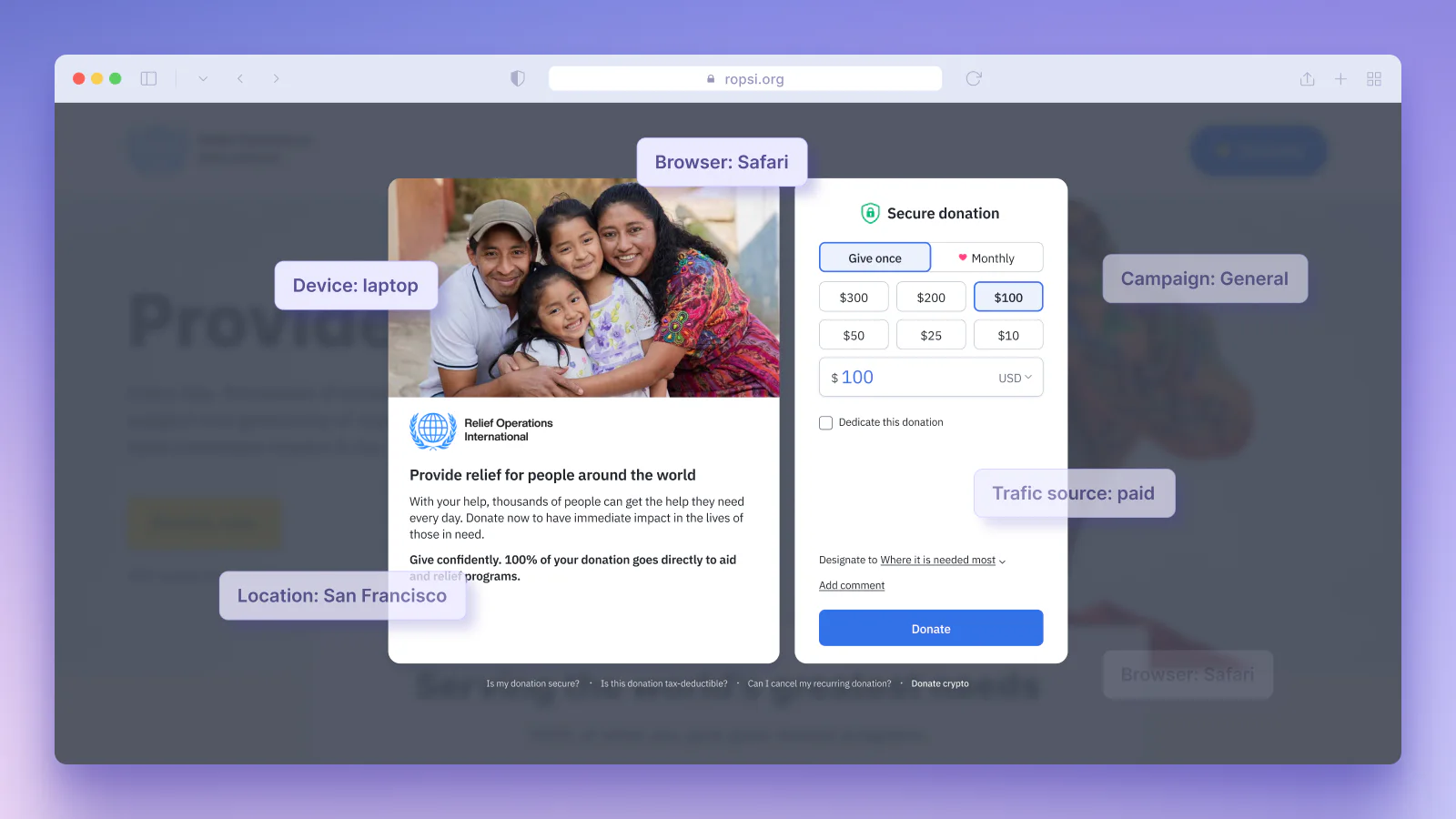
In the following screenshot, see how Fundraise Up analyzes the donor’s device (laptop), browser (Safari), location (San Francisco), campaign source (general), and traffic type (paid ad) — all in real time — to recommend the ideal donation amount. In this case, the platform has suggested $100 based on hundreds of anonymized data points and past donor behavior.
This is the smart ask at work: personalized, contextual, and designed to increase conversion and gift size.
Pros
- Fundraise Up predicts donor behavior through a mix of real-time and historical data — so you’re not reacting to trends after the fact, you’re staying ahead of them.
- One feature that adds real value is the AI-driven prompt that asks donors to cover transaction fees. Even small fees can add up quickly for nonprofits, so it’s smart to recover costs wherever you can without affecting the donor experience.
Cons
- Fundraise Up’s transaction-based pricing means you’re not locked into monthly or annual contracts — you just pay a percentage of each donation. But since you can’t always predict how many donors will cover those fees, it can make annual budgeting a bit tricky.
- While the platform is built to optimize the donor experience, its support for region-specific payment methods isn’t always seamless, which can be frustrating if you’re counting on global donations.
Fundraise Up pricing
Fundraise Up doesn’t list dollar amounts publicly — instead, you’ll choose from two tiers based on your annual online donation volume:
- Quick Start: For nonprofits processing under $300,000 per year; no contract, setup, or support fees; full access to platform features as they roll out; 24-7 support; and free migrations
- Enterprise: For nonprofits processing more than $300,000 per year; everything in Quick Start, plus dedicated Customer Success Manager, personalized onboarding, and strategic growth support
7. GoFundMe Pro: Best for optimizing donation forms at scale with AI-powered personalization
| Developer | GoFundMe, Inc. |
| Overall G2 rating | 4.4/5 ⭐ |
Key features
- Each donation form adapts to the individual donor: gift frequency, amount, and on-page prompts shift depending on user behavior and context.
- GoFundMe’s AI is powered by insights from more than 190 million donors and over $40 billion raised, giving you access to one of the largest fundraising datasets in the world.
- Build and brand your donation forms and campaigns without a single line of code; everything is designed to flex to your fundraising needs, whether that’s event-based giving, P2P, or one-time appeals.
- “Intelligent Ask Amounts” uses machine learning to suggest personalized donation amounts, frequencies, and nudges for each supporter based on your goal (e.g., revenue, conversion, or recurring gifts).
- AI helps individual supporters launch their own fundraisers faster, with suggested fundraiser titles, enhanced story editing (tone, grammar, clarity), and dynamic goal recommendations.
While Fundraise Up also uses AI to optimize donation amounts, GoFundMe Pro’s standout strength lies in the depth and breadth of its data. Intelligent Ask Amounts is trained on insights from a community of over 200 million donors and $40 billion raised using GoFundMe’s technology and services.

And since AI is only as good as its data, this makes a meaningful difference. GoFundMe has tested Intelligent Ask Amounts on more than 50 million nonprofit giving sessions, with A/B testing results publicly published in their Research Hub.
Pros
- Since they’re backed by one of the largest donor datasets in the world, GoFundMe can — and does — continuously optimize both donor experience and nonprofit results.
- GoFundMe Pro integrates smoothly with most CRMs, including Salesforce, which makes it easy to plug into your existing fundraising workflow without adding friction.
Cons
- The no-code, drag-and-drop builder makes launching campaigns fast and easy, but you’ll sacrifice deeper customization. If you want total control over form design or layout, you’re a bit constrained compared to platforms.
- While GoFundMe Pro shines with smart fundraising features and campaign creation, you’re largely responsible for marketing and outreach execution. The platform doesn’t include a wide variety of built-in donor messaging or content tools.
GoFundMe Pro pricing
GoFundMe Pro doesn’t list pricing publicly. Instead, it offers flexible fundraising plans tailored to your organization’s size and needs.
Here’s what’s included:
- Assisted onboarding aligned to your goals
- Recurring giving management and marketing analytics
- Expert-led support and on-demand resources
- Application programming interface (API) access and integrations with tools like Salesforce
According to G2 reviews, GoFundMe Pro is 13 percent more expensive than the average fundraising product overall and 21 percent more expensive for mid-market orgs.
It;s best if you’re looking for a high-touch, data-rich fundraising platform and are comfortable paying a premium for proven results.
8. DonorSearch Ai: Best for predictive donor analytics and wealth screening
| Developer | DonorSearch |
| Overall G2 rating | 4.6/5 ⭐ |
Key features
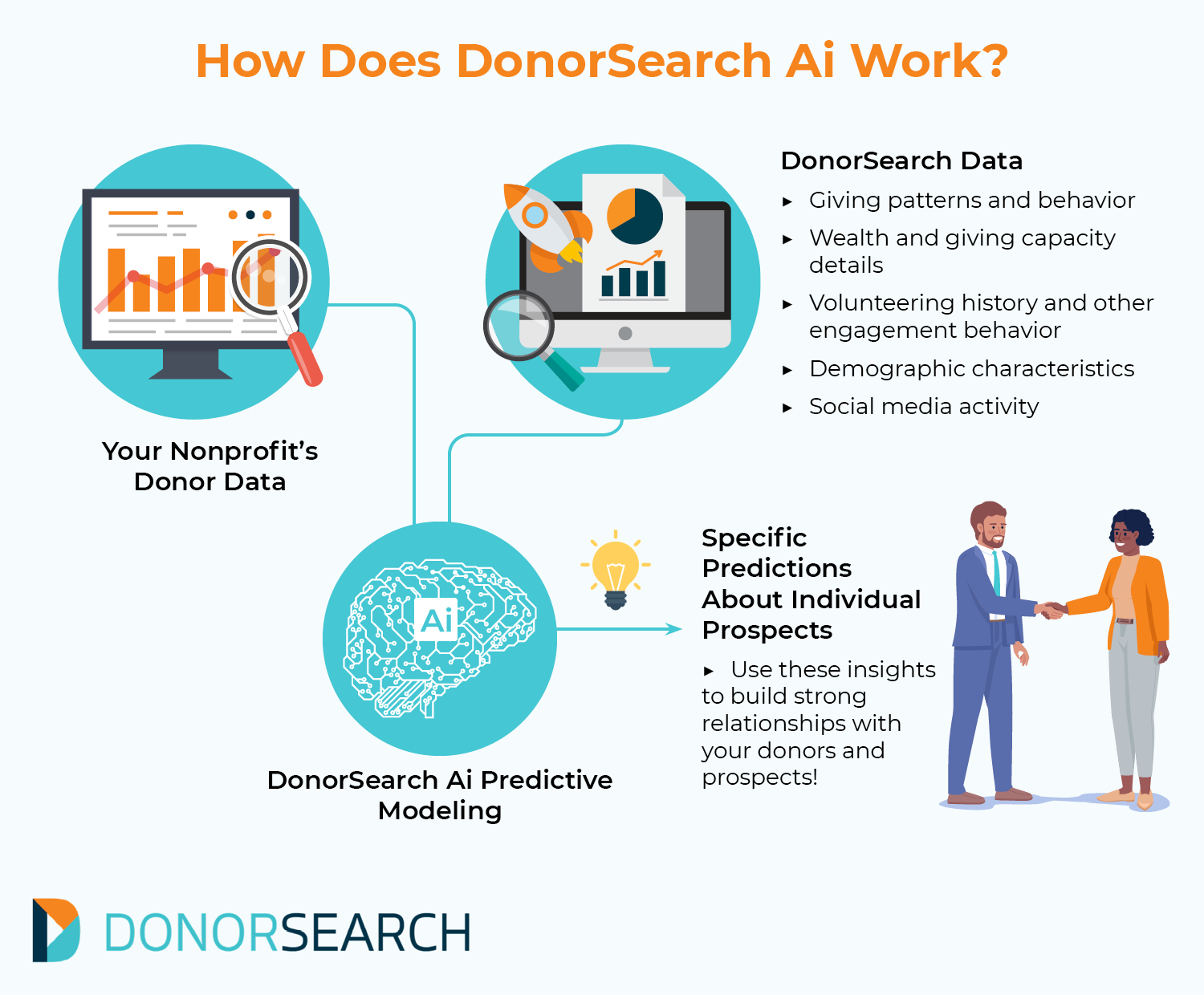
- DonorSearch Ai is the most advanced offering from DonorSearch; it uses customizable machine learning models trained on prospect research data to help nonprofits identify high-value donors and build more targeted fundraising pipelines.
- DonorSearch Ai recognizes intricate patterns and makes tailored predictions about which prospects are most likely to donate within a rolling 12-month period by enriching your internal donor data with more than 800 additional data points.
- Enhanced CORE is the entry-level version of DonorSearch Ai; it includes standardized predictive models and point-and-click data visualization to make it easier for teams to get started without advanced analytics experience.
- ProspectView Online 2 is an AI-powered reporting tool that generates concise, actionable reports on individual donor prospects, allowing fundraisers to make quick, informed decisions during campaign planning.
- Nonprofits can fine-tune models to match their specific campaign goals whether they’re focused on major gifts, alumni outreach, or capital campaign fundraising.
Say you’re gearing up for a capital campaign and need to identify donors most likely to give. You run your data through DonorSearch Ai, and it blends your donor history with external signals like wealth, volunteering, demographics, and even social media behavior.
Suppose one alum stands out. They haven’t donated in years but recently upped their volunteer hours and engaged with your posts online. DonorSearch flags them as a high-likelihood prospect. You reach out with a message tailored to their renewed interest — and land a meaningful gift.
Pros
- The built-in wealth screening and charitable giving history tools offer a clear edge when prioritizing outreach and planning major campaigns.
- DonorSearch Ai is especially great for identifying new prospects in your area, especially high-net-worth individuals who are more likely to give.
Cons
- For organizations with fewer internal data points or limited donor history, insights may be less specific. While powerful, the tool requires a solid data foundation to maximize its predictive accuracy and prioritize effectively.
- DonorSearch’s predictive models and wealth screening are highly accurate — estimates hover around 90 percent — but they aren’t flawless. Some high-net-worth individuals may still be under- or overestimated, so human validation is necessary before making high-stakes asks or setting gift tiers.
DonorSearch Ai pricing
DonorSearch doesn’t list any public pricing plans. You’ll need to request a demo through their website to get a personalized quote.
Marketing and outreach
About 28 percent of nonprofits now use AI tools for copywriting and content creation, and another 28 percent rely on AI for idea generation and editing.
Yet while 90 percent of nonprofits are using AI for outreach in some form, most feel underprepared, and only 24 percent have a formal AI strategy.
That gap creates opportunity for you. The right tools can take the guesswork out of content, personalize your outreach across channels, and help you move faster, even without a full-time marketing team on staff.
9. Magic Studio by Canva: Best for fast, high-quality visual creation
| Developer | Canva |
| Overall G2 rating | 4.7/5 ⭐ |
Key features
- Magic Design generates polished visuals, presentations, and short videos from a user prompt or uploaded media, helping teams create professional-grade assets instantly.
- Magic Write acts as Canva’s AI writing assistant, crafting copy, from captions to full text, in your brand voice or summarized style at the click of a button.
- Magic Media transforms text prompts into unique images or short videos, allowing nonprofit teams to visualize stories without needing separate tools or creative skills.
- Magic Switch (aka Resize) reformats your design into new formats, sizes, or languages — turning a presentation into an Instagram post, for example.
- Magic Grab isolates the subject of an image so you can move, resize, or reuse it; Magic Expand intelligently adds background to fill the frame.
- Magic Edit and Magic Eraser let you adjust colors, remove objects, or entirely alter an image with simple prompts.
- Magic Morph and Magic Animate bring your designs to life: Text and shapes can morph using prompts, and animations can be added to any element in seconds.
- Canva Shield ensures safe and ethical use of AI by giving nonprofits control over data usage and protecting against potential content misuse.
Back when I was running digital communications for Chhoti Si Asha, I wore every hat under the sun: copy, social, photo, design.
Canva took care of one-third of that equation by itself. I’d shoot product photos, like the ones from our Pride Scrunchies collection that follow, then open Canva to clean them up, add simple text overlays, remove backgrounds, and adjust layouts for each platform.
We found our brand fonts, set up color palettes, and used Magic Resize to adapt one post into five. For a small team without a dedicated designer, it was the most practical way to maintain visual polish while keeping momentum.

Pros
- Canva is one of the easiest ways to get your brand off the ground, especially if you’re building visibility through social media.
- Magic Resize is a lifesaver when you’re short on time; one post becomes five formats in seconds, helping you meet donors where they are, whether that’s Instagram, email, or your website.
Cons
- The Magic Studio packs in a lot, so don’t expect to master it in a day. You’ll need to spend a little time tinkering — especially to set up your brand kit so you can move faster later.
- If you’re hoping for pro-level control like you’d get in Adobe, this won’t scratch that itch. Canva’s more about speed and simplicity, helping you get your brand out there, fast.
Canva pricing
- Free: Includes 50 Magic Media generations, basic tools, and standard exports
- Pro at $120 per year for individuals (or pay-as-you-go weekly): Adds 500 Magic Media credits/month, 1TB storage, premium assets, background remover, and more
- Teams at $100 per year per person (minimum three seats): All Pro features plus shared folders and brand management tools
Canva for Nonprofits is completely free. Once approved, your nonprofit gets access to all the premium features of Canva Teams.
10. Buffer AI Assistant: Best for maintaining a consistent, multichannel social media presence
| Developer | Buffer |
| Overall G2 rating | 4.3/5 ⭐ |
Key features
- Buffer’s AI Assistant helps you generate fresh content ideas in seconds, perfect for when you’re stuck or just need a quick caption to keep things moving.
- You can rework and optimize your content for each social platform — LinkedIn, Threads, X, Instagram, Bluesky — without starting from scratch, keeping your voice consistent across the board.
- The Assistant understands each channel’s needs, so your posts feel right at home, whether it’s a snappy X thread or a polished LinkedIn update.
- One-click edits let you adjust tone, structure, and length, helping you rewrite, expand, shorten, or smooth out your content without overthinking it.
I gave Buffer’s AI Assistant a spin using the prompt “Promote my nonprofit organization for fall donations,” and it served up a full caption instantly — plus platform-specific previews for LinkedIn, Threads, Instagram, and more. Start from scratch or tweak what it gives you with a click: rephrase, expand, shorten, change the tone.

Pros
- The AI Assistant understands platform nuances, so you’re not just blasting the same message everywhere. It’s great for nonprofit teams that want to push out tailored captions across platforms — LinkedIn, Threads, Instagram, X — all from a single, unified workspace.
- It’s extremely intuitive to use, even for first-time Buffer users. Your team won’t need lengthy onboarding or tutorials to get started.
Cons
- The AI can suggest solid first drafts, but it’s not contextually deep. So for more nuanced messaging (e.g., sensitive appeals, donor segmentation), you’ll need to polish the output.
- Buffer offers limited visual content suggestions or pairing. It’s great for captions, but you’ll still need to use Canva or another tool to handle the visual side of social posts.
Buffer pricing
All listed prices are per channel. That means for every additional connected channel, your monthly cost increases:
- Essentials Plan: An additional $5/month for each extra channel
- Team Plan: An additional $10/month for each extra channel
- For 10 or more channels: You’ll need to contact Buffer’s sales team for a custom plan
Here’s the base pricing breakdown for one channel:
- Free Plan: Connect up to three channels, 10 scheduled posts per channel (refillable), 100 content ideas, one user seat, AI Assistant access, basic analytics
- Essentials Plan at $5 per month (billed annually at $60): Unlimited scheduled posts, unlimited content ideas, one user seat, AI Assistant access, advanced analytics, engagement inbox, hashtag manager, first comment scheduling
- Team Plan at $10 per month (billed annually at $120): Everything in Essentials, plus unlimited user accounts, role-based access, content approval workflows
For nonprofits, Buffer offers a 50 percent discount.
11. Hootsuite Listening: Best for AI-powered social media monitoring
| Developer | Hootsuite (powered by Talkwalker) |
| Overall G2 rating | 4.3/5 ⭐ |
Key features
- You can track brand mentions, trending topics, and conversations across social media and the web. This helps nonprofits stay ahead of public perception, whether it’s managing sensitive narratives or monitoring donor reactions.
- Instead of combing through thousands of social posts, Blue Silk™ AI condenses chatter into clear, readable summaries. It’s perfect for small communications teams that need fast, actionable takeaways.
- Sentiment analysis helps you understand how the public reacts to your messaging, appeals, or policy stance; it can also help you measure the emotional tone around your sector (e.g., climate, refugee aid, animal rights) and pivot outreach accordingly.
- AI image and logo recognition goes beyond text to monitor logos and visual mentions in memes, reels, videos, and GIFs. If you’re running a visual-first campaign or monitoring unauthorized logo use, this gives you full coverage.
- Forecast which conversations are about to spike so you can join them early or prepare timely campaign messaging; great for issue-based advocacy, “Giving Tuesday” campaigns, or aligning your posts with what people already care about.
- Hootsuite helps you surface potential collaborators based on reach, engagement rate, and audience fit so you can amplify impact without cold-pitching the wrong people.
- Set alerts to flag spikes in conversation or negative sentiment. Whether it’s a data breach, controversy, or public confusion about your mission, you can act fast to clarify, reassure, or course-correct.
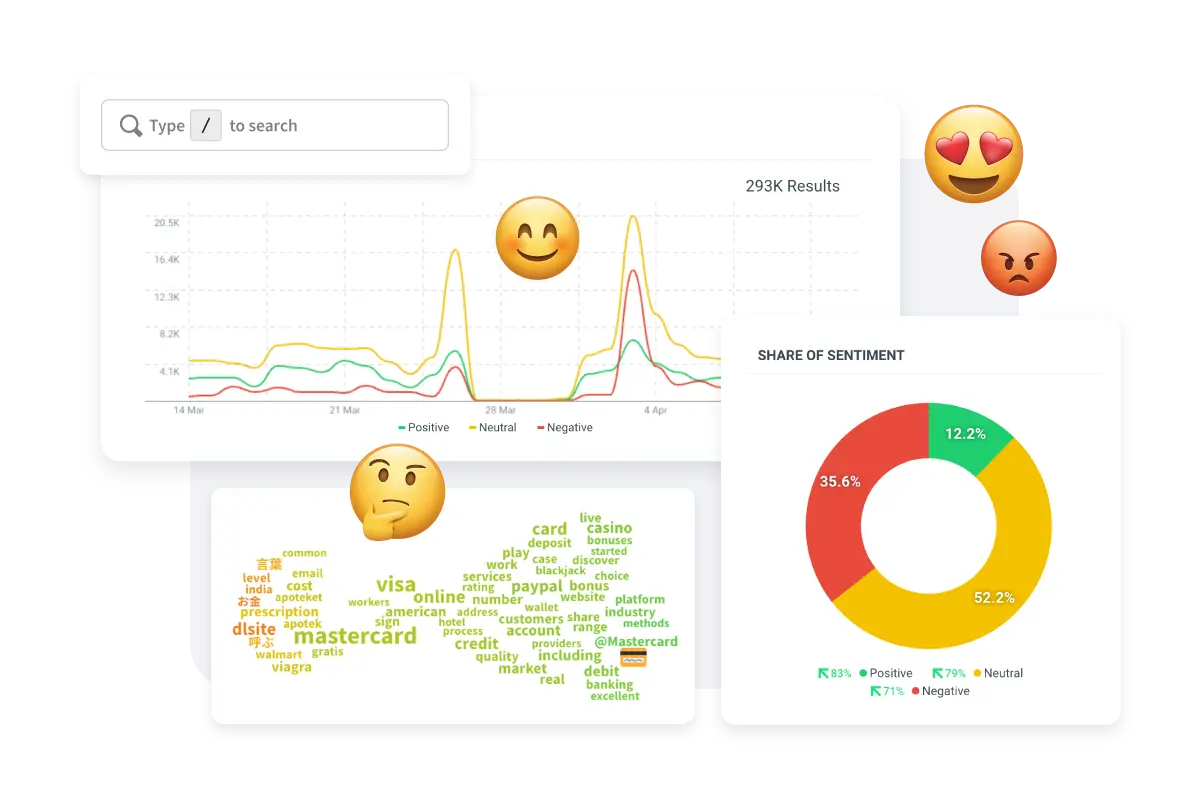
Suppose you’re running a public awareness campaign around digital payment access in rural communities. Hootsuite Listening instantly surfaces spikes in conversation; analyzes public sentiment around terms like Mastercard, online banking, or credit access; and spots rising misinformation, helping you tailor your response in real time.
Pros
- Real feedback lives in the wild — on X, Reddit, comment sections, news threads, etc. Hootsuite Insights helps you tap into that raw sentiment, whether it’s excitement over your impact or quiet frustration over a donation process.
- Most nonprofits aren’t using AI-powered listening yet, so tracking chatter across 30-plus social networks, 150 million websites, and more than 100 data partners gives you a serious edge.
Cons
- Some platforms, especially Facebook and Instagram, have limited insight due to API restrictions, so you may not capture everything your stakeholders say.
- The cost is notably high, which can challenge tightly budgeted nonprofits.
Hootsuite Listening pricing
Talkwalker’s AI-powered social listening is part of Hootsuite’s Advanced and Enterprise plans — it’s not available in the free or basic tiers.
- Standard at $99 per user per month (or $39 per user per month with nonprofit discount): Includes up to five social accounts, unlimited scheduling, AI writing assistant, Canva templates, basic social listening over the past seven days, engagement inbox, competitor sentiment benchmarking, and AI tagging
- Advanced at $249 per user per month (or $99 per user per month with nonprofit discount): Everything in Standard, plus unlimited social accounts, customizable analytics reports, bulk scheduling for up to 350 posts, message outsourcing and tagging, inbox analytics, and social listening over the past 30 days across dozens of platforms
- Enterprise (custom pricing): Includes full Talkwalker data intelligence (covering over 150 million sources and 30-plus social platforms), Blue Silk™ AI-powered insights, visual recognition, long-term history, compliance tools, Salesforce integration, and personalized support
If you’re an eligible nonprofit, you can save up to 60 percent on Hootsuite’s Standard or Advanced plans with the HootGiving program.
Your next move with AI
Your mission is too important to get bogged down by manual processes.
Pick one AI tool from this guide that doesn’t bloat your tech stack. Test it for two weeks. Measure the time saved. Then scale up.
Or start with Jotform’s AI Agents. In under 30 minutes, you can automate donor forms, volunteer sign-ups, and supporter engagement — freeing up hours every week for what actually matters.
With 129 ready-made Charity AI Agent templates and 50 percent off for nonprofits, we support your mission-driven impact all the way.
This guide is for nonprofit directors, development and program leads, and lean comms or operations teams who need practical, low-lift ways to cut burnout, automate routine work, and grow fundraising with AI









































































Send Comment: