

Top Buffer alternatives
Buffer is a top social marketing platform with some of the most sought-after features for social media management. The platform offers visual social media calendar planning, an intuitive interface, and plenty of engagement tools to grow across multiple channels.
It’s a solid choice, especially for managing a few social channels with their free tier or individual pay-per-channel or team plans, but there are plenty of Buffer alternatives offering deeper analytics, more advanced social listening, and agency-grade workflows.
So how do you pick the best Buffer alternative for you? We’ve rounded up the 10 best Buffer alternatives, including how they compare for scheduling, inbox management, workflows, analytics and reporting, social listening, compliance, and — of course — pricing.
The best Buffer alternatives — at a glance
| Tool | Best for | Standout features | Starting price* | Free plan/trial |
|---|---|---|---|---|
 Hootsuite |
All-in-one social media management |
AI insights and social listening; employee advocacy |
$99/month |
Free trial |
 Agorapulse |
Agencies and inbox management |
Customizable DM and comment-reply workflows; client portal |
$79/month |
Free trial |
 Sendible |
Multiclient workflows and reporting |
Secure onboarding without storing client passwords; white-label branding |
$25/month |
Free trial |
 Zoho Social |
Current Zoho users |
Integrations with other Zoho tools |
$10/month |
Free plan and free trial |
 SocialPilot |
SMBs on a budget |
Multiclient workflows and AI in affordable package |
$25.50/month |
Free trial |
 Loomly |
Brand consistency and collaboration |
Visual planning and mockups; customizable workflows |
$249/month |
Free trial |
 Later |
Instagram and/or TikTok publishing and creators |
Platform-native scheduling features for Instagram/TikTok; influencer marketplace |
$18.75/month |
Free trial |
 Statusbrew |
Data privacy and team governance |
Encryption and audit logs; robust integrations |
$69/month |
Yes |
 Sprout Social |
Enterprise-grade listening and reporting |
AI-powered data and competitive intelligence; easy reporting |
$199/month per user |
Yes |
 Sprinklr Social |
Enterprise scale and governance |
Customization by location; unified marketing and operations for global brands |
Custom |
No |
*Billed annually where applicable.
Pro Tip
Choosing the best Buffer alternative depends on your unique business factors, such as team size, social channels, workflows, governance and compliance requirements, importance of social listening, reporting needs, and — most importantly — budget.
Hootsuite: Best for robust all-in-one management with social listening

Hootsuite includes everything most businesses need for social media management, from publishing and engagement to analytics, advertising, and powerful social-listening capabilities. Hootsuite offers many AI-assisted features, including content generation, time-saving summaries, trend predictions, and more.
Interested but not the right fit? Check out our top Hootsuite alternatives.
How it works/UX: Plan and schedule content in the visual calendar with customizable team workflows and collaboration spaces. Plus, create paid ads, run an employee advocacy program, and integrate with over 100 other top digital marketing tools.
Pros:
- Provides custom reports to view overall or per-channel performance in one place
- Boosts organic engagement by up to 8 times with its employee advocacy program
- Is regularly updated with new features
- Has easy-to-use AI assistant, including content and image generation
Cons:
- Can’t add extra social channels on standard plan
- Steep learning curve at first to get the full value out of each feature
Pricing: Starting at $99 per month per user. All plans billed annually.
- Standard: $99 per month per user for up to 10 social channels
- Advanced: $249 per month per user for unlimited social channels, team workflows, and advanced reporting
- Enterprise: Custom
Free plan/trial: Yes — a free 30-day trial
G2 rating: 4.3/5
Agorapulse: Best for agencies and inbox workflows

Agorapulse offers a full range of social media management features, although its advanced white-label reporting and client portal make it ideal for agencies working with multiple clients.
How it works/UX: Access customizable workflows, team collaboration spaces, AI content tools and suggestions, social listening, and more in a clean, modern interface.
Pros:
- Customizes inbox management to reply to cross-platform DMs and comments in one place, including priority triage
- Has easy-to-use, intuitive dashboard
- Speeds up insights and client reporting with AI summaries
Cons:
- Some workflow customization options are only available in top-tier plan
Pricing: Starting at $79 per month per user. All plans are billed annually and include 10 social channels. Additional social channels are $10 per month each on any plan.
- Standard: $79 per month per user for basic scheduling and analytics
- Professional: $119 per month per user for link in bio, first-comment scheduling, advanced inbox management, and more
- Advanced: $149 per month per user for shared calendars, bulk scheduling, brand-sentiment tracking, spam control, and more
- Enterprise: Custom
Free plan/trial: Yes — a free 30-day trial
G2 rating: 4.5/5
Sendible: Best for client workflows and reporting

Sendible offers all the scheduling, publishing, and analytics tools businesses need, plus secure client onboarding and custom workflows for managing multiple client accounts.
How it works/UX: Sendible’s visual planning centers around calendar workspaces. Setting up separate calendars for each client streamlines managing multiple brands.
Pros:
- Provides secure access to client social profiles through Client Connect onboarding without sharing or storing passwords
- Customizes each client portal and reports for their goals
- Offers white-label branding to build your own agency brand recognition
- Enables automatic scheduling and bulk importing
Cons:
- Cannot add additional social profiles without adding another user or upgrading
- UI not as modern and intuitive as others
Pricing: Starting at $25 per month. Plans billed annually.
- Creator: $25 per month for one user and up to six social accounts
- Traction: $76 per month for four users/calendars and up to 24 social accounts, with team collaboration and client features
- Scale: $170 per month for seven users/calendars and up to 49 social accounts, with custom reports and campaigns
- Advanced: Ranges from $255 per month for 20 users/calendars and 100 social accounts to $446 per month for 35 users and 175 accounts; white labeling add-on available
- Enterprise: Ranges from $638 per month for 80 users and 400 social accounts to $758 per month for 95 users and 475 accounts; includes dedicated support
Free plan/trial: Yes — a free 14-day trial
G2 rating: 4.5/5
Zoho Social: Best for teams already on Zoho

Zoho Social is part of the larger Zoho platform, a do-it-all suite of everything the modern business needs, from corporate email and CRM software to cloud storage, accounting, and much more. Zoho Social’s publishing and reporting features stand up well on their own, but it especially makes sense if you use Zoho’s other tools, thanks to its built-in integrations.
How it works/UX: Plan drafts with your team and schedule posts with the simple web interface and calendar-style layout.
Pros:
- Integrates with Zoho CRM and other Zoho apps for easy business workflow management
- Is affordable for managing multiple brands
- Supports scheduling YouTube videos and Shorts, where Buffer is limited to Shorts only
Cons:
- Customer support only available Monday through Friday
- Limited social-listening capabilities
Pricing: The free plan includes up to six social profiles. All paid plans are billed annually.
- Standard: $10 per month includes one brand (one social channel per platform), scheduling features, and basic reporting
- Professional: $30 per month for live video, bulk and repeat scheduling, social listening, plus the ability to add additional brands or users
- Premium: $40 per month for inbox management, team collaboration, Zoho integrations, custom roles, and more
Free plan/trial: Yes — a free plan with limited features and a 15-day free trial
G2 rating: 4.6/5
SocialPilot: Best budget option for SMB teams

SocialPilot keeps up with demanding social-marketing needs and multiclient workflows in a more affordable package than most, making it ideal for small and medium-sized businesses and new agencies.
How it works/UX: Find AI-enhanced publishing, reporting, team collaboration, and more top-notch tools inside a well-organized, modern dashboard.
Pros:
- Is excellent value for money
- Boasts many advanced features including AI, Google Maps locations, and review management
- Is intuitive and easy to use
- Offers multiclient management with white-label branding
Cons:
- Doesn’t include paid campaign management or reporting
Pricing: Starting at $25.50 per month. Add on extra social accounts for $4 per month or extra users for $5 per month. Plans billed annually.
- Essentials: $25.50 per month for one user and up to seven social accounts
- Standard: $42.50 per month for up to three users and 15 social accounts, 1,000 AI credits, inbox management, and collaboration workflows
- Premium: $85 per month for up to six users and 25 social accounts, 5,000 AI credits, white labeling, and advanced analytics
- Ultimate: $170 per month for unlimited users and 50 social accounts, unlimited AI credits, advanced security, and account management
Free plan/trial: Yes — a 14-day free trial
G2 rating: 4.5/5
Loomly: Best for brand consistency and collaboration

Loomly packs all the necessary scheduling and publishing features and a focus on customizable team workflows. With customizable roles and permissions, including client access, Loomly excels at collaboration.
How it works/UX: Visual planning is at the heart of Loomly, with the ability to create separate content calendars per client or brand and store templates and media in a library or integrate directly with Canva, Unsplash, and other tools. Realistic post mockups and customizable workflows help ensure brand consistency.
Pros:
- Customizes workflows for team-oriented workspaces that fit business or client needs
- Ensures current brand elements are always accessible with content library
- Fits Slack, Microsoft Teams, and other integrations seamlessly into existing tech stack
Cons:
- Lacks social listening, brand monitoring, and other research features offered by many competitors
- More expensive than most competitors
Pricing: $249 per month, billed annually.
Free plan/trial: Yes — a feature-limited, non-timed free trial
G2 rating: 4.6/5
Later: Best for Instagram/TikTok planning and visual creators

Later best fits creators and businesses focusing on Instagram and TikTok growth, though it supports all major social platforms. With visual planning, a marketplace to match creators and brands for influencer partnerships, support for affiliate links, and a “link in bio” page, Later is an excellent choice for both content creators and social-first brands.
How it works/UX: Visuals take priority in Later, with the ability to edit, crop, and add text to images or video while scheduling. You can also preview your Instagram grid and tag products and locations within the post editor.
Pros:
- Features exclusive, searchable marketplace of over 10 million influencers for brands to hire
- Makes it easy to find user-generated content and share it with proper attribution
- Has strong social-listening capabilities, including conversation tracking, brand sentiment, and industry insights
Cons:
- Social listening currently limited to Instagram and TikTok
Pricing: Starting at $18.75 per month, billed annually. Add extra “social sets” (groups of social profiles) for $11.25 per month or users for $3.75 per month on Growth or Scale plans.
- Starter: $18.75 per month for individuals; includes one of each social profile (eight max) and basic analytics
- Growth: $37.50 per month for two users and two social sets; includes AI tools, inbox management, and team workflows
- Scale: $82.50 per month for four users and six social sets; includes advanced analytics, trend predictions, and industry insights
Free plan/trial: Yes — a 14-day free trial
G2 rating: 4.5/5
Statusbrew: Best for compliance and team governance

Statusbrew provides cross-platform social media marketing and analytics with a strong focus on security. For privacy-conscious stakeholders, Statusbrew’s SOC 2 Type 2, GDPR, and CyberSecurity certifications, data encryption, and audit logs offer peace of mind.
How it works/UX: Customizable team workflows automate secure brand compliance, inbox management increases engagement, and social listening keeps you informed — all in a tidy, modern interface.
Pros:
- Offers multiple security certifications and data encryption
- Uncovers the customer conversations that matter most with AI social listening and filters
- Integrates with Salesforce, Hubspot, Microsoft Teams, Slack, and other top tools
Cons:
- Complex custom workflows can be time consuming to set up at first
Pricing: Starting from $69 per month, with flexibility to add more social profiles or users on Standard and Premium plans. All plans billed annually.
- Lite: $69 per month for one user, up to five social accounts, and basic publishing
- Standard: $129 per month for three users, 10 social accounts, AI content creation, inbox management, and advanced analytics
- Premium: $229 per month for six users, 15 social accounts, custom workflows, benchmarking, and social listening
- Enterprise: Custom pricing for unlimited users, social accounts, and enhanced security
- Agency: Starting at $49 per month per client
Free plan/trial: Yes — a 14-day free trial
G2 rating: 4.9/5
Sprout Social: Best for enterprise-grade listening and reporting

Sprout Social offers powerful data and reporting with advanced AI-powered social listening, automated workflows, and real-time competitive intelligence. Sprout is best for enterprise-level organizations looking for premium analytics that draw connections between social media activity and the ROI it generates.
Interested but not the right fit? Check our top Sprout Social alternatives.
How it works/UX: Sprout Social is feature packed, but the web dashboard is easy to use and intuitively laid out.
Pros:
- Offers AI social listening and custom reports, so you’ll always be ready to show ROI to key stakeholders
- Deploys ready-made AI bots to automate manual workflows (or offers the option to customize your own) to save time while remaining privacy compliant
- Tracks real-time sentiment at scale to track positive and negative spikes
Cons:
- Costlier than most other tools; organizations with highly engaged social accounts will see the most value
Pricing: Starting at $199 per month per user. All plans billed annually.
- Standard: $199 per month per user for up to five social accounts and limited reporting
- Professional: $299 per month per user for unlimited social accounts and basic social listening
- Advanced: $399 per month per user for advanced social listening, AI, and full access to all tools
- Enterprise: Custom; includes onboarding and support
Free plan/trial: Yes — a 30-day free trial
G2 rating: 4.4/5
Spinklr Social: Best for enterprise scale and governance
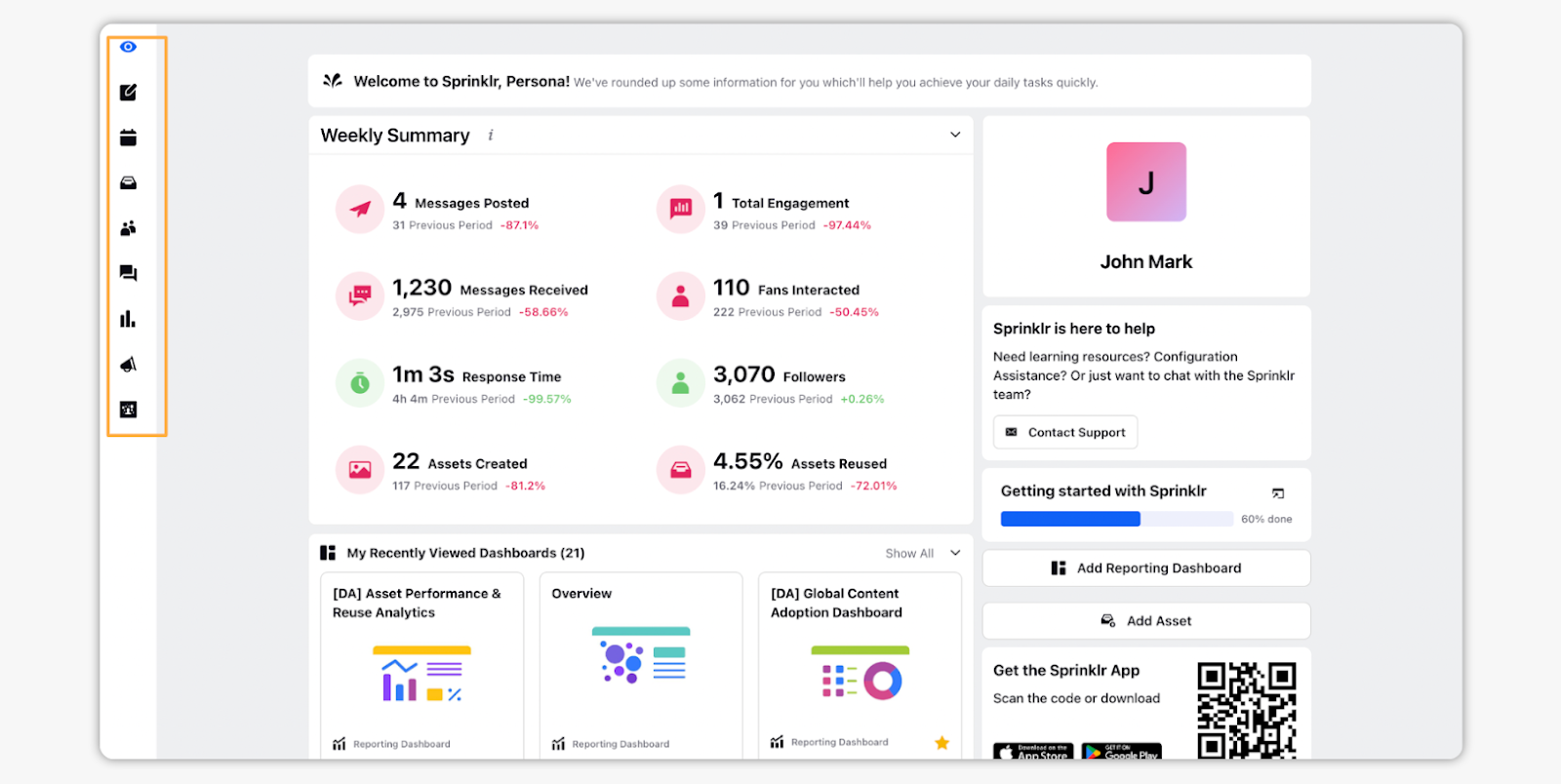
Sprinklr Social is an enterprise-focused social media marketing platform ideal for large organizations in regulated industries, such as finance and healthcare. Built for global teams, Sprinklr offers customizable roles, permissions, and workflows with detailed auditing features to ensure compliance with strict governance requirements.
How it works/UX: Sprinklr features a well-appointed visual dashboard to access all social media tools, from publishing to social listening, analytics, advertising, and AI-powered insights. It also integrates with other Sprinklr tools.
Pros:
- Customizes workflows and roles by sub-brand, location, or business unit
- Has AI automation assistant available in over 100 languages
- Flags noncompliant content automatically before publishing, with customizable rules
- Is part of Sprinklr’s unified business platform designed for the world’s largest brands
Cons:
- Requires dedicated training and long implementation time
- Too complex for non-enterprise organizations
Pricing: Custom; contact for quote
Free plan/trial: No, but a free demo is available
G2 rating: 4.1/5
The best Buffer alternatives for all types of businesses
Which of these Buffer alternatives is right for you depends on a few crucial factors, such as your organization size and social media goals. SocialPilot and Zoho Social are among the best Buffer alternatives for small and medium-sized businesses, and Sprout Social or Sprinklr are top enterprise-level options.
If streamlining workflows is a focus for you, try Jotform’s 20,000-plus form templates to collect and connect customer data with over 150 business tools. Plus, integrate with Jotform AI Agents to manage data, conversations, and customer support together in one tool, or try the Jotform Instagram Agent for AI chat support, lead capture, and social selling at scale.
Plus, it’s free! Start with Jotform today to reimagine what social media management looks like for you.
This guide is for SMB/mid-market social media managers who’ve outgrown Buffer, agencies juggling multiple clients that need secure multi-brand workflows and white-label reporting, and enterprise evaluators comparing visual-first platforms with deeper analytics, listening, and governance










Send Comment: