

The rumors are true. While you were sleeping and resting well, Team Jotform has been working hard, day and night in the last 6 months, to bring you an exciting new feature- the New Jotform Form Designer.
This ambitious project gives our users complete control of their form designs. Our previous form design options were limited to basic sizing, color selection, and font selection.

Replacing this is an attractive new WYSIWYG interface where users can design the form however they like.

Jotform’s New Form Designer Example Using the form designer is simple:
1.Build your form as you always have with Jotform’s world renowned form builder.
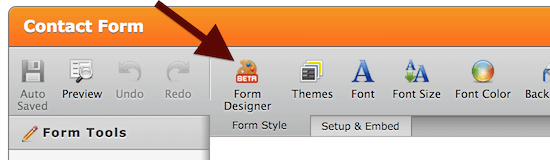
2.Click the Form Designer Icon on the Form Style toolbar. (Pictured below)
3.Design your form using the many options in our Form Designer’s intuitive interface.
The major categories include:
- •Color Scheme. Select from numerous professionally designed themes, or select your own colors.
- •Background Image. Select both form and page background images.
- •Form Layout. Establish widths of form and elements, padding, and corner styling.
- •Font Options. Select font and sizing.
- •Label Styles. Customize the labels for your form inputs.
- •Line Layout. Adjust line spacing, along with its vertical/horizontal layout.
That’s just the beginning. Once the basic design and layout of the form is established each field can be selected allowing you to customize it further. Here are the options specific to the text box field, for example:
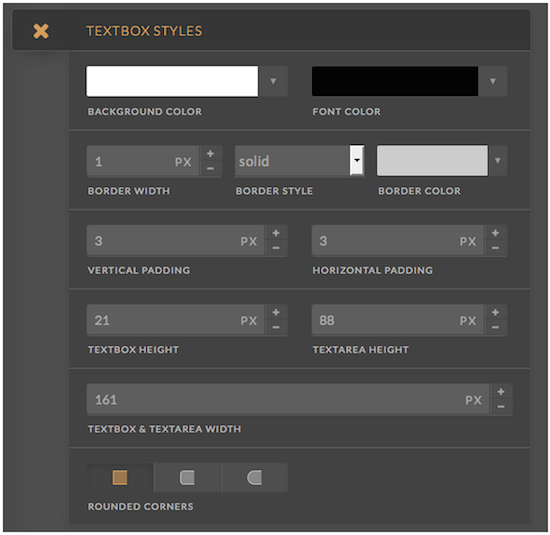
The many customization options on the design tab will allow users to set up the basic design of the form and its fields. Sometimes more granular control is needed. For this we provide the CSS interface. Our CSS helper makes it easy for users to find the fields they would like to provide specific styles to. If users want even more control, they can enter any CSS they like.

The Form Designer marks an exciting new phase in Jotform’s Story. Our forms can now readily match any website. Unlimit your imagination: Try the new form designer today!















Send Comment:
31 Comments:
October 19, 2018
Is form designer available into free version?
May 13, 2016
How do we revert back to the template we originally chose to build the form with? The designer is both restrictive and frustrating as you cannot revert back should you dare to play with it.
January 7, 2015
Can you export the design to be used with other forms?
October 24, 2014
I have the same problem as brinbro. Doesn't seem to work right. Is this a released product feature?
October 22, 2014
Aytekin you guys haven't got bought out yet? Lol remember our comments from like 5 years ago?
October 20, 2014
Trying it now - doesn't work and the settings won't save but I see a lot of potential. Will rework a few of my forms once the bugs are worked out!
October 17, 2014
LOOKS AMAZING!
I CAN'T WAIT TO DESIGN SOME NEW JOTFORMS! THANKS JOTFORM TEAM!
October 16, 2014
I like it; great job.
October 16, 2014
It is excellent. I like it. thanks.
October 16, 2014
Love it guys and very pleased to see it's responsive. Well done!
October 16, 2014
Looks easy to use, love it boys...thanks!
October 16, 2014
When will this be available and included in my form builder? I don't see the beta as of yet.
October 15, 2014
Amazing! Thanks Jotform!
October 15, 2014
Pl offer payment gateway integration in Indian currency
October 15, 2014
Excellent good work guys looks so much easier to use especially changing sizes of boxes ...love it
Well DoneOctober 15, 2014
This is amazing! Currently, I'm designing my forms in such a way that the background image would complement the static fields.
It's in beta right now, but I can't wait for the new form design to transition to the current editor. It'll be possible now to create more flat/metro style forms, which I was hoping for some time now.
October 15, 2014
Great work guys. Luv Jotform + use it all over my website. Thank you:
FYI: I get tolled often by my website users that there is no way to 'CLOSE' the form/page afterwards ie., an 'X' in the right hand corner. Would love it even more if there was an option for all forms of: 1. Make this form a pop-up 2. Add a close 'X' button to the top corner.
October 15, 2014
How do you add the icons next to the form fields. For example the person icon next to name, and envelope icon next to email.
October 15, 2014
I've been in the internet marketing space for a little over 10 yrs. now and I think Jotform by for is the best out there, However, I would like to see you come up with a way to copy an old Doc, PDF form and convert it somehow, because it time consuming to create a form from scratch. Thanks, Alvin
October 15, 2014
changes i've made in the new form designer are not being saved.
October 15, 2014
EXCELLENT!!!... JUST WHAT THE DOCTOR ORDERED!!... GREAT JOB JOTFORM TEAM... THANK YOU VERY MUCH...
October 15, 2014
Mobile friendly is great! Well done and thanks.
October 15, 2014
Aytekin. Perfect timing. Solved an issue with a new mobile form straight away!
Will this be included in Jotform application?
Thanks
October 15, 2014
You guys are a life saver! Forms have always been the bane of my existence.
October 15, 2014
Are these forms responsive?