

Top 8 SaaS tools for startups
A startup software stack is how a tiny team does the work of 10 people before it can afford to hire them.
The 2025 State of SaaS Report found the average business now runs on 106 apps. If there’s a job to be done, there’s probably a SaaS tool — short for “software as a service,” in which you get platform access via subscription — for it. No wonder the IT-to-employee ratio has jumped to 1:108.
When the headcount is tight, software is the team. That’s the concept for this list.
What is a good startup SaaS stack?
A good startup SaaS stack covers the work you can’t avoid but can’t hire for yet.
The key is stage-fit.
- Pre-MVP: The stack is about thinking clearly and shipping fast; it’s about documentation, internal communications, lightweight demos.
- Post-launch: Your stack expands to feedback loops, payments, support, and early analytics.
- At scale: You add structure; this includes automation, deeper reporting, and tighter integrations.
That’s how Vaibhav Dubey, cofounder and CEO of Plexe AI, built his early stack. “We started out with Notion, Screen Studio, AWS, Stripe, and Slack,” he says. “Notion for all brainstorming and documentation to figure out what we were going to build, Slack for internal comms and customer support (we would add any customer who signed up to a private Slack channel so we could get quick feedback) and Screen Studio for recording demos of the product.”
How I selected this list of startup productivity tools
This list comes from proximity, not just desk research.
- First, I talk regularly to founders who are building under real constraints: limited headcount and constant pressure to ship. My conversation with Vaibhav is one of the many examples.
- Second, I’ve worked inside startups, both as a consultant and as a full-time employee.
- Third — and honestly, this is the one that matters most — I’ve used every tool on this list myself.
Then I asked three hard questions:
- Can a new team adopt this without a six-week implementation?
- Does it integrate into your existing workflow?
- Will the cost stay predictable, or are you going to get blindsided by a surprise bill?
Below is the result of all I could find.
1. Jotform: Best for modular tools you can assemble as your startup grows
Stage: Pre-MVP → Scaling
G2 rating: 4.7/5
Let’s get the obvious out of the way: Yes, this is a Jotform blog — and yes, Jotform is first. For early teams, it solves one of the most persistent SaaS problems sooner than almost anything else: data fragmentation.
Say your startup launches a pilot, and interest barrels in: beta signups, support questions, partner requests. But everything lands in different places — inboxes, Slack DMs, or spreadsheets. Because of this, no one has a clean view of what’s coming in or who’s supposed to act.
How does Jotform solve this?
Step 1: Capture and centralize requests
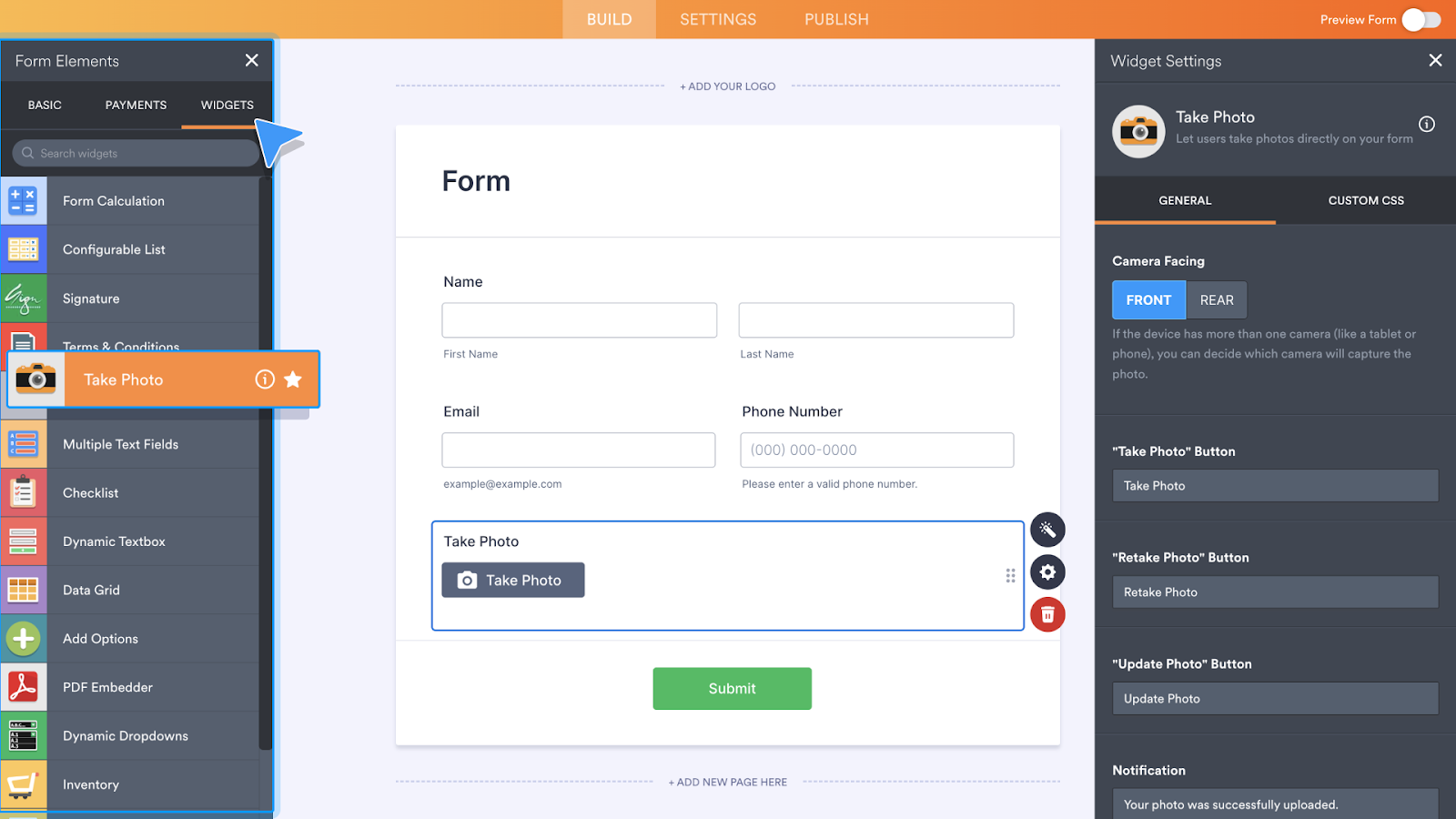
Early teams need a reliable front door for data: pilot applications, beta signups, support intake, partner requests. Jotform’s Form Builder serves this purpose.
You get a drag-and-drop online form builder that lets you create and customize forms without coding. You can quickly add and arrange fields, include file uploads, and adapt questions using conditional logic so respondents see only what matters to them.
Embed or share these forms anywhere — on your website, in email campaigns, or via direct links — without technical work from engineers.
Every submission flows straight into Jotform Tables, a collaborative workspace where your team filters, sorts, assigns, comments on, and updates entries in one place. Instead of exporting data to Excel or hunting through inboxes, intake stays structured, reviewable, and shared — ready for action.
And because Jotform integrates with 200-plus tools, it extends the stack you already use instead of replacing it.
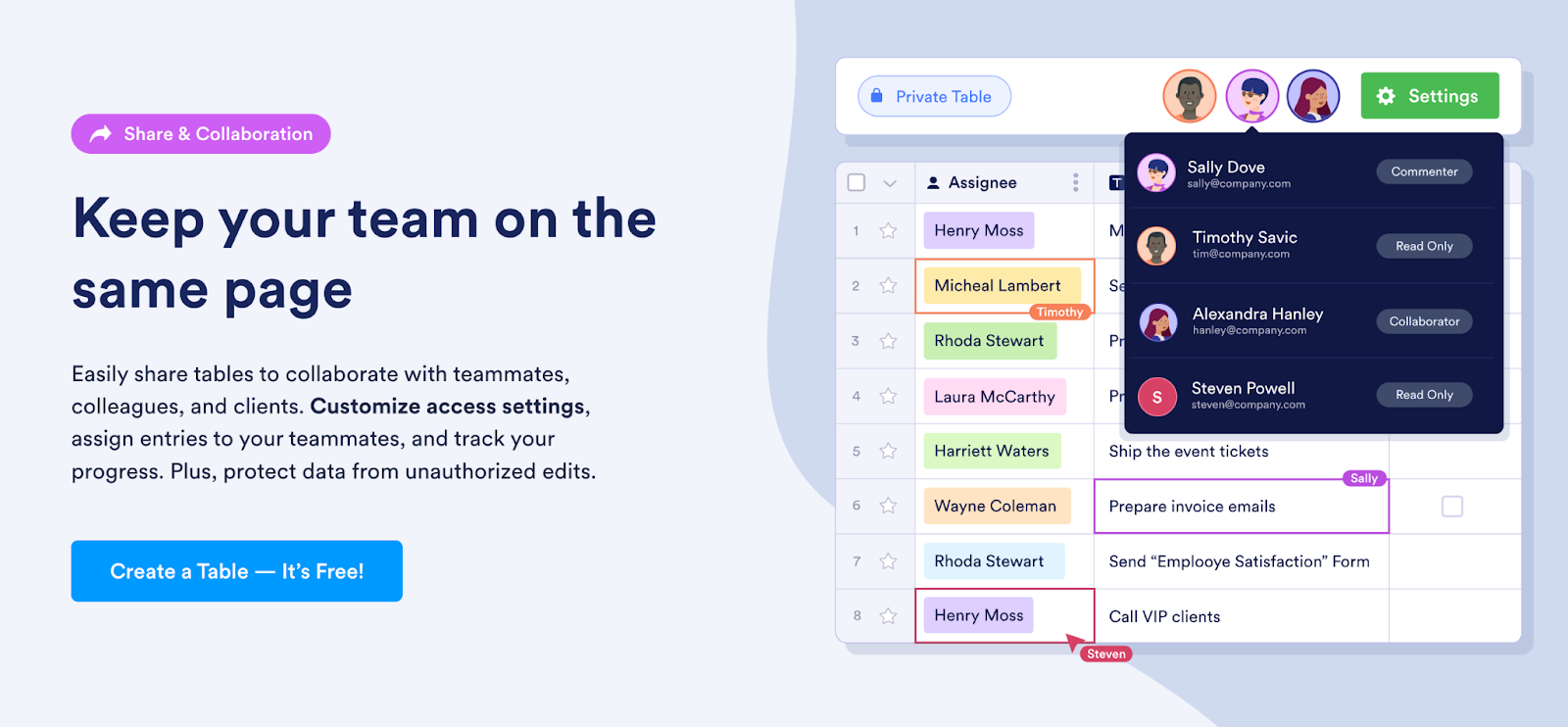
Your team can filter and sort entries, assign records, update statuses, and leave internal comments in one shared workspace — and migrate out of Excel spreadsheets for good.
Step 2: Route and automate decisions
Jotform Workflows lets you build condition-based processes on top of their forms and tables using a visual, no-code builder. These workflows automatically route submissions, request approvals, send notifications, collect e-signatures, and trigger follow-ups based on predefined rules.


For small teams, this replaces the “someone please keep an eye on the spreadsheet” phase. The rules live in the system, not in someone’s head. And founders don’t have to micromanage to keep the workflow moving.
This layer is the center of gravity: Everything before it feeds into it, and everything after it builds on it.
Step 3: Extend intake with conversation and AI
Jotform’s AI Chatbot Builder lets teams turn existing forms into conversational flows that can be embedded directly on a website or portal, without code. Instead of sending users to a static form, the chatbot asks questions one at a time and collects the same structured data underneath.

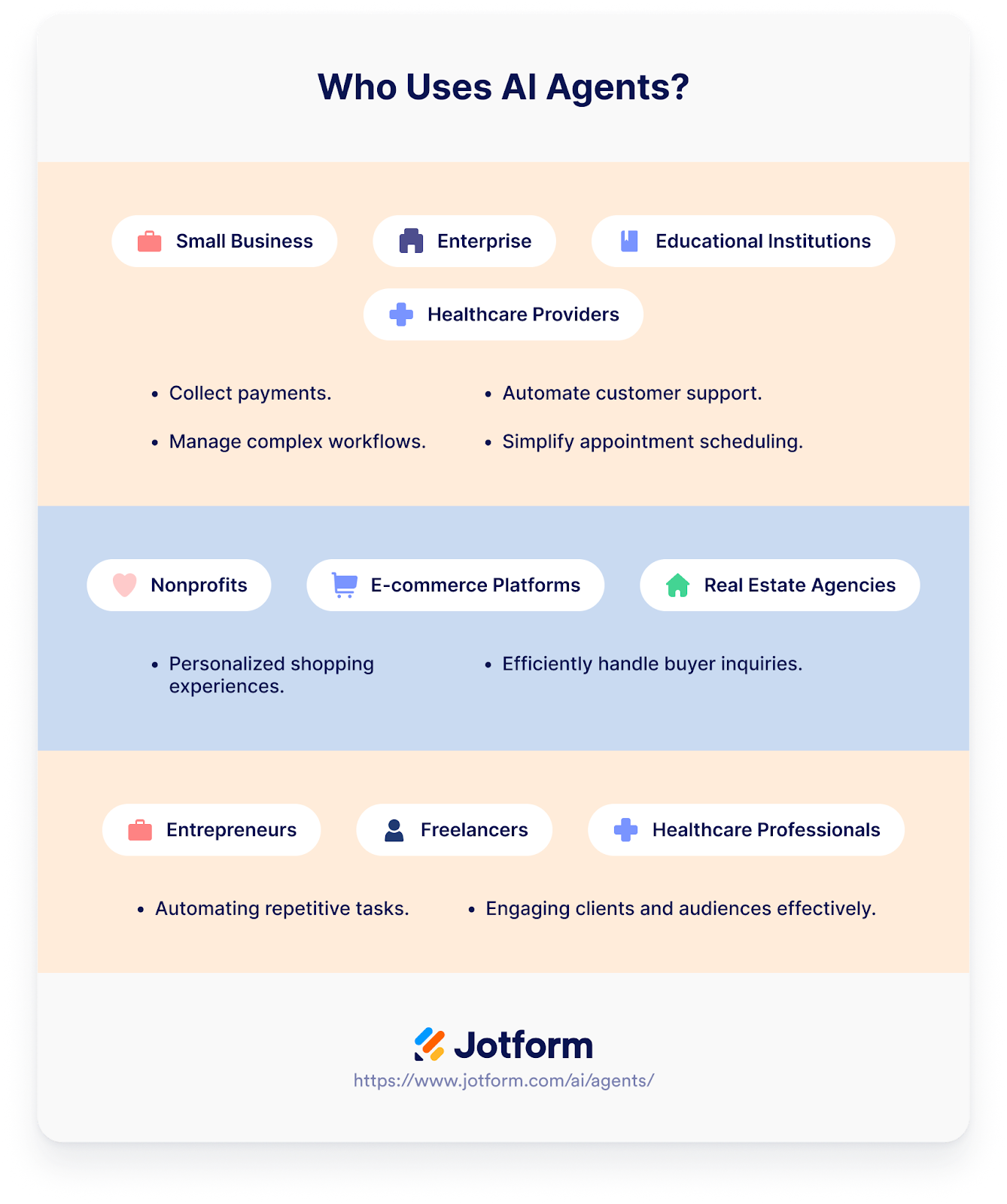
Jotform AI Agents take this further, using connected knowledge (documents, tables, help content) to answer questions, handle follow-ups, and triage routine requests.
For startups, the moment AI becomes useful is when it starts closing loops — responding to questions, handling follow-ups, triaging routine cases, and surfacing context that would otherwise require a human to assemble.
That’s why it earns the first spot on this list. Take Jotform for a free ride and feel the difference.
- Pros:
- Even on the free tier, you can connect to popular apps so data flows into tools you already use.
- Jotform is built for teams without a dedicated operations person, because the rules live in the system, not in someone’s head.
- Cons:
- There’s a learning curve if you’re building complex workflows with conditional logic.
- If you need heavy calculations, pivot tables, or complex formulas, you might eventually outgrow Tables.
- Plans/Pricing:
- Jotform offers a free Starter plan with basic forms and Tables. Paid plans start at $34 per month (billed annually) and scale by submissions and storage, while AI Agents are priced separately, starting at $34 per month for 25 agents and 1,000 conversations.
2. Notion: Best for a shared workspace for docs, projects, and team knowledge
Stage: Pre-MVP
G2 rating: 4.6/5
Notion describes itself as “a single space where you can think, write, and plan.” It’s a connected workspace where teams capture knowledge and manage projects in one place.
How can startup teams use it?
- Set up a team wiki as your “single source of truth” for onboarding, processes, and product knowledge.
- Use databases (known in Notion as “collections of pages”) to run task lists, roadmaps, and trackers with different views.
- Use Projects in Notion to track work and let AI help with repetitive project administrative work via AI Autofill (for example, summaries/updates).
Notion’s integrations include connections with tools like Asana, GitHub, Google Drive, Trello, Jira, Slack, Zapier, Figma, Webex, and Typeform.
- Pros:
- Notion’s accessibility options make it easier to use for people with visual sensitivities.
- Most teams can be up and running in under an hour.
- Cons:
- I’ve found that as Notion layers in more functionality, like AI and advanced formulas, performance can lag.
- The “single source of truth” can fall apart over time; with too many pages and workspaces, teams often end up recreating the same sprawl they were trying to fix.
- Plans/Pricing:
- Notion’s core pricing includes a Free plan and two standard paid tiers: Plus at about $9.50 per user per month and Business at about $19.50 per user per month when billed annually. Enterprise pricing is custom.
3. Slack: Best for keeping team communication centralized and searchable
Stage: Pre-MVP → Scaling
G2 rating: 4.5/5
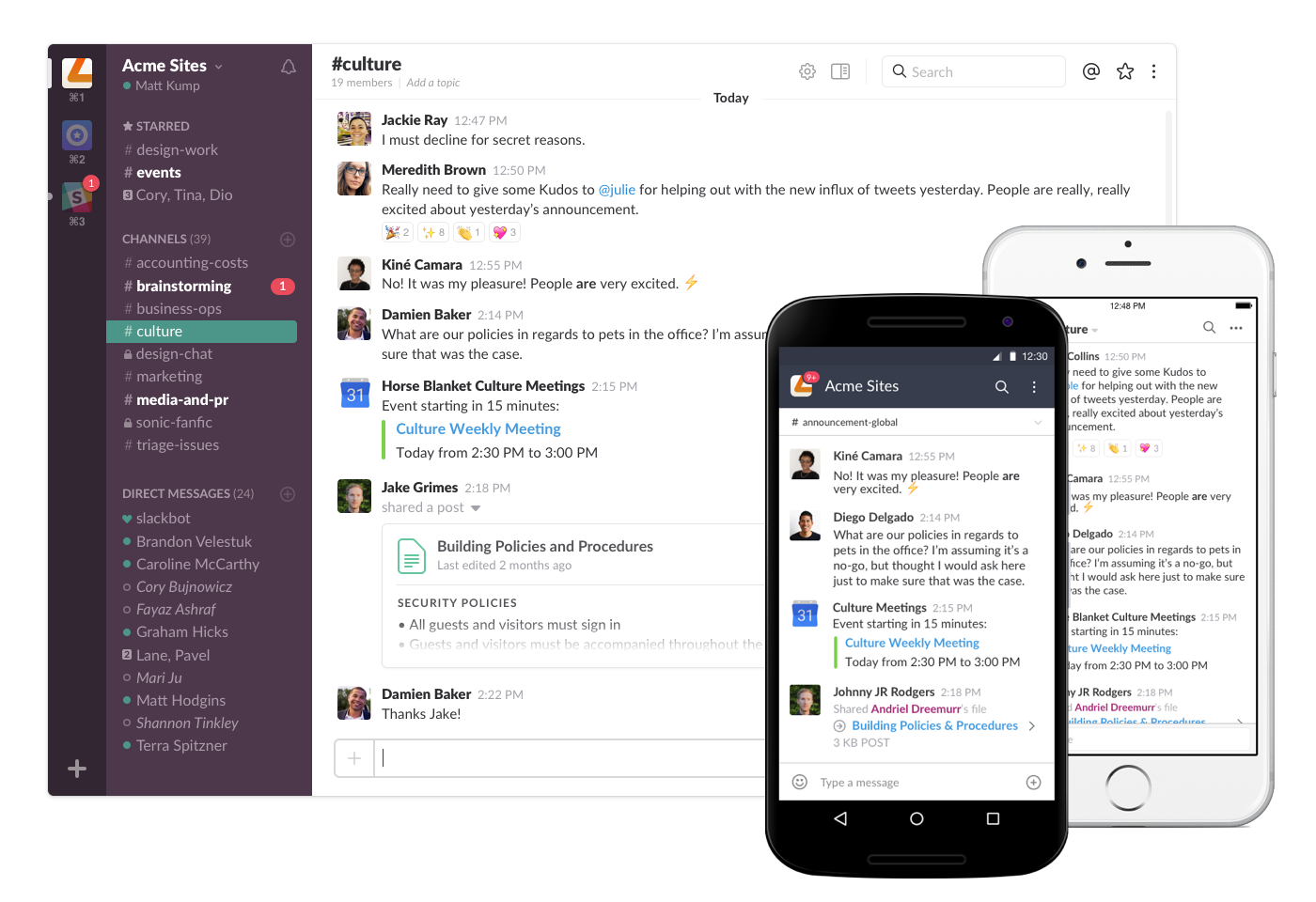
Slack is a team communication platform replacing email with organized channels, so you have a centralized workspace where conversations, files, and updates live in searchable channels.
How can startup teams use it?
- Create channels organized by team, project, or topic (#marketing, #product-launch, #watercooler).
- Use threads to keep conversations organized and searchable instead of letting discussions scatter across email chains.
- Use Huddles for quick audio and video calls without scheduling, and Clips to share asynchronous updates.
- Integrate over 2,600-plus popular project management, support, CRM, file sharing, and developer tools. This way, alerts, tasks, and status changes can show up directly in channels or DMs.
- Pros:
- The interface is intuitive enough that most people start using it effectively within a day or two.
- The free plan is genuinely useful for small teams; you get channels, direct messaging, and integrations with up to 10 apps. Many startups never need to upgrade.
- Cons:
- I have to turn off notifications far too often — as your team grows and channels multiply, the stream of messages can pull focus from deep work.
- The free plan’s 90-day message history limit means older context gets lost.
- Plans/Pricing:
- Slack offers a Free plan with basic messaging, up to 90 days of searchable history, and a limited number of app integrations. Paid plans start with Pro at $7.25 per user per month (billed annually) and then Business+ at $15 per user per month (billed annually).
4. Trello: Best for visual task tracking and lightweight project workflows
Stage: Pre-MVP → Post-launch
G2 rating: 4.4/5
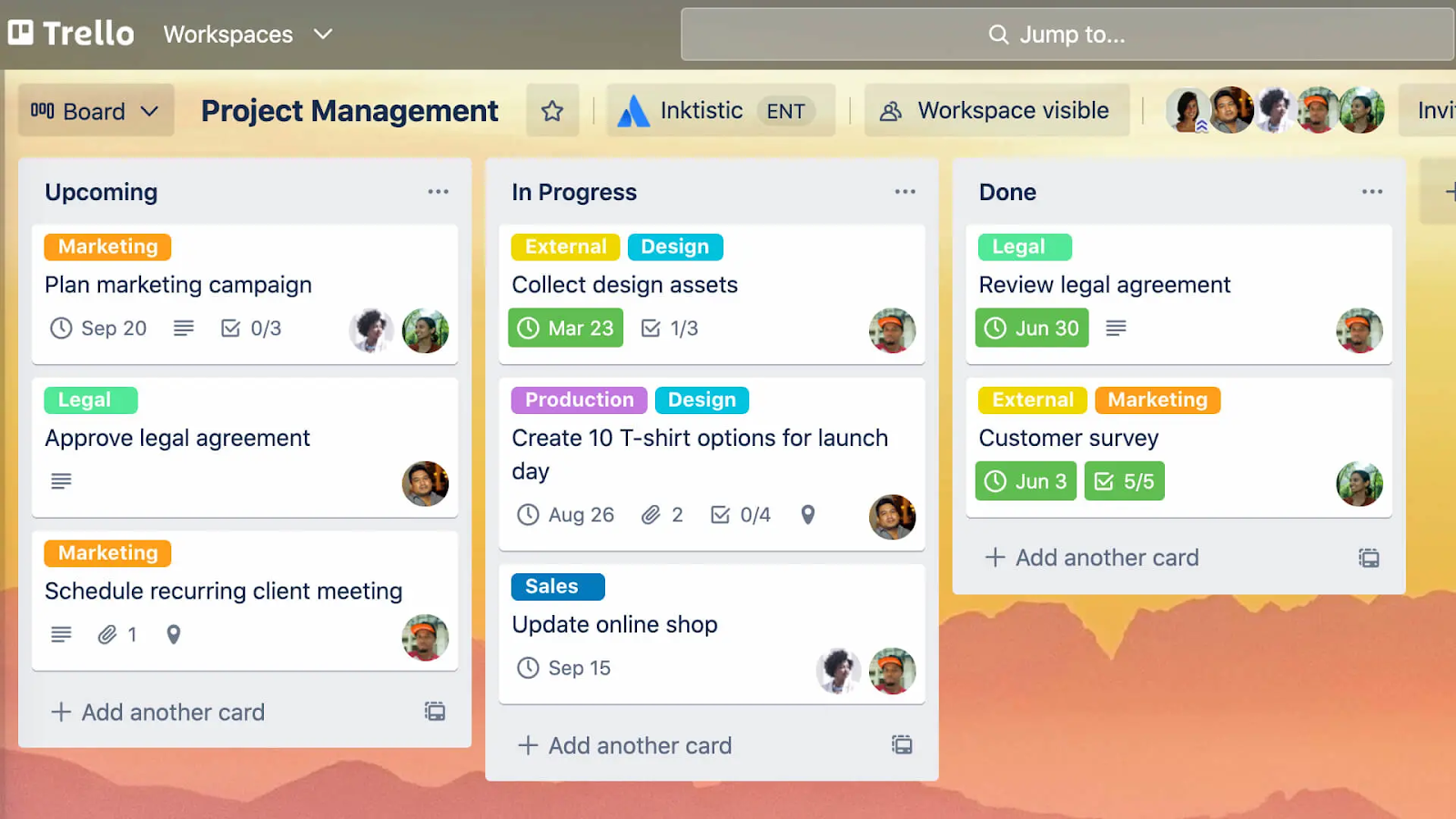
Trello is a visual project management tool built around boards, lists, and cards that help teams organize tasks and workflows at a glance. It lets you manage work from simple to-dos to multi-step processes using a kanban-style visual layout.
How can startup teams use it?
- Create boards for major workflows — for example, onboarding, feature sprints, support backlogs — and move cards through lists (To Do → Doing → Done) as work progresses.
- Connect Trello boards to other tools with Power-Ups. You can integrate Slack, Google Drive, Jira, Notion, Salesforce, and more. This way, updates, files, and alerts are surfaced right where your team already works.
- Use color-coded labels to categorize tasks, making it easy for your team to identify priorities and task types at a glance.
- Pros:
- Power-Ups let you connect work to tools you already use, and automation (built-in) reduces manual steps on cards and boards.
- Trello’s free plan is genuinely functional; you get unlimited cards, multiple boards, and basic integrations, making it realistic for small teams to never pay.
- Cons:
- Trello’s simplicity is a strength early on, but I’ve seen teams with heavy reporting needs outgrow it.
- Calendar, timeline, and dashboard views are only available on paid tiers, so the free plan feels limited.
- Plans/Pricing:
- Trello has a Free plan with basic boards, cards, and up to 10 boards per workspace. Paid plans start at $5 per user per month (billed annually) for Standard, $10 per user per month (billed annually) for Premium with advanced views and admin controls.
5. HubSpot CRM: Best for startups that need a free CRM now and room to scale later
Stage: Post-launch
G2 rating: 4.5/5
HubSpot CRM is a customer relationship management platform that centralizes your contacts, interactions, deals, tasks, and pipeline in one place.
How can startup teams use it?
- Store customer, company, and lead details from calls, emails, and interactions in one easy-to-access place with Contact Management.
- Send emails directly from Outlook or Gmail, track opens, and use provided templates for consistency with Email Tracking.
- Use Breeze, HubSpot’s AI virtual assistant, which summarizes conversations, takes meeting notes, and performs basic automation for startups.
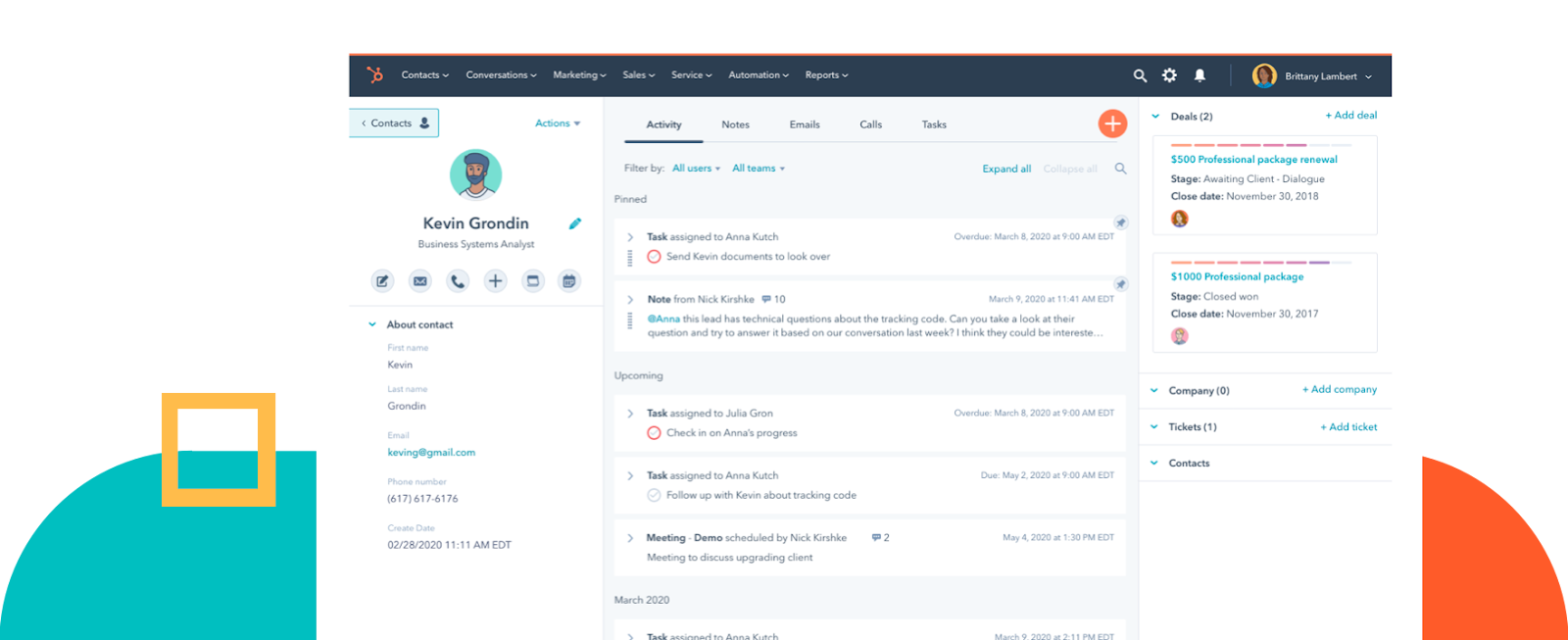
HubSpot CRM integrates with many tools through the HubSpot Marketplace and supports two-way data sync to keep contacts and activities aligned across systems.
- Pros:
- HubSpot automatically enriches contact and company data with details scraped from public sources.
- HubSpot’s CRM grows with you; basic contact and pipeline tracking works for early teams, and paid “Hubs” add advanced automation and analytics later.
- Cons:
- HubSpot’s all-in-one breadth means a steep learning curve once you move past the basics.
- Core CRM is free, but more sophisticated automation, reporting, and AI-enhanced features are gated and get expensive as you scale.
- Plans/Pricing:
- HubSpot CRM itself is 100 percent free forever, unlimited users and up to a million contacts included. Paid upgrades come via add-on “Hubs” or bundled packages typically starting around $20–$50 per month per product.
6. Intercom: Best for scalable, conversational customer support
Stage: Post-launch → Scaling
G2 rating: 4.5/5
Intercom is a customer communication platform built around real-time messaging, contextual support, and lifecycle engagement. The software functions as a digital front desk for your business where every question, complaint, or compliment goes, and each message is sent to the right team member.
How can startup teams use it?
- Use Fin, Intercom’s AI-powered support bot, which resolves FAQs instantly, escalates complex issues to human agents, and works across tickets, email, and live chat.
- Use help articles and self-serve content tied to chat to reduce repetitive tickets and empower users to find answers faster.
- Set up assignment rules and SLAs, and use workflows to make sure every conversation reaches the right agent automatically.

Intercom supports 350-plus integrations across CRM, analytics, support, marketing, e-commerce, and developer tools, making it a solid startup help desk.
- Pros:
- Intercom matches modern chat systems like Facebook and Twitter that most people are already familiar with, making onboarding teams straightforward.
- The real-time messaging plus automated bots make support feel immediate and context-aware.
- Cons:
- You can’t build behavior-based segments to drive adoption without importing data from other sources.
- The integration setup with third-party tools can be complex and require troubleshooting, and the mobile app offers fewer features with occasional performance issues.
- Plans/Pricing:
- Intercom’s pricing is tiered by plan and charged per seat. With Essential at about $29 per seat per month (billed annually), Advanced at about $85 per seat per month (billed annually), and Expert at about $132 per seat per month (billed annually), your cost scales with feature set and team size.
On top of base seat pricing, usage charges apply for AI resolutions (for example, Fin AI at ~$0.99 per resolved conversation) and certain messaging channels.
A quick note on Intercom Fin vs. Jotform AI Agents
If you’re comparing customer service AI, Intercom Fin charges per resolution (starting at $0.99 per resolution on top of your base plan), which adds up quickly as you scale.
Jotform AI Agents, by contrast, start free and handle forms, dynamic responses, voice support, and payment collection — all things Intercom Fin can’t do.
7. PostHog: Best for product-led startups making data-backed feature decisions
Stage: Post-launch → Scaling
G2 rating: 4.5/5
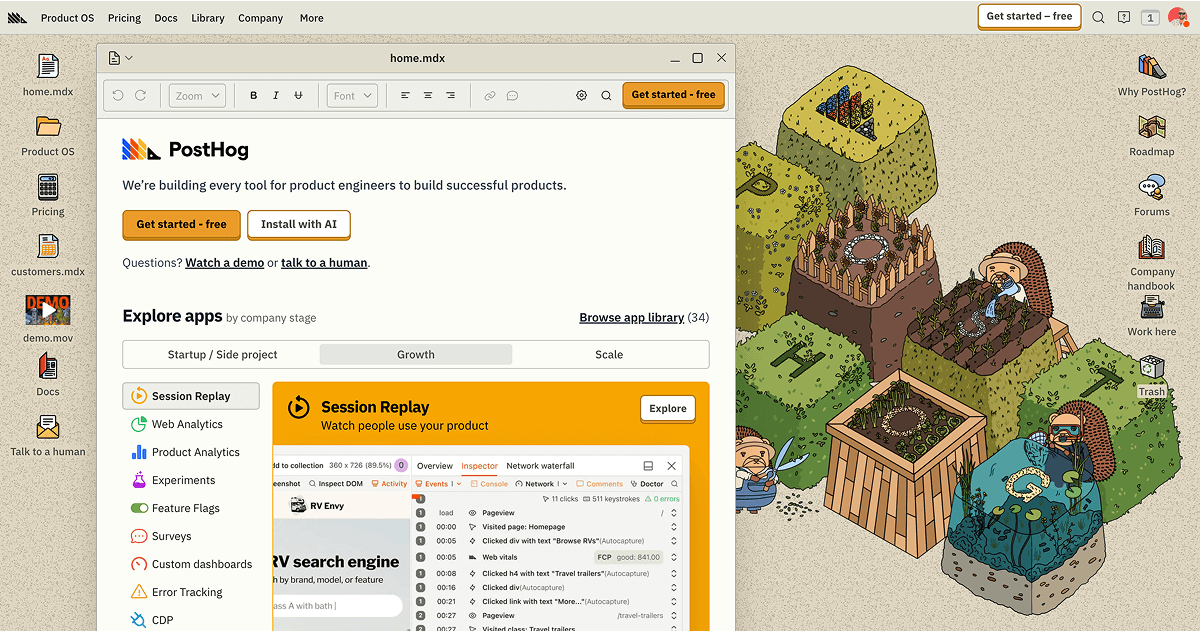
PostHog is a product analytics platform built for understanding how users actually interact with your product.
How can startup teams use it?
- Watch real user sessions of interactions with your website or mobile app to diagnose issues and understand user behavior using Session Replays.
- Ship features behind feature flags, then test and roll them out gradually based on usage or experiment results.
- Track usage with Product Analytics using autocapture or manually instrument event-based analytics to understand user behavior and analyze data with visualization or SQL.
PostHog can send event data to external tools like Slack, HubSpot, Intercom, and webhooks using its data pipeline destinations.
- Pros:
- PostHog is open source, so you can self-host it on your own infrastructure without cost, or use PostHog Cloud for the full hosted suite with advanced capabilities and ongoing support.
- The free tier is genuinely generous: 1 million product analytics events monthly, 5,000 session recordings, 1 million feature flag requests, and 250 survey responses.
- Cons:
- If you’re leading a non-technical team or need to act immediately on insights through in-app engagement without coding, PostHog will be hard to adopt.
- When you hit the free tier limits, PostHog stops ingesting data, so you must upgrade immediately.
- Plans/Pricing:
- PostHog provides a free tier. After you exceed those monthly limits, pricing scales on a usage-based model where you pay for additional events, recordings, flag requests, etc., rather than per seat or per user.
8. Stripe Billing: Best for startups moving beyond simple payments to flexible pricing models
Stage: Post-launch → Scaling
G2 rating: 4.4/5
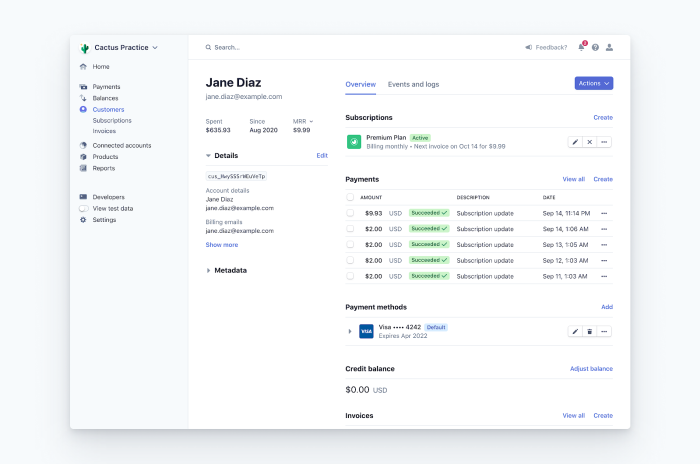
Stripe Billing is Stripe’s subscription and invoicing engine built on top of its core payments platform — it lets you manage recurring revenue, metered billing, trials, coupons, invoices, and customer lifecycle billing without building these systems from scratch.
How can startup teams use it?
- Create custom pricing plans with support for flat-rate, per-seat, usage-based, tiered, variable, and multi-currency pricing models.
- Automate invoicing and reduce payment failures with custom invoice generation with tax calculations and line-item breakdowns.
- Create, customize, send, and revise a Stripe-hosted invoice from the Dashboard without writing a single line of code.
Because Billing is part of Stripe’s platform, it flows into the broader ecosystem via both Stripe’s partner network (for example, Salesforce, HubSpot, Xero, QuickBooks) and Zapier-powered automations.
- Pros:
- The pricing model is affordable, especially for startups, since you pay fees only when you process revenue.
- Stripe Billing is a smart dunning system that improves payment collection and reduces involuntary churn.
- Cons:
- Billing add-ons (for example, Stripe Tax) and volume-based charges add layers to your cost model.
- Subscription rules, proration logic, and usage billing need careful configuration and validation.
- Plans/Pricing:
- Stripe Billing uses a pay-as-you-go model — you pay 0.7 percent of billing volume for recurring and usage-based billing, covering both on- and off-Stripe billing transactions.
FAQ
For most early-stage teams, these five metrics matter most:
- MRR (Monthly Recurring Revenue)
- Churn rate
- CAC (Customer Acquisition Cost)
- LTV (Lifetime Value)
- Activation rate
Many teams start with lightweight product analytics for startups
It depends on whether they solve an immediate pain point. A tool like Stripe Billing is worth it if you’re losing sleep over subscription management; Intercom makes sense if support is consuming your entire week.
But Salesforce? Probably not — not until you have a real sales team to manage.
Free tiers won’t last forever, but they’re often enough to reach product-market fit without burning runway:
- HubSpot CRM as a free startup CRM
- Jotform for intake, workflows, and automation
- Notion for docs and team knowledge
- Slack for communication
This guide is for resource-strapped founders, the first ops or product hire, solo marketers, and hands-on tech leads at pre-MVP through Series A startups who need a stage-fit SaaS stack to do the work of a bigger team.



















Send Comment: