

Müşteri Hizmetleri Yetkilisi Formları

İşveren Geri Bildirim Anketi
Temsilci Geri Bildirim Formu ile görüşme sonrası müşteri memnuniyetini ölçün, hizmet kanallarına göre değerlendirmeleri karşılaştırın ve Jotform üzerinden veri toplama sürecini tek merkezden yönetin.
Kategoriye git:Geri Bildirim Formları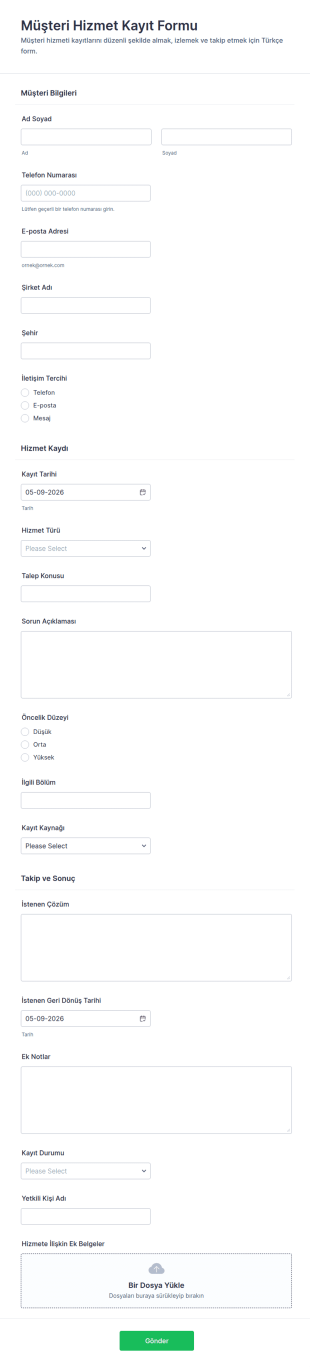
Müşteri Hizmetleri Kayıt Formu
Müşteri Hizmet Kayıt Formu, müşteri taleplerini online olarak kayda alıp önceliklendirmek isteyen destek ekipleri ve hizmet birimleri için Jotform üzerinden veri toplama ve form yanıtı takibini kolaylaştırır.
Kategoriye git:Müşteri Hizmetleri FormlarıMüşteri Hizmetleri Yetkilisi Formları Hakkında
Customer Service Agent Forms are specialized digital forms designed to streamline and enhance the efficiency of customer service operations. These forms cater to a variety of tasks frequently managed by Customer Service Agent, such as logging customer inquiries, tracking service requests, and managing feedback. By automating these processes, Customer Service Agent Forms help in cutting down response times and ensuring that customer interactions are recorded systematically and accurately. In real-world workflows, these forms are often used to facilitate seamless communication between customers and service teams, ensuring that the customer's voice is heard and addressed promptly.
Jotform, Müşteri Hizmetleri Temsilcisi Formları için önde gelen online form oluşturucu olarak öne çıkar ve veri toplama süreçleri için eşsiz özelleştirme kolaylığı ile otomasyon yetenekleri sunar. Jotform ile özel bir form oluşturmak, sezgisel sürükle-bırak özelliğini kullanmak kadar basittir ve tamamen kişiselleştirilmiş bir kullanıcı deneyimine olanak tanır. Ayrıca Jotform, Jotform Tablolar aracılığıyla merkezi veri yönetimi sunarak müşteri hizmetleri ekiplerinin verileri verimli bir şekilde düzenlemesini ve analiz etmesini sağlar. Bu entegrasyon, toplanan tüm bilgilerin güvenli bir şekilde saklanmasını ve kolayca erişilebilir olmasını sağlayarak daha düzenli ve duyarlı bir müşteri hizmetleri operasyonunu destekler.
Müşteri Hizmetleri Temsilcisi Formları Neden Kullanılır?
- Müşteri Hizmetleri Temsilcisi Formları veri toplama sürecini kolaylaştırır ve bilgilerin doğru ve tutarlı bir şekilde yakalanmasını sağlar. Bu, elle yapılan veri girişinde oluşabilecek hataları azaltmak ve toplanan bilgilerin genel güvenilirliğini artırmak açısından kritik öneme sahiptir.
- Bu formlar, müşteri soru ve taleplerinin işlenme sürecini önemli ölçüde hızlandırır. Rutin veri girişi görevlerini otomatikleştirerek Müşteri Hizmetleri Temsilcisi, müşteri ihtiyaçlarına daha hızlı yanıt verebilir ve genel müşteri deneyimini iyileştirir.
- Profesyonel veri işleme, Müşteri Hizmetleri Temsilcisi Formlarının bir özelliğidir; çünkü bu formlar müşterilerin hassas bilgilerinin güvenli bir şekilde yönetilmesini sağlar. Bu, müşteri güvenini korumak ve veri koruma düzenlemelerine uymak açısından çok önemlidir.
- Dijital formların kullanımı, zahmetli olabilen ve yanlış yerleştirmeye veya kaybolmaya açık kağıt tabanlı süreçlere olan bağımlılığı azaltır. Dijital formata geçerek kuruluşlar, tüm verilerin kolayca geri alınabilmesini ve fiziksel depolama alanının en aza indirilmesini sağlayabilir.
- Üçüncü taraf uygulamalarla entegrasyon yeteneği sayesinde bu formlar geliştirilmiş işlevsellik sunar ve müşteri hizmetleri ekiplerinin daha kapsamlı veri analizi ve raporlama olanakları için Google E-Tablolar veya Salesforce gibi araçlara bağlanmasını sağlar.
Müşteri Hizmetleri Temsilcisi Formlarının Çözdüğü Yaygın Sorunlar
- Evrak işlerinin zahmetli doğası, birçok müşteri hizmetleri operasyonunda önemli bir sorun noktasıdır. Müşteri Hizmetleri Temsilcisi Formları, fiziksel belgelere olan ihtiyacı ortadan kaldırır ve böylece karmaşayı ve kritik bilgilerin kaybolma riskini azaltır.
- Elle yapılan veri girişi genellikle hatalara ve tutarsızlıklara yol açar ve bu da hizmet kalitesini etkileyebilir. Bu formlar veri girişi süreçlerini otomatikleştirerek bilgilerin doğru ve tutarlı bir şekilde yakalanmasını sağlar ve insan hatası olasılığını en aza indirir.
- Kaybolan veriler, bir müşteri hizmetleri ekibinin müşteri ihtiyaçlarına etkili bir şekilde yanıt verme becerisini ciddi şekilde engelleyebilir. Dijital formlar kullanılarak tüm veriler bulutta güvenli bir şekilde saklanır ve gerektiğinde kolay erişim ve alma sağlanır.
- Müşteri Hizmetleri Temsilcisi Formlarının kullanımıyla zaman alan süreçler kolaylaştırılır ve müşteri hizmetleri personelinin insan müdahalesi gerektiren daha karmaşık görevlere odaklanmasına olanak tanınır. Bu, genel verimliliği artırır ve hizmet sunumunu iyileştirir.
Kullanım Senaryolarını Özelliklerle Eşleştirme
- Sürükle-bırak form oluşturucu, geri bildirim formları veya hizmet talep formları gibi özellikle müşteri hizmetleri ihtiyaçlarına yönelik özelleştirilmiş formlar oluşturmayı kolaylaştırarak kullanıcı deneyimini ve operasyonel verimliliği artırır.
- Koşullu mantık, formların kullanıcı girdisine göre dinamik olarak ayarlanmasına olanak tanır; böylece müşteriler yalnızca kendi sorgularıyla ilgili soruları görür, veri toplama süreci kolaylaşır ve kullanıcı memnuniyeti artar.
- With 30+ payment gateways, forms can be used to collect payments directly from customers, simplifying transactions and enhancing the customer service experience by offering a seamless payment process.
- Jotform Sign aracılığıyla elektronik imzalar, müşteri onaylarını veya rızasını yakalamak için kullanışlı bir yol sunar; böylece fiziksel evrak ihtiyacını azaltır ve hizmet sunum süreçlerini hızlandırır.
- Integration with 100+ third-party applications enables the seamless transfer of data from forms to platforms like Slack or Salesforce, facilitating better communication and data management.
- PDF Düzenleyici, form yanıtlarından profesyonel PDF belgelerinin otomatik olarak oluşturulmasına olanak tanıyarak tüm etkileşimlerin resmi ve düzenli bir şekilde belgelenmesini sağlar.
- Müşteri taleplerini inceleme ve onaylama sürecini otomatikleştirmek için formlar içinde onay iş akışları kurulabilir; bu da verimliliği artırır ve müşteri ihtiyaçlarına zamanında yanıt verilmesini sağlar.
Müşteri Geri Bildirim Formu Nasıl Oluşturulur
- Bir Müşteri Hizmetleri Temsilcisi şablonu için Şablon Listesi'ne göz atın veya boş bir formdan başlayın.
- Sürükle-bırak Form Oluşturucu'yu kullanarak tasarımı ve alanları özelleştirin.
- Doğrudan Bağlantı, E-posta veya Web Sitesine Yerleştirme yoluyla yayınlayın ve paylaşın.
Müşteri Hizmetleri Temsilcisi Formları için En İyi Kullanım Örnekleri
- Yöneticiler İçin: Müşteri Hizmetleri Temsilcisi Formları, yöneticilere müşteri etkileşimlerinin ve hizmet performansının ayrıntılı bir genel görünümünü sunar. Bu formlardan yararlanan yöneticiler, ekiplerinin verimliliğini izleyebilir, geliştirilmesi gereken alanları belirleyebilir ve müşteri hizmetleri standartlarının tutarlı bir şekilde karşılanmasını sağlayabilir. Merkezi veri toplama ayrıca daha bilinçli karar verme ve stratejik planlama olanağı tanıyarak hizmet departmanının genel başarısına katkıda bulunur.
- Ekipler İçin: Müşteri hizmetleri ekipleri, bu formların sağladığı kolaylaştırılmış iş akışlarından yararlanır. Otomatik veri toplama ve işleme sayesinde ekipler, idari görevlerden çok müşterilerle etkileşim kurmaya odaklanabilir. Güncel bilgilere kolay erişim, tüm ekip üyelerinin uyum içinde olmasını ve müşterilere tutarlı ve yüksek kaliteli hizmet sunabilmesini sağlar ve bu da nihayetinde ekip verimliliğini ve moralini artırır.
- Müşteriler İçin: Müşteri açısından bakıldığında, bu formlar hizmet temsilcileriyle iletişim kurma sürecini basitleştirir. Müşteriler, uzun telefon görüşmeleri veya bekleme süreleri zahmetine girmeden hızlıca soru veya geri bildirim gönderebilir. Dijital formların sağladığı kolaylık ve verimlilik, müşterilerin ihtiyaçlarının hızlı ve etkili bir şekilde karşılanmasıyla daha olumlu bir müşteri deneyimi sunar ve böylece daha fazla memnuniyet ile bağlılık oluşturur.
Müşteri Hizmetleri Temsilcisi Formlarını Özetleme
Müşteri Hizmetleri Temsilcisi Formları, müşteri hizmetleri operasyonlarını iyileştirmek isteyen her kuruluş için gereklidir. Jotform'un online form oluşturucusunu kullanan kuruluşlar, belirli hizmet ihtiyaçlarını karşılayan son derece özelleştirilebilir ve verimli formlar oluşturabilir. Kullanım kolaylığının yanı sıra güçlü veri yönetimi ve entegrasyon yetenekleri, müşteri hizmetleri ekiplerinin daha etkili bir şekilde çalışabilmesini, müşteri sorularına hızlıca yanıt verebilmesini ve yüksek hizmet kalitesi standartlarını koruyabilmesini sağlar. Sonuç olarak bu formlar daha düzenli, duyarlı ve müşteri odaklı bir hizmet ortamına katkıda bulunur.
Sıkça Sorulan Sorular
1) Jotform'da Müşteri Hizmetleri Asistanı formları oluşturmak ücretsiz mi?
Evet, Jotform; kullanıcıların Müşteri Hizmetleri Asistanı formları oluşturmasına ve özelleştirmesine olanak tanıyan ücretsiz bir plan sunar; ancak ücretli planlara kıyasla form ve yanıt sayısında sınırlamalar vardır.
2) Formlar ve gönderilen veriler güvenli mi?
Kesinlikle, Jotform; SSL şifreleme ve çeşitli veri koruma standartlarına uyumluluk gibi özellikler sunarak güvenliğe öncelik verir ve tüm formların ve veri yanıtlarının güvenli ve gizli tutulmasını sağlar.
3) Bir Müşteri Hizmetleri Asistanı formu oluşturmak için kodlama bilgisine ihtiyacım var mı?
Hayır, Jotform'un kullanımı kolay sürükle-bırak form oluşturucusu, hiçbir kod yazmadan form oluşturmanıza olanak tanır ve her teknik seviyeden kullanıcı için erişilebilir hale getirir.
4) Ödemeleri doğrudan formlarım aracılığıyla toplayabilir miyim?
Evet, Jotform; Stripe, PayPal ve Square dahil 30'dan fazla ödeme ağ geçidini destekler ve formlarınız aracılığıyla doğrudan kolayca ödemeler toplamanıza olanak tanır.
5) Bu formlar mobil cihazlarda kullanılabilir mi?
Evet, Jotform formları tamamen duyarlıdır ve her mobil cihazda erişilip kullanılabilir; böylece dilediğiniz yerden kullananlar için sorunsuz bir deneyim sağlanır.
6) Form yanıtlarını profesyonel PDF belgelerine dönüştürebilir miyim?
Gerçekten de Jotform'un PDF Düzenleyici'si, form yanıtlarından otomatik olarak profesyonel PDF belgeleri oluşturmanıza olanak tanır ve düzenli kayıtlar tutmanızı kolaylaştırır.
7) Bu formları CRM sistemime entegre edebilir miyim?
Evet, Jotform; Salesforce dahil olmak üzere çeşitli CRM sistemleriyle entegrasyon sunar. Bu sayede gelişmiş müşteri ilişkileri yönetimi için verileri formlardan CRM'inize sorunsuzca aktarabilirsiniz.
8) Formumun müşteriler için kullanıcı dostu olduğundan nasıl emin olabilirim?
Jotform'un koşullu mantık ve sürükle-bırak oluşturucusunu kullanarak kullanımı kolay ve gezinmesi basit formlar tasarlayabilir, böylece müşterileriniz için genel kullanıcı deneyimini iyileştirebilirsiniz.