

Ulaşım Olay Formları

Havacılık Olay Bildirim Formu
Havacılık Olay Bildirim Formu, uçuş operasyonlarında yaşanan olayları tutarlı biçimde kayıt altına almanıza ve inceleme süreçlerini desteklemenize yardımcı olan pratik bir form şablonudur.
Kategoriye git:Olay Raporu Formları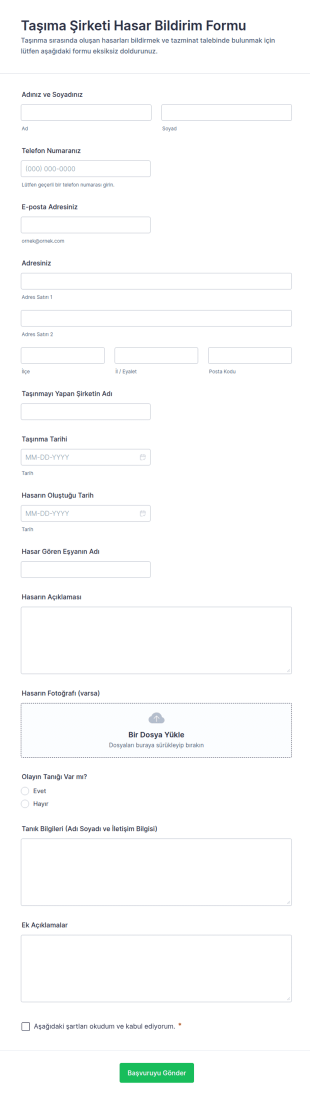
Taşıma Şirketi Hasar Bildirim Formu
Taşıma Şirketi Hasar Bildirim Formu, taşınma sırasında oluşan hasar başvurularını online olarak toplamak ve değerlendirmek isteyen nakliyat firmaları ile müşteri hizmetleri ekipleri için pratik bir çözümdür.
Kategoriye git:Talep FormlarıUlaşım Olay Formları Hakkında
Transportation incident forms are structured documents used to report, document, and track incidents that occur during vehicle and transportation operations. They help organizations capture consistent details about accidents, near misses, injuries, cargo damage, route disruptions, and safety hazards so teams can respond quickly and keep accurate records for investigations and compliance. Transportation incident forms are commonly used by logistics and delivery companies, fleet operators, public transportation teams, school transportation services, construction and field service fleets, and organizations that rely on regular vehicle movement. By standardizing incident reporting, these forms improve safety visibility, reduce reporting gaps, and support more effective corrective action.
With Jotform, transportation incident forms can be created quickly using a no-code, drag-and-drop Form Builder and optimized for mobile reporting in the field. Conditional logic can reveal follow-up questions based on incident type or severity, and file upload fields allow drivers to attach photos, documents, or evidence. Submissions are stored in Jotform Tables for organized review and filtering by vehicle, driver, location, and incident category. Automated notifications can alert managers or safety teams immediately when high-severity incidents are submitted.
Use Cases of Transportation Incident Forms
Transportation incident forms support safety reporting, operational follow-up, and documentation for internal and external reviews. Below are common ways these forms are used and the challenges they help solve.
Olası Kullanım Senaryoları:
- Araç kazası ve çarpışma raporlaması
- Ramak kala ve güvenli olmayan sürüş davranışı bildirimi
- Taşıma sırasında yaralanma ve güvenlik olaylarının belgelenmesi
- Kargo, ekipman veya mülk hasar raporlaması
- Rota kesintisi ve gecikme olay raporlaması
- Sigorta, tazminat talepleri ve soruşturma belgelendirme alımı
Problem Çözme Noktaları:
- Sürücüler ve rotalar genelinde olay detaylarını eksiksiz ve tutarlı bir şekilde kaydedin
- Önem derecesine dayalı yönlendirme ile yanıt ve yükseltmeyi hızlandırın
- Soruşturmalar, talepler ve uyumluluk için zaman damgalı kayıt oluşturun
- Tekrarlayan güvenlik risklerini belirlemeye ve eğitim veya politikaları iyileştirmeye yardımcı olur
Olası Sahipler ve Kullanıcılar:
- Sürücüler ve araç operatörleri
- Sevk ekipleri ve filo yöneticileri
- İş güvenliği ve uyumluluk ekipleri
- Faaliyet liderleri ve amirleri
- Sigorta veya risk yönetimi ekipleri
Oluşturma Yöntemlerinin Farkları:
- Kaza ve çarpışma rapor formları, zaman ve konum, dahil olan araçlar, ne olduğu, yaralanmalar, hasarlar ve fotoğraf ve belge gibi kanıt yüklemeleri üzerine odaklanır.
- Ramak kala ve tehlike raporu formları risk tanımını, katkıda bulunan faktörleri (yol, hava durumu, davranış), önem derecesini ve önleyici eylem önerilerini vurgular.
- Kargo hasarı ve hizmet kesintisi olay formları, gönderi veya rota tanımlayıcılarını, etki detaylarını (gecikmeler, kayıp), müşteri veya durak bilgilerini ve alınan çözüm adımlarını önceliklendirir.
How to Create a Transportation Incident Form
Creating a transportation incident form with Jotform helps you standardize incident reporting while making it easy for drivers and field teams to submit reports quickly.
1. Şablon Seçin veya Sıfırdan Başlayın
Çalışma Alanım'da "Oluştur"a tıklayın ve "Form"u seçin. Bir olay raporu şablonuyla başlayın ve ulaşım iş akışları için özelleştirin.
2. Add Incident Identification Fields
Tarih/saat, konum, güzergâh veya yolculuk numarası, araç numarası, sürücü adı ve olay kategorisini toplayın. Yapılandırılmış açılır menüler raporları standartlaştırmaya yardımcı olur.
3. Capture Incident Details and Impact
Olayların açıklaması, yaralanmalar, hasarlar, ilgili taraflar ve acil servislere başvurulup başvurulmadığı bilgilerini ekleyin. Alınan acil önlemler için alanlar ekleyin.
4. Use Conditional Logic for Severity and Incident Type
Çarpışmalar, ramak kala olaylar ve kargo hasarı için farklı bölümler gösterin. Yüksek önem dereceli raporlar için ek ayrıntı gerektirin ve yükseltme adımlarını etkinleştirin.
5. Add File Uploads for Evidence
Takip sürecini azaltmak için olay yeri, hasarlar, belgeler veya tanık ifadelerinin fotoğrafları için dosya yükleme alanları ekleyin.
6. Publish and Track Reports in Jotform Tables
Formu yayınlayın ve sürücüler için bağlantı veya QR kod aracılığıyla paylaşın. Yanıtları Tablolar'da araç, sürücü, tarih ve duruma göre takip edin.
Sıkça Sorulan Sorular
1. What are Transportation Incident Form templates in Jotform?
Transportation Incident Form templates in Jotform are ready-to-use digital forms that help teams report accidents, near misses, injuries, cargo damage, and other transportation-related incidents in a consistent format.
2. Why use Jotform templates instead of paper incident reports?
Jotform templates speed up reporting, reduce missing details, and make it easier to store and review incident records in one place. They also support mobile submissions from the field.
3. What information do these templates usually collect?
Typical templates collect incident date/time, location, vehicle and driver details, incident type, description, injuries or damages, immediate actions taken, and evidence attachments like photos.
4. Can drivers submit incident reports from a phone?
Yes. Jotform forms are mobile-friendly, so drivers can complete and submit incident reports on-site using a phone or tablet.
5. Can Jotform Transportation Incident Forms include photos and documents?
Yes. You can add file upload fields so users can attach photos of damage, the incident scene, insurance documents, or other supporting files.
6. Where do incident submissions go after someone submits the form?
Submissions are stored in Jotform Tables, where managers can filter and review reports by driver, vehicle, route, incident type, date, or severity.
7. Can incident reports trigger alerts for urgent cases?
Yes. You can set up notification emails that alert safety teams or managers immediately when a form is submitted, and you can route escalations based on severity using conditional logic.
8. Can these templates be customized for different fleets or incident types?
Absolutely. You can edit templates in Jotform’s drag-and-drop Form Builder, add conditional sections for collisions vs near misses, and tailor required fields to match your internal policy or compliance needs.