
Which AI assistant should you choose?
- Claude does fewer things, but it does them exceptionally well. If you write, code, or want to get started with agent-based automation, Claude is the better choice.
- ChatGPT is broader: It’s better at images, voice, browsing, integrations, and general purpose assistance. If you need versatility and multimodal capabilities, ChatGPT is the better choice.
The ChatGPT vs Claude comparison doesn’t have a clear winner: Parent companies Anthropic and OpenAI, respectively, are in a dead heat, constantly overtaking each other on intelligence, agent technology, and productivity features. Both started as conversational AI tools and have since expanded well beyond the chat interface.

I use both every day. Claude handles writing, coding, and workflow automation; ChatGPT handles images, online research, deep dives into new topics, and sharing custom GPTs with friends and clients. I mapped my experience across nine categories to help you find the best AI assistant for your work.
Winner | Why? | |
|---|---|---|
| Coding | Claude | Claude leads on software engineer (SWE) bench and excels at large codebases and multi-file refactoring. Claude Code is overwhelmingly more popular among developers. |
| Writing quality | Claude | Claude varies sentence structure more naturally, avoids corporate clichés, and gives more direct, actionable editing feedback. |
| Deep reasoning | Claude for top-performing model, ChatGPT for daily use | Claude Opus 4.8 tops ARC-AGI-3 and holds 1 million tokens in context; GPT-5.5 outperforms Claude Sonnet on everyday reasoning benchmarks with a stronger midtier model. |
| Image generation | ChatGPT | ChatGPT has GPT Images 2 with accurate in-image text and intuitive editing tools. Claude has no image generation. |
| Voice mode | ChatGPT | ChatGPT’s voice is more natural and polished, with camera sharing and a longer track record. Claude’s voice mode is newer and inconsistent across voice options. |
| Tools & automation | ChatGPT for general use, Claude for developers and professionals | ChatGPT offers an easier consumer app marketplace and shareable GPTs. Claude’s MCP model is more open and flexible for niche or professional integrations. |
| Privacy controls | Claude | Claude defaults to opting out of data-sharing for training; ChatGPT defaults to opting in, requiring users to manually turn it off. |
| Agentic AI | Claude | Claude Code is the dominant developer tool for agentic coding, and Anthropic led the introduction of computer use capabilities. |
| Pricing | ChatGPT | It has fewer usage constraints across plans, no noticeable rolling cutoff windows on paid tiers, and lower API entry points for simple tasks. |
1. Coding skills
Winner: Claude, but ChatGPT is closing the gap.
You can see the arms race between the two companies in the model intelligence benchmarks. On the SWE-bench coding leaderboard:
- Claude Opus 4.8 scores 61.4 percent.
- GPT-5.5 scores 60.2 percent.
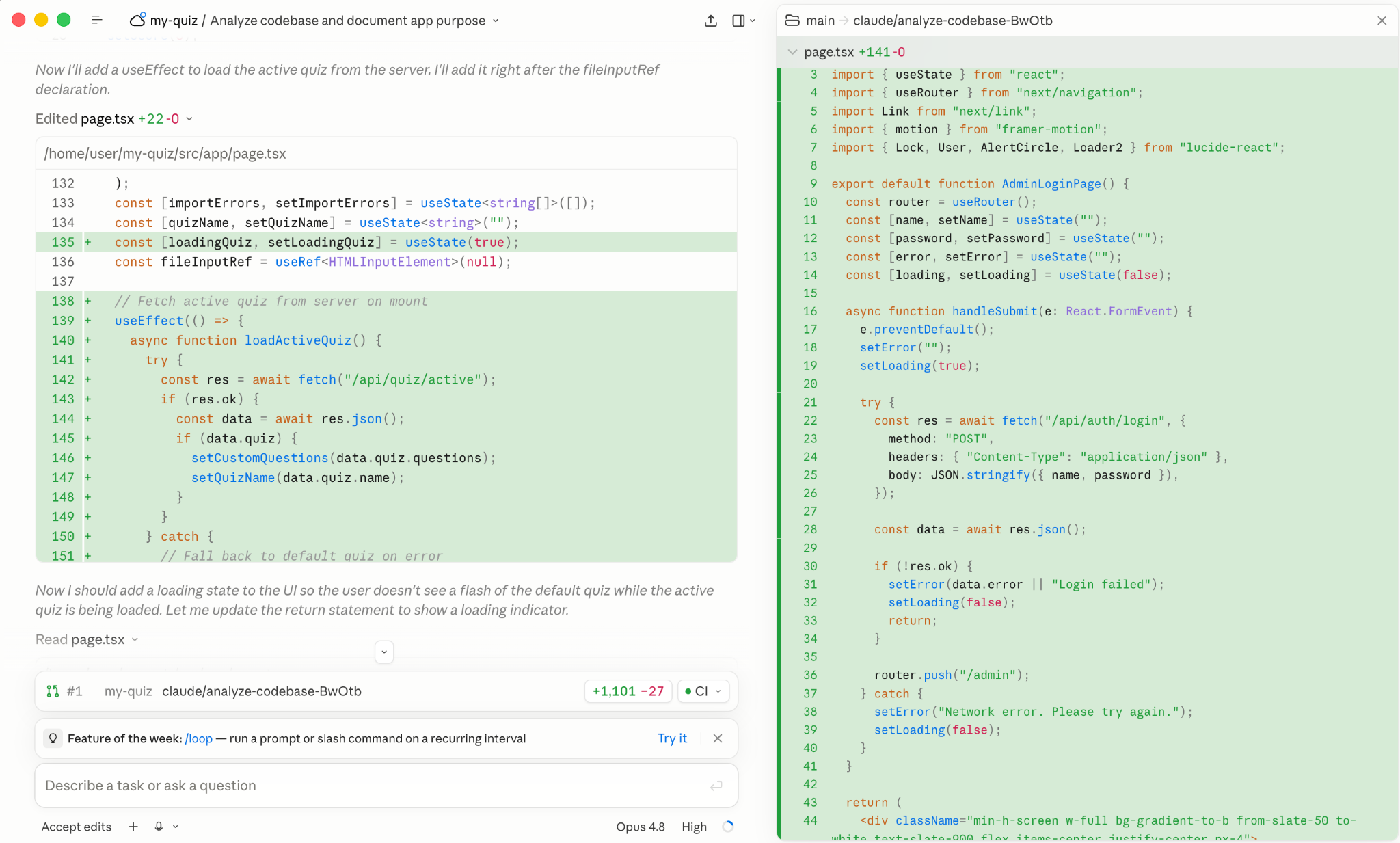
Beyond the numbers, the developer consensus positions Claude as the better option for navigating large codebases and multi-file refactoring. Anthropic’s agentic loop is better at producing a plan for large-scale changes, architecture planning, and complex logic. The code is more readable and better documented.
The user interfaces it builds are more appealing. It opts for rounded corners, smart font combinations, hierarchy combining shadows with colored elements, and lots of cards. This initial advantage is slowly becoming a drawback: If you don’t give clear guidelines, the model will produce an interface that looks like everything else.
OpenAI’s product excels in terminal-based workflows, competitive programming, mathematical/algorithmic problems, and rapid prototyping. It also established itself as the best for async autonomous work, due to its original implementation as a cloud-based coding agent.
Its interface design is not as immediately appealing, but you can tune it with specific instructions. The GPT-5.5 model is more efficient when coding, requiring fewer tokens to produce an equivalent result to Claude’s, which makes it more economical. The reasoning steps it shares as it builds are more straight to the point, even if they can lean too technical, a friction point for non-developers.
While you can ask for coding tasks in the chatbot versions of both (creating Artifacts in Claude and canvas files in ChatGPT), the best place to use these features is in Claude Code and Codex. These integrate the AI model into an agent harness, which is software that allows the model to act across longer periods of time, using external tools, to achieve the goal. These are agentic AI products we’ll cover in a later section.
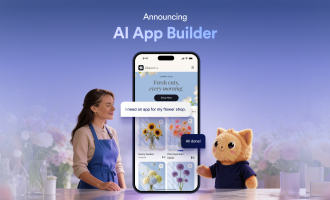
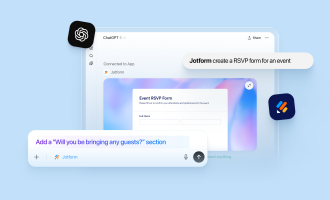
For simpler business apps, both platforms offer a similar no-code workflow through Jotform App Builder for ChatGPT and Claude. In either case, you describe an app—such as a client portal or onboarding hub—then adjust its layout, forms, and branding through conversation before publishing. Connect now to use Jotform App Builder in ChatGPT or Claude to turn your app idea into a published app without coding, within your preferred AI workspace.
2. Writing quality and tone
Winner: Claude.
AI writing is still plagued with formulaic structure and crutches (for example, “it’s not X, it’s Y”). On the Claude vs ChatGPT writing comparison, Claude comes out on top with writing that more frequently switches up the formula: It doesn’t follow a dominant rhythm, sentence lengths vary, it can write fresher transitions, and its writing is cleaner.
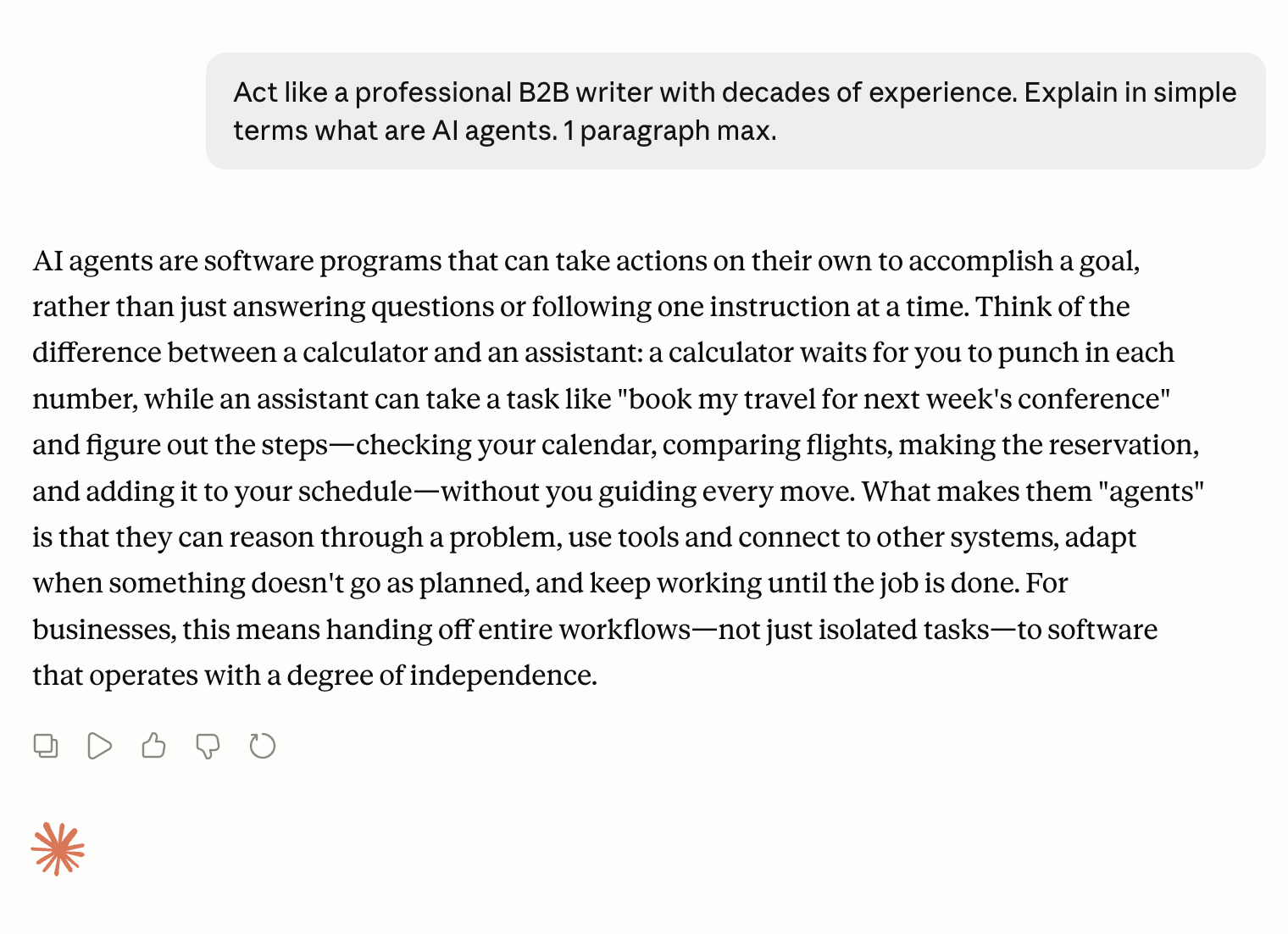
It has a range of styles available as slash commands that you can apply to any writing task, with the option of creating your own. The output still needs sharpening, but the structure is usually strong enough that it saves time until a piece is ready to publish.
ChatGPT improved dramatically from GPT-4o to the current GPT-5.5, but it’s still too attached to a more corporate way of writing. It leans on explaining everything and chaining paragraphs with stale transitions such as “it’s worth noting that …” For longer responses, it uses a lot of bullet points that can make claims feel disjointed, more notes than a narrative. And when editing, it defaults to a gentler personality by comparison, which isn’t ideal when you want actionable feedback.
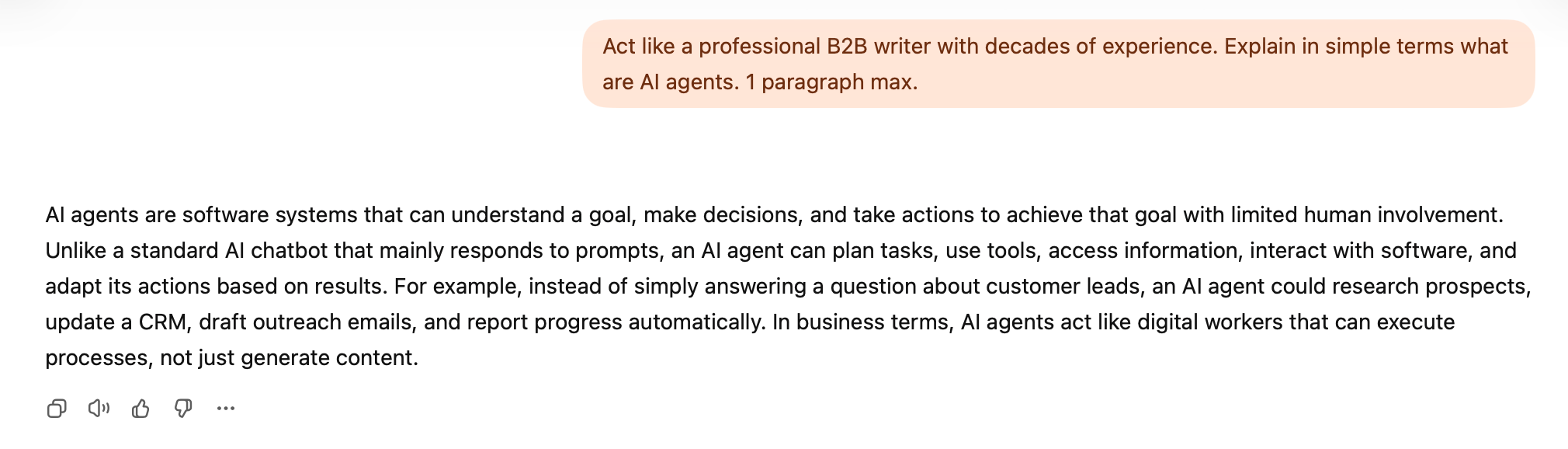
If you need criticism of your writing to sharpen a draft, Claude is also a better fit: It’s more direct, has better instincts on what to change and what to keep, and is an excellent guide if you want editing prompts rather than direct changes.
That said, getting strong writing output from either tool depends heavily on the prompt you provide. Browsing AI prompt examples is a good way to sharpen that skill and unlock more of the benefits of AI writing assistance.
3. Deep reasoning
Winner: Claude for top-performing model, ChatGPT for daily driver.
Deep reasoning is more than just solving differential equations. In your daily workflow, this affects how the model
- Assesses a 50-page contract to surface risks.
- Summarizes the key elements of a research project, properly connecting the main claims and topics.
- Debugs a chain of logic in a report across three datasets.
- Holds a complex argument in a long conversation, maintaining the main thread and being able to discuss it as accurately as possible.
Is Claude better than ChatGPT at reasoning? On the main benchmarks, the scores are very close. The only one that shows a wider gap is the extremely difficult ARC-AGI-3, testing the ability to discover and apply rules from limited context.
The models have to guess the correct image pattern from sets with three examples each; they haven’t seen any of them during training, so they can’t rely on previous experience to respond. There is also a cost component: The model that uses more computational power to get to the solution is penalized.
With both models set to their maximum performance settings, Claude Opus 4.8 scored at the top of the market with a hard-earned 1.8 percent, while GPT-5.5 attained 0.4 percent. For frontier work, Claude has a very slight edge.
Beyond raw reasoning power, Claude retains the edge on conversational memory due to its 1 million token context window: It can hold about 750,000 words in context, making it better for longer conversations or analyzing long documents. ChatGPT supports a maximum of 400,000 tokens, but the limits vary depending on which model type you’re using (GPT-5.5 Instant is capped at 27,000, the lowest end) and the pricing plan you’re on.
The story changes for daily work, especially due to usage constraints for the top-performing models. Using the ARC-AGI-2 benchmark (a slightly easier test):
- Claude Sonnet 4.6 scores 60.4 percent.
- GPT-5.5 scores 83.3 percent, winning on cost efficiency and a stronger model for daily use.
For everyday reasoning tasks, ChatGPT offers robust performance with a decent context window. Claude is a better fit for your hardest tasks and those that require a longer conversational memory.
4. Image generation
Winner: ChatGPT.
ChatGPT has GPT Images 2, one of the most capable AI image generation models available right now. Beyond its overall visual quality, it’s capable of generating accurate text inside the image without deformations or imprecision. It can also reason about composition and lighting before generating, increasing the quality of the image’s content.

You can edit images by adding new prompts, either in general to transform the whole or by marking areas manually. The model can execute the changes without touching what you didn’t want to change, making the experience easy and intuitive.
ChatGPT is a clear winner here because Claude doesn’t have image generation features. If you ask Claude to generate something, it will instead write code to render a visual asset: an interface, a chart, or a vector illustration, a better fit for web development or user interface/user experience (UI/UX) design.
Pro Tip
For more than one-off image edits, explore the best ChatGPT design apps to match each design task with the right tool, from marketing visuals and photo edits to UI concepts, diagrams, and presentations.
5. Voice mode
Winner: ChatGPT.
Voice mode adds convenience when interacting with a chatbot: You can just speak out what you’re thinking without curating it into sentences. ChatGPT was the first to introduce this mode, and it’s still coming out on top.
The mobile app has the best implementation of this feature: Choose one of the available voices, tap the Voice Mode button, and the conversation begins. After you finish speaking, the model starts responding, searching to add more context to its responses if needed. Its standout feature allows you to share your camera with ChatGPT so it can view your surroundings. It can describe and chat about objects or areas around you with surprising accuracy.
The interface keeps scrolling down to highlight the agent’s response, but you can always scroll up to see all previous messages. Even though ChatGPT uses a speech-to-speech model to handle voice mode, everything is transcribed so you can reference it later.
The vocal performance in ChatGPT voice mode is currently one of the most natural on the market, relaxed and well-articulated. It sometimes cuts off in bad network conditions, but it maintains its quality if both your connection and OpenAI’s servers are working well.
Claude only recently added its own voice mode. It offers features comparable to ChatGPT: It transcribes the entire conversation, responds in real time, and can search the web to contextualize its responses. The voice quality is a bit uneven, depending on which one you pick. The Rounded voice performed better in my tests, with others still sounding robotic at times.
As for standout features, Claude offers push-to-talk, a useful control for people who like to think between conversation turns. Instead of having to stay silent until you’re ready to interact with the agent, you can press the button when you’re ready to speak and take as much time as you need before continuing the conversation. Tap the settings icon and scroll down the modal to reveal this option.
6. Tools & automation
Winner: ChatGPT for general use, Claude for professionals and developers.
OpenAI originally positioned ChatGPT as a consumer product, designed to appeal to a large audience. The most obvious signal of this positioning is in how it’s displaying ads to Free and Go users.
Its ecosystem is built on the principle of accessibility. ChatGPT’s Apps screen shows all the available connections with third-party software, offering an easy integration process. Top apps include Canva for design, Airtable for productivity, or Booking.com for finding stays. There are dozens more for lifestyle and productivity use cases.
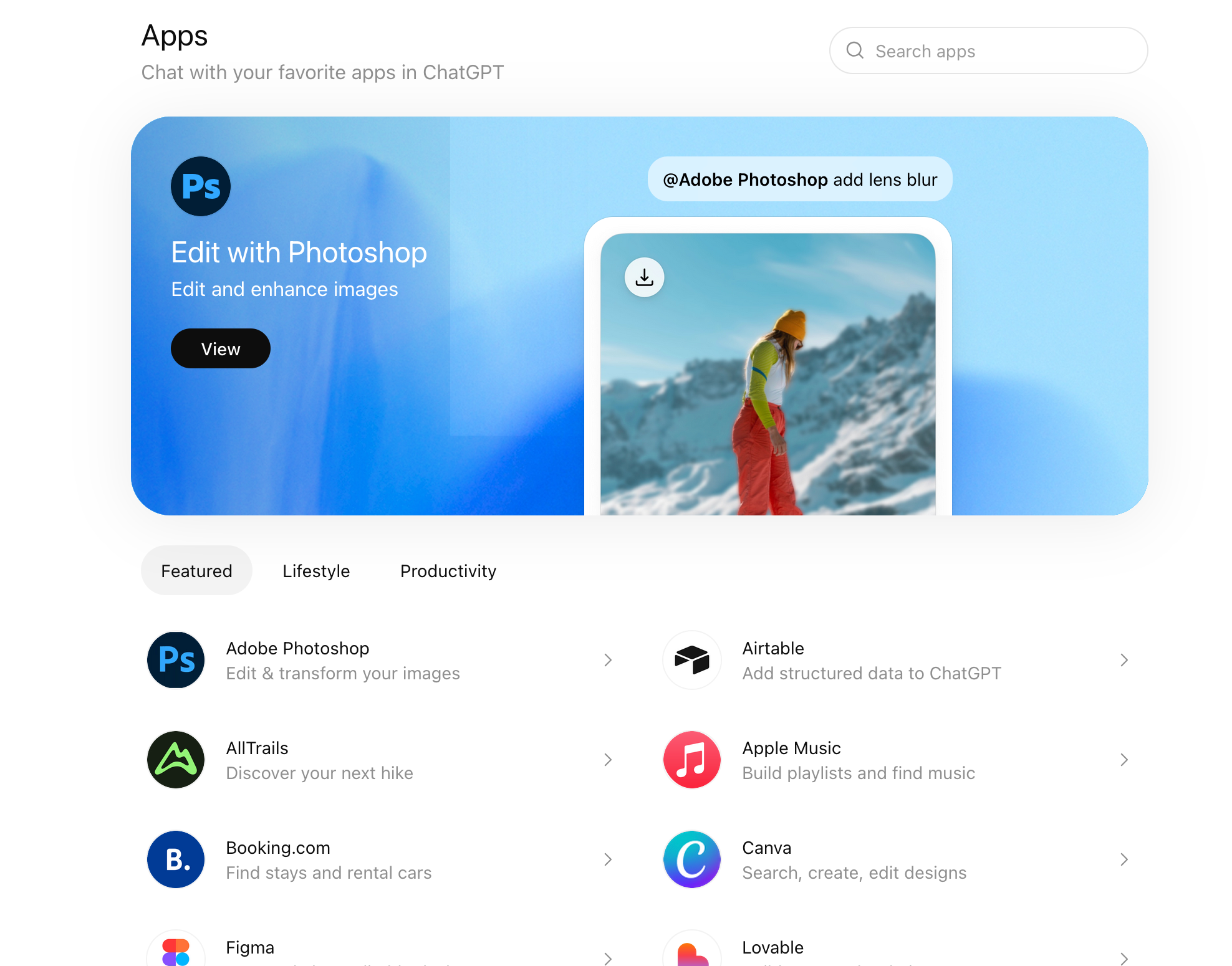
Once you authenticate ChatGPT with the third-party app, you can mention the app in the chat (e.g., @Canva), and the agent will start working with that app. The capabilities vary depending on the app and the integration’s power (set by the third-party app’s developers and approved by OpenAI), but they usually revolve around creating and viewing resources.
Beyond integrations, any paid user can create a GPT: essentially, a version of ChatGPT with custom instructions, knowledge, and integrations. They’re handy for reusing instructions across conversations and for sharing with others. The best ones can go viral; the most popular GPTs are featured in a top picks page, giving incentives to more users to try them.
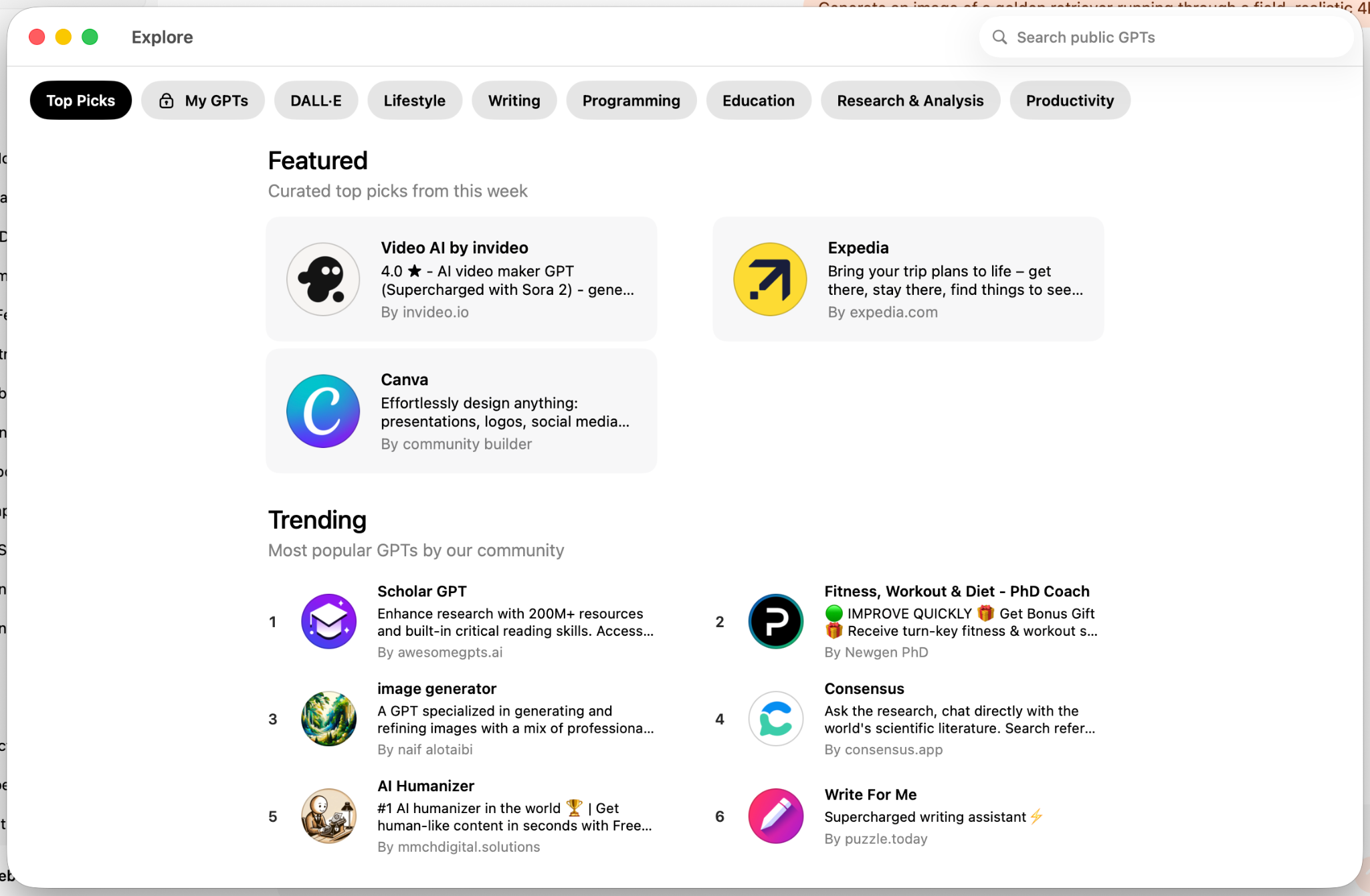
As far as tools and automation go, ChatGPT wraps its feature set: Projects for long-term memory and reusable instructions across multiple uploaded files, and agent mode for running actions in a virtual computer, which is useful for complex tasks like building a shopping list by searching the web or interacting with websites that don’t support API integration.
Claude targets professional and developer workflows by providing a toolkit that speaks to their needs. It was the first to introduce the Projects feature (which ChatGPT later adopted). It ramped up its connectors library, which now has dozens of integrations with apps such as Figma for UI/UX design, Slack for communication, or Strava for analyzing your running. The connection experience is equivalent to the diverse ecosystem of ChatGPT communication apps and third-party integrations currently available.
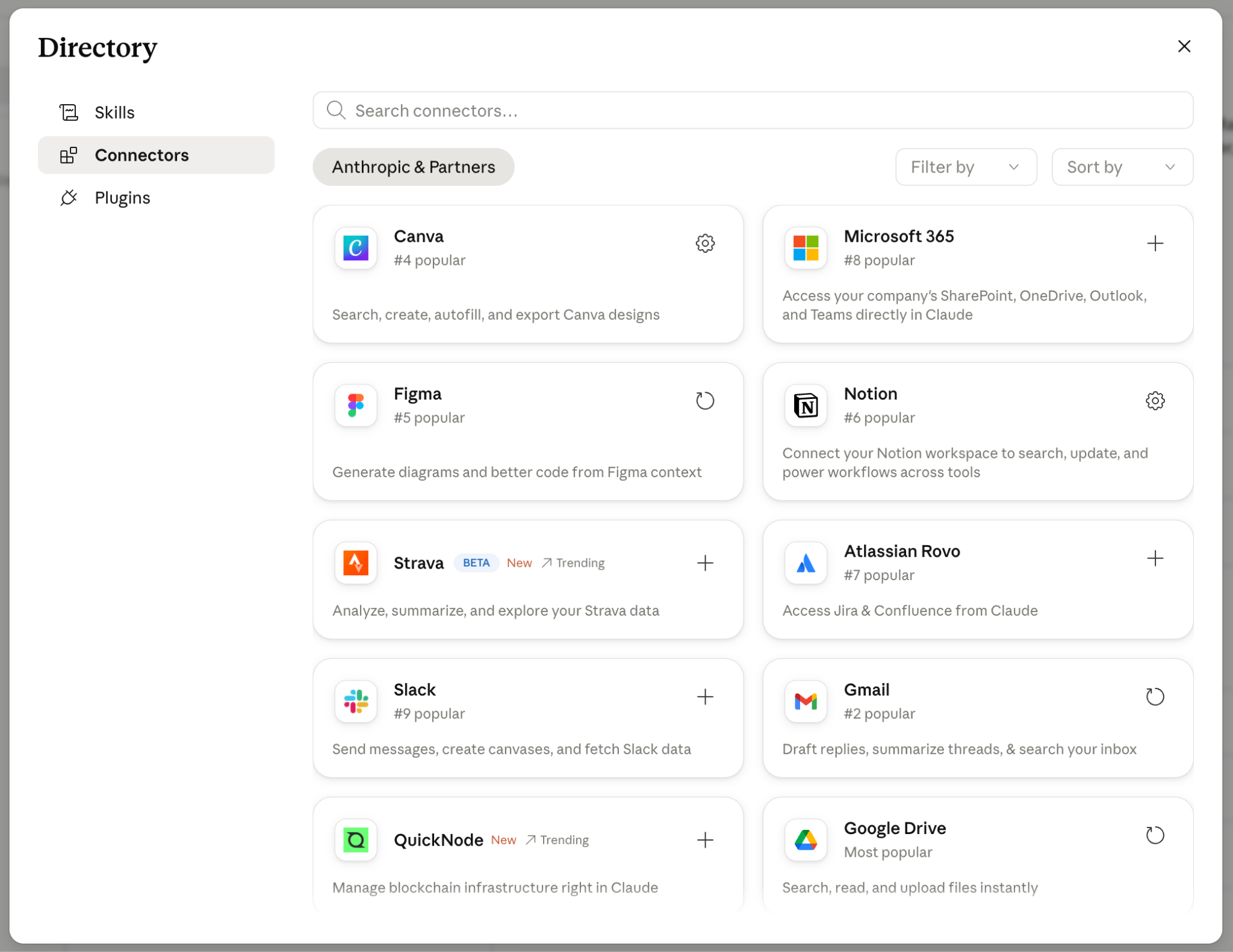
Anthropic is also responsible for the Model Context Protocol (MCP), the USB-C of AI integrations with external platforms. Despite its setup friction, the MCP model is more open: ChatGPT gates access to its Apps directory, whereas anyone can build an MCP server with custom capabilities and connect it to Claude. Even if the connector isn’t available on the Claude interface, you can upload the integration or create your own.
This is a better fit for professionals: You can access a wider range of integrations, including niche software, not just the selections from a curated app lineup. There’s no gatekeeper of the capabilities the agent should have when interacting with third-party apps: You can give full control or limit it to read-only access. And for businesses running internal tools, MCP is an effective interface to let agents see and manipulate data on their systems.
Instead of GPTs, Claude has Skills: It can execute sets of repeatable instructions consistently as soon as it detects the task in your conversation. You can use one or several in the same conversation thread: For example, you can use a data analysis skill to extract your year-on-year growth, then trigger a presentation skill to pack that insight into a PowerPoint. This adds a layer of workflow automation but removes the shareability component of ChatGPT’s approach.
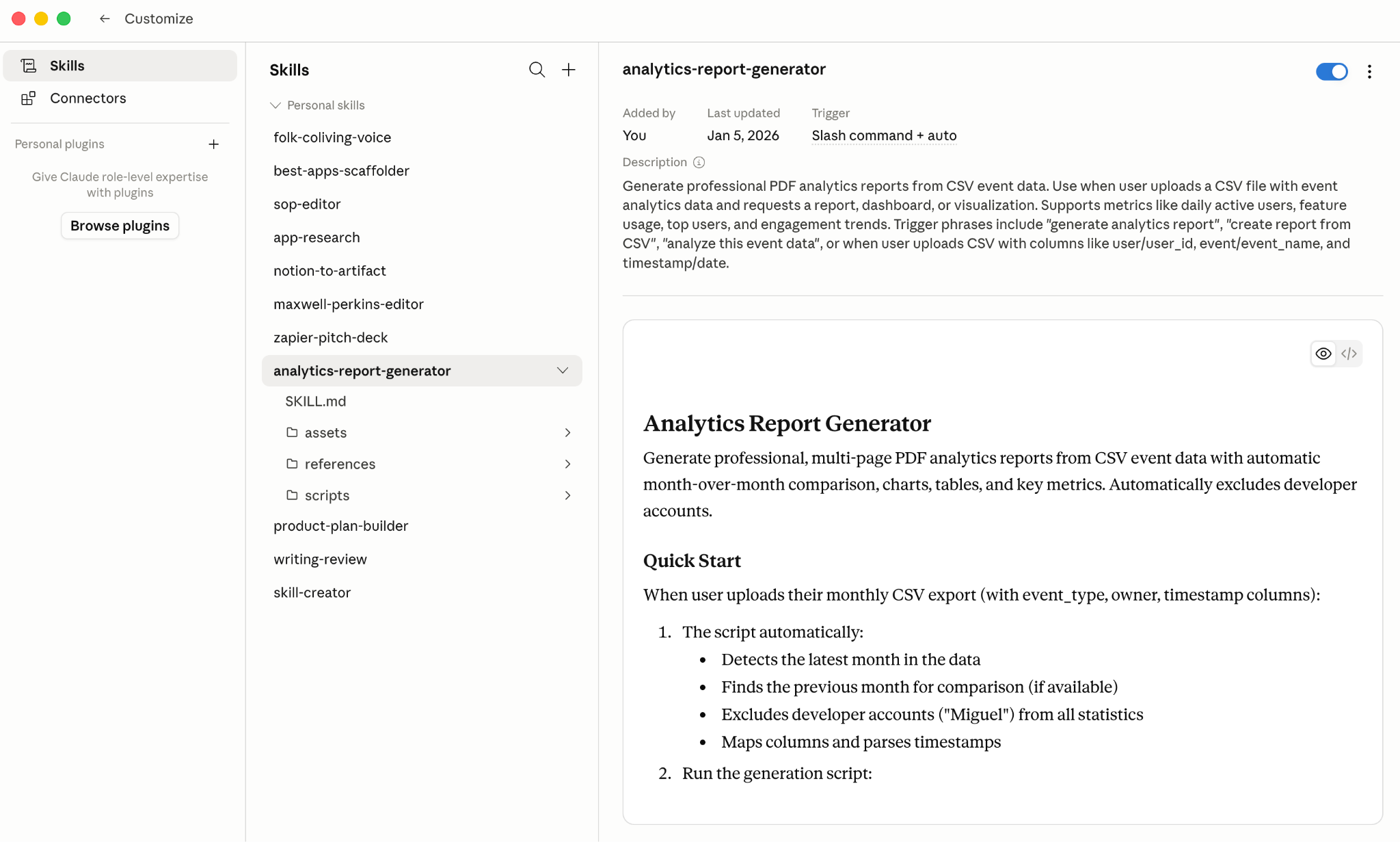
Both platforms now let Jotform users manage their forms without leaving the chat interface. ChatGPT has the Jotform ChatGPT App in its marketplace; Claude has the Jotform Claude Connector. In both cases, you can ask to create a form, update a field, or pull a submission, and the agent interacts with the data in your Jotform account. This is useful for automating form-related workflows. It’s a practical example of the benefits of chatbots applied to everyday business tasks.
The same functionality extends to e-signature workflows. Jotform Sign for ChatGPT and Claude let users create or upload documents, revise them conversationally, add recipients, send signature requests, and track their status. This takes both platforms beyond form management by allowing users to complete document-signing workflows without leaving the conversation. Connect now to use Jotform Sign in ChatGPT or Claude to move from drafting to signed documents within your preferred AI workspace.
Pro Tip
If form creation is part of your AI workflow, learning how to create a form in ChatGPT can help you turn a natural-language prompt into a working form, then refine fields and review submissions without leaving the conversation.
7. Security & privacy settings
Winner: Claude (by a small margin).
Claude wins by a small margin on how it handles data-sharing for model training. When you sign up for a new account, the default is that your data isn’t shared at any point. If you choose to opt in, Anthropic can retain and use your data for up to five years.
ChatGPT has the opposite flow: New accounts are opt-in by default. If you don’t want to share your data with OpenAI, you must proactively go to Settings, then Data Controls. Set Improve Model for Everyone to Off.
For enterprises, the margins are also small but could make a difference, depending on your needs. For identity management and access control, both platforms are at parity in terms of technology, but ChatGPT is more granular in feature-by-feature permissions: Admins can restrict access to image generation, Codex, or any other tool.
As for security and compliance, both comply with key standards such as SOC 2, ISO 27001, FedRAMP, and HIPAA (available with a Business Associate Agreement). Claude has a very slight edge in its ISO 42001 certification (a standard for AI security management systems) that ChatGPT hasn’t attained yet.
8. Agentic AI
Winner: Claude.
Agentic AI means AI that takes action. Starting from your prompt, it plans implementation, uses tools to interact with devices and external systems, and runs across as many steps as needed to reach the goal without losing focus, sometimes as long as multiple hours. It’s the closest we get to autonomous AI, though both tools still require human checkpoints.
The Claude vs ChatGPT coding competition reaches its peak here: Claude wins due to Claude Code’s quality and overwhelming popularity with developers. To compensate, ChatGPT offers two useful features for professionals: deep research and workspace agents.
Claude Code vs Codex
Available via terminal, on the web, and on desktop apps, Claude Code executes software development tasks from English prompts, using an agentic loop to plan, gather context, ask for permissions or extra input, and then execute changes you can review. Initially available only locally, using your computer to run commands and manage files, it’s now also available in the cloud.
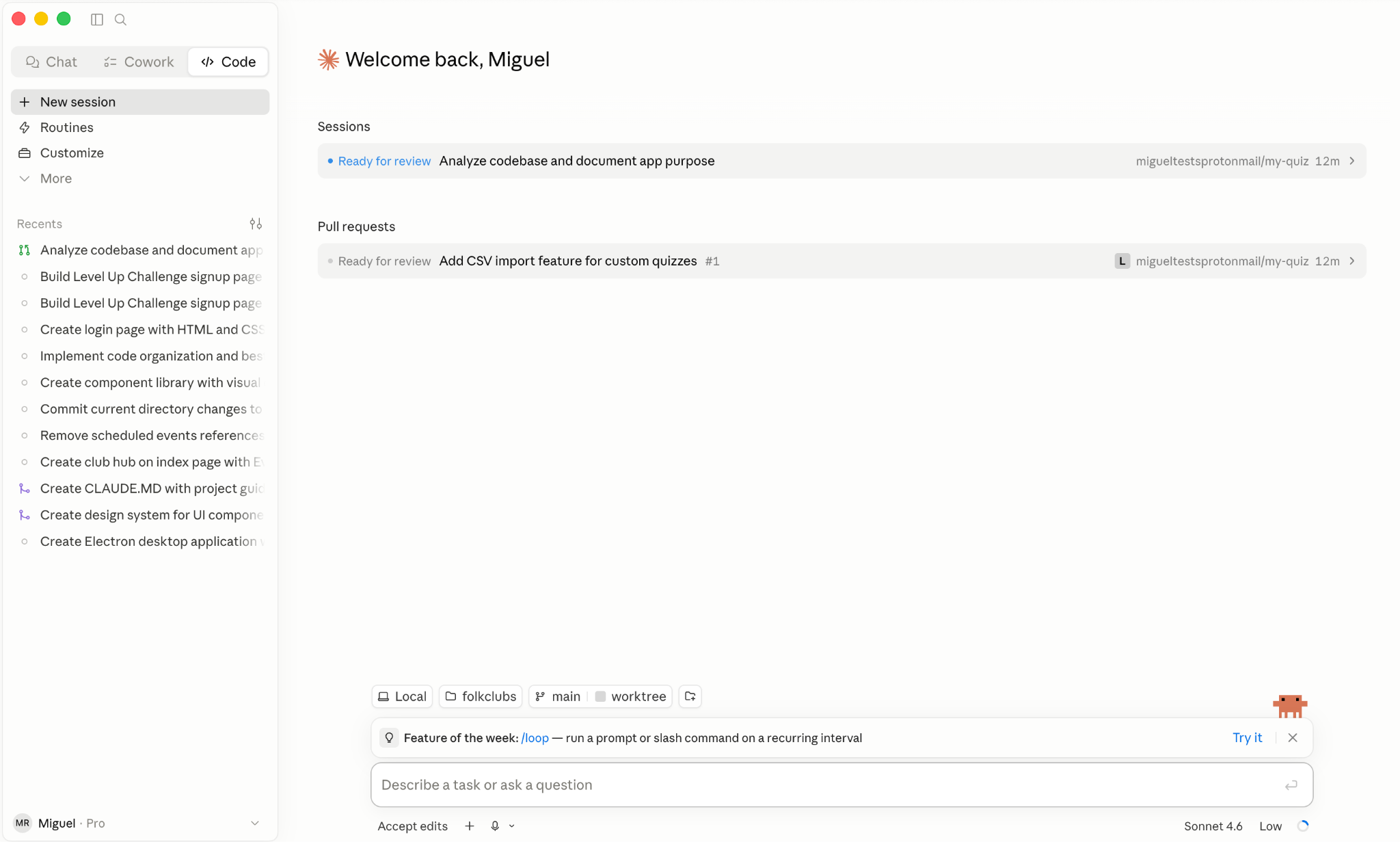
Claude was the first to both deliver usable code and offer a UX that felt engaging, with developers claiming it made the coding experience fresh again. Over time, nontechnical users joined in, using it for content, sales, and marketing workflows, which led to the release of Claude Cowork, a sibling product for nontechnical workflows.
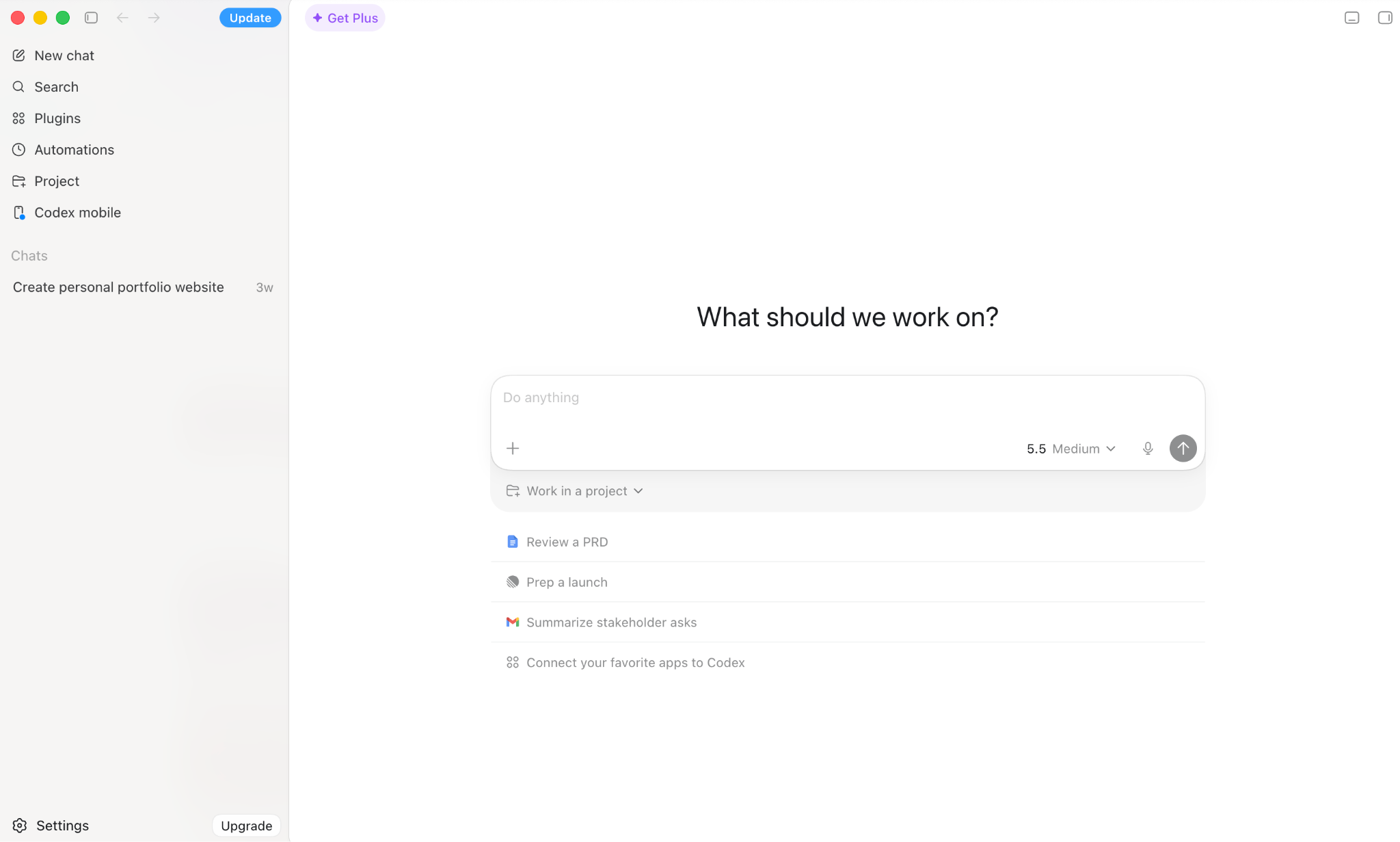
On the other side of the field, OpenAI’s Codex offers a similar feature set powered by GPT models. It has grown over the past year, attracting a wider user base due to its higher token efficiency (affecting costs) and better performance on well-scoped tasks: It zeroes in when solving problems, whereas Claude is more exploratory. It’s still not as popular as Claude Code, but developer sentiment is increasingly positive, with some teams starting to use both, depending on tasks they need to complete.
ChatGPT deep research
While both agents are connected to the internet and can search for web pages, ChatGPT has an edge with deep research. State a topic and the agent asks for more context so it can understand what kinds of information you’re looking for. Once you confirm, it runs an agentic search step that can take up to 30 minutes, scouring the web for sources to answer your question as best it can.
The resulting report is rich in information density, with clear logical structure and sources after each major claim, making it easy to fact-check and catch any hallucinations. It’s a great starting point when you’re diving into a new topic, updating your knowledge, or using it as context for a set of exploratory chats.
Claude has a research feature you can activate on new chats, but it’s not on the same level as ChatGPT’s tool.
ChatGPT’s workspace agents
For teams in Business, Enterprise, and Edu plans, ChatGPT offers workspace agents directly from the chatbot’s interface. Powered by Codex technology, it allows you to set up agents to automate tasks in your company. As you start the configuration process, describe the workflow you want to automate and the agent will guide you through the setup steps.
Featured use cases include Slack integration for triaging software requests; a product feedback routing agent connected to Linear and the web; and a lead outreach agent that qualifies inbound leads by reading Gmail and Google Calendar, then enriching that information with data from the web.
These agents run in the cloud and can be set to execute on a recurring basis, adding a set-and-forget element that helps the automation stick and actually be used by your team. For teams evaluating AI chatbots for business, this is ChatGPT’s strongest argument.
Computer use
Anthropic led the introduction of computer use in 2024, allowing Claude to perceive and interact with computer interfaces by looking at screenshots, clicking elements, and typing text. One implementation of this technology is in the Claude for Chrome extension, which lets the AI model control the open tabs on your browser.
OpenAI offers similar capabilities in its Agent Mode, available by selecting that mode when starting a new chat in ChatGPT. The main difference is that the agent doesn’t run on your device; it opens a new virtual computer on the cloud, where it visits websites in its own browser, clicks elements, and completes tasks.
Despite both being promising in theory, Claude and ChatGPT still have serious limitations in practice. They can get stuck in loops when browsing complex websites and sometimes ignore key instructions, making it a bit of a hit-or-miss feature right now.
9. Subscription and API pricing
Overall winner: ChatGPT.
The ChatGPT vs Claude pricing competition consistently favors OpenAI’s product. ChatGPT offers more usage across all plans, despite ads on the Free and Go plans. For the API, OpenAI is more expensive for the top-performing model but has lower entry points for mini and nano models, a good fit for simpler tasks.
Free tier and ChatGPT Go
At the free tier, both give users access to capable models:
- Claude offers Sonnet 4.6 and Haiku 4.5 within a rolling five-hour usage window. You get robust models, but when you hit the limit, the conversation stops.
- ChatGPT gives you GPT-5.5 Instant and GPT-5 Thinking Mini for a limited number of messages over a similar rolling period. When that allotment is spent, it degrades to a lower-quality model instead of cutting off.
There’s a catch for the ChatGPT free tier: Users in the United States now see ads, and the coverage is expanding across more regions. This is also true for members on the $8 per month Go plan, a lite plan that extends usage for casual use.
Winner: ChatGPT for more usage, even with ads and a model with lower intelligence after the initial message quota.
Claude Pro vs ChatGPT Plus
At the $20 per month parity tier, Claude Pro unlocks all models, including Opus 4.8, plus Claude Code, Cowork, a 500,000-token context window, and usage at five times the free quota. An annual option brings it down to $17 per month, which ChatGPT doesn’t match.
ChatGPT Plus at $20 includes GPT-5.5 Instant and expanded Thinking access, agent mode, canvas, deep research, Codex, and advanced voice, but not GPT-5.5 Pro. The context window on Plus varies by model and plan, with Instant models capped at 54,000 tokens.
Winner: ChatGPT. Claude’s yearly pricing discount is a plus, but the rolling five-hour usage window is still present in the paid plan, which can frequently cut users off during work. After using a paid ChatGPT account for three years, I’ve never hit any limits, even during heavy usage.
Midtier and top individual plans
Claude and ChatGPT both offer a $100 plan, raising usage limits and letting you access their models faster and with priority in peak usage periods. The plans are nearly symmetrical, with each offering all the power of their respective platforms, with one key difference: Claude models get expanded memory with a 1 million token context window.
Both used to have a $200 per month plan that increased usage limits even further, but this is shifting. ChatGPT is no longer promoting it on its pricing page or via any publicly accessible link. Claude removed that plan from its pricing page but still offers an entry point via a landing page on its website.
Team and enterprise plans
Claude offers the same split of its $20 per month and $100 per month individual plans for teams: You can decide how much you want to pay per seat, with bundled usage being the main difference.
ChatGPT offers a flat $20 per user, per month for teams, with virtually unlimited access to GPT-5.5 Instant, the base model. Despite this generosity, there are limits to using the more powerful models:
- GPT-5.5 Thinking: 3,000 requests per week
- GPT-5.5 Pro: 15 requests per month
For developers, OpenAI also offers the Business Codex plan: a pay-as-you-go plan for using Codex, without a fixed monthly price.
Both offer Enterprise plans with pricing on request, negotiated directly with Anthropic and OpenAI’s teams.
Winner: ChatGPT.
API pricing
API pricing is complex for both platforms, with plenty of details hidden in the fine print and model infrastructure.
For the top-performing models, the input cost is identical: $5 per million tokens (mtok). For output, OpenAI is more expensive, with GPT-5.5 output at $30 per mtok and Claude Opus 4.8 at $25 per mtok.
Here’s where it gets complicated:
- Opus 4.8 introduces a new tokenizer (the translation layer between text and numerical representations that the model uses to process requests) that effectively increases token usage. While the advertised price is lower, the price per task might actually be higher, depending on your feature or product.
- OpenAI has different pricing based on context size; input price doubles and output price increases by 50 percent on average for long-context tasks.
For less powerful models for simple tasks, OpenAI has a range of low-cost mini and nano series models starting at GPT-5.4 nano at $0.25 per mtok input, $1.25 per mtok output. Claude’s pricing is higher, with Haiku 4.5 at $1 per mtok input, $5 per mtok output.
Winner: OpenAI.
Claude vs ChatGPT: Which should you choose?
Both Claude and ChatGPT are excellent generative AI tools. If you’re a power user and rely on AI as work infrastructure, using both is the best option: Route research-heavy tasks and image generation to ChatGPT, and use Claude for writing, coding, and automation.
That said, here’s how to think about Claude AI vs ChatGPT depending on your use case. If you have to choose one, Claude is a better fit
- If writing is a core part of your work, considering outputs need less editing before they’re ready to share.
- If you want to start working with AI agents and agent-based automation, because Claude Cowork handles complex workflows on local files with less friction than comparable tools.
- If coding is part of your work, since Claude Code is currently the most popular tool among developers for delegating and reviewing code.
ChatGPT is a better pick if you
- Need capabilities Claude doesn’t currently offer, such as image generation or deep research reports.
- Want to save and share reusable instructions. GPTs make it easy to package a customized version of ChatGPT and share it with a single link.
- Are more budget-conscious. Fewer usage constraints and a lower entry point for API tasks make it the more accessible option for heavy use.
If neither fits perfectly, there are ChatGPT alternatives such as Gemini and Grok, and Claude alternatives such as Copilot and Perplexity. Each is worth taking a look at, depending on your use case.
This article is for knowledge workers, marketers, students, small business owners, developers, and operations teams comparing Claude and ChatGPT for writing, coding, research, file analysis, form creation, and everyday productivity.



















































































Send Comment: