On any website, especially an e-commerce site, a well-placed countdown timer creates a sense of urgency that turns passive browsers into active shoppers. Whether you’re running a flash sale, providing registration for a webinar, launching a product, or offering a limited-time product or service, adding a visible countdown widget makes your deadline difficult to ignore, improves click-through rates, and lifts conversions in a way static content can’t.
But you can convey that urgency only if you use the right countdown timer widget. With dozens on offer, it can be challenging to figure out which ones include the right features to inspire excitement and scarcity while allowing you control over design and timing.
To make things easier, I tested popular countdown widgets for websites and picked the five best no-code options. For each, I installed the widget on a fresh WordPress website, used it, and then looked through user reviews, development logs, and new feature additions.
The 5 best countdown timer widgets in 2026
| Tool | Best for | Price | Customization | Embed flexibility |
|---|---|---|---|---|
 Jotform Countdown Timer widget |
Free, no-code countdown campaigns on any website |
Free |
Easy to customize without design skills |
Supports WordPress, Squarespace, Framer, Shopify, and Wix |
 Elfsight Countdown Timer widget |
E-commerce sites running frequent, branded promotions |
Free and paid subscriptions |
Customizable with custom CSS and JavaScript |
Supports 112+ platforms |
 TickCounter |
Personal sites, blogs, and one-off event pages |
Free forever with one lifetime payment |
Basic customization options |
Supports 11+ platforms |
 Common Ninja Countdown widget |
Highly customized, animation-rich countdowns |
Free and paid |
Deeply customizable, with multiple layouts, design skins, and CSS |
Supports 200+ platforms |
 HurryTimer |
WordPress and WooCommerce |
Free and paid |
Easy to customize |
Supports most WordPress page builders |
1. Jotform Countdown Timer widget
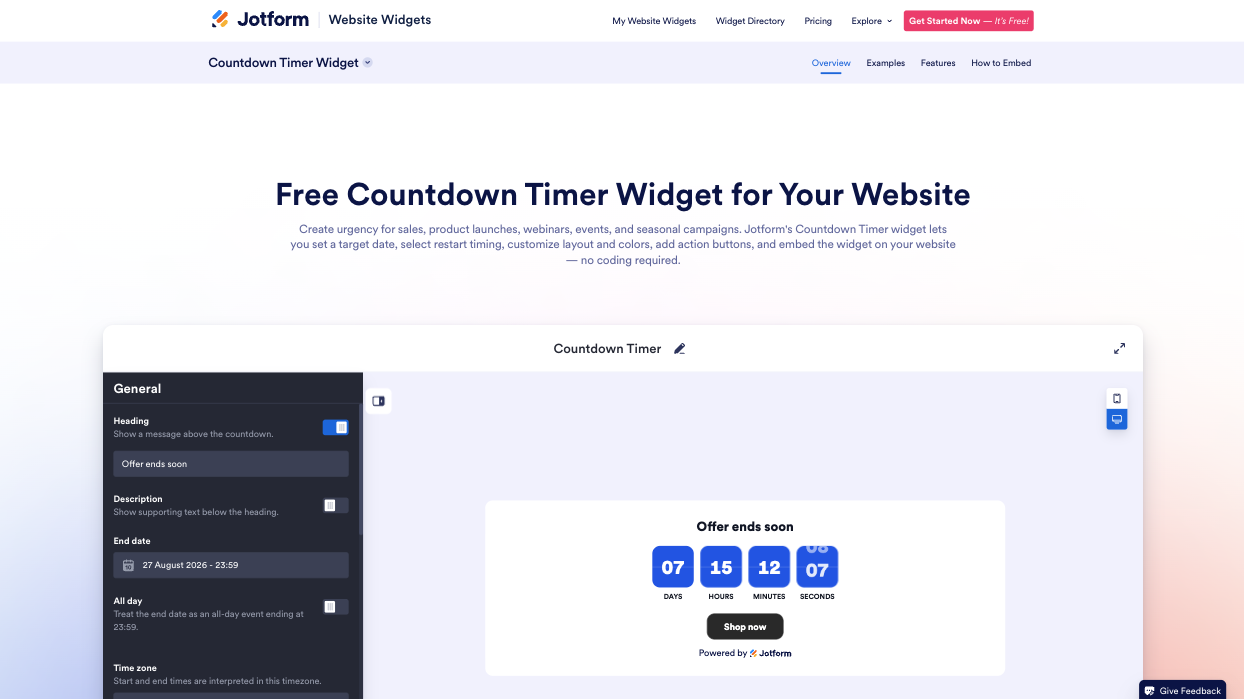
If you’re looking for a free countdown widget built for most platforms (including WordPress, Shopify, Wix, Squarespace, and Framer), Jotform’s Countdown Timer widget is your best option.
Start on the Countdown Timer page (pictured in this section), where you can adjust basic settings, such as the description, end date, time zone, scheduling (including repeat schedules), and post-countdown behavior. Customize the widget’s appearance with campaign-ready theme presets, or match it to your branding with custom CSS. Jotform gives you lots of flexibility.
Key features
- Multiple layout options: Place the timer in-line (within your page content), stretch it across a full-width section, pin it to a top or bottom announcement bar, or float it as a card, depending on how your page flows. You can also control how the widget shows up on a desktop, tablet, or mobile device, set its position and alignment; and enable animated number transitions.
- Three timer styles: Choose among flip, block, or minimal designs, and customize the timer with your own colors, text, and font. With Jotform, you can adjust labels, set corner styles, and choose visible time units (e.g., days, hours, minutes, seconds).
- Precise deadline control: Set the exact date, time, and time zone.
- Recurring countdowns: Create looping timers for flash sales, daily deals, or incentives. Schedule the timer to repeat daily, weekly, monthly, annually, or on specific weekdays. To build anticipation on birthday pages, use a birthday countdown clock that repeats annually.
- Post-countdown behavior settings: Decide what happens after the countdown runs out. You can hide the widget, show a custom closing message, or redirect visitors to another page.
- Built-in action buttons: Connect the timer to a full conversion campaign by adding call-to-action buttons that guide visitors to a registration form, a checkout page, or a booking link.
Despite its wide range of features, I found the Jotform Countdown Timer widget to be the quickest to set up. The widget requires no coding experience, installation, maintenance, or updates. Once you’re done customizing it, simply copy the embed code from your dashboard and paste it into your website.
Pricing: Free to start, with unlimited access to all widget features until January 2027
Pro Tip
If you’re new to web design, learn how to create a website without coding skills before you add your timer.
2. Elfsight Countdown Timer widget
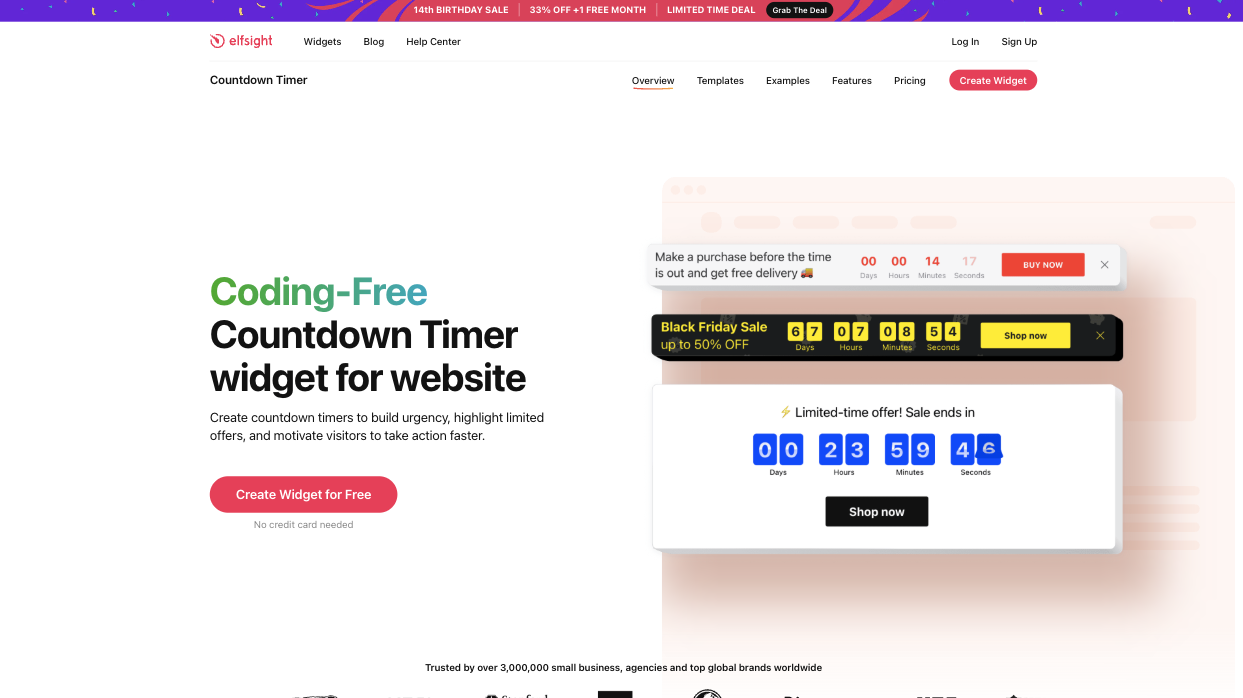
The Elfsight Countdown Timer serves more than 3 million users and holds a 4.8 rating (out of 5) across hundreds of G2 reviews. It’s one of Elfsight’s 90-plus widgets, and the platform gets high praise for its ease of use.
The countdown timer supports holiday themes and multiple timer types, including fixed-date timers and a personal countdown timer that persists across multiple visitor sessions. Click Create Widget for Free on the Countdown Timer page to go straight into the editor, where you can customize the widget for mobile-device and desktop view. You can style the timer’s appearance, set its position on the page, add post-countdown actions, and tailor the theme with custom CSS. Elfsight allows you to use Google Analytics and custom JavaScript to add extra functionality and track performance.
After configuring the widget, I had to create an account, verify my email, and choose a plan before I could access the embed code. With the free version, I could create only one countdown widget, but I could put that widget on multiple websites.
Key features
- Five timer designs, seven holiday-themed presets, and over 50 ready-made templates
- Three dynamic countdown animations and a full custom CSS/JavaScript editor
- Over 112 platform connections, including WordPress, Shopify, Wix, Webflow, and Joomla
Notable limitation: The free plan adds prominent Elfsight branding to your widget, and the one-widget cap on that plan makes the free version impractical past the testing phase.
Pricing: Free to start (with one widget and 200 views); paid plans start at $4 per month.
3. TickCounter
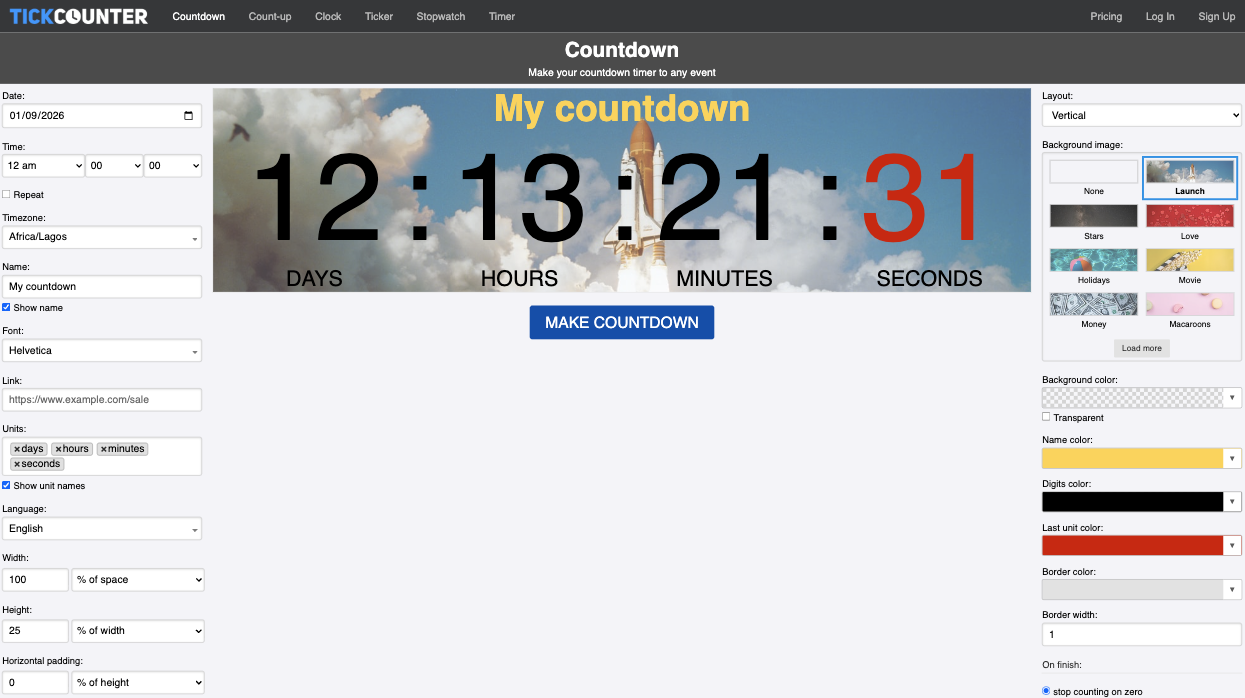
TickCounter, a single-purpose clock utility tool, runs on over 2 million websites and has no view limits or recurring subscription price. It’s a great option if you’re looking for a permanently free countdown widget for your landing page, blog, or one-off event page.
TickCounter creates only fixed-date timers. In the editor, you can set general configuration options, such as date, time zone, font, and post-countdown actions. You can style the widget with preset background images, change the background color, and use different colors for digits. Once you’re happy with the look, click Make Countdown to generate an embed code, which you can drop into any HTML snippet on your website.
TickCounter offers unlimited counters and views, and it supports more than 10 platforms. Compared with other widgets on this list, TickCounter feels more basic, with fewer styling options. But it is responsive across mobile devices and desktops and scales smoothly as the screen gets narrower. The free version includes a subtle watermark.
Key features
- Free-forever plan, with no view-based paywall
- Money-back guarantee (60 days) on the paid lifetime plan
- API access for developers
Notable limitation: Fewer design and customization options; one user described it as “too simple” to integrate into other software.
Pricing: Free forever, with a watermark; the paid plan is covered by a one-time payment of $99 and allows you to remove the watermark.
4. Common Ninja Countdown widget
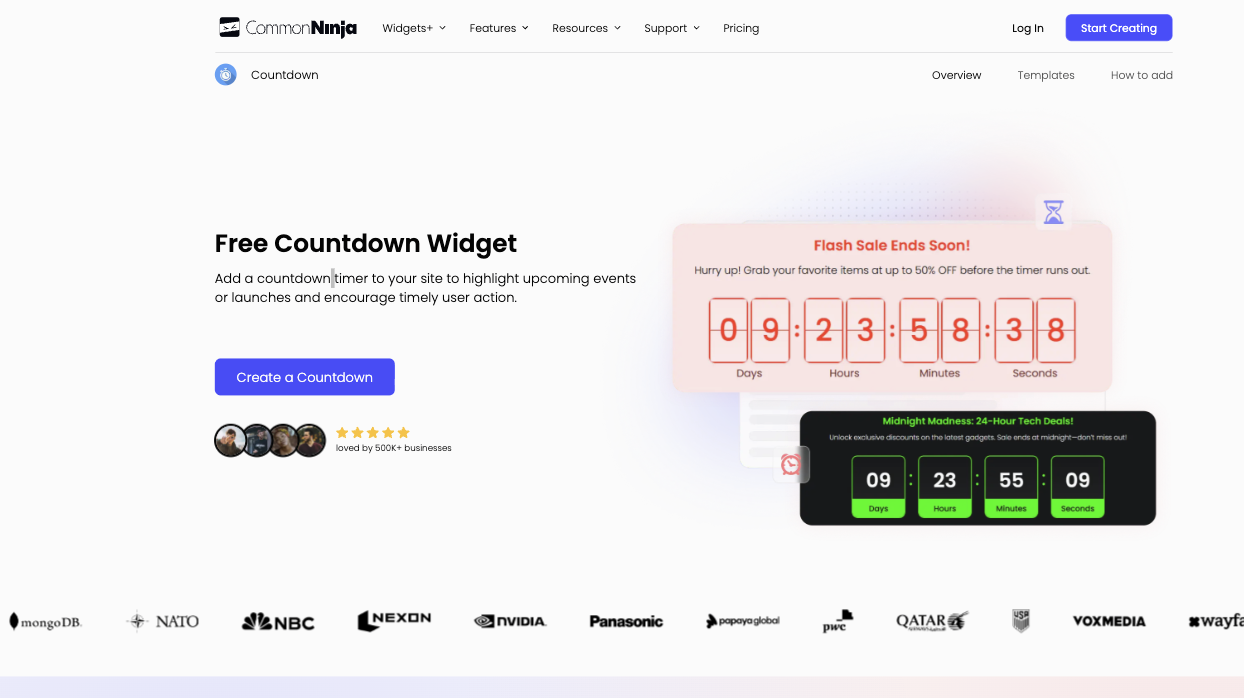
The Common Ninja Countdown widget runs on more than 500,000 business websites and works across over 200 platforms, including Notion and Canva. The tool is part of Common Ninja’s 200-plus widget directory and offers deeper customization capabilities than other tools on this list.
You can build a countdown timer from scratch or start with a template. Beyond the general options (like timer type, countdown button, and time zone), Common Ninja includes multiple layout options, design skins, confetti animations, and full CSS controls for more granular customization. You can also use its built-in AI chatbot to customize the timer, integrate Google Analytics for tracking, and get updates in real time in the editor, with a live preview.
Like other countdown timer widgets, Common Ninja provides an embed code you can paste into your WordPress, Squarespace, or Shopify website. However, you need to create an account to save any changes to your widget. Once live, the widget looks sleek, is fully responsive, and includes a visible watermark if you’re using the free version.
Key features
- Built-in AI assistant to help configure the widget
- Live drag-and-drop preview editor
- Per-visitor or fixed-date countdown modes, animated confetti, and full CSS customization
Notable limitation: Most advanced widget customization features are accessible only with paid plans.
Pricing: Free to start (with only one widget); paid plans start at $7.86 per month (billed annually).
5. HurryTimer
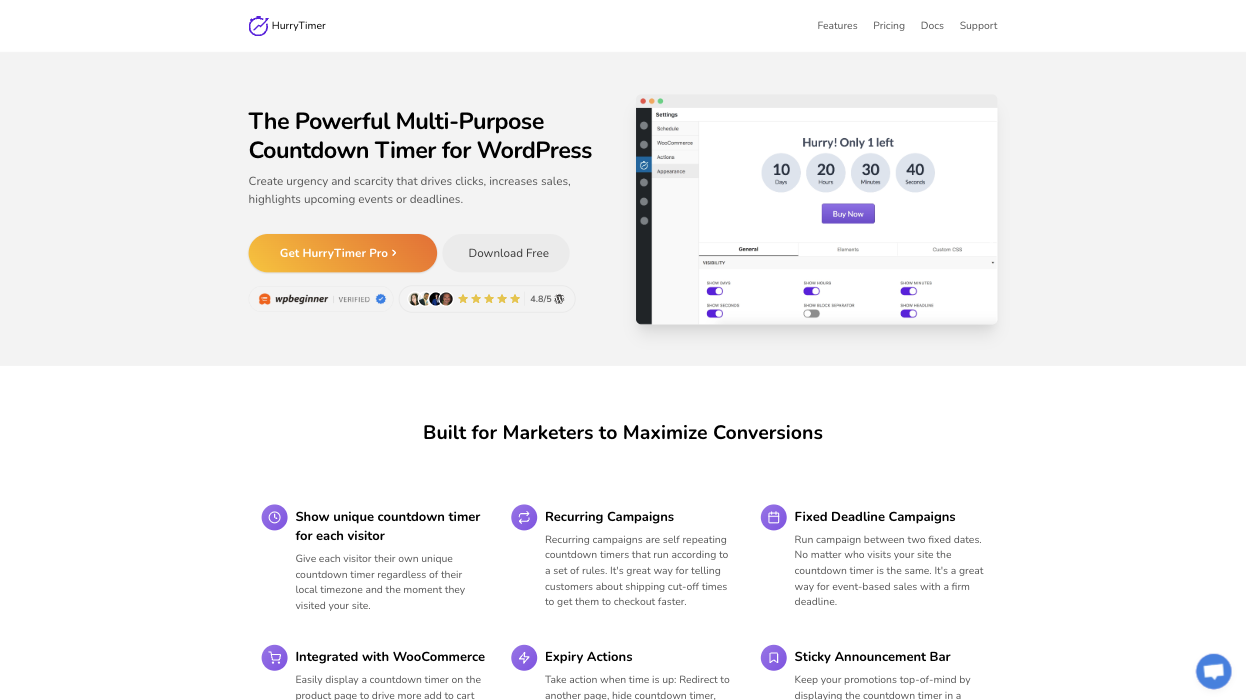
HurryTimer is built specifically for WordPress and WooCommerce. Unlike other widgets covered on this list, HurryTimer requires you to download and install it. But once it is installed on major page builders (like Elementor, Divi, WPBakery, and Gutenberg), you can add countdown timers for flash sales, event promotions, and recurring campaigns. The widget works especially well in WooCommerce, allowing you to create real-time stock-unit countdowns on product pages.
Inside the editor, you can create global end-date timers and per-visitor timers with cookie and IP detection. You can customize the widget’s colors, font, and messaging and use custom CSS to add more styling options. When the timer is up, you can set a range of post-countdown actions, including redirecting visitors to a new page, hiding the Add to Cart button, showing a custom message, and changing stock status. You can even trigger multiple actions at the same time.
Key features
- Native integration with WooCommerce to show product scarcity and sale schedules, and set custom actions
- Multiple post-countdown actions
- Multiple deadlines that automatically cycle without manual updates
Notable limitation: Since it’s a plug-in, you’ll need to download it and perform necessary maintenance.
Pricing: It’s free to use, with advanced features reserved for paid plans. Paid plans start from $39 per year.
Use smart, serverless widgets to enhance your website
Whether you’re creating a website with WordPress, Wix, Squarespace, or Shopify, it should look polished, include interactive elements that improve user engagement, and move visitors to act. To refine your website, you shouldn’t always have to install another plug-in or pay for an app that makes your website load slower and raises your expenses.
Jotform sidesteps all those issues with serverless widgets that improve your website’s functionality without adding plug-in overhead. Each Jotform widget runs on the platform’s server. All you need to do is build and customize the widget inside the Jotform app, copy the generated embed code, and paste it into your page. Since nothing is installed on your website, there’s no security patch to track and nothing clashes with your theme. You make every change inside Jotform rather than in your site’s code.
For your website visitors, each widget is responsive and scales seamlessly across mobile devices, tablets, and desktops.
If you’re looking for a widget to capture more leads on your site, improve visitor engagement, or serve dynamic content, the Jotform Website Widgets directory probably includes a widget that can replace the paid plug-in you’d otherwise install. For example, you can use the Product Catalog Widget to display multiple items in a grid, add the Testimonials Widget to build trust, and use the floating Click-to-Call Widget to help visitors make inquiries.
Browse Jotform’s directory of over 150 widgets to find the right tool for enhancing your website without touching plug-ins or knowing how to code.
This article is for marketers, web designers, and small business owners looking to add a countdown timer to a website, landing page, or campaign page — without writing code. Likely building urgency around a sale, product launch, event, or webinar registration deadline.











Send Comment: