Insights provides information about your assets’ performance, how they interact with the audience, and how many times the assets are visited or completed with data visualized with graphs and metrics. In your daily routines, you may need a helper who analyzes and reports asset-related metrics.
Smart Signals is an AI-powered system that analyzes your assets’ performance insights, detects anomalies, and shares detailed findings and suggestions to improve your asset’s performance and usage within the Insight page.



Smart Signals Cards
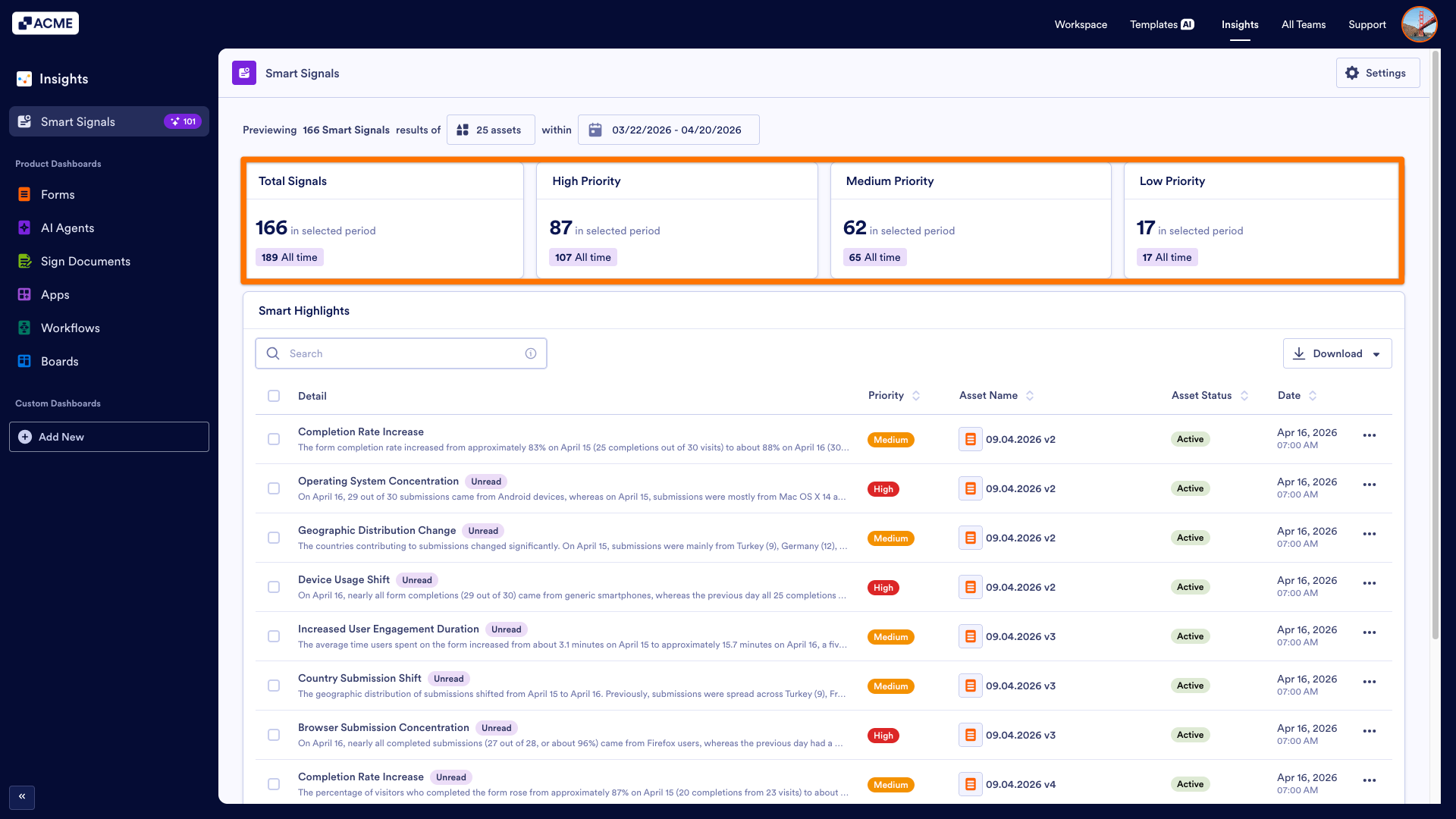
At the top of the page, there are cards showing the total signal count and distribution of the signal numbers according to the priorities, which are High, Medium, and Low.
The Smart Signals' priority is based on the following conditions:
| Priority | Form | App | Workflow | Sign Document | AI Agent |
|---|---|---|---|---|---|
|
High |
- Completion rate below 10% or above 95% - A single country/device/browser accounts for more than 90% of traffic - Major drops (>50%) in submissions or views compared to previous period - Zero activity in expected categories - Sudden spikes or drops in daily metrics |
- Major drops (>50%) in views or visitors compared to previous period - Recent zero activity when previous period had consistent activity - Sudden spikes or drops in daily metrics - Downloads dropping to zero when previously active |
- Major drops in run flows or completed flows compared to previous period - Completion rate below 30% (many runs failing/stalling) - Average completion time increasing by more than 100% - Zero completions when runs are happening - Sudden spikes or drops in daily metrics |
- Major drops (>50%) in sign requests or completions compared to previous period - Completion rate below 30% (many documents not being signed) - Average signing time increasing by more than 100% - Zero completions when sign requests are being created - Sudden spikes or drops in daily metrics |
- Major drops (>50%) in sessions or conversations compared to previous period - Conversation rate below 20% (sessions not converting to conversations) - Average messages per conversation dropping by more than 50% - Zero conversations when sessions are happening - Sudden spikes or drops in daily metrics |
|
Medium |
- Completion rate between 10 and 20% or 80 and 95% - A single source accounts for 70-90% of traffic - 25-50% changes from previous period - Unusually uniform daily data with minimal variation |
- 25-50% changes in views or visitors from previous period - Engagement rate (visitors/views) significantly changing - Inconsistent daily patterns with notable variability |
- 25-50% changes in runs or completions from previous period - Completion rate dropping significantly - Average completion time increasing by 50-100% - Inconsistent daily patterns suggesting issues |
- 25-50% changes in requests or completions from previous period - Completion rate dropping significantly - Average signing time increasing by 50-100% - Inconsistent daily patterns with notable variability |
- 25-50% changes in sessions or conversations from previous period - Conversation rate dropping significantly - Average messages per conversation changing by 25-50% - Inconsistent daily patterns with notable variability |
|
Low |
- 10-25% changes - Minor distribution imbalances - Low absolute numbers requiring attention |
- 10-25% changes - Minor fluctuations in download counts - Low absolute numbers requiring attention |
- 10-25% changes - Minor fluctuations in completion time - Low absolute numbers requiring attention |
- 10-25% changes - Minor fluctuations in signing time - Low absolute numbers requiring attention |
- 10-25% changes - Minor fluctuations in engagement depth - Low absolute numbers requiring attention |
Smart Highlights
You can see the detailed information under the Smart Highlights list. This list has 5 columns: Detail, Priority, Asset Name, Asset Status, and Date.
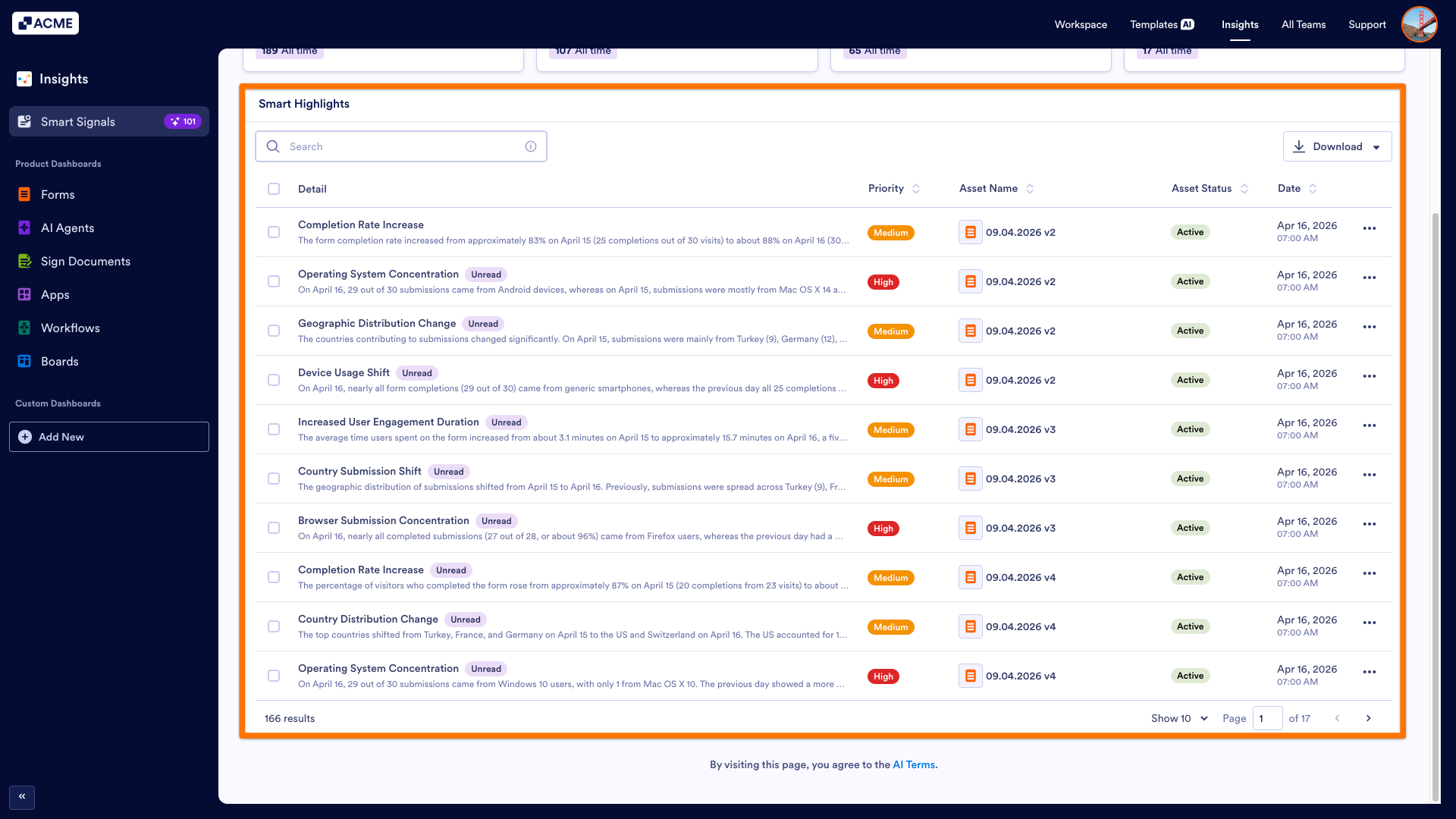
- Detail: Under this column, the subject and the issue regarding your asset’s performance are explained.
- Priority: This column indicates the issue's priority.
- Asset Name: This column shows the title of the asset.
- Asset Status: This column shows if the asset is active or disabled, archived, or deleted.
- Date: This column displays the date Smart Signal is sent.

Send Comment: