Buat Jajak Pendapat Rapat
Buat jajak pendapat rapat online kustom secara gratis — tanpa perlu pengodean. Baik Anda sedang mengatur pertemuan pribadi atau pertemuan besar di konferensi, kumpulkan preferensi dan umpan balik mengenai lokasi, waktu, aktivitas, dan menu acara dari peserta Anda pada perangkat apa pun.
Templat
Jelajahi Templat Gratis Jajak Pendapat Rapat
Create a custom online meeting poll for free — no coding required. Whether you’re organizing one-on-ones or large meetings at conferences, collect preferences and feedback on locations, times, activities, and event menus from your attendees on any device.
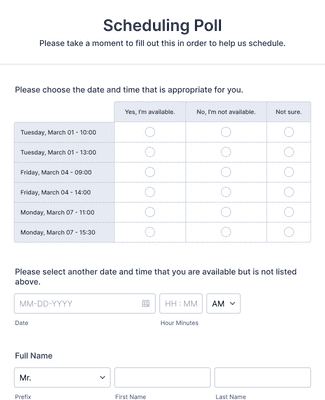
Scheduling Poll
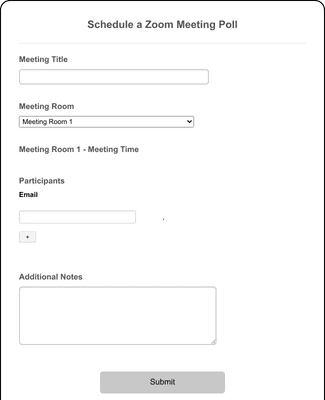
Jadwalkan Zoom Jajak Pendapat
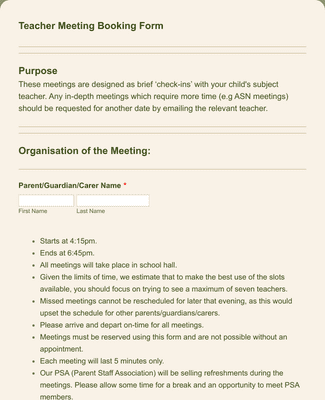
Parent-Teacher Meeting Booking Form
Manfaat
Easy-to-use Interface
Create a meeting poll in minutes using Jotform’s user-friendly builder. Add meeting time and location options, then share the poll as soon as it’s ready. You can adjust the questions and choices at any time, so the poll matches the meeting you’re planning.
Kumpulkan dan Kelola Respons
See every response in Jotform Tables, so meeting availability stays in one workspace instead of scattered across messages. You can attach files and collect uploaded documents or images when the meeting needs extra context. You can also switch between views to spot the best option faster.
Works on All Device Types
Participants can fill out the meeting poll on a phone, tablet, or computer without installing anything. You can share the poll as a link or publish it with a QR code so people can open it quickly on mobile. This makes it easier to collect responses from everyone, even if they are not at a desk.
Customizable Thank You pages
Show a Thank You page immediately after someone submits the poll, so participants know the response went through. You can customize the message to match the meeting and next steps, or redirect people to another page when needed. This helps reduce follow-up questions after submission.
Build professional reports
Turn meeting poll submissions into charts and shareable reports with Jotform Report Builder. The report can automatically visualize results so trends are easy to review. You can share the report when it’s ready, which helps stakeholders agree on the final time faster.
Testimonial
Apa yang dikatakan pengguna kami tentang Jotform
How to create a poll
Jajak pendapat rapat adalah alat yang hebat untuk membantu mencapai konsensus kelompok atau mengumpulkan preferensi peserta. Selain itu, Anda tidak perlu tahu cara membuat kode untuk menggunakannya! Pelajari cara membangun jajak pendapat Anda dari awal, menampilkan hasil dalam bagan yang dapat disesuaikan, dan membuat URL yang dapat dibagikan dalam tutorial singkat ini.
Pertanyaan yang Sering Diajukan
Semua pertanyaan Anda tentang Jotform — dijawab. Lihat FAQ kami untuk jawaban atas pertanyaan umum, atau hubungi tim dukungan kami untuk informasi lebih lanjut.
Apa itu jajak pendapat rapat?
Jajak pendapat rapat adalah alat penjadwalan yang digunakan untuk menentukan ketersediaan dan preferensi pertemuan peserta untuk suatu acara, konferensi, pertemuan, dll. Jajak pendapat rapat memungkinkan penyelenggara untuk menanyakan kepada peserta mengenai hari, waktu, dan lokasi yang mereka pilih dengan cara yang cepat dan ramah pengguna, membantu mengatasi kelompok orang dengan jadwal yang berbeda dan menemukan opsi yang paling cocok untuk semua orang.
Dengan menggunakan jajak pendapat rapat, Anda dapat menyederhanakan proses penjadwalan, mengurangi komunikasi yang berbelit-belit, dan dengan cepat menyaring ketersediaan peserta atau partisipan Anda.
Bagaimana cara saya membuat jajak pendapat rapat?
Start by creating a list of questions, preferences, or possible dates and times for participants to meet. Once you’ve identified the information you’re looking for, you can share the poll with your intended participants, allowing them to select their preferred options from the list or provide their own suggestions. Once everyone has responded, the organizer will analyze the results and identify the options that work best for the majority of participants.
To make the process even simpler, you can create a meeting poll by using one of Jotform’s hundreds of free templates or building one from scratch using our intuitive online form builder. When you’ve customized the poll to your liking, you can share it via email or link and watch the responses pour in. It’s that easy!
How do I set up an online poll for a meeting?
Jajak pendapat rapat online dapat dilakukan baik selama pertemuan, ketika Anda sudah memiliki perhatian semua orang, atau setelah pertemuan selesai. Seringkali, jajak pendapat ini berupa pertanyaan yang diajukan kepada peserta selama pertemuan untuk meningkatkan keterlibatan. Setiap orang kemudian dapat menjawab secara bersamaan untuk hasil secara real-time, biasanya menggunakan fitur jajak pendapat yang terintegrasi dalam perangkat lunak konferensi web atau aplikasi seluler.
You also have the option of creating a meeting poll that you can send to participants immediately following a meeting or before it even happens. With software like Jotform, you can collect and view responses as they roll in, which makes it easier for you to make a sound decision about your meetings. Plus, you can customize the poll to your exact needs.
As a pro tip, make sure to encourage participation by sending polite reminders to your participants to complete the poll. This will ensure that you have as much information as possible for your meeting.
How do I schedule meetings using a poll?
Once you’ve created your poll with a list of available times, meal options, locations, and more, you can gather responses and schedule your meeting with the data you’ve collected.
Using analytics tools like those available in Jotform Tables, you can identify the date, time slot, and other options that work best for the majority of participants. Make sure to consider any other factors, such as the availability of key decision-makers or crucial resources (like rooms or transportation).
Based on these results, you can schedule your meeting and send invitations to your participants, including the final date, time, and any other relevant details. The meeting poll helps cut down on complicated communication by providing all responses in one place.
How can I find a meeting time and place that work for everyone?
Meskipun memilih waktu dan tempat rapat yang cocok untuk semua orang bisa terlihat menakutkan, jajak pendapat rapat dapat membantu menyederhanakan proses tersebut. Setelah Anda menciptakan beberapa opsi dan membagikannya kepada peserta, Anda akan mulai menerima tanggapan yang membantu Anda menyusun pilihan-pilihan tersebut. Jika kehadiran beberapa peserta lebih penting daripada yang lain, pastikan untuk memeriksa ketersediaan mereka terlebih dahulu.