

არაკომერციული ორგანიზაციის ცხრილების შაბლონები

გრანტის მონიტორინგის ცხრილი
გრანტის მონიტორინგის ცხრილი არის ონლაინ ელექტრონული ცხრილი რომელიც გამოიყენება რათა თვალყური ადევნოთ საგრანტო განაცხადებს. თქვენ შეგიძლიათ გამოიყენოთ Jotform-ის უფასო ონლაინ საგრანტო განაცხადების მონიტორინგის ელექტრონული ცხრილი რათა თვალყური ადევნოთ მიმდინარე საგრანტო განაცხადების სტატუსს, მართოთ საკონტაქტო დეტალები და მართოთ ინფორმაცია რათა სწორად განსაზღვროთ დაფინანსების ოდენობები. თქვენ ასევე შეგიძლიათ გადართოთ კალენდარის ხედზე რათა მარტივად იხილოთ მოახლოებული ვადები. მოარგეთ მოცემული საგრანტო განაცხადების მონიტორინგის ელექტრონული ცხრილი რათა იდეალურად მართოთ ყველა თქვენი ინფორმაცია. დაამატეთ რიგები და სვეტები, განაახლეთ იარლიყის სახელები და ფერები და შეცვალეთ განლაგება თქვენი საჭიროებების შესაბამისად. თქვენ ასევე შეგეძლებათ გამოიყენოთ ჩვენი სწრაფი გამოთვლის ფუნქციონალი რათა ავტომატურად შეაჯამოთ მოთხოვნილი და გაცემული ოდენობები. გაამარტივეთ თქვენი სამუშაო პროცესი და შეაგროვეთ მონაცემები პროფესიონალური ონლაინ ელექტრონული ცხრილის გამოყენებით.
Go to Category:Marketing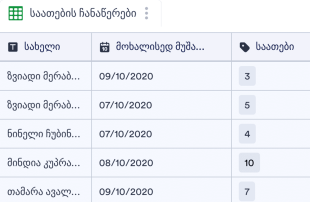
მოხალისის საათების ჩანაწერების ცხრი?
მოხალისის საათების ჩანაწერების ცხრილი გამოიყენება რათა თვალყური ადევნოთ საქველმოქმედო ან არაკომერციული ორგანიზაციის მოხალისეების ინფორმაციას და თითოეული მოხალისის აქტივობების დეტალებს. თქვენ გჭირდებათ მხოლოდ შეავსოთ თანდართული მოხალისის საათების ჩანაწერის ფორმა ან ატვირთოთ არსებული CSV ან Excel ფაილები რათა შეინახოთ თქვენი მოხალისეების საათების ინფორმაცია ერთი სივრცის ქვეშ. თვალყური ადევნეთ საათებს, საკონტაქტო დეტალებს, აქტივობების აღწერას და მრავალი სხვა. თქვენ შეგიძლიათ იხილოთ თქვენი ინფორმაცია ელექტრონული ცხრილის, ბარათის ან კალენდარის სახით, ასევე განაახლოთ სვეტები, გადაანაწილოთ ინფორმაცია სხვადასხვა ჩანართებში ან დაამატოთ ფერადი იარლიყები. გააუმჯობესეთ თქვენი მოხალისეების ინფორმაციის მართვის სისტემა და დააჩქარეთ სამუშაო პროცესი - დაზოგეთ დრო და ძალისხმევა.
Go to Category:არაკომერციული ორგანიზაციებისათვისAbout არაკომერციული ორგანიზაციის ცხრილების შაბლონები
შეინახეთ თქვენი არაკომერციული ან საქველმოქმედო ორგანიზაციის ყველა მონაცემი ორგანიზებულად უნივერსალური ონლაინ სამუშაო სივრცის ქვეშ Jotform ცხრილის შაბლონების გამოყენებით! თუ თქვენ თვალყურს ადევნებთ დონაციებს, გრანტებს ან მოხალისეთა განრიგებს, Jotform ცხრილები გაგიმარტივებთ თქვენი ინფორმაციის ორგანიზებას და თქვენი გუნდის წევრებთან თანამშრომლობას. აირჩიეთ ცხრილის სასურველი შაბლონი, შეაგროვეთ მონაცემები Jotform-ის ონლაინ ფორმების გამოყენებით, ატვირთეთ არსებული მონაცემები CSV ან Excel ფაილიდან ან შეიტანეთ მონაცემები ხელით. თქვენ შეგიძლიათ შემდეგ გააზიაროთ თქვენი ცხრილი რათა იმუშაოთ გუნდის წევრებთან ნებისმიერი მოწყობილობიდან.
თქვენი არაკომერციული ორგანიზაციის ცხრილის შაბლონის მორგება არის საკმაოდ მარტივი. სვეტების მზა ტიპების, ფორმულების, ფილტრისა და ძიების ფუნქციონალის გამოყენებით, თქვენ შეგიძლიათ შექმნათ შაბლონი რომელიც იდეალურად ერგება თქვენი ორგანიზაციის კონკრეტულ საჭიროებებს. და თუ თქვენ დააკავშირებთ ონლაინ დონაციის ფორმას თქვენ მიერ არჩეულ ცხრილის შაბლონს, თქვენ შეგეძლებათ შეაგროვოთ ახალი დონაციები და დონორის ინფორმაცია და ავტომატურად გაუგზავნოთ თქვენს ცხრილებს. გადაერთეთ ციფრულ ფორმებზე და დააჩქარეთ თქვენი სამუშაო პროცესი.
Why Use Nonprofit Sheet Templates?
- Managing submissions with Nonprofit Sheet Templates in Jotform Tables eliminates the need for manual data transfer, ensuring all responses are automatically recorded and organized. This automation saves time and reduces errors.
- Keeping all responses together in a singular, easily accessible location allows form owners and teams to quickly locate submissions, enhancing efficiency in reviewing and managing data.
- With Jotform Tables, users can review complete submission details, including any attachments or uploads, providing a comprehensive understanding of each entry.
- Nonprofit Sheet Templates enable effective coordination of follow-up actions by allowing users to assign tasks or track submission status, ensuring no response is overlooked.
- Utilizing search, filters, and data grouping features, form owners can quickly find specific records or entries, streamlining the process of data retrieval and analysis.
- The ability to report on collected data in various views allows nonprofits to generate insights and summaries that support informed decision-making and strategic planning.
Common Problems Solved by Nonprofit Sheet Templates
- Manual copying of submissions into spreadsheets is a tedious task frequently encountered by nonprofits, but Nonprofit Sheet Templates solve this by automatically populating new entries directly from Jotform Forms.
- Scattered responses across multiple platforms can lead to confusion and inefficiency. These tables centralize all submissions, making it easier to manage and review data.
- Difficulty locating specific records is a common issue, but the search and filter capabilities of Jotform Tables address this by allowing users to quickly find the needed information.
- Inconsistent review processes often result from missing context or disorganized data. Nonprofit Sheet Templates offer detailed views and organized columns to ensure thorough and consistent reviews.
- Handling uploads can be challenging when context is missing. The Uploads View and associated column types in Jotform Tables provide clear organization and context for each file, facilitating easier review and management.
Matching Form Submission Use Cases to Jotform Tables Features
- When a nonprofit organization receives volunteer applications through a Jotform Form, the submissions are automatically populated into the connected table, ensuring all entries are promptly recorded and ready for review.
- Using Table View or Detail View, form owners can thoroughly review each submission, edit details as needed, and maintain organized records for efficient data management.
- For managing team responsibilities, access settings and assignees allow nonprofits to coordinate responsibility and ensure that each team member has the appropriate level of access to the submissions.
- Reporting on the collected data is streamlined with Report View, enabling the creation of customized reports that summarize insights and trends, which are vital for strategic planning.
- With search and filters, nonprofits can quickly locate specific submissions or categories of responses, greatly improving the speed and accuracy of data retrieval.
- For grant requests, data grouping and column types help categorize and organize information, making it easier to analyze and prioritize submissions.
- Integrating action buttons allows nonprofits to execute approved actions directly from the table, such as sending follow-up emails or updating records, enhancing workflow efficiency.
How to Use Nonprofit Sheet Templates with Jotform Forms
- Start with a category-relevant Jotform Tables template, a blank table, or the table connected to an existing Jotform Form. The Jotform Form collects category-specific information, and new responses automatically appear in the connected table, ensuring all entries are systematically recorded.
- The form owner configures the table for submission review by naming columns, choosing appropriate column types, and selecting relevant views such as Table View, Detail View, Calendar View, Uploads View, or Report View to best suit their organizational needs.
- The form owner or team manages submissions with capabilities such as search, filters, grouping, formulas, access settings, assignees, revision history, linked tables, action buttons, and outputs, ensuring efficient data handling and collaboration.
Top Use Cases for Nonprofit Sheet Templates
- For Form Owners: Form owners benefit significantly from Nonprofit Sheet Templates as they provide a streamlined process for reviewing incoming responses. They can easily edit submission data, check details or uploads, and maintain organized records within Jotform Tables. This setup ensures that all collected information is systematically managed and readily accessible for further processing or action.
- For Teams: Authorized team members use Nonprofit Sheet Templates to efficiently find submissions and maintain entries. They can coordinate responsibility with assignees and use access settings to secure data handling. Revision history supports shared work by providing a clear audit trail of changes, ensuring transparency and accountability in data management.
- For Managers: Managers utilize Nonprofit Sheet Templates to monitor collected data, review category-specific patterns, and check progress or ownership of submissions. They can leverage Report View or other relevant views for oversight, gaining insights into the data that inform strategic decisions and operational improvements.
Summarizing Nonprofit Sheet Templates
Nonprofit Sheet Templates provide invaluable support for collecting and managing data specific to nonprofit needs. By using Jotform Forms to gather information and Jotform Tables to manage the resulting submissions, organizations can streamline their data processes and enhance their operational efficiency. These templates help maintain organized, accessible, and actionable records, ultimately aiding nonprofits in achieving their goals more effectively.
ხშირად დასმული კითხვები
1) Is it free to use Nonprofit Sheet Templates with Jotform Tables?
Jotform offers a Starter plan, which allows users to utilize Nonprofit Sheet Templates without an initial cost. This plan provides access to essential features needed to manage submissions effectively. However, it is important to review the specifics of the Starter plan to understand the features available.
2) How do submissions from Jotform Forms appear in Nonprofit Sheet Templates?
Submissions from Jotform Forms automatically appear in Nonprofit Sheet Templates as entries or rows in the connected table. This auto-population ensures that each response is captured promptly and accurately. Future submissions continue to be added seamlessly, providing a real-time record of all incoming data.
3) Can I edit, search, filter, group, and calculate data in Nonprofit Sheet Templates?
Yes, you can edit submissions and utilize features such as search, filters, data grouping, formulas, and calculations within Nonprofit Sheet Templates. These capabilities allow for in-depth data analysis and management without the need for external tools. This flexibility helps ensure that data is organized and insights are easily accessible.
4) Can I export the data inside the tables as CSV or Excel?
Data within Nonprofit Sheet Templates can be exported as CSV or Excel files. This functionality allows you to add existing information alongside connected-form submissions or share data with stakeholders who prefer these formats. Exporting data ensures compatibility and ease of use across different platforms.
5) Which Jotform Tables views can I use with Nonprofit Sheet Templates?
You can use various views such as Table View, Detail View, Calendar View, Report View, and Uploads View with Nonprofit Sheet Templates. Each view offers unique perspectives, like Table View for structured organization or Report View for data summaries. These views enhance the way submissions are reviewed and analyzed.
6) Can teams collaborate on submissions in Nonprofit Sheet Templates?
Teams can collaborate effectively using Nonprofit Sheet Templates by leveraging features such as access settings, collaboration tools, assignees, real-time tracking, and revision history. These capabilities support coordinated efforts and ensure that team members can work together seamlessly on submission management.
7) Can I connect Nonprofit Sheet Templates to related data or other applications?
Nonprofit Sheet Templates can be connected to related data through linked tables and integrations. Action buttons further enhance workflow by allowing specific actions to be executed directly from the table. This connectivity facilitates streamlined data management and operational integration.
8) Can I create reports, PDFs, and manage files from Nonprofit Sheet Templates?
Yes, you can create reports using Report View, generate PDFs, and manage files with Uploads View in Nonprofit Sheet Templates. These features enable comprehensive data presentation and secure document handling, supporting the diverse needs of nonprofit operations.