Create Meeting Polls
Jotform’s meeting poll tool helps you create online meeting polls to collect preferences on times, locations, activities, and other meeting details from participants. With this meeting poll tool, you can customize polls without coding, share them via link or QR code, and manage responses across devices to simplify scheduling and decision-making.
Templates
Explore Free Meeting Poll Templates
Create a custom online meeting poll for free — no coding required. Whether you’re organizing one-on-ones or large meetings at conferences, collect preferences and feedback on locations, times, activities, and event menus from your attendees on any device.
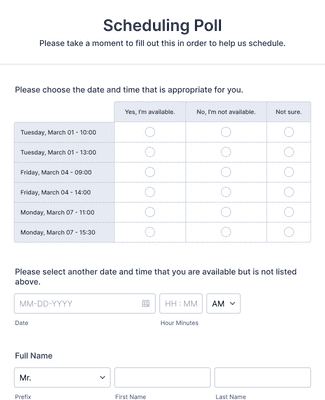
Scheduling Poll
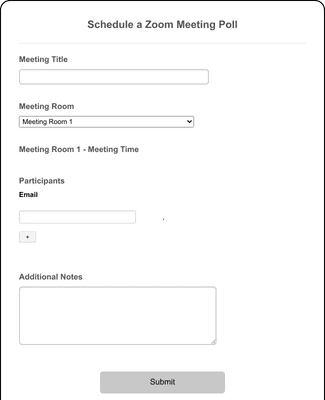
Schedule a Zoom Meeting Poll
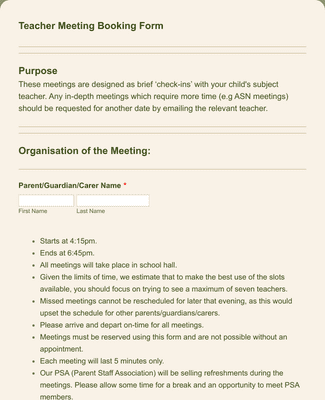
Parent-Teacher Meeting Booking Form
Benefits
Easy-to-use Interface
Create a meeting poll in minutes using Jotform’s user-friendly builder. Add meeting time and location options, then share the poll as soon as it’s ready. You can adjust the questions and choices at any time, so the poll matches the meeting you’re planning.
Collect and Manage Responses
See every response in Jotform Tables, so meeting availability stays in one workspace instead of scattered across messages. You can attach files and collect uploaded documents or images when the meeting needs extra context. You can also switch between views to spot the best option faster.
Works on All Device Types
Participants can fill out the meeting poll on a phone, tablet, or computer without installing anything. You can share the poll as a link or publish it with a QR code so people can open it quickly on mobile. This makes it easier to collect responses from everyone, even if they are not at a desk.
Customizable Thank You pages
Show a Thank You page immediately after someone submits the poll, so participants know the response went through. You can customize the message to match the meeting and next steps, or redirect people to another page when needed. This helps reduce follow-up questions after submission.
Build professional reports
Turn meeting poll submissions into charts and shareable reports with Jotform Report Builder. The report can automatically visualize results so trends are easy to review. You can share the report when it’s ready, which helps stakeholders agree on the final time faster.
Testimonials
What our users say about Jotform
How to create a poll
Meeting polls are a great tool to help reach group consensus or collect attendee preferences. Plus, you don’t have to know how to code to use them! Learn how to build your poll from scratch, display results in a customizable chart, and generate a shareable URL in this quick tutorial.

Frequently Asked Questions
All your questions about Jotform — answered. Check out our FAQs for answers to common questions, or contact our support team for further information.
What is a meeting poll?
A meeting poll is a scheduling tool that’s used to pinpoint the availability and meeting preferences of participants for an event, conference, meeting, etc. Meeting polls allow organizers to ask attendees about their preferred days, times, and locations in a quick user-friendly way, which helps to wrangle groups of people with different schedules and find the options that work best for everyone.
Using a meeting poll, you can streamline your scheduling process, cut out back-and-forth communication, and quickly narrow down the availability of your attendees or participants.
How do I create a meeting poll?
Start by creating a list of questions, preferences, or possible dates and times for participants to meet. Once you’ve identified the information you’re looking for, you can share the poll with your intended participants, allowing them to select their preferred options from the list or provide their own suggestions. Once everyone has responded, the organizer will analyze the results and identify the options that work best for the majority of participants.
To make the process even simpler, you can create a meeting poll by using one of Jotform’s hundreds of free templates or building one from scratch using our intuitive online form builder. When you’ve customized the poll to your liking, you can share it via email or link and watch the responses pour in. It’s that easy!
How do I set up an online poll for a meeting?
Online meeting polls can be conducted either during the meeting, when you already have everyone’s attention, or after the meeting wraps up. Often, these polls come in the form of a question that’s posed to participants during the meeting to increase engagement. Everyone can then answer simultaneously for real-time results, typically using poll features built into web conferencing software or mobile apps.
You also have the option of creating a meeting poll that you can send to participants immediately following a meeting or before it even happens. With software like Jotform, you can collect and view responses as they roll in, which makes it easier for you to make a sound decision about your meetings. Plus, you can customize the poll to your exact needs.
As a pro tip, make sure to encourage participation by sending polite reminders to your participants to complete the poll. This will ensure that you have as much information as possible for your meeting.
How do I schedule meetings using a poll?
Once you’ve created your poll with a list of available times, meal options, locations, and more, you can gather responses and schedule your meeting with the data you’ve collected.
Using analytics tools like those available in Jotform Tables, you can identify the date, time slot, and other options that work best for the majority of participants. Make sure to consider any other factors, such as the availability of key decision-makers or crucial resources (like rooms or transportation).
Based on these results, you can schedule your meeting and send invitations to your participants, including the final date, time, and any other relevant details. The meeting poll helps cut down on complicated communication by providing all responses in one place.
How can I find a meeting time and place that work for everyone?
Though choosing a meeting time and place that work for everyone can seem daunting, meeting polls can help simplify the process. Once you come up with multiple options and share them with your participants, you’ll start to receive responses that will help you narrow down the possibilities. If the attendance of certain participants is more important than others, make sure to check their availability first.