

Шаблони Апликација за Образовање

Апликација за Квиз из Математике
Креирај математичке квизове за своје ученике и дели их у бесплатној апликацији за преузимање са Jotform-ом. Без обзира да ли си наставник математике или тутор, прави квизове који се могу без проблема попунити на било ком уређају — укључујући рачунаре, таблете или паметне телефоне — да одмах прикупиш одговоре онлајн. Ова апликација је спремна за употребу пружа ти унапред припремљене квизове који аутоматски израчунавају резултате подносиоца. Можеш додати своје квизове или променити постојеће. Када завршиш, подели апликацију. Пријаве се чувају на твом безбедном налогу и спремне су за преглед у Jotform табелама или за претварање у извештаје користећи Jotform Креатор Извештаја. Прилагоди овај шаблон Апликације за Квиз из Математике помоћу нашег "превуци и пусти" креатора. Промени икону апликације или почетни екран, додај нове квизове или ажурирај постојеће и укључите онолико линкова, докумената и слика колико желиш. Можеш чак и да подесиш аутоматско израчунавање оцене сваког ученика! Уштеди време и папир са Jotform-овом бесплатном Апликацијом за Квиз из Математике.
Иди на категорију:Education Apps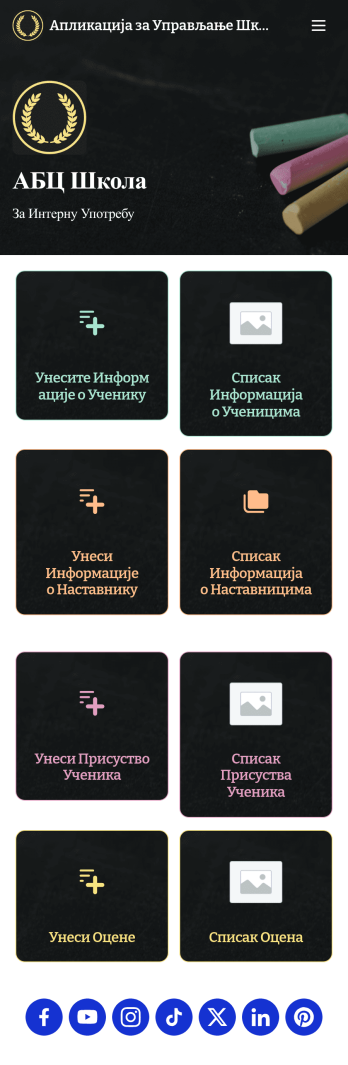
Апликација за Управљање Школама
Школе и образовне институције користе Апликација за Управљање Школама за снимање и прикупљање информација о ученицима. Наша апликација обједињује четири корисна обрасца, омогућавајући школским администраторима и наставницима да лако додају контакт информације школе и наставника, евидентирају присуство и бележе резултате испита са било ког уређаја. Сваки образац аутоматски уноси податке у лаку за разумевање табелу, коју можеш сортирати, филтрирати и претраживати са свог безбедног Jotform налога. Учини овај шаблон апликације за управљање школама својим за неколико секунди помоћу Jotform-овог креатора апликација. Само превуци и пусти да додаш или промениш елементе обрасца, измениш текст и поља обрасца, промениш шему боја да одговара бојама твоје школе, приложиш документе, линкове и још много тога. Када завршиш са прилагођавањем, можеш да делиш апликацију тако што ћеш послати линк од апликације или је уградити у веб сајт школе за интерну употребу. Наставници и особље могу затим да је преузму на било који паметни телефон, таблет или рачунар и одмах почну да је користе. Креирај апликацију за управљање подацима о ученицима са само неколико кликова помоћу ове бесплатне Jotform-ове апликације за управљање.
Иди на категорију:Education Apps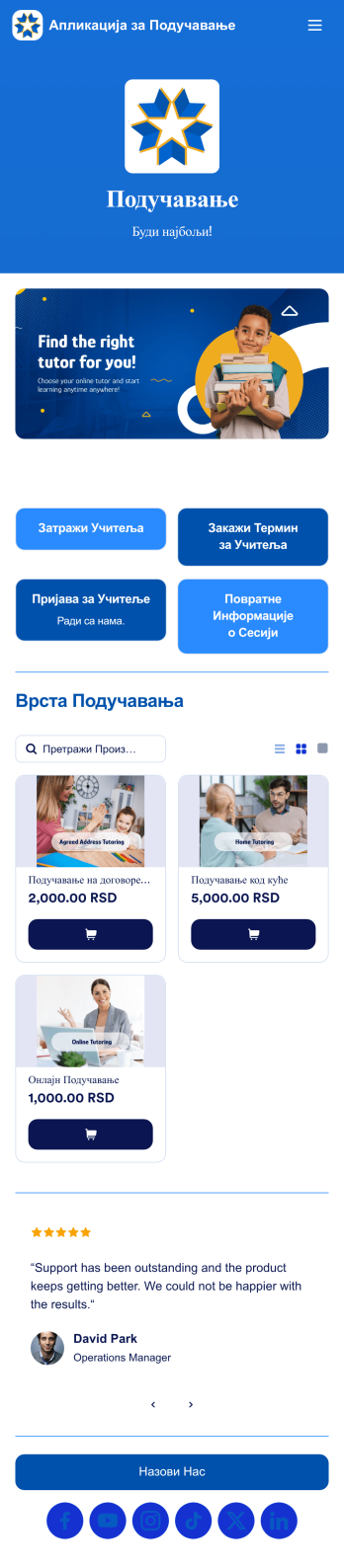
Апликација за Подучавање
Апликацију за подучавање користе агенције за подучавање за запошљавање учитеља и заказивање часова са ученицима. Ова бесплатна апликација за подучавање укључује образац захтева за учитеље за ученике да попуне опште контакт информације и наведу своју област учења, као и образац за заказивање термина. Постоји и образац за запошљавање, као и образац за повратне информације о сесији е-учења где ученици могу оценити учинак учитеља. Желиш да прилагодиш своју апликацију тако да одговара бренду твоје агенције? Jotform-ов "превуци и пусти" интерфејс олакшава додавање или замену елемената обрасца, отпремање логотипа, персонализовање почетне странице и још много тога — није потребно кодирање. Подели своју апликацију помоћу линка и ученици ће јој моћи приступити и преузети је на било ком паметном телефону, таблету или речунару. Помози ученицима да се у кратком року повежеу са учитељима уз ову потпуно прилагодљиву апликацију за подучавање.
Иди на категорију:Education Apps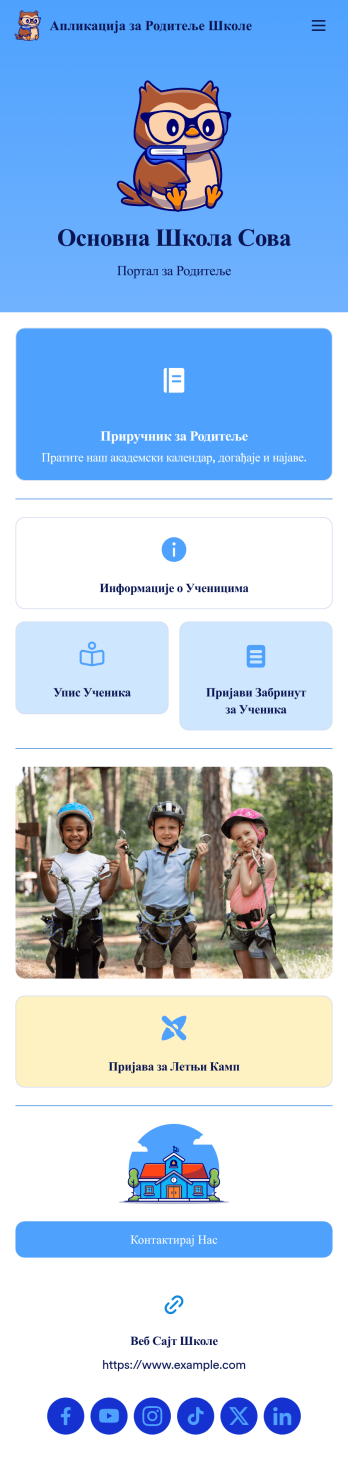
Апликација за Родитеље Школе
Апликација за Родитеље Школе је портал за родитеље који омогућава родитељима да приступе и дају податке о ученицима са било ког уређаја. Креирај мобилну апликацију за своју школу помоћу наше бесплатне апликације. Овај готов шаблон укључује образац са информацијама за ученике, образац за упис ученика, образац за пријаву забринутости и образац за пријаву за летњи камп, као и линк до приручника за родитеље и школског веб сајта. Родитељи могу да преузму и користе твоју апликацију са било ког паметног телефона, таблета или десктоп рачунара. Прилагоди своју апликацију без икаквог кодирања помоћу нашег "превуци и пусти" креатора. Можеш да додајеш или уклањаш обрасце, уграђујеш линкове до других сајтова, додаш табеле, ажурираш текст, отпремиш лого школе и мењаш подешавања апликације. Подели своју апликацију са родитељима тако што ћете им послати линк путем имејла или је објавити на веб сајту школе – они ће моћи да сачувају апликацију на својим уређајима ради лакшег приступа. Омогући родитељима сигуран приступ у реалном времену информацијама о ученицима помоћу лако доступне онлајн апликације за родитеље школе.
Иди на категорију:Education AppsAbout Шаблони Апликација за Образовање
Едукативне апликације су специјализоване мобилне и веб апликације дизајниране да поједноставе и унапреде образовне процесе у различитим срединама. Ове апликације омогућавају разне оперативне функције као што су упис студената, заказивање часова, управљање задацима и комуникација између наставника и студената. Индустрије које имају користи од ових апликација укључују школе, универзитете, образовне консултантске компаније и тренинг центре, где радни процеси често захтевају управљање великим количинама података, осигурање ефикасне комуникације и праћење образовног напретка.
Jotform Apps offers a no-code app builder specifically tailored for creating dynamic Education apps. Utilizing Progressive Web App (PWA) technology, these apps can be installed directly via any web browser without the need for an App Store, making them accessible across iOS, Android, tablets, and desktops. With centralized data management through Jotform Tables, educators can ensure all data is seamlessly integrated and easily accessible, facilitating streamlined workflows and improved educational management processes.
Why Use Education Apps?
- Education apps provide a centralized platform for managing student data, which simplifies the process of tracking academic progress and administrative tasks. This ensures that educators and administrators can focus more on teaching and less on paperwork.
- These apps offer enhanced communication channels between students, teachers, and parents. With features like push notifications, important updates and reminders can be sent instantly, ensuring that everyone stays informed and engaged.
- The ability to automate workflows within education apps can significantly reduce the time spent on repetitive tasks. This automation allows educators to allocate more time to curriculum development and student interaction.
- Education apps support seamless integration with various payment systems, enabling smooth processing of tuition fees and other payments. This integration helps streamline financial transactions, ensuring they are secure and efficient.
- By offering a wide range of customization options, education apps can be tailored to meet specific institutional needs. This flexibility allows for the creation of unique educational experiences that cater to diverse learning environments.
Common Problems Solved by Education Apps
- One of the primary challenges in education is the management of student records and data. Education apps address this by providing a centralized database that allows for easy storage and retrieval of student information, thereby reducing administrative burden.
- Effective communication is often a struggle within educational institutions, with messages getting lost or delayed. Education apps solve this by facilitating instant communication through various channels, ensuring that important information reaches its intended recipients promptly.
- Many educational institutions face challenges with scheduling and resource allocation. Education apps offer solutions by providing tools to efficiently schedule classes, manage classroom resources, and ensure optimal use of facilities.
- Payment processing for tuition and other fees can be a cumbersome and error-prone process. Education apps integrate with secure payment systems, allowing for automated, error-free financial transactions that are both secure and convenient for users.
- Keeping up with technological advancements can be daunting for educational institutions. Education apps ensure that schools and universities stay current with the latest tech, providing cutting-edge features that enhance the learning experience.
Matching Use Cases to Features
- For institutions looking to streamline their communication processes, the Push Notifications feature within education apps ensures that all stakeholders receive timely updates. This feature improves engagement and ensures that no critical information is missed.
- Schools aiming to manage their financial operations more efficiently can benefit from Payment Integrations with platforms like Stripe and PayPal. This capability allows for secure and hassle-free processing of tuition fees and other financial transactions.
- To support diverse learning environments, the Publish Options feature offers different levels of access, such as Public, Private, and Company-only modes. This ensures that educational content is shared with the appropriate audience, maintaining privacy and security.
- For institutions that require data accessibility across various devices, Jotform Apps' compatibility with iOS, Android, and desktops ensures a seamless user experience. This cross-platform functionality allows educators and students to access necessary resources anytime, anywhere.
- The Drag-and-Drop Interface is ideal for educators with limited technical skills, as it simplifies the app creation process, allowing for easy customization and updates, ensuring that educational content remains relevant and engaging.
How to Create an Education App
- Choose a category-relevant template from the Template List or start from scratch.
- Customize using the Drag-and-Drop Interface to tailor the app to your educational needs.
- Share via Link, QR Code, or Embed to distribute your app efficiently to students and educators.
Top Use Cases for Education Apps
- For Managers: Education app templates empower managers with the ability to oversee and streamline administrative processes within educational institutions. By providing centralized access to data and communication tools, managers can ensure that operations run smoothly and efficiently. The ability to automate routine tasks also allows managers to focus on strategic planning and improving educational outcomes.
- For Teams: Teams within educational settings, such as faculty committees or administrative groups, benefit from improved collaboration and communication facilitated by education apps. These apps provide a shared workspace where team members can access important documents, track project progress, and communicate effectively, leading to enhanced teamwork and productivity.
- For Customers: For students and parents, education apps offer a convenient and accessible way to engage with educational content and stay informed about academic progress. These apps provide a user-friendly interface where users can access schedules, assignments, and important updates, fostering a more connected and informed educational community.
Summarizing Education Apps
Education apps, powered by Jotform’s no-code app builder, offer significant business value by enhancing the efficiency and effectiveness of educational operations. They provide a centralized platform for managing data, facilitating communication, and streamlining administrative processes. By integrating cutting-edge technology and customizable features, education apps empower educational institutions to deliver high-quality, engaging learning experiences to their students.
Често Постављана Питања
1) Is it free to create and use Education apps on Jotform?
Jotform offers a Starter plan that allows users to create and use education apps at no cost. This plan is ideal for individuals or small educational institutions looking to explore the capabilities of Jotform Apps without financial commitment. Users can build apps with basic features and experience the platform's core functionalities before deciding to upgrade for more advanced options.
2) Are the data and payments collected through the app secure?
Yes, security is a top priority for Jotform, and all data and payment transactions are protected with high-level security measures, including GDPR compliance. Jotform ensures that sensitive information is encrypted and securely stored, providing peace of mind to users who manage confidential educational and financial data.
3) Do I need any coding skills to create an Education Apps app with Jotform?
No coding skills are required to create an education app using Jotform. The platform's intuitive Drag-and-Drop Interface allows users to easily customize their apps to meet specific educational needs. This accessibility enables educators and administrators to focus on content and functionality rather than technical details.
4) Can I collect payments for services directly through the app?
Yes, Jotform Apps supports payment collection directly through the app with integrations such as Stripe and PayPal. These integrations allow educational institutions to process tuition fees and other payments securely and efficiently, providing a seamless experience for both administrators and users.
5) Does Jotform support offline data collection for Education apps?
Yes, Jotform Apps supports offline data collection through its Mobile Forms capability. This feature is particularly useful in educational settings where internet access may be limited, as it allows users to collect data offline and sync it once a connection is available, ensuring continuous data collection.
6) Are Jotform Apps compatible with both iOS and Android devices?
Jotform Apps are designed to be compatible with both iOS and Android devices, ensuring that users have a consistent experience across different platforms. This compatibility allows educators and students to access educational apps on their preferred devices, enhancing accessibility and convenience.
7) How can education apps improve student engagement?
Education apps enhance student engagement by providing interactive content and instant communication channels. Features like push notifications keep students informed and motivated, while customizable content ensures that learning materials are relevant and engaging, fostering a more interactive educational experience.
8) Can education apps facilitate remote learning?
Yes, education apps are instrumental in facilitating remote learning by providing a centralized platform for content delivery, communication, and assessment. With features that support cross-platform accessibility and seamless data integration, these apps enable educators to deliver comprehensive learning experiences to students regardless of their location.