You wouldn’t have wanted to train an AI chatbot in the early 2000s.
Back then, chatbot training was manual and relied on complex scripts with specific conversational paths to handle user queries. Programmers needed extensive technical expertise, which made chatbot training expensive. And even if you had that expertise, training a bot took a significant amount of time.
Fortunately, chatbot technology has advanced to the point that no-code chatbot platforms and widespread large language models let you bypass the complex parts of training and customize different types of chatbots using your own business data.
Let’s take a look back at the challenges of traditional chatbot training and explore how platforms like Jotform have revolutionized what chatbots are and how they are trained. We’ll take you step by step through how to configure, test, and deploy your AI bot. Then we’ll take things a step further by showing how advanced features can make training even simpler.
How to train your chatbot traditionally
Training your chatbot the traditional way requires manually building a rule-based chatbot that responds based on predefined rules or decision trees. Programmers need to
- Establish predictable use cases for the chatbot, such as answering FAQs.
- Design a decision tree or flowchart that guides the steps a chatbot takes when responding to requests.
- Clearly define all the intents that represent a user’s primary goal (such as “track order” or “find product”).
- Write all the different ways a user might phrase questions to declare their intent (for example, “Where’s my package?”).
- Indicate keywords or “entities” that add context to an intent. For instance, the phrase “I want to buy a Spider-Man comic” contains the entities “buy” (purchase action) and “Spider-Man” (comic book character), which a chatbot needs to extract to complete a task.
- Craft exact responses for possible conversational paths a traditional chatbot might encounter.
- Create “fallback” responses a chatbot can provide for situations in which it doesn’t understand a user’s intent or request.
- Test the chatbot through conversation simulations with real people and refine its responses as new user questions come up.
Traditionally trained chatbots offer limited responses compared with chatbots that use machine learning (ML). Poorly trained chatbots can provide incorrect information and feel impersonal, preventing people from enjoying the benefits of chatbots and decreasing customer satisfaction.
Traditional chatbot training challenges
Traditional chatbot training presents developers with numerous challenges that make building chatbots costly and time-consuming. Trainers deal with the following:
Technical complexity
Manually creating decision trees and predefined scripts is hard. Developers need to write and refine all the rules that interpret user input. This means they need to anticipate every possible query and provide appropriate responses for each one. Even with natural language processing (NLP) expertise, this process is prone to error.
Data requirements
To help chatbots understand language and generate appropriate responses, programmers must provide massive datasets that give examples of user intent, company protocols, human language patterns, and more.
This data can come from user inputs, conversation logs, product manuals, and customer support tickets. Even after training a chatbot, programmers need to update the data to keep improving the bot’s performance.
Time investment
Depending on a chatbot’s complexity and dataset size, the time it takes to develop and train an AI chatbot can range from several weeks to several months. Post-development, programmers need to regularly monitor and adjust the chatbot’s performance, which takes up more time.
Cost implications
It’s expensive to hire developers with specialized expertise, spend weeks processing high-quality data, and manually integrate a traditional rule-based chatbot. Companies need to budget several thousand dollars for initial setup, and then pay additional fees for ongoing maintenance, including fees for platforms, security updates, support, and regular tuning.
Bias and quality issues
Human biases can creep into datasets used to train chatbots, and those biases can be amplified by the bots themselves. As a result, their responses may reflect negative stereotypes and prejudices. For instance, a chatbot might recommend higher salaries to job applicants with Caucasian-sounding names while suggesting lower salaries for applicants with names perceived as African American.
In addition, if user queries fall outside the training datasets provided to chatbots, the AI may present false, inaccurate, or misleading information. This creates quality issues in user interactions with chatbots, potentially harming a company’s brand.
Integration difficulties
If your traditionally trained chatbot needs to fetch external data from multiple systems, response time can slow and hurt user experience. Likewise, chatbots must adhere to complex security and privacy protocols when accessing personal information, adding further complexity to integration.
Traditional chatbots are usually designed to connect with specific APIs for predefined functions. Integrating with new or updated APIs requires developers to manually recode and reconfigure the system, eating up valuable time.
Comparison: Traditional vs Jotform training
Here’s a side-by-side comparison of how traditional chatbot training differs from the more accessible teaching methods provided by Jotform AI Agents.
Traditional training | Jotform AI Agents | |
|---|---|---|
| Technical skills required | High (programming, NLP, ML) | None (visual interface) |
| Training time | Weeks to months | Minutes |
| Data requirements | Massive datasets | Simple upload process |
| Cost | High development costs | Affordable monthly plans |
| Maintenance | Continuous technical updates | Automated learning |
| Deployment channels | Limited integration | Multichannel (web, WhatsApp, SMS, phone) |
| Customization | Complex coding | Drag-and-drop interface |
Jotform AI Agents: Revolutionary training simplicity
Modern chatbot platforms like Jotform provide the tools to make training chatbots faster and simpler. Jotform even provides customizable AI Agents that are a step above the traditional chatbot.
What are AI Agents? Unlike chatbots that follow decision trees to respond to users, an AI Agent is a more autonomous system. You can program your AI Agent to analyze complex data, make decisions on its own, and complete tasks without regular human direction.
Here are some key features Jotform offers to make training your AI chatbot easier.
No-code training
Train your chatbot with Jotform’s AI Agent Builder, a no-code platform that lets you build and customize a chatbot or AI Agent for your business needs. A visual, drag-and-drop interface eliminates the usual programming requirements, and templates and training options help speed up the process.
Knowledge base training
Jotform AI Agent Training lets you add your specific business information to a chatbot or AI Agent instead of starting from scratch. You can effortlessly upload your documents, spreadsheets, FAQs, and URLs to build a knowledge base for your chatbot.
You can also provide specific question-and-answer pairs for key inquiries, guiding your chatbot to provide accurate, relevant responses to user queries and create a better customer experience.
URL crawling
Train your chatbot directly from your own website content with one-click crawling. Just enter your site’s URL, and the Jotform AI Agent or chatbot will download the content and process it for use in responses. Because the data comes from live, current content, your chatbot can give more accurate responses based on your latest information.
Document upload
This feature lets you expand your chatbot’s knowledge base by uploading relevant documents for it to process and study. These can include product manuals, user guides, company policy documents and more. Jotform supports various file formats, including PDFs, spreadsheets, and more.
Conversational training
Teach your chatbot how to deal with customer interactions by chatting with it live. You can see how it responds using its current knowledge base and add more information as needed to improve its answers.
Because the chatbot uses ML, it can refine its ability to comprehend user intent with each interaction. This enables it to handle more complex questions and adapt its style to better reflect your company’s brand tone.
AI persona customization
You can adjust your AI Agent’s default language to interact better with your target audience. You can also customize its tone to be more formal, friendly, or casual so your AI persona matches your brand identity. This choice can be reflected in how detailed your chatbot’s responses are, allowing you to give your customers minimalist answers or conversational explanations.
Prebuilt templates
While you can still build your chatbot from scratch, Jotform offers access to more than 7,000 ready-made AI Agent templates for instant deployment. Choose from a Customer Support, HR Manager, Information Request, or IT Help Desk Agent, or other AI Agent or chatbot template.
You can customize each prebuilt template to fit your specific needs without any coding knowledge. This helps streamline the training process and saves time on setup.
Real-time learning
All user interactions with your AI Agent are visible on your Agent Conversation dashboard. This allows you to quickly identify any incorrect answers made by the agent and manually correct them. This constant learning refines your agent’s performance for future interactions and allows for a deeper understanding of customer needs.
How to train your Jotform AI Agent in 6 steps
Let’s take a step-by-step look at how to train a Jotform AI Agent so you can see how fast and easy it is compared with traditional chatbot training methods.
Step 1: Access the AI Agent Builder
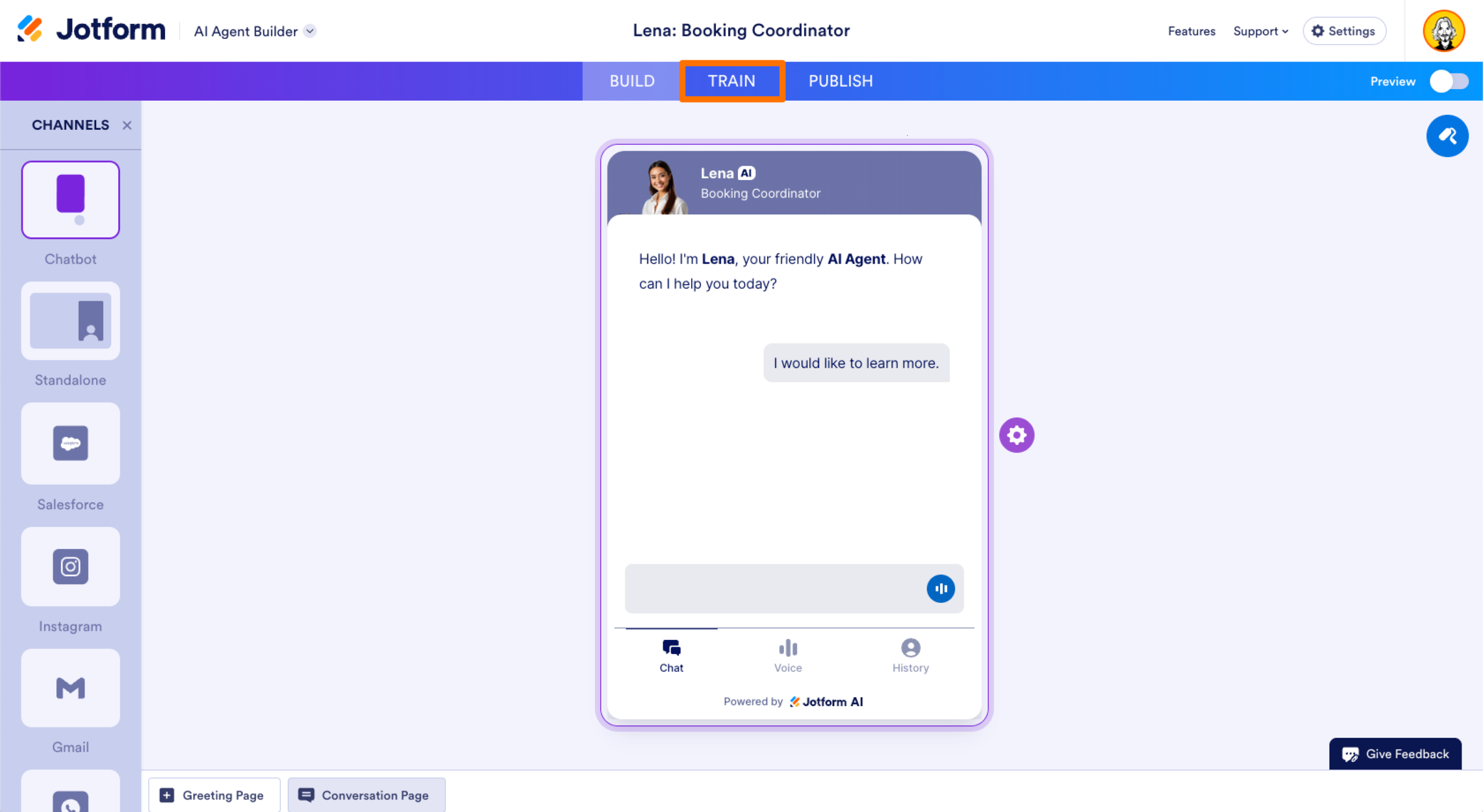
Go to the Jotform AI Agents homepage and select Create Your Agent. If you’re already training an existing agent, choose that from your workspace. Click the Train tab in the top navigation bar.
Step 2: Choose your training method
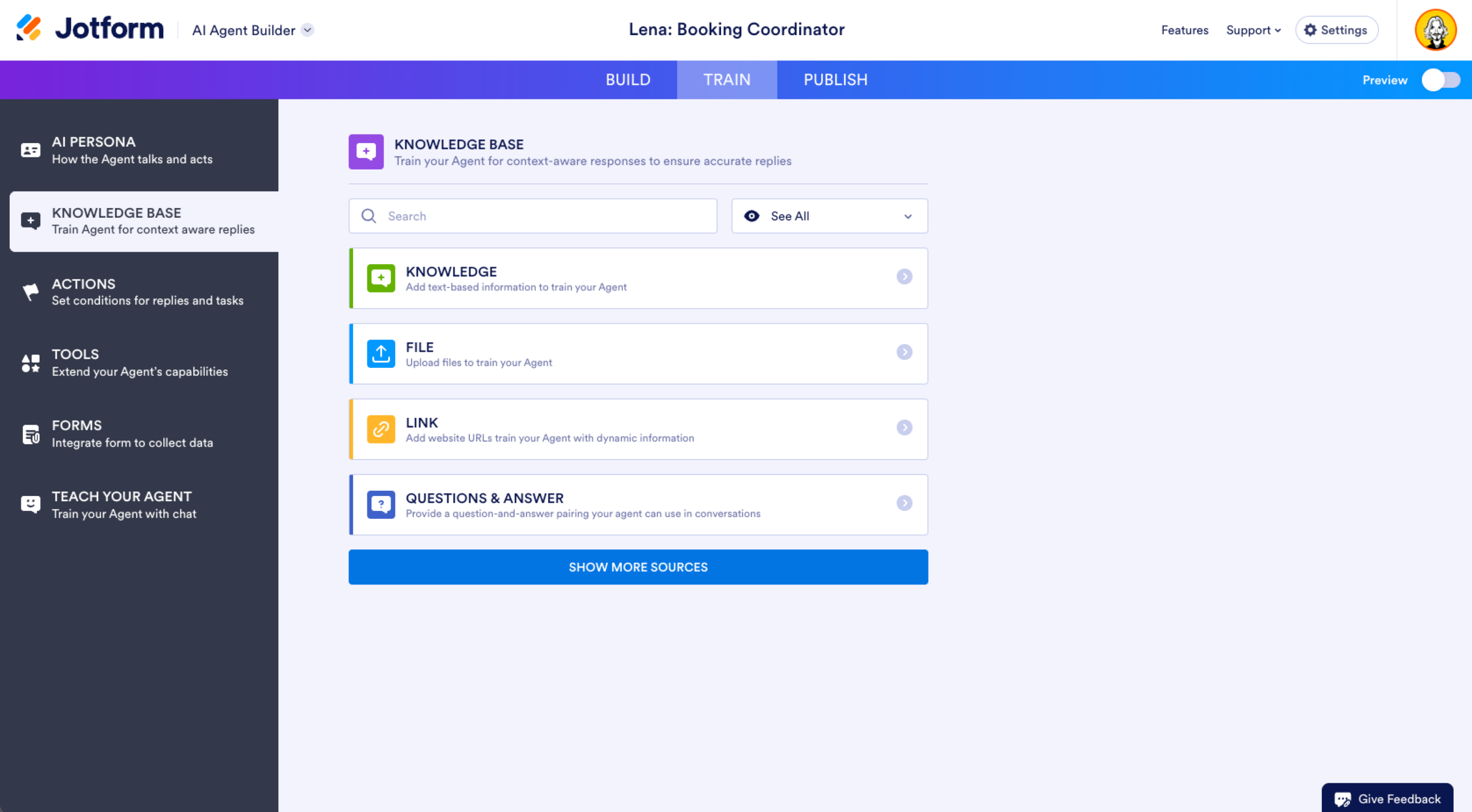
Click Add New Knowledge and start building or adding to your knowledge base. You can add knowledge from URLs by clicking Link and entering the website URL. If you want to add knowledge from existing documents, select Add a File. If you have specific answers you want your AI Agent to give for key queries, click on the option to add specific question-and-answer pairs.
Step 3: Upload or input your training materials
Enter your URL and click the Crawl button to let your agent scan a website. Upload any PDF, DOC, or relevant documents you want your AI Agent to process. Enter key questions and provide relevant answers to make sure your agent generates relevant responses to user queries.
Step 4: Configure AI persona and conversation style
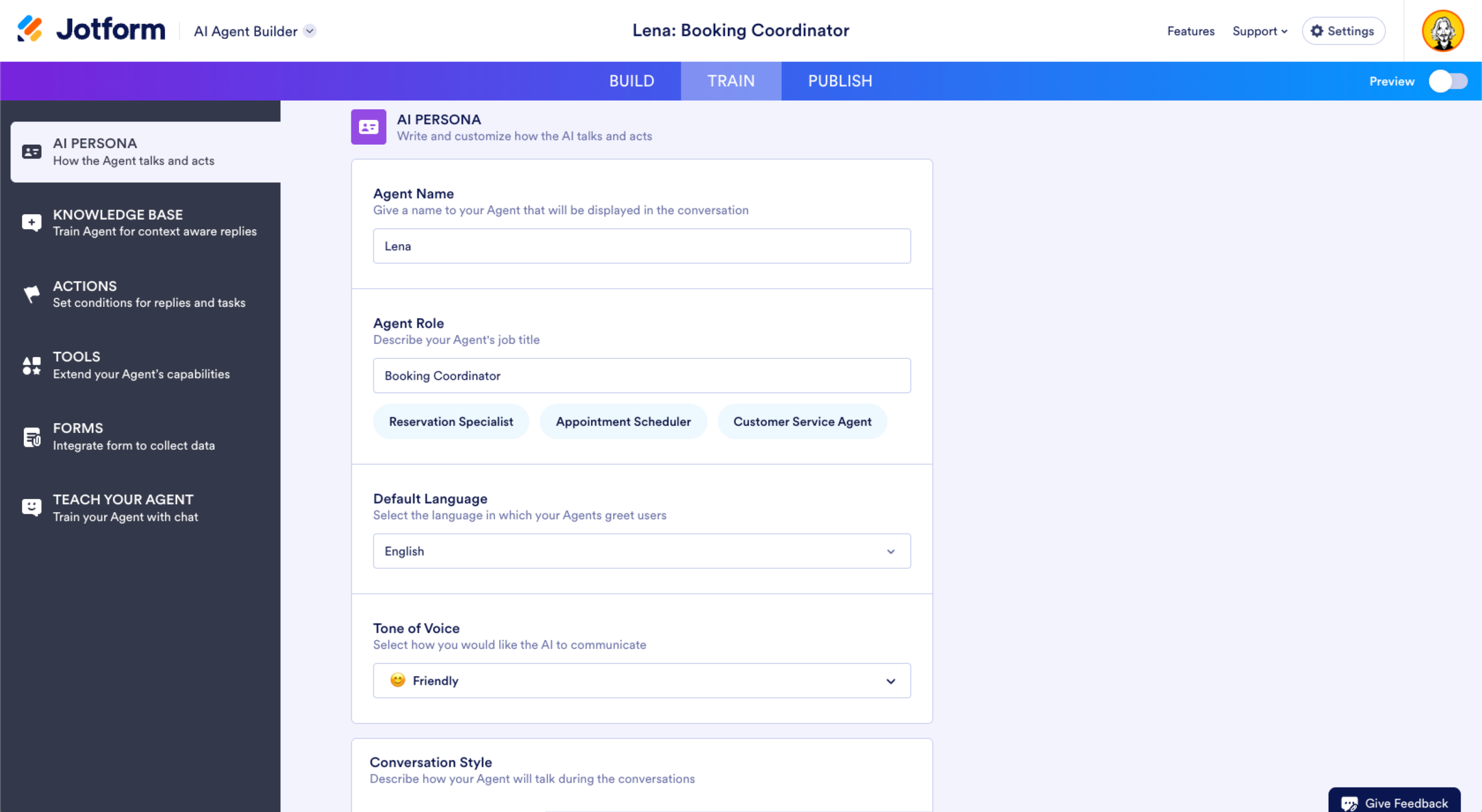
Under the Train tab, click AI Persona. From here, you can select your AI Agent’s default language and tone of voice (professional, casual, or friendly). You can choose how detailed its responses should be (minimalist, short, long, or chatty). You can also name your agent and select a specific role to identify it for users.
If you want to refine your AI Agent’s conversation style, you can add specific guidelines in the provided text box. For instance, you might instruct your agent to suggest certain products to clients or ask follow-up questions. You can also require your agent to show a video when discussing a certain topic to better educate customers.
Step 5: Test and refine responses
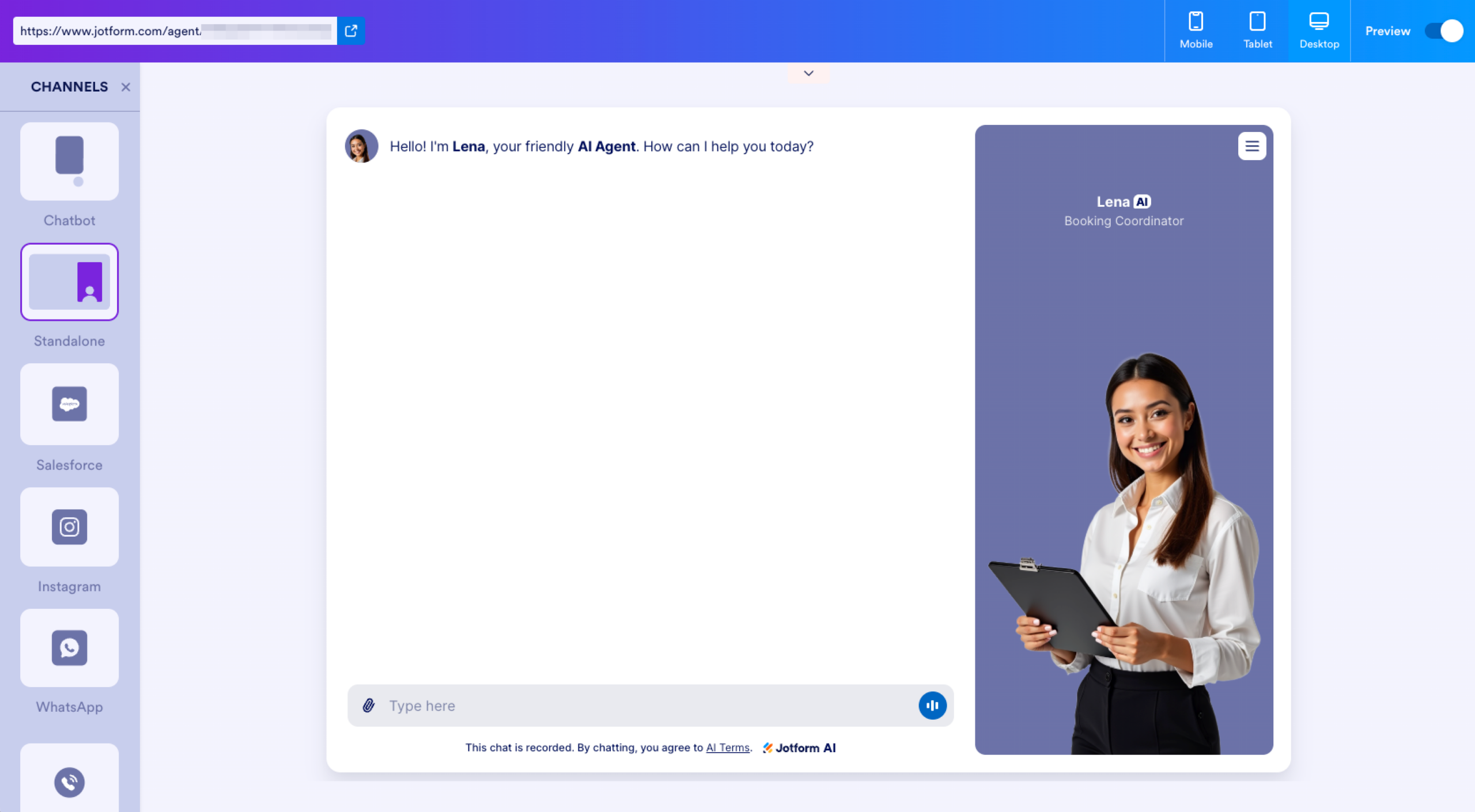
Training your AI chatbot doesn’t stop after you upload your training materials and set its persona. You’ll also want to test how it behaves in different scenarios using the built-in preview and test feature. Just click the Preview toggle switch in the top-right corner and chat with your AI Agent to see how it responds to various questions.
You can also review transcripts of your bot’s actual conversations to see where it needs improvement. Check your knowledge base to see whether any unanswered questions were flagged and upload new data to help your agent with future encounters.
Step 6: Deploy across multiple channels
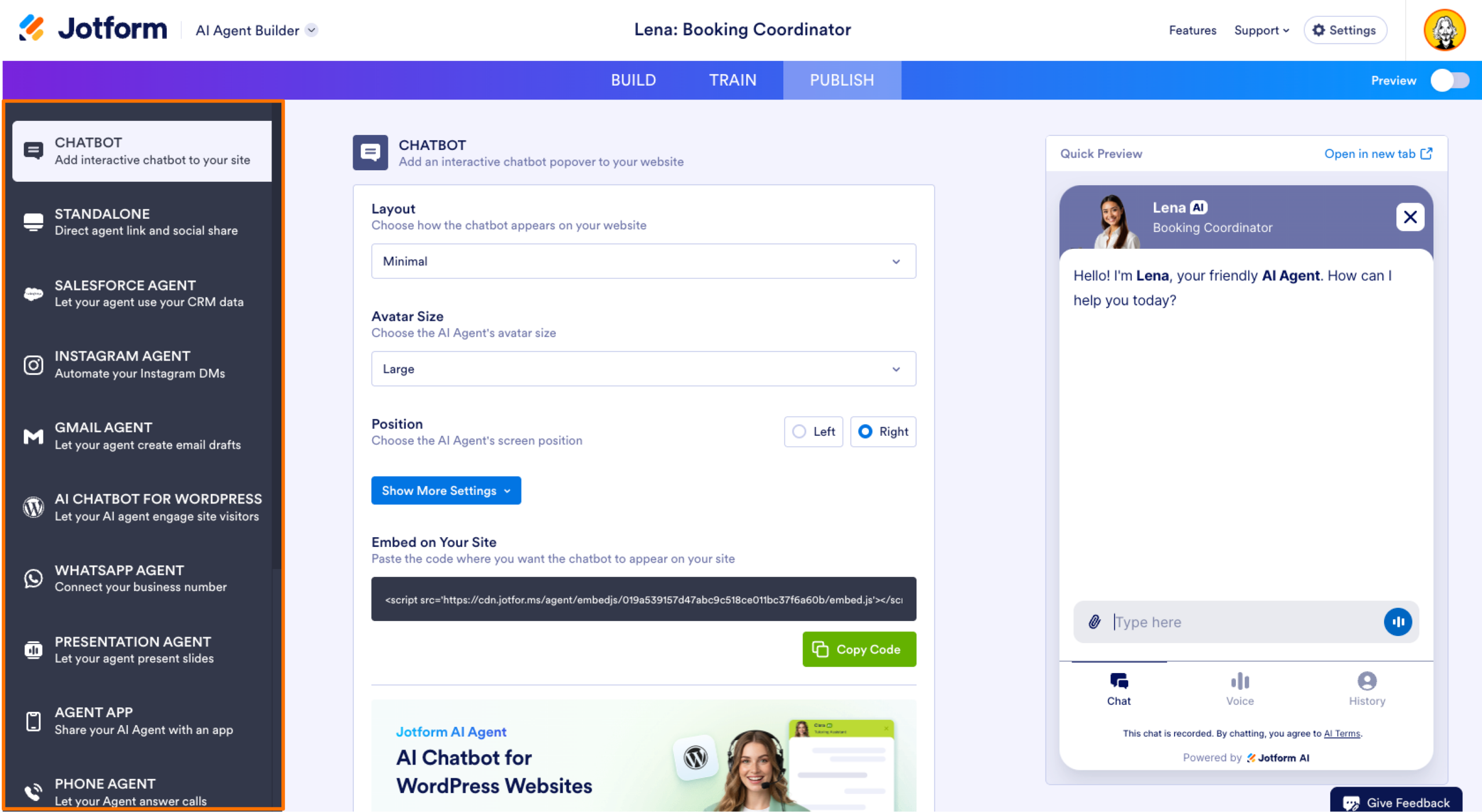
After training and testing your AI Agent, configure it for the platform you want to use. Go to the Publish tab and select the platform you want to deploy it on, such as Messenger, SMS, or Zoom.
Customize the agent’s settings to aid its performance on each platform. For instance, certain websites may need embed code options for their chat functions. Paste this code in the website HTML. After that, you can publish your agent and deploy it across all chosen channels.
Advanced features that simplify training
Jotform provides advanced features that further simplify and speed up chatbot training. Depending on your needs, you may consider using the following features:
Multichannel intelligence
One of the biggest advantages of Jotform AI Agent Builder is that you don’t need to rebuild or retrain your bot for every website or platform. Instead, you can train it once in a central location, save your data, and reuse it across deployments.
From there, you can publish your AI Agent to WhatsApp, Messenger, SMS, and other channels. If you want to offer website chat, the builder can generate a simple embed code to be copied and pasted into your website’s HTML.
Integration capabilities
Connect your Jotform AI Agent with external platforms such as Google Calendar, Slack, or APIs to automate tasks and exchange data more easily. For instance, a Google Calendar integration lets your AI Agent schedule appointments and manage events based on user requests. This added convenience makes user interactions with your AI Agent much smoother.
Voice-enabled training
Advanced voice recognition and transcription features simplify chatbot training by letting you train via speech instead of manual text entry. For example, you can dictate your policies and FAQs to a voice-enabled AI, helping to build your knowledge base. You can also chat verbally with an AI Agent to identify awkward or incorrect responses and refine them more quickly.
Multilingual support
Jotform AI Agents have built-in language capabilities that enable them to identify a customer’s preferred language based on interactions with the client. The agent can then respond in that language or even switch between languages, creating a smoother user experience. And because this multilingual feature is centralized, you won’t have to build a separate bot for each language.
Human handoff
Customer questions are sometimes too complex for even a well-trained AI Agent. When this happens, the human-handoff feature transfers the conversation from the AI Agent to a human customer service rep who can better assist the customer.
This transfer can be triggered when a user asks for a human agent, uses keywords that suggest a complex issue, or shows signs of frustration. In those cases, a human agent receives a summary of the conversation or the full chat, making it easier to help the customer seamlessly.
Human handoff helps reduce customer frustration and highlights situations in which human empathy and problem-solving matter most, as well as areas in which a bot has significant knowledge gaps that limit its ability to respond adequately.
Get started with Jotform today
After that, you can choose from several paid tiers, including Bronze, Silver, Gold, and Enterprise. Each tier offers a higher AI Agent limit and additional features. From there, you can start building your agent from scratch or a prebuilt template, and then customize its appearance, name, and conversation style. Train your agent with business data from your own links and files and access Jotform’s user guides and AI Agents for additional support and resources.
Training your AI chatbot is no longer a time-consuming process meant for specialized developers. Visit our website and learn how you can quickly train and deploy Jotform’s AI Agents to streamline your workflows and improve your operations.
This article is for digital product teams, customer experience managers, and anyone who wants to simplify chatbot training without coding by leveraging no-code AI solutions like Jotform AI Agents.








































































Send Comment: